Why Personalized Email Images Are a Game-Changer in 2026
Let's be honest, we're all drowning in digital noise. Generic, one-size-fits-all emails just don't cut it anymore—they're the modern-day equivalent of junk mail left on the doorstep. Easy to ignore, and even easier to forget.
This is exactly why personalized email images have become so crucial. Think of an email with a personalized image like a handwritten invitation. When someone's name is elegantly scripted on the front, it’s almost impossible to ignore. It feels special, valuable, and demands attention in a way that mass-produced content never will.
From Broadcast to Conversation
So, how does it work? Personalized email images are essentially "merge tags for images." You set up a single, dynamic image template and link it to your subscriber data. When you hit "send," the image automatically pulls in unique information for each user—like their name, company, or recent activity—to create a custom visual for every single person.
This simple shift has a massive impact on engagement. It turns what would have been a generic broadcast into thousands of individual, one-to-one conversations. We already know that personalized subject lines can boost open rates by 26%, but the effect of a truly personalized visual goes even deeper.
When you make your content hyper-relevant, personalized emails can drive transaction rates up to six times higher than generic ones. It all comes down to a basic human desire: we want to feel seen and understood.
Going Beyond Just a First Name
Real, effective personalization is about more than just slapping a name on a stock photo. The true magic happens when you create experiences that reflect a customer's unique journey with your brand.
Here are a few ways you can use dynamic images to build real connections:
- Acknowledge Past Actions: Show a customer a picture of the exact product they left in their shopping cart, giving them a gentle nudge.
- Celebrate Milestones: Design a custom graphic to celebrate a user's one-year anniversary with your service.
- Visualize Their Value: If you run a SaaS tool, you could generate a personalized report card image showing a user's progress or ROI.
Each of these examples puts the user at the center of the story. It shows you’re paying attention not just to who they are, but to what they’ve actually done. This level of detail builds a powerful sense of connection and lays the groundwork for stronger customer loyalty and real revenue growth.
The Psychology Behind Why Personalization Works
Generic visuals just don't cut it in modern email marketing, and the reason is simple: they ignore basic human psychology. We're all bombarded with information, and our brains have become experts at filtering out noise. Think of it like walking into a crowded party. A general announcement shouted to the room is easy to tune out, but hearing someone call your name? That instantly cuts through the chatter and gets your attention.
Personalized email images do the exact same thing in a crowded inbox. When a subscriber sees an image made just for them—maybe with their name, a product they recently looked at, or a loyalty milestone—it triggers a powerful feeling. It makes them feel seen and valued by your brand.
This isn't just a nice little trick; it's a fundamental shift in how we connect with customers. That feeling of individual recognition breaks through the apathy that kills so many email campaigns. Your message stops feeling like an ad and starts feeling like a personal note, which is the secret to building real trust and engagement.
The Cocktail Party Effect in Your Inbox
There's actually a name for this phenomenon: the "cocktail party effect." It’s our brain's built-in ability to focus on a single, personally relevant piece of information while ignoring a sea of background noise. A generic email is just noise. An email with a personalized image is the sound of someone calling your name.
It’s this ability to command attention that leads directly to better business results. The power of personalization is rooted in making your content genuinely relevant. A crucial first step is to truly understand your audience through powerful customer segmentation examples, which allows you to tailor your images and messages with precision.
When you segment your audience based on their behavior, demographics, or past purchases, you can be sure the personalized visuals you send are not just custom, but truly meaningful.
The Expectation of Relevance
Today's consumers don't just hope for personalized experiences; they expect them. From Netflix movie suggestions to Spotify's Discover Weekly playlists, they're used to brands that understand and adapt to their tastes. When an email misses that mark, it feels lazy and disconnected.
Research backs this up completely. One study found that 74% of people actively hate receiving irrelevant content. On the flip side, 88% of respondents reported feeling more positive about emails that seemed to be written specifically for them.
This psychological shift has created a clear business case for personalization. It’s no longer a trend—it's the baseline for effective communication.
From Emotional Connection to Measurable Revenue
That emotional connection you build with personalization has a direct and measurable impact on your bottom line. When customers feel valued, they're far more likely to open, click, and ultimately buy from you. The numbers tell a very clear story.
Marketers who invest in these tactics have reported up to a 760% increase in email revenue when using segmented, personalized campaigns. It has become a standard practice across the industry, with 91% of brands worldwide implementing some form of it as of 2025. You can see how personalization is shaping email marketing and explore more of these findings.
At the end of the day, the psychology is simple:
- Recognition: "This brand knows who I am."
- Relevance: "This content was actually made for me."
- Reciprocity: "They put in the effort, so I'll pay attention."
This is the sequence that transforms a passive subscriber into an active, engaged customer. It tackles the core problems of declining email ROI and audience burnout, proving that a thoughtful, personalized approach is the most reliable way to grow your business.
How to Create Personalized Email Images at Scale
Understanding the power of personalized email images is one thing. Actually creating them for thousands of subscribers? That can feel like a whole different challenge.
The good news is, it’s far more accessible than you might think. You don’t need a team of designers or developers working around the clock. Instead, you can use automated tools to generate unique, eye-catching visuals for every single person on your list.
This process is all about turning a static design into a dynamic canvas. By connecting an image template to your subscriber data—things like names, company logos, or even profile pictures—you can build a system that does the creative heavy lifting for you. It lets you achieve a scale that would be completely impossible to manage by hand.
This approach taps directly into a powerful psychological loop. When you meet a customer's expectation for a relevant, personal experience, you build a connection. That connection is what ultimately drives real revenue.
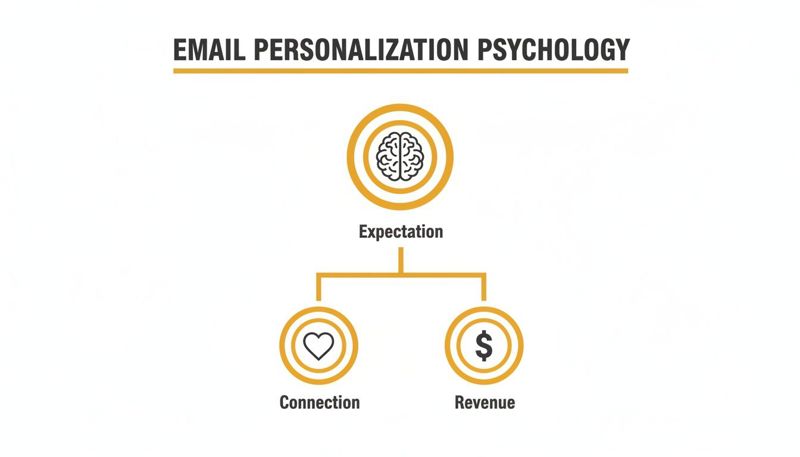
As you can see, it all starts with meeting the modern customer's expectation for relevance. Nail that, and you're on the path to building an emotional connection and seeing tangible business growth.
Choosing Your Implementation Method
There are three main ways to generate personalized email images, and each one is suited for different needs and technical comfort levels. Think of them as different tools for the same job, ranging from simple and direct to incredibly powerful and flexible.
Simple Merge Tags: This is the easiest way to get started. It works just like the text-based merge tags you already use, such as
{{first_name}}. You simply create a dynamic image URL that includes these tags. When your email service provider (like Mailchimp or Klaviyo) sends the email, it swaps the tags with the recipient's data, and the image is created on the fly. This method is perfect for basic personalization, like adding a name to a welcome image.Flexible HTML Snippets: If you want a bit more control, you can use a small piece of HTML code. Instead of just a simple URL, you embed a snippet that can handle more complex logic. This is great for when you need to include fallback options—for example, showing "Valued Customer" if a first name field is empty. It strikes a great balance between ease of use and added functionality.
Powerful API Integrations: This is the most advanced and flexible option, giving you complete control. An API (Application Programming Interface) lets your systems "talk" directly to an image generation service like OKZest. Developers can use this to create deeply integrated workflows, like automatically generating personalized social media content or creating custom images based on real-time app activity.
Key Takeaway: The best part? You don't have to be a developer to get started. Most businesses see immediate value by starting with simple merge tags and can always explore more advanced methods as their strategy evolves.
No-Code and Developer-Friendly Solutions
Modern platforms are built to accommodate everyone, no matter their technical skill set.
For Marketers (The No-Code Approach) Platforms like OKZest offer a visual, user-friendly interface where you can design your image templates with a drag-and-drop editor. From there, you can generate the merge tags or HTML snippets you need with just a few clicks. This approach to no-code image design automation makes it incredibly easy to get started and plug these dynamic visuals right into your existing email campaigns.
For Developers (The API-First Approach) If you're building a custom solution or need to integrate image generation deep within your product, an API is the way to go. This opens up a world of possibilities:
- Batch Processing: Generate thousands of images at once for large-scale campaigns.
- Real-Time Generation: Create images based on live user actions or data pulled directly from your database.
- Complex Workflows: Build sophisticated automation sequences that combine dynamic image generation with other business logic.
Whether you're a marketer sending a newsletter from Klaviyo or a developer building a custom onboarding sequence, there’s a method that fits your workflow. The key is to start with an approach that solves your immediate needs and scale up as your personalization strategy gets more ambitious.
Building Your Automated Revenue Engine
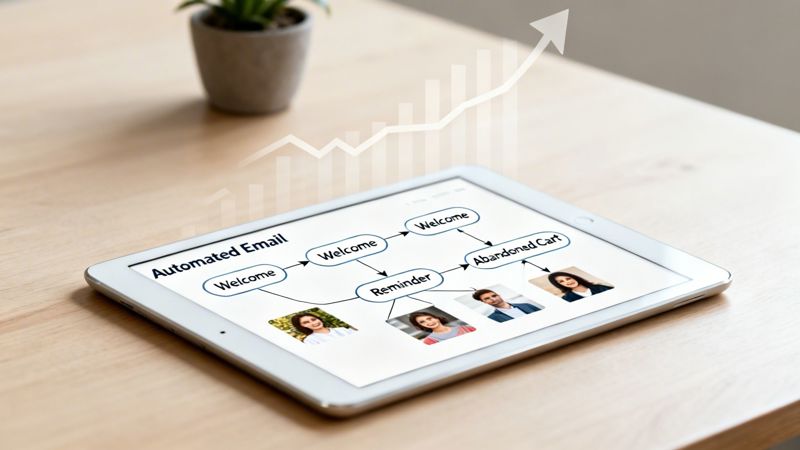
Making a great personalized image is one thing. Hooking that image up to a system that works for you 24/7 is where the real money is made. It’s about creating an engine that turns subscriber actions into sales, all without you lifting a finger.
Think of it as your best salesperson, one who never needs a coffee break. This salesperson knows exactly when to pop up, what to say, and which visual will hit home at just the right moment. Instead of blasting one-off campaigns, you’re setting up smart email flows that trigger based on what your customers actually do.
When you drop personalized images into these flows, you turn a standard, automated message into a powerful, one-to-one conversation.
The Power of Automated, Personalized Sequences
Automated sequences are the workhorses of any solid email strategy. They're the backbone for critical touchpoints like:
- Welcome Series: Greeting new subscribers and making a great first impression.
- Abandoned Cart Reminders: Nudging shoppers to come back and finish their purchase.
- Post-Purchase Follow-ups: Saying thanks and suggesting other products they might love.
- Re-engagement Campaigns: Winning back subscribers who haven’t opened an email in a while.
Each one of these is a golden opportunity to get personal. A generic abandoned cart email is easy to ignore. But an email showing the exact item they left behind, with their name on a special offer? That’s much harder to dismiss. This is exactly why a good marketing automation strategy is so critical.
The difference in performance isn't small—it's massive. Data shows automated flows lead to a placed order at a 2.11% rate, while regular campaigns only convert at 0.16%. To really get this engine humming, checking out specialized platforms like Gethukt can be a game-changer.
That’s a staggering 13-fold difference in conversion. Even more telling, top-performing brands in 2026 are driving 37% of their total email revenue from these automated flows, even though they only account for 2% of all emails sent.
This data makes it crystal clear: your most valuable customer interactions are happening inside these automated, triggered moments.
Real-World Scenarios in Action
Okay, let's move from theory to what this actually looks like. Here’s how personalized images completely change the game for your most important automated emails.
Scenario 1: The Abandoned Cart Saver
A customer named Sarah adds a pair of running shoes to her cart but gets distracted and leaves your site.
- Generic Email: An hour later, she gets a "You left something behind!" email with a stock photo of some random shoes. She barely glances at it.
- Personalized Email: Instead, an email arrives with the subject, "Sarah, still thinking about these?" Inside, an image shows the exact running shoes she wanted, with a banner that says, "Your next run is waiting, Sarah!" The direct, visual reminder is far more persuasive.
Scenario 2: The Engaging Welcome Email
A new subscriber, David, signs up for your newsletter.
- Generic Email: He gets a "Welcome to our community!" email with a generic brand logo. It's fine, but forgettable.
- Personalized Email: David receives an email with an image of a welcome card that reads, "Welcome to the club, David!" Below that, a personalized coupon with his name on it offers 15% off his first order. He feels seen, valued, and now has a great reason to make a purchase.
In both examples, the personalized image does more than just look nice. It grabs attention, reinforces the message, and makes the call to action feel deeply personal. It’s this blend of smart automation and high-impact personalization that turns a simple email flow into a reliable revenue stream.
It's one thing to talk about the benefits of personalized email images, but it's another to see them in action. That's where the real "aha!" moments happen. Let's move past simply adding a name to an email and look at some creative ways you can solve real business problems and get tangible results.
Think about the generic emails that flood your own inbox. They’re forgettable, right? Now, imagine how a single, dynamic image could completely change that experience, making your message feel personal and urgent. It’s all about finding that perfect opportunity to show a customer you’re paying attention.
Boost Engagement for Events and Webinars
Event organizers are in a constant battle to get people to actually show up. Personalized images can make your invitations feel exclusive, creating a sense of urgency that helps you crush those no-show rates.
- The Scenario: You're running a virtual summit and want to make sure everyone who registered actually attends.
- The Strategy: Ditch the generic reminder email. Instead, send one with a personalized event ticket. This image could include the attendee's full name, a unique QR code for check-in, and even their hand-picked session schedule.
- The Impact: This does more than just remind them; it creates a sense of ownership. That ticket feels like something they actually possess, making them far more likely to show up. You've turned a simple registration into a real commitment.
Drive Course Completion for Coaches and Educators
If you're a coach or an online educator, keeping students engaged from start to finish is half the battle. It's a huge hurdle, but personalized visuals can be a game-changer, acting as powerful markers of progress along their learning journey.
A personalized certificate of completion, sent automatically, does more than just reward a user—it provides a clear, aspirational goal. Seeing an image of a certificate with their name already on it can be the final push a student needs to finish the last module.
Here’s a simple way to implement this:
- Progress Reports: Send a "Progress Snapshot" image midway through a course. This visual can show the percentage completed and what's left, all customized with the student's name.
- Milestone Celebrations: When a student finishes a big section, automatically send a congratulatory badge image with their name and the milestone they just crushed.
- Completion Certificates: As soon as they finish, send a high-quality, personalized certificate they can download and proudly share on LinkedIn or other social media.
This approach gamifies the learning experience, breaking down a big goal into a series of smaller, rewarding wins.
Personalized images can be used in a huge variety of ways across different industries. Here’s a quick look at a few practical applications.
Personalized Image Use Cases by Industry
| Industry / Role | Use Case | Business Goal |
|---|---|---|
| SaaS | Send a personalized onboarding image with the user's name and a "Quick Start" checklist. | Improve user activation and reduce churn. |
| eCommerce | Send a "Happy Birthday" email with a personalized image showing a discount code. | Drive repeat purchases and build loyalty. |
| Financial Services | Send a personalized image visualizing a client's portfolio growth or savings goal. | Enhance client engagement and trust. |
| Travel & Hospitality | Send a pre-arrival email with an image of a personalized welcome card or room key. | Create a memorable guest experience. |
These are just a few ideas to get you started. The key is to think about the moments in your customer journey where a personal touch would make the biggest impact.
Increase Sales and Book More Meetings
Sales teams and real estate agents live and die by their personal connections. A well-timed, personalized image can slice through the noise and get a prospect's attention in a way that plain text never could. We cover even more ideas in our guide on personalized email marketing examples that get results.
For Sales Teams: Imagine a B2B salesperson trying to land a demo. Instead of another boring "let's connect" message, they send a DM with a personalized image. It could be a mockup of the prospect's website showing a "before and after" of your service, or even just a picture of a coffee cup with "Coffee's on me, [Prospect's Name]?" It's unexpected, breaks the pattern, and starts a real conversation.
For Real Estate Agents: An agent can weave personalized images throughout the entire client journey.
- Initial Outreach: Send a potential buyer an image of a home in their dream neighborhood with a "Welcome Home, [Family Name]" sign digitally added to the front yard.
- Post-Showing Follow-Up: After a viewing, email an image that visually compares the property's features to the buyer's "must-have" list.
- Closing Gift: As a thank you, send a digital image of their new house with a celebratory message—perfect for them to share online.
In every case, the goal is the same: use a unique visual to make the recipient feel like an individual, not just another name on a list. This simple act of personalization builds rapport and can turn a cold lead into a happy client.
Best Practices for Your Personalization Strategy
Just having the tech for personalized images isn't enough—you need a smart strategy to make it work. To get real results, you need a set of best practices that makes every email look sharp, feel personal, and drive action. These guidelines will help you skip the common mistakes and get the most out of your efforts.
Start by designing flexible image templates. Think of your template as a dynamic canvas that has to look good no matter what data you put on it. For example, your design must accommodate both short names like "Jo" and longer ones like "Christopher" to avoid text that looks squished or wraps awkwardly.
Maintain Impeccable Data Hygiene
Your personalization is only as strong as the data behind it. If your data is messy or incomplete, you’ll end up with embarrassing mistakes, like an email that says, "Hello, Fname!" This doesn't just look sloppy; it completely breaks the personal connection you were trying to build.
A broken or badly personalized image is often worse than a generic one. It screams "automation error" and can damage your brand's credibility, turning a potentially delightful moment into a jarring one.
Make it a habit to regularly clean your contact lists. Fix typos, standardize how data is formatted, and fill in any missing information. Clean data is the absolute, non-negotiable foundation for any personalization that actually works.
Always Have a Fallback Plan
What happens when data is missing? Maybe a new subscriber didn't give you their first name, or a specific piece of information for a custom image just isn't there. If you don’t have a plan B, you risk sending an email with a broken image link, which looks unprofessional and can even hurt your deliverability.
This is where a fallback strategy is so important. A fallback is simply a default image or text that your system shows automatically when the primary data is missing.
- Fallback Text: If a name field is empty, your image can default to something like "A Special Offer for You."
- Fallback Image: If a dynamic product image can't be created, you could show a branded graphic or a standard offer image instead.
This simple step ensures every single person gets a complete, professional-looking email, protecting your brand's reputation and your campaign's performance.
Optimize for Performance and Testing
Finally, a couple of technical best practices are key to your success. First, always optimize your image file sizes. Huge images can make your emails load slowly and might even get you flagged by spam filters. As a rule of thumb, try to keep each image under 100KB to ensure everything loads smoothly for a good user experience.
Second, A/B test your visuals. Don't just guess what will connect with your audience. Test different image styles, messages, and calls-to-action to see what really gets them to click. The insights you get from testing will help you fine-tune your approach and keep improving your results over time.
Frequently Asked Questions About Personalized Images
Jumping into personalized images can feel like a big step, and it's natural to have a few questions. Let's tackle the most common ones so you can move forward with confidence and build a strategy that works.
Is This Difficult to Set Up if I’m Not a Developer?
Not in the slightest. You don't need to be a developer to make this work. Modern tools like OKZest are built with no-code options that make the whole process incredibly simple.
If you’ve ever used merge tags to add a subscriber's first name to an email, you already have the skills you need. Our tools integrate with over 99% of email service providers, letting you plug personalized images directly into your existing workflow without touching a single line of code.
What Happens if I Don’t Have Data for a Recipient?
This is a common concern, but any good personalization platform has a plan for it. Tools like OKZest come with a built-in fallback feature.
You can set a default image or text that automatically shows up if a piece of data, like a first name, is missing. This ensures every single recipient gets a complete, professional-looking email instead of a broken image or an awkward empty space.
This fallback mechanism is your safety net. It ensures that even with imperfect data, your brand maintains a professional appearance and a consistent user experience across every single email you send. It's a non-negotiable feature for any serious personalization strategy.
Is This Only Affordable for Large Companies?
Definitely not. Image personalization is designed to scale with your business, no matter its size.
Platforms like OKZest have flexible pricing, from free plans for those just starting out to enterprise solutions for massive campaigns. This means solo entrepreneurs, small businesses, and large corporations can all use the same powerful technology to connect with their audience.
Ready to turn your emails into personalized, attention-grabbing conversations? OKZest helps you automate the creation of dynamic images at scale with our easy-to-use no-code and API solutions. Start creating your personalized images today at okzest.com.