
For years, marketers have personalized emails with a simple {{FirstName}}. What if you could do the same thing, but for your images?
That’s the core idea behind real-time marketing visuals. Think of them as merge tags for images—a way to turn generic, static content into a hyper-personalized experience that’s created the very moment someone sees it.
What Are Real-Time Marketing Visuals Anyway?
<img src="https://okzest.blob.core.windows.net/blog/a-laptop-on-a-desk-showing-a-smart-device-with-hi-alex-next-to-a-plant-and-coffee-cup.jpg" alt="A laptop on a desk showing a smart device with "Hi, Alex", next to a plant and coffee cup." width="800">
Let's stick with that merge tag analogy. Marketers have long used tags like {{first_name}} to make email text feel personal. Real-time marketing visuals apply that exact same logic to images, banners, and other graphics.
Instead of blasting the same stock photo to your entire list, you can generate a unique visual for each user, on the fly. This isn't about sitting there and manually creating thousands of images. It’s about setting up a single, smart template that automatically pulls in data to build a custom version for every single viewer. It’s a shift from a one-to-many broadcast to a true one-to-one conversation.
The Core Idea Explained
The magic happens the instant a user opens your email or lands on your webpage. At that exact moment, a request is sent to a generation engine, like the one we’ve built at OKZest. This engine grabs your base image template and instantly combines it with specific data to render a completely custom visual.
This data can come from all sorts of places:
- User Information: A name, company, or location you have stored in your CRM.
- Real-Time Context: The current time, a live countdown timer, or a unique QR code.
- Behavioral Data: Things like items left in a shopping cart or recently viewed products.
The core principle is simple but powerful: the image doesn't exist until the moment it's viewed. This ensures the content is always relevant, timely, and personal, capturing attention in a way static visuals never could.
How It Works in Practice
So, what does this look like in the real world? Imagine sending a webinar confirmation email. Instead of a generic banner, you could display a live countdown timer perfectly synced to each recipient's local timezone. That creates a natural sense of urgency that’s tailored specifically to them.
Or think about an e-commerce store. An abandoned cart email could show the actual product image overlaid with the person’s name, like, "Alex, still thinking about this?" It's a simple touch, but it makes the message feel direct and personal, cutting right through the usual marketing noise.
This kind of technology used to be reserved for huge companies with massive development budgets. Not anymore. Platforms like OKZest make creating real-time marketing visuals accessible to everyone. You design your template, connect your data, and get a simple link or HTML snippet to drop into your emails or website. No complex coding required. It levels the playing field, helping businesses of any size create sophisticated, personalized visual campaigns that truly connect with their audience and drive measurable results.
Why Dynamic Visuals Drive Real Business Growth
In a world filled with marketing messages, getting noticed is half the battle. This is where real-time marketing visuals stop being a neat trick and become a serious tool for growing your business. They help you create a true one-to-one connection with your audience, making each person feel seen in a way that generic content just can’t match.
That connection isn't just a feeling; it drives real business results. The goal is to move past broadcasting to the masses and start creating experiences that are hyper-relevant to the individual. When a visual speaks directly to someone, it stands out and gives them a reason to act.
From Attention to Action
The path from getting a customer’s attention to earning their business often starts with a single click. We’ve all learned to scroll past static, impersonal ads. But an image that includes your name, your company’s logo, or a live countdown for an offer you actually care about? That makes you pause.
That moment of recognition is powerful. It’s what turns passive browsing into active engagement. By making your audience the star of the visual, you give them a personal reason to be curious and interact, which leads to measurable improvements all the way through your funnel.
When a customer feels like you are speaking directly to them—not just to a demographic segment—they are far more likely to listen. This personal touch builds trust and turns a simple marketing message into a meaningful conversation.
This personalized approach has a proven track record, leading to:
- Skyrocketing Click-Through Rates: Banners in emails and on websites see way more clicks when they’re directly relevant to the person viewing them.
- Higher Conversion Rates: A landing page that greets a visitor by name or shows them a custom offer feels more trustworthy, making it easier for them to sign up or make a purchase.
- Stronger Brand Loyalty: Consistent, personal interactions show customers you understand them, building a relationship that lasts long after a single sale.
Making Personalization Possible for Everyone
It’s no secret that personalization works, and the right tools are making it easier than ever. Personalized real-time visuals are completely changing how campaigns are run, with AI-powered tools allowing 75% of marketers to create custom images and videos at scale. In fact, smart AI image editors are now the top AI use case for marketers, followed by video generators. For more data on these trends, you can check out the latest HubSpot report on marketing statistics.
This is exactly where a solution like OKZest comes in. By automating the creation of personalized images from different data sources, this kind of powerful marketing is no longer just for massive companies with huge budgets.
For example, marketing agencies, 76% of whom used automation last year, can manage multiple client campaigns and make changes on the fly. Nonprofits and real estate agents see stronger relationships when their visuals feel personal—a huge deal when 73% of customers say they’re willing to pay more for brand transparency. Our detailed guide on using dynamic images gives more hands-on examples of how this works in practice.
At the end of the day, using real-time marketing visuals is more than just making things look good. It's a strategic choice to communicate in a more human, relevant, and effective way. This approach builds better connections, drives results you can actually measure, and delivers a clear return on your investment.
How Real-Time Visuals Actually Work
Ever wondered about the magic behind those hyper-personalized images you see in emails and on websites? It might seem complex, but the core idea is surprisingly simple. Think of it like a mail merge, but for images—a process that combines a base template with unique data to create a visual just for that person.
It all comes together in the blink of an eye, right at the moment a user opens your email or lands on your page. There’s no pre-rendering or manual design work; the image is born the instant it’s needed.
The process is fast, efficient, and makes sure every visual hits the mark. This is how you turn a simple interaction into a real connection, which is the first step toward business growth.
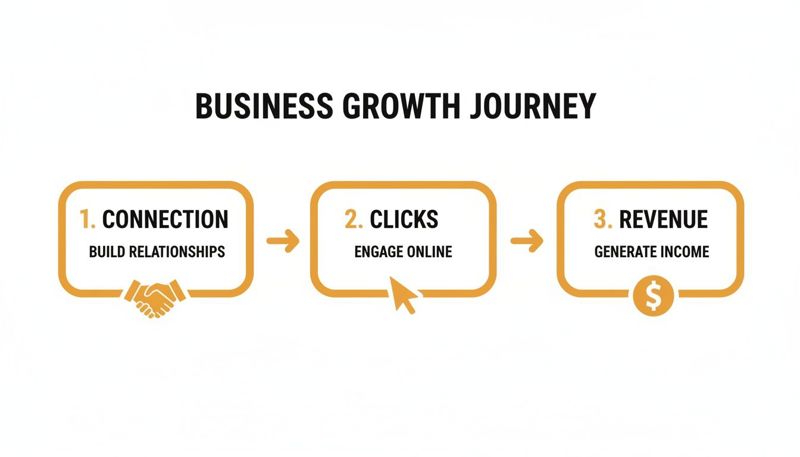
As you can see, forging that personal connection is what gets the ball rolling. It naturally leads to more clicks and, ultimately, more revenue.
The Three Core Ingredients
So, how do these visuals actually get made? It comes down to three key pieces working together seamlessly.
Base Image Template: This is your foundation. It’s a master design you create in a platform like OKZest that holds all the static parts of your image, like your logo, background, and branding. More importantly, it contains placeholders for the dynamic content, like a customer's name, company, or profile picture.
Dynamic Data Sources: This is the fuel for your personalization engine. The data can come from anywhere—a simple customer list in a spreadsheet, your CRM, or even live information pulled from an external API. For instance, a deep dive into understanding the Twitter Trend API shows how you can pull in real-time topics to make visuals incredibly timely.
The Generation Engine: This is the brains of the whole operation. When a user triggers a request by opening your email or visiting your site, the engine (like OKZest) gets to work. It grabs your template, pulls the correct data for that specific user, and merges them to create and serve the final, unique image—all in milliseconds.
Three Ways to Bring Visuals to Life
Once your template is ready and you know where your data is coming from, you have a few ways to get your real-time visuals out into the world. Each method is built for different channels, from simple email campaigns to complex, automated workflows.
The beauty here is accessibility. Whether you’re a marketer living in your email platform or a developer building a custom app, there’s a straightforward path for you.
1. The Image Merge Tag for Email
This is the most common and direct method for email marketers. Your image generation platform gives you a special URL that works just like a standard merge tag. You simply copy this URL and paste it into an image block in your email editor, whether you use Klaviyo, Mailchimp, or another provider.
When the campaign goes out, your Email Service Provider (ESP) automatically populates the URL with each recipient's data (like their first name). When they open the email, that unique link tells the engine to create a personalized image just for them, right on the spot.
2. The HTML Snippet for Websites
To personalize your website, you’ll use a small piece of HTML code. You can paste this snippet anywhere you want the dynamic image to show up, like a hero banner, a welcome popup, or a checkout page.
The code tells the visitor's browser to fetch the personalized image from the generation engine. You can feed it data based on their login status, referral source, or items in their cart, making every visit feel unique.
3. The API and No-Code Integrations
For total control and automation, an API gives you the most power. It lets you programmatically generate visuals for just about anything—chatbots, social media DMs, mobile apps, or any custom software you’ve built. You can explore our guide on the real-time image rendering API to see how it works under the hood.
If you'd rather not code, no-code tools like Zapier are your best friend. They let you connect your image engine to thousands of other apps. You could easily set up a workflow that automatically sends a personalized "thank you" image in a Twitter DM whenever someone mentions your brand.
Real-World Use Cases That Drive Results
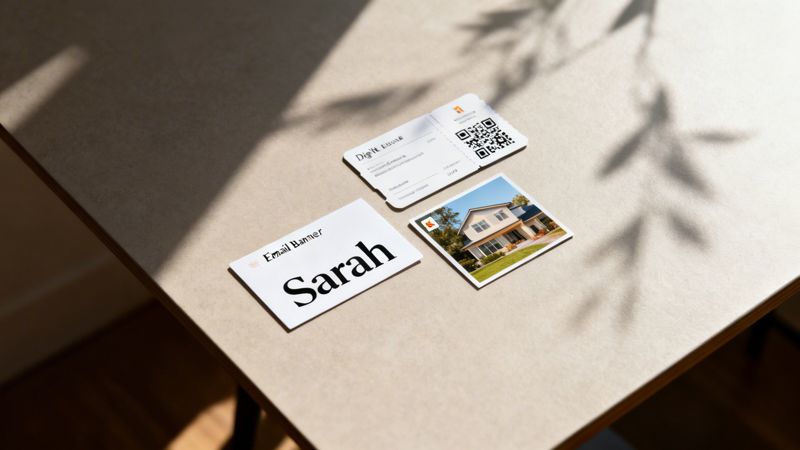
Understanding how real-time marketing visuals work is one thing; seeing them in action is something else entirely. The real magic happens when you connect this technology to your business goals. It's not just about slapping a name on a picture—it's about creating a moment that truly connects with someone.
Let's move past the theory and look at some practical plays. These examples show how different roles can use dynamic visuals to get noticed, drive engagement, and see better results.
For Email Marketers: Personalized Banners
Email is still a powerhouse, but let's be honest, inboxes are a battlefield. To win attention, you need more than a {{first_name}} tag in your subject line. Imagine an email where the banner image greets every single subscriber by name. That’s an immediate, personal connection.
But why stop there? You could pull in their location, company name, or even a product they just looked at. A travel company, for instance, could send a banner showing a gorgeous destination with the text, "Sarah, your next adventure in Bali awaits!" That’s not a generic promo; it’s a direct, compelling invitation.
This strategy helps you hit several key goals:
- Boost Engagement: A personalized visual is infinitely more clickable than a tired stock photo.
- Increase Conversions: Speaking directly to a subscriber makes your call to action feel more relevant and urgent.
- Strengthen Brand Connection: It shows you see your audience as people, not just names on a spreadsheet.
For Event Organizers: Digital Tickets with QR Codes
Event organizers juggle a mountain of logistics. From managing registrations to ensuring a smooth check-in, the details are everything. Real-time marketing visuals are the perfect tool for creating unique, branded digital tickets or event passes.
With a tool like OKZest, you can design one pass template and automatically spin up a unique version for every attendee. Each pass can feature the person's name, ticket type, and a personalized QR code for instant scanning at the door.
This approach doesn't just streamline your operations; it elevates the entire attendee experience. A custom, professional-looking digital pass feels exclusive and makes guests feel valued long before they even arrive.
This is a game-changer for events of all sizes—from huge conferences and trade shows to intimate workshops and webinars. It cuts down on admin headaches while projecting a polished, modern image.
For Sales Teams: High-Impact Outreach
In sales, just getting a prospect's attention is half the battle. Cold emails are easy to ignore because, frankly, most of them feel robotic and impersonal. Sales teams can cut through that noise by embedding custom images directly into their outreach.
Think about sending a prospect an email that includes an image of their own company's logo seamlessly worked into a visual. It could be a mockup of your software with their branding, or even a simple graphic that says, "John, here's how [Your Company] can help [Prospect's Company]."
This simple act shows you've done your homework. It instantly separates your email from the hundred other generic templates in their inbox. This touch of personalization can dramatically increase reply rates and help you book more meetings.
Real-Time Visual Use Cases by Professional Role
To make this even more concrete, let's look at how different professionals can use real-time visuals to achieve their specific goals. The table below breaks down a few practical applications.
| Professional Role | Primary Goal | Example Use Case with OKZest |
|---|---|---|
| Email Marketer | Boost email engagement and CTR | Create a banner image for a weekly newsletter that greets each subscriber by name: "Sarah, your weekly insights are here!" |
| Event Organizer | Streamline check-in and enhance attendee experience | Generate personalized digital event passes with the attendee's name, company, and a unique QR code for fast entry. |
| Sales Development Rep | Increase cold email reply rates | Embed a personalized image in an outreach email showing the prospect's company logo on a mockup of your product. |
| Real Estate Agent | Create an emotional connection with buyers | Send an image of a listed property with a text overlay: "David, picture your family celebrating the holidays here." |
| Nonprofit Manager | Improve donor relations and acknowledgment | Automate a "Thank You" image sent to donors, personalized with their name and the impact of their gift. |
| eCommerce Manager | Reduce cart abandonment and drive sales | Send a reminder email featuring an image of the abandoned product with the shopper's name and a unique discount code. |
As you can see, the applications are tied directly to core business objectives—whether it's generating leads, delighting customers, or increasing revenue.
More Creative Applications
The great thing about real-time marketing visuals is their flexibility. They can be adapted for almost any industry. Here are a couple more ideas to spark your imagination:
- Real Estate Agents: Send property updates to buyers with images personalized for them. An image of a house with an overlay saying, "David, picture your family here," forges an instant emotional bond.
- Nonprofits: Automatically send "thank you" images to donors right after they contribute. A visual with their name and specific impact ("Thank you, Emily! Your gift will provide 20 meals.") makes the acknowledgment feel far more sincere.
Looking at these real-world examples, it’s clear that dynamic visuals are more than just a cool gimmick. They're a powerful tool for building connections, communicating more effectively, and hitting your most important business goals.
Your Guide to a Successful First Campaign
Jumping into your first campaign with real-time marketing visuals is an exciting moment. But to make sure it truly lands, a little prep work goes a long way. Think of it as the difference between a campaign that connects and one that gets lost in the noise. This guide will walk you through the essentials for a home run launch.
First things first: start with a single, measurable goal. What, exactly, are you trying to accomplish? Are you looking to bump up the click-through rates in your next email blast? Or maybe you want to boost reply rates for your sales team's outreach or cut down on cart abandonment.
Pinpointing one primary objective gives your entire campaign a sharp focus. It shapes your design choices, your personalization strategy, and most importantly, the numbers you’ll watch to see if it worked. Without a clear "why," you’re just making pretty pictures. With one, you're building a strategic tool.
Design with Versatility in Mind
Once you have your objective, it's time to get creative with the design. Your base template is the foundation of your whole campaign, so it needs to look great while being incredibly flexible. Remember, this visual is going to be seen on all sorts of devices, from a wide desktop monitor to a tiny smartphone screen.
Aim for a template that is:
- Responsive: Your design has to look fantastic on any screen. Text must be easy to read and key elements should never get cut off.
- Flexible: The layout needs to handle different lengths of data without breaking. A name like "Jen" uses far less space than "Christopher," and your design must accommodate both gracefully.
- Brand-Aligned: This visual should feel like a natural part of your brand. Use your established colors, fonts, and overall tone of voice.
Clean Data and Smart Fallbacks
Your visuals are only ever as good as the data you feed them. Before you hit "send," take a moment to clean up your data source. This means fixing typos, standardizing formats (like using proper capitalization for names), and stripping out anything irrelevant. Messy data leads to awkward, unprofessional-looking results.
But even with perfectly clean data, you’re bound to run into gaps. What happens when you don't have a first name for a subscriber? This is where fallback rules are your best friend.
A fallback is just a default value that shows up when personalization data is missing. Instead of an awkward blank space, you can have the image display a friendly, generic message like "A Special Offer for You!" This ensures every single person gets a complete, polished visual.
Setting up fallbacks in a tool like OKZest is straightforward but absolutely critical. It’s a small step that guarantees a flawless brand experience for your entire audience, regardless of how complete your data is. For those wanting to dig deeper into automating visuals, our guide on automated marketing graphics offers more advanced strategies.
Test, Measure, and Optimize
Finally, no campaign is truly finished without a plan to measure its success. Don’t just launch and hope for the best; you need to track performance to see what’s working and prove the value of your efforts.
The digital marketing world moves fast, and you need an edge. Real-time marketing visuals are on the rise, especially as short-form video continues its climb. Industry reports show 49% of marketers now rank short-form video as their top content type for ROI. This is huge, because dynamic visuals—whether images or short clips—can be personalized on the fly with live data. This is particularly effective on platforms like Snapchat, where users are 60% more likely to make an impulse buy from their phone. For a deeper look, check out this comprehensive overview of digital marketing statistics.
To prove your own campaign's impact, here’s what to do:
- A/B Test Your Designs: Pit different visual layouts, calls to action, or personalization elements against each other. Does an image with a first name get more clicks than one with a company name? Testing is the only way to find out for sure.
- Track the Right Metrics: Look beyond standard email open rates. Measure the click-through rate on the dynamic image itself. This number directly tells you how many people were engaged enough by the personalization to take action.
- Analyze and Iterate: Use what you learn to make your next campaign even better. Every launch is a chance to learn and refine your approach, making your next effort more powerful than the last.
Frequently Asked Questions About Real-Time Visuals
Jumping into any new marketing tactic brings up a few questions. When it comes to real-time visuals, we often hear marketers asking about the technical bits, the impact on performance, and of course, the cost. We'll tackle those common questions right here to clear things up and show you how to get started.
Our goal is to show you that this powerful technique is much more approachable than you might think. With the right approach, any team can start creating dynamic, personalized experiences that truly connect with their audience.
Is This Too Technical For My Marketing Team to Handle?
This is probably the number one concern we hear, and the answer is a simple no. Modern tools like OKZest were built from the ground up with marketers in mind. You’ll find no-code interfaces that feel just as familiar as using standard merge tags in your favorite email platform.
For most campaigns, it's as straightforward as copying a special URL and pasting it into an image block. That’s it. You don't need to write a single line of code or wait for a developer to help you out.
While we offer powerful API options for more advanced integrations, the core functions are designed for everyone. If you can build an email, you can create a fantastic real-time visual.
What Happens If I Don't Have Personalization Data For Someone?
A critical question, because no one's database is perfect. Any solid platform is designed to handle this exact scenario using what are known as fallback rules. Think of these rules as your safety net, making sure every visual looks complete and professional, no matter what.
You can easily set a default value or a backup image for any dynamic part of your design.
For example, say you’re personalizing an image with a first name. If that data is missing for a subscriber, the system won't just leave a blank space. Instead, it will automatically "fall back" to a generic greeting you've already set, like "Hello there!" or "A Special Offer for You."
This simple feature is a lifesaver. It guarantees a seamless brand experience for every single person, even when your data has a few gaps, and removes any risk of sending out broken-looking images.
Will These Dynamic Images Slow Down My Website or Emails?
Performance is always a valid concern, but you can rest easy. The technology that powers real-time visuals is built for speed. The images aren't stored on your website or email server, so they don’t add any weight to your assets.
Here’s a quick rundown of how it stays so fast:
- On-Demand Generation: The image is created by a powerful external server the exact moment a user opens their email or loads your page.
- Global CDN Delivery: Once generated, the visual is served through a Content Delivery Network (CDN). This network of servers around the world makes sure the image loads almost instantly for your audience, regardless of where they are.
- Lightweight Request: The link in your content simply makes a split-second request. The whole process is highly optimized and won’t hurt your site speed scores or email deliverability.
The entire process happens in milliseconds. It’s completely unnoticeable to the end-user, but it delivers a highly engaging, personalized experience.
Is This Technology Affordable For a Small Business?
Absolutely. Not long ago, this kind of personalization was only an option for enterprise companies with huge budgets. Today, things have completely changed, and the technology is incredibly accessible for businesses of all sizes.
Many providers, including OKZest, offer tiered pricing plans that scale with your needs. This often starts with a generous free tier, which lets you get going and generate thousands of personalized images without any upfront cost.
As your campaigns grow and you see the ROI for yourself, you can easily move to a plan that supports a higher volume of images and adds more team features. This flexible model makes real-time visuals a cost-effective, high-impact strategy for everyone, from solo entrepreneurs to global brands. You can start small, prove the value, and scale up as you grow.
Ready to turn your static visuals into personalized, attention-grabbing experiences? With OKZest, you can start creating real-time marketing visuals in minutes. Sign up for a free account and see how easy it is to connect with your audience on a whole new level.