Imagine sending an email where the main image actually features your customer's name, their company, or even a picture of the product they were just looking at. That’s the magic of automated marketing graphics.
It’s a concept that’s a lot like the “merge tags” you already use for text, but this time, it’s for images. It gives you the power to create thousands of unique, personalized visuals on the fly, without lifting a finger.

From Broadcasting to a Conversation
Automated marketing graphics are what allow brands to stop shouting at everyone with the same message and start having real one-to-one visual conversations.
Instead of designing a single, generic image that you hope resonates with your entire audience, you can dynamically insert customer data into a master design template. This simple process can generate endless variations, each one perfectly tailored to the person seeing it. It makes your marketing feel incredibly personal and engaging, all without any manual design work.
Think of it like an assembly line for your visuals. You create one master design—that’s your blueprint. The automation engine is the machinery, and your customer data is the raw material. The engine takes your data and produces a finished, personalized graphic for every single person on your list.
How It Works: Static vs. Dynamic Visuals
At its core, the idea is simple but incredibly powerful. A traditional static graphic is a one-size-fits-all image that everyone sees. A dynamic graphic, on the other hand, is built in layers, and some of those layers can be changed automatically based on data.
This creates a far more relevant and eye-catching experience for the viewer.
Here are the key pieces that make it all possible:
- A Master Template: This is your core design. It includes the parts that don't change (like your logo and branding) and sets aside dynamic areas as placeholders for things like names, dates, or product images.
- A Data Source: This can be anything from a simple spreadsheet with customer names to a live connection with your CRM or e-commerce platform via an API.
- An Automation Engine: This is the software that does all the heavy lifting. It connects your template to your data source and generates each unique graphic instantly.
This approach completely changes how you communicate visually. If you want to dive deeper into the mechanics, you can learn more about how real-time image generation works and see what it can do.
By automating your visual creation, you're not just saving a ton of time. You're building a system that can speak to each customer like an individual. It’s the difference between a generic billboard on the highway and a handwritten note.
The best part is its incredible scalability. Whether you have a hundred contacts or a million, the effort to create personalized visuals is exactly the same. You set up the template and the data connection just once, and the platform handles the rest. Every single person gets a graphic that feels like it was made just for them.
Why Automation Is Reshaping Creative Marketing
Today's customers expect a personal touch. They want to feel like you're talking directly to them, but that creates a huge roadblock for creative teams. How can you possibly design a unique graphic for every single person on your email list or every visitor to your website? It’s simply not feasible to do it manually.
This is where automation completely changes the game. Instead of treating every visual as a one-off project, automated marketing graphics turn your creative assets into scalable systems. This shift finally allows marketers to deliver personalization on a scale that was just a dream a few years ago.
Freeing Up Human Creativity
The real magic of automation isn’t about replacing designers—it’s about liberating them from the dull, repetitive tasks that eat up their day. Think about all the hours spent manually resizing images, swapping out names on certificates, or creating dozens of nearly identical social media posts. Those are perfect jobs for a machine.
This isn't just a fleeting trend. Creative production is going through a massive overhaul, with AI-powered workflows poised to become the new standard. These tools are on track to handle 80% to 90% of repetitive creative tasks, freeing up designers to focus on high-level strategy and genuine innovation. You can get a deeper look at these marketing predictions and trends from Quad.
By handing over the production side of design to automation, your team can redirect its energy toward what actually moves the needle:
- Developing core brand strategy: Focusing on the big-picture narrative and visual identity.
- Innovating new campaign concepts: Brainstorming original ideas that grab attention.
- Optimizing user experience: Designing more effective and engaging customer journeys.
This move from production grunt work to strategic thinking is a game-changer. To get the full picture of this shift, it's worth understanding how AI is transforming graphic design and the creative industry at large.
Automation handles the how so your team can focus on the why. It’s about elevating your creative output, not just speeding it up. By taking over the tedious work, automation gives your most valuable asset—your team’s creativity—the space it needs to flourish.
Meeting Modern Marketing Demands
The demand for fresh content is nonstop, and in today's market, speed is a massive competitive advantage. Automation makes marketing teams far more agile, allowing them to react to market changes or launch new campaigns in a fraction of the time it would take otherwise.
For instance, an e-commerce brand can automatically generate personalized offer images for a flash sale based on a customer's recent browsing history. An event organizer can instantly create and send hundreds of custom-branded "Thank You" graphics to attendees just moments after a webinar ends.
These actions build stronger customer relationships and drive real engagement, turning a simple graphic into a powerful and personal communication tool. This makes automated marketing graphics an essential part of any modern team's toolkit.
How to Launch Automated Graphics in Your Campaigns
Alright, let's get down to business. Putting automated marketing graphics into action is probably a lot easier than you think. Whether you're a marketer who lives in spreadsheets or a developer who breathes code, there's a clear path for you.
The whole idea is to connect a design template with a data source. Technology then does the heavy lifting, generating a unique, personalized visual for every single person on your list. This is how marketing shifts from a grind of repetitive tasks to a focus on high-impact strategy.
Think of it as an evolution. You move from manual, one-off production to smart, scalable automation that frees you up for the creative work that really matters.
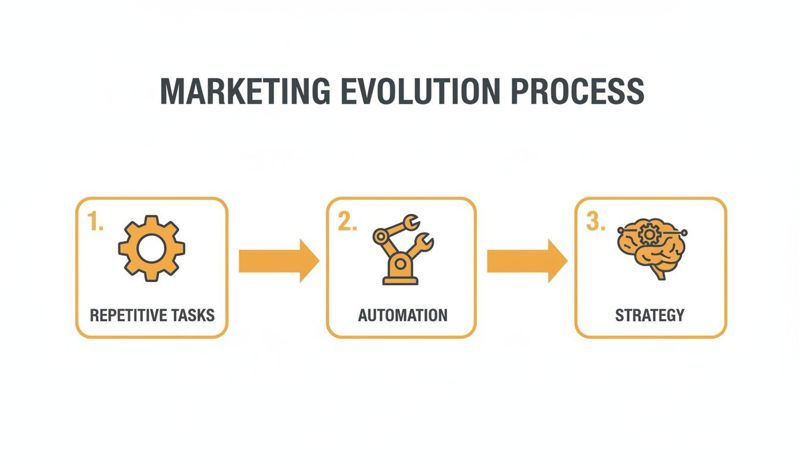
This graphic really nails it—automation is the bridge that gets you from routine production work to genuine strategic thinking.
The No-Code Method for Marketers
For anyone who isn't a developer, launching a campaign is surprisingly simple. Seriously, you can get this done in minutes without touching a single line of code. It breaks down into three basic steps.
- Upload Your Template: Start with a design you've already made in a tool you love, like Canva or Figma. This becomes your master template.
- Define Dynamic Layers: Next, you'll visually point and click on the elements in your design that need to change. This could be a text box for someone's name, a shape for their profile picture, or an area for a product image.
- Connect Your Data: Finally, link your template to where your data lives. This can be as simple as uploading a CSV file or connecting a Google Sheet with columns for each dynamic piece (like "FirstName" or "CompanyName").
Once you connect everything, the platform spits out a unique URL for each row in your spreadsheet. You just pop that URL into your email campaigns using a simple merge tag, and you're good to go.
The API Method for Developers
For developers who want maximum control and real-time generation, an Application Programming Interface (API) is your best friend. This route lets you create images programmatically, triggered by user actions or changes in your database.
For example, an e-commerce site could use an API to instantly generate an image featuring the exact product a user just added to their cart. This is perfect for abandoned cart emails or dynamic website banners that feel incredibly personal. If you want to dive deeper, we've got a detailed breakdown on using an API for personalized email graphics at scale.
The beauty of this technology is its flexibility. A marketer can launch a full campaign with just a spreadsheet, while a developer can build a deeply integrated, real-time visual experience. Both paths lead to powerful personalization.
Embedding these graphics is just as straightforward. For emails, you simply insert the generated image URL with a merge tag, like `
. On a website, a basic HTML ` tag is all you need.
A smart way to get started is by repurposing what you already have. For instance, learning how to create YouTube Shorts from existing video is a fantastic way to turn long-form content into bite-sized marketing assets for social media—all powered by automation.
Powerful Use Cases for Personalized Visuals
Knowing the theory is one thing, but seeing how automated marketing graphics actually get results is where it all clicks. The beauty of this technology is its flexibility—it can be molded to fit just about any campaign goal, no matter the industry. Whether you're trying to get more buzz for an event or create irresistible e-commerce offers, these visuals help you build genuine, one-to-one connections on a massive scale.
Let's ditch the theory and look at some real, tangible examples. Think of these as mini-playbooks showing how businesses are using personalized visuals to grab attention and boost their most important metrics.
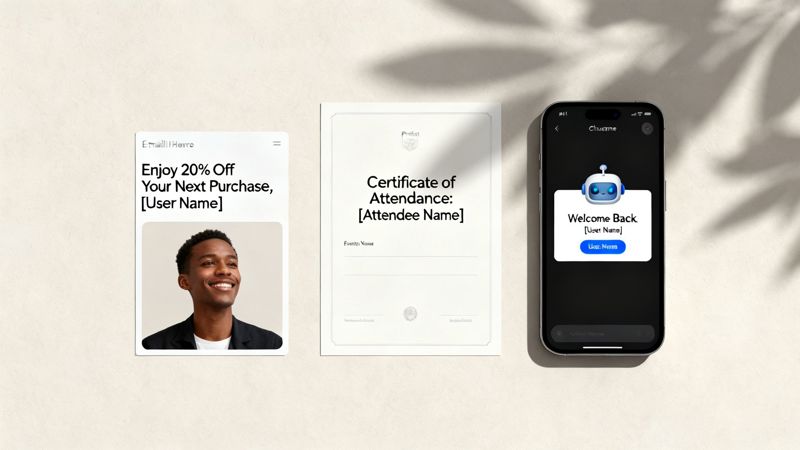
Event Marketing and Attendee Engagement
If you're an event marketer, coach, or consultant, you know how important it is to make attendees feel special. Automated graphics are perfect for this. They deliver instant, personalized takeaways that not only delight your audience but also encourage them to share on social media, building a stronger community around your brand.
Use Case: Automated Certificates of Completion
- Goal: Drive post-event buzz and collect social proof.
- Setup: First, an organizer whips up a branded certificate template. As soon as the webinar or workshop ends, an automation zaps the attendee list (from a CRM or a simple spreadsheet) over to the template.
- Result: Bam. Every single attendee gets a unique certificate with their name on it, ready for sharing on places like LinkedIn. This instantly turns your attendees into brand advocates, spreading the word about your event without you lifting a finger.
E-commerce and Dynamic Offers
Let's be honest, the e-commerce world is noisy. Standing out in a stuffed inbox is a huge hurdle. Most promotional images are instantly forgettable, but a visual made just for the recipient can stop them mid-scroll and demand their attention.
Personalized visuals slice right through the marketing clutter. They turn a generic promo into an exclusive, relevant offer. When an image reflects a customer's interests or loyalty status, it stops feeling like an ad and starts feeling like a genuinely helpful tip.
Use Case: Personalized Coupon Codes in Emails
- Goal: Boost email click-through rates and ring up more sales.
- Setup: An e-commerce store designs a slick graphic with placeholders for the customer's name and a unique discount code. Using an email platform like Klaviyo or Mailchimp, they pop in a dynamic image URL loaded with merge tags.
- Result: Every subscriber opens the email to see an image created just for them, like "Hi Sarah, here's 20% off just for you!" This makes the offer feel way more valuable and urgent.
SaaS and User Onboarding
For any SaaS company, that initial interaction with a new user can make or break long-term retention. Dropping personalized visuals into automated messages—like chatbot welcomes or social media DMs—makes the whole onboarding journey feel less robotic and way more engaging right from the start.
Use Case: Personalized Chatbot Welcome Banners
- Goal: Nail the first impression and get new users to take action.
- Setup: A SaaS business connects its user database to an image generation API. The moment a new user signs up and starts talking to the onboarding chatbot, the system creates a custom welcome image.
- Result: The chatbot greets the user with a banner that says, "Welcome, Alex from Acme Corp!" It's a small touch that instantly validates who they are and makes the entire experience feel professional and tailored.
Best Practices for Flawless Execution
Getting your automated marketing graphics up and running is one thing. Making sure they work perfectly every time? That’s what separates the pros from the amateurs.
Success really boils down to a few key habits. These aren't just suggestions; they're the difference between a campaign that wows your audience and one that falls flat with broken images and embarrassing errors.
Prioritize Data Hygiene and Quality
Let's be blunt: your visuals are only as good as the data you feed them. That makes data hygiene non-negotiable.
If your customer data is a mess of typos, empty fields, or old information, your graphics will be too. It’s a surefire way to look unprofessional and erode the trust you've worked so hard to build. Nobody wants to see an image that says, "Hello, FNAME!" instead of "Hello, Jessica!"
Before you hit 'send' on any campaign, take the time to scrub your data. This means standardizing formats (like making sure all first names are capitalized), fixing obvious spelling mistakes, and filling in any missing gaps. It’s a simple check that prevents a world of headaches.
To keep your data in top shape long-term:
- Run Regular Audits: Set a reminder to review your CRM or customer lists every quarter to clean out old or incorrect info.
- Use Validation Rules: Set up your data collection forms to reject bad data from the start. Simple rules can prevent a lot of downstream problems.
- Enrich Your Data: Use tools to fill in missing details like company names or job titles. This doesn't just clean up your data; it opens up even more personalization opportunities.
Your dynamic graphics are a direct reflection of your data's integrity. Clean data ensures your brand looks sharp and detail-oriented, while messy data makes you look careless. There's no middle ground.
Implement Smart Fallback Rules
Even with the cleanest data, you’re going to run into missing information. It happens. The real question is, what happens then?
This is where fallback rules become your safety net. A fallback is simply a default value or image that shows up when the dynamic content you wanted isn't available.
For example, if a FirstName field is empty, a fallback rule can swap in a generic greeting like "Hello there!" instead of leaving a broken, empty space. It’s a tiny adjustment that keeps your graphic looking polished and professional, and most importantly, prevents the user from seeing a glaring error.
Think of it as your campaign’s insurance policy. Setting up fallbacks is a critical step that protects your brand’s reputation.
Embrace Continuous A/B Testing
Never assume your first idea is your best one. The most successful teams treat their automated graphics like a living, breathing part of their marketing—constantly tweaking and testing to see what works.
Continuous A/B testing is the only way to truly figure out what clicks with your audience.
Start experimenting with different elements to see what moves the needle on engagement:
- Switch up your templates: Do bold colors outperform pastels? Does a different layout get more clicks?
- Tweak dynamic elements: Does adding a prospect's company logo work better than just using their name?
- Refine your call to action: Test different button text, colors, and placements within the graphic itself.
By systematically testing one variable at a time and measuring the results, you can turn a good campaign into a great one that drives consistently better results.
Measuring the ROI of Your Automated Graphics
Let's be honest, any cool marketing tactic is just a gimmick until you can connect it to real business goals. Without clear numbers, your automated marketing graphics are a fun party trick. With them, they become a powerful, justifiable engine for growth.
Measuring the return on investment (ROI) isn't as complicated as it sounds, but it does mean tracking the right things.
The most direct impact you'll see from personalization is on engagement. When someone sees a graphic made just for them, they're way more likely to stop scrolling and pay attention. This initial spark is the first domino to fall, setting off a chain reaction that boosts performance all the way down the funnel.
Key Performance Indicators to Track
To build a solid case for your efforts, you need to focus on metrics that draw a straight line from your visual campaigns to revenue and customer loyalty. These are the KPIs that will tell the story of your success.
- Email Click-Through Rate (CTR): This is your first and most immediate signal. A personalized image that grabs someone's attention is far more likely to earn a click. In fact, studies have shown that personalized calls to action can outperform generic ones by over 200%. That's a huge lift.
- Social Media Engagement: Keep an eye on likes, comments, shares, and saves. When you automatically send personalized graphics in DMs or through chatbots, you're creating a shareable "wow" moment that users get genuinely excited about.
- Website Conversion Rate: This is where the money is. Track how many people who interact with a personalized graphic go on to do what you want them to do—whether that's making a purchase, signing up for a demo, or downloading a resource.
Proving ROI is really just about connecting the dots. A higher CTR in an email isn't just a vanity metric; it means more interested people are landing on your pages. That directly influences your conversion rates and, ultimately, your bottom line.
Presenting Your Findings
When you're sharing this data with your team or stakeholders, don't just throw up a chart. Tell a story. It's not enough to show that the CTR went up; you need to explain why.
The story is simple: personalization creates relevance, relevance captures attention, and attention drives action. By tracking these key metrics, you can clearly show the financial impact of your automated marketing graphics.
If you're looking to go even deeper on email-specific numbers, our guide on understanding email campaign analytics is a great next step.
Got questions before you jump in? We get it. Here are the answers to the things people usually ask us.
What Kind of Data Can I Use to Personalize Images?
Pretty much anything you have. Most people start with the basics, like a customer's name, company, or profile picture. You can also pull in transactional data, like their last purchase, a product name, or even their loyalty points balance.
If you’re running events, you could use an attendee's name and the event title. For the more adventurous, you can even hook up to a live API to pull in things like the current weather or sports scores to create something truly in-the-moment.
Do I Need to Be a Designer or a Developer to Use This?
Nope, not at all. These tools are built for marketers, not coders. The whole point is to make it easy. You can upload a design you've already made in a tool like Canva or Figma, then just click to tell the system which parts of the image need to change for each person.
While we do have an API for developers who want to get fancy and build custom integrations, you absolutely don't need it to get started. The process is designed for everyone.
How Does This Work With Email Platforms Like Mailchimp or Klaviyo?
It's a surprisingly simple and clean integration that works with just about any email service provider (ESP) out there. The platform generates a unique image URL for every single person on your email list. All you have to do is copy and paste that URL into your email template.
You'll use your ESP’s own merge tags (like *|FNAME|* in Mailchimp) within that URL. When the email goes out, your ESP does its thing, swapping the merge tag with the right data, and voilà—the correct personalized image loads for each person.
Ready to create stunning, personalized visuals in minutes? With OKZest, you can automate your marketing graphics with no-code tools and powerful API options. Start for free today at okzest.com.