Let's be real—most generic emails get deleted on sight. An API for personalized email graphics at scale is your way out of the junk folder. It lets you create unique, eye-catching visuals for every single person on your list, automatically. Think of it as graduating from simple text merge tags like [First Name] to fully custom images that grab attention the second an email is opened.
Why Personalized Graphics Are the Future of Email
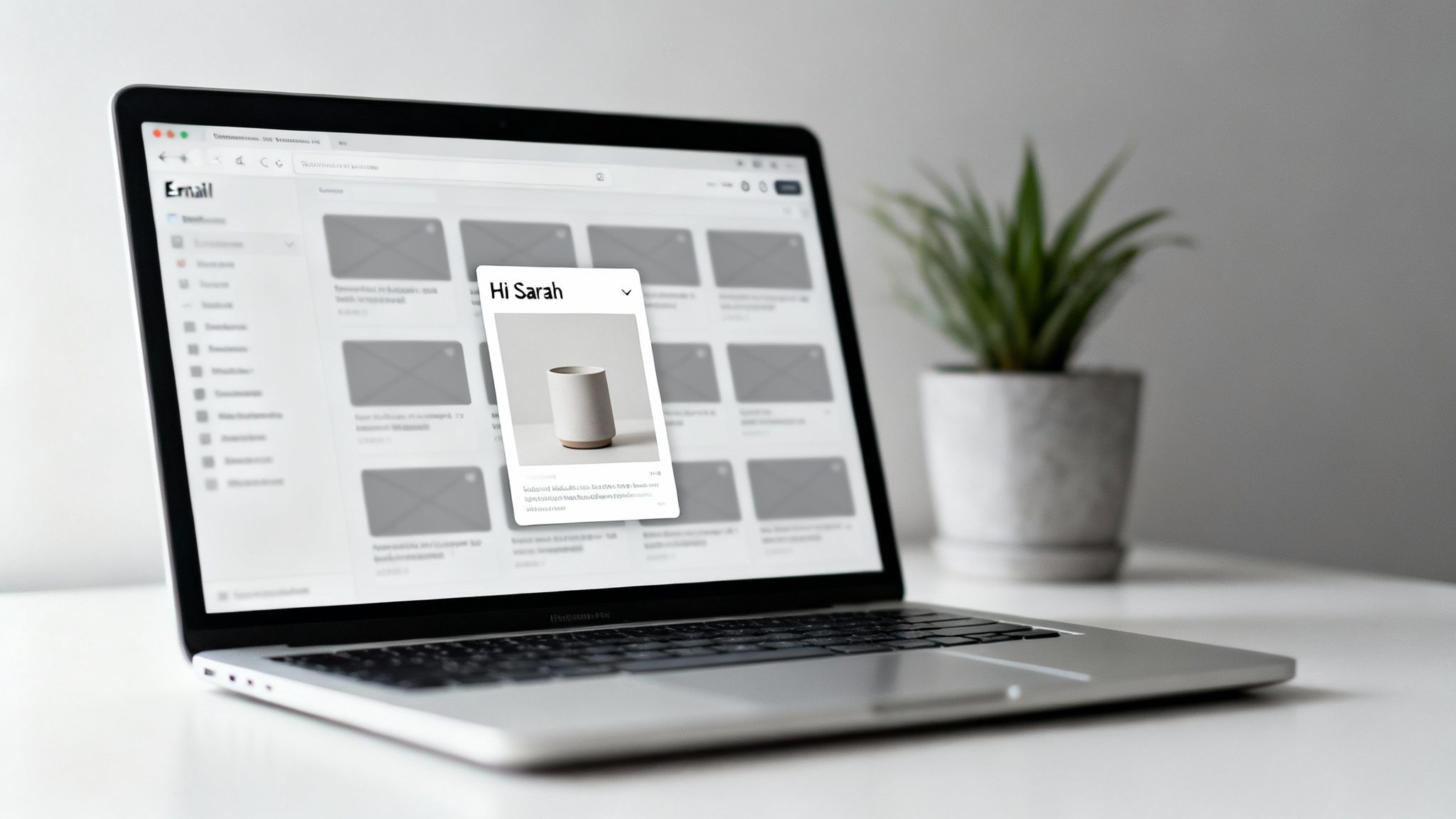
In a world of overflowing inboxes, you have to get personal to stand out. Text merge tags have been around forever, and while they're better than nothing, they've become so common they barely make a dent. The next real frontier in making a genuine connection is visual.
Imagine an e-commerce store sending a welcome email. Instead of a generic banner, the new customer sees their own name styled beautifully over a product they just looked at. That single change transforms a robotic broadcast into a one-to-one conversation. It makes the recipient feel seen.
Moving Beyond Generic Communication
This isn't just about making things look pretty; it's about driving actual business results. The data is crystal clear on this. Personalized emails are known to deliver 6 times higher transaction rates. When you pair that with smart segmentation, personalized campaigns can be responsible for up to 58% of all revenue from email.
With 74% of marketers confirming that personalization increases customer engagement, it's easy to see why this is becoming the new standard. If you want to dive deeper into the data, CodeCrew.us offers some great insights on email personalization.
This is exactly where an API for personalized email graphics becomes a game-changer. It's the engine that automates the whole process, letting you generate thousands—or even millions—of unique images without a designer touching a single one.
The Core Benefits of Dynamic Visuals
When you start integrating dynamic visuals, you unlock a few key advantages that directly boost your marketing goals and your bottom line.
- Increased Engagement: An image that speaks directly to a recipient—using their name, company logo, or a relevant piece of data—is far more likely to get noticed and clicked than some stock photo you use for everyone.
- Stronger Brand Connection: Personalization shows you're paying attention. It tells your customers you see them as individuals, not just another entry in a database. That fosters loyalty and trust in a way generic messaging never could.
- Higher Conversion Rates: By visually showing someone a relevant product, a personalized offer, or useful information, you cut down on friction. You make it easier for them to take the next step, whether that's clicking through or making a purchase.
Ultimately, this tech helps you create email experiences that don't just get opened, they get remembered.
How Real-Time Image Personalization Actually Works
It might sound like digital wizardry, but the process behind real-time image personalization is actually quite straightforward. Think of it as a super-fast, automated assembly line for your email graphics. Every unique image you send is built in milliseconds, pieced together from a few key components.
At the center of it all is the image template. This isn't your standard JPG or PNG file. It's a dynamic blueprint you design once, often in a simple, no-code editor. You set the layout, pick the fonts, and arrange the background elements, but you also mark specific spots as placeholders for dynamic content.
For example, you might create a placeholder for a first name, a company logo, or a specific product image. Each placeholder is like an empty slot on that assembly line, just waiting to be filled with the right piece for each customer.
The Three Key Ingredients
To bring a personalized graphic to life, three things have to work together perfectly. This workflow is the core of how an API for personalized email graphics at scale operates, turning your data into eye-catching visuals in the blink of an eye.
- The Image Template: This is your master design. It’s the consistent, branded foundation that all the personalization is built upon.
- Customer Data: This is the fuel. It comes from your CRM, ESP, or any other database where you keep audience info—names, locations, purchase history, you name it.
- The API Call: This is the instruction that tells the assembly line what to build. It's a special URL that combines your template with specific customer data for one recipient.
When someone opens your email, their email client requests this special URL. The API instantly grabs your template, pulls in the specified data, and assembles the unique graphic in real time before showing it in their inbox. The entire process happens in a fraction of a second.
From Data Points to Dynamic URLs
So how does the API know which data to plug in? This is where merge tags come into play—the very same ones you already use to personalize the text in your emails. When you build the dynamic image URL, you simply embed these merge tags right into it.
Let's say you want to create a welcome image with a person's first name and company. Your template has placeholders for {{first_name}} and {{company_name}}. Your email service provider (like Klaviyo or Mailchimp) automatically swaps these tags with the actual data from your contact list for every single email it sends.
Key Takeaway: The personalized image doesn't even exist until the moment a user opens their email. The API generates it on-demand by merging a pre-designed template with real-time user data, ensuring every visual is perfectly customized.
This on-demand generation is a huge win for performance. Since you aren't trying to send massive, unique image files from your own servers, email deliverability stays high. Plus, the images load almost instantly because these services use powerful Content Delivery Networks (CDNs) to serve them. You can dive deeper into this topic in our detailed guide on using a dynamic image API for email marketing.
To make this crystal clear, here’s a breakdown of how the components work together.
Key Components of a Personalization API Workflow
This table shows the core elements involved in generating a personalized graphic via an API, clarifying the role of each component.
| Component | Function | Example |
|---|---|---|
| Image Template | The foundational design with fixed elements and dynamic placeholders. | A banner with your logo and a blank space labeled {{FirstName}}. |
| Customer Data | The unique information for each recipient, stored in your CRM or ESP. | A contact record: FirstName: "Sarah", City: "London". |
| Merge Tags | Placeholders in the image URL that your ESP replaces with customer data. | &text={{FirstName}} in the image URL. |
| API Call | The final URL that combines the template, merge tags, and data to request the image. | https://api.okzest.com/...?text=Sarah |
| Generated Image | The final, personalized graphic created in real-time when the email is opened. | The banner now reads: "Welcome, Sarah!" |
As you can see, it's a logical flow from a static template to a fully dynamic, personalized visual for every single recipient.
Ensuring a Flawless Experience with Fallbacks
What happens if some of your data is missing? For example, what if you don't have a first name for a new subscriber? A good system handles this gracefully using fallbacks.
You can set a default value for any dynamic element. If the {{first_name}} field is empty, the API can automatically insert a default greeting like "Valued Customer" or "A Special Offer for You." This ensures that no recipient ever sees a broken or incomplete image, maintaining a professional and polished look for every single email. This capability makes the technology reliable, even when you're working with imperfect data.
The Business Case for Dynamic Visual Content
We've covered the technical "how," so now it's time to dig into the strategic "why." Investing in an API for personalized email graphics isn't just about making flashy visuals; it’s a smart business move that directly grows your bottom line. Let's face it, generic content gets ignored. Dynamic, personal visuals, on the other hand, demand attention and drive results you can actually measure.
The real magic is in making each person feel seen, not just like another entry in your database. When a customer opens an email and sees an image with their name on it, or one that shows a product they just looked at, it creates an instant, powerful connection. You're no longer just broadcasting a message; you're starting a one-to-one conversation.
Boosting Engagement and Click-Through Rates
The first thing you’ll notice is a huge jump in engagement. A personalized image is infinitely more compelling than a stock photo, making people actually stop and look. This focus naturally leads to higher click-through rates (CTR) because the visual is relevant and genuinely interesting to them.
For example, imagine an e-commerce store that automatically generates an image of the exact pair of shoes a customer left in their cart. The image includes their name and a special offer. That’s a world away from a boring "You left something behind!" email. It’s a visual nudge that reminds them what they wanted, making it much harder to resist completing the purchase.
The process behind this is surprisingly simple: you combine a design template with user data to generate the final personalized image on the fly.
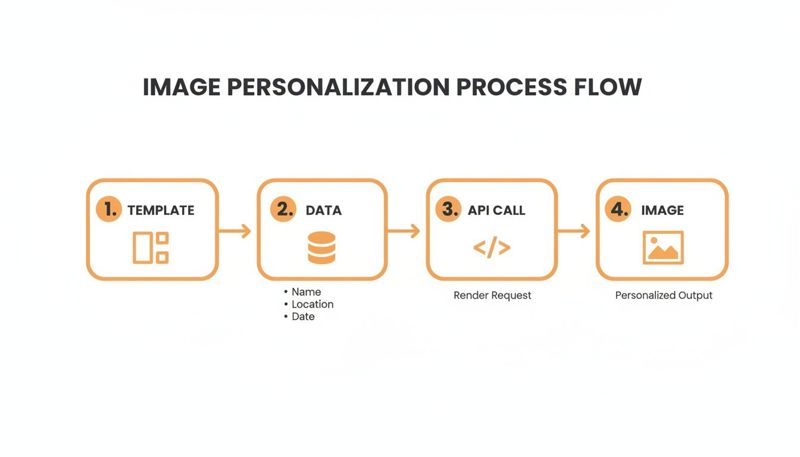
This workflow shows how a static template and dynamic data come together through an API call to produce a unique graphic for every single user, in real-time.
Driving Conversions and Revenue
Higher engagement is great, but what we're really after is revenue. This is where dynamic visuals truly prove their worth. The numbers don't lie: personalized calls-to-action are proven to convert 202% better than generic ones. Even something as simple as a birthday email with a custom graphic can generate 342% higher revenue per email than a standard promotional blast.
With 80% of shoppers more likely to buy from brands that offer tailored experiences, the ROI is impossible to ignore. You can find more compelling stats on email marketing personalization here.
This isn't just a clever marketing trick; it's a direct line to more sales. By tailoring the visual experience, you smooth out the customer journey and make the path to purchase more intuitive and appealing.
Think about how this could work for different teams:
- Sales Teams: A sales rep could send a cold outreach email with an image featuring the prospect’s company logo and a personal message. That email will instantly stand out from the hundreds of plain-text messages in their inbox.
- Marketing Agencies: Agencies can offer scalable image personalization as a premium service, delivering better campaign results for their clients and justifying higher fees.
- Coaches and Consultants: A coach could automatically generate and email personalized certificates to clients when they complete a course, creating a sense of achievement and community.
Cultivating Brand Loyalty and Trust
Finally, personalization builds something that generic marketing can never quite achieve: genuine brand loyalty. When you consistently deliver relevant, thoughtful, and visually interesting content, you're showing customers that you get them. That builds trust and strengthens the relationship over the long haul.
Each personalized image is a small interaction that reinforces your brand's commitment. A travel agency sending an email with a stunning image of a user's dream destination, or a nonprofit sending a personalized thank-you graphic to a donor, creates a memorable experience.
These moments are about more than just transactions. They build an emotional connection that turns one-time buyers into lifelong brand advocates, which means less churn and higher lifetime value. The investment in personalization pays for itself by creating a more resilient and loyal customer base.
Inspiring Use Cases Across Different Industries
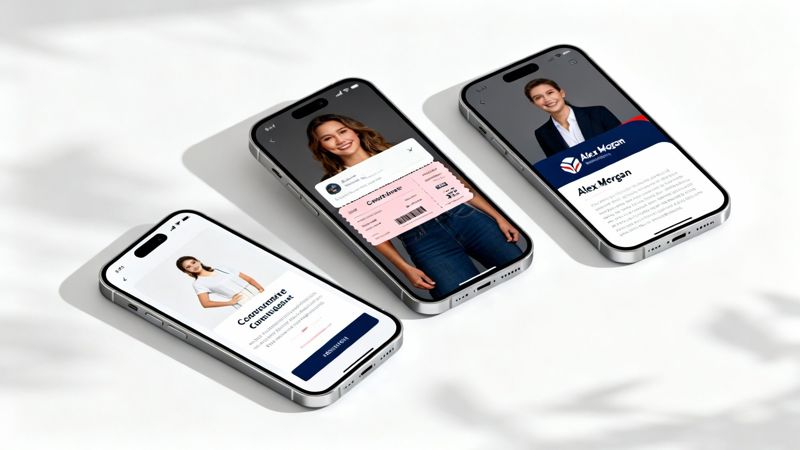
Theory and tech specs are great, but the real magic happens when you see how this stuff solves actual business problems. An API for personalized email graphics at scale isn't just a technical tool; it’s a creative powerhouse that helps different teams connect with their audiences in far more memorable ways.
From e-commerce stores trying to win back abandoned carts to sales teams just hoping to get a reply, dynamic visuals are a game-changer. Let’s dive into some concrete examples of how different industries are using personalized graphics to get noticed and drive real results.
For E-commerce Marketers
E-commerce is probably the most natural fit for real-time image personalization. Instead of blasting everyone with the same generic sale banner, marketers can create visuals that reflect a shopper's individual journey. It makes every email feel less like an advertisement and more like a genuinely helpful nudge.
Here are a few ways they're putting it to work:
- Abandoned Cart Reminders: Forget plain text reminders. Imagine an email with an image of the exact product someone left behind, with their name and a unique discount code layered right on top. That’s hard to ignore.
- Welcome Series Banners: Greet new subscribers with a welcome banner that features their name. You can even take it a step further by showing an image from the specific product category they were browsing before they signed up.
- Post-Purchase Thank You Images: After a customer buys something, send a thank-you email with a graphic that includes their name and a picture of the item they just bought. It’s a simple touch that reinforces their purchase and builds brand loyalty from day one.
When you can visually remind customers of products they've already shown interest in, you close the gap between browsing and buying. It’s a simple trick that can seriously lift conversion rates for abandoned cart flows and other automated campaigns.
For Event Organizers and Coaches
If you're an event organizer or a coach, your whole business is built on creating a sense of excitement and community. Personalized graphics are perfect for making every attendee or client feel like a VIP from the very first email.
Check out how they're using this technology:
- Personalized Digital Tickets: Automatically generate a unique digital ticket for every attendee, complete with their name, a custom QR code, and all the event details. It looks incredibly professional and makes the check-in process a breeze.
- Speaker and Session Reminders: A few days before the event, send out emails with custom graphics showing the specific sessions an attendee signed up for. Including the speaker's headshot, session title, and start time is a fantastic visual reminder.
- Custom Course Completion Certificates: For coaches and online course creators, automatically generating a personalized certificate of completion is a huge win. The graphic can pull in the client's name, the course title, and the completion date, giving them a shareable asset that also doubles as marketing for you.
For B2B Sales and Outreach Teams
In the B2B world, getting noticed in a crowded inbox is half the battle. A generic, copy-pasted outreach email is destined for the trash folder. An API for personalized email graphics at scale gives sales teams a secret weapon to cut through the noise.
Sales reps can get pretty clever with dynamic images:
- Hyper-Personalized Cold Outreach: Embed an image in that first email featuring the prospect's company logo, their first name, and your headshot. It immediately shows you’ve done your research and aren't just spamming a list.
- Meeting Confirmation Visuals: Once a prospect books a meeting, the confirmation email can include a graphic that says, "Looking forward to our chat, [Prospect's Name]!" Add your photo and the meeting details for a friendly, human touch.
- Case Study and Proposal Covers: Create dynamic cover pages for proposals or case studies that are personalized for the recipient's company. It adds a layer of polish that makes a great impression before they've even read a single word.
Adding a visual, personal touch to what is usually a text-heavy channel can dramatically increase reply rates and help book more meetings. It’s all about turning a cold email into a warm interaction. This is where you can learn more about crafting effective personalized email campaigns that people actually want to open.
Integrating Personalized Graphics with Your Tools

This is where the magic really happens. Plugging an API for personalized email graphics at scale into the tools you already use is a lot more straightforward than it sounds. Modern platforms are built for marketers, not just developers, meaning you can get stunning campaigns live without touching a single line of code.
The whole concept boils down to one simple idea: you create a "smart" image URL that acts as a blueprint. Your Email Service Provider (ESP) then uses this URL to automatically generate a unique graphic for every single person on your list, right at the moment they open their email.
The Four-Step Implementation Process
Getting your first personalized campaign off the ground follows a simple, repeatable workflow. It’s a four-step dance from design to launch. If you want a more detailed breakdown, our guide on API integration tutorials is a great place to start.
Here are the exact steps you’ll take:
- Design Your Base Template: First, you build your visual foundation in a no-code editor. This template will have static elements, like your logo or a background image, plus dynamic placeholders for personalization. Think of these placeholders as empty slots waiting to be filled.
- Define Your Data Layers: Next, you connect those placeholders to specific data points from your email list. For instance, you could create a text layer and link it to the
{{first_name}}merge tag from your ESP. You can add layers for names, company logos, product images—you name it. - Construct the Dynamic Image URL: Once your template is set, the platform generates a special URL for it. This URL contains all the merge tags you defined, acting as a set of instructions that tells the API which template to use and what data to pull for each recipient.
- Embed in Your Email Builder: Finally, just copy this dynamic URL and paste it into the image block of your favorite email editor, whether that's Klaviyo, Mailchimp, or Instantly. Your ESP takes it from there, automatically swapping the merge tags with each contact's data on the fly.
The real beauty here is the simplicity. You aren't manually creating thousands of images. You're creating one smart template and letting your existing marketing stack do all the heavy lifting for you at the moment of engagement.
Scaling Your Campaigns with Confidence
When you start sending personalized graphics to thousands—or even millions—of subscribers, performance and reliability become non-negotiable. A robust API for personalized email graphics at scale is engineered to handle that volume without breaking a sweat, ensuring every recipient gets a flawless experience.
For businesses sending millions of images a month, these APIs are built with fallbacks that use default values if data is missing, preventing any ugly gaps in your campaign. In a world where email ROI can hit an incredible $36 for every $1 invested, tools that enable this level of powerful image personalization are essential for cutting through the noise.
To make sure your campaigns run smoothly at high volume, there are a few key things to keep an eye on.
Key Considerations for High-Volume Sends
- Fast Image Delivery: Look for a provider that uses a global Content Delivery Network (CDN). A CDN ensures your personalized images are served from a location close to your recipients, letting them load almost instantly. This protects both the user experience and your email deliverability.
- Data Security and Privacy: You're handling customer data, so security is paramount. Make sure the API provider is compliant with privacy regulations like GDPR and is transparent about its security measures. Your customers' trust is your most valuable asset.
- Reliable Fallback Logic: Let's face it, your data won't always be perfect. A solid system lets you set default "fallback" values. If a contact is missing a first name, the image can automatically show a generic greeting like "Hello there!" instead of a blank space, keeping every email looking polished.
- API Rate Limits and Performance: Check the provider’s API limits to be sure they can handle your send volume without throttling. The system should be built to generate images in milliseconds, even during peak send times, to avoid any delays in your campaign delivery.
Implementation Checklist for Personalized Graphics API
To help you get started, here's a simple checklist to guide you through setting up your first personalized image campaign from start to finish. Following these steps will ensure you cover all your bases for a successful launch.
| Phase | Key Action | Success Metric |
|---|---|---|
| 1. Planning | Define campaign goal and identify key personalization data (e.g., name, city). | Clear objective (e.g., increase CTR by 15%). |
| 2. Design | Create a base image template in a no-code editor with dynamic placeholders. | Template is visually appealing and has clear spots for personalization. |
| 3. Integration | Connect data layers to ESP merge tags and generate the dynamic image URL. | Dynamic URL is generated and successfully tested with sample data. |
| 4. Testing | Embed the URL in your email builder and send test emails to various clients. | Images render correctly and load quickly across all test devices. |
| 5. Launch & Monitor | Send the campaign to a small segment first, then roll out to the full list. | Monitor open rates, click-through rates, and image generation metrics. |
By working through this checklist, you can methodically move from a great idea to a fully functioning, high-impact email campaign that truly connects with your audience.
Choosing the Right Partner for Visual Personalization
Picking the right platform for visual personalization is the final, crucial piece of the puzzle. The best technology is only as good as the team and tools supporting it. To get the most out of an API for personalized email graphics at scale, you need a partner that truly gets your goals.
First things first, a powerful, no-code template builder is non-negotiable. It gives your marketing team the freedom to design and tweak visuals without roping in a developer for every tiny change. This creative independence is what lets you launch campaigns fast. Just as important is making sure the platform plays nice with the Email Service Providers (ESP) you already rely on for a seamless hookup.
Evaluating Key Platform Features
When you're sizing up different solutions, zero in on a few core areas that will make or break your workflow and ability to grow. You want a platform that scales with you, not one that holds you back.
- Scalable Pricing: Look for flexible pricing tiers that make sense whether you're sending a few thousand images or millions every month.
- Responsive Support: When you hit a snag, you need help fast. Prioritize partners who offer quick, real-time support to get you answers and fix issues without delay.
- Comprehensive Documentation: Clear, detailed guides and tutorials make the initial setup and day-to-day use of the API so much smoother for everyone on your team.
As you explore your options, checking out platforms like the saucial platform can give you a good sense of the features and solutions currently available for visual personalization.
Remember, the goal is to make personalization an asset, not a technical headache. A strong partner gives you both the technology and the support system to make sure your campaigns are a massive success.
The right tool really does make all the difference. We've seen segmented campaigns with personalized elements drive 30% more opens and 50% more clicks. When you go all-in on personalization, revenue can jump by an incredible 760%. You can dig into more data on how 68% of marketers confirm dynamic content boosts performance on Shopify.com.
To see how all these features come together in a real-world tool, check out our guide on choosing the best image personalization software.
Ready to see the impact for yourself? Start a free trial or schedule a demo to see how the right personalization partner can completely change your email game.
Got Questions? We've Got Answers
Jumping into any new tech can feel a bit overwhelming, so let's clear up a few common questions about using an API for personalized email graphics at scale. Here are some straightforward answers to help you get started with confidence.
Is This Going to Be Hard to Set Up?
Not at all. Modern platforms are built for marketers, not just developers. Most services, like OKZest, give you a no-code visual editor where you can build and tweak your image templates without touching a line of code.
It's a simple process: you design the template, copy a special URL that has your merge tags built-in, and then paste it right into your email service provider. For the vast majority of campaigns, you can get everything running without any coding skills.
Will These Custom Images Slow Down My Emails?
Nope, they won't. This is a common worry, but a well-designed image API is smart about how it works. It generates the custom visual the moment a recipient opens their email, not when you hit "send."
These services use global Content Delivery Networks (CDNs), which means the images are hosted on servers all over the world. When someone opens your email, the graphic is pulled from the server closest to them. This ensures it loads in a flash and doesn't mess with your email deliverability.
The key takeaway is that the image isn’t actually in the email file itself. The email client just fetches it in real-time. This keeps your email size tiny and your send speeds fast, even if you're sending to a list of millions.
What Happens if I'm Missing Personalization Data for Some Contacts?
This is exactly what "fallbacks" are for. It's a crucial feature that lets you set a default value for any dynamic part of your image template. This way, even if your data isn't perfect, your graphics always look complete and professional.
For example, if you don't have a 'First Name' for someone on your list, the image can automatically show a generic greeting like 'A Special Offer for You!' instead of an awkward blank space. This fallback logic makes sure every single person gets a great-looking visual.
Can I Use These Graphics in Places Other Than Email?
Absolutely. That dynamic image URL you get from the API is incredibly flexible. You can use it across all sorts of marketing channels to create a consistent, personalized experience wherever your audience is.
You can drop these personalized graphics into:
- Your website's landing pages
- Chatbot conversations
- Direct messages on platforms like LinkedIn or X (formerly Twitter)
- Your social media campaigns
Using the same API everywhere helps you maintain that personal touch across the board.
Ready to stop sending generic emails and start having personal conversations? With OKZest, you can create stunning, personalized images for every single recipient. Start your free trial today and see the difference for yourself at okzest.com.