Personalized images,
generated on demand.
Send a JSON payload. Get back a finished, personalized image. Drop it into any email, app, or workflow - instantly, at any scale.
Start with 500 free images · No credit card needed
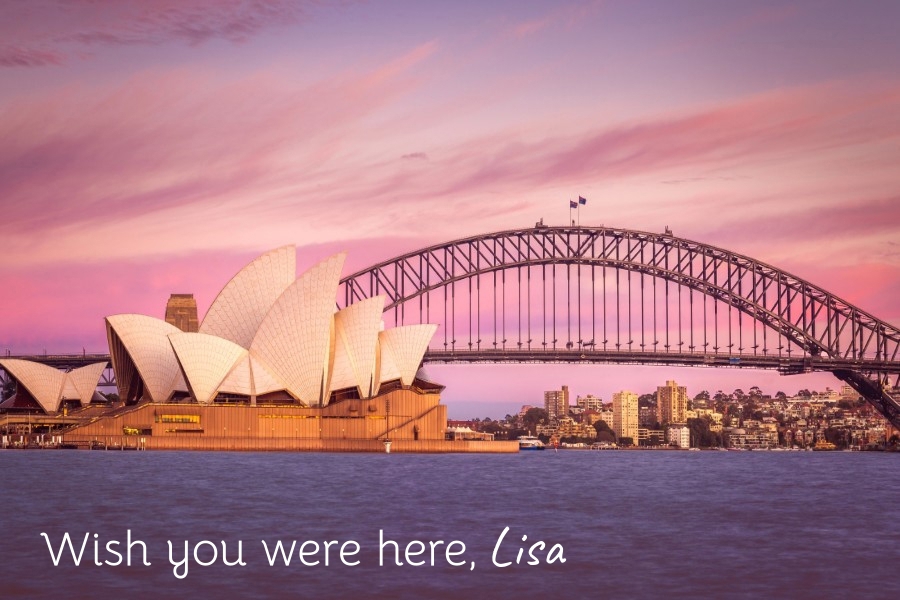
"design_id": "AbOHw7ix50q",
"format": "jpg",
"layers": [{
"layer_id": "name",
"text": "Lisa"
}],
"background": {
"image_url": "Sydney.jpg"
}
}
From design to live image in three steps
No complex setup. No SDK required. Just a simple REST API you can call from any language or tool.
Design your template
Use the visual editor to create an image template. Add text, image, and shape layers for the merge tags you need.
Call the API
POST your recipient's data - name, company, photo URL, any custom field. One call per image.
Use the image anywhere
Get back the image file itself. Attach it to an email, ad, chat message, or certificate - wherever you need it.
Everything you need to build with
A clean, well-documented API designed to handle real production workloads.
Rendered on demand
Each call renders your design with the values you send and returns the image in the same response - no queue, no polling.
Multiple merge tags per image
Combine name, company, location, photo, and any custom field in a single image. Stack as many layers as your design needs.
Dynamic backgrounds
Pass a different background image URL per request. OKZest composites it into your template on the fly - no extra design work.
Fallback values
Set a default for any layer. If a merge tag is missing or empty, your image still looks perfect - no broken placeholders.
Bulk generation
Loop through your contact list and generate thousands of unique images in a single script.
Team API keys
Create separate API keys per workspace or team member. Revoke access instantly without affecting your other integrations.
A few lines to your first personalized image
# Generate a personalized image for Lisa

curl -X POST https://api.okzest.com/v1/images \
  -H "x-api-key: YOUR_API_KEY" \
  -H "Content-Type: application/json" \
  --output image.jpg \
  -d '{
  "design_id": "AbOHw7ix50q",
  "format": "jpg",
  "layers": [
    { "layer_id": "name", "text": "Lisa" },
    { "layer_id": "company", "text": "Acme Corp" }
  ],
  "background": {
    "image_url": "https://example.com/office.jpg"
  }
}'

# Response: the image itself (a JPEG here, because the body sets "format": "jpg"), saved to image.jpg
# "format" can be "jpg", "png", "webp" or "pdf"
Full API reference
Every endpoint, parameter, and response code documented. Try requests directly from the docs - no Postman needed.
API key in your dashboard
Find your key under Settings → API. Create as many API keys as you need, one per tool or teammate. Delete a key to revoke it.
Test with the free plan
Every account starts with 500 free images - no credit card needed. Good enough to build a full proof of concept.
Read the full documentation
Works with the tools you already use
Zapier has a built-in integration. Other tools work by using the OKZest image URL or API.
Let your AI agent make the images
AI agents that support MCP can create designs and get personalized images from your OKZest account.
OKZest has an MCP server. Connect your agent to it and ask in plain words: "Make a 600 by 300 banner with the name Lisa on it."
Your agent can:
- list your projects and designs
- create and save a new design from a description of its layers
- try out changes to a design's text, colors and images and get a preview image (the changes are not saved to the design)
- get the image URL for a design, with your values filled in
Designs your agent creates are saved in your OKZest account, so you can open and edit them like any other. Preview images last only a short time, so do not use them in emails.
Your first API call
takes about 5 minutes.
Create a free account, grab your API key, and start generating personalized images before your next coffee break.