Picture this: you send an email, and the main banner doesn't just have your logo—it has your customer's name, their loyalty points balance, or even a picture of the exact shoes they were just looking at.
That's campaign image automation in a nutshell. Think of it like a classic mail merge, but instead of just personalizing text, you're dynamically changing the actual visuals in your marketing for every single person.
What Is Campaign Image Automation?
Campaign image automation is a smart technology that takes a base image template and dynamically inserts unique data into it. This process can generate thousands of unique, personalized graphics from a single design—one for each individual in your audience. It’s a huge step away from the old one-size-fits-all approach.
Instead of spending hours creating one static image for everyone, you build one smart template. This template has placeholders for data like names, locations, product images, or even real-time information. When a customer opens your email or lands on your page, the automation instantly pulls their specific data and builds an image just for them.
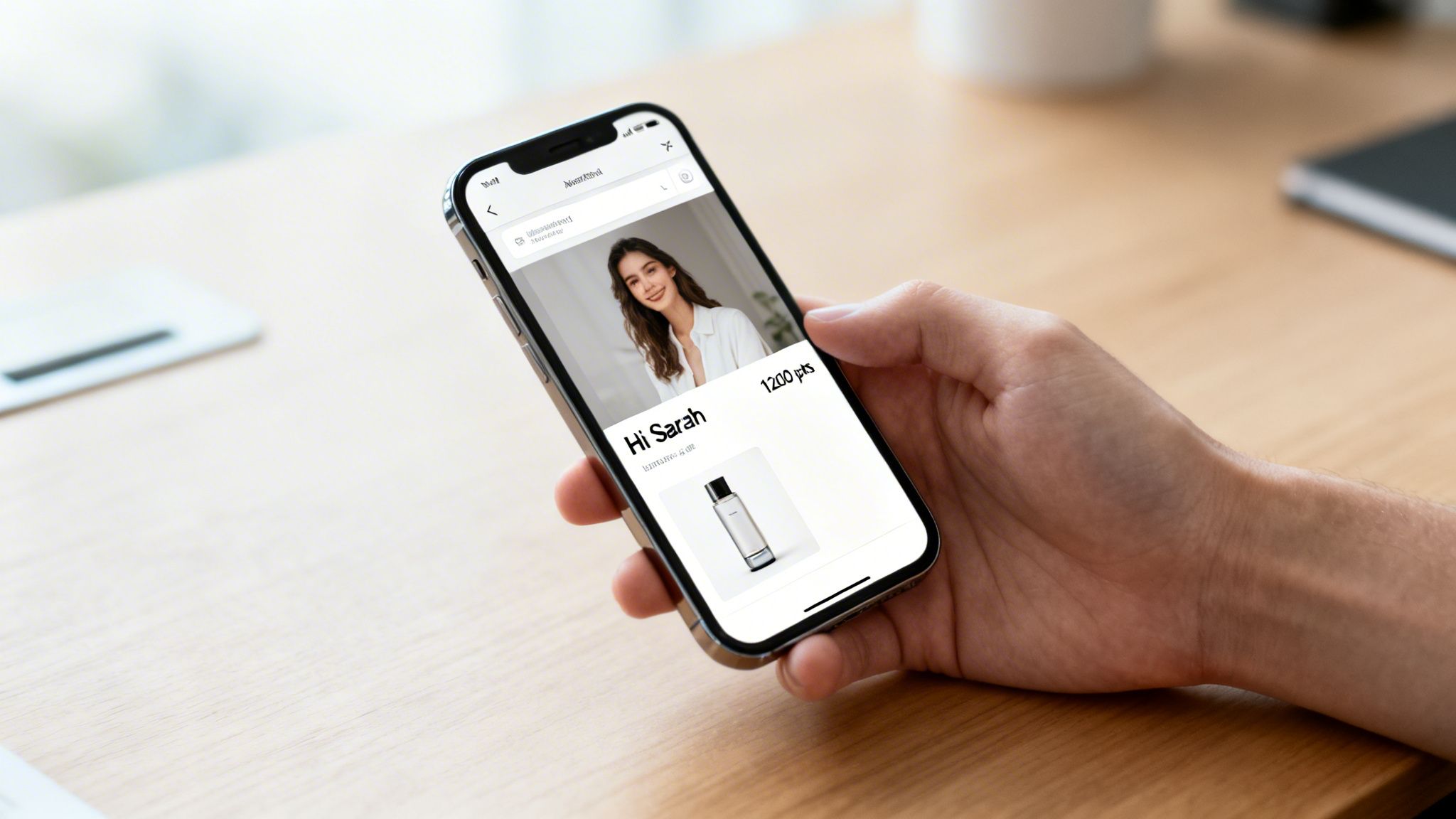
To give you a quick overview, here's a look at the core benefits and how they're applied in the real world.
Campaign Image Automation At a Glance
| Benefit | Description | Example Use Case |
|---|---|---|
| Drives Engagement | Personalized visuals grab attention far more effectively than generic ones, leading to higher interaction rates. | An abandoned cart email showing the exact product the customer left behind. |
| Boosts Conversion | Relevant, timely images with personalized offers or details make the call-to-action more compelling. | A promotional banner with the customer's name and a unique discount code. |
| Increases Efficiency | Automate the creation of thousands of image variations from one template, saving massive amounts of design time. | Automatically generating thousands of unique social media share images for an event. |
| Enhances Brand Loyalty | Making customers feel seen and understood on an individual level builds a stronger, more personal connection. | A "Happy Anniversary" email with a banner celebrating the customer's loyalty milestone. |
This approach allows marketers to create more meaningful interactions at scale, turning standard campaigns into memorable experiences.
Why It Matters Now More Than Ever
In today's crowded digital world, simply getting noticed is half the battle. Your customers have become experts at tuning out generic ads that don't speak to them directly. Campaign image automation helps you cut through that noise by making your marketing feel less like a broadcast and more like a one-to-one conversation.
This isn't just a fleeting trend; it’s a direct response to what customers now expect from brands. They want more personal and relevant interactions.
That’s why this approach is quickly becoming essential for modern marketers. It's no surprise that a recent study found that nearly 75% of marketers now use AI for creating images and videos. On top of that, automation saves an average of 2.3 hours per campaign and can slash setup time by up to 50%, delivering a serious return on investment. You can dive deeper into these trends in the HubSpot State of Marketing Report 2026.
By transforming a broadcast message into a personal greeting, you make each customer feel seen, understood, and valued. This is the core principle that drives higher engagement and deeper brand loyalty.
Platforms like OKZest are built to make this powerful technology accessible to everyone. Whether you're a solo entrepreneur on a free plan or a large agency generating millions of images, the tools are designed for both simplicity and scale. You can connect real-time data to automatically generate personalized visuals for almost anything, including:
- Email Newsletters: Greet subscribers by name in a custom banner image.
- Event Certificates: Instantly issue certificates with each attendee's name.
- Chatbot Interactions: Display dynamic, helpful visuals within a conversation.
- Social Media Posts: Create unique graphics for outreach on platforms like Twitter.
Ultimately, this method turns your standard campaigns into hyper-personalized experiences that actually get results.
Why Personalized Visuals Boost Engagement
Most marketing feels like a monologue—a brand talking at everyone with the same message. But what if you could turn that into a real, one-on-one conversation? That’s the magic of campaign image automation. It helps you create personalized visuals that make every single customer feel seen and valued.
Think about it. An event organizer sends a digital ticket, but instead of a boring QR code, it’s a beautifully designed pass with the attendee's name right on it. Or a real estate agent sends a "Welcome Home, Sarah!" image on closing day. These small, personal touches turn a routine message into something memorable. They show you see your customer as an individual, not just another name in your database.
This strategy is so effective because it taps into a core part of human psychology. We're wired to notice things that are relevant to us. It's like the "cocktail party effect"—how you can hear your name spoken from across a noisy room. A personalized image does the exact same thing in a crowded inbox or social feed, cutting through the noise to grab your customer's attention.
From Monologue to Meaningful Dialogue
This personal touch does more than just get noticed; it fundamentally changes the relationship you have with your customers. The dynamic shifts from a brand broadcasting at an audience to a brand talking with them. This dialogue builds a level of trust and loyalty that generic marketing just can't match.
Consider these real-world applications:
- An online coach sends custom certificates of completion, displaying each student's name and the course they finished.
- An e-commerce shop sends a "Happy Birthday!" email with a banner showing a unique discount code made just for the recipient.
- A nonprofit sends personalized thank-you images to its donors, showing the impact of their specific contribution.
Each of these examples creates a genuine moment of connection. It's not just a "nice-to-have" gimmick; it's a powerful way to do business. When you make customers feel important, you encourage them to come back and tell their friends about you.
A personalized visual says, "We made this just for you." It's a simple message, but it carries immense weight in building strong, lasting customer relationships and ultimately boosting revenue.
Plus, the efficiency boost is huge. We already know that 83% of marketing departments automate their social media posts and 75% automate email tasks. This is happening because automation is proven to improve job performance for 90% of knowledge workers. For busy consultants and event organizers, it can cut campaign setup time by as much as 50%. You can explore more workflow automation trends and their compelling ROI statistics on Kissflow.
Driving Tangible Business Outcomes
At the end of the day, marketing is all about driving results. Campaign image automation directly impacts your bottom line by improving the metrics that matter most. These personalized images aren't just for show; they are high-performance assets that deliver a measurable return.
When you swap out a generic stock photo for an image tailored to the individual, you can expect to see:
- Skyrocketing Engagement: Personalized visuals are proven to dramatically increase click-through rates, social shares, and overall interaction.
- Higher Conversion Rates: A relevant, personal image makes your call-to-action far more persuasive, leading to more sales, sign-ups, and downloads.
- Deeper Brand Loyalty: Creating these memorable, personal moments makes customers far more likely to stick with your brand for the long haul.
This approach transforms your marketing from a simple cost center into a true revenue generator. It proves that adding a personal touch is one of the smartest investments you can make.
Three Practical Ways to Automate Your Images
Knowing that campaign image automation is powerful is one thing, but actually putting it into practice is another. The good news is that modern tools are built to be flexible, giving you a few different ways to get personalized visuals into your workflow. Whether you're an email marketer who loves keeping things simple or a developer building a custom app, there’s an approach that will work for you.
Let's walk through three practical methods for getting started. Each one is designed for a different level of technical comfort and a specific kind of project.
1. The No-Code URL Method for Emails
This is by far the fastest way to get started with personalized images, especially in your email marketing. It requires absolutely zero coding and plays nicely with just about every email service provider (ESP) out there, including Mailchimp, Klaviyo, and Instantly.
Think of it like a special kind of merge tag. Instead of just pulling in a subscriber's first name as text, you're using a dynamic URL to pop in a complete, personalized image.
The process couldn't be simpler:
- Design Your Template: First, you create your base image in a tool like OKZest, marking where dynamic bits like names or dates will go.
- Generate a Dynamic URL: The platform will give you a unique URL for your image. This URL has placeholders that match the merge tags in your ESP (like
*|FNAME|*for Mailchimp). - Paste into Your Email: Just copy that URL and paste it into the image block of your email editor.
When someone opens the email, their data (like "Jane") gets passed through the URL, and the image is generated instantly just for them. It’s an incredibly straightforward way to add a personal touch that really stands out. We cover this in more detail in our guide to no-code image design automation.
2. The HTML Snippet for Websites and Landing Pages
What if you want those personalized images directly on your website or a landing page? For that, the HTML snippet method is perfect. It's a little more technical than the URL method, but it’s still very easy to handle for anyone who's done basic web editing.
Instead of just a URL, you get a small piece of HTML code—an <img> tag—that you can drop anywhere on your site. This works great for:
- Creating personalized welcome banners for logged-in users.
- Showing dynamic offer images on product pages.
- Generating custom visuals on post-purchase thank-you pages.
The code snippet uses the same dynamic URL logic, but it comes wrapped in standard HTML. You just copy the snippet and paste it into the HTML of your website builder, CMS, or custom-coded page. The result is a personalized visual that looks and feels like it was always part of your site.
3. The API Integration for Developers
For anyone who needs full control, real-time image generation, and a solution that can scale, the API is the way to go. This approach is for developers who want to plug campaign image automation directly into their own apps, workflows, or backend systems.
An API (Application Programming Interface) is just a bridge that lets two different software systems talk to each other and share data automatically. It's the engine that runs real-time, automated personalization.
With an API, your application can programmatically ask for a personalized image to be created on the fly. This opens the door to more advanced uses, like:
- Instantly creating social media graphics from user-generated content.
- Automating thousands of event tickets or completion certificates.
- Building personalized visuals into chatbots and mobile apps.
This flowchart shows how getting personal directly affects your marketing goals, leading to better engagement and, ultimately, more conversions.
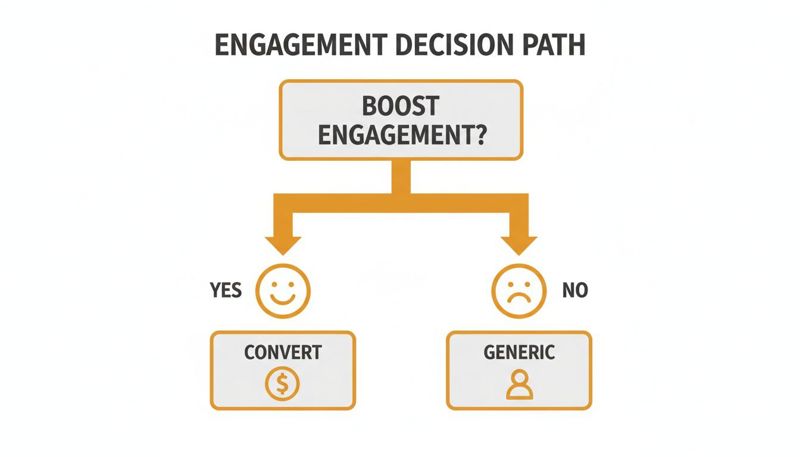
As the diagram shows, you have a choice: a generic approach that gets you generic results, or a personalized one that actually drives the conversions you’re after. While it takes some development work upfront, the API offers the most freedom and power for your campaigns.
Creative Campaign Ideas for Different Industries
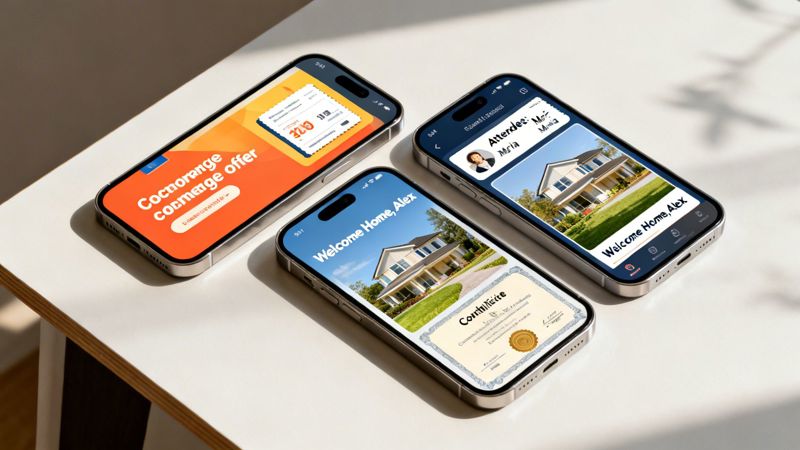
The real magic of campaign image automation happens when you move past the theory and start seeing how it works in the real world. So, let's look at some practical, creative ideas you can use to hit your business goals, no matter what industry you're in.
It’s no secret that marketers are leaning heavily into this. Nearly 80% of marketers already use AI for producing content, with 75% of them zeroing in on images. This is exactly why tools like OKZest exist—to let professionals plug real-time data directly into their campaign visuals. We've seen this save an average of 2.3 hours per campaign and generate returns as high as 446%. You can dig into more of these impressive marketing automation ROI statistics at Thunderbit.
The table below breaks down some specific ideas by professional role, showing how a little automation can go a long way.
| Professional Role | Channel | Creative Idea | Business Goal |
|---|---|---|---|
| E-commerce Manager | Send an abandoned cart email with an image of the actual product left behind. | Recover Lost Sales | |
| SaaS Marketer | Website | Display a personalized banner showing a user their current plan vs. the next tier. | Drive Upgrades |
| Event Organizer | Social Media | Post a "Can't wait to see you!" image with the attendee's name and headshot. | Build Community |
| Real Estate Agent | Send a "Welcome Home!" graphic with a photo of the client's new house. | Generate Referrals | |
| Sales Rep | Embed a prospect's company logo into an image with a relevant stat. | Increase Reply Rates |
These are just a handful of starting points. The core idea is to use the data you already have to create a visual experience that feels one-to-one, not one-to-many. Let's explore these roles a bit more.
Ideas for E-commerce and SaaS Marketers
If you're in e-commerce or SaaS, you know the daily battle is cutting through the noise. Personalized, automated images give you a direct line to making your user experience more relevant and compelling, all at scale.
- Dynamic Abandoned Cart Reminders: Instead of the tired "You left something behind" email, imagine sending one that shows the actual product, the customer's name, and a ticking clock for a free shipping offer.
- Personalized Upgrade Banners: For a SaaS platform, you could show logged-in users a banner with their name, their current plan details, and an image that visually breaks down what they’re missing out on by not upgrading.
- Webinar Invitation Images: Want to boost webinar sign-ups? Send an email with a slick, personalized graphic that includes the attendee's name, their company logo, and a countdown to the event.
These tactics transform a generic call to action into something that feels more like a helpful, personal nudge.
Strategies for Event Organizers and Coaches
When your business is built on relationships—like it is for event managers and coaches—celebrating milestones and making people feel seen is everything. Campaign image automation is perfect for adding that personal touch to every interaction.
By automating personalized visuals, you can make every attendee, client, or donor feel uniquely acknowledged. This simple act of recognition is a powerful driver of loyalty and word-of-mouth marketing.
Consider these powerful approaches:
- Custom Digital Tickets and Badges: Automatically generate event tickets or virtual name badges that include each person’s name, a unique QR code, and maybe even their personalized session schedule.
- Automated Certificates of Completion: For coaches or course creators, you can instantly send out polished, professional-looking certificates with the student’s name, the course title, and the date they finished.
- Motivational Quote Images: Imagine sending a daily email to your coaching clients with a beautiful image featuring their name alongside an inspiring quote chosen just for them.
Use Cases for Real Estate and Sales Teams
In high-stakes roles where personal connections can make or break a deal, standing out is critical. Automated images help sales pros and real estate agents build that rapport from the very first touchpoint.
- "Welcome Home" Graphics: A real estate agent closes a deal. An automatic email goes out with a beautiful "Welcome Home, [Client Name]!" graphic featuring a photo of their new house. That’s a moment they’ll want to share.
- Personalized Sales Outreach: A sales rep can embed an image in an outreach email that pulls in the prospect's company logo, their name, and a compelling statistic about their industry. It shows you did your homework.
- Anniversary and Follow-Up Messages: Nurture those long-term relationships by automatically sending an image one year after a big purchase. A simple "Happy 1-Year Anniversary, [Client Name]!" keeps you top of mind.
These ideas are just scratching the surface. The principle is the same no matter the industry: use data to create visuals that speak to the individual, not the crowd. Whether it's through email, social media, or your own website, campaign image automation provides the tools to build stronger connections and, ultimately, drive better results.
How to Ensure Your Campaigns Run Flawlessly
A great personalized campaign needs more than a clever idea—it needs a solid technical setup running behind the scenes. But don't worry, you don’t need to be a developer to get this right. Let’s walk through the key pieces that make sure your campaign image automation works perfectly every time.
We'll cover how to connect your data, what to do when things go wrong, and how to make sure everything runs smoothly with the tools you already use.
Connecting Your Data Sources
First things first: where does your personalization data live? Think of this as giving your image generator the raw ingredients it needs to cook up thousands of unique, personalized visuals. Depending on where your customer info is stored, you have a couple of straightforward options.
Static CSV Files: This is the simplest way to get started. Just upload a spreadsheet (a CSV file) with all your data, like names and offer details. It's a perfect fit for one-off campaigns, like creating personalized certificates after a webinar.
Real-time API Connections: For more advanced, on-the-fly personalization, an API is your best friend. This lets your own systems "talk" to the image generator in real-time. For example, an e-commerce store could use an API to instantly pull a customer’s live loyalty points balance and display it in an email the moment they open it. If you're ready to explore this, check out our guide on API integration best practices.
This flexibility means you can start simple with a CSV and scale up to a more powerful, real-time setup as your campaigns grow.
Building in Safeguards with Fallback Logic
What happens if a piece of your data is missing? Maybe you don't have a first name for every single subscriber on your list. Without a plan B, you could send an email with a broken-looking image that says "Hello, !" instead of "Hello, John!". It’s an awkward look for any brand.
This is where fallback logic saves the day. It’s your safety net, allowing you to set default values for any missing information.
Fallback logic is your insurance policy against broken images. It ensures every single recipient has a polished, professional experience, even when your data isn't perfect.
You can set simple but powerful rules, such as:
- If a
first_namefield is empty, use the text "Valued Customer" instead. - If a specific
product_imageisn't available, show your company logo by default. - If a unique
discount_codefails to populate, display a generic "Shop Our Sale" banner.
This feature is a must-have for preventing embarrassing mistakes and keeping your brand looking its best, no matter what.
Ensuring Broad Compatibility and Performance
A great tool is only useful if it plays nicely with your existing marketing software. That's why top-notch campaign image automation platforms are built to be compatible with 99% of Email Service Providers (ESPs), including major players like Mailchimp, Klaviyo, and Instantly. The dynamic image URL is just a lightweight bit of text, so it has zero negative impact on your email deliverability or send speeds.
Performance is just as important. The personalized image is generated in real-time, at the exact moment a recipient opens their email or loads your webpage. The whole process is incredibly fast, so your audience gets a seamless experience without any annoying load times.
Finally, let’s talk security. Your customer data is handled with care. Secure connections are used to generate the visuals on-the-fly without storing sensitive information long-term. This combination of speed, compatibility, and security gives you—and your customers—total peace of mind.
Measuring ROI and Scaling Your Automation Efforts
Connecting your creative work to real business growth is the final, most important piece of the puzzle. Using campaign image automation isn't just about making nice-looking visuals; it’s about driving results you can actually measure. Tracking your return on investment (ROI) proves the value of personalization and gives you the hard data you need to justify going bigger.
The most straightforward way to see the impact is by running an A/B test. Simply pit a campaign using your new personalized images against an identical one with generic visuals. This isolates the effect of personalization, showing you exactly how much it moves the needle on your key metrics.
Key Metrics to Track
When you're looking at your campaign performance, you need to focus on the numbers that show real engagement and lead to conversions. These are the metrics that tell a clear story about what’s working.
- Click-Through Rate (CTR) Lift: This is your number one indicator. Measure the percentage increase in clicks you get on personalized images compared to the static ones. A big lift here is a clear sign your visuals are grabbing attention.
- Conversion Rate Impact: Don't stop at the click. Track how many of those clicks turn into a desired action, like a purchase or a sign-up. This is how you connect personalized images directly to revenue.
- Social Shares and Mentions: If you're running campaigns on social media, keep a close eye on how often your personalized images get shared. A high share rate means your content is truly resonating with people on a personal level.
The goal isn't just to see if people clicked; it's to prove that a more personal experience leads to more valuable customer actions. A higher CTR combined with a better conversion rate is the ultimate proof of ROI.
This data is your best friend when it comes to getting buy-in from stakeholders. When you can show a clear, data-backed connection between campaign image automation and business goals, the value is impossible to ignore.
Scaling Your Automation Strategy
Once you've proven the concept works, the next logical step is to scale. What might have started as a small, one-off test can quickly grow into a central part of your marketing engine. A flexible platform like OKZest is built to grow with you, supporting your needs at every stage of the journey.
Thinking about growth from day one is smart. For those just getting their feet wet, a free plan is the perfect way to run those initial A/B tests and get a feel for the tools. You can test out different designs and measure the results on a small scale without any cost.
As your confidence and needs expand, you can easily shift to higher-tier plans that support a larger volume of images and more complex campaigns. For larger organizations, enterprise-level solutions are designed to handle millions of image generations a month, packed with advanced features for team collaboration and project management. You can learn more about how this works for bigger teams in our post on personalized image automation for enterprise.
This scalable approach means you only pay for what you use, but you always have a clear path to expand your personalization efforts. Whether you're sending a few hundred personalized emails or automating visuals for an audience of millions, the right platform makes it possible to grow without any friction.
Common Questions About Image Automation
Jumping into something new like campaign image automation always brings up a few questions. It's completely normal to wonder about the technical side—performance, potential glitches, and whether it’s a good fit for your brand. Let's tackle some of the most common concerns so you can get started with confidence.
Will Campaign Image Automation Slow Down My Emails?
Not a bit. The dynamic image URL is just a tiny snippet of text in your email's code. It adds virtually no weight to the email itself, which means it has zero impact on your email provider’s send speed or your deliverability.
The personalized image itself is created instantly, the moment a subscriber opens your email. The whole process is fine-tuned for speed, ensuring your audience sees their custom visual right away. No frustrating load times, just a smooth, seamless experience.
What Happens If I Am Missing Personalization Data?
This is a fantastic question, and it's something every marketer deals with. A good image automation platform prepares for this with something called fallback logic. Think of it as a safety net for your data.
If a first name is missing from your list, you can set a default value, like "Valued Customer," to show instead. Or, if a specific product image isn't available for a user, you can tell the template to display a generic offer banner or your company logo.
This fallback system is your guarantee that every single person sees a complete, professional-looking image. It gracefully prevents broken images or awkward empty spots, protecting your brand's look and feel.
Is This Only for Large Companies with Developers?
Absolutely not. While developers can definitely dig in with APIs for really deep integrations, modern campaign image automation is built for marketers, not just coders.
No-code solutions are incredibly popular for a reason. They let you create your dynamic image and simply paste a URL directly into your email platform or website builder. No code required. With different pricing tiers available—from free plans for startups to full enterprise solutions—this technology is accessible to everyone, whether you're a solo entrepreneur or a huge corporation.
Can I Use My Company's Branding and Fonts?
Yes, of course. Keeping your brand consistent is non-negotiable. Image automation templates are fully customizable to match your brand's visual identity perfectly.
You can upload your brand's specific fonts, plug in the exact hex codes for your colors, and place your logo exactly where it needs to go. You design the entire layout to fit your brand guidelines. The dynamic data simply slots into the pre-approved, on-brand template you created.
Ready to see how easy it is to create personalized visuals that really grab your audience's attention? Start building more engaging campaigns today with OKZest. Explore our tools and start for free.