Think of it like a mail merge, but for visuals. An API for personalized graphics is a clever bit of tech that takes a single design template and automatically creates thousands of unique versions by plugging in different data for each one.
What Is an API for Personalized Graphics?
Imagine you’re sending a welcome email, and the main image greets your new subscriber by name. Or picture a social media graphic that automatically pulls in a user's profile picture to make it feel special. That's exactly what an API for personalized graphics does. It’s the bridge connecting your data—like names from your CRM or user stats from your app—directly to your visual content.

This technology puts the creation of countless image variations on autopilot. You just need one reusable template. Just as a mail merge in an email pulls a name from a spreadsheet to personalize a sentence, this API fetches data to customize different layers inside an image. The result? A highly relevant visual, created instantly for each person.
From Technical Tool to Marketing Powerhouse
Now, the term "API" (which stands for Application Programming Interface) might sound like something only a developer would touch. But that’s no longer the case. Modern platforms have made this technology accessible to everyone.
Through simple no-code tools or copy-paste snippets, marketers, course creators, and sales teams can now generate hyper-personalized visuals without writing a single line of code. This is a game-changer, empowering teams to:
- Boost Engagement: Let’s be honest, personalized images grab attention far better than generic stock photos. This naturally leads to higher click-through rates and more interaction.
- Strengthen Relationships: When you address customers with visuals that acknowledge them as individuals, your communication feels more personal and less like it came from a robot.
- Increase Conversions: Unique visuals in your sales outreach or marketing campaigns can make a massive difference in response rates and, ultimately, drive more revenue.
- Automate at Scale: You can effortlessly create thousands of unique certificates, event tickets, or social media graphics, saving countless hours of tedious manual design work.
A great example of this in action is something like an AI outfit generator, which acts like a digital stylist by creating unique outfits tailored to the user. In the same way, a custom image API can generate dynamic marketing materials that truly connect with each person who sees them.
By turning raw data into meaningful visuals, this technology makes every interaction feel one-of-a-kind.
How Personalized Graphics Drive Real-World Results
Alright, let's move past the theory. The real magic of an API for personalized graphics isn't in what it is, but in what it does for your real-world campaigns. This isn't just a neat tech gimmick; it's a strategic tool that makes every single customer interaction feel like it was made just for them. That's how you build real connections and see actual results.
When a message is truly tailored to an individual, it doesn't just get seen—it gets felt. You stop broadcasting one generic visual to everyone and start having a one-on-one conversation, acknowledging what you know about them. It's a fundamental shift that separates modern marketing from the old way of doing things.
Supercharging Email Marketing Campaigns
Email is still king in digital marketing, but let's be honest, grabbing attention in a crowded inbox is a daily battle. This is where personalized header images completely change the game, lifting engagement by immediately showing something relevant.
Think about an abandoned cart email. A generic stock photo is easy to ignore. But what if the image showed the actual product the customer left behind? Maybe even with their name on it? Suddenly, you've created a sense of ownership and urgency that a plain text email just can't match. This one simple touch is proven to send click-through rates soaring.
By making the visual content of an email as dynamic as the text, you transform a simple message into a compelling, personal experience that gets people to act.
Another perfect spot for this is in welcome emails. A header that says "Welcome, Sarah!" instead of a bland greeting makes a new subscriber feel seen from the very first interaction. You're not just adding them to a list; you're starting a relationship on the right foot.
Engaging Audiences Across Different Channels
This goes way beyond email. A good API for personalized graphics can be plugged into just about any digital channel where making a personal connection counts.
Here are a few ways smart teams are using it:
- Event Management: Forget boring PDF tickets. Automatically generate unique digital tickets or shareable certificates for every single attendee, complete with their name and a QR code. It streamlines your logistics and gives attendees something cool to share on social media.
- Sales Outreach: Sales pros can break the ice on platforms like LinkedIn by sending direct messages that include a custom image. A visual with a prospect's company logo or name is almost impossible to scroll past.
- E-commerce: Instead of a static banner, imagine showing dynamic product recommendations inside an image, tailored to a user's browsing history. You can create a highly relevant shopping experience right on your website or inside a newsletter.
- Chatbots and Support: Make your automated conversations feel more human. Generate visuals on the fly that summarize a user's order, confirm a booking with their details, or provide personalized, easy-to-follow instructions.
The goal is to make every interaction feel unique. When you do that, you hold onto people's attention and build much stronger loyalty. When customers feel understood, they don't just buy—they engage, they convert, and they tell their friends about you. That's a direct line to growing your revenue.
The table below breaks down how different industries can apply this technology for tangible benefits.
Personalized Graphics Use Cases by Industry
This table showcases practical applications of personalized graphics APIs across various professional fields, illustrating the versatility of the technology.
| Industry / Role | Primary Use Case | Key Benefit |
|---|---|---|
| E-commerce Manager | Displaying abandoned cart items or personalized product recommendations directly within an email or web banner image. | Recovers lost sales and increases average order value. |
| Event Coordinator | Auto-generating personalized digital tickets, event badges, or completion certificates for attendees. | Streamlines logistics and encourages social sharing, boosting event reach. |
| SaaS Marketer | Creating personalized welcome images for new users or visuals that celebrate customer milestones (e.g., anniversaries). | Improves user onboarding, increases retention, and fosters brand loyalty. |
| Sales Professional | Sending hyper-personalized outreach images on LinkedIn or in emails featuring the prospect's name or company logo. | Breaks through the noise, increases response rates, and books more meetings. |
| Educator / Trainer | Issuing customized certificates of completion for online courses with the student's name and course details. | Adds a professional touch and provides a shareable asset for students. |
As you can see, the applications are broad and impactful, tailored to solve specific challenges across different sectors. Ultimately, it's about using data to create a more relevant and engaging visual experience.
Understanding How Image Personalization Works
The magic behind turning one design into thousands of unique, hyper-relevant images isn't as complicated as you might think. It all boils down to a simple idea: connecting your data to specific, changeable layers within an image. Think of it like a smart assembly line for your visuals, where each graphic is built on the fly for a specific person.
At the core of any API for personalized graphics is a master template. This is the design you create just once, complete with static elements like your logo and background, plus designated "dynamic" areas. These spots are essentially placeholders, just waiting to be filled with real information.
This process completely changes how you can communicate visually, whether you're trying to make your email campaigns pop, personalize sales outreach, or manage event registrations.
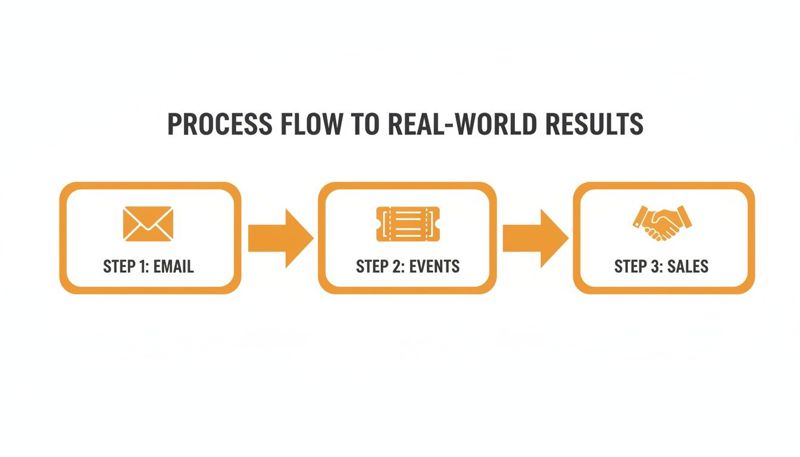
This is a classic funnel where personalized emails grab attention and drive event sign-ups, which ultimately leads to more sales—all powered by graphics tailored to each individual.
Connecting Data Sources to Your Images
To bring those placeholders to life, you need data. The great thing about modern platforms is their flexibility; they can pull data from pretty much anywhere you store it.
Some of the most common sources include:
- Spreadsheets (CSV): Perfect for one-off campaigns, like generating thousands of unique conference badges from a simple list of attendees.
- Customer Relationship Management (CRM): You can pull customer names, company logos, or even recent purchase details directly from your CRM to create marketing visuals that feel personal and timely.
- Real-time Databases: For more advanced uses, you can connect to a live database to display dynamic info like a user's achievements or progress inside an app.
Once you’ve connected a source, the data is mapped directly to the dynamic layers you set up in your template.
The Role of Merge Tags and Dynamic Layers
This is where the real personalization happens. Each dynamic layer in your image template gets a merge tag, which is just a variable that lines up with a column in your data source. For instance, a merge tag like {{first_name}} tells the API to find the "first_name" column and plug that value right into the image.
An API for personalized graphics acts like an interpreter. It translates raw data from your spreadsheet or CRM into the visual elements of your design, automatically swapping placeholders with real names, images, and text.
These layers can be just about anything, from text to other images. You could have a dynamic text layer for a person's name, an image layer for their profile picture, and another text layer showing their membership level. The API simply reads each row of your data and generates a complete, unique graphic for every single person.
Ensuring a Flawless Finish with Fallbacks
But what happens when some of your data is missing? Say, a contact in your list doesn't have a first name filled out. Without a backup plan, you'd end up with a graphic that has an awkward blank space, which just looks unprofessional.
This is where fallbacks are absolutely essential. A fallback is simply a default value you set for any dynamic layer. If the data for a specific person is missing, the API will automatically use the fallback instead.
- For a first name, a fallback might be something friendly like "Valued Customer."
- For a profile picture, a great fallback could be your company logo.
By setting up solid fallbacks, you guarantee that every single image generated looks complete and polished. It’s a simple safety net that’s critical for maintaining a professional brand image when you’re automating campaigns at scale.
Choosing Your Integration Method
So, you're ready to start creating dynamic visuals. The big question now is how to connect your data to your image templates. You've got two main paths when using an API for personalized graphics: a direct, code-heavy integration or a streamlined no-code approach. The right choice really boils down to your team's technical chops, how complex your project is, and your timeline.
Think of it like building furniture. You could buy the raw lumber and build a custom piece from scratch (that's the direct API route), giving you total control. Or, you could grab a flat-pack kit with pre-drilled holes and simple instructions (the no-code approach) and get a finished product much faster. Both get the job done, they just serve different needs.
A direct API connection gives developers maximum flexibility to build custom apps or embed image generation deep into existing software. On the other hand, no-code solutions are a marketer's best friend—fast, simple, and no coding required.
The Direct API Integration Path
For teams with developers on hand, connecting directly to the API offers the ultimate level of control. This is the way to go when you need to automate complex workflows, integrate with proprietary systems, or build a customer-facing feature that generates images on the fly. It lets you build in sophisticated logic, handle errors gracefully, and fine-tune performance for your exact needs.
When you go down this path, it helps to know a bit about different API architectures. The differences between, say, GraphQL and REST APIs can have a real impact on how efficiently your application works. This is the route for custom-built solutions where scalability and deep integration are top priorities. If you want to get into the nitty-gritty, our guide offers a deeper look into the API integration process.
The No-Code and Low-Code Approach
For most marketers, sales teams, and business owners, the no-code route is the quickest win. This method uses pre-built integrations and simple snippets that do all the heavy lifting for you. Instead of writing code, you just copy and paste a URL with merge tags into your email platform or embed a small HTML snippet on your website.
This method is perfect for:
- Email Campaigns: Easily pop personalized images into platforms like Klaviyo, Mailchimp, or Instantly.
- Website Personalization: Show a unique welcome banner for logged-in users.
- Simple Automation: Generate certificates from a spreadsheet without bugging a developer.
The beauty of no-code is how accessible it is. It empowers creative teams to launch highly personalized campaigns in minutes, not weeks, putting powerful visual personalization into everyone's hands.
The demand for these kinds of flexible, easy-to-integrate solutions is fueling massive market growth. In fact, the Open API market, which is the backbone of these platforms, is projected to hit $26.7 billion by 2035. This trend just goes to show how critical it is for businesses to have tools that play nicely with their existing marketing stack. Learn more about the Open API market growth on futuremarketinsights.com.
Key Considerations for a Successful Launch
Jumping straight into generating thousands of personalized graphics without a plan is a recipe for trouble. A successful launch isn't just about a beautiful design; it’s about making sure the tech behind it can handle your campaign smoothly, securely, and at scale. A little planning upfront prevents those technical headaches that can completely derail a great idea.

This means thinking about how fast your images will load in an email, how you're protecting customer data, and whether the tool you choose can actually grow with you.
Performance and Loading Times
In email marketing, speed is everything. A slow-loading image can kill the user experience before it even begins and might even get your email flagged by providers. Your personalized graphics need to be delivered from a global Content Delivery Network (CDN) to make sure they pop up instantly, no matter where your recipient is opening their inbox.
A solid API for personalized graphics should create and serve those images in milliseconds. Anything slower can lead to broken images or frustrated subscribers who hit delete before your message has a chance to load.
Security and Data Privacy
When you’re personalizing content, you’re handling customer data. It's a huge responsibility. You absolutely must ensure this information is managed securely. Your provider should be using industry-standard encryption (like HTTPS) for all data in transit, which protects sensitive details from being intercepted.
Beyond that, a trustworthy provider will have a crystal-clear privacy policy that explains exactly how your data is used—and more importantly, how it's protected. Never, ever compromise on security for the sake of a campaign.
A great personalization strategy is built on trust. Thinking about data privacy isn't just a technical checkbox; it's fundamental to keeping a good relationship with your audience.
Scalability and Robust Infrastructure
What starts as a small campaign for a thousand users could easily explode into a million. The API you choose has to be built on an infrastructure that can handle that massive volume without breaking a sweat. This is where the concept of API management really comes into play.
The market for API management, which is the backbone for delivering these kinds of scalable solutions, is expected to hit USD 169.33 billion by 2034, growing at an insane 34% annually. This growth highlights just how critical a reliable infrastructure is for any business serving customers globally. You can find more insights about the rise of API management on precedenceresearch.com.
Picking a provider with a proven, scalable backend means your campaigns can grow without you ever having to worry about hitting a ceiling.
How to Select the Right Graphics API Provider
Choosing a partner for your API for personalized graphics is a bigger decision than just picking a piece of software. You're bringing on a partner that needs to support your growth, whether you're a startup sending a few thousand emails or a major company generating millions of custom visuals. The right choice is all about balancing cost, features, and the quality of support you'll get when you really need it.
First, look for a flexible pricing model. The last thing you want is to overpay when you're just starting out or hit a hard ceiling right as your campaigns are gaining momentum. A good provider will have a range of plans, from a free or low-cost tier to enterprise packages, ensuring the solution can scale right alongside your success.
Evaluating Teamwork and Support
If you're an agency or part of a larger marketing department, collaboration features aren't just a nice-to-have; they're essential. The ability to manage multiple projects, set user roles, and control access is key to keeping your brand consistent and your workflows running smoothly. A provider that gets this will offer solid project management tools.
Just as important is getting a real human to help you when things go wrong. When you're staring down a deadline and an integration isn't working, you need a partner who can jump in and help you solve it. Look for providers that offer direct lines of communication, like live chat or video calls—it’s a clear sign they’re committed to your success.
Finding the right provider means looking for a true partner—someone invested in your long-term strategy, not just selling a tool. Their support and feature roadmap should align with your business goals.
Future-Proofing Your Personalization Strategy
When you invest in a graphics API, you're plugging into a market that's growing at an incredible pace. The global AI API market, which powers these personalization tools, is expected to hit $246.87 billion by 2030. That kind of explosive growth tells you that API-driven solutions are becoming a core part of modern marketing. You can read more about this trend and what it means at grandviewresearch.com.
By carefully looking at the pricing, collaboration tools, and level of support, you can pick a provider that not only handles what you need today but also helps you stay ahead of the curve. For a deeper dive into the technical side of scaling, check out our guide on choosing a scalable image API for your projects.
Some Questions You Might Have
As you start thinking about using an API for personalized graphics, a few questions usually pop up. Let's get you some clear, straightforward answers on the big topics like data privacy, image formats, and whether this will play nice with your current tools.
Is My Customer Data Safe?
Absolutely. Security is non-negotiable. Any reputable provider will transmit all data over an encrypted HTTPS connection, which is the standard for protecting information from being intercepted. The key is to pick a service with a crystal-clear privacy policy that states your data is only used to generate the image and never shared.
What Image Formats Can I Use?
Most APIs work with the web standards you already know, like PNG and JPG. We find PNG is often the best choice because it supports transparent backgrounds. That little feature is a game-changer for layering personalized text or images onto your existing designs, making sure your graphics blend perfectly into any email or webpage.
Think of your API provider as a secure vault. Your data goes in, gets processed into an image, and the final visual comes out, all without exposing the raw information to the outside world.
Does This Work With My Email Platform?
Yes, this is designed to be as universal as possible. These APIs are built to work with just about every major Email Service Provider (ESP) out there, including big names like Mailchimp, Klaviyo, and Instantly. Getting it to work is usually as simple as pasting a special URL with merge tags directly into your email editor.
Ready to create stunning visuals that speak to every customer individually? OKZest makes it easy to automate personalized graphics for your email, web, and social media campaigns. Start for free and see the difference today at OKZest.