A scalable image API is a service that automatically creates and delivers unique, personalized images based on your data. Think of it like merge tags, but for visuals instead of text. It’s built to generate images on the fly for audiences of any size—from a single person to millions—all without you lifting a finger.
The Power of Personalized Visuals at Scale
Imagine creating a completely unique image for every single customer, automatically. That’s the magic of a scalable image API. Instead of blasting everyone with the same generic graphic, you can deliver visuals that speak directly to them, featuring their name, company logo, or even a personalized QR code.
We like to call it ‘merge tags for visuals.’ You know how a merge tag in an email pulls a customer's name from a list to say, "Hello, Sarah"? A scalable image API does the same thing with images. It’s a huge leap from one-size-fits-all content into the world of truly personal marketing.
Breaking Down the Concept
To really get it, let's look at the two key parts:
API (Application Programming Interface): This is the engine that does all the work. It’s basically a bridge that lets your marketing platform (like your email provider or website) talk to an image generation service. You send over some data—like a name, a date, or a product image—and the API sends back a finished, personalized graphic in real-time.
Scalable: This is what makes the whole thing so powerful for businesses. ‘Scalable’ means it’s designed to handle a flood of requests without breaking a sweat. Whether you need 10 images for a targeted sales email or 10 million for a Black Friday promo, the system just works. It grows with you, making sure every single person gets their custom image instantly.
A scalable image API closes the gap between data and design. It turns boring rows in a spreadsheet into thousands of unique visual experiences, creating a real connection that generic stock photos never could.
Why This Matters for Marketers and Developers
The need for this kind of tool comes from a simple truth: personalization works. Campaigns with personalized content consistently crush those without. The problem is, creating custom visuals for everyone manually is flat-out impossible. A scalable image API fixes that.
For marketers, it unlocks a ton of new creative ideas without needing to be a tech wizard. You can design one template and let the API spin up endless variations for all your different audience segments. It’s perfect for things like:
- Event Invitations with each attendee's name.
- Sales Proposals featuring the prospect's company logo.
- E-commerce Promotions showing a customer's recently viewed items.
- Certificates of Completion for online courses.
For developers, it’s a reliable and super-efficient way to plug dynamic visuals into any app. Instead of building a complex image generation system from scratch, they can use a service like OKZest to handle the heavy lifting of processing, rendering, and delivering images all over the world. This frees up their time to focus on core product features, knowing the visual side of things is covered.
How a High-Performing Image API Works
A top-tier image API can feel like magic, churning out thousands of unique visuals in an instant without breaking a sweat. But behind the curtain, it’s a finely tuned system engineered for speed and reliability. Once you understand the core pieces, you'll see how it can flawlessly handle even your most ambitious campaigns.
Think of it like an elite logistics operation. The goal is to get a custom package (your personalized image) to its destination (your customer's screen) as fast as possible, no matter how many you need to send. This process hangs on a few powerful strategies working together.
This diagram gives a simplified look at how data flows through a scalable API to create that final, personalized image.
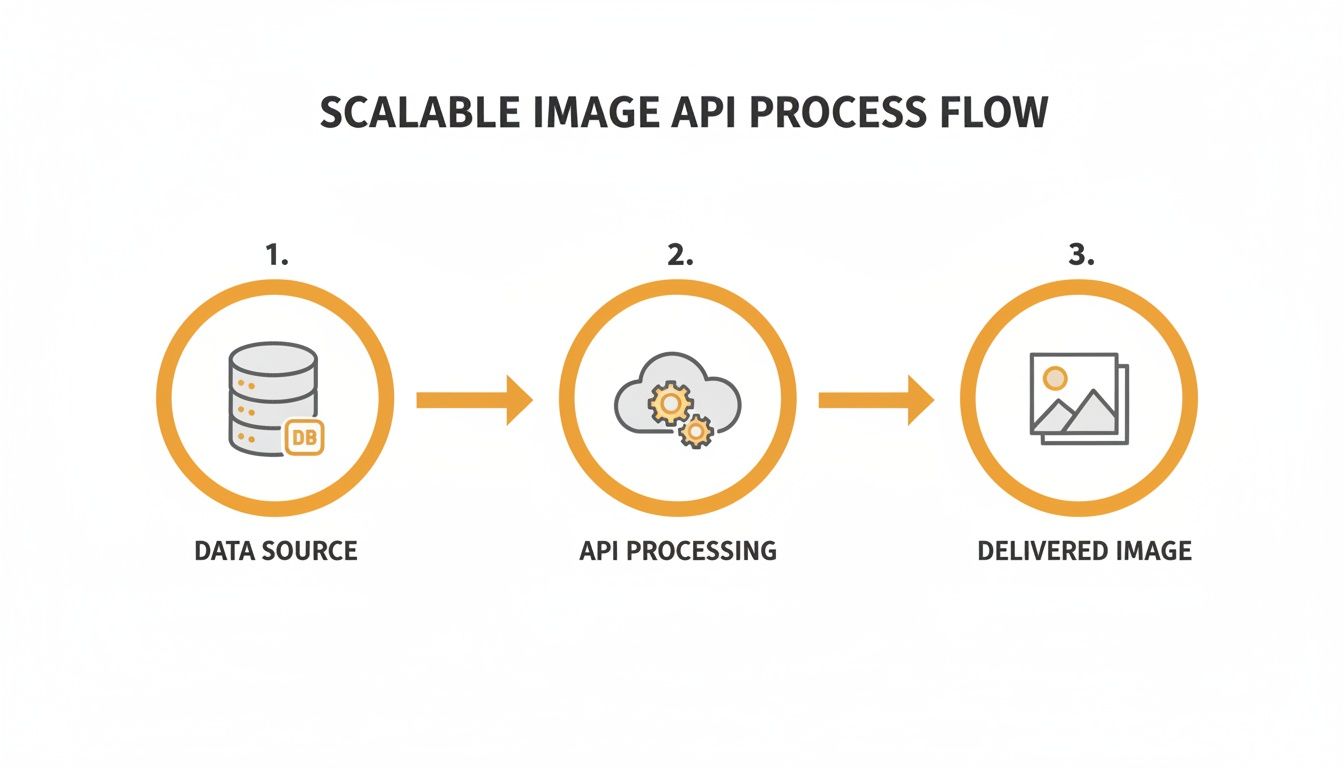
It shows how the system can take raw data, run it through the API's engine, and render a unique visual asset right when it's needed.
Speeding Up Delivery with Caching
One of the most important ingredients for speed is caching. Imagine you run a busy coffee shop. Instead of brewing a fresh espresso for every single customer, you keep a few ready to go for the most common orders. Caching works the exact same way for an image API.
When an image is generated for the first time, the system saves a copy. The next time that same image is requested, the API delivers the saved version instantly instead of building it from scratch. This slashes processing time and server load, making for a snappy user experience.
Caching is the API's "speed dial." It remembers previously generated images so it doesn't have to do the same work twice, leading to much faster delivery for frequently requested visuals.
Reaching a Global Audience with a CDN
While caching handles repeat requests, a Content Delivery Network (CDN) solves the problem of physical distance. A CDN is a worldwide network of servers that stores copies of your images in locations all around the globe.
If your main server is in New York, a user in Tokyo would normally face a delay as the image travels across the planet. With a CDN, that image is instead served from a local server in or near Tokyo.
This global distribution ensures your images load quickly for everyone, no matter where they are. It’s essential for any business with an international audience and a key part of following responsive web design best practices by optimizing image delivery for any device.
Handling Traffic Spikes with Horizontal Scaling
What happens during a massive traffic surge, like on Black Friday or from a viral post? This is where horizontal scaling comes in. It’s the system's ability to automatically add more servers to handle the increased demand.
Think of it like opening more checkout lanes at a supermarket when the lines get long. A scalable image API sees a spike in requests and instantly brings more computing power online to manage the load.
This flexibility ensures your service stays fast and reliable even under extreme pressure. Your campaigns won't crash, and every customer gets their personalized image without a frustrating wait. If you want to dive deeper into the technical side, you can learn more about how a REST API delivers an image and manages these complex operations.
This combination of caching, global delivery, and on-demand power is what makes a truly scalable image API a reliable partner for your growth.
How to Choose the Right Scalable Image API
Picking a scalable image API isn't like grabbing a tool off the shelf. It’s more like choosing a business partner—one who needs to keep up with your growth and make your marketing shine. With so many options out there, you have to look past the flashy features and dig into what really counts. The right choice saves you headaches, boosts your campaigns, and delivers those personalized moments that grab your audience's attention.
To make a smart decision, you need a simple framework to compare providers. It helps you tune out the marketing jargon and focus on what will actually drive your success. Let’s walk through the must-have factors when you’re vetting an image API for your business.
Performance and Core Infrastructure
First and foremost, an image API has to be fast and reliable. Nothing kills a campaign faster than slow-loading images. We've all seen the stats—even a one-second delay can tank your conversions. So when you’re evaluating performance, don't just look at the sunny-day scenarios. Ask how the system performs under pressure.
Get straight answers from potential providers on these key metrics:
- Latency: How fast does an image show up after it’s requested? You need low latency, especially if your audience is global.
- Throughput: How many images can the API crank out at the same time? This is huge for big campaigns where you’re hitting thousands of people at once.
- Rate Limits: Are there caps on how many API calls you can make? Make sure the limits won’t choke your campaigns during peak traffic.
A rock-solid infrastructure is non-negotiable. Look for things like a global CDN and auto-scaling servers. That’s what ensures every single person gets their personalized image instantly, whether you're emailing 100 people or 1 million.
Creative Flexibility and Personalization
Let's be real—the whole point of an image API is to create cool, personalized visuals. So, the creative power of the platform is everything. A good API does more than just slap a name on an image; it gives you a flexible canvas to bring your ideas to life.
You’ll want a powerful templating system that lets you dynamically control every part of your image. Can you change text, swap photos, adjust colors, and generate unique QR codes all based on your data? The more levers you can pull, the more creative you can get.
The best image APIs empower marketers to think like designers. They provide the tools to build deeply personalized and on-brand visuals without needing to write a single line of code.
One feature that’s an absolute lifesaver is fallbacks. What happens when your data is incomplete, like a missing first name? A bad API will show a broken image, which looks unprofessional. A great one lets you set a default value, like "Friend," or even show a completely different backup image. This little safety net is what keeps your campaigns looking polished, no matter what. To see just how far you can take this, check out our guide on top-tier image personalization software.
Security and Integrations
Security isn’t just a checkbox item; it’s a must. You're handling customer data to create these images, so you need to know it's protected. Make sure any provider you consider has clear security protocols, like data encryption. The entire service should be built on a secure foundation to protect you and your customers.
Finally, think about how this new tool will plug into your current workflow. Does it play nice with the tools you already use every day, like your email platform or CRM? An API that connects effortlessly with Klaviyo, Mailchimp, and Instantly using simple merge tags is a game-changer. It means you can get started right away without a massive development project. This easy integration is often what separates a tool you’ll actually use from one that just collects digital dust.
Scalable Image API Evaluation Checklist
To make this even easier, here’s a quick reference table. Use it as a checklist when you're comparing different image API providers to see how they stack up.
| Feature | What to Look For | Why It Matters for Marketers |
|---|---|---|
| Performance & Speed | Low latency image generation and a global CDN. | Ensures images load instantly for every user, improving engagement and preventing campaign drop-off. |
| Throughput & Rate Limits | High concurrent generation capacity and generous API rate limits. | Allows you to run large-scale campaigns (e.g., email blasts) without hitting walls or slowing down. |
| Templating System | A flexible visual editor that allows dynamic control over text, images, QR codes, and other elements. | Gives you complete creative freedom to design on-brand, highly personalized visuals without coding. |
| Personalization Features | Support for dynamic text, images, and logic-based fallbacks for missing data. | Guarantees every image looks professional and tailored, even with imperfect data. |
| Security | Clear data encryption policies (in transit and at rest) and a commitment to secure infrastructure. | Protects your customer data and builds trust, ensuring you meet compliance and privacy standards. |
| Integrations | Pre-built connections or simple integration patterns (merge tags, webhooks) for your existing marketing stack. | Saves you time and technical resources, letting you launch campaigns faster and with less friction. |
| Pricing Model | Transparent, scalable pricing that aligns with your usage and growth. No hidden fees. | Provides predictable costs and ensures the tool remains cost-effective as your campaigns and audience grow. |
Ultimately, the goal is to find a provider that not only meets your technical needs but also feels like a true partner in your marketing efforts. A great API should make your job easier, not harder.
How Personalized Images Are Being Used in the Real World
Alright, let's move away from the technical jargon and talk about where the rubber meets the road. The true magic of a scalable image API really clicks when you see how businesses are using it to create those "wow" moments for their customers. This is the engine that turns raw data into visuals that grab attention and get results. These aren't just parlor tricks; they're smart, practical strategies that boost conversions, build loyalty, and cut through the endless digital noise.
Let's dive into a few real-world examples that show just how powerful this can be across different industries.
Driving Engagement in Email Marketing
Email is still a powerhouse, but let's be honest, most generic campaigns get deleted on sight. A scalable image API can turn a standard email blast into something that feels like a one-on-one conversation. By dropping in unique visuals for every single person on your list, you can seriously bump up your click-through rates.
Think about it:
- E-commerce Retargeting: A customer leaves a blue sweater in their cart. Minutes later, an email hits their inbox with a picture of that exact sweater, their name overlaid on it, and a unique discount code like "SARAH15" created just for them. That’s hard to ignore.
- SaaS Onboarding: A new user, David, signs up. His welcome email includes a slick image with his profile picture right next to a "Welcome, David!" message. Instantly, he feels seen and valued.
- Newsletter Personalization: Your weekly newsletter could have a dynamic header image that changes based on the subscriber's location, showing a photo of their city's skyline.
This level of personalization stops your email from feeling like junk mail and makes the recipient feel like you're actually talking to them.
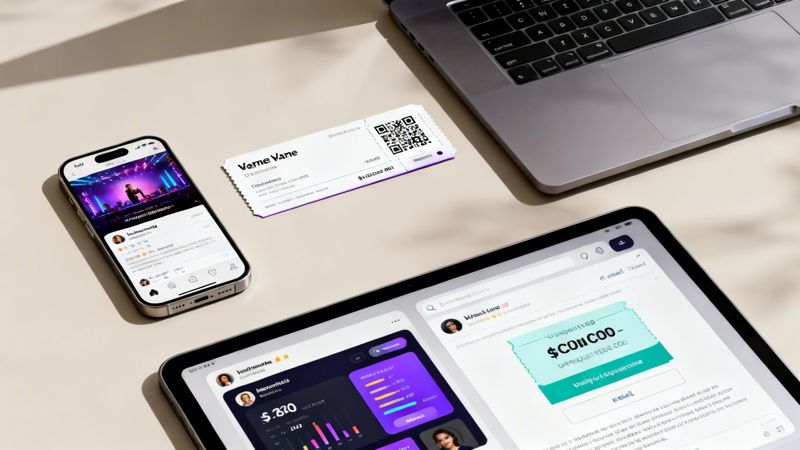
Revolutionizing Event and Ticket Management
Event organizers are always looking for ways to make their attendees feel special. A scalable image API is a game-changer here, automating the creation of professional, personalized assets that get people excited from the moment they sign up.
An event ticket isn't just for getting in the door; it's a keepsake. By personalizing it with an attendee's name, a unique QR code for check-in, and maybe even their profile photo, you make the whole experience feel more premium.
This goes way beyond just the ticket. You can auto-generate custom social media images for every attendee—pre-filled with their name and a branded event frame—making it ridiculously easy for them to share and spread the word. Your attendees just became your best marketers.
Empowering Sales and Outreach Teams
In sales, just getting a prospect to open your email is half the battle. Generic messages are white noise. But a personalized visual? That can stop someone mid-scroll. Sales teams are using image APIs to create hyper-relevant visuals that get noticed.
Check out how effective these tactics can be:
- LinkedIn Outreach: Instead of a boring text-only message, a sales rep sends an image showing the prospect's company logo next to their own, with a simple line like, "Imagine [Prospect Company] + OKZest." It's visual, intriguing, and different.
- Personalized Proposals: The cover page of a proposal features a dynamic image with the prospect's headshot and name. Right away, it feels like this proposal was built just for them, not copied and pasted. For a deeper look at this, a guide on AI for professional headshots shows how powerful custom visuals can be.
- Meeting Confirmations: A calendar invite includes a branded image with the attendee's name, the meeting time, and the host's photo. It reinforces the connection before the call even starts.
These small visual touches show you put in the effort. They show you're creative. And they make your outreach far more likely to get a response. By connecting your data directly to your design, a scalable image API gives you the power to create these moments for every single person you talk to, no matter how big your list gets.
How to Implement Your Image API
Getting started with a scalable image API is much simpler than it sounds. This is your hands-on guide to integrating dynamic, personalized images into your marketing workflow, and the good news is you don't need a team of developers to launch a powerful campaign. We’ll cover the most common, user-friendly methods that let you start creating in minutes.
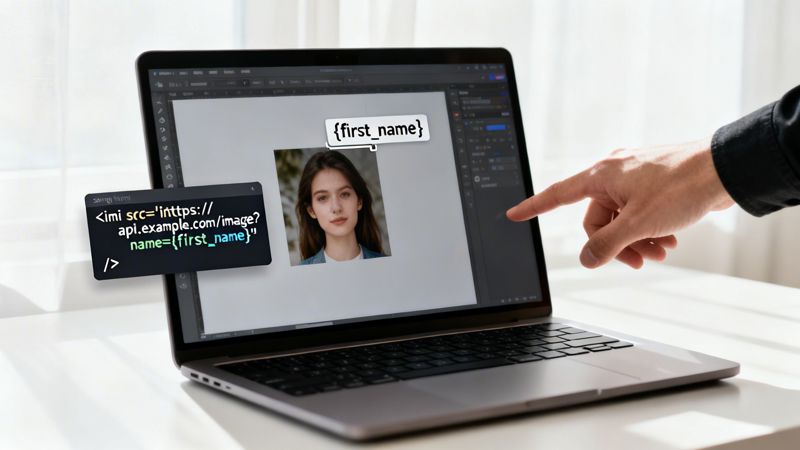
The core idea is to embed a special URL that acts as a blueprint for your image. This URL contains parameters that tell the API what data to use, like a customer's name or company. When someone opens their email or visits your webpage, their browser requests this URL, and the API instantly generates and delivers the finished, personalized image.
Email Merge Tags: The No-Code Method
For email marketers, this is the easiest and most popular way to add personalized visuals. Email Merge Tags are placeholders your email service provider (like Klaviyo or Mailchimp) replaces with a contact's specific data. A scalable image API simply plugs into this same system.
The process is as simple as copy-and-paste:
- Design Your Template: First, you create your base image design in a visual editor, like the one in OKZest. This is where you define where dynamic elements like text or logos will go.
- Generate the URL: The platform gives you a special image URL that includes merge tags. For example, the URL might contain
?name={{first_name}}. - Paste into Your Email: You just insert this URL into your email template as an image source. When the campaign sends, your email provider automatically replaces
{{first_name}}with each recipient's actual name, telling the API to generate a unique image for Sarah, another for Tom, and so on.
This method requires zero coding knowledge. If you can add a merge tag to an email subject line, you can add a personalized image to the email body. It’s a game-changer for creating memorable email campaigns at scale.
This approach works with nearly every email platform because it relies on the standard functionality you already use every day.
Web Snippets for Landing Pages
What about personalizing your website or landing pages? Web Snippets offer the same simplicity but for HTML. A web snippet is just a small piece of code—usually a single line—that you add to your site's source code where you want the image to appear.
For instance, a basic HTML image tag looks like this: <img src="your-image-url-here">. To make it dynamic, you simply replace the static URL with the one from your image API. You can even pass data to it using URL parameters based on user information or page content.
This is perfect for:
- Welcome Banners: Displaying a personalized welcome image to logged-in users.
- Dynamic CTAs: Creating call-to-action buttons with custom text for different audience segments.
- Personalized Offers: Showing an image with a unique coupon code generated for a specific visitor.
Understanding the structure of an image API URL is the key to unlocking these more advanced uses.
Advanced Control with SDKs and API Calls
While no-code methods cover most marketing needs, sometimes developers need deeper control. For custom applications or complex workflows, a scalable image API offers more technical integration options.
- SDKs (Software Development Kits): These are pre-packaged libraries that simplify making API calls in a specific programming language (like Python or JavaScript). An SDK handles the complex parts of the API communication for you.
- Direct API Calls: For maximum flexibility, developers can make direct HTTP requests to the API endpoint. This allows for batch image generation, integration into backend processes, or building completely custom visual workflows inside an application.
To give you a better idea of which method fits your needs, here's a quick comparison.
Image API Integration Methods at a Glance
Choose the best method to add personalized images to your marketing channels.
| Integration Method | Best For | Technical Skill Required |
|---|---|---|
| Email Merge Tag | Email marketers using platforms like Klaviyo, Mailchimp, Instantly | None (Beginner) |
| Web Snippet | Adding personalized images to websites and landing pages | Basic HTML (Beginner) |
| SDKs & API Calls | Developers building custom applications or backend integrations | Intermediate/Advanced |
No matter your technical comfort level, a modern scalable image API provides an accessible entry point. You can start with the simplest method today and explore more advanced options as your needs grow.
Why Personalized Visuals Are the Future of Marketing
The way we talk to customers is changing. Gone are the days of one-size-fits-all messages. Today, people expect to be seen and understood, and that expectation is turning the scalable image API from a neat trick into a must-have for any business that wants to build real relationships.
The future isn't just about personalizing text—it's about personalizing visuals. We've been using merge tags to add names to emails for years, but applying that same one-to-one thinking to images is the next big step. When you automate visual personalization, you're doing more than just saving a ton of time on manual design work. You're creating unique, shareable moments that a generic email could never hope to match.
It's About Connection, Not Just Automation
Think about it like this: a generic stock photo is like a billboard on the highway. Thousands of people see it, but it doesn't really speak to anyone. A personalized image, on the other hand, is like getting a handwritten note. It proves you're paying attention.
This creates a powerful chain reaction:
- It Grabs Attention: An image with someone’s name or company logo is impossible to ignore. It cuts right through the noise.
- It Drives Engagement: When content feels like it was made just for them, people are much more likely to click, share, and buy.
- It Builds Loyalty: These small, personal touches add up, making customers feel like you actually value them.
A scalable image API is the engine that powers this new kind of visual communication. It lets you turn raw customer data into genuine connections, one perfectly tailored image at a time.
The Path to Meaningful Growth
At the end of the day, the goal is to stop broadcasting at people and start communicating with them. Generic visuals are a leftover from an era of marketing that simply doesn't connect anymore. Figuring out how to use data-driven images in your strategy isn't just about chasing a trend; it's an investment in a smarter, more human way of doing business.
This is your chance to meet customers where they are with content that respects them as individuals. Now is the time to embrace this technology, transform your engagement, and drive real growth for your business.
Frequently Asked Questions
Getting into image automation can bring up a few questions, especially when you're more focused on marketing results than technical details. Here are some straightforward answers to the questions we hear most often.
Do I Need to Be a Developer to Use This?
Not at all. While the word "API" can sound intimidating, tools like OKZest are built for marketers first. For most of what you'll want to do—like adding a personalized image to an email—it’s as simple as copying and pasting a merge tag.
This no-code approach means you can get your first campaign live in just a few minutes. Of course, for developers who want to dive deeper, full API access and documentation are ready when they need them.
Will This Work with My Current Email Marketing Tool?
Yes, a good scalable image API is built to be universally compatible. It should slide right into your existing workflow.
Top solutions work seamlessly with pretty much any Email Service Provider you can think of, including popular platforms like Mailchimp, Klaviyo, and Instantly. The integration uses the same standard merge tags you're already using, so there's no complex setup required.
This compatibility is key. A good image API should adapt to your tools, not the other way around, ensuring you can enhance your current marketing efforts with minimal friction.
What if Personalization Data Is Missing?
This is a fantastic question and a very real concern. The solution is a feature called fallbacks.
A solid image API lets you set a default value or a different default image if a piece of data, like a first name, is missing. For instance, if a name field is blank, the image can automatically show "Friend" instead. This acts as a crucial safety net, making sure every single person receives a complete, professional-looking visual. No more broken images or awkward gaps.
Is It Affordable for a Small Business?
Absolutely. Modern pricing is designed to scale right along with you, which makes this technology accessible to everyone.
Many providers, including OKZest, offer a generous free tier so you can test things out without any commitment. As your campaigns grow and you need more images, you can move to paid plans that support millions of images. This pay-as-you-grow model makes it cost-effective for solo entrepreneurs and large companies alike—you only pay for what you actually use.
Ready to create stunning, personalized visuals in minutes? Explore what OKZest can do for your marketing campaigns and sign up for a free account today.