You've probably heard it a thousand times: personalization is key in email marketing. But what if you could take it beyond just dropping a Hi [First Name] into your subject line?
What if you could personalize the most eye-catching part of your email—the images?
This is where email marketing dynamic content images come in. Think of them as a merge tag for images. Instead of a static picture, you have a visual that automatically changes based on who's looking at it. Elements like a customer's name, their loyalty points, or even a unique QR code for an event can be layered onto a base image, all in real time.
This simple shift turns a generic email blast into thousands of unique, personal experiences.
Why Dynamic Images Are a Game Changer for Email
Let's be honest, static, one-size-fits-all email campaigns are getting tuned out. The real way to cut through the inbox noise is to make every message feel like it was created just for the recipient.

When someone opens your email and sees their own name beautifully integrated into a banner, a certificate, or a ticket, it creates an instant connection. It's a "wow" moment that a generic stock photo just can't deliver.
Moving Beyond Generic Broadcasts
The idea is powerful because it's so direct. Instead of sending the same hero image to your entire list, you’re sending an image that adapts to each individual subscriber. This isn't just a gimmick; it's a smart strategy for building much stronger customer relationships.
Picture these scenarios:
- For Event Marketers: Imagine sending digital tickets with each person's name and a unique QR code already printed on the image. It looks incredibly professional and makes event check-in a breeze.
- For Coaches and Course Creators: You could automatically generate and email personalized certificates of completion. This celebrates your clients' achievements instantly, without you lifting a finger in Canva.
- For E-commerce Brands: What about showing a customer an image of a product they recently viewed, but with a banner that says, "Still thinking about this, Sarah?" It's a simple, visual way to re-engage them.
This level of personalization makes your subscribers feel seen and valued, not just like another email address in your database. It shifts the conversation from a mass broadcast to a personal one-on-one chat.
The Impact on Engagement and Revenue
When you start treating your images like interactive merge tags, you'll see a real impact on your KPIs. Personalized visuals grab attention much more effectively than generic ones, which naturally leads to higher click-through rates and, ultimately, more conversions.
When an email feels genuinely relevant, people are simply more likely to act on it.
This technique transforms your email marketing from a static channel into an interactive, revenue-driving machine. As you read on, you'll see exactly how to put email marketing dynamic content images to work for your own brand. To dive even deeper, you can find a comprehensive guide on creating dynamic images that walks you through the entire process.
Designing Your First Dynamic Image Template
Alright, let's get into the fun part: creating your first dynamic image for an email campaign. The trick is to think about your image in two parts. First, you have the static, foundational elements that everyone sees. Then, you have the dynamic layers—the special touches that change for every single person on your list.
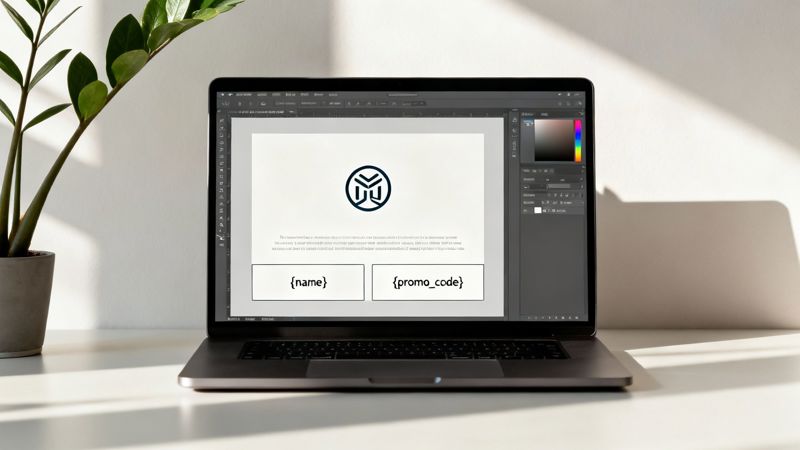
Your base image is the canvas. This background layer should have all the consistent visual pieces, like your logo, brand colors, and any text or graphics that don't change. Getting this right ensures your brand looks sharp and consistent across thousands of unique variations.
Once your base is locked in, you can start layering on the dynamic parts. These are essentially smart placeholders that will pull data straight from your email platform.
Identifying Static vs. Dynamic Elements
Picture a personalized ticket for an event. The event's name, the date, and your company logo? Those are all static. But the attendee's name and their unique QR code are dynamic—they're different for every single ticket holder. Nailing this distinction is the secret to creating effective email marketing dynamic content images.
Before you jump into a design tool, map out what you actually want to personalize. Some of the most common—and effective—dynamic elements we see are:
- Recipient's First Name: This is the classic starting point for personalization. It’s simple, but it works.
- Unique Promo Code: Putting a one-of-a-kind code right on an image makes it feel exclusive and important.
- Loyalty Points Balance: A quick visual of their current points can be just the nudge a customer needs to come back and spend them.
- Countdown Timers: Nothing creates urgency quite like a real-time timer ticking down to the end of a sale.
Design Best Practices for Dynamic Text
Here’s where a little planning goes a long way. When you're designing your template, you have to account for the unexpected. A short name like "Jen" uses way less space than "Christopher." If you don't build in some flexibility, longer names can completely break your design or become impossible to read.
Pro Tip: Always give your text-based dynamic layers more horizontal room than you think you'll need. It’s much better to have a bit of extra space than to have text spilling out of its container. I've also found that center-aligning dynamic text often helps it look balanced, no matter how long or short the content is.
Font choice is also huge. That trendy, thin script font might look amazing with a four-letter name, but it could be a mess with a longer one. For any text that’s going to change, stick to clean, simple fonts that are easy to read at different sizes.
If you want to get more technical, our guide on email image templating APIs dives into how you can get even more granular control over these elements.
Setting Up Fallback Rules
So, what happens when the data you need just isn't there? For example, you want to greet someone by their first name, but you never collected it for that subscriber. This is where fallbacks save the day. A fallback is simply a default value that your image will show when the primary data is missing.
Instead of an email with a broken image or an awkward blank space like "Hello, !", you can set a default. A good fallback for a missing first name could be something friendly like "Valued Customer" or even just "Friend."
This simple step ensures every single person gets a complete, professional-looking image. It protects the user experience and keeps your brand looking polished. The good news is that most no-code dynamic image editors make setting up these rules incredibly simple.
So, you've designed your dynamic image template. Now for the fun part: actually getting it into your email campaigns.
This is where the magic happens, and it’s a lot simpler than you might think. The whole process really just boils down to a single, powerful URL that your dynamic image platform gives you. This isn’t your average link to a static picture; it’s an intelligent URL built to create thousands of unique images in real-time.
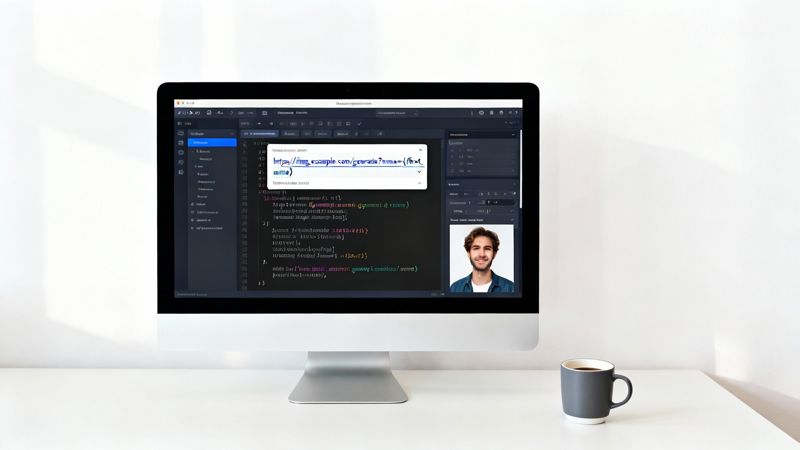
This special URL has placeholders that match up with the data fields in your email service provider (ESP)—things like a contact’s first name or a custom property you've stored. When you send an email, your ESP automatically swaps these placeholders with each recipient's actual data. It’s like giving the image service a unique set of instructions for every single person.
Using Merge Tags To Personalize Image URLs
The secret ingredient here is merge tags (you might also know them as personalization tags). They’re the same tags you already use to add a personal touch to your email copy, like {{first_name}} in Klaviyo or *|FNAME|* in Mailchimp. You just pop these tags right into the image URL itself.
Instead of embedding a fixed, static image, you're embedding a URL that builds the image the moment your subscriber opens the email. This completely changes the game. You can launch incredibly personalized campaigns at scale without ever needing to manually create an image for each person.
The core idea is simple: one image URL, powered by merge tags, can generate a unique visual for every single person on your list. This makes email marketing dynamic content images a scalable and efficient strategy for any team.
For a deeper dive, our guide on image URL personalization for email walks through more advanced techniques and examples.
Practical Examples for Popular Email Platforms
Because this method relies on standard HTML, nearly every modern ESP can handle it. You'll usually just drop the dynamic URL into an HTML block or directly into the source code for an image element.
Here are a few copy-and-paste examples for popular platforms to show you what I mean:
- Klaviyo Example: To show a recipient's first name, you'd find the part of the image URL where the name goes and insert Klaviyo's
{{ first_name }}tag. - Mailchimp Example: Same concept, different tag. For Mailchimp, you’d use
*|FNAME|*inside the URL to pull in the subscriber’s first name. - Instantly Example: This works great for cold outreach, too. Platforms like Instantly use variables like
{{firstName}}, which you can use in the same way to add a personal touch.
The concept behind dynamic images in email is very similar to Dynamic Creative Optimization (DCO), a technique used to personalize ad creatives in real-time. It’s all part of a larger shift toward truly one-to-one marketing.
The data backs this up, too. As personalization becomes the standard, dynamic content consistently lifts key metrics.
Dynamic Content Impact Across Email Metrics
This table gives a quick look at the kind of performance boost you can expect by swapping static content for dynamic, personalized elements in your emails.
| Metric | Performance with Static Content (Baseline) | Performance with Dynamic Content (Uplift) |
|---|---|---|
| Open Rate | 18-22% | 25-30% (up to 29% increase) |
| Click-Through Rate (CTR) | 2-3% | 4-7% (up to 133% increase) |
| Conversion Rate | 1-2% | 3-5% (up to 150% increase) |
| Unsubscribe Rate | 0.2-0.4% | 0.1-0.2% (up to 50% decrease) |
These numbers tell a clear story: personalized visuals don't just look good; they drive real business results. With over 60% of emails now opened on mobile devices, using responsive dynamic images can boost mobile clicks by around 15%—a major win in today's competitive inbox.
Powerful Use Cases For Dynamic Images You Can Try Today
Theory is one thing, but seeing dynamic images in action is where the magic really happens. This isn't just a gimmick; it's a practical tool that solves real-world marketing challenges and helps you create genuinely memorable moments for your customers.
Let's dive into some practical applications you can start using right away to boost engagement and get better results from your emails.
For Event Organizers And Coaches
If you're in the events space, you can completely elevate the attendee experience. Imagine sending a pre-event email with a personalized agenda image. It could feature the attendee’s name, the specific sessions they signed up for, and even a unique QR code for a quick and easy check-in. It feels exclusive and looks incredibly professional.
For coaches and consultants, this is a fantastic way to celebrate client wins automatically. Instead of spending time manually creating certificates or progress reports, you can generate personalized images that highlight key milestones. An email with an image that says, "Congratulations, Mark, on completing Module 3!" hits a lot harder than plain text.
The goal is to make each person feel uniquely recognized. This simple act of visual personalization can significantly boost event attendance, client retention, and word-of-mouth referrals.
For Real Estate And Sales Teams
In a competitive field like real estate, creating urgency and a personal connection is everything. A real estate agent could send a follow-up email showing a property image with a subtle banner that reads, "Reserved for Sarah." This creates a powerful feeling of ownership and makes the opportunity feel exclusive.
Sales teams can also use dynamic images to personalize their outreach without sacrificing scale. An image featuring a prospect's company logo alongside a key benefit makes a cold email feel instantly warmer and more relevant. Think of an image that says, "OKZest + [Prospect Company Logo] = Better Engagement."
For E-commerce And Retail
E-commerce brands are sitting on a goldmine of opportunities to use dynamic images, especially for re-engaging shoppers and recovering lost sales.
- Abandoned Cart Reminders: Show an image of the exact product they left behind with a personalized message like, "Still thinking about this, David?"
- Loyalty Program Updates: Send an email with a visual that actually displays the customer's current points balance, making their loyalty status feel tangible.
- Personalized Product Recommendations: Create a collage-style image that features products based on a customer's browsing history or recent purchases.
If you're looking for more ideas on how to craft emails that convert, checking out successful campaigns can provide a ton of inspiration. This collection of 12 Newsletter Examples That Actually Drive Revenue is a great place to start.
These examples are just scratching the surface. The core idea is simple: use the data you already have to create a more relevant, visual, and personal conversation with your audience. This approach turns a standard email campaign into a powerful relationship-building tool.
Measuring The Real Impact Of Your Personalized Images
Data is your best friend when it comes to proving the value of any marketing tactic, and dynamic images are no exception. To really understand their power, you have to look past vanity metrics like opens and focus on the numbers that actually move the needle on revenue and engagement.
This is how you build a rock-solid case for personalization.
The cleanest way to see what your dynamic images are really doing is a simple A/B test. Before you go all-in on a campaign, set up a split test pitting a personalized image against a generic, static one. Send the dynamic version to one segment and the static version to another. The key is to keep everything else—the subject line, the copy, the CTA—exactly the same.
Isolate And Track Key Metrics
Once your test is out in the wild, you need to know what to watch for. Don't get hung up on open rates. The real story unfolds after the open.
These are the metrics that tell you what’s truly working:
- Click-Through Rate (CTR): This is the big one. Are more people clicking the personalized image compared to the static one? A higher CTR is a clear signal that the visual resonated and drove action.
- Conversion Rate: This tracks who completed your desired goal after clicking, whether that's making a purchase or signing up. It’s the ultimate measure of ROI.
- Click-to-Open Rate (CTOR): This metric shows the percentage of people who opened the email and then clicked. It’s a great way to gauge how engaging your content was for the audience that actually saw it.
Industry data backs this up time and time again. Brands that consistently use dynamic content report a marketing ROI of around 42:1. That’s double the 21:1 ROI seen by brands that rarely use it. That massive lift comes directly from better engagement and conversion. You can find more stats on the ROI of email personalization strategies to see the full picture.
This chart breaks down some of the industries getting the most out of dynamic images.
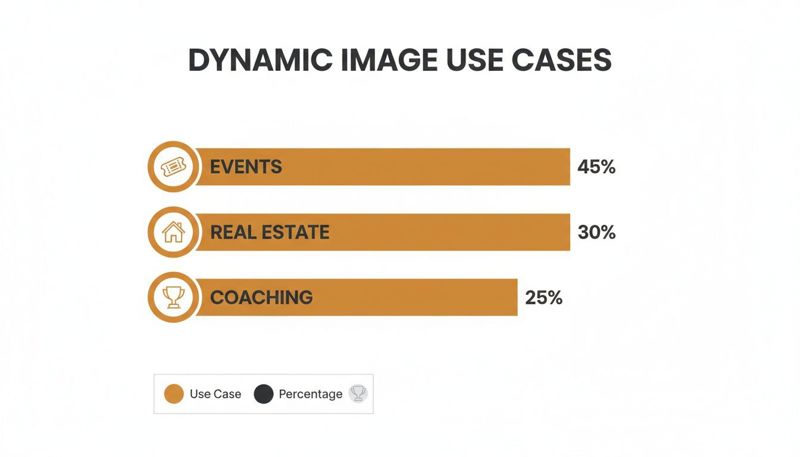
As you can see, the events industry is leading the charge, using dynamic images for things like personalized tickets and agendas. Real estate and coaching aren't far behind, leaning on them for client-specific communications that feel truly one-on-one.
Presenting Your Findings
When your A/B test is done, you’ll have clear, quantifiable results. Instead of just saying "personalization works," you can walk into a meeting and state, "Our personalized image campaign increased our click-through rate by 37% and boosted conversions by 15%."
That’s the kind of data-backed argument that gets attention from stakeholders and clients. It transforms your personalization efforts from a "nice-to-have" creative idea into a proven, revenue-generating strategy.
How To Scale Your Personalization With Automation
It’s one thing to create a single, beautifully personalized image. It’s another thing entirely to do it for thousands—or even millions—of people without multiplying your workload. This is where you move past manual design and into true automation, using an API to generate unique email marketing dynamic content images at scale.
This approach completely smashes the creative bottleneck. Instead of a designer manually tweaking templates one by one, your systems can automatically spin up unique images for massive promotional campaigns or behavior-triggered emails like order confirmations and event reminders.
Connecting Live Data Sources
Imagine plugging your image templates directly into your live business data. An API makes this possible, letting you pull real-time information straight from your CRM, product database, or loyalty program. This opens the door to some incredibly timely and powerful personalization.
For example, you could automatically generate visuals showing:
- A customer's current loyalty points balance, updated to the minute.
- Real-time stock levels for a product they just looked at.
- Personalized event badges with their name and a unique QR code for check-in.
By connecting your image generation directly to your business data, you ensure every email contains the most current and relevant information. This turns a simple image into a dynamic, data-driven communication tool.
Streamlining Production For Teams And Agencies
For bigger teams and marketing agencies juggling multiple clients, efficiency is the name of the game. An API-first approach, especially when paired with team management features, makes creative production both collaborative and incredibly cost-effective.
Designers can build and lock down brand-approved templates. Then, marketers can easily deploy them across different campaigns and client accounts without ever needing to open a design tool.
This kind of operational efficiency is a huge lever for growth. We're already seeing a massive market demand for faster, scalable creative, with a 340% year-over-year jump in AI-powered image generation. Platforms with flexible pricing, from free plans to enterprise volumes, allow teams to turn raw recipient data into unique visuals at an almost negligible marginal cost.
It completely removes the old-school manual design bottleneck. This model slots perfectly into the high-ROI world of personalized email, where returns can often top 40:1. You can find more stats on the impact of email marketing automation and see just how powerful it is.
An automated workflow guarantees that whether you're emailing one hundred people or one million, every single person gets a perfectly personalized image. And the best part? It requires zero extra manual work per send. This lets you hit tight deadlines, maintain brand consistency, and turn a once-complex personalization strategy into a simple, repeatable process.
Ready to automate your visual content? With OKZest, you can generate millions of unique, personalized images for your email campaigns, social media, and websites using our powerful no-code editor and API. Start creating for free at okzest.com.