Enterprise email marketing automation isn't just about sending a lot of emails. It’s about being the central nervous system for your entire marketing world, connecting huge pools of data to drive intelligent, automated conversations with millions of individual customers. Unlike simpler tools, these systems are built from the ground up to handle immense complexity.
Moving Beyond Basic Email Blasts
As a business scales, so do its communication needs. The simple email sequences that work for a startup just won't cut it when you're managing millions of customer relationships across different regions, product lines, and lifecycle stages. This is where enterprise email marketing automation steps in, moving you far beyond basic campaigns into full-scale, data-driven orchestration.
Think of it like this: a small business email tool is a local delivery van. It’s perfect for handling a few packages on a set, predictable route. An enterprise platform, on the other hand, is a global logistics hub, coordinating a fleet of planes, trains, and trucks to deliver millions of unique parcels to precise destinations at exactly the right time.
The Core Shift in Strategy
This jump isn't just about sending more emails—it's a fundamental change in strategy and capability. Enterprise systems are designed to handle:
- Vast Data Integration: Seamlessly plugging into CRMs, e-commerce platforms, data warehouses, and product analytics tools to build a single, unified view of the customer.
- Complex Segmentation and Logic: Building intricate audience segments based on predictive analytics, real-time behavior, and historical data to make sure every single message is deeply relevant.
- True Multi-Channel Orchestration: Coordinating messages not just through email, but also via SMS, push notifications, and in-app messages to create a truly cohesive customer experience.
- Unparalleled Scalability: Reliably sending billions of emails per month while maintaining impeccable deliverability and performance, a feat that's simply impossible for standard platforms.
For a deeper dive into the foundational concepts, our guide on what is email automation covers the core principles that these enterprise systems build upon.
The table below breaks down the key differences between the tools you might start with and the platforms you grow into. It highlights how the focus shifts from simple execution to sophisticated, data-driven strategy.
Key Differences SMB vs Enterprise Automation
| Feature | SMB Automation | Enterprise Automation |
|---|---|---|
| Data Sources | Basic list uploads, light CRM sync | Deep integration with data warehouses, CDP, BI tools |
| Segmentation | Manual lists based on tags or simple attributes | Dynamic, predictive, and behavioral segmentation |
| Campaign Logic | Linear, trigger-based sequences | Complex, multi-branching customer journeys |
| Channels | Primarily email, maybe some SMS | Email, SMS, push, in-app, web, direct mail |
| Scale | Thousands to hundreds of thousands of sends | Millions to billions of sends with high deliverability |
| Personalization | Basic merge tags (e.g., {{FirstName}}) |
1:1 dynamic content, predictive recommendations |
| Reporting | Standard campaign metrics (open/click rates) | Advanced attribution, LTV, cohort analysis |
As you can see, the enterprise approach is a completely different ballgame, built for the scale and complexity that come with a large, diverse customer base.
The primary goal of enterprise automation is not just efficiency but intelligence. It's about empowering large organizations to operate with precision, using data to anticipate customer needs and respond proactively, turning every interaction into a meaningful step in the customer journey.
For a great primer on the channel itself, check out this guide on Mastering Email Marketing in B2B. This strategic approach is what separates a simple tool from a powerful growth engine, allowing you to build lasting customer loyalty and drive significant, measurable revenue through highly personalized, automated conversations.
Designing Your Strategic Automation Architecture
Any successful enterprise email automation system rests on three core pillars: Data, Logic, and Content. The best way to think about it is like building a skyscraper. If you don't have a solid blueprint showing how every beam, wire, and window connects, the whole thing is at risk. Your automation strategy needs that same architectural foresight to handle massive scale and complexity.
This diagram shows how Data, Logic, and Content work together to form the foundation of a powerful enterprise automation ecosystem.
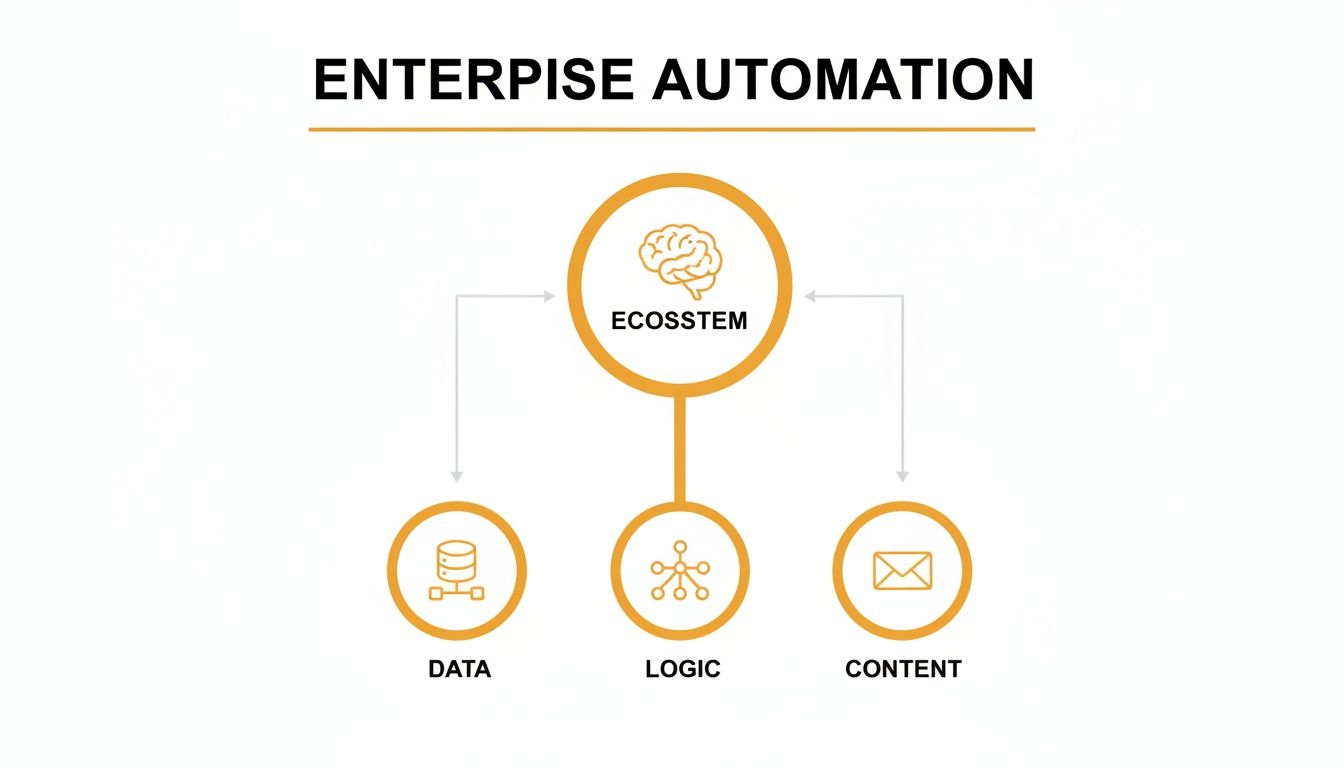
As you can see, a robust Data model is the bedrock. It enables the intelligent Logic that ultimately decides how your dynamic Content gets delivered.
The Foundation: Your Customer Data Model
First up is Data—the deep foundation of your skyscraper. For an enterprise, this is way more than a simple list of contacts. It’s a unified, 360-degree view of every customer, pulling from countless touchpoints across the business. This data model becomes the single source of truth that fuels every decision your automation platform makes.
A well-designed data architecture connects information from separate systems to build out a rich customer profile.
- CRM Data: Think sales history, lead scores, account status, and every interaction with your sales team.
- ERP & E-commerce Data: This is where you find transactional info, order frequency, average order value, and product SKUs.
- Behavioral Data: This is the real-time stuff—website page views, app usage, feature engagement, and content downloads.
- Support Data: Don't forget information from helpdesk tickets, customer satisfaction scores, and feedback forms.
Having this centralized data is what lets an enterprise system go from basic segments like "customers in California" to hyper-specific audiences like "repeat purchasers in California who viewed a specific product category in the last 7 days but haven't bought yet."
The Framework: Intelligent Automation Logic
Next, we have the Logic, which acts as the steel framework of your skyscraper. This layer is all about the complex workflows, trigger-based rules, and AI-driven decisions that define how, when, and why you communicate with someone. It’s the "if-this-then-that" engine running at a massive scale.
This is where you actually map out the customer journey, planning every potential path and interaction.
Your automation logic should be designed for the future, not just for today's campaigns. A well-structured workflow can be tweaked and expanded without needing a total rebuild, saving you countless hours down the road.
A simple welcome series logic, for instance, might look like this:
- Trigger: A new user signs up for a trial.
- Immediate Action: Send Welcome Email #1, introducing key features.
- Wait Condition: Pause for 3 days.
- Logic Branch:
- If User A activated a key feature, send Email #2 with advanced tips.
- If User B hasn't done anything, send a re-engagement email focused on the core value proposition.
This intelligent framework makes sure every message feels relevant, timely, and responsive to what each user is actually doing.
The Interior: Dynamic and Modular Content
Finally, we have Content—the customizable interior of your skyscraper. At the enterprise level, content is rarely static. It has to be dynamic and modular, ready to adapt to the data and logic that came before it. This means ditching the old monolithic email templates and embracing a system of reusable, dynamic content blocks.
These blocks can be populated automatically based on the recipient's data.
- Product Blocks: Dynamically display recommended products based on someone's browsing history.
- Offer Blocks: Show a unique discount code or a promotional banner that's relevant to a customer's loyalty tier.
- Educational Blocks: Slot in links to blog posts or guides related to features the user has already engaged with.
This modular approach ensures that while the core email structure stays consistent, the content inside is uniquely assembled for each person. When you master these three pillars—Data, Logic, and Content—you're not just building a powerful system; you're designing an enterprise automation architecture that's resilient and ready for long-term growth.
Achieving True Personalization at Scale
Let's be honest, real enterprise-level personalization is a world away from just dropping a {{FirstName}} tag into a subject line. It's about crafting millions of genuinely one-to-one experiences that run on autopilot. This is where enterprise platforms truly earn their keep, transforming what used to be mass communication into a series of intimate, automated conversations.
The end goal is simple: make every single customer feel like they're your only customer. This isn't magic; it's the result of tapping into real-time behavioral triggers, leaning on predictive AI, and building seamless journeys that cross multiple channels. We're moving beyond reacting to old purchases to a place where we can actually anticipate what customers need next.

From Basic Tags to Dynamic Visuals
The first step beyond a name tag is usually dynamic content blocks—swapping out sections of an email based on user data. But the real game-changer is dynamic visual personalization. This is where the images themselves are generated on the fly, unique to every single person who opens the email.
Picture a common retail scenario: A customer ditches their shopping cart with a specific pair of sneakers inside. An hour later, an email hits their inbox.
- The Old Way (Static): A standard abandoned cart email shows a generic photo of the shoe. It’s better than nothing, but it still feels like a generic reminder.
- The Smart Way (Dynamic): With a platform like OKZest, the hero image in that email is created instantly. It might show the sneaker with the customer's name elegantly overlaid, a personalized discount code like "JAMES20," and even a real-time stock counter to add a little urgency.
Suddenly, a forgettable reminder becomes a compelling, visually stunning message that demands attention and drives them back to your site. To get a better look at how this works under the hood, check out our guide on scalable email personalization software.
Leveraging AI and Behavioral Triggers
Advanced personalization isn't just about what you show people, but when you show it. Enterprise automation platforms plug directly into your data warehouse, allowing them to act on complex behavioral signals in the blink of an eye.
This means you can build entire automated journeys around triggers like:
- Browse Abandonment: Someone views a product page three times in a single visit but never adds it to their cart. This could trigger an email showcasing customer reviews for that exact item.
- Repeat Purchase Signals: A customer who always buys a 30-day supply of vitamins gets a reorder reminder on day 25, complete with a personalized image of their last purchase.
- Predictive Churn Risk: An AI model flags a high-value customer whose engagement has tanked. This automatically kicks off a "we miss you" campaign with a special offer to bring them back before they're gone for good.
An enterprise automation system doesn't just send emails; it senses and responds. It functions like a digital nervous system, detecting subtle shifts in customer behavior and deploying the right message through the right channel automatically.
This isn’t just marketing fluff; it's backed by powerful numbers. Personalization is no longer a nice-to-have. 54% of marketers are already customizing content, and AI adoption has hit 77.5% among executives. This shift is driving real results, including 41% revenue growth and 13.44% CTR gains. Think about it: automated emails are responsible for 41% of total orders from just 2% of sends, and 82% of marketers using triggered emails see 8x more opens and higher earnings.
Orchestrating Multi-Channel Journeys
True personalization can't be trapped in the inbox. The most powerful strategies weave together seamless experiences across every touchpoint, with the automation platform acting as the central conductor.
Imagine a multi-channel "back-in-stock" notification:
- Initial Alert (Email): The waitlisted item is available. An email goes out with a personalized image of the product.
- Follow-Up (SMS): If the email isn't opened in three hours, a quick SMS alert is sent to create a sense of urgency.
- Final Nudge (Push Notification): Still no action after 24 hours? A push notification from your app reminds them the popular item might sell out again.
Each step is informed by the last, creating a persistent but not annoying experience. This intelligent orchestration ensures the message gets through without burning out your customer. By combining behavioral data, AI-driven insights, and dynamic visuals across every channel, you can finally achieve what marketing has always been striving for: true, scalable, one-to-one personalization.
Integrating Your Marketing Tech Stack
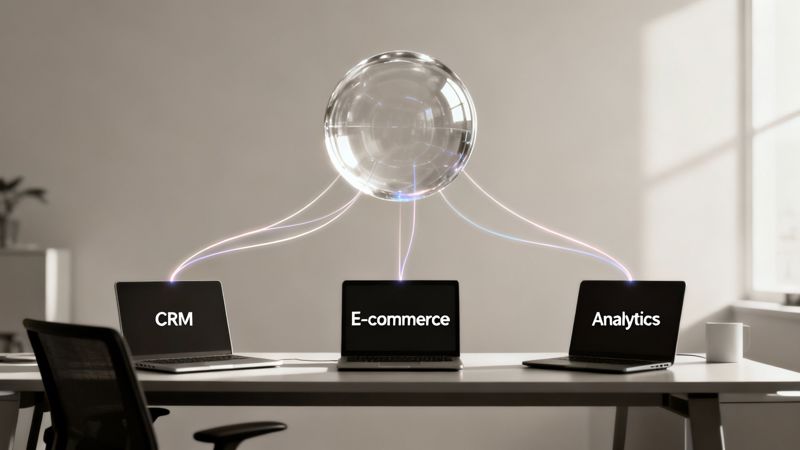
An enterprise email automation platform is only as good as the data it can get its hands on. It can't just operate in a silo. Think of it as the brain of your marketing operations—for it to make smart decisions, it needs a constant stream of information from the entire body: your CRM, e-commerce engine, data warehouse, and other critical systems. Integration is the backbone of your entire strategy.
A truly connected ecosystem makes sure data flows smoothly between platforms. This gets rid of manual data entry and ensures every team is working from a single source of truth. Without it, you’re stuck with fragmented customer views, delayed insights, and a personalization strategy that's dead on arrival. The goal is to build a network where your systems are constantly talking to each other in real-time.
Common Integration Patterns
Connecting your tech stack isn't a one-size-fits-all affair. Depending on the platforms you use and the complexity of your data, you’ll probably end up using a mix of different methods. Each has its own purpose, from simple plug-and-play connections to highly customized data pipelines.
Here are the most common ways to get it done:
- Native Connectors: These are pre-built, out-of-the-box integrations offered by the automation vendor for popular platforms like Salesforce, Shopify, or Adobe Analytics. They’re the easiest to set up and are perfect for standard tasks, like pulling new sales leads from your CRM.
- Middleware Solutions: Tools like Zapier or Workato act as translators between apps that don't have a native connection. They let you build "if-this-then-that" style workflows without writing code, which is great for connecting niche applications into your main ecosystem.
- Custom API Integrations: For maximum flexibility and control, a custom integration using APIs (Application Programming Interfaces) is the gold standard. This allows your developers to build a direct, two-way data pipeline between systems. It enables real-time data exchange for advanced use cases, like triggering an email the moment a support ticket is resolved.
Knowing how to use a marketing automation API is a critical skill for any technical team looking to build these powerful, custom connections. It opens up a whole world of possibilities for creating truly responsive and data-driven customer experiences.
Why A Unified Data Model Is Essential
Just connecting your tools is only half the battle. For your email platform to make sense of all the incoming data, it needs to fit into a unified data model. Imagine trying to build a puzzle with pieces from ten different boxes—it would be pure chaos. A unified data model makes sure all the pieces actually fit together.
This means that a "customer" in your CRM is the exact same "customer" in your e-commerce platform and your email system. It's all about standardizing data fields, formats, and identifiers across all connected systems to create a cohesive, 360-degree view of each person.
Without this unified structure, you’re asking for data conflicts, duplicate records, and personalization that falls flat. A customer might get an offer for a product they just bought because the sales data from your e-commerce platform hadn't synced properly with their profile in the automation tool.
By focusing on a clean, integrated tech stack with a unified data model, you empower both your marketing and technical teams. This foundational work is what allows you to move beyond basic campaigns and execute the kind of sophisticated, data-driven automation that defines a successful enterprise strategy.
Mastering Deliverability and Global Compliance
When your enterprise platform is firing off millions of emails, getting them into the inbox isn't just a goal—it's a mission-critical operation. At scale, deliverability stops being a simple metric and becomes a complex logistical challenge. Think of it like international shipping; your emails need the right passports and customs clearance to guarantee they reach their destination without getting lost or rejected.
This means you need a dual focus: one on the technical infrastructure that proves you're a legitimate sender, and the other on the legal frameworks that respect user privacy across the globe. Getting either side wrong doesn't just tank your open rates—it can seriously damage your brand and lead to hefty fines.

Building a Bulletproof Technical Foundation
In the world of email, your sender reputation is everything. Internet Service Providers (ISPs) like Gmail and Outlook are constantly watching, and they use a set of technical signals to decide if you’re a trusted sender or just another spammer. Getting this right is absolutely non-negotiable.
Here are the core technical pillars you have to get in place:
- Dedicated IP Warming: When you're sending at an enterprise volume, you'll be using a dedicated IP address. You can't just flip a switch and start blasting millions of emails from a new IP. You have to "warm it up" by gradually increasing your sending volume over several weeks. This process carefully builds a positive sending history and proves to ISPs that you're a legitimate, high-volume sender.
- Sender Authentication Protocols: These are the digital passports for your emails. They are critical for proving your emails are authentic and haven't been forged by a bad actor.
- SPF (Sender Policy Framework): This is a simple record that tells ISPs which IP addresses are actually authorized to send email on behalf of your domain.
- DKIM (DomainKeys Identified Mail): This adds a digital signature to your emails. Receiving servers can then verify that signature to ensure the message wasn't tampered with in transit.
- DMARC (Domain-based Message Authentication, Reporting & Conformance): This protocol sits on top of SPF and DKIM. It tells ISPs what to do with emails that fail authentication (like reject or quarantine them) and, just as importantly, sends you crucial reports on who is trying to send email from your domain.
Properly configuring SPF, DKIM, and DMARC is the single most important technical step you can take to protect your domain's reputation and ensure your messages are delivered. It’s the digital equivalent of putting a tamper-proof seal on your envelope.
Navigating the Global Compliance Maze
Beyond the technical setup, you have to operate within a complex and ever-changing web of global privacy regulations. What’s perfectly legal in one country could be a major violation in another. Enterprise email marketing automation demands a robust compliance strategy built around transparency and giving users control.
Your system has to be smart enough to handle these regional requirements dynamically.
- GDPR (General Data Protection Regulation) in the EU: This regulation is all about explicit, unambiguous consent. You can't pre-check consent boxes or assume you have permission. Users must actively opt-in, and you have to make it just as easy for them to opt-out.
- CCPA/CPRA (California Consumer Privacy Act/Privacy Rights Act): This gives California residents the right to know what data you're collecting about them and to demand its deletion. Your systems need clear, accessible processes for honoring these data access and deletion requests.
A user-friendly preference center is essential here. It lets subscribers choose the types of content they receive and how often they hear from you, which is a fantastic way to reduce unsubscribes and spam complaints. By mastering both technical deliverability and global compliance, you ensure your carefully crafted messages actually land where they belong—the inbox.
Choosing the Right Enterprise Platform
Picking an enterprise email marketing automation vendor is a huge commitment, kind of like signing a lease on a new corporate headquarters. It’s not a decision you make on a whim. The right partner becomes a natural extension of your marketing team, but the wrong one can saddle you with years of technical debt and missed opportunities. This goes way beyond a feature checklist—it's about finding a platform that can handle not just where you are today, but where you plan to be in five years.
A smart evaluation process cuts through the noise of slick sales demos and gets down to the architectural nuts and bolts that support true enterprise scale. You have to be ruthless in how you vet potential partners, measuring them against a clear set of criteria that map directly back to your business goals.
Core Evaluation Criteria
When you’re kicking the tires on different platforms, these are the non-negotiables. Think of each one as a critical pillar for building an automation engine that can actually handle the messy, demanding reality of a large, dynamic business.
- Scalability and Performance: Can this platform realistically handle your projected growth over the next five years? Don't accept vague answers. Ask for hard numbers on sending volume, data processing speeds, and how their infrastructure copes with massive activity spikes, like the ones you see during a Black Friday sale.
- Deep Integration Capabilities: Does it have robust, well-documented APIs? What about pre-built connectors for your absolute must-have systems (CRM, CDP, e-commerce)? A platform’s real value is unlocked by how easily it can pull and push data across your entire tech stack.
- Advanced Security Protocols: How are they protecting your customer data? You need to see certifications like SOC 2 Type II, GDPR and CCPA compliance tools, and granular user permissions. Data governance has to be airtight, period.
- Support for Complex Data Structures: Your data model is yours alone. The platform has to be flexible enough to ingest and make sense of your custom objects and quirky data relationships without trying to cram you into a rigid, one-size-fits-all box.
It can also be helpful to see how automation is applied in specific industries. For instance, you can find great examples by looking at resources for real estate marketing automation software.
Planning a Seamless Migration
Once you’ve made your choice, the real work begins: migration. A poorly planned transition is a recipe for disaster, disrupting revenue and burning out your team. The only way to do this right is with a phased, methodical approach that keeps business interruption to a bare minimum.
The investment here is massive, and for good reason. The global market for this tech is expected to balloon to $36.3 billion by 2033. This explosion is driven by real results—63% of marketers now use automation for email, and 77.5% of B2B execs are using AI to personalize those emails, driving revenue lifts as high as 41%. You can dig into more of these marketing automation stats on Hostinger.com.
Here’s a practical roadmap to get you from your old system to your new one without pulling your hair out:
- Conduct a Thorough Data Audit: Before you move a single contact, clean your house. This means scrubbing your lists, standardizing data fields, and archiving anything that's obsolete. A clean data set is the absolute foundation of a successful migration.
- Rebuild Core Campaign Workflows: Don't just "lift and shift" your old campaigns. This is your chance to redesign your most critical automation flows—your welcome series, abandoned cart sequences, and re-engagement campaigns—from the ground up in the new platform, taking full advantage of its unique features.
- Implement a Phased Rollout: Whatever you do, avoid a hard cutover. Start by running a small, low-risk campaign in the new system. Slowly move more complex workflows over, running both platforms in parallel for a short time to validate data and performance before you finally pull the plug on the old one.
Choosing a vendor is more than a software purchase; it’s a partnership. Look for a team that offers strategic guidance, robust technical support, and a clear product roadmap that aligns with your long-term vision. This ensures you're not just buying a tool, but investing in a platform that will help you innovate for years to come.
Frequently Asked Questions
When you're diving deep into enterprise email automation, a few practical questions always come up. It's natural to wonder about the real-world value and whether all the new tech is just hype. Let's tackle some of the most common ones.
How Do We Measure ROI for an Enterprise System?
Thinking about ROI for a major automation platform means looking way beyond simple opens and clicks. The real goal is to draw a straight line from your email efforts to actual business results.
Instead of getting lost in vanity metrics, focus on what really moves the needle:
- Attribution Modeling: Can you see how a specific welcome series or an abandoned cart reminder directly led to a sale? That's what you need to track.
- Customer Lifetime Value (CLV): Are your automated retention campaigns actually making customers stick around longer and spend more? Your CLV data will tell you.
- Sales Cycle Velocity: Is automation helping your sales team close deals faster? Measure the time it takes for a lead to become a customer.
- Operational Efficiency: This one is simple but powerful. Calculate the hours your team gets back by automating tasks they used to do by hand.
Is AI Just a Buzzword in Email Marketing?
It's easy to be skeptical—the term "AI" gets thrown around a lot. But in enterprise email marketing, it's delivering real, measurable results. AI isn't here to replace marketers; it’s here to give them superpowers.
Think of it this way: AI algorithms can sift through thousands of data points to predict which customers are about to churn. It can then automatically drop them into a retention campaign before they even think about leaving. It also fine-tunes your send times, making sure your email lands in the inbox at the exact moment an individual is most likely to open it.
The numbers don't lie. Automated emails pull in four times more revenue than batch-and-blast campaigns. And even though they only account for 2% of all emails sent, they drive an incredible 37% of all sales. The best-automated workflows can hit open rates as high as 65.74%, which blows the average manual campaign out of the water. You can find more stats and insights on email marketing performance at vib.tech.
Ready to create hyper-personalized visuals that boost engagement? OKZest offers powerful no-code and API solutions to generate unique, dynamic images for every recipient in your email campaigns. Learn more at https://okzest.com.