Your team probably has the same symptoms I see in growing organizations.
The CRM says one thing. The email platform says another. Paid media audiences are built from exports that are out of date. Sales complains about weak lead handoffs. Marketing complains that sales ignores good leads. Meanwhile, personalization means adding a first name token to an email and hoping that counts as customer experience.
At that point, the problem is not effort. It is architecture. Enterprise marketing automation exists for teams that have outgrown disconnected campaign tools and need one operating system for customer journeys across channels, teams, and regions.
The Tipping Point from Busy Marketing to Smart Automation
A lot of teams do not realize they have crossed into enterprise complexity until normal work starts feeling fragile.
A webinar campaign launches, but the attendee list does not sync cleanly into the CRM. The nurture sequence fires, but it uses old segmentation logic from a previous quarter. A sales rep follows up with someone who already bought. Another prospect visits the pricing page three times and gets nothing because that behavior never reached the workflow tool.
None of these failures look dramatic in isolation. Together, they create a customer experience that feels improvised.
What the tipping point looks like
You are likely at the tipping point when several things are happening at once:
- Channels are multiplying: Email is no longer enough. You need web personalization, paid retargeting, chat, social messaging, and post-sale lifecycle programs to work together.
- Data lives in silos: Customer history sits across CRM, support, product usage, form tools, ecommerce, and spreadsheets.
- Manual coordination is everywhere: Campaign managers export lists, clean CSVs, and patch reporting in spreadsheets just to launch on time.
- Personalization is shallow: The message may change by segment, but the experience still looks generic across email, web, and social.
That is usually the moment when teams start asking what marketing automation means in practice. A simple primer on https://okzest.com/blog/what-is-marketing-automation is useful if you need to align stakeholders on the basics before moving into enterprise requirements.
Why basic tools stop working
Basic tools are good at single-channel execution. Enterprise marketing automation is built for orchestration.
The difference matters. A small tool can send an email when someone fills out a form. An enterprise system can evaluate firmographic fit, recent behavior, account activity, consent status, sales ownership, region, and product interest before deciding what should happen next.
When campaigns break because teams are stitching together too many point solutions, adding one more tool rarely fixes the issue. A shared data and workflow layer does.
The shift is from campaign management to experience management. That marks the tipping point.
Understanding the Enterprise Marketing Automation Engine
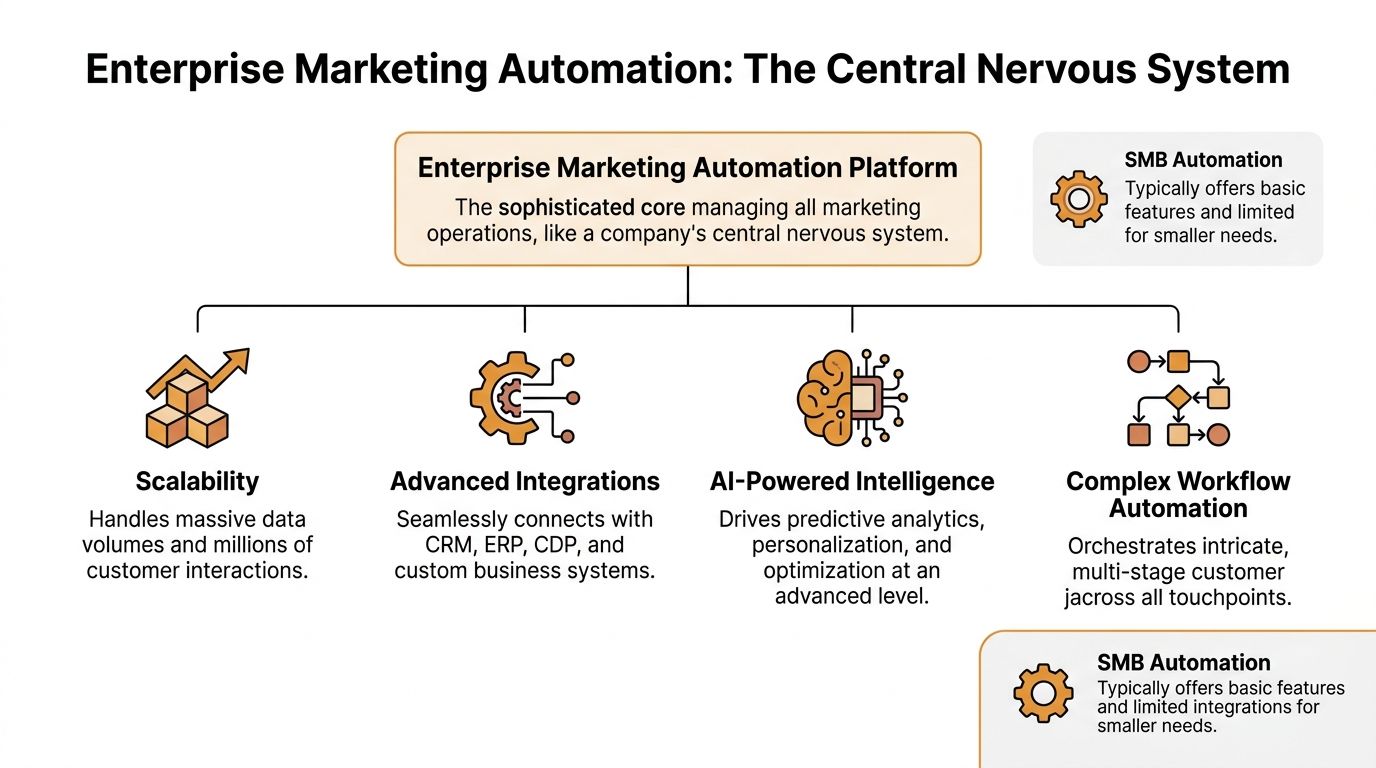
Think of enterprise marketing automation as the central nervous system for customer experience.
Your channels are the limbs. Your data sources are the senses. Your workflow logic is the reflex arc. When someone opens an email, visits a pricing page, replies to a message, or triggers an event in your product, the system should sense it, interpret it, and coordinate the next action without forcing five teams to manually intervene.
The market is moving in that direction fast. The global marketing automation market is projected to grow from USD 47.02 billion in 2025 to USD 81.01 billion by 2030 at a 11.5% CAGR, with cloud deployment holding 73.6% of the market, according to MarketsandMarkets research on marketing automation software.
The four parts that matter most
Most enterprise stacks differ in interface and depth, but the architecture usually comes down to four layers.
Customer data layer
Identity and context come together here.
The platform pulls in records from CRM, forms, web events, ecommerce, support systems, webinar tools, product telemetry, and sometimes offline sources. The goal is not just storage. The goal is a usable profile that helps marketing, sales, and service act from the same record.
If this layer is weak, everything downstream gets messy. Segments drift. Suppression fails. Reporting becomes political.
Workflow engine
This layer handles decisions.
It handles triggers, branching logic, wait steps, routing rules, lead lifecycle changes, suppression criteria, alerts, and handoffs. In a mature setup, the workflow engine is not just firing messages. It is coordinating timing and responsibility.
A common mistake is treating workflows like linear drip sequences. Enterprise systems work better when the logic reflects real buyer behavior, not the org chart.
Analytics and attribution layer
Here, you find out whether the machine is helping or just creating more activity.
Good enterprise platforms track not only sends and clicks, but also movement between lifecycle stages, channel influence, account engagement, and sales outcomes. The analytics layer should help you answer operational questions, not just produce dashboard screenshots for leadership.
Integration framework
This is the plumbing that keeps the whole structure stable.
Enterprise platforms distinguish themselves through advanced integrations, CRM and ERP connectivity, role-based permissions, custom workflows, and compliance requirements. If you are evaluating architectural patterns, this practical reference on Enterprise Marketing Automation Strategies gives useful context around how teams structure these systems in practice.
What makes it enterprise, not just larger
Scale is one part of it, but not the only part.
Enterprise marketing automation platforms are built to manage over 100,000 contacts, support complex segmentation, integrate thoroughly with CRM and ERP systems, and meet requirements such as SOC 2 and GDPR compliance. They also support multi-user permissions and custom workflows, and some deployments take 6 to 12 months to realize full value because governance and security controls add complexity, as described in Birdeye’s enterprise marketing automation overview.
Why APIs matter more than many marketers think
When marketers hear API, they often assume engineering problem. In practice, APIs are what let your automation platform behave like part of a wider operating environment instead of a standalone app.
They allow you to pass customer state, trigger external actions, pull personalized assets, and keep channels aligned. If your team wants a practical grounding in that layer, https://okzest.com/blog/marketing-automation-api is a helpful example of how API-driven automation extends what standard campaign builders can do.
A platform becomes strategic when it can listen to the rest of your stack, not only broadcast from within its own walls.
Exploring Core Capabilities and Advanced Features
The feature list matters less than how the features behave under pressure.
Many platforms can score a lead, build a segment, or launch a journey. Enterprise marketing automation earns its keep when those functions stay reliable across regions, business units, long buying cycles, and messy data conditions.

Lead management that reflects reality
Lead scoring at the enterprise level is not just a points game.
The useful models combine demographic, behavioral, and firmographic signals. They also change over time. A pricing page visit from a student researcher should not carry the same weight as repeated engagement from someone at a target account with buying authority.
Progressive profiling is one of the quieter high-impact features here. Instead of asking for every field on the first form, the platform collects information across multiple interactions. According to Coffee & Dunn on enterprise marketing automation, progressive profiling can lift form completion rates by 35%, and data-driven attribution models can recover 20% to 40% of lost pixel-based conversions.
Segmentation that goes beyond campaign lists
Enterprise segmentation is usually where teams discover whether their data model is solid.
A useful segment is not “everyone in finance who downloaded a guide.” It is often closer to “finance leaders in named accounts, in EMEA, with recent buying committee activity, no open support escalation, and interest in product line B.”
That level of segmentation changes campaign quality. It also reduces wasted outreach.
Here is the practical distinction:
| Capability | Basic setup | Enterprise setup |
|---|---|---|
| Audience logic | Static lists | Real-time dynamic segments |
| Data inputs | Form fields and email activity | CRM, account data, behavior, lifecycle, region, consent |
| Refresh cadence | Manual or scheduled | Event-driven or near real-time |
| Main use | Batch sends | Cross-channel orchestration |
Journey orchestration across channels
Here, marketers often overestimate platform maturity.
Plenty of tools can trigger an email and update a field. Fewer can coordinate web content, ad suppression, chatbot states, sales alerts, and follow-up sequencing from the same customer context.
The difference shows up in timing. If a prospect books a demo, the system should stop awareness messaging, alert the right rep, change retargeting audiences, and update the website experience. If each channel waits on a separate sync, the customer gets contradictions.
Attribution that survives modern tracking conditions
Privacy changes and browser restrictions have made old attribution setups brittle.
Enterprise teams need models that can handle partial visibility and still support decisions. Server-side tracking, configurable attribution windows, and stronger event governance are now operational requirements, not technical extras.
This is also where specialized personalization tools can fit. Teams that want to move beyond text tokens into dynamic creative can explore approaches like https://okzest.com/blog/personalized-marketing-automation to understand how personalized visual assets can plug into broader journey logic.
Advanced features only matter when the team can trust them. If scoring, segmentation, and attribution are opaque, operators stop using them and revert to manual workarounds.
Automated Workflows and Use Cases in Action
The easiest way to understand enterprise marketing automation is to watch what happens when several capabilities work together.
The workflow is the unit that matters. Not the email. Not the segment. Not the dashboard. The workflow.

Used well, automation creates strong operational advantage. Companies using marketing automation see an average 451% increase in qualified leads, email automation reaches an average open rate of 35.64%, and 80% of marketers report lead growth from automated nurture workflows, according to Marketing LTB’s marketing automation statistics.
B2B lead nurture that adapts
A practical B2B workflow usually starts with a high-intent action such as a demo request, pricing-page return visit, event attendance, or content download from a target account.
From there, the system can:
- Change lifecycle state: Move the contact into a defined stage based on fit and intent.
- Route by ownership: Send the record to the right sales team based on region, segment, or account rules.
- Suppress conflicting campaigns: Stop awareness-stage messaging once buying intent is clear.
- Trigger customized follow-up: Send content based on role, industry, or product interest instead of one generic sequence.
What works is progressive qualification. What does not work is sending a fixed seven-email series to everyone who touched the same form.
B2C and lifecycle automation across moments
In B2C or high-volume lifecycle programs, timing beats complexity.
A strong enterprise setup handles welcome journeys, onboarding nudges, replenishment reminders, win-back programs, and loyalty messaging from the same behavioral record. The message should change when the customer’s state changes.
That sounds obvious, but many teams still build journeys around campaign calendars instead of customer signals. The result is over-messaging.
Where visual personalization changes the experience
Most enterprise programs personalize copy first because it is easy.
The neglected layer is visual personalization. That matters because customers do not experience a journey as fields in a database. They experience what they see on screen.
A few examples make this concrete:
- Email: A post-event follow-up can include a personalized certificate or branded image with the attendee’s name and event details.
- Web: A landing page can render an image that reflects the visitor’s segment, sales owner, or product interest.
- Chat and messaging: A bot or direct message flow can deliver a personalized visual asset instead of plain text.
- Sales enablement: Reps can send appropriate visual follow-up assets that feel relevant without requiring design work for every prospect.
One option for this layer is OKZest, which generates personalized images through no-code and API-based workflows so teams can place dynamic visuals into email, websites, WhatsApp, and other channels.
Social and conversational workflows
Enterprise automation often underuses social and messaging because teams still run them manually.
That is a missed opportunity. Social workflows can coordinate audience movement, message timing, and response triggers with the same customer context used in email and CRM. If your team is operationalizing that channel, this practical guide to social media automation is a useful complement to the broader enterprise view.
A workflow pattern that usually performs better
When a workflow underperforms, the issue is often not volume. It is sequence design.
Here is the pattern I trust more than the typical drip:
- Start with a meaningful trigger: Use behavior that signals actual intent or state change.
- Check context before sending anything: Role, account status, recent sales contact, support issues, and consent should shape the next step.
- Change the message by channel: Email can educate. Web can reinforce. Sales outreach can narrow the path.
- Use creative assets intentionally: Personalized visuals work best when they clarify progress, ownership, or reward.
- Exit aggressively: If the person converts, disengages, or moves stages, stop the old workflow.
The best workflows feel coordinated from the customer side. They do not feel like separate teams each firing their own automation.
Implementing and Integrating Your Automation Platform
A team launches a new automation platform, wires up a welcome series, and expects performance to climb. Three weeks later, leads are routed to the wrong owners, customers still receive prospect messaging, and reporting does not match the CRM. That is a systems problem, not a campaign problem.
Implementation decides whether the platform becomes an operating layer or an expensive email tool.

Start with the data model, not the journey map
Journey planning is tempting because it is visible. Data architecture is less glamorous, but it determines whether personalization works across channels or breaks the moment a record changes state.
Set the foundations early. Identity resolution, field definitions, source-of-truth rules, consent status, lifecycle stages, and sync frequency all need clear ownership. If those pieces are fuzzy, every workflow inherits the ambiguity.
A phased rollout usually performs better than a full migration because teams can test handoffs under real conditions before adding more complexity. A practical sequence looks like this:
- Phase one: CRM sync, lifecycle framework, core audiences, and one or two revenue-linked journeys
- Phase two: Lead routing, attribution cleanup, suppression logic, and reporting definitions
- Phase three: More channels, business-unit variations, localized programs, and richer personalization
That order matters. Teams often try to build advanced nurture logic before they can reliably tell a customer from an open opportunity.
Integration is the primary implementation work
The platform UI gets attention during selection. The integration layer determines day-to-day performance.
CRM, ERP, product data, support systems, and consent tools each hold part of the customer story. The job is to make those systems agree enough to support timing, relevance, and compliance. Twilio Segment explains the business case clearly in its overview of unified customer profiles and personalization. When customer context is available in real time, teams can trigger more relevant messaging instead of relying on stale list logic.
That applies to more than copy. If product usage changes, the next email should change. If order data updates, WhatsApp or web content should reflect that status. If a high-value account opens a support case, promotional journeys may need to pause. Personalized visual content depends on the same plumbing. Dynamic images, offer panels, region-specific creative, and account-aware landing page elements only work when the underlying data arrives cleanly and on time.
The practical test is simple. Check how long it takes for a meaningful customer change to appear inside automation logic. Minutes can be acceptable. Next-day syncs usually create friction the customer can feel.
Governance is how enterprise teams keep quality while scaling
Governance sounds administrative until three regions build three different definitions of MQL and no one can explain the numbers.
Good governance protects speed. It gives teams a shared system for naming, approving, changing, and auditing what gets built. Without it, every expansion creates more exceptions, more local workarounds, and more reporting disputes.
Define these areas early:
| Governance area | What to define early |
|---|---|
| Naming conventions | Programs, campaigns, assets, regions, business units |
| Permissions | Who can publish, approve, edit, or access sensitive data |
| Lifecycle ownership | Which team controls stage definitions and handoff rules |
| Data quality | How duplicates, missing fields, and stale values are handled |
| Change control | How scoring, routing, and key workflows are updated |
I have seen enterprise instances stay usable with dozens of contributors because these rules were clear. I have also seen smaller setups become hard to trust because nobody owned field changes or suppression logic.
Use APIs where the core platform falls short
No platform handles every enterprise need equally well. That is normal.
Use the automation platform for orchestration and decisioning. Connect specialist systems where they add clear value, especially for product feeds, event streaming, creative generation, and personalized asset delivery. This reveals the gap between tool power and real omnichannel execution, often showing up as a struggle for a platform to produce personalized visuals at scale across email, web, paid media, and messaging channels, even if it supports tokens and conditional content.
API-connected services solve that problem more cleanly than manual production. Instead of asking designers to build hundreds of static variants, teams can generate approved visual assets from live rules and feed them into the journey when the trigger fires.
Build the smallest architecture that your team can trust and operate well. Advanced automation only creates value when the data, integrations, and creative layer work together under real operating conditions.
How to Choose the Right Enterprise Automation Vendor
Most vendor evaluations fail because teams score demos instead of operating models.
A polished interface can hide weak governance, limited integration depth, or poor support for multi-team operations. The right enterprise marketing automation platform is the one that fits your operating complexity, not the one with the longest feature grid.
What to test beyond the sales demo
Start with the essential capabilities.
Can the platform support your CRM and ERP environment? Does it handle role-based permissions in a way that matches your org structure? Can legal and security teams get what they need for compliance review? Can marketing ops debug workflows without filing tickets for everything?
Then move to the strategic questions.
A key challenge in enterprise automation is that over-automation can stifle brand differentiation, and teams should evaluate how a platform supports personalization in the visual and creative layer, not only workflow efficiency, as discussed in Tenon’s article on marketing automation challenges.
That point gets missed all the time. A platform can be strong operationally and still push your team toward generic output.
Vendor selection criteria for enterprise marketing automation
| Criterion | Description | Why It Matters for Enterprises |
|---|---|---|
| Scalability | Ability to handle large databases, multi-region programs, and high message volume | Prevents painful replatforming as business units and channels expand |
| Integration depth | Native and API-based connections with CRM, ERP, data warehouses, support tools, and web systems | Keeps customer context aligned across teams and reduces manual reconciliation |
| Governance and permissions | Role controls, approval flows, auditability, and workspace structure | Protects data, supports compliance, and lets multiple teams work safely in one system |
| Workflow flexibility | Support for branching logic, reusable templates, suppression rules, and multi-step journeys | Determines whether the platform can model real buying and customer journeys |
| Analytics quality | Visibility into lifecycle movement, channel performance, and operational reporting | Helps operators improve programs instead of just reporting activity |
| Creative personalization support | Ability to support dynamic content, modular assets, and personalized creative layers | Prevents automation from flattening brand experience into repetitive templates |
| Ease of administration | How easily ops teams can manage fields, workflows, QA, and troubleshooting | Reduces dependence on outside help and shortens iteration cycles |
| Total cost of ownership | License, implementation, support, training, and maintenance burden | Stops teams from underestimating the full cost of running the system |
The trade-off many teams underestimate
There is usually a trade-off between power and clarity.
Some platforms let you model almost anything, but they become difficult to govern. Others are easier to run but constrain advanced use cases. Neither is better by nature. The answer depends on the maturity of your marketing ops function, your integration needs, and how much process discipline the organization can maintain.
A simple way to pressure-test finalists
Ask each vendor to show these workflows using your logic, not theirs:
- Cross-channel suppression: What happens when a lead books a meeting mid-journey?
- Lead routing exceptions: How are ownership conflicts handled across territories?
- Data hygiene: How do duplicates and stale values affect segmentation?
- Creative flexibility: Can your team personalize visuals and content without creating chaos?
- Debugging: How quickly can an operator explain why a person did or did not receive a message?
If a vendor cannot make edge cases understandable, daily operations will become expensive and slow.
Conclusion The Future Is Scalable and Personal
A common enterprise pattern looks like this. The stack is in place, the workflows run on schedule, reports go out, and every channel is technically connected. Yet the customer experience still feels generic because the system is good at sending messages, not at shaping relevant experiences across content, timing, and creative.
Enterprise marketing automation works best as the operating layer for that coordination. It connects customer data, decision logic, channel execution, reporting, and governance so teams can run marketing as a managed system instead of a queue of disconnected campaigns.
That changes the job of the team.
The point is not to automate more activity. The point is to automate repeatable decisions and production steps so people can spend their time on audience strategy, testing, creative quality, and the judgment calls machines still handle poorly.
The next gains will come from this area. AI will improve prediction, timing, scoring, and content operations. The teams that get real value from those gains will pair machine speed with stronger decisions about message quality, channel fit, offer relevance, and how the experience looks to the customer.
That last part still gets missed. Many programs can personalize text fields and branch logic, but the visual layer often stays stuck in static templates or manual asset production. That creates a gap between what the automation engine knows and what the customer sees.
For teams building for 2026 and beyond, the mandate is straightforward. Build a system that scales cleanly, protects governance, and leaves room for creative personalization across channels, including personalized visual content. Scale matters. So does not sounding and looking like a machine.
If your team wants to add personalized visual content to enterprise workflows without producing endless manual asset variations, OKZest is one option to consider. It lets marketers generate personalized images through no-code or API-based setups, then place those images into email, websites, chat, social messaging, and WhatsApp workflows as part of a broader automation stack.