At its core, image automation is the process of creating thousands of unique, personalized images from a single design template. It works by programmatically merging individual data—like a customer's name, their loyalty points, or even a specific product they viewed—into a base image.
What Is Image Automation for Marketing?
Think of it like a mail merge, but for visuals. Instead of just dropping a first name into an email, you're dynamically layering personalized text, data, and even other graphics onto an image. This simple but powerful technique transforms generic, one-size-fits-all campaigns into personal conversations that actually capture attention in crowded inboxes and social feeds.
It's important to understand this isn't about using AI prompts to generate random art. Image automation is a precise marketing tool. It takes structured data you already have—a customer’s name from your CRM, their last purchase from your e-commerce platform, or an item they left in their cart—and uses it to build a relevant, timely visual. It’s all about making each customer feel seen.
From Static to Dynamic: A Fundamental Shift
The real magic here is moving away from static, one-size-fits-all visuals. A static image looks the same to every single person. A dynamic, automated image, on the other hand, can change for every viewer, creating a true one-to-one connection at scale.
This is more than just a novelty; it offers huge advantages for marketing teams. Below is a quick summary of the core benefits.
Core Benefits of Image Automation at a Glance
| Benefit | Impact on Marketing Campaigns |
|---|---|
| Massive Scalability | Generate thousands of unique images in minutes, not days. |
| Deep Personalization | Go beyond names; use any data point to make visuals hyper-relevant. |
| Consistent Branding | Lock down templates to ensure every image perfectly matches brand guidelines. |
| Improved Efficiency | Free up designers from repetitive tasks to focus on high-impact creative work. |
These benefits allow you to create deeply personal experiences without sacrificing efficiency or brand control. For a deeper dive into the strategy behind this, you can explore our guide on what is personalization in marketing.
The example below shows just how simple yet effective this can be. A single template is instantly personalized for a user named Alex, creating a welcoming experience across different devices.

This one design can produce endless variations, with each one perfectly tailored to the person seeing it.
A Growing Trend You Can't Ignore
Adopting automation for visual content isn't just a niche tactic anymore—it's quickly becoming a cornerstone of modern marketing. In fact, it's predicted that by 2026, nearly 75% of marketers will use AI for media creation, making it one of the top five use cases in the industry.
This trend mirrors the explosive growth we saw with email automation, where 58% of marketers had already adopted automated workflows by 2026, according to HubSpot. The reason is simple: personalized visuals get results.
Why Personalized Visuals Matter More Than Ever
It’s no secret our brains love visuals. We process images about 60,000 times faster than plain text, which explains why a great graphic can stop someone mid-scroll when a wall of words just gets ignored. But with everyone using the same stock photos and templates, just having an image isn't enough to cut through the noise anymore.
This is where personalization completely changes the dynamic. When a customer sees an image with their name, their company logo, or data that’s specific to them, it creates a genuine connection. It’s the difference between hearing your name called across a crowded room and just being part of the background hum.
<img src="https://okzest.blob.core.windows.net/blog/hand-holding-a-smartphone-displaying-a-personalized-welcome-back-message-and-a-coffee-photo-in-a-cafe.jpg" alt="Hand holding a smartphone displaying a personalized "welcome back" message and a coffee photo in a cafe." width="800">
That simple act of recognition makes your marketing feel less like an ad and more like a one-on-one conversation. It shows that your brand sees them as an individual, not just another contact in your email list.
Building Trust Through Relevance
Let's be honest—generic content is easy to tune out. A personalized visual, on the other hand, instantly makes your message relevant. That relevance is the bedrock of any modern customer relationship.
When content is relevant and personalized, it’s not seen as an interruption. Instead, it becomes a valuable service. This shift from interruption to service is what builds brand trust and loyalty in the long run.
Think about how this plays out in the real world:
- For email marketers: A welcome email with a banner that says "Welcome, Sarah!" is so much more effective than a generic "Welcome!" header. That small touch makes a huge difference in click-through rates and sets a positive tone from day one.
- For event organizers: An invitation that features a custom-made badge or a personalized agenda for the attendee feels exclusive and important. It turns a simple registration into a VIP experience right from the start.
The Business Impact of Personalized Images
At the end of the day, personalization isn't just a nice-to-have feature; it's a strategy that drives real business results. By creating more memorable and relevant touchpoints, you build authentic relationships that lead directly to higher conversions and better customer lifetime value.
The whole point of image automation for marketing is to deliver these moments of recognition consistently and at scale. It’s about showing every single customer that they matter, in every interaction. This is no longer just a trend—it's a fundamental expectation in today's market.
Powerful Use Cases for Image Automation
The real power of image automation comes to life when you see it working across your different marketing channels. Moving beyond the theory, this approach opens up a ton of practical applications that can change how you talk to your audience, making every single interaction feel more personal and relevant.
Just think about it. A new subscriber opens their welcome email and sees a banner that not only greets them by name but also shows off a product category they were just looking at. That small touch instantly makes them feel seen and sets a positive tone for the entire relationship.
Dynamic Visuals in Email and Social Media
Email marketing is one of the most obvious places to start. Instead of using the same static banner for everyone, you can create dynamic visuals that change based on who’s looking at them. And this goes way beyond just inserting a first name.
- Abandoned Cart Reminders: Show the actual products a user left in their cart, displayed inside a personalized image. Seeing the item is so much more compelling than just reading its name in a text link.
- Loyalty Program Updates: Create a branded graphic showing a customer their current points balance or VIP status, giving them a little nudge to take the next step.
- Welcome Series: Greet new subscribers with their name or company logo front and center. It’s a simple way to make them feel valued from the very first email.
This same idea works wonders on social media, especially in direct messages. An outreach message to an influencer that includes a personalized graphic with their handle and profile picture is way more likely to get a response than a generic, text-only DM. It shows you did your homework and helps you cut through the noise.
Automation for Events and E-commerce
Event organizers and e-commerce brands can also find huge value here. The applications are both practical and creative, saving you time while making the customer experience that much better. One really powerful example is 3D product visualization, which creates interactive product displays that completely change how customers engage with brands online.
For anyone managing events, automatically generating personalized speaker badges, attendee tickets with QR codes, or custom social sharing graphics can save hundreds of hours. In the same way, online course creators can instantly issue professional-looking completion certificates with the student's name and the course they finished.
By automating these repetitive design tasks, you free up your creative team to focus on big-picture strategy and high-impact campaigns instead of churning out endless variations of the same visual. That’s a massive efficiency win for any marketing department.
So, how does this look for different people on the team? The table below gives a quick breakdown of how different professionals can use image automation to hit their specific goals.
Image Automation Applications by Role
| Professional Role | Primary Use Case | Key Benefit |
|---|---|---|
| Marketing Agencies | Personalized client reporting dashboards and social media content at scale. | Improves client retention and operational efficiency. |
| Sales Teams | Custom outreach images for LinkedIn with a prospect's name and company logo. | Increases response rates and booked meetings. |
| Event Managers | Automated generation of personalized tickets, badges, and certificates. | Reduces manual work and enhances the attendee experience. |
Whether you're trying to win over a new client, nurture a lead, or delight an event attendee, personalized visuals give you a powerful and scalable way to make a memorable impression.
How Image Automation Technology Actually Works
Getting into the nuts and bolts of image automation is actually less complicated than it sounds. You don’t need to be a developer to get it. At its core, the whole thing works on a concept you’re already familiar with: templates.
Think of it like a fill-in-the-blanks story you did in school. You start with a base image template—this is your canvas. It might have your logo, a branded background, and some text that doesn't change. But it also has specific empty spots, or layers, just waiting for unique details.
Stitching It All Together with Data
So, how does a customer’s name or their company logo magically appear on that canvas? That’s where your data comes into the picture. Image automation platforms connect to the data you already have, whether it’s in a CRM, a simple spreadsheet, or pulled from an external API.
The key to making this connection is using merge tags (you might also know them as dynamic parameters) inside a special URL. It’s the exact same idea behind personalizing an email with a subscriber's first name.
Essentially, an image automation platform like OKZest creates a unique URL for your image template. This URL has placeholders that your other marketing tools, like your email service provider, fill in with real customer data.
For instance, a URL could have a bit of code like ?name={{first_name}}. When your email campaign goes out, your system swaps {{first_name}} with "Sarah" for one person and "David" for the next. The image tool then generates the right visual for each person on the fly. To dig deeper into the technical side, you can learn more about how a dynamic image API manages this entire process.
Ensuring a Flawless Result Every Time
But what happens if some of your data is missing? A good image automation system is ready for that. It uses fallbacks, which are basically smart backup plans. They’re predefined rules that show a default value if a piece of information isn’t there.
If a first name is missing, for example, the image can default to a friendly "Hello there!" instead of showing an awkward blank space or a broken image.
This simple feature ensures every single image looks professional and complete, which protects both your brand's reputation and the user's experience. While the technology is powerful enough for developers, it’s designed to be accessible for marketers, too. And as powerful AI design tools continue to evolve, the creative possibilities just keep expanding. You really don't need to write a line of code to create incredible, personalized visuals.
Launching Your First Image Automation Campaign
Alright, you get the "what" and the "why" of image automation. Now for the fun part: actually doing it. Moving from theory to your first live campaign can feel like a big leap, but it's really just a series of small, logical steps.
Let's walk through that process. We'll map out a path from your initial idea to hitting "send," making sure your first run is a success you can build on.
But before you even think about pixels and designs, you need to start with a clear goal. What are you trying to accomplish? Are you aiming for a higher click-through rate on your welcome emails? Or maybe you want to see more shares on social media? Nailing down a specific, measurable target is the foundation for everything that follows.
This simple diagram breaks down the core mechanic: your data feeds into a template, and out comes a unique, personalized image for each person.
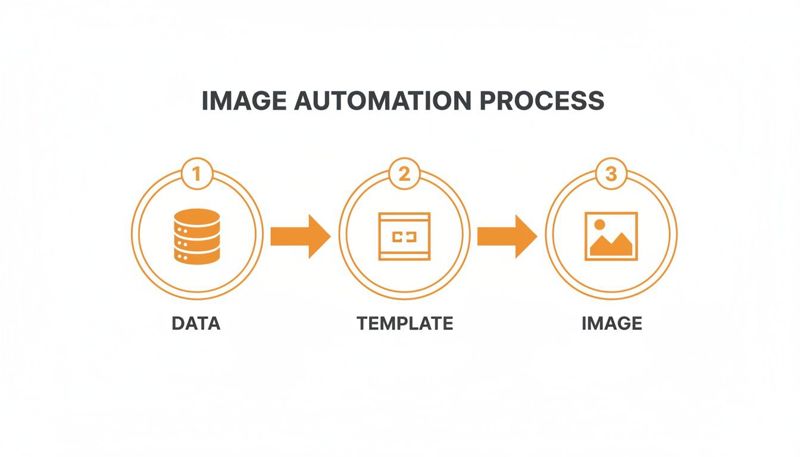
This is the engine running behind the scenes, turning bits of information into something that genuinely connects with your audience.
Building Your Campaign Step by Step
With your goal locked in, the next decision is your data source. For your first campaign, keep it simple. Use data you already have on hand, like the first name and company name stored in your CRM or email list. This avoids any unnecessary technical headaches right out of the gate.
Next up is designing your dynamic image template. This is your visual blueprint. Using a platform like OKZest, you can use an intuitive editor to create a branded background, add any static text or logos, and then place the dynamic layers that will change for each recipient.
Pro Tip: Start with a low-risk, high-impact campaign. A personalized welcome email is the perfect testing ground. It gives you a controlled environment to see the workflow in action and measure the results before you apply image automation for marketing to bigger things like abandoned cart emails or a massive event promotion.
Integration and Execution
Once your template is looking sharp, the final piece is integration. And honestly, this is usually the easiest part. Image automation tools give you a single dynamic URL for your template. You just copy that URL and paste it into whatever marketing tool you’re already using—your email service provider, social media scheduler, you name it.
Follow these key steps to get your first campaign out the door smoothly:
- Define a Clear Goal: Decide what you want to achieve (e.g., increase welcome email CTR by 15%).
- Select Your Data: Start with basic merge tags you already have, like
{{first_name}}. - Design a Simple Template: Create a clean, on-brand design that isn't overly complicated.
- Integrate with Your Tools: Copy the generated image URL and place it in your email or social post, using the merge tags your platform provides.
- Test and Launch: Always send a test to yourself first to make sure the personalization is pulling through correctly. Then, you're ready to launch and watch the results.
Measuring the ROI of Automated Visuals
Great marketing isn't just creative; it's measurable. While personalized images create a fantastic experience for your audience, their real power comes from delivering a quantifiable return on investment (ROI). Proving the value of your image automation efforts is the key to justifying your budget and scaling up your strategy.
The good news is that tracking this impact is surprisingly straightforward. You can connect the performance of your automated visuals directly to the bottom line by focusing on the right key performance indicators (KPIs). This isn't about chasing vague metrics; it's about gathering clear, hard data that proves growth.
There's a reason the entire marketing automation market is booming. It's on track to hit $15.58 billion by 2030, with 91% of marketers saying AI has fundamentally improved their workflows. Companies using automation see 34% higher revenue on average, making a strong case that investing in personalized visuals is a direct path to showing significant ROI. You can dive into more details in these marketing automation statistics.
Key Metrics to Track
To measure the success of your image automation campaigns, start by focusing on a few core metrics. These will give you a clear picture of how personalized visuals are actually influencing what your audience does next.
- Click-Through Rate (CTR): This is your most direct indicator of engagement. A higher CTR on emails or ads that feature personalized images means your visuals are doing their job and grabbing attention.
- Conversion Rate: Are more people taking the action you want, like making a purchase or signing up for a webinar? Tracking this shows how your visuals are driving results at the bottom of the funnel.
- Engagement Metrics: On social media, this means looking at likes, shares, and comments. A spike in these numbers for posts with personalized images shows they are resonating more deeply with your followers.
Proving Impact with A/B Testing
The most definitive way to prove the value of image automation is with a simple A/B test. All you have to do is pit your new, personalized images against the static, generic ones you were using before.
By sending a dynamic image to one half of your audience and a static one to the other, you create a controlled experiment. The resulting data provides undeniable proof of which approach performs better, removing all guesswork from your analysis.
For example, you could test a welcome email where Group A gets a banner with their first name, and Group B gets a generic "Welcome!" banner. Comparing the CTR and subsequent conversion rates between the two groups will clearly show the lift generated by personalization. You can also explore our guide on how to measure marketing campaign success for more detailed strategies.
By connecting these specific metrics to broader business goals like revenue and customer lifetime value, you can build a powerful case for continued investment. You'll demonstrate that image automation for marketing isn't an expense—it’s a direct contributor to your company’s growth.
Answering Your Top Questions
You've probably got a few questions floating around. Let's tackle the most common ones so you can get started with confidence.
Is Image Automation Difficult to Set Up?
Honestly, it’s much easier than you might think. Modern no-code platforms use visual editors that feel a lot like putting together a slide presentation.
You just design your template and connect your data sources without touching a single line of code. For most marketers, all it takes is pasting a special link with merge tags into the tools you already use for email or social media.
What Kind of Data Can I Use for Personalization?
Just about anything you can imagine. You can start with the basics from your CRM or email list, like names, companies, and locations. But the real magic happens when you pull in real-time information.
For example:
- An e-commerce store can show the exact products a shopper left in their cart.
- A SaaS company can display a user's unique progress stats to motivate them.
- An event organizer can create personalized schedules for every single attendee.
Good systems also use fallbacks. This means a default value is shown if a piece of data is missing, so every image still looks complete and professional, no matter what.
How Does This Integrate with Tools Like Mailchimp or Klaviyo?
The integration is incredibly smooth. Image automation platforms give you a unique URL for your image template. You simply drop this URL into your email editor, then add the right merge tags from your email provider (like *|FNAME|* for Mailchimp).
When you hit send, your email platform fills in the tags automatically. This tells the image tool exactly which personalized graphic to show each person on your list. This method works with pretty much any modern marketing tool, making it a simple addition to your current setup.
Ready to create stunning, personalized visuals at scale? Get started with OKZest and see how easy image automation can be. Start for free today!