In a world of constant digital noise, standard images just don't cut it anymore. A dynamic image API is a game-changer, turning your generic visuals into personalized experiences. It works a lot like the merge tags you already use for text, but instead of just inserting a name into an email, you can embed unique details right into the images themselves.
Moving Beyond One-Size-Fits-All Visuals
Think about it—every day, your audience gets bombarded with content. Emails, social media posts, and website banners are all fighting for a fraction of a second of their attention. This leads to something called content blindness, where people automatically tune out generic, impersonal visuals because they’ve seen them a thousand times before. This is a huge roadblock for marketers, sales teams, and anyone trying to connect with an audience.
This is where a dynamic image API completely changes the game. It's the next logical step in personalization. For years, we've used merge tags like {{first_name}} to add a personal touch to our text. A dynamic image API takes this exact idea and applies it to your visuals, letting you create one-of-a-kind images for every single person you reach.
From Generic to Genuine Connection
Imagine sending a welcome email. Instead of some generic stock photo, your new subscriber sees an image with their name beautifully woven into the design. Or what about an event confirmation where the digital ticket shows the attendee's unique QR code and seat number? This isn't just a cool trick; it's a fundamental shift in how you communicate.
Personalization at this level makes your audience feel seen and valued as individuals, not just as another entry in a database. It turns a one-way broadcast into a one-to-one conversation, which is the cornerstone of building real customer relationships.
This approach gives a serious edge to all kinds of professionals:
- Email Marketers: Boost your click-through rates and conversions by making every email feel like it was made just for the recipient.
- Sales Teams: Cut through the noise in your outreach campaigns with visuals that mention the prospect's name or company.
- Coaches and Event Organizers: Automatically generate personalized certificates or tickets. You'll save hours of manual work while delivering a premium, polished experience.
By moving past one-size-fits-all visuals, you stop competing on volume and start competing on relevance. This guide will walk you through exactly how this technology works and how you can use a dynamic image API to create unforgettable marketing moments that get real results.
How a Dynamic Image API Actually Works
So, how does this all work behind the scenes? Let's use a simple analogy: ordering a custom coffee.
When you go to a coffee shop, the barista grabs a standard branded cup (that's your template), writes your name on it (the dynamic data), and hands you a unique drink. A dynamic image API does the exact same thing, just with pixels instead of paper cups and markers. It's a "visual chef," taking a base recipe and adding personalized ingredients on the fly to serve up a one-of-a-kind image for every single user.
This kind of automation is what makes creating personalized visuals at scale not just possible, but genuinely easy.
This technology is a huge part of the booming digital image processing market. That market, valued at USD 93.27 billion in 2024, is set to explode to USD 435.68 billion by 2035—growing at a 15.04% CAGR. This massive growth is fueled by AI-powered tools like OKZest that make real-time personalization simple for everything from generating course certificates to customizing newsletter images.
The Three Core Components
To make the magic happen, a dynamic image API pulls together three key building blocks. Each one has a specific job in turning a static design into a personalized masterpiece.
The Static Image Template: This is your foundation. It’s the constant, branded part of the image, like the coffee cup itself. This might be an email banner, a certificate border, or a social media graphic with your logo, brand colors, and other fixed elements.
Dynamic Layers and Elements: These are the customizable parts of your image—think of them as empty placeholders just waiting to be filled. These layers can be text (like a customer's name, company, or a unique discount code) or even other images (like a user's profile picture or a company logo).
The Data Source: This is the information used to fill in those dynamic layers. The data can come from practically anywhere—your CRM, an email marketing platform like Klaviyo, a Google Sheet, or even another API. It’s the "list of names" the barista uses to personalize each cup.
This concept map shows how a dynamic image API takes a standard image and combines it with data to produce a personalized output.
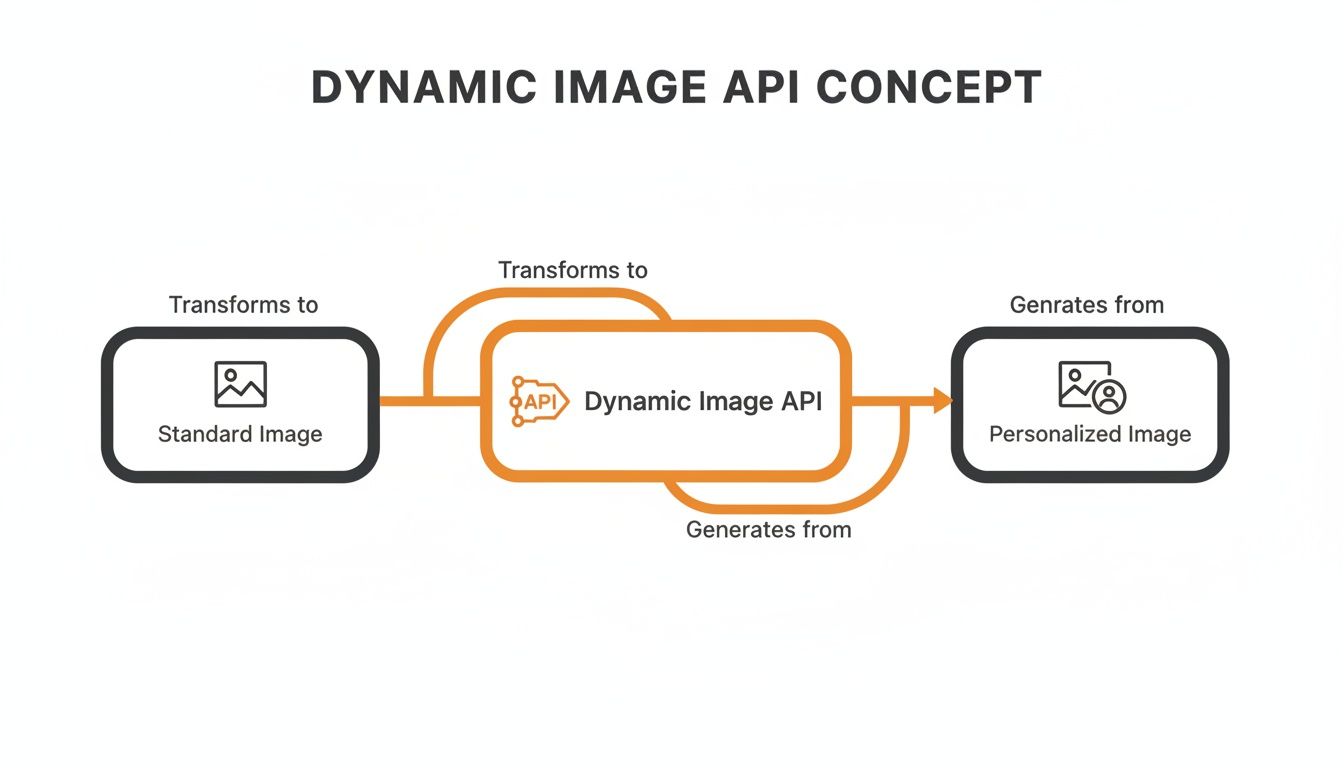
As you can see, the API acts as the engine in the middle, taking a generic visual and turning it into something unique and user-specific.
The Role of Fallback Values
But what happens if your data source is incomplete? Say you want to greet a user by their first name, but you only have their email. A good dynamic image API has a built-in safety net for this exact situation: fallback values.
Fallbacks are default values the API uses when the primary data is missing. They ensure every generated image still looks professional and complete, preventing awkward blank spaces or error messages.
For example, instead of an image that says "Hello, {{first_name}}!" you could set a fallback to display "Hello, there!" or "A Special Welcome to You!" This guarantees a polished, on-brand experience for everyone, no matter what data you have. To really get this, it helps to understand the broader concept of dynamic content.
The best part? This entire workflow happens in milliseconds. When a request is made, the API grabs your template, pulls the specific data for that user, merges it into the dynamic layers, and instantly generates a new image URL. We cover how to build these in our guide to image API URL parameters.
That final URL is what you embed in your email, website, or social media message to deliver a perfectly personalized image, every single time.
Why Should Marketers Care About Dynamic Images?
It’s one thing to get the technical side of a dynamic image API, but the real magic happens when you see why it’s a game-changer for your marketing. Let’s be honest, personalization isn’t a fun extra anymore—it’s what customers expect. Dynamic images are your secret weapon for meeting that expectation, turning passive scrollers into genuine fans.
When a customer sees an image made just for them, it cuts through the noise. This isn't just about sticking a name on a generic banner. It's about creating a small moment of connection that makes your brand memorable and builds trust. The impact on your key metrics can be huge, and fast.
By making each customer feel seen and valued, hyper-personalized visuals can dramatically increase click-through rates, conversions, and overall campaign engagement.
Drive More Conversions and Higher Engagement
Think about it: static images are easy to scroll past. Personalized images, on the other hand, make people stop. They command attention because they’re directly relevant to the person looking at them. When you show a prospect their own company logo in a sales outreach image, or a customer sees their name on a special offer, your message becomes impossible to ignore.
This level of personal touch translates directly into better performance:
- Higher Click-Through Rates (CTR): Emails and ads with personalized images just get more clicks. It's that simple.
- Better Conversion Rates: A custom visual can be the final nudge a customer needs to make a purchase, sign up for a webinar, or book that demo.
- Lower Bounce Rates: Greeting returning visitors with a personalized banner on your website keeps them on the page longer and encourages them to look around.
This is exactly why the tech behind it all, synthetic image generation, is booming. This market, which lets a dynamic image API create custom graphics on the fly, is expected to grow from $2.36 billion in 2025 to a massive $6.75 billion by 2030. We already know personalized newsletters drive more engagement, and tools like OKZest make it incredibly easy for any team to get started. You can read more about the rapid growth in synthetic media generation here.
Build Real Brand Loyalty
Building a relationship that lasts takes more than a single sale. It’s about creating consistent, positive experiences that make customers want to stick around. Dynamic images are perfect for this, allowing you to keep the conversation personal and ongoing.
Imagine a loyalty program that sends members a yearly "thank you" image summarizing their journey with your brand. Or an e-commerce store that emails a custom graphic showing products related to a customer’s past buys. These are the small, thoughtful touchpoints that make people feel appreciated and strengthen their connection to you.
Get a Huge Boost in Efficiency
Finally, let’s talk about the operational headache you get to skip. Manually creating thousands of unique images isn’t just a pain—it's impossible. A dynamic image API completely automates this, saving you countless hours of design and busywork.
Instead of a designer grinding away for days on individual assets, your team sets up a single template. The API does all the heavy lifting, generating every unique variation you need in seconds. This frees up your creative team to focus on big-picture strategy instead of repetitive tasks, giving you a serious efficiency advantage.
Real-World Use Cases for Dynamic Images
Understanding the theory behind a dynamic image API is one thing, but seeing it in action is where the lightbulb really goes on. The real power is in using this tech to solve actual business problems and create customer interactions people remember. These aren't just abstract ideas—they're practical, repeatable strategies that boost engagement and get results across different channels.
Let's walk through some real-world examples of how businesses are using dynamic images to change the game in their marketing and communications. From hyper-personalizing emails to automating event tickets, the applications are as diverse as they are effective.
Personalized Email Marketing Campaigns
Email is still a heavyweight marketing channel, but generic blasts just don't cut it anymore. Dynamic images help you craft emails that feel more like a one-on-one conversation, which can dramatically boost engagement. In fact, adding personalized visuals makes each message uniquely relevant and can significantly increase click-through rates.
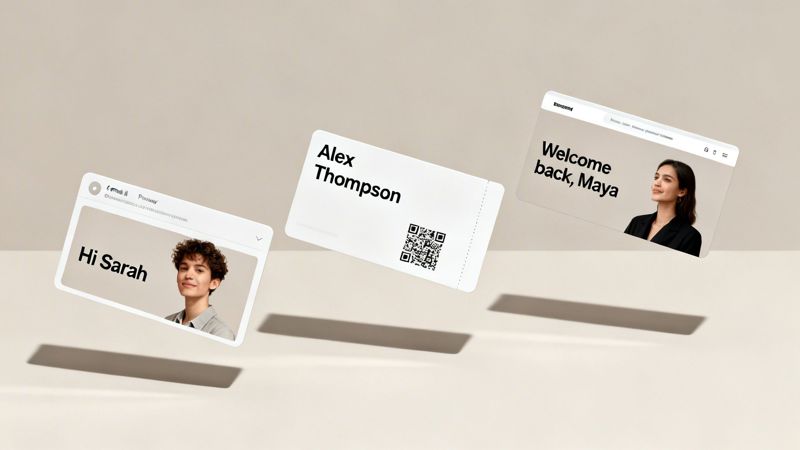
Think about a welcome email you set up in Klaviyo. Instead of a standard banner, a dynamic image API can generate a visual that greets your new subscriber by name. It’s an instant attention-grabber that makes a great first impression.
- Goal: Boost engagement and build an immediate connection with new subscribers.
- Data Used: The subscriber's
first_namefrom your email list. - Outcome: A personalized welcome image like "Welcome, Sarah!" gets automatically slotted into the email. This leads to higher open rates and a more positive brand feel right from the start.
You can use this same approach for abandoned cart reminders, where an image shows the exact product a customer left behind. For a deeper look, check out our guide on using a dynamic image API for email marketing.
Automated Certificates and Event Tickets
If you're a coach, course creator, or event organizer, you know the pain of manually creating personalized documents. A dynamic image API completely automates this, letting you generate thousands of unique certificates or tickets in minutes.
A perfect example is issuing digital tickets for a conference. Every ticket needs to be unique, showing the attendee's name, a scannable QR code, and maybe even their seat number.
By connecting your registration list (from a Google Sheet or your CRM) to a dynamic image template, you can instantly generate a personalized ticket for every single person who signs up. This not only saves hundreds of hours but also gives off a professional, high-tech vibe.
This method is ideal for:
- Course Completion Certificates: Automatically add the student's name and completion date.
- Event Passes: Include attendee details, QR codes for entry, and event branding.
- Membership Cards: Generate digital cards with member names and unique ID numbers.
Hyper-Personalized Cold Outreach
In the B2B sales and cold outreach world, standing out is everything. Sales teams using platforms like Instantly can use dynamic images to cut through the inbox clutter and grab a prospect's attention. It's easy to delete a generic email, but one with a personalized image? That's much harder to ignore.
For instance, a sales rep could build an outreach template that pulls in the prospect's name, company, or even their company logo into an image.
- Goal: Increase reply rates on cold email campaigns.
- Data Used:
first_name,company_name, andcompany_logo_urlfrom a prospect list. - Outcome: An email lands with a custom image that says, "Hey David, here's how OKZest can help Acme Corp." That level of personalization shows you've done your homework and makes your pitch way more compelling.
Engaging Website and Social Media Content
Dynamic images are also incredibly useful on your website and social media. You can tailor website content for returning visitors or create one-of-a-kind visuals for direct messages on platforms like X (formerly Twitter) or LinkedIn.
Imagine a customer logs back into your e-commerce site and sees a hero banner that says, "Welcome back, Maya! Here are some new arrivals we think you'll love." This small touch makes the shopping experience feel personal and curated, encouraging loyalty and repeat business.
Similarly, sending a new follower a personalized "thank you" graphic with their username in a social media DM can create a powerful and memorable interaction. It turns a simple notification into a genuine moment of connection.
The table below breaks down how different roles can leverage dynamic images to hit specific goals.
Dynamic Image Use Cases by Industry
| Target Audience | Use Case Example | Key Benefit |
|---|---|---|
| Sales Teams | Add a prospect's company logo to an outreach image. | Increase reply rates and book more meetings. |
| Course Creators | Auto-generate certificates with student names. | Save time and provide a professional student experience. |
| Event Marketers | Create personalized event passes with QR codes. | Streamline check-in and boost attendee engagement. |
| E-commerce Managers | Show a "Welcome Back, [Name]" banner on the homepage. | Increase customer loyalty and repeat purchases. |
As you can see, the applications are broad and directly tied to tangible business outcomes. It's all about using data to make your visual content more relevant and impactful for each individual.
How to Get Started with a Dynamic Image API
Diving into personalized visuals is a lot more straightforward than you might think. Whether you're a marketer who lives in email platforms or a developer who speaks in code, there's a clear path to start using a dynamic image API. The right approach just depends on your comfort level with tech and what you're trying to achieve.
It all starts with choosing between two main methods. One path is built for speed and simplicity, letting you get started without writing a single line of code. The other offers deep customization and control through direct API calls for those who need it. Both routes lead to the same powerful outcome—incredible, personalized images generated on the fly.
This isn't just a niche idea; it's a core part of the booming AI API market. Valued at USD 48.50 billion in 2024, this sector is projected to hit USD 246.87 billion by 2030, growing at a blistering 31.3% CAGR. With cloud APIs making up over 71% of deployments, it's clear that services like OKZest are at the heart of this shift. Marketing alone claimed over 30% of the related image recognition market in 2023, showing just how critical this technology has become.

The No-Code Path for Marketers
For marketers, social media managers, and entrepreneurs, the no-code approach is a total game-changer. It removes all the technical hurdles, letting you create and use dynamic images with the tools you already know and love. Platforms like OKZest are built exactly for this, making personalization as simple as using standard merge tags.
Here’s a quick look at how it works:
- Design Your Template: First, you use a visual, drag-and-drop editor to build your base image—adding your logo, background, and other fixed elements.
- Add Dynamic Layers: Next, you define placeholders for text or images, like
{{first_name}}or{{company_logo}}. - Generate a Merge Tag URL: The tool gives you a special URL that includes these placeholders.
- Paste and Personalize: You then paste this URL into your email marketing platform (like Klaviyo or Instantly), CRM, or website builder. Your platform automatically swaps the placeholders with data from your contact list, creating a unique image for every single person.
This method is incredibly powerful because it requires zero coding. If you know how to copy and paste, you can create hyper-personalized email campaigns that grab attention and get clicks.
The API Path for Developers
For developers or teams needing more complex integrations, direct API access is the way to go. It offers complete flexibility, allowing you to programmatically generate images right from your own applications, databases, or backend systems.
The workflow here involves sending a request to the dynamic image API endpoint with a payload, usually in JSON format. This payload contains all the data needed to build the image.
Once you’ve settled on a dynamic image solution, it’s a good idea to dig into its documentation. For example, exploring a provider's dedicated page on API Access can give you the code examples and guides you need to get up and running quickly.
A simple JSON payload might look something like this:
{ "templateId": "tmpl_123abc", "modifications": [ { "name": "first_name", "text": "Alex" }, { "name": "profile_image", "image_url": "https://example.com/alex-photo.jpg" } ] }
The API takes this request, generates the image, and sends back a URL for it. You can then embed that URL anywhere in your app. This approach is perfect for situations that require real-time image generation based on user actions or complex data lookups.
Key Implementation Considerations
No matter which path you choose, there are a few things to keep in mind to make sure your dynamic images load fast and work every time.
- Performance and Caching: Dynamically generated images need to be fast. Good API providers use a Content Delivery Network (CDN) to cache generated images. This ensures that once an image is created, any future requests for it are served instantly, which is critical for email open rates and website speed.
- Security: When you're passing data through URLs, make sure your provider offers secure methods like signed URLs. This stops people from messing with the parameters and generating images you didn't authorize.
- Rate Limits: Always check for any rate limits the API might have. If you’re planning a huge campaign, you need to be sure your plan can handle the volume of requests without hitting a wall.
- Fallback Strategy: Always have a backup plan. A solid dynamic image API will let you set default values for both text and images. This way, even if personalization data is missing for someone, your visual still looks complete and professional—no more broken or empty images.
Choosing the Right Dynamic Image Solution
Picking the right partner to bring your personalized visuals to life is a big decision. Now that you have a handle on what a dynamic image API is and what it can do, it’s time to find a solution that fits your needs—whether you're a solo marketer or part of a big enterprise team. The sweet spot is a platform that offers the perfect mix of power, flexibility, and genuine ease of use.
This choice often boils down to balancing serious technical muscle with a user-friendly interface. You need a tool that lets your marketing team move fast and experiment without hitting a wall, while also giving developers the solid API they need for deeper integrations. That combination is what separates a good tool from a great one.
Finding a Solution for Everyone
A key thing to look for is a tool that serves two masters well. The best platforms are built for both non-technical users and experienced developers.
- Powerful No-Code Editor: Marketers need an intuitive, visual editor to design templates and generate merge tag URLs without touching a line of code. This speeds up campaigns and makes it easy to try out new ideas on the fly.
- Flexible Developer API: At the same time, the platform has to deliver a well-documented, flexible API. This allows developers to build custom workflows and weave dynamic images right into your company’s own applications.
This kind of versatility ensures your whole company can get in on the personalization action, no matter their technical skills. It breaks down silos and makes dynamic imaging a shared asset instead of a niche, developer-only task. We built OKZest on this very principle, combining a simple drag-and-drop editor with a powerful API to serve every type of user.
Essential Features and Considerations
Beyond the main editor and API, a few other features are make-or-break for a successful rollout. When you're weighing your options, you need to look at the complete package.
A solid fallback system is non-negotiable. As we’ve mentioned, missing data is just a fact of life, and your tool must handle it without missing a beat. A platform that lets you set default text and images ensures every visual stays professional and on-brand, which protects the user experience. You can learn more about how a custom image API handles these details in our dedicated guide.
The right solution isn't just about making images; it's about providing a reliable, end-to-end service that anticipates real-world data issues and makes sure your brand always looks its best.
Pricing should also be a major factor. Look for pricing models that are both accessible and can scale as you grow. A provider with a generous free tier lets you test everything out and prove the ROI before you have to commit. As your needs get bigger, the pricing should scale transparently to support high-volume campaigns for enterprises generating millions of images each month.
Finally, don’t forget about the human element. Great customer support can make all the difference, especially when you’re just getting started. A partner who is responsive and actually listens to feedback—using it to guide their product roadmap—is invested in your success. At OKZest, we pride ourselves on human-centric support and invite our users to help us shape the future of the platform. By choosing a tool that’s designed for your success, you can confidently start building the meaningful, revenue-driving campaigns you’ve been dreaming of.
Frequently Asked Questions About Dynamic Image APIs
Whenever you're thinking about adding a new tool to your stack, questions are bound to pop up. When it comes to dynamic image APIs, getting clear answers is the first step to feeling confident about using them. Let's walk through some of the most common questions we hear.
How Technical Do I Need to Be?
This is probably the most common question, and the answer is great news: you don't have to be a coder to make this work. It really just depends on how you want to use it.
- For Marketers (No-Code): If you're comfortable in an email marketing platform, you have all the skills you need. Solutions like OKZest give you a simple merge tag URL. You just copy and paste it into your email template, and the platform does all the heavy lifting.
- For Developers (API): If you want to integrate dynamic images directly into your app or website for a more custom setup, you can use the direct API. This approach gives you maximum control but does require some programming knowledge to implement.
What Happens If My Personalization Data Is Missing?
This is a really important point. What if you want to add a first name to an image, but your database only has an email for that contact? This is exactly why fallbacks exist.
Fallbacks are your safety net. They are predefined default values that automatically show up when specific data is missing, ensuring your images never look broken or unprofessional.
For instance, an image designed to say "Hello, Sarah!" could automatically default to a more general "Hello, there!" if the first_name data isn't available. This simple trick guarantees a polished look for every single person who sees your image.
Is a Dynamic Image API Affordable for My Business?
Yes, absolutely. This technology is built to be accessible for businesses of all sizes, from solo entrepreneurs to large enterprises. Many providers, including OKZest, offer pricing that grows with you.
This usually looks something like this:
- A generous free tier for anyone just getting started or with low-volume needs.
- Affordable mid-range plans for growing businesses that are scaling their campaigns.
- Custom enterprise plans that can handle millions of image generations every month.
This model lets you start small, prove the ROI, and then scale up your usage as your business grows—all without a big upfront investment.
Will This Slow Down My Emails or Website?
Performance is always a valid concern, but modern dynamic image solutions are designed for speed. The first time an image is generated, it’s instantly cached on a global Content Delivery Network (CDN).
What this means is that every subsequent time that same image is requested, it’s delivered almost instantly from a server close to the user. This whole process happens in the background to make sure your emails load quickly and your website performance stays snappy, giving your audience a great experience.
Ready to create stunning, personalized visuals that capture attention and drive results? With OKZest, you can automate your image creation with our easy-to-use no-code editor or our flexible developer API. Start building more engaging campaigns today at https://okzest.com.