Let's be honest, marketing can feel like controlled chaos.Let's be honest, marketing can feel like controlled chaos. Deadlines loom, tasks get dropped, and nobody seems to know who’s supposed to do what next. Marketing workflow management is how you tame that chaos and build a predictable, high-performance engine for your team.
Think of it as the blueprint for getting things done. It’s the system that ensures every single project—from a quick social media post to a massive campaign launch—runs smoothly, on time, and on budget.
The Blueprint for Marketing Success

Picture a top-tier restaurant kitchen during the dinner rush. Every chef has a specific role, every ingredient is ready to go, and dishes glide from one station to the next without a hitch. That’s a workflow in action. Without it, you get duplicated effort, missed deadlines, and a whole lot of confusion. Sound familiar?
Effective marketing workflow management is much more than a simple to-do list; it’s a core strategy. When you map out every step, assign clear roles, and build a repeatable process, you start eliminating those frustrating bottlenecks. It frees up your team to do what they do best: creative, high-impact work. A key part of any modern marketing blueprint is understanding what is workflow automation and how it can supercharge your efficiency.
Why This System Matters
Putting a solid workflow in place fundamentally changes how your team operates. Instead of constantly putting out fires, your team can proactively plan and execute campaigns with clarity and confidence. The benefits pop up almost immediately:
- Eliminates Chaos: It creates a single source of truth for every project, cutting down on confusion over tasks, deadlines, and who owns what.
- Boosts Productivity: By automating the repetitive stuff, marketers can shift their focus from admin work back to strategy and creativity.
- Improves Collaboration: It establishes clear handoffs and communication lines, so everyone is aligned and knows their part.
By systematizing your processes, you build a marketing machine that is not only efficient but also scalable. As your team grows, a solid workflow ensures quality and consistency remain high.
Ultimately, this system gives you control and foresight. The principles here are closely tied to the ideas behind great project management for creative teams, where structure actually enables creativity instead of stifling it. This is how you build an operation that delivers impressive, predictable results, time and time again.
The Five Pillars of an Effective Workflow
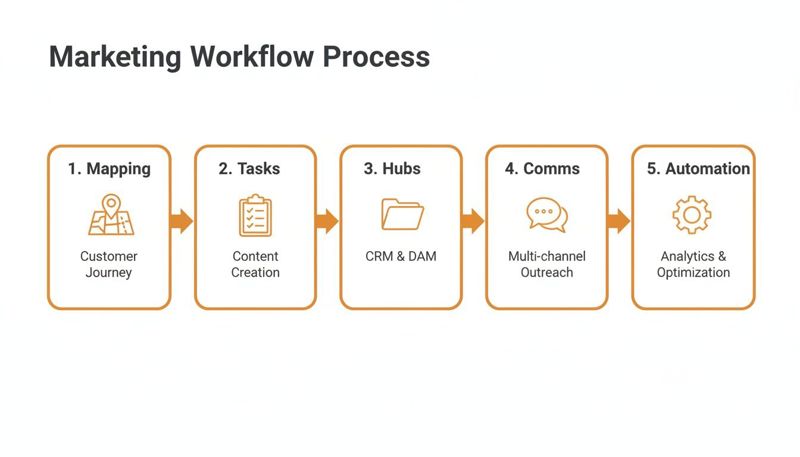
A solid marketing workflow doesn't just happen on its own; it’s built on five core pillars that all lean on each other. Think of it like building a house—if the foundation is shaky or a wall is missing, the whole structure is compromised. When these five pillars work in harmony, they turn creative chaos into a smooth, predictable engine for growth.
Let's break down exactly what those pillars are.
1. Process Mapping
Before you can fix or improve a workflow, you have to actually see it. Process Mapping is just that—creating a visual blueprint of a project from the first spark of an idea to the final launch. It shows every single step, every decision point, and who hands off work to whom.
Imagine you're launching a new ad campaign. A process map would lay it all out: initial brainstorming, creating the brief, writing the copy, getting the design done, and finally, the review and go-live. This map makes sure everyone on the team knows the full journey and exactly where they fit in.
2. Task Management
If your process map is the high-level roadmap, then Task Management is the turn-by-turn GPS for every person on the team. It’s where you break down that big, beautiful map into small, bite-sized tasks with clear owners, deadlines, and dependencies. This is how the big picture translates into a daily to-do list.
Good task management means no more guesswork and nothing gets dropped. It gives you instant answers to crucial questions:
- What's the designer focused on today?
- Is the copy approved yet?
- Who’s responsible for pushing this live?
3. Resource Hubs
A Resource Hub is your team's central library—a single, organized place for every asset, template, brand guideline, and key document. Without one, your team wastes precious time digging through old emails, messy shared drives, and endless chat threads just to find the right file.
A clean resource hub is the difference between a cluttered garage and a surgeon's operating table. It prevents version-control headaches and keeps your brand consistent because everything has its place, ready to go.
4. Communication Channels
Clear communication is the nervous system of your entire workflow. Communication Channels are the designated places where your team discusses projects, gives feedback, and shares updates. This pillar stops critical information from getting buried in a messy inbox or lost in a random DM.
By setting up specific channels—like using your project management tool for task comments and a chat app for quick questions—you cut through the noise and make sure everyone is on the same page.
5. Intelligent Automation
The final pillar, Intelligent Automation, is what gives your workflow its power. It’s all about using technology to take care of the repetitive, manual tasks that eat up your team's time, freeing them to focus on strategy and creative thinking. This push for efficiency is huge, with the global workflow management system market expected to hit $17.7 billion by 2025.
To really kick things into high gear, you need to build in scalable marketing automation strategies. This could be as simple as a task automatically being assigned to the next person in line once the previous step is marked complete, or sending a reminder when a deadline is near. This is where a great workflow management system truly pays for itself.
Mapping Your Marketing Campaign Lifecycle
Every campaign—from a quick blog post to a full-scale product launch—travels through a clear sequence of steps. Mastering this sequence is the heart of marketing workflow management, turning big ideas into repeatable processes. Think of it like following a well-marked trail: without signposts, your team wanders; with them, everyone knows exactly when to pitch the tent, refill water, or reach the next peak.
Before we unpack each phase, let’s take a bird’s-eye view of the journey.
Marketing Workflow Lifecycle Stages and Key Roles
Below is a snapshot of the five core stages, the main activities you’ll tackle, and who typically owns them.
| Stage | Key Activities | Primary Roles Involved |
|---|---|---|
| Stage 1 Strategic Briefing | Define campaign goals, audience, messaging, budget | Content Strategist, Marketing Manager |
| Stage 2 Creative Production | Develop copy, visuals, video assets, SEO integration | Copywriter, Designer, Video Producer, SEO Specialist |
| Stage 3 Review and Approval | Gather feedback, perform quality checks, secure sign-offs | Marketing Manager, Brand Manager, Legal |
| Stage 4 Campaign Launch | Publish assets, schedule posts, deploy across channels | Social Media Manager, Web Developer, Email Marketer |
| Stage 5 Performance Analysis | Track metrics, analyze results, recommend optimizations | Data Analyst, Marketing Manager |
Now that we have this overview, let’s dive into each stage in detail.
Stage 1 Strategic Briefing
This is where you lay the groundwork. A Marketing Manager or Content Strategist gathers the “why” behind the campaign: who you’re talking to, what you want them to feel, and how much you can invest.
- Outcomes: A sharp creative brief that becomes the single source of truth.
- Risk: Skip this step, and your team is building without blueprints.
With clear goals in hand, every following action—from drafting copy to choosing images—stays aligned with the bigger picture.
Stage 2 Creative Production
Here, ideas take form. Writers sculpt the narrative, designers craft visuals, and video producers storyboard and shoot. An SEO Specialist also weighs in, sharing keyword insights.
- Collaboration points: Sync copy and design to maintain brand voice.
- Tip: Block out short, focused review sessions to keep feedback flowing.
When each piece slots together, you’ll have a suite of assets ready for refinement.
Stage 3 Review And Approval
Nothing goes live without this checkpoint. Stakeholders review drafts, spot errors, and confirm alignment with strategic goals. A scattered feedback process can derail progress—emails slip through the cracks and approvals stall.
- Best practice: Centralize comments in one tool.
- Sequence: Copy review → Manager approval → Final sign-off.
This visual guide prevents misunderstandings, so everyone sees exactly where things stand and who’s up next.
Stage 4 Campaign Launch
Launch day demands precise timing. Whether it’s scheduling social posts, publishing a landing page, or sending an email blast, coordination is everything. A misaligned release can dilute impact.
- Checklist: Confirm channel settings, double-check links, and ensure tracking is live.
- Coordination: A shared launch calendar keeps everyone on the same page.
When everything fires off together, your campaign hits hard and early.
Stage 5 Performance Analysis
The campaign isn’t over once it’s live. This is where you gather the data—engagement rates, conversion figures, return on investment—and turn numbers into lessons.
- Core metrics: Traffic sources, click-through rates, cost per conversion.
- Outcome: Actionable insights that inform your next campaign.
By closing the loop, you prove your team’s value and sharpen future strategies, making each new campaign stronger than the last.
Building Your Integrated Marketing Tech Stack

Your marketing workflow is only as good as the tools you use to run it. But a random pile of disconnected apps just creates more digital chaos, forcing your team to constantly copy, paste, and manually update everything. The real goal is to build a cohesive ecosystem where information flows freely between every platform you use.
Think of it like assembling a crew for a mission. Each member has their own special skill, but they all need to communicate instantly to get the job done right. Your tech stack should work the exact same way.
The Core Components of Your Stack
Most solid marketing tech stacks are built on three main pillars. These tools become the operational hub for all your campaigns, giving you structure and a single source of truth everyone can rely on.
- Project Management Hub: This is your command center. Tools like Asana or Trello give you a visual roadmap for every project, letting you track tasks, deadlines, and who owns what from beginning to end.
- Real-Time Communication: This is your team’s direct line. Platforms like Slack or Microsoft Teams cut through the email noise for quick questions and feedback, keeping the momentum going.
- Central Asset Library: This is your organized arsenal. A cloud-based spot like Google Drive or Dropbox ensures everyone has the latest brand guidelines, approved images, and final copy at their fingertips.
A truly integrated stack isn’t just about having the right tools; it’s about making them talk to each other. The magic happens when an action in one platform automatically triggers a response in another.
This is where you start to see real efficiency. For example, you could use an integrator like Zapier to automatically create a task in Asana the moment a new lead pops up in your CRM. No more manual data entry, no more delays.
Connecting Your Tools for Seamless Automation
Great marketing workflow management is all about creating those seamless connections. Imagine a designer marking a task “complete” in Trello, which then automatically pings the project manager in Slack and uploads the final design to a specific Google Drive folder. That’s the power of an interconnected system.
And the impact is huge. Research shows that companies automating email workflows can generate twice as many leads and 58% more conversions. In the B2B world, 67% of marketers see at least a 10% jump in their sales pipeline from automation. You can dig into the numbers yourself in this breakdown of workflow automation statistics.
This same principle applies to your specialized creative tools. For instance, by integrating a platform like OKZest, you can automate personalized image creation on a massive scale. A new name added to a spreadsheet could instantly trigger a unique, personalized image for that new email subscriber, which is then pulled directly into your email marketing tool.
This is just one of many ways you can learn how to automate business processes to save time and seriously boost engagement. It turns your tech stack from a simple collection of tools into a self-sufficient, automated marketing engine.
How to Measure Workflow Performance and ROI
An efficient workflow feels great, but feelings don't impress the C-suite—data does. To really prove the value of your marketing workflow management, you have to move past gut feelings and focus on the hard metrics that show a real impact on the business and, most importantly, its return on investment (ROI).
It’s all about tracking Key Performance Indicators (KPIs) that draw a straight line from your operational improvements to the company's bottom line. The right metrics don’t just justify your efforts; they build a rock-solid case for more investment in marketing ops.
Key Metrics for Workflow Success
You don't need to track every single click and action. The key is to zero in on a handful of critical KPIs that tell you how healthy and efficient your entire system is. These numbers tell a clear story about your team's speed, capacity, and cost-effectiveness.
Here are four essential metrics to start with:
- Project Cycle Time: This is the big one. It measures the total time from the moment a project kicks off to the second it’s complete. A shorter cycle time means your team is agile and can turn ideas into live campaigns much faster.
- Throughput: This KPI tells you how much work your team is actually getting done in a set period. Think of it as the number of blog posts published per month or campaigns launched per quarter. Higher throughput is a clear sign of improved capacity.
- Resource Utilization: This metric tracks how your team’s time is being spent. The goal isn’t to make sure everyone is busy 100% of the time, but to ensure your most skilled people are focused on high-value strategic work, not bogged down with admin tasks.
- Cost Per Campaign: By adding up all the costs for each campaign (including team hours and tools), you can directly measure how your workflow improvements are driving down expenses and making your budget work harder.
Tracking these core metrics is the first step in a larger journey. To truly understand your impact, you need to connect them to broader campaign results. You can explore our guide on how to measure marketing campaign success to see how operational efficiency translates into market performance.
Proving the Financial Impact
Ultimately, the goal is to prove financial return. The data on marketing automation's impact is pretty compelling, showing it can deliver up to a 544% ROI. Just look at automated lead nurturing, which has been shown to produce a 451% increase in qualified leads.
Better still, 76% of companies report seeing a positive ROI within the first year of implementation. These stats, which you can find more of over at Thunderbit.com, show how a well-oiled workflow directly fuels growth and profitability. When you connect your workflow KPIs to these bigger business outcomes, you turn an internal win into a clear, undeniable business advantage.
Common Workflow Mistakes to Avoid
Look, even the most thoughtfully designed marketing workflow can go sideways if you’re not careful. Putting a new process into place is a delicate dance, and a few common missteps can throw everything off course. Knowing what not to do is just as important as knowing what to do.
One of the biggest traps teams fall into is over-engineering the process. They get excited and build a monster workflow with dozens of steps, rigid rules, and endless approval gates. Instead of making things more efficient, they create a system so inflexible that it grinds to a halt the moment something unexpected happens. The goal is structure, not a straitjacket.
Another classic mistake is treating your workflow like a "set-it-and-forget-it" document. The market changes. Your team changes. Your goals change. Your processes have to change, too.
Neglecting Team Buy-In
Rolling out a new system without getting input from the people who will actually be in the trenches using it every day? That's a recipe for failure. When team members feel like a process is being forced on them, they’ll either resist it or find workarounds, which defeats the whole purpose.
A workflow is a living document. It should be reviewed quarterly to spot bottlenecks, get feedback, and make small, iterative improvements. A process that isn't evolving is already on its way out.
To make sure your new system sticks, steer clear of these blunders:
- Choosing Tools for Flashy Features: It's easy to get distracted by the latest shiny object. Pick your software based on your team's real, core needs and how well it plays with the tech you already have—not on a bunch of features you'll never touch.
- Ignoring the Onboarding Process: Just handing your team a new tool and hoping for the best won't cut it. You have to provide clear documentation and proper hands-on training so everyone knows how to use the system correctly and consistently.
By sidestepping these common mistakes, you can make sure your new workflow doesn’t just get adopted but actually becomes a lasting asset for your team.
Frequently Asked Questions
Even with a solid plan, a few questions always come up when you're about to change how your team works. Let’s tackle some of the most common ones to give you a bit more clarity.
What Is the First Step to Implementing This System?
The best place to start is with a workflow audit. Seriously, before you even think about looking at software, grab a whiteboard and map out how a project currently gets done—say, a blog post from idea to publish.
Jot down every single step, who’s responsible for it, and—most importantly—where things always seem to get stuck. This isn't about blaming anyone; it's about finding the bottlenecks and communication gaps.
This audit gives you a real-world picture of what you need to fix. It ensures you're designing a new process based on how your team actually works, not how you think they work.
The goal isn't just to buy a tool; it's to solve a problem. An audit makes sure you're solving the right one from day one, which makes your entire marketing workflow management effort far more likely to stick.
How Do You Get Team Members to Adopt a New Workflow?
Getting people on board comes down to two things: including them in the process and showing them what's in it for them. Nobody likes having a new system forced on them out of the blue.
Bring your team into the conversation early. Ask them about their biggest frustrations and what features would genuinely make their day-to-day work easier. When they have a say in building the solution, they feel a sense of ownership.
Then, start small. Run a pilot project with the new workflow. When your team sees for themselves that it means fewer boring tasks, less chasing people for approvals, and clearer communication, they'll be much more open to adopting it for good.
Can This Work for a Small Team or Solo Marketer?
Absolutely. In fact, it might be even more important. Workflow management is all about having a smart process, and that's not something only big teams need.
For a small team or a one-person marketing department, a good workflow is your secret weapon against burnout. It helps you focus on the tasks that actually move the needle, automate the repetitive stuff (like posting to social media), and build a system that can grow with you instead of holding you back.
Ready to supercharge your marketing with automation? OKZest helps you create thousands of personalized images automatically, turning every customer interaction into a unique experience. Stop creating visuals one by one and start engaging your audience at scale. Discover how to automate your creative workflow with OKZest today!