Your campaign can have smart segmentation, polished copy, and a tested subject line, yet still feel mass-produced the moment it opens. The reason is simple. The words change, but the visual stays the same.
That gap matters more than many teams expect.
A personalized greeting tells someone the message was assembled with their data. A personalized image shows the message was prepared for them. It works like merge tags for images. Instead of only dropping a first name into the copy, you can place names, company details, event information, scores, or product context directly into the visual.
API generated images make that possible at scale. They let your team create one image template, connect it to campaign data, and produce a different version for each recipient automatically. A webinar invite can display the attendee’s name on a badge. A sales follow-up can include the prospect’s company logo. A course completion email can arrive with a certificate already filled out and ready to share.
For a marketing manager, the value is practical, not abstract. Your team gets a way to turn CRM fields, form inputs, and campaign data into visuals without asking a designer to build hundreds of one-off assets by hand. Agencies can personalize creative across clients and audiences without multiplying production time. Sales teams can send follow-ups that look prepared, specific, and relevant.
The takeaway is simple: Visual personalization is becoming practical, expected, and scalable. You need a system that turns campaign data into images on demand.
Beyond Text Personalization Your Introduction
A marketing manager launches an event email to a carefully segmented list. The subject line is strong. The greeting uses the recipient’s name. Then the email opens and shows the same generic banner every contact receives.
Personalization stops at the surface.
Now take the same campaign and change the image. Sarah sees a VIP pass with her name, the event title, and the correct date already placed on the design. The message no longer feels like a standard template with a name inserted. It feels prepared for her.
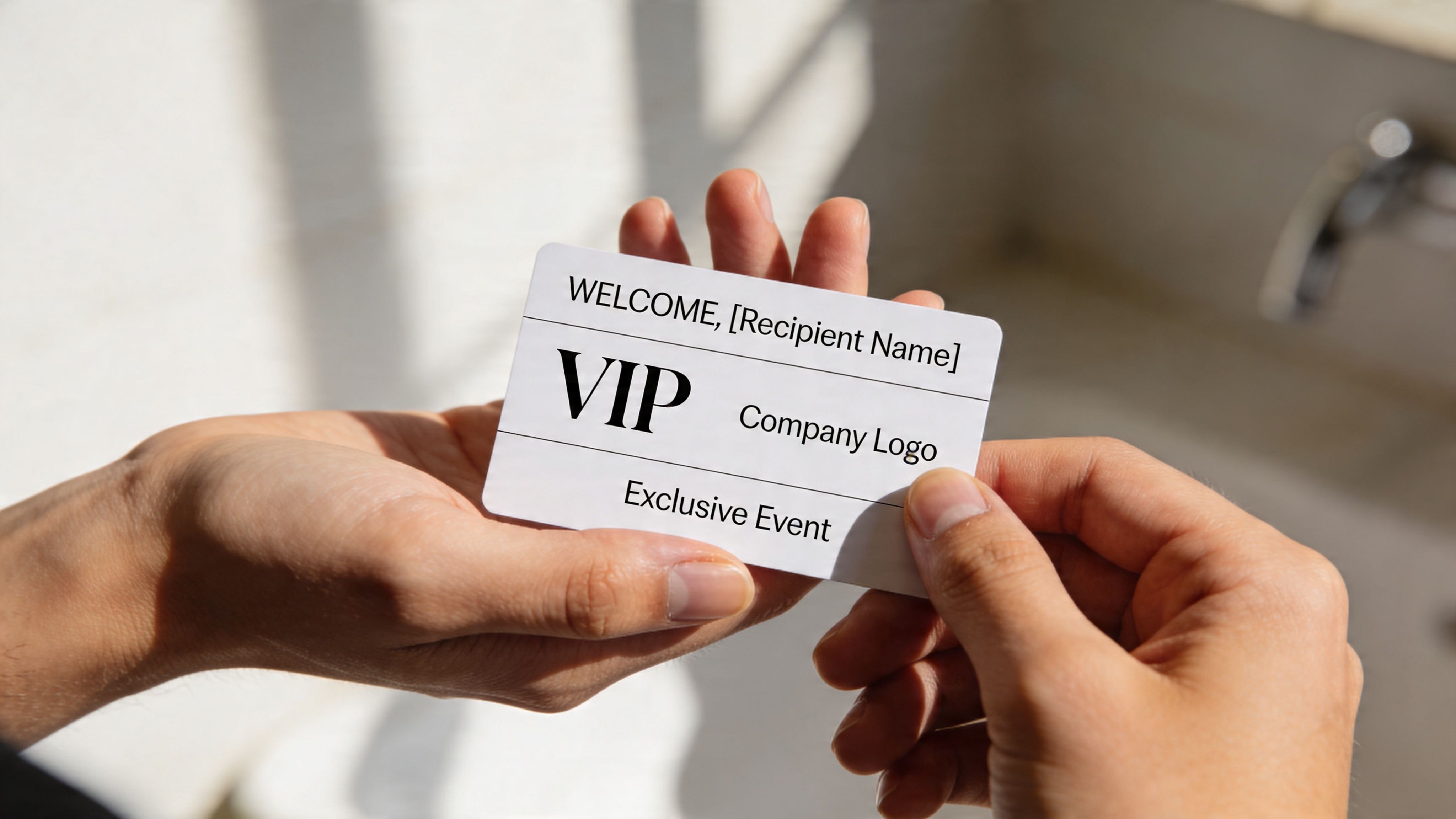
That is the shift API generated images create. They extend personalization from copy into the visual, where attention and credibility are often decided in a second.
Why text alone stops short
Basic text personalization still helps. A first name in a subject line or greeting can improve recognition. But audiences are accustomed to that level of customization and often dismiss it when everything else in the message looks identical.
Visuals do a different job. They set context fast. A badge with a recipient’s name, a certificate with a completion date, or a sales graphic with a prospect’s company logo signals specificity before the reader processes the body copy. For marketers, that matters because campaigns are judged quickly. The image often acts like the cover of the message.
A useful way to frame this is simple. Text merge tags personalize what you say. API generated images personalize what people see.
Why this matters now
Image generation is now part of normal campaign operations, not a niche experiment. As noted earlier, the volume of AI-generated imagery shows how quickly teams have adopted these workflows across marketing, design, and sales.
That matters for a practical reason. Marketing teams no longer have to choose between relevance and production speed. With the right setup, one approved template can produce many customized visuals automatically. That closes the gap between technical API documentation and the core campaign question a manager cares about. How do we create assets that feel one-to-one without sending dozens of design requests?
The answer is to treat images more like dynamic content blocks than fixed files.
This pattern is already easy to spot in adjacent categories such as AI generated interior design, where a single system can produce customized visual outputs for very different use cases. Campaign personalization applies the same operational logic. A template stays consistent, while the data changes what each person sees.
Personalized visuals make a campaign feel prepared, not merely addressed.
For agencies, this means client creative can scale across segments without rebuilding assets by hand. For sales teams, it means follow-up images can reflect account details automatically. For marketers, it means campaign data starts doing visual work, not just copy work.
The upgrade is not automation by itself. The upgrade is useful relevance at campaign scale.
What Are API Generated Images
The easiest way to understand API generated images is this. They’re merge tags for images.
Many are familiar with how merge tags work in email. You insert something like {{FirstName}}, and your email platform swaps in the right value for each recipient. One campaign becomes many slightly different versions.
API generated images apply that same logic to visuals.
Think of a template plus live data
Start with a designed image template. That could be a webinar banner, certificate, coupon, social graphic, or hero image.
Then add dynamic fields such as:
- Recipient details like first name, company name, city, or job title
- Campaign data such as event date, product name, offer code, or membership tier
- Live information pulled from a CRM, spreadsheet, form submission, or another app
When the system receives a request, it combines the template with that data and creates a custom image for that one person.
A static image says the same thing to everyone. A dynamic image changes itself based on who’s viewing it.
A simple mental model
If you’ve ever used product recommendation blocks in an email, you already understand the principle. The content changes based on the reader.
API generated images work the same way, except the changing part is visual. The text on the image can change. The logo can change. In some setups, the background, badge color, or supporting elements can change too.
Practical rule: If you can describe a graphic as “the same design, but with different details for each person,” it’s a good candidate for API generated images.
Where marketers usually get confused
The word “API” often sounds more technical than the actual workflow feels.
You don’t need to think about servers or code first. Think about inputs and outputs.
- Input: your template and your recipient data
- Output: a unique image URL or rendered graphic for each person
That’s it at the campaign level.
Some teams use a no-code tool to set this up. Others connect it to their systems through an API. The marketing goal is the same in both cases. Create one repeatable design, then let data personalize it automatically.
A useful parallel shows up outside email too. In visual property marketing, tools can transform room imagery based on different design choices and contexts. If you want a broader example of how AI-driven visuals are changing non-technical workflows, this piece on AI generated interior design gives a helpful comparison.
What it’s not
API generated images are not just “AI art for campaigns.” They’re not random images made from a prompt and dropped into a newsletter.
For marketers, the strongest use case is controlled personalization. You define the layout, the brand style, and the editable areas. The system fills in the right values. That control is what makes the approach usable in real campaigns, not just fun in demos.
Why Visually Personalized Content Wins
Most campaigns compete for a fraction of a second. A person scans an inbox, scrolls a feed, or glances at a notification. Generic visuals disappear into that flow because they ask the viewer to do extra work. The viewer has to decide whether the message matters.
A personalized image removes some of that friction. It signals relevance before the person reads much at all.
It feels specific, not broadcast
When someone sees their name, company, event, or goal reflected inside an image, the campaign feels less like a bulk send. It feels like a direct message.
That matters because attention is emotional before it’s analytical. People respond faster to content that appears meant for them. A generic banner says, “this is one of many.” A personalized graphic says, “this one is yours.”
The image carries the message faster
Marketers often try to put all the persuasion into the copy. But visuals shape the first impression.
A static event email might show a generic conference stage. A personalized version could show a badge with the recipient’s name and ticket type. The second option doesn’t just decorate the message. It communicates status, belonging, and action.
That’s why API generated images are useful across more than one KPI. They can help with:
- Engagement: people are more likely to stop and notice the message
- Clarity: the offer or context is visible without reading every line
- Relationship building: the brand appears attentive and organized
- Conversion support: the visual reinforces the call to action instead of repeating generic branding
Personalization becomes more believable
Recipients have learned to ignore shallow personalization. They’ve seen enough “Hi John” emails with stock art below them.
Visual personalization is harder to dismiss because it takes your campaign data and puts it in the part of the message people process immediately. It can make the message feel coordinated rather than automated.
A custom image doesn’t replace strong strategy. It makes strong strategy visible faster.
It works across the customer journey
This isn’t just a top-of-funnel tactic. It can support welcome emails, lead nurturing, event logistics, onboarding, milestone messages, sales follow-ups, and retention campaigns.
The reason is simple. Every stage has details that can be individualized.
A welcome campaign can include the subscriber’s name. A renewal reminder can show account details in a branded visual. A post-purchase email can display product-specific imagery with the customer’s context layered in. The same core mechanism keeps working because the underlying marketing need stays the same. You want the recipient to feel that the message was prepared for them, not merely sent to them.
Powerful Use Cases for Every Campaign
The best way to evaluate API generated images is to look at ordinary campaign moments that already exist in your workflow. Teams often don’t need new channels. They need better visuals inside the channels they already use.

Email campaigns that look one to one
Before: a newsletter promotes a webinar with a single hero image for the full list.
After: each recipient sees a webinar card showing their first name, company, and session time. If you’re running account-based outreach, the image can also reflect the target company or market segment.
This works especially well for:
- Welcome sequences where you want the first touch to feel personal
- Promotional emails tied to a named offer, event, or membership
- Re-engagement campaigns where a custom visual helps restart attention
If your team wants examples of how campaign workflows can automate image creation, this guide on https://okzest.com/blog/campaign-image-automation is worth reviewing.
Certificates that don’t require manual design work
Before: an event team exports attendee names, then asks a designer to create certificate files in batches.
After: the certificate template stays fixed while the attendee name, course title, completion date, or badge level is inserted automatically for each recipient.
That makes the delivery feel immediate. It also reduces the operational mess that usually appears after webinars, courses, workshops, and internal training programs.
A clean certificate flow can support:
- Course completion emails
- Event participation follow-ups
- Employee recognition programs
- Partner enablement or channel certification
Social DMs that feel hand prepared
Direct messages often have strong open rates but weak presentation. The text may be personal, yet the image still looks like a mass asset.
With API generated images, a social or community manager can send a welcome image that includes the follower’s name, handle, or milestone. An influencer team can generate branded graphics for new members, private community invites, or campaign shout-outs.
The effect is subtle but important. The recipient sees effort, not just automation.
Sales follow-ups with account context
Sales teams already personalize the copy in outreach. The image layer is usually missing.
A rep could send a follow-up image that includes the prospect’s company name, logo, meeting date, or a visual summary of the offer discussed. The image doesn’t need to be complex. Even a well-branded “proposal ready” visual can create more clarity than a plain block of text.
When a rep sends a follow-up that looks prepared for the account, the conversation feels more deliberate.
Chatbots and support flows with visual outputs
A chatbot doesn’t have to reply only with text. It can return a personalized image summary, onboarding card, milestone badge, or event reminder.
That’s useful when the user needs a visual asset they can keep, download, or share. Support teams can generate branded setup cards. Community bots can issue welcome graphics. Coaching businesses can deliver progress snapshots.
Website personalization without creating dozens of versions
Landing pages often get duplicated just to change a headline or supporting visual. API generated images offer another route. Keep the page layout stable, then swap the image details dynamically based on user data, campaign source, or audience segment.
The design work becomes more reusable. The visitor experience becomes more relevant. And your team doesn’t have to maintain a pile of slightly different creative files just to support one campaign idea.
The Technical Magic How It Really Works
Under the hood, the process is simpler than most non-technical teams expect. Think of it as a production line with five jobs. Data comes in. A template is selected. The system combines them. An image is produced. That image gets delivered where your campaign needs it.
This flow is easier to grasp visually.
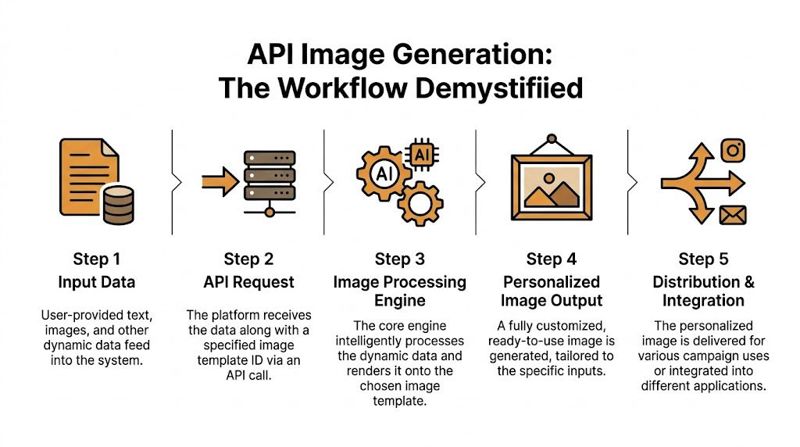
The basic workflow
A typical setup looks like this:
You create a template
A marketer or designer builds the base image. This includes fixed brand elements such as colors, fonts, logos, and layout.You define dynamic fields
These are the parts that change. Name, company, event title, score, date, offer code, or profile image.Your system sends data
That data might come from a CRM, email platform, spreadsheet, form tool, internal database, or another app.The platform generates the image
It fills the dynamic fields and returns a ready-to-use image.Your campaign displays it
The image can appear in email, on a webpage, inside a chatbot flow, or in a direct message workflow.
If you want to see how a REST-based image request works at a practical level, this walkthrough on https://okzest.com/blog/rest-api-image gives a useful implementation view.
What the API call is really doing
For a marketing manager, the API call isn’t a mysterious technical event. It’s just the handoff.
Your campaign tool says, in effect, “Use template X, insert these values, and give me the finished image.” The values could be pulled at send time or generated when a customer reaches a certain step in a journey.
That’s why API generated images are powerful in automation. They aren’t static files stored in folders waiting for someone to upload them manually. They’re assembled when needed.
Fallbacks keep campaigns from breaking
One common concern is missing data. What if you don’t have a company name for every lead? What if a user skipped a form field?
Good implementations use fallback values. If the ideal personalization field is missing, the image still renders with a safe default.
Examples include:
- Missing first name: use “there” or a generic welcome phrase
- Missing logo: show a brand-neutral placeholder
- Missing event detail: use the main campaign title instead of a session-specific line
Fallbacks matter because broken personalization looks worse than no personalization.
Design your templates for real-world data, not perfect data.
Resolution and file size affect real campaigns
Marketing and technical decisions often meet. Large, high-quality images may look great in a design preview but behave poorly in production.
According to the OpenAI image generation guide, output resolution and quality settings directly affect generation latency. For email, which often enforces less than 1MB image limits, specifying JPEG or WebP with 50 to 70 percent compression is critical. That can reduce file sizes by 60 to 80 percent without perceptible quality loss, while helping cut API costs and avoid deliverability problems caused by oversized images.
A practical setup for marketing teams
For most campaigns, the winning approach is not “highest possible quality.” It’s “high enough quality for the channel.”
A certificate download may justify a richer image. An email header probably needs a lighter file. A mobile DM graphic needs to load quickly and still look sharp on a small screen.
That’s technical magic. Not complexity for its own sake. Controlled automation that respects campaign performance.
Best Practices for Flawless Implementation
Teams often don’t struggle with the idea of personalized visuals. They struggle with consistency. One image looks perfect. The next has awkward text wrapping, a mismatched style, or a missing field that throws off the whole design.
Good implementation solves for those problems before launch.
Protect brand consistency from the start
If your image generation workflow includes AI rendering or controlled image variation, consistency matters more than novelty. A campaign should feel like one brand speaking clearly, not a collection of near-matches.
The most important technical control here is the seed. According to Getty Images’ AI generation parameters documentation, reproducibility hinges on seed parameters, which fix the random element in AI generation and allow exact replication of an image with the same prompt. APIs that expose a seed integer support precise consistency for A/B testing and branded content where stylistic variance needs to stay minimal across large volumes.
For marketers, that means this: if you like a result, you should be able to reproduce it.
Build templates for messy data
Real customer data is uneven. Some names are short. Some company names are long. Some records are missing fields altogether.
A durable template accounts for that.
- Allow flexible text space so long names don’t crash into logos or edges
- Use hierarchy carefully by giving the most important personalized field the clearest visual priority
- Test with awkward examples such as long surnames, all caps company names, and missing profile images
Many failed campaigns aren’t caused by the image engine. They’re caused by brittle template design.
Create fallback logic before you need it
Fallbacks shouldn’t be treated like emergency repairs. They’re part of the design system.
Consider three levels:
| Fallback area | Better default choice |
|---|---|
| Name field | A neutral greeting or role-based label |
| Logo slot | A branded icon or simplified badge |
| Optional data point | Remove the field entirely if it weakens the layout |
A fallback should still look intentional. If a user never knows data was missing, the system did its job.
Match the image to the channel
Different channels reward different decisions.
Email favors lighter files and quick loading. A certificate or downloadable social asset can support more detail. A chatbot image may need to prioritize clarity over decoration.
Use a short checklist before launch:
- Channel fit: confirm the aspect ratio suits where the image will appear
- Readability: check that the key personalized element is visible on mobile
- Load behavior: avoid oversized files that create friction
- Brand review: verify fonts, color use, and spacing still feel on-brand after personalization
Stable personalization beats flashy personalization.
Separate design approval from data approval
This is an operational habit that saves time. Approve the visual system and the data logic independently.
The design team should confirm the template works with realistic examples. The marketing ops or CRM owner should confirm the right field values are being passed into the image.
That split prevents a common problem where teams blame the design for an issue that originated in the source data, or blame the data when the layout was never built for variation.
Keep a library of proven templates
Once a certificate, webinar card, sales follow-up image, or welcome graphic works well, save it as a reusable pattern. Over time, your team builds a catalog of assets that can be adapted without starting from zero.
That’s when API generated images stop being an experiment and start becoming a repeatable marketing capability.
How to Choose an Image Generation Platform
A polished demo can hide important gaps. The key question isn’t whether a platform can create an eye-catching image once. It’s whether your team can use it reliably inside live campaigns.
The best evaluation method is to score the platform against your workflow, not against a feature list alone.
Vendor evaluation checklist
| Criteria | What to Look For |
|---|---|
| Ease of setup | A workflow your team can understand without heavy developer support |
| No-code options | A visual editor or guided setup for marketers who don’t want to work directly with raw requests |
| API access | Flexible integration for teams that want to generate images from apps, CRMs, or custom systems |
| Data inputs | Support for names, company info, image layers, and other dynamic fields from common tools |
| Fallback handling | Default values and safe rendering when personalization data is missing |
| Channel compatibility | Images that can be used in email, websites, chatbots, social messages, and other campaign environments |
| Scalability | A pricing and usage model that can support small tests and larger campaign volume |
| Team workflow | Project organization, collaboration, and role management for agencies or larger internal teams |
| Support quality | Fast help when a campaign is live and something needs to be fixed |
| Brand control | Reliable template control so personalized outputs still match your visual standards |
Questions worth asking in a demo
Don’t stop at “Can it generate images?” Ask how the platform behaves in normal marketing conditions.
For example:
- What happens when a field is blank?
- Can non-technical marketers update templates without opening a support ticket?
- How does the platform deliver the final image?
- Can the same template work across email and web use cases?
- Is there a practical path from a small pilot to larger campaign volume?
Those questions reveal more than a gallery of sample outputs ever will.
Match the platform to your team shape
A solo consultant doesn’t need the same setup as a multi-client agency. A sales team running account-specific outreach has different needs from an event organizer issuing certificates.
If your team prefers visual tools over engineering-heavy workflows, it also helps to understand the broader trend toward simpler AI product building. This overview of a no code AI app builder is useful context because it shows how quickly non-technical teams now expect to assemble automation without writing much code.
One practical example of fit
Some platforms focus on broad image generation. Others focus on campaign personalization. If your need is controlled, repeatable image automation for marketing use cases, compare vendors that support both no-code and API workflows, dynamic data, and fallback logic. For example, OKZest offers no-code and API-based personalized image generation for channels such as email, websites, social messaging, and certificates.
For a broader category review, this comparison of https://okzest.com/blog/best-image-personalization-platforms-2026 can help you frame the options.
What usually matters most
In practice, buyers often overvalue novelty and undervalue reliability.
A platform earns its place when your team can launch without friction, maintain brand consistency, and adapt the same system across multiple campaigns. If you can’t trust the output, or if every new use case needs custom intervention, the tool becomes another bottleneck.
Choose the platform that makes personalized visuals operational, not just possible.
Start Creating Your Personalized Visuals Today
Generic visuals hold back campaigns that are otherwise well targeted. You may have the right segment, the right offer, and the right timing, yet still deliver a message that looks mass produced.
API generated images fix that by turning your campaign data into visuals that feel specific. That’s the practical leap. Not personalization in theory, but personalization people can see.
A good way to begin is to pick one use case with obvious value and low complexity. A welcome email is a strong starting point. A certificate workflow is another. Both let your team test the full process of template design, data mapping, fallback handling, and delivery without rebuilding your whole marketing stack.
Start small, but start with a real campaign. Use real contact data. Review the images on desktop and mobile. Check how they load. See how the visual changes the feel of the message.
Once one workflow is stable, the pattern becomes reusable. The same operating model can support events, sales outreach, social messaging, chatbots, and web personalization.
The important part isn’t mastering every technical detail on day one. It’s recognizing that images no longer have to be static files. They can be dynamic campaign assets, just like copy, offers, and product recommendations already are.
If your team has already outgrown “Hi {{FirstName}}” as the whole personalization strategy, this is the next move.
If you want to test personalized image workflows without committing to a large build, OKZest is one option to explore. It supports no-code and API-based image personalization, including fallback values and use cases like email, certificates, websites, chatbots, and social messaging.