You’ve probably had this campaign briefing before.
The email copy is solid. The segment is clean. The offer fits the audience. Then the creative goes out with one generic hero image for everyone, and the whole message feels less personal than the data behind it.
That gap matters. A subscriber can see their own name in a subject line, then open the email and find a stock image that could have gone to anyone. Sales teams run into the same problem in outreach. Event organizers hit it with badges, certificates, and reminders. Coaches hit it when they want every client touchpoint to feel direct, not mass produced.
Backend image rendering closes that gap. It lets a server create finished images from a template plus live data, then deliver those images into email, web, social messages, certificates, and landing pages without asking the recipient’s device to assemble anything. The result is simple for the audience and far more controlled for the team running the campaign.
Why Your Next Campaign Needs Dynamic Images
A static campaign usually fails in a predictable way. The targeting gets more precise, but the visual layer stays generic.
A webinar invite goes to thousands of contacts, yet everyone sees the same banner. A conference reminder includes customized schedule details in the copy, but the image still looks like a broad announcement. A sales rep personalizes the first line of a message, then attaches a visual that feels mass sent.
Dynamic images change that experience.

Static creative breaks the story
Marketing teams already understand mail merge for text. Backend image rendering applies the same logic to visuals.
A template stays fixed. The data changes. The system inserts a first name, event title, reward level, city, coach note, or product detail into the image before it’s delivered.
That matters because images do emotional work faster than body copy. A personalized visual tells the recipient, in one glance, that the message was prepared for them.
A dynamic image works like mail merge for design. One template, many outputs, no manual export queue.
The shift from manual production to live generation
Without backend rendering, teams usually pick one of two weak options:
- Manual versions: Designers export many variants by hand. This works briefly, then collapses under volume.
- Front-end assembly: The browser or email client tries to build the visual experience on the user side. That creates inconsistency and limits control.
Backend image rendering solves both. The image is produced on the server as a final asset, then sent out ready to display.
That model has deep roots. The development of computer graphics and visualization techniques from 1965-1978 laid the groundwork for modern image generation systems, including the rendering ideas later commercialized by companies founded by alumni from the University of Utah center, such as Adobe, Pixar, and Atari.
Where marketers feel the difference
The practical uses are immediate:
- Email marketers can send one campaign where each recipient sees a different hero image.
- Event organizers can generate badges, certificates, and reminders without a design bottleneck.
- Sales teams can turn outreach visuals into one-to-one assets instead of generic attachments.
The biggest benefit isn’t novelty. It’s alignment. Your image finally matches the personalization already happening in your CRM, ESP, and campaign logic.
Understanding Backend Image Rendering
Often, people hear “rendering” and think of something complicated. In practice, the idea is straightforward.
A backend rendering system takes a design template, fills it with data, turns it into an image file such as a PNG or JPEG, and returns that finished file to email, web, or another delivery channel. The user doesn’t build the image. They just receive it.
Think of it as a kitchen, not a meal kit
Front-end rendering is like handing ingredients to every customer and asking them to cook dinner at home. Some kitchens are great. Some are missing tools. Some clients won’t support the recipe at all.
Backend image rendering is the restaurant kitchen model. The cooking happens in one controlled place. The finished dish arrives ready to serve.
That matters in marketing because recipients use mixed environments. Gmail, Outlook, Apple Mail, landing pages, mobile browsers, and chat apps all behave differently. A pre-rendered image reduces those variables.
What happens behind the scenes
The workflow usually looks like this:
A request comes in An email, page load, automation step, or API call asks for an image.
The system fetches data That may include names, dates, product attributes, account details, or content from a database or external API.
Template rules apply Text is inserted. Images swap. Conditional logic can show one message for one segment and another for a different segment.
The server renders the image Fonts, layers, alignment, cropping, and output size are handled centrally.
A final image URL is returned The receiving platform displays the asset like any other image.
Why teams choose backend over browser-side assembly
Backend rendering gives teams control in four places that matter:
- Consistency: The same template renders the same way regardless of user device.
- Performance: The heavy work happens before the image reaches the user.
- Security: You can control how incoming data is sanitized and transformed.
- Operations: Designers, marketers, and developers can work from one repeatable system.
If your team wants a deeper technical view of the request-response model, this guide on an image API for developers is a useful companion.
Practical rule: If the visual must look correct in email, assume the client is hostile to complexity and render the final asset on the backend.
Where the confusion usually starts
People often mix up backend image rendering with front-end lazy loading, CSS effects, or client-side canvas work.
Those can be useful, but they solve different problems. Backend rendering is about creating the image. Front-end techniques are mostly about displaying it.
That distinction changes project planning. If your campaign depends on reliable personalization at scale, the rendering decision belongs upstream, where your templates, data validation, and fallback rules live.
Comparing Backend Rendering Architectures
Once a team decides to generate images on the backend, the next question is architecture. Many projects often get stuck here.
There isn’t one universal approach. Different rendering stacks behave very differently under design complexity, traffic bursts, and real-time personalization demands.
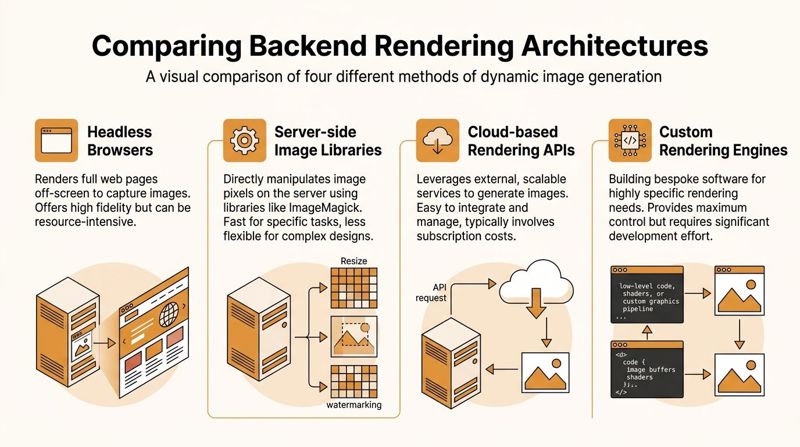
Headless browsers
A headless browser, such as Puppeteer, renders a page off-screen and captures the result as an image.
This approach is attractive because designers and front-end developers can reuse familiar HTML and CSS. If you can build the layout in a browser, you can often render it on the server with minimal design translation.
The trade-off is operational weight. You’re running a browser stack on the server, not just an image tool. That means more memory pressure, more moving parts, and more debugging when fonts, timing, or environment differences show up.
Headless browsers fit well when:
- You already have HTML-based templates
- You need high fidelity to a web layout
- Your team can tolerate heavier infrastructure
They fit poorly when your use case is simple, repetitive, and high volume.
Server-side image libraries
This model uses graphics libraries to draw directly onto a canvas or process layers in code. Think ImageMagick, Sharp, Cairo, or language-specific imaging packages.
These libraries are often fast and predictable for structured layouts. They work well for tasks like placing text over a background, compositing profile photos, resizing assets, and exporting standard formats.
The downside is design flexibility. Once layouts become visually rich, code-based drawing can become tedious. Small creative changes often require developer time. Kerning, line wrapping, and layout rules can also be more finicky than marketers expect.
This architecture suits teams that value speed and control over visual experimentation.
SVG to raster pipelines
SVG-based systems sit between browser rendering and pixel-level drawing. The team builds a vector template, injects data into the SVG, and converts the result into PNG or JPEG.
For many marketing use cases, this is a strong middle ground. Text stays structured. Layouts can remain crisp. Templates are often easier to maintain than pure drawing code.
But not every design translates cleanly into SVG. Filters, font handling, and external asset behavior can introduce surprises. If your creative team works mostly in vector-friendly layouts, SVG can be efficient. If they rely on complex effects, the pipeline can get brittle.
Serverless functions
Serverless rendering packages the generation step into short-lived functions that scale on demand.
This is useful for bursty traffic. A campaign launch, event registration window, or promotional send can trigger large spikes in image requests. Serverless can absorb that pattern without keeping permanent capacity online.
The catch is startup behavior and execution constraints. Cold starts, dependency packaging, font loading, and image library support can all complicate the setup. If the rendering workload is heavy, serverless can become harder to tune than a dedicated service.
Cloud rendering APIs and managed platforms
Many teams eventually land on a managed API model because they don’t want to become experts in rendering infrastructure.
That’s a practical decision, not a shortcut. Most marketing teams need a reliable image generation layer more than they need a custom rendering stack. A managed option can make sense when you care about output, workflow, and integration more than owning every internal component. For enterprise teams comparing this route against custom builds, this piece on an enterprise image API frames the trade-offs well.
The wrong architecture usually doesn't fail on the first campaign. It fails on the first deadline, spike, or data issue.
Comparison of Backend Image Rendering Architectures
| Architecture | Typical Speed | Scalability | Development Cost | Best For |
|---|---|---|---|---|
| Headless Browsers | Moderate | Moderate to high with tuning | High | HTML-based layouts and screenshot-style rendering |
| Server-side Image Libraries | Fast for structured compositions | High | Moderate to high | Repeatable image generation with strong engineering control |
| SVG to Raster | Fast to moderate | High | Moderate | Template-driven visuals with vector-friendly designs |
| Serverless Functions | Variable | High for burst traffic | Moderate | Event-driven workloads and spiky campaign demand |
| Cloud-based Rendering APIs | Operationally simple for teams | High | Subscription instead of infrastructure build | Marketing teams that want fast deployment and less maintenance |
| Custom Rendering Engines | Depends on implementation | Can be very high | Very high | Specialized products with unusual rendering requirements |
Which one works best in practice
For most personalized marketing campaigns, the cleanest path is the one that minimizes hidden complexity.
Choose a headless browser if your creative is closely tied to browser layout. Choose image libraries if your outputs are structured and engineering-led. Choose SVG if your templates are vector-centric and controlled. Choose serverless when traffic is bursty and your render jobs stay within those limits.
If your primary priority is campaign execution, a managed rendering workflow usually wins because it reduces maintenance, shortens implementation time, and keeps the team focused on creative and data quality instead of infrastructure plumbing.
Navigating Performance and Security Trade-offs
Rendering an image is only half the job. Delivering it fast and safely is what determines whether the system survives real campaign traffic.
Project managers usually face two decisions first. Should the image be generated in real time or cached ahead of time? And how much flexibility should the system allow in dynamic fields before it becomes risky?
The caching decision
Not every image needs live generation.
If the output won’t change after it’s created, pre-generating and caching the image usually simplifies delivery. That works well for certificates, static event badges, evergreen social assets, and post-purchase graphics tied to a fixed data snapshot.
Real-time generation is better when the image depends on changing inputs such as inventory, countdowns, scores, API-fed content, or segmentation that may shift at send time.
A practical way to decide is this:
- Cache it when the image should remain stable across repeated views.
- Generate on request when freshness matters more than storage efficiency.
- Use a hybrid when the base image is stable but one layer changes often.
Why performance metrics matter
Rendering speed affects engagement because the image still has to appear quickly in the user’s environment.
According to SpeedCurve’s explanation of rendering metrics, top-performing sites achieve a First Meaningful Paint under 1.5 seconds, average Hero Rendering Times are 1.8 seconds, and delays beyond 2 seconds can cause a 20 to 30 percent drop in conversions. Those are web performance metrics, but the lesson carries directly into personalized image delivery. If the key visual is slow, the campaign loses impact before the message is absorbed.
The metrics teams should watch
Three metrics tend to matter most in practice:
- Start Render: When the first visible content appears.
- Speed Index: How quickly visible content fills in.
- Hero rendering behavior: How long the largest important visual takes to appear.
For marketers, the simple translation is this. The recipient doesn’t care how elegant your rendering stack is. They care whether the important image shows up fast enough to support the message.
If the personalized hero image arrives late, the campaign feels broken even when the backend succeeded technically.
Progressive delivery helps perception
Progressive image rendering is useful when bandwidth varies or images are large.
A discussion of progressive image rendering and progressive JPEG behavior highlights the value of partially displaying images before the full resource arrives. In practical terms, this improves perceived speed. For marketing teams, that means the recipient can begin to see the visual sooner, even before every byte has loaded.
Security isn't optional
Dynamic rendering accepts input, and input makes systems messy.
The most common failures aren’t dramatic attacks. They’re ordinary data issues that create broken or risky outputs:
- Unexpected text length breaks layout.
- Unsupported characters cause rendering failures.
- Untrusted image URLs introduce fetch problems or unsafe content.
- Template-level logic errors expose data you didn’t intend to show.
Protect the pipeline by keeping rules strict:
- Validate all incoming fields.
- Set maximum text lengths for every dynamic layer.
- Restrict or proxy external assets instead of fetching anything the payload provides.
- Escape or sanitize text before rendering.
- Separate marketer-editable fields from system-controlled template logic.
Performance and security often feel like competing priorities. They aren’t. The most stable systems define tight input rules, cache aggressively where possible, and reserve real-time rendering for moments when freshness is worth the extra work.
Inspiring Use Cases for Backend Image Rendering
The strongest use cases usually aren’t the flashiest ones. They’re the moments where one visual makes a message feel specific instead of broad.
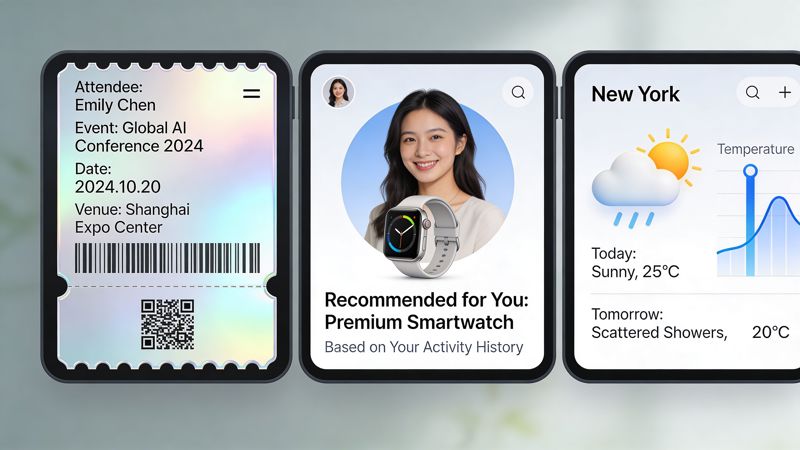
Coaches and consultants
A coach often sends milestone emails that sound personal but look generic.
Backend rendering changes that. The same template can produce individualized progress cards, welcome graphics, accountability reminders, or completion certificates that include the client’s name, program, and milestone message.
That does more than make the email look nice. It gives the client a shareable asset. A congratulations graphic can move from inbox to story post to community chat without extra design work.
Event marketers
Events generate repetitive visual work. Registration confirmations, speaker promos, attendee reminders, digital tickets, and certificates all follow a template but differ by person or session.
With backend image rendering, the event team can keep one approved design system and let the data create the variations. Names, dates, tracks, seat details, or sponsor variations can all flow into a final image automatically.
For event teams, the operational win is often bigger than the creative win. One approved template can serve an entire campaign lifecycle.
Sales teams and outbound
Outbound teams need assets that feel one-to-one without becoming manual design projects.
A rep might send an image that references the prospect’s company, role, region, or campaign concept. That kind of asset can stand out in LinkedIn messages, email outreach, or follow-up sequences because it looks prepared, not mass produced.
The key is restraint. Personalized outreach images work best when the visual adds context, not gimmicks.
Retail and visual merchandising workflows
Some adjacent categories are worth watching because they show how flexible rendering systems can become.
Fashion brands, for example, often need many visual variations across products, audiences, and channels. Teams exploring AI-assisted product presentation may find tools like an AI fashion model generator useful for understanding how personalized visual production is expanding beyond simple text overlays into broader asset generation workflows.
What these examples have in common
Different industries use backend image rendering differently, but the pattern is the same:
- One template system
- Many data-driven outputs
- No manual export loop
- A final image that fits the delivery channel
That’s why this approach works across email, certificates, websites, direct messages, and social support content. The channel changes. The rendering logic stays disciplined.
How to Integrate Personalized Images with OKZest
Integration usually breaks down in two places. Either developers get an API working but leave marketers dependent on engineering for every template tweak, or marketers get merge tags working and then hit a wall when live data is incomplete.
A better setup gives both groups a path.

For developers
If you’re integrating via API, keep the payload model simple. Send the template identifier, pass the personalization fields as structured JSON, and return a generated image URL that your app, email workflow, or automation can insert downstream.
A minimal example looks like this:
POST /v1/generate
{
  "template": "event-invite",
  "data": {
    "first_name": "Sam",
    "event_name": "Growth Summit",
    "seat_label": "VIP",
    "cta_text": "See your agenda"
  }
}
The important implementation detail isn’t the endpoint shape. It’s the contract around the data.
Define which fields are required, which are optional, what the fallback should be for each optional field, and what happens when upstream systems send blanks. If you’re evaluating the API route directly, the OKZest API shows the integration surface.
For marketers and no-code teams
No-code deployment matters because most image changes happen inside campaigns, not inside applications.
The useful pattern is simple:
- Build one approved template.
- Map merge tags from Klaviyo, Mailchimp, Instantly, or another ESP into the image fields.
- Insert the returned image URL into the campaign like any normal image.
That gives the marketing team independence while preserving a controlled design system. It also keeps the image logic close to the send workflow, which is where segmentation and timing decisions already live.
Missing data is a primary production problem
Most tutorials treat personalization as if the data is always clean. It isn’t.
Fields are blank. API calls fail. CRM values arrive late. A first name contains junk text. A profile image URL expires. In such scenarios, production systems either look polished or fall apart.
A major challenge in backend rendering is handling fallbacks for missing data. A 2025 Stack Overflow survey summary discussed on roadmap.sh reported that 68% of backend developers struggle with real-time data fallbacks in image pipelines, and that properly handled personalized images can boost email open rates by up to 26%.
That’s why fallback design should be built into the template itself, not treated as an afterthought.
Use rules like these:
- Name missing: Show a neutral greeting instead of a blank field.
- Profile image missing: Swap to a default brand-safe avatar or illustration.
- Offer text absent: Use a generic campaign message that still makes sense visually.
- Live API unavailable: Fall back to the last known good value or a static version.
What a stable rollout looks like
For a production launch, I’d keep the checklist tight:
- Approve templates before wiring in live data.
- Test with good data, blank data, malformed data, and delayed data.
- Lock text length rules early so design doesn’t drift.
- Preview across your main email clients and mobile contexts.
- Monitor failed renders separately from normal campaign metrics.
The best rendering setup isn't the one with the fanciest logic. It's the one that still produces a professional image when the data is messy.
Best Practices for Scalable Image Personalization
Scalable image personalization is less about one clever trick and more about disciplined system design. The teams that get steady results usually follow the same operating habits.
Keep the template system boring
Complex templates look impressive in demos and become fragile in production.
Use layouts with predictable text areas, controlled font combinations, and clear safe zones for dynamic content. If a field can vary wildly in length, design for the worst-case input first, not the prettiest one.
Treat data like a design dependency
Marketers often think of data quality as an operations issue. In backend image rendering, it’s also a visual issue.
Build a field dictionary. Decide what each data point is allowed to contain. Define defaults before launch. A personalized image system is only as reliable as the data contract behind it.
Separate freshness from volume
Not every campaign asset needs real-time generation.
Use live rendering when the message depends on current information. Use caching when the output won’t change. Hybrid systems usually hold up better under pressure than all-real-time pipelines.
Plan for future AI carefully
AI-driven rendering is becoming part of this domain, but it changes the architecture.
According to Patsnap’s write-up on AI in image-based rendering, adoption of AI models for image generation surged 150% in early 2026, while cold starts in some deployments can add 2 to 5 seconds of latency. For marketers, that means AI can expand creative possibilities, but unmanaged AI rendering can also slow delivery at the exact moment speed matters.
A working checklist
- Design for fallback first: Every dynamic field needs a safe default.
- Limit variable text: Tight constraints protect brand consistency.
- Choose architecture by campaign behavior: Stable assets and live assets shouldn't share the same assumptions.
- Measure what the user feels: Fast output matters more than elegant internals.
- Adopt new rendering methods through platforms or controlled pilots: Don't drop experimental AI workflows into critical campaigns without operational guardrails.
The future of backend image rendering will include more AI, more real-time data, and more cross-channel use. The teams that benefit most won’t be the ones chasing every new rendering method. They’ll be the ones with stable templates, clean data contracts, and delivery workflows that can absorb new capabilities without breaking the campaign machine.
If you want to turn personalized images into a repeatable campaign process instead of a one-off design task, OKZest provides no-code and API-based image generation built for email, web, certificates, social outreach, and other data-driven use cases.