An image API for developers is a service that programmatically generates or modifies images through simple web requests. Think of it as a mail merge for pictures—instead of manually creating thousands of visuals, you can automate the entire process, transforming a single template into countless personalized images for every user, customer, or event attendee.
What Is an Image API and Why Should You Care?
At its core, an image API is built to take the soul-crushing, repetitive work of manual image creation off your plate. Forget about a designer spending hours in Photoshop making tiny tweaks for different user segments. With an API, a developer can just build a URL with specific parameters that act as a set of instructions.
This simple approach marks a huge shift from static, one-size-fits-all visuals to truly dynamic, data-driven content. The API takes a base template and instantly overlays it with the unique elements you provide, like text, logos, or even other user-specific images. The end result is a unique visual generated on the fly, perfectly tailored to its context.
To really see the difference, let's compare the old way with the new way.
Manual vs API-Driven Image Personalization
| Aspect | Manual Image Creation | Using an Image API |
|---|---|---|
| Speed | Slow and laborious; hours or days per campaign. | Instant; images are generated in real-time. |
| Scale | Extremely limited; impractical for more than a few dozen images. | Virtually unlimited; create millions of unique images. |
| Flexibility | Rigid; requires a designer for every change. | Highly flexible; developers can change content via code. |
| Cost | High, factoring in significant design time and resources. | Low and predictable, based on API usage. |
| Integration | Manual upload process for each marketing channel. | Seamless integration with email platforms, apps, and websites. |
As you can see, an API-driven workflow is built for modern marketing and development needs where speed and scale are everything.
The Power of Automation and Scale
The real magic of an image API shines when you think about scale. Manually creating 10 personalized welcome images might be doable. But 10,000? That's just not going to happen. An API automates this entire workflow, making personalization at a scale that was previously pure fantasy.
The adoption of these tools exploded after the 2022 launch of Stable Diffusion, which made open-source image models accessible to everyone and triggered a 150% year-over-year increase in API provider investments. You can explore more about this trend in the full report on API provider growth.
This trend points to a clear move toward more efficient and powerful workflows. For developers, it means you can build more engaging features faster without getting bogged down by mind-numbing design tasks.
By integrating a dynamic image API, you're not just sending generic messages anymore. You’re creating unique, personal experiences that grab attention and drive real results, from email campaigns to automated social media posts. Learn more about how this works in our guide on the basics of a dynamic image API.
Unpacking the Core Features of an Image API

On the surface, an image API seems simple. But its real power comes from the specific features it offers. Not all APIs are created equal, and the right set of tools can be the difference between a clunky workaround and a perfectly scalable system for creating personalized visuals.
For any developer building an engaging app or marketing campaign, knowing what to look for is key. At the heart of any image API for developers is the power to create dynamic overlays—the magic that layers text and other images onto a base template.
Think about a welcome email where the customer's name appears written on a coffee cup. That's a dynamic text overlay. Or imagine automatically placing a client's logo onto a generic background image for a B2B campaign. That's a dynamic image overlay.
Customization Through Parameters
True flexibility comes from parameter-based customization. A great image API lets you control almost every detail of the final image just by changing the parameters in the API request URL. This goes way beyond just adding text.
You can tweak all the fine details:
- Fonts and Sizing: Change the typeface, size, and weight to stay on-brand.
- Colors: Adjust text colors, backgrounds, or overlay shades with simple hex codes.
- Positioning: Get pixel-perfect control over the exact X/Y coordinates of any text or image layer.
- Image Effects: Apply filters, adjust opacity, or even blur backgrounds for a professional touch.
This level of control turns the API from a simple text-adder into a full-blown image composition engine. Developers can build complex, multi-layered visuals without ever opening an image editor. The whole design is defined and executed through code, making it endlessly repeatable and easy to scale.
Data Integration and Fallback Logic
To make an image truly personal, the API needs to connect with your data. This could be a user database, a CRM like HubSpot, or even another API. By passing variables in the request, you can pull real-time information right into your image templates. An e-commerce site, for instance, could generate an image showing the exact product a user left in their cart.
But what happens when the data isn't there? A user might not have provided a first name, or a product image URL could be broken. This is where fallback logic becomes a must-have feature.
A reliable fallback system is your safety net. It stops a missing piece of data from ruining the user experience. Instead of showing an error or a half-finished image, the API automatically uses a predefined default—like using "there" when a first name is missing.
This ensures every single image you generate looks complete and professional, protecting your brand's reputation. Without it, you risk sending out campaigns full of broken visuals, which can seriously damage how customers see you. A top-tier image API for developers has to be as reliable as it is powerful.
Real-World Use Cases That Drive Growth
An image API for developers is more than just a technical toy—it's a practical tool for growth. Let's move past the theory and look at how businesses are actually using programmatic images to connect with their audiences, automate painful tasks, and improve their bottom line.
Hyper-Personalized Email Marketing
Think about the last email that really caught your eye. Chances are, it felt like it was made just for you. Now, imagine opening an email to find a coupon with your name on it, or an event invite with a personalized map right there in the image.
This is worlds beyond just dropping a {{first_name}} merge tag into a block of text. With an image API, marketers can bake dynamic, user-specific details directly into the visuals of their email campaigns.
When someone sees an image made specifically for them, it feels intentional. It creates a "wow" moment that makes them far more likely to click and convert. This works especially well for:
- Promotional offers: Generating unique coupon codes on branded images.
- Event invitations: Displaying a user's name on a digital ticket.
- Loyalty programs: Creating personalized visuals, like a stamp card showing their progress.
The numbers back this up. By 2025, reports showed over 70% of marketing agencies were using image APIs for dynamic content, leading to an average 26% boost in email open rates. Even better, businesses that use personalized images often see engagement rates triple, which can lift revenue by up to 15% in industries like real estate.
This is exactly where a tool like OKZest shines, offering compatibility with over 99% of email service providers. You can find more details about these trends in this report on API provider growth.
Automated Social Media and Community Engagement
Welcoming every new follower or community member personally is a huge challenge for social media managers. An image API can automate this beautifully.
You can set up a simple workflow that instantly generates a custom "welcome" image the second someone joins your Discord or follows your brand. The image could pull in their username or profile picture, creating a personal touchpoint right from the start.
By connecting an image API to a social media monitoring tool, you can create a system that says "thank you" visually and personally, without any manual effort. This simple gesture makes new members feel seen and valued from day one.
The same idea works for chatbots. Instead of just spitting out text, a bot can generate and share dynamic images on the fly—like a custom product mockup or a visual chart—making the conversation more helpful and engaging.
Instant Generation of Certificates and Credentials
If you've ever run an online course or a large event, you know the headache of creating hundreds of certificates. It's a massive time sink.
An image API completely eliminates this problem. By connecting the API to your list of attendees or students, you can automatically generate a unique, professional-looking certificate for every single person.
Each certificate can be instantly personalized with:
- The recipient's full name
- The course or event title
- The completion date
- A unique credential ID
This doesn't just save you countless hours. It gives attendees a shareable asset they can post on LinkedIn, which turns into free, organic marketing for your brand.
Your First Steps to Integrating an Image API
Jumping into an image API is a lot more straightforward than you might think. You don’t need to be a backend wizard to get from zero to a fully personalized image. The whole process really boils down to three simple stages: grabbing an API key, designing a reusable template, and then building a special URL that generates your images on the fly.
Let's walk through it. First things first, you'll need to sign up for the service to get your unique API key. This key is basically a secret password that tells the API it’s you making the request. It’s what keeps your account secure, so be sure to protect it and never, ever expose it in your front-end code.
Designing Your First Template
Once you have your key, you get to the fun part—designing your image. Most modern image APIs, including OKZest, come with a no-code visual editor. This is where you’ll create a base template. You can upload a background, add some text or logos, and most importantly, define placeholders for the dynamic bits you'll populate with the API.
Think of it like creating a PowerPoint slide. You could design a welcome banner and leave a blank space for a customer's name. In the editor, you’d give that space a simple layer name, like name_text, which you'll reference later in your code.
This flow chart shows how a single template can be used across completely different channels.
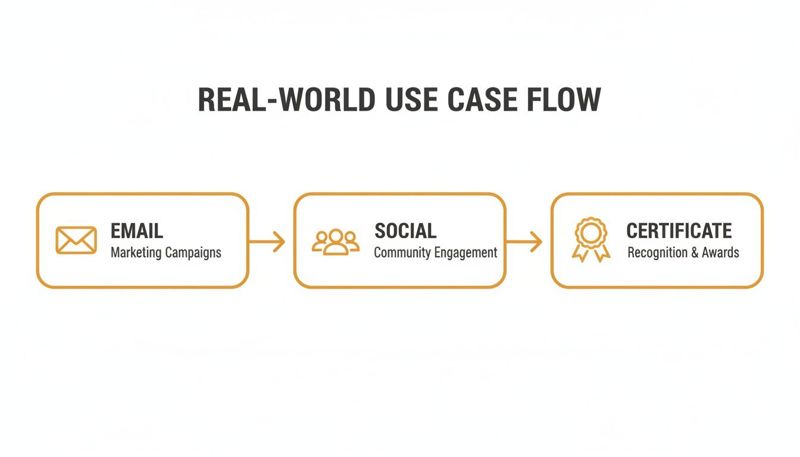
As you can see, the same API integration can power visuals for your emails, social media posts, and even professional certificates. It’s all about maximizing your effort.
Constructing the Dynamic URL
With your template saved, it’s time to construct the dynamic URL. This is the real engine behind any image API for developers. It's just a URL that combines the API's base address, your template’s ID, and the data you want to inject, all passed along as URL parameters.
Here’s a quick look at how you’d do it in JavaScript using fetch:
// Let's assume our template layer is named "name_text" const customerName = "Maria"; const apiKey = "YOUR_API_KEY"; const templateId = "YOUR_TEMPLATE_ID";
// Construct the dynamic URL with parameters
const dynamicImageUrl = https://api.okzest.com/v1/images/${templateId}?api_key=${apiKey}&name_text=${encodeURIComponent(customerName)};
// This URL now points to a personalized image: "Welcome, Maria!" console.log(dynamicImageUrl);
You can then pop this dynamicImageUrl straight into an <img> tag in your HTML, an email template, or anywhere else an image can go. For a deeper look at the mechanics, check out our guide on creating a REST API for images.
It’s just as easy in Python with the requests library:
import requests
customer_name = "David" api_key = "YOUR_API_KEY" template_id = "YOUR_TEMPLATE_ID"
Define the parameters for the API call
params = { "api_key": api_key, "name_text": customer_name }
Construct the URL and make the request
url = f"https://api.okzest.com/v1/images/" response = requests.get(url, params=params)
The final, generated image URL is in response.url
print(response.url)
How to Choose the Right Image API Provider
Picking the right partner for your image generation is a bigger deal than you might think. It's a choice that directly impacts your project's success. An unreliable or slow service can lead to broken images, frustrated users, and lost revenue.
Think of it like choosing a cloud provider. You wouldn't just pick the first one you find; you'd carefully evaluate its performance, scalability, and support. The same logic applies here. The right image API will feel like a seamless part of your own tech stack, while the wrong one will be a constant source of problems.
To make a smart choice, you need a clear checklist of what to look for in an image API for developers.
Performance and Scalability
First and foremost, how fast can the API generate and serve your images? Every millisecond of delay puts you at risk of a user bouncing from your page or deleting your email. Ask potential providers about their average response times—you're looking for one that consistently delivers images in under a second.
Equally important is scalability. Can the API handle your traffic when it really matters?
- Rate Limits: What are the caps on how many images you can generate per minute or per month? Make sure they can handle your biggest campaigns.
- Concurrency: How many requests can the API handle at the same time? This is absolutely vital for high-volume email sends where thousands of images are requested almost instantly.
As demand for programmatic visuals grows, scalability has become a top concern for developers. In fact, 80% of developers cite scalability as a primary benefit, with the resulting automation leading to cost savings of around 25% by reducing manual design work. You can explore more data on the growth of structured image data APIs here.
Platform Compatibility and Integration
An image API doesn't work in isolation. It has to play nicely with your existing tools, especially your Email Service Provider (ESP) or CRM. Before you commit, get confirmation that the provider is compatible with your marketing stack.
For example, a provider like OKZest offers proven compatibility with 99% of ESPs, including major players like Klaviyo and Mailchimp. This is a non-negotiable feature for any serious marketer, as it ensures the dynamic image URLs generated by the API will render correctly for every single recipient, no matter which email client they use.
Finally, take a hard look at the developer documentation. Is it clear, comprehensive, and packed with practical code examples? A well-documented API makes integration much faster and smoother, saving your team valuable development time. A provider that also offers direct developer support through chat or video calls is a huge plus—it shows they’re truly invested in your success.
Automated Image Personalization with OKZest
It's one thing to understand the power of a personalized image API for developers, but actually putting one to work is a whole different story. This is exactly where OKZest comes in. We built it to be a practical solution that gives you the power of an API combined with the simplicity of a no-code visual editor.
Think of OKZest as the engine behind your creative campaigns. It gives developers the control they need while being easy enough for marketers to use directly. This unique blend lets your whole team collaborate on creating stunning personalized visuals without getting bogged down in technical back-and-forths.
The Best of Both Worlds
Our platform stands out by focusing on what truly matters for real-world marketing campaigns. Here’s what makes it so effective:
- Seamless ESP Integration: OKZest plays nice with over 99% of email service providers, including giants like Klaviyo and Mailchimp. This ensures your dynamic images show up perfectly every single time, no matter what platform you use.
- Flexible Data Sources: You can pull information from almost anywhere—spreadsheets, your CRM, or even other APIs—to create deeply personalized and relevant content for each user.
- Reliable Fallbacks: Never worry about a broken image again. You can easily define default text or a backup image to display whenever data is missing, guaranteeing a flawless experience for your audience.
Using OKZest for automated image personalization fits right into broader marketing automation strategies, helping make your campaigns more effective from top to bottom.
OKZest is built to scale right alongside your business. Whether you're a solo consultant sending a few hundred emails or a large enterprise sending millions, we have a plan designed to fit your needs without ever sacrificing performance.
For larger teams and agencies, we've included advanced features like project and role management to make collaboration a breeze. You can learn more about how to put all these features into practice by checking out our full guide to building a personalized image API.
Frequently Asked Questions
Jumping into a new tool like an image API always brings up a few questions. Whether you're a developer getting ready to code or a marketer looking for a simpler workflow, getting these answers sorted is the first step. Let's tackle some of the most common things we get asked.
How Much Technical Skill Do I Need?
This really comes down to how you want to use the tool. For developers, the process is exactly what you'd expect—it’s a standard HTTP request to an endpoint. You build a URL with the right parameters, and you get a custom image back. Simple as that.
But many modern platforms, including OKZest, now offer a completely no-code option. Marketers can use a visual, drag-and-drop editor to design their templates. The tool then provides a simple merge tag to copy and paste right into your email service provider. No programming required. This dual approach means everyone on the team can create personalized images.
What Happens If My Data Is Missing?
This is a great question, and any solid image API handles this with something called fallbacks. It’s a safety net for your data. When you design an image template, you can set a default text or a default image for any dynamic part.
For example, imagine your template says "Hi,
{{first_name}}!" You can set the fallback for thefirst_nameto be "there." If a contact in your database is missing a name, the API automatically generates an image that reads "Hi, there!" instead of showing a broken visual or an ugly error. It ensures a professional and seamless experience, every single time.
Can Image APIs Handle High-Volume Campaigns?
Absolutely. In fact, that's exactly what they're built for. Enterprise-grade image APIs are designed to process millions of requests without breaking a sweat. When you fire off a huge email campaign, the image for each person is generated on-the-fly the moment their email client requests it.
Service providers like OKZest use scalable infrastructure and offer tiered plans specifically to make sure your service is fast and reliable, whether you're sending to a hundred people or a million.
Ready to see how easy automated image personalization can be? OKZest provides both a powerful API for developers and an intuitive no-code editor for marketers. Start creating dynamic images for free today at OKZest.