You launched the campaign on time. The copy was solid, the audience list was clean, and the offer made sense.
Then the results came back flat.
A common reason is not the message itself. It is the visual. The same hero image went to every subscriber, every lead, every customer segment, and every follow-up touchpoint. In a crowded inbox or feed, generic visuals start to blur together.
That creates a hard scaling problem for marketers and sales teams. You want each person to see something that feels relevant, but making separate images by hand for every audience, rep, location, or product variation quickly turns into design chaos. Teams either give up on personalization or limit it to first names in email copy.
An enterprise image API solves that problem differently. Instead of designing thousands of files, you create a system that builds the right image when it is needed. It functions like merge tags for images. The same way an email platform can swap in a person’s name, a dynamic image system can swap in a name, company, product, rep photo, appointment time, live score, or custom message inside the image itself.
For non-developers, that can sound technical. It is not magic, and it is not only for engineering teams. It is a practical way to make visual communication as flexible as your email, CRM, and website data already are.
The Limits of One-Size-Fits-All Visuals
A webinar team spends weeks promoting an event. They build one polished banner, one speaker card, and one reminder graphic. It all looks professional.
But every recipient sees the same thing.
The CEO gets the same reminder image as a junior manager. A customer in retail sees the same creative as a prospect in healthcare. A sales rep shares the same follow-up visual with every account, even though each buyer has different priorities.
That is where static design starts to break down. It scales production, but not relevance.

Why generic visuals lose attention
People notice when an image feels made for everyone. They also notice when it feels made for them.
A static visual can communicate brand consistency. It cannot easily adapt to:
- Audience context: Different industries, roles, or stages in the funnel need different framing.
- Real-time information: Event times change. Inventory changes. Results update.
- Sales ownership: Buyers respond better when outreach looks tied to an actual person or account.
- Location and language: Regional relevance often matters as much as the offer itself.
Teams often try to patch this with folders full of variants. One image for each vertical. Another for each product. Another for each sales rep. Soon you are managing dozens or hundreds of files that all need updates when branding changes.
Manual personalization does not scale
The bottleneck usually shows up in one of three places:
- Design teams get overloaded. Every campaign requests “just a few more versions.”
- Marketers simplify too much. They use one generic image because it is faster.
- Sales teams improvise. Reps screenshot, crop, and edit ad hoc visuals that drift away from the brand.
A personalized image is not just decoration. It can carry context that the surrounding copy cannot deliver as quickly.
That is why many teams stop thinking about image personalization as a design task and start treating it as a delivery system. Instead of asking, “How many versions can we make?” they ask, “What data should the image respond to?”
An enterprise image API becomes useful at exactly that moment. It turns visual personalization from a file management problem into a rules-and-data problem. That is much easier to scale.
What Is an Enterprise Image API
An enterprise image API is a system that creates, transforms, and delivers images programmatically. In plain language, it lets software request an image with specific instructions, instead of relying on a designer to manually produce every version.
The easiest mental model is merge tags for images.
If your email platform can insert {{first_name}} into a subject line, an enterprise image API can insert a first name, company name, product detail, expiry date, or custom message into the image itself. The image can also change size, crop, format, quality, or layout based on the request.
The simple version
A normal image workflow looks like this:
- A designer exports a file.
- That file gets uploaded somewhere.
- Everyone sees the same version.
An enterprise image API works differently:
- A template or source asset exists once.
- A request tells the API what should change.
- The API returns the image variation needed for that moment.
That request might come from an email platform, website, CRM, event tool, internal dashboard, or sales workflow.
What makes it different from image hosting
Basic image hosting stores and serves files. That is useful, but limited.
An enterprise image API goes further. It can:
- Generate variations on demand: Different text, layout choices, or visual elements for different people.
- Transform images automatically: Resize, crop, rotate, optimize, and convert formats when required.
- Connect to business data: Pull in dynamic values from forms, CRMs, databases, or external systems.
- Support large operations: Enterprise-grade platforms are built for high-volume delivery across teams and channels.
This category is moving from niche infrastructure into mainstream marketing operations. One buyer analysis notes that enterprise image APIs are projected to underpin 60% of personalized visual content in email and social campaigns by 2027, with engagement boosted by 35%, and with 99% compatibility across ESPs like Mailchimp driving adoption according to the OpenAI enterprise AI report summary.
A plain-English example
Suppose you run a conference.
Instead of designing separate welcome graphics for every attendee, you create one master design. The image API receives each attendee’s name, company, ticket type, and session details. It returns a different image for every person.
That image could then appear in:
- the registration confirmation email
- the event reminder
- the attendee portal
- the post-event certificate
The value is not only personalization. It is consistency at scale. Every image still follows the same brand system, but the content changes automatically.
If email merge tags personalize text, an enterprise image API personalizes the visual layer.
That is why marketers, sales teams, and business owners should care. It turns visuals from static assets into responsive assets.
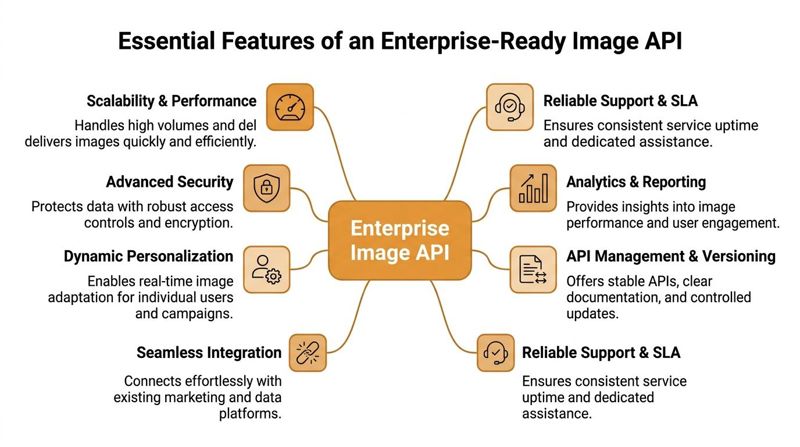
Essential Features of an Enterprise-Ready API
Not every image API is built for enterprise use. Some tools are fine for light editing or a narrow workflow. Others are designed to support high-volume operations, strict compliance requirements, and multiple teams working in parallel.
The difference matters. A broken image in a personal project is annoying. A broken image in a large campaign, regulated workflow, or customer-facing portal becomes an operational problem.
Scale and speed
At enterprise level, image delivery is not a side feature. It is production infrastructure.
Top providers in this space must handle high-volume image optimization and transformation, often processing billions of images monthly, while also offering SLAs with 99.99% uptime and compliance with GDPR, HIPAA, and SOC 2 as outlined in Cloudinary’s guide to the top image API for enterprises.
That tells you what “enterprise-ready” really means. The API must stay fast and available under pressure, not just during a product demo.
A few practical checks:
- Traffic spikes: Can the platform support campaign launches, seasonal demand, and large audience sends?
- Global delivery: Are images served quickly across regions?
- Transformation load: Can the system process many variations without slowing down customer experiences?
If your team sends high-volume email, runs paid social at scale, or serves personalized images on landing pages, performance has direct business impact.
Security and compliance
Security is not an add-on for enterprise image workflows. It is foundational.
This matters most when images include personal or sensitive information such as names, job titles, account details, certificates, healthcare communication, or recruitment data.
Look for:
- Access controls: Teams should be able to limit who can view, edit, publish, or manage assets.
- Auditability: You need a clear trail of what changed and when.
- Compliance fit: Regulated sectors may require stricter review of where images are generated, stored, and delivered.
A marketing team may focus on campaign speed. A compliance officer will focus on whether the visual workflow introduces unnecessary risk. A strong enterprise image API has to satisfy both.
Reliability for teams, not just developers
Enterprise buying decisions often stall when a product works technically but fails operationally.
That usually shows up in team workflows:
- A marketer cannot preview output without developer help.
- A designer cannot manage templates safely.
- A regional team overwrites another team’s work.
- A platform update breaks a live campaign because versioning is unclear.
This is why enterprise readiness also includes support for roles, permissions, version control, testing environments, and stable documentation. If the API is only usable by one specialist, it will become a bottleneck.
For a more practical view of what scalable implementation looks like, this guide on a scalable image API is useful reading.
Integration and business fit
An enterprise tool also needs to connect cleanly to the systems your team already uses.
That can include:
| Capability | Why it matters |
|---|---|
| CRM and database connectivity | Personalized images depend on reliable data inputs |
| ESP compatibility | Marketing teams need image delivery inside existing email workflows |
| Template management | Brand teams need consistency without recreating assets |
| Monitoring and reporting | Operations teams need visibility into failures and usage |
The strongest enterprise image API is not the one with the longest feature list. It is the one that stays reliable, secure, and easy to govern when multiple teams depend on it.
Common Integration Patterns in Practice
The idea becomes much easier to grasp once you see how teams use it. Most implementations fall into a few repeatable patterns.
They are less complicated than they sound. In many cases, the image is requested through a dynamic URL, then dropped into a tool your team already uses.

Email images that behave like merge tags
This is a pattern many marketers understand quickly.
A campaign uses dynamic fields such as name, company, appointment date, or offer type. Those values are inserted into an image URL. When the email loads, each recipient gets a unique visual.
A simple example might look conceptually like this:
<img src="https://image-api.example.com/banner?name={{first_name}}&company={{company}}" alt="Personalized banner">
The email platform handles the merge tags. The image API handles the visual output.
This works well for:
- Event reminders: Add attendee names, dates, or session tracks
- Sales outreach: Show rep names, account names, or custom messages
- Newsletters: Swap visuals based on segment or product interest
The reason marketers like this setup is that it fits existing campaign logic. The image becomes another personalized field.
Website and landing page embeds
A second pattern uses personalized images in web pages.
Instead of hardcoding one static asset, the site embeds an image URL that responds to user data, campaign parameters, or page context. That can be useful for account-based marketing pages, customer dashboards, or promotional pages designed for a segment.
The HTML stays straightforward:
<img src="https://image-api.example.com/hero?segment=retail&offer=spring" alt="Dynamic hero image">
For teams dealing with multiple screen sizes and render contexts, delivery standards matter. The IIIF Image API 3.0 defines image requests using URI path segments for region, size, and rotation, which improves cacheability and can lead to 2-5x faster CDN response times according to the IIIF Image API 3.0 specification.
That matters because dynamic does not have to mean slow.
Live data from other systems
The most powerful pattern is connecting the image API to real-time data.
A sales team might generate visuals using CRM fields. A dashboard might show updated performance figures inside a branded image. A certificate workflow might insert completion details from a registration system. A travel company might place itinerary details into a customer-ready visual after a booking event.
In practice, the flow often looks like this:
- A tool such as Mailchimp, Klaviyo, HubSpot, or a custom app sends data.
- The image API reads the values.
- The API returns an image built from a reusable template.
- The image appears in email, on the web, or inside a portal.
If you want a hands-on walkthrough of these moving parts, this API integration tutorial shows the pattern in a practical way.
Fallbacks keep campaigns safe
A detail many teams overlook is missing data.
Not every contact record has every field. A well-designed integration should support defaults so the image still renders cleanly. If a first name is missing, show a generic greeting. If a rep photo is unavailable, use a standard branded version.
That keeps image personalization from becoming fragile.
Dynamic image workflows work best when they are designed like email personalization. Use real data where available, and sensible fallback values when it is not.
A Quick Look at the Developer Experience
A business buyer wants confidence that the system is manageable. A developer wants to know whether it is predictable.
A good enterprise image API usually checks both boxes by using familiar patterns. Most are exposed through standard web endpoints, accept structured parameters, and return images or metadata in a consistent way. That means engineering teams do not need to learn an entirely new model to get started.
What developers usually evaluate
The first layer is basic API hygiene:
- Authentication: Most enterprise APIs use keys or token-based access controls so only approved systems can request or modify assets.
- Endpoints: Teams look for a clear separation between template management, image generation, asset storage, and reporting.
- Rate limits and quotas: These help teams plan volume safely and avoid accidental overload.
- Error handling: If a request fails, the system should return useful feedback and allow fallback behavior.
Those details sound technical, but they connect directly to business reliability. If the endpoint structure is messy or the authentication model is awkward, projects slow down. If the API returns clear errors and stable outputs, campaign teams can trust it.
Structured control matters
Modern image generation is becoming more programmable. In Bria’s enterprise image tooling, a JSON-based control framework can disentangle over 100 visual attributes, which allows precise and auditable image generation while helping teams maintain brand consistency and commercial safety, as described on Bria’s AI image generation page.
That matters because developers and brand teams often need the same thing for different reasons.
A developer wants predictable inputs and outputs. A brand team wants to know that generated visuals will stay within approved constraints. A structured image API makes both possible.
Graceful failure is part of good delivery
One of the strongest signs of a mature implementation is what happens when data is incomplete or a request does not match expectations.
Developers usually look for:
- default values when fields are missing
- placeholder assets when references fail
- versioned templates so updates do not break old campaigns
- test environments for validation before launch
A strong developer experience is not about exposing endless complexity. It is about making visual generation dependable enough that non-technical teams can use it without fear.
How to Choose the Right Image API Vendor
Many vendors can generate or transform images. Fewer can support the workflows, governance, and operational comfort that real teams need.
Vendor selection gets easier when you stop asking, “Which platform has the most features?” and start asking, “Which platform fits our delivery model, team structure, and risk profile?”
Start with your use case, not the demo
A polished demo can hide the practical questions that matter later.
For example:
- Will marketing use this mainly in email?
- Does sales need one-off personalized visuals for outreach?
- Will a web team embed dynamic images on pages?
- Does your industry need stronger controls around privacy and hosting?
Those questions point you toward different priorities. A campaign-focused team may care most about template simplicity and ESP compatibility. A regulated organization may care more about deployment choices, approvals, and data control.
One area that deserves more attention is privacy-first architecture. BridgeHead notes a gap in mainstream guidance around privacy-first, federated image architectures for sensitive industries such as healthcare and recruitment, which matters for buyers who do not want to surrender control to a centralized vendor model, as discussed in its piece on enterprise imaging.
Vendor selection criteria checklist
| Criterion | What to Look For | Why It Matters |
|---|---|---|
| Deployment model | Cloud, self-hosted, or flexible options | Determines how much control you keep over sensitive workflows |
| Personalization workflow | Template-driven setup, dynamic fields, fallback handling | Affects how easily marketers can launch campaigns |
| Integration fit | Compatibility with your ESP, CRM, CMS, and internal tools | Reduces implementation friction |
| Team collaboration | Roles, permissions, approval flow, project separation | Prevents operational confusion across departments |
| Documentation quality | Clear examples, endpoint references, troubleshooting help | Shortens setup time for technical teams |
| Support model | Responsive help, onboarding guidance, real humans when needed | Matters when campaigns are live |
| Pricing structure | Usage-based tiers, predictable scaling, room to grow | Prevents surprise costs as volume increases |
| Governance | Versioning, audit trails, asset control | Protects brand consistency and compliance |
Check the surrounding ecosystem
Sometimes the right vendor decision depends on adjacent tooling.
If your team is also reviewing asset libraries, brand portals, and approval workflows, this overview of Choosing the Best Digital Asset Management Software gives helpful context. Image APIs and DAM platforms solve different problems, but they often sit next to each other in the same stack.
You should also look at the balance between no-code and developer-first options. Some teams need a visual workflow builder. Others want raw API flexibility. The strongest vendors usually support both paths so marketing and engineering can move at different speeds without creating separate systems.
For a broader look at the category, this roundup of best image personalization platforms for 2026 is a useful comparison point.
The right vendor is not only technically capable. It matches how your team works, how your data flows, and how much control your organization needs.
Measuring the Impact of Image Personalization
An enterprise image API should not be judged only by how clever the implementation looks. It should be judged by whether it improves business outcomes you already care about.
That means measurement starts with the use case.
Match the metric to the workflow
If the image appears in email, your first questions are usually about engagement.
Useful metrics include:
- Click-through rate: Did the personalized visual increase clicks on the CTA?
- Reply rate: Did sales outreach with custom visuals trigger more responses?
- Forwarding or sharing behavior: Did recipients pass the message along?
If the image appears on a landing page or website, measure downstream behavior:
- Page conversion rate: Did more visitors complete the desired action?
- Time on page: Did the visual hold attention longer?
- Segment performance: Did certain audience groups respond better to specific creative?
If the image is operational, such as a certificate, badge, or customer update, then completion metrics may matter more:
- Delivery success
- Download rate
- Customer support reduction
- Faster handoff between teams
Useful business examples
A few patterns are especially easy to measure.
Event and education workflows
Personalized registration banners, reminders, and certificates can be evaluated across the attendee journey. Did more people show up after receiving a reminder image with their own details? Did more recipients download and share certificates?
Sales outreach
Account-specific visuals can support outbound messages. Measure response quality, meeting booking patterns, and whether reps adopt the workflow consistently.
Newsletters and lifecycle email
Segmented visuals can be tested against standard creative. The cleanest approach is often a controlled A/B setup where the copy remains similar and the image personalization changes.
Look beyond vanity metrics
A flashy personalized image can get attention without helping revenue.
That is why it helps to track at three levels:
| Level | What to measure | Why it matters |
|---|---|---|
| Engagement | Clicks, replies, interactions | Shows whether the visual attracted attention |
| Conversion | Sign-ups, bookings, purchases, form fills | Ties the image to business action |
| Operational efficiency | Time saved, fewer manual design requests, faster campaign launch | Captures internal value |
The third category is often underrated. Many teams adopt image automation not just to improve response, but also to remove repetitive production work.
If you cannot say what success looks like before launch, you will struggle to prove the value of personalization after launch.
The most effective reporting approach is simple. Pick one use case, one audience, and one measurable outcome. Launch the personalized version. Compare it with the standard version. Learn from the result, then expand.
Start Personalizing Your Visuals Today
Static images still have a place. Brand campaigns need consistency, and not every workflow requires one-to-one variation.
But many business moments do. Event reminders, sales outreach, newsletters, website experiences, certificates, and customer updates all become more useful when the visual reflects the person seeing it.
That is the primary value of an enterprise image API. It does not replace good design. It gives good design a way to adapt at scale.
For marketers, the big shift is simple. Stop thinking only in files. Start thinking in templates, rules, and data.
For sales teams, the shift is just as practical. Instead of sending generic assets, you can deliver visuals that reflect the account, the rep, the timing, and the message.
For business leaders, the decision is less about technical novelty and more about operational efficiency. A reusable image system can help teams personalize faster, stay on brand, reduce manual production, and create more relevant customer experiences.
You do not need to begin with a massive rollout. Start with one workflow that already depends on personalization. A webinar reminder. A prospecting campaign. A certificate series. A dynamic website banner. Once the team sees the process working, the next use cases become much easier to justify.
The main thing is to treat visual personalization as a system, not a design chore. That is when an enterprise image API becomes strategic.
If you want a simple way to put this into practice, OKZest helps teams create personalized images with both no-code and API options. It works like merge tags for images, supports email, websites, and other channels, and gives you a practical starting point whether you are testing one campaign or scaling up across teams.