We've all heard of 'content blindness'—that state where your audience automatically tunes out the generic stock photos and cookie-cutter banners you’re using. It’s a real problem. Custom graphics are the answer. These aren't just static visuals; they are dynamic, data-driven images that pull in unique information for each person, making your marketing feel like a one-to-one conversation.
Why Custom Graphics Are Your Secret Weapon

Ever feel like your marketing is just shouting into the void? You're not alone. The digital world is incredibly noisy, and people have become masters at filtering out anything that doesn’t feel relevant to them. This is exactly where personalized visuals change the game.
When you swap out a one-size-fits-all banner for an image that pulls in a customer's name, their loyalty points balance, or even their company logo, you create an instant "aha!" moment. It's a simple move, but it cuts through the clutter and makes the person on the other end feel seen.
The Power of Personal Connection
Our brains are wired to notice things that are about us. Seeing your own name or a detail specific to you in an image triggers a subconscious reaction that generic content just can't match.
This isn’t some cheap trick; it’s a core principle of good communication. It builds an immediate connection and helps nurture a real relationship with your brand. Just think about it from your own inbox: an email with a graphic saying "Hi Customer" gets deleted, but one showing "Hi Sarah, you have 250 points!" is almost impossible to ignore.
Personalization turns a monologue into a dialogue. It tells your customer, "We know who you are, and this message is specifically for you." That’s a powerful driver for both engagement and loyalty.
Real-World Impact on Performance
Let's look at a common scenario: an email marketer promoting a webinar. The standard playbook is to send an email with a static banner showing the event time and topic. It works, but it's completely forgettable.
One marketer I know decided to run a test. They replaced that static banner with a custom graphic that pulled in each recipient's first name and company name, creating a truly personalized invitation. The result? Their click-through rate more than doubled.
Understanding the critical role of visual design in advertising campaigns helps explain exactly why this strategy is so effective. Visuals that feel personal don't just get seen—they get felt.
Impact of Personalization Across Campaign Channels
The benefits of custom graphics aren't limited to a single channel. This approach delivers tangible results across email, social media, and direct messaging by making every interaction more relevant.
| Channel | Traditional Approach | Custom Graphic Approach | Primary Benefit |
|---|---|---|---|
| Static promo banner with a generic greeting. | Image with the user's name and loyalty points. | Higher click-through rates. | |
| Social Media Ads | General ad creative for a broad audience. | Ad visual showing a product relevant to the user's browsing history. | Increased ad relevance and conversions. |
| SMS/MMS | Text-only message with a standard URL. | Image of a personalized coupon with the user's name. | Better engagement and redemption rates. |
| Direct Mail | Generic postcard with a standard offer. | Postcard featuring an image of the recipient's local store. | Stronger local connection and foot traffic. |
As you can see, tailoring your visuals creates a more compelling experience, no matter where your audience interacts with your brand.
Building Your Data Foundation for Personalization
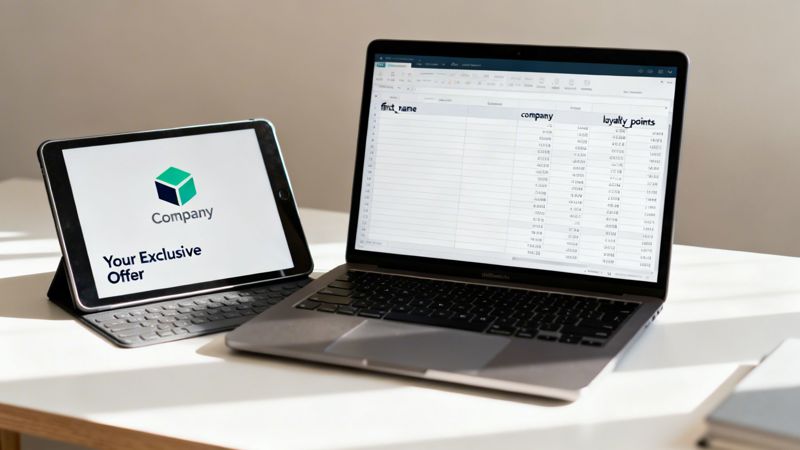
Before you even think about pixels and color palettes, your journey into creating powerful custom graphics for campaigns has to start with a solid data strategy. This is the engine that drives true personalization, turning a nice-looking image into a message that feels truly one-to-one.
Without the right data, even the most stunning design is just a generic template. The goal here is to move way beyond the basics, like just dropping in a first name. That’s table stakes. The real magic happens when you identify data points that speak to the individual's unique relationship with your brand.
Identifying High-Impact Data Points
So, what information would make your customer actually stop scrolling and pay attention? Instead of just spitballing ideas in a meeting, take a hard look at the data you already collect and ask yourself how it could be brought to life visually.
Here are a few practical examples to get the wheels turning:
- For an e-commerce brand: Imagine showing a customer their current loyalty points balance or their VIP membership tier right on a promotional graphic. It’s an instant reminder of their value.
- For a SaaS company: How about sending a sales outreach email that includes a mock-up of your dashboard with the prospect's own company logo on it? That’s hard to ignore.
- For an event organizer: A simple "See you in [City]!" graphic promoting a local meetup instantly feels more personal and relevant.
This kind of specificity shows you understand your customer's context. It’s not creepy—it’s attentive. And that’s how you build trust and make your message feel genuinely valuable.
The most powerful personalization doesn't just use a name; it reflects a shared history or a relevant context. It shows you're paying attention to the customer's journey, not just their contact information.
Sourcing Your Data and Setting Up Fallbacks
Once you’ve figured out what data to use, the next question is how to get it ready. For quick, one-off campaigns, a simple CSV file is your best friend. Just set up columns for each piece of data, like first_name or company_logo_url. It’s fast, straightforward, and works perfectly for a single send.
But for more dynamic, always-on campaigns, you'll want to connect directly to your CRM or another data source via an API. This keeps the information fresh and ensures your graphics reflect real-time changes, like updated loyalty points or a customer's most recent purchase.
Now for the important part: what happens when a data field is empty? A graphic that says "Hi, !" looks broken, unprofessional, and instantly kills the personalized vibe. This is where data fallbacks are absolutely essential.
A fallback is simply a default value your system uses when the primary data point is missing. For example, if a first_name field is blank, you could default to something friendly like "Valued Customer" or "Your Exclusive Offer." If a company logo isn't available, maybe you show a generic industry icon instead.
Setting up these smart defaults is non-negotiable. It’s the safety net that protects the user experience and ensures every single graphic looks polished and complete—no matter what the data looks like. If you're looking to dive deeper into how to collect this kind of customer-provided info, check out our complete guide on what is zero-party data.
Designing Templates That Adapt and Impress

This is where your creative vision gets put to the test. A truly great personalized graphic isn't just about the data you feed it; it's about having a design that can gracefully handle whatever you throw at it. The real goal is to build a single, robust master template that can generate thousands of unique, flawless variations on its own.
Personalized content has pushed design from a nice-to-have into a major business investment. The graphic design market was valued at USD 62.79 billion in 2024, with DIY design tools accounting for a massive 44.60% of user preferences. This trend makes one thing clear: accessible, powerful design solutions are in high demand, making skills in creating custom graphics for campaigns more valuable than ever. You can dig deeper into the growth of the graphic design market from SkyQuest.
Planning for Data Variations
The biggest headache in template design is accounting for unpredictability. A text box that looks perfect with the name "Jo" might completely break when it has to display "Maximillian." Without some careful planning, your beautiful design can turn into a jumbled mess in a hurry.
Smart design anticipates these problems. Instead of locking text into a fixed position, use alignment rules that anchor it to one side. For example, left-aligning a name ensures it always starts at the same spot and simply expands outward, leaving other elements undisturbed.
Here’s a quick checklist for building adaptive text fields:
- Alignment: Use left, right, or center alignment to control how text flows as it gets longer or shorter.
- Negative Space: Always leave plenty of buffer room around dynamic elements to prevent them from crashing into each other.
- Line Breaks: Set rules for how longer text should wrap to a second line. It's a small detail that saves a lot of visual chaos.
A great template is like a container designed to hold water—it doesn't care about the exact shape of the liquid, it just needs to be strong enough to hold it without leaking. Your design must be flexible enough to contain any data you pour into it.
Technical and Aesthetic Polish
Beyond handling variable text, your templates need to look fantastic no matter where they show up. This means getting into the technical details that ensure a consistent, professional look across different devices and email clients.
A common pitfall is using niche or custom fonts. They might look amazing in your design software, but they won't render correctly for users who don't have them installed. The safe bet is to stick with web-safe fonts like Arial, Helvetica, or Open Sans to guarantee everyone sees what you intended. For more ideas on creating visuals that work everywhere, check out our guide on versatile social media graphics templates.
Another critical step is testing your design in both dark and light modes. An image with dark text on a transparent background might look sharp in a light-mode email but become completely unreadable in dark mode. Previewing these scenarios helps you catch these readability issues before your campaign ever goes live. It’s a small step that makes a huge difference in the user's experience.
Choosing Your Automation Workflow: No-Code vs. API
Once your design template is ready, it’s time to bring it to life with automation. The thought of generating thousands of personalized images might sound intimidating, but it really just boils down to two paths. Your choice will depend entirely on your team's technical comfort level and how fast you need to get your campaign out the door.
For most marketers, speed and simplicity are everything. This is where a no-code workflow is a game-changer. It’s designed to be visual, intuitive, and incredibly fast, completely removing the need to pull in a developer.
The whole idea of on-demand personalization has exploded, completely reshaping the online custom printing world and making unique products accessible to everyone. Just look at the growth of marketplaces like Etsy and Redbubble—it’s clear people crave customized items. This consumer trend is a huge win for marketers, as tools offering no-code image personalization let you tap into that desire for individuality at scale. You can find more data on the custom printing market at Polaris Market Research.
The Simplicity of No-Code Automation
A no-code approach puts the power directly into the marketer's hands.
Imagine uploading your finished design template into a tool like OKZest. From there, you just visually map your data fields—connecting the 'First Name' layer in your design to the first_name column in your spreadsheet. It's that straightforward.
Within minutes, the platform gives you a single, powerful URL. This URL is your golden ticket. You can paste it directly into your email service provider, your social media scheduler, or your website, and it will dynamically create a unique graphic for every single person who sees it. For a deeper dive, our guide on no-code automation tools is a great place to start.
This workflow is perfect for:
- Rapid campaign launches: Go from an idea to a live personalized campaign in less than an hour.
- Teams without developers: Marketing and sales teams can run the entire show on their own.
- Simple data sources: Works beautifully with CSV files or basic data integrations.
When an API Workflow Makes Sense
On the other hand, some campaigns need a deeper, more programmatic level of integration. This is where an API (Application Programming Interface) workflow comes in. It’s the go-to solution for tech-savvy teams who need to generate custom graphics for campaigns based on real-time data from their own applications.
Think about an e-commerce platform sending out a transaction receipt. A developer can send a simple API request with the customer’s name, order number, and purchased items. The API then instantly returns a custom-generated graphic that can be embedded directly into that confirmation email.
An API workflow turns image generation into a seamless, automated part of your existing technical infrastructure. It’s less about manual uploads and more about programmatic, event-triggered creation.
This method gives you maximum flexibility and is essential for dynamic, high-volume situations, like generating personalized welcome images for new app users or creating real-time event tickets with unique QR codes.
To take it a step further, you can explore how to schedule social media posts with AI, bridging the gap between design and deployment. Picking the right workflow is all about empowering you to automate with confidence.
You’ve nailed the design for your flexible template and picked your automation workflow. Now comes the moment of truth: getting those custom graphics into your campaigns and making sure they look perfect for every single person on your list. This is where all the prep work pays off.
The magic behind this is the dynamic URL your automation tool generates. This isn't just a link to a static JPG or PNG. It’s a smart, powerful URL that creates a unique image on the fly for each viewer. Your job is to plug this URL into your email or web platform and tell it where to find the data for personalization.
Plugging Into Your Email Platform
Most modern Email Service Providers (ESPs) like Mailchimp, Klaviyo, or Instantly make this part a breeze with merge tags (you might also see them called personalization tags). These are just little snippets of code that your ESP swaps out with subscriber data right before an email goes out the door.
So, instead of a standard image source, your URL will have these merge tags built right in.
For example, a typical dynamic URL from a tool like ours might look something like this:
https://your.service/image.png?name={{first_name}}&city={{city}}
When your ESP sends the campaign, it finds {{first_name}} and {{city}} and replaces them with the actual data from your contact list. The recipient’s email client then loads a perfectly personalized image. It’s a beautiful, seamless process that scales without you lifting a finger.
The demand for this kind of personalization is absolutely exploding. The custom printing market is projected to skyrocket to USD 68.46 billion by 2030, and marketing materials alone make up over USD 8.5 billion of that. This just goes to show the massive opportunity for marketers who can deliver custom graphics at scale. If you're interested in the numbers, you can explore the full marketing material market research from Grandview Research.
The diagram below breaks down the two main automation paths that get you to this point, comparing the visual, drag-and-drop style of a no-code tool against the programmatic power of an API.
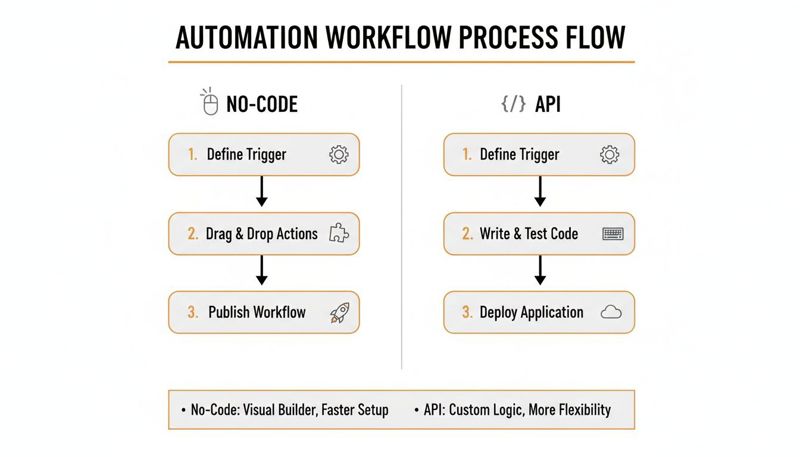
As you can see, both routes lead to that all-important dynamic image URL. It’s all about empowering you to pick the method that fits your team’s skills and campaign goals.
Your Pre-Flight Testing Checklist
Before you even think about hitting "send" to thousands of people, you have to test. Rigorous testing is non-negotiable. A broken image or mangled text can do more harm than sending nothing at all—it erodes trust and makes your brand look sloppy.
A single broken graphic in a campaign is more than just a technical glitch; it’s a broken promise of personalization. Testing isn’t just about quality assurance—it's about protecting the customer experience.
Run through this pre-flight checklist to catch the most common issues before they ever see the light of day.
1. Push Your Data to the Extremes Don't just test with a "John Smith." You need to see how your design handles the outliers.
- Exceptionally Long Names: How does the template handle a name like "Christopher" or "Alexandrina"? Does the text overflow its container or shrink to an unreadable size?
- Very Short Names: On the flip side, does a name like "Jo" or "Li" look awkward and lost in a huge text box?
- Special Characters: Always check names with hyphens, apostrophes, or non-English characters (e.g., O'Malley, François, Müller).
2. Double-Check Your Fallbacks What happens when the data just isn't there? This is one of the most frequent points of failure.
- Empty Fields: Send a test to a contact with a blank first name. Does your fallback text, like "Your Exclusive Offer," show up correctly?
- Missing Images: If your graphic pulls in a company logo, what happens if that logo's URL is broken or missing? Make sure your default image loads without a hitch.
3. Preview Across Every Environment Your graphic is going to be seen in dozens of different email clients and on all kinds of devices. What looks amazing in Gmail on your laptop could fall apart in Outlook on a phone.
- Use an email testing service like Litmus or Email on Acid to see how your email renders across all the major clients.
- Pay extra close attention to Outlook. It's notoriously fussy about how it handles modern images and code.
- Always check both light mode and dark mode to make sure your text is legible and your design doesn't break.
How to Measure and Optimize Your Campaign Success
Creating a beautiful, personalized graphic is a great start, but it's only half the job. If you can't prove that your shiny new images are actually moving the needle, they’re just a fun creative experiment. The trick is to look past vanity metrics like open rates and zero in on what really matters: clicks, conversions, and cold, hard ROI.
The most direct way to see if your custom graphics for campaigns are working is to track the click-through rate (CTR) on the images themselves—not just the overall email CTR. Most email service providers let you see exactly which links are getting all the love. This data is your first, best clue that the personalization is grabbing people’s attention.
Setting Up a Clear A/B Test
To get undeniable proof of your graphic's impact, nothing beats a classic A/B test. It's a simple but powerful way to get clean data and build a rock-solid business case for doing more personalization.
Keep your test setup clean and simple:
- Version A (The Control): This is your standard email, the one with the usual static, generic graphic.
- Version B (The Variation): This is the exact same email, but you swap out the generic graphic for your new dynamic, personalized one.
Send each version to a statistically significant slice of your audience and just let the numbers do the talking. Compare the CTR on the image, and more importantly, track the final conversion rate on your landing page. When Version B delivers a clear lift in conversions, you've got proof that your personalized graphics are making you money.
A well-run A/B test turns your personalization strategy from a "nice-to-have" idea into a data-backed growth engine. It’s how you find out what feels creative versus what is actually effective.
Troubleshooting Common Performance Issues
Even a brilliant design can get tripped up by technical glitches. If you’re seeing low engagement or, worse, getting emails from customers about broken visuals, it's time to pop the hood and see what's wrong.
Two of the most common culprits are slow-loading images and broken data links. A slow-loading image is a campaign killer. Studies have shown that a delay of just a few seconds can cause a huge drop-off in engagement. Make sure your image generation service is built for speed and that your base template isn't so complex it's slowing everything down.
Broken data links are another frequent problem. This usually happens because of a typo in your merge tags or a mismatch between the data in your ESP and what the image URL needs. Go back and triple-check that your merge tags are formatted perfectly. Also, confirm your fallback rules are working correctly for contacts who might be missing a piece of information. A little bit of monitoring and a few quick fixes can keep the experience smooth and ensure your campaigns deliver their full potential.
A Few Common Questions
If you're just starting to explore automated, data-driven visuals, you probably have a few questions. That's a good thing. We hear these all the time, so let's clear up some of the technical hurdles and strategic choices you'll face.
What’s the Real Difference Between Dynamic and Static Graphics?
It’s pretty simple. A static graphic is just a standard image file, like a JPG or PNG. Everyone who sees it sees the exact same thing. Think of a generic "50% Off" banner you might see on any website.
A dynamic graphic, on the other hand, is generated on-the-fly for each individual person. It starts with a base template but then pulls in specific data—a person’s name, their company, their loyalty points, you name it—to create a completely unique version just for them.
Can I Use My Brand’s Custom Fonts?
Technically, yes, you can design with any font you want. But from experience, it’s much safer to stick with web-safe fonts like Arial, Helvetica, or Open Sans.
Here’s why: if a recipient doesn’t have your cool, custom font installed on their device, their email client or browser will just swap in a default font. This can completely break your layout and ruin the whole look. Sticking to web-safe fonts guarantees a consistent, predictable experience for everyone, no matter what setup they're using.
A non-standard font is a gamble on your audience's device settings. A web-safe font is a guarantee that your design will show up exactly as you intended, protecting both the user experience and your brand's professional look.
Will This Slow Down My Emails or Web Pages?
That's a super valid concern—nobody wants slow-loading visuals killing their engagement. Any good dynamic image platform is built for speed, using powerful servers and Content Delivery Networks (CDNs) to create and deliver images in milliseconds. Most of the time, the impact on load time is so small that your users won't even notice.
However, the complexity of your template design does matter. A simple design with a couple of text layers will generate way faster than one pulling multiple external images and applying a bunch of filters.
Always test your graphics to see how quickly they load. A good rule of thumb is to keep your final image file sizes under 200KB whenever you can.
Ready to create compelling, personalized visuals that actually grab attention and get people to act? OKZest makes it simple to automate custom graphics for all your campaigns. Get started today by visiting https://okzest.com.