This is about more than just plugging a first name into a subject line. Customer-specific email content automation is all about creating completely unique visuals—like images or videos—for every single person on your email list. It’s a huge leap beyond basic personalization, delivering a true one-to-one experience that makes each subscriber feel like you're talking directly to them.
What Is Customer-Specific Email Content Automation
Think of yourself as an online personal shopper. Instead of sending a generic "Hello [First Name]" email, what if you sent each client a personalized digital lookbook with their name elegantly scripted right on the cover?

That’s the magic behind customer-specific email content automation. It’s a smarter marketing approach that transforms your standard email blasts into deeply personal, visual conversations.
This isn't just about dropping a name into a sentence. We're talking about generating entirely new, meaningful content—especially powerful visuals—for every individual who gets your email. It's like a mail merge, but for your images and videos.
Moving Beyond Basic Merge Tags
For years, email marketing has leaned on simple merge tags. They work, but they only scratch the surface of what’s possible. Customer-specific automation takes the next step by focusing on visual content, which grabs attention way more effectively than text alone.
You can automatically generate things like:
- Personalized Event Tickets: An attendee gets a ticket in their inbox with their name, seat number, and a unique QR code already on it.
- Custom Business Proposals: A sales lead opens a proposal, and their name and company logo are seamlessly integrated into the cover image.
- Unique Welcome Images: A new subscriber receives a welcome email with a beautiful image that says, "Welcome, Sarah!"
This level of detail makes customers feel genuinely seen and valued. It shifts the entire dynamic from a mass-market broadcast to a personal interaction. By using customer data, you can craft experiences that really connect with people on an individual level.
Making Advanced Automation Accessible
Not long ago, this kind of hyper-personalization was only possible for giant corporations with massive development teams and budgets to match. But today, modern no-code tools like OKZest have put this game-changing strategy within reach for everyone—from solo coaches and consultants to global marketing agencies. If you want to see how this fits into a broader growth plan, it's worth exploring different ecommerce marketing automation strategies.
This process is a key part of any solid email automation strategy. To understand where it fits in the bigger picture, you can learn more about the fundamentals of what is email automation and how it helps streamline your communication. This guide will break down exactly how this visual automation works, helping you build more meaningful relationships at scale.
The Power of Personalized Visuals in Email
Why settle for a basic "Hello [First Name]" when you can send a custom image that literally stops your subscribers in their tracks? Sure, generic text personalization is expected these days, but automated visual content creates a genuine moment of surprise and delight. This is the heart of effective customer-specific email content automation.
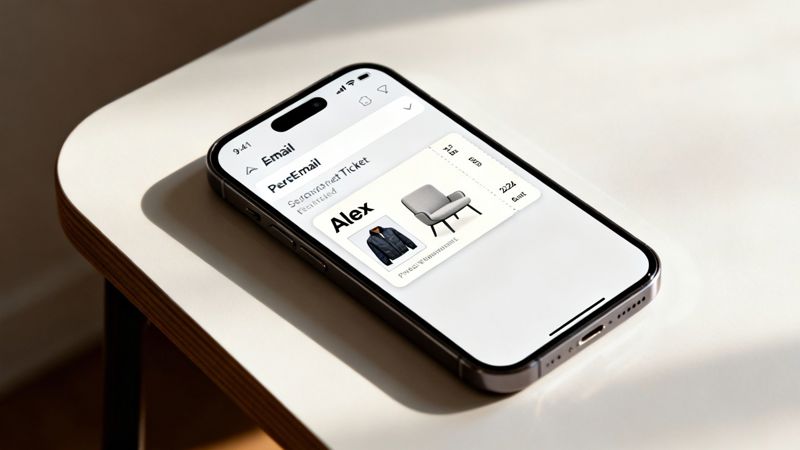
Think about it. When someone sees their name perfectly blended into an image—like a certificate of completion or a slick welcome graphic—it triggers a powerful psychological response. The brain instantly recognizes that personal detail, grabbing their attention and making the entire message feel uniquely relevant to them.
This simple technique transforms a mass email into what feels like a one-to-one conversation. You’re building a direct, emotional connection that static, impersonal content just can't compete with.
Creating Standout Moments in the Inbox
Let’s look at how this plays out in the real world. Imagine an event organizer sending out thousands of emails. Instead of a generic confirmation, each person gets an image of their own personal ticket, complete with their name and a unique QR code. It’s no longer just an email; it’s their exclusive pass.
Or, picture a sales team sending a proposal where the cover image dynamically includes the client's name and logo. That small touch shows a level of care and attention to detail that makes a massive impression before the document is even opened.
This strategy is about more than just grabbing attention. It’s about making your audience feel seen and valued as individuals, turning a simple communication into a meaningful, personal experience that fosters loyalty.
These standout moments are what you need to cut through the inbox noise. The numbers don't lie. AI-driven personalization, which includes dynamic content like customer-specific images, has been shown to boost revenue by 41% and click-through rates by 13.44% compared to standard emails.
The data also shows that personalized emails achieve 6x higher transaction rates. It's a clear signal that consumer expectations have shifted. People want to feel understood, and personalized visuals are a powerful way to show you’re paying attention.
From Engagement to Conversion
The benefits of this approach tie directly to your bottom line. When you build a stronger connection with your audience, you increase engagement, which naturally leads to higher conversion rates.
Here’s a quick rundown of how personalized visuals drive real results:
- Boosted Open Rates: A subject line teasing a "personalized welcome image" is far more intriguing than a generic one.
- Increased Click-Throughs: When the content inside feels truly personal, people are much more likely to click through to see what's next.
- Enhanced Brand Loyalty: Memorable, positive experiences create customers who feel a genuine affinity for your brand.
Here's a closer look at how standard campaigns stack up against those using personalized automation.
Impact of Personalization on Email Engagement Metrics
This table compares key performance indicators for standard email campaigns versus those using customer-specific automated content, highlighting the significant performance lift from personalization.
| Metric | Standard Campaigns | Personalized Automated Campaigns | Performance Increase |
|---|---|---|---|
| Open Rate | 18% | 26% | 44% |
| Click-Through Rate (CTR) | 2.5% | 4.5% | 80% |
| Conversion Rate | 1.5% | 6.0% | 300% |
| Transaction Rate | 0.5% | 3.0% | 500% |
As you can see, the impact isn't minor—it's substantial across every key metric. Moving from a generic approach to one that feels individual and specific completely changes the game.
Ultimately, this is about building relationships at scale. Instead of a one-size-fits-all message, you deliver a unique experience to every single subscriber, fostering trust and driving tangible business growth. To learn more about putting this into practice, check out our guide on using personalized images for email marketing.
How Visual Content Automation Actually Works
So, how does this technology create thousands of unique, personalized images in the blink of an eye? Let's pull back the curtain.
At its heart, customer-specific email content automation is like a mail merge on steroids. But instead of just dropping text into a document, it populates a master image template with unique data for every single person on your list.
Think of it like this: you design one beautiful image—your "canvas." This could be an event ticket, a welcome card, or a sales proposal. On this canvas, you leave specific spots empty, ready to be filled with personalized info. The real magic begins when you connect that canvas to your customer data.
The Three Core Components
This whole process relies on three key pieces working together perfectly. Once you get how they connect, you're well on your way to mastering this technique.
- The Dynamic Image Template: This is your starting point. You design it in a simple, no-code editor (like ours at OKZest). First, you set up the static background elements, then you add dynamic layers for things that will change, like names, company logos, or even unique QR codes.
- The Data Source: This is where all the personalization comes from. It could be a simple spreadsheet (like a CSV file), your company’s CRM system, or any other database that holds your customer information.
- The Email Service Provider (ESP): This is the engine that delivers your emails, whether it's Klaviyo, Mailchimp, or Instantly. The automation tool gives you a unique URL for each image, which you just copy and paste right into your email builder.
This screenshot from OKZest shows just how clean the interface is for managing your dynamic image templates.
The dashboard gives you a clear, organized view, making it easy for any marketer to jump in and manage their visual campaigns without needing to be a tech wizard.
How Data Powers the Process
When you hit 'send' on an email campaign, the system does the heavy lifting automatically for each subscriber. Your ESP calls that special image URL, which basically acts as a set of instructions.
This URL tells a platform like OKZest to grab the right data for that specific person—say, "John Smith" from your CRM. The platform instantly fills in the dynamic layers on your template with John's information and serves the final, personalized image directly into his inbox. It all happens in a fraction of a second, but the impact is huge.
If you want a more technical deep-dive on how this connection works, you can read up on the role of a dynamic image API for email marketing.
What’s absolutely crucial here is the use of fallback rules. If a piece of data is missing—like a first name—the whole thing doesn't break. Instead, the system inserts a default you've already set, like "Valued Guest." This ensures every email looks polished and professional, preventing those awkward blank spaces and keeping the customer experience top-notch.
Setting Up Your First Personalized Image Campaign
Alright, let's move from theory to practice. This is the fun part—where your ideas come to life and you start creating campaigns that genuinely connect with your audience. Launching your first campaign is a lot simpler than you might think, especially when you break it down into a few clear steps.
With a tool like OKZest, the whole process feels intuitive, even if you don't have a technical bone in your body. Think of it like putting together a personalized gift: you start with a nice box (the template), add something special inside (the customer's data), and then send it off (through your email platform).
This flow chart nails the basic concept.
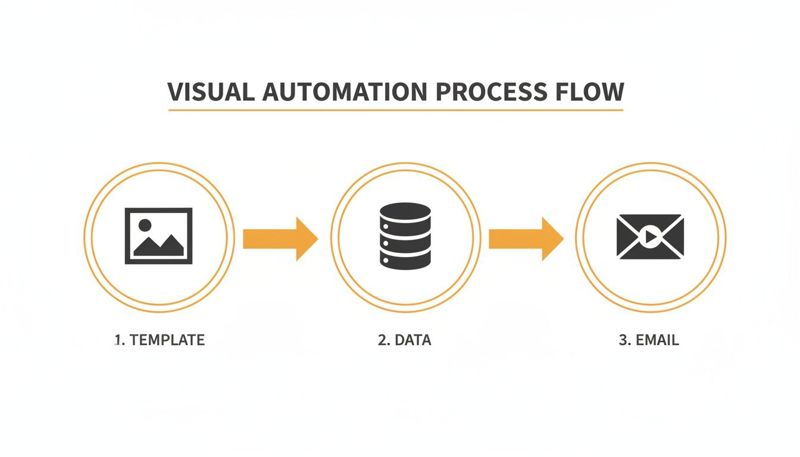
It all starts with a creative template, gets powered by your customer data, and ends with a unique, personalized email hitting the inbox. Simple as that.
Designing Your Dynamic Template
Your first stop is the no-code editor. This is your design playground. You'll kick things off by either uploading a background image or creating one from scratch. This static layer is the canvas for all your dynamic, personalized content.
Next, you'll start adding the moving parts—the placeholders that will pull in each customer's unique information.
- Text Layers: Drop in placeholders for things like names, cities, or even specific dates. You have full control over the font, size, color, and placement to keep everything on-brand.
- Image Layers: Want to show a customer their own profile picture or an image of a product they just looked at? You can add dynamic image layers for that, too.
- Conditional Elements: This is where it gets really clever. You can set rules for what shows up. For instance, you could display a "VIP" badge, but only if a customer belongs to your VIP segment.
The drag-and-drop setup means you can skip the technical headaches and focus completely on making your design look great and work hard.
Connecting Data and Generating Your URL
Once you're happy with your template, it's time to hook it up to your data. This can be as straightforward as uploading a CSV file with columns for FirstName, Email, and whatever other data points you need. For more advanced workflows, you can connect directly to your CRM or other databases using an API.
After linking your data, the platform generates a special image URL for you. This URL is the magic key to the whole operation; it's basically a supercharged merge tag for images. It contains all the instructions needed to grab the correct data and build a custom image for every single person on your list.
Think of this URL as a special recipe. When your email service provider (like Klaviyo or Mailchimp) calls this recipe for a subscriber, the automation platform instantly cooks up the perfect, customized image just for them.
Pasting this URL into your email builder is as easy as adding any other merge tag. Your ESP handles the rest, automatically swapping in the right personalized image the moment the email is sent.
For agencies juggling multiple clients, platforms often include project and team management features to keep all your campaigns neatly organized. This setup ensures your team can collaborate smoothly and manage workflows efficiently across different accounts, making it a solution that scales right alongside your business.
Inspiring Use Cases Across Different Industries
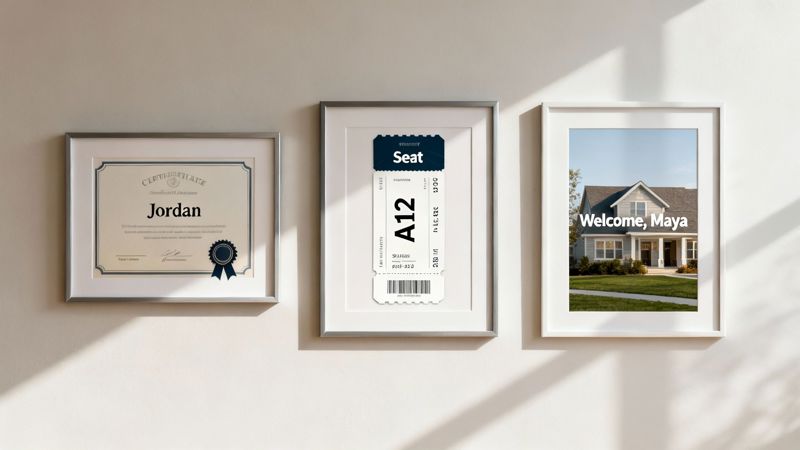
Visual automation isn't just for one type of business; its power is in its flexibility. Companies in all sorts of industries are turning simple data points into stunning personalized visuals, creating those "wow" moments that build real customer loyalty. Let's look at how customer-specific email content automation is being used in the wild.
The numbers back this up, big time. Automated email flows see an average open rate of a whopping 48.57%, with the best campaigns reaching 65.74%. Compare that to the standard 22-24% for typical broadcast emails, and you see why everyone is jumping on board. In fact, brands sent 250 million more automated emails last year than the year before, proving this isn't just a trend—it's a fundamental shift in marketing.
Coaching and Consulting
For any coach or consultant, celebrating a client's wins is a huge part of the job. But instead of a plain-text "congratulations" email, imagine instantly sending a beautifully designed, personalized certificate the moment a client finishes a course or hits a major goal.
An image with their name, the program they completed, and the date makes that achievement feel real and substantial. It's something they'll be proud of, and it often turns them into your best marketers when they share it all over social media.
Event and Hospitality Management
Event organizers know that the experience starts long before the doors open. With automation, they can build excitement from the second a ticket is bought. Every attendee gets a custom ticket in their inbox with their name, seat number, and a unique QR code. It feels less like a receipt and more like a personal invitation.
Hotels are doing something similar, sending welcome emails with an image of the guest's name on a digital welcome sign or even a personalized itinerary. These little touches create a feeling of luxury and personal care before the guest has even checked in, setting the stage for a fantastic stay.
The core idea here is simple: transform a standard, functional email into a memorable, personal experience. Moving from generic to specific is what grabs attention and leaves a lasting mark.
Sales and Real Estate
In sales, first impressions are everything. Teams can make a huge impact by sending proposals where the cover image instantly populates with the prospect's name and company logo. It's a small detail that shows you've done your homework and makes your proposal stand out from the stack.
Real estate agents can use this to create an emotional connection. Imagine sending an email about a property that includes an image of a "Welcome Home" sign with the potential buyer's family name on it. This helps them visualize themselves in the space, turning a house into a potential home. If you want to see more ways automation can reshape communications, checking out different marketing automation workflow examples can spark some great ideas.
Best Practices for Flawless Execution
So, you’ve got the tools and you’re ready to go. But launching a campaign with customer-specific email content automation that really works requires more than just tech—it demands a smart, proactive strategy. Getting it right comes down to a few core principles that ensure every personalized visual not only lands perfectly but also strengthens your relationship with each customer.
First things first, let's talk about your image templates. Think of your template as a stage where your customer’s data is the star. Your job is to make sure the stage—the background and static elements—supports the star, not competes with it. Use high-contrast colors and clear, legible fonts. The goal is to make sure names and other dynamic text pop and are easy to read on any device, from a giant monitor to a tiny phone screen.
Brand consistency is huge here, too. Your dynamic images aren't a separate thing; they're a direct extension of your brand. They need to fit right in with your existing color palette, typography, and overall visual vibe. This creates a seamless, professional experience that builds trust.
Managing Data and Optimizing Performance
Let’s be honest: your automation is only as good as the data fueling it. Before you even think about hitting "send," you have to clean and validate your data source. Incomplete or messy information is the fastest way to create a broken, awkward experience. Make sure fields like first names are properly formatted and actually there.
The best campaigns are built on two things: clean data and a commitment to always be testing. One tiny data error can shatter the personalization magic, while one small A/B test can unlock a massive lift in engagement.
This is where you need to be proactive. Smart platforms like OKZest offer built-in life-savers for those inevitable data hiccups:
- Fallback Rules: What happens if a name is missing? A good system doesn't just break. It automatically swaps in a default value you’ve set, like "Valued Customer," so the design never looks empty or busted.
- Text Overflow Management: We've all seen it—a super long name that stretches and completely wrecks a beautiful design. Features that automatically shrink the font size or neatly truncate the text are absolute must-haves for keeping things looking polished.
Finally, never, ever stop tweaking. A/B test your visual elements to see what your audience truly responds to. Pit a bold font against a script font for names. Try a couple of different background images. You’d be surprised how tiny changes can lead to big wins in engagement and conversion rates over time.
Got Questions? We've Got Answers
Even after walking through the whole process, it's totally normal to have a few questions pop up. Let's tackle some of the most common ones so you can move forward with confidence.
Is This Technology Hard for Non-Technical People to Use?
Not at all. We built OKZest specifically for people who aren't coders.
It features a simple drag-and-drop editor for designing your images. Getting them into your email provider is as easy as copying and pasting a special link—it works just like any other merge tag you already use. No code required.
Which Email Marketing Platforms Are Compatible?
Pretty much all of them. Modern tools like OKZest are designed to play nicely with 99% of Email Service Providers (ESPs) out there.
That includes all the major platforms you're likely using, such as:
Basically, if your ESP can handle custom merge tags or a little bit of HTML, you’re good to go.
What Happens if Customer Data Is Missing?
This is a great question, and it's something we've thought a lot about. What if you don't have a first name for someone on your list?
Reliable tools have fallback rules built right in. You can set a default value, like "Valued Customer" or "Friend," to show up if a name is missing. It's a simple safety net that makes sure every single email still looks professional and complete.
Ready to create stunning, personalized visuals that grab attention and get people clicking? See what OKZest can do for your email campaigns at https://okzest.com.