Let's be honest, the old "one-size-fits-all" approach to marketing is dead. To connect with customers today, you need to deliver experiences that feel personal and relevant. That's where dynamic content at scale comes in. It's not just about sending a few personalized emails; it's about building an automated system that tailors content for every single user, creating deeper engagement and real growth.
Why Dynamic Content at Scale Is a Business Imperative

In a world overflowing with digital noise, personalization is no longer a "nice-to-have"—it's a core expectation. Your customers expect you to know who they are, what they like, and to communicate with them like an individual, not a data point.
When you drop the ball on this, you're not just creating a bad user experience. You're actively frustrating potential customers and handing them over to competitors who get personalization right.
The Real Cost of Irrelevant Content
The numbers don't lie. Research shows that a staggering 67% of consumers now expect dynamic, relevant content when they interact with a brand online. And when they don't get it? Nearly 74% of users report feeling frustrated by generic web pages, which is a fast track to a high bounce rate. This gap between what customers want and what they often get is a massive opportunity. You can find more on these evolving expectations at Publitas.com.
This isn't just about feelings; it's about revenue. Take a look at the business impact of dynamic content.
The Impact of Dynamic vs Static Content
| Metric | Static Content | Dynamic Content |
|---|---|---|
| Engagement | Low open/click rates | Higher interaction and time on page |
| Conversion Rate | Standard, often below average | Significantly higher conversion rates |
| Customer Loyalty | Weak; customers feel anonymous | Stronger; customers feel understood |
| Revenue | Stagnant or slow growth | Up to 31% revenue increase |
The data makes it clear: investing in a scalable personalization strategy isn't a cost center. It's a high-return investment that directly fuels your bottom line.
Our Take: Ignoring personalization is a direct threat to your growth. As customer expectations climb, dynamic content is your best tool for grabbing attention, earning loyalty, and driving revenue.
Beyond Basic Personalization
When we talk about dynamic content at scale, we mean much more than just dropping {{FirstName}} into an email subject line. That’s a start, but a truly powerful system can generate thousands—or even millions—of unique content variations automatically. If you want to brush up on the basics, our guide on what dynamic content is is a great place to start.
Think about these real-world examples:
- An e-commerce brand sends a post-purchase email featuring a custom image of the exact product the customer just bought, creating a "wow" moment.
- An event organizer instantly generates thousands of unique digital tickets, each with the attendee's name and a personal QR code.
- A B2B sales team creates personalized outreach images for LinkedIn, embedding a prospect's company logo and name to instantly cut through the noise.
These aren't marketing fantasies. They're achievable with systems that connect your data—from a CRM, a spreadsheet, or an app—to flexible design templates. This is exactly what we built OKZest to do. It offers both no-code tools for marketers and a powerful API for developers, making it possible for any team to automate personalized images and content at scale.
Building Your Data and Template Foundation
To really nail dynamic content at scale, you have to get two things right: your data and your templates. Get these two sorted, and you'll have a powerful system that can pump out thousands of personalized variations with surprisingly little effort.
Your data provides the raw ingredients, and your templates are the recipe that brings it all together. Those ingredients can come from just about anywhere—your CRM, an e-commerce platform like Shopify, a simple spreadsheet, or even real-time APIs. The template dictates exactly how those ingredients are combined to create something unique for each customer.
Unifying Your Customer Data
First things first, you need a complete picture of your customer. This usually means pulling together data from a few different places to build one coherent profile. You might grab a customer's first name from your email platform, their last purchase from Shopify, and their loyalty status from your CRM.
- Customer Relationship Management (CRM): The source for names, company info, and where they are in your sales cycle.
- E-commerce Platforms: Gives you purchase history, product preferences, and abandoned cart details.
- Event Registrations: A goldmine of attendee names, job titles, and company details—perfect for personalized certificates or badges.
- Spreadsheets (CSV/Excel): A simple but powerful way to manage data for one-off campaigns, like a list of webinar attendees or contest winners.
Once you have this unified view, you can move way beyond basic personalization. For instance, you could generate a dynamic image that not only says "Hello, Sarah" but also shows a product she previously looked at and includes a discount based on her loyalty tier. That’s when things get interesting.
Designing Flexible and Scalable Templates
With your data organized, it's time to design your templates. This is where the creative work happens. Inside a visual editor like the one in OKZest, you decide which parts of your image will stay the same and which will change for every person.
The key is to think in layers. Your brand logo, the main background design, and your specific brand colors are typically static elements. They remain consistent across all images to keep your brand looking sharp.
On the other hand, things like a customer's name, a unique discount code, a profile picture, or a specific product image are dynamic layers. These are the placeholders that your data will fill, making each image one-of-a-kind. This approach is the heart of creative automation, which is completely changing how marketers produce personalized visuals. It lets brands design one master template that can automatically adapt for thousands of individual personas, locations, or preferences without needing a redesign every time.
Here’s a peek at what a simple template structure looks like in a visual editor, where you can define both static and dynamic layers.
This screenshot shows a template designer where you can place text, images, and shapes onto a canvas, with each element becoming a potential dynamic field.
Pro Tip: Always design with fallbacks in mind. What happens if a piece of data is missing? A good template will have a default value, like showing "Valued Customer" if a first name isn't available. This ensures no one ever sees a broken or incomplete image.
Let's say you're an event organizer creating personalized "Thank You" images for everyone who attended your conference.
- Static Elements: Your event logo, the "Thank You For Attending!" text, and a branded background.
- Dynamic Elements: The attendee's full name, their company logo, and a personalized QR code for a post-event survey.
By connecting a spreadsheet of attendee data to this single template, you can generate thousands of unique, shareable images in minutes. The process is surprisingly straightforward, and our in-depth guide on how to use an image templating API offers even more technical detail for developers.
Building out this data and template foundation is the most critical part of the whole process. It's the engine that will drive your entire personalization strategy.
Automating Content Generation with Workflows
Okay, you’ve sorted out your data and designed your templates. Now comes the exciting part: actually making the personalized content. This is where you move from planning to production and see the real magic of dynamic content at scale come to life. The best part? You don't need to be a developer to make it happen.
There are two main routes you can take to automate content generation: no-code workflows or an API-driven approach. Both are incredibly effective, but they cater to different use cases and levels of technical know-how.
Let's look at how each one works. The core idea is simple: your data and templates are the inputs, and a flood of personalized content is the output.
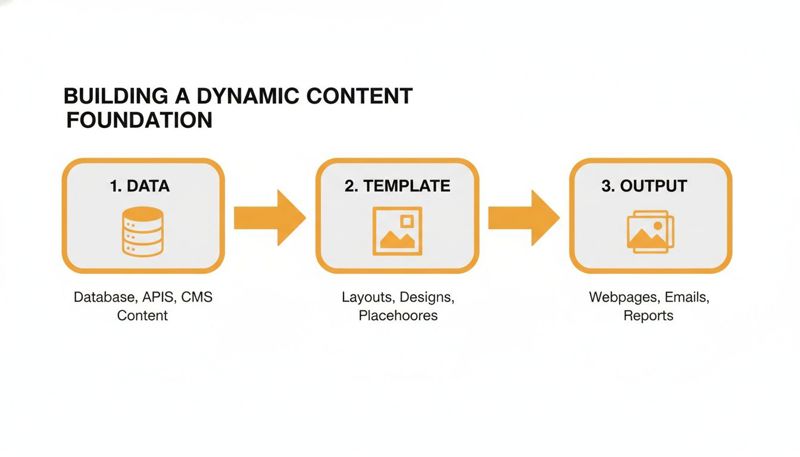
This workflow is the engine behind your entire personalization strategy, turning structured data into countless unique images.
The No-Code Path for Marketers and Agencies
For most marketers, agency teams, and business owners, the no-code approach is the quickest and easiest way to get results. It’s built for speed and simplicity, letting you turn a big spreadsheet into beautiful, personalized images without touching a line of code.
Let's say you just finished a webinar with 500 attendees. You want to send every single person a custom "Thank You" image with their name and company on it—perfect for a follow-up email or a social media shout-out.
In a tool like OKZest, the process is straightforward. First, you'd export your attendee list from your webinar platform as a CSV file. This file would have columns like FirstName, LastName, and CompanyName.
Next, you connect those CSV columns to the dynamic layers in your image template inside the editor. It's a simple mapping exercise—you'd link the FirstName column to your {{name}} text layer, for example.
Then, with just one click, you hit "Generate." The platform instantly reads every row in your spreadsheet, plugs the data into your template, and creates a unique image for each attendee.
In a matter of minutes, you’ll have a new CSV file ready for download. This file includes all your original data, plus a new column containing a unique URL for each person's personalized image. This is the link you'll pop into your email campaign's merge tags.
Our Take: No-code tools have made dynamic content generation accessible to everyone. What used to demand custom scripts and a developer's time can now be done by a marketer with a spreadsheet, often in less time than it takes to finish a coffee.
The API Path for Real-Time Personalization
For teams that have developers or more technical resources, an API-driven workflow offers incredible flexibility and real-time power. Instead of generating images in bulk from a static file, you can create them instantly in response to user actions.
This is where dynamic content becomes truly interactive and part of your product or service. The possibilities are practically endless, as you can integrate image generation directly into your website, app, or sales tools. For a deeper look at connecting these systems, our guide on building a marketing automation workflow is a great resource.
Here are a few scenarios where I’ve seen this work wonders:
- E-commerce Welcome Emails: A new customer signs up. Your system immediately makes an API call, passing their name to your template to generate a personalized welcome banner. This banner is embedded in their welcome email, which lands in their inbox seconds later.
- SaaS Onboarding: A user completes a key step in your application. An API call triggers the creation of a custom certificate with their name and the date, congratulating them on their achievement right inside the app.
- Sales Outreach: A sales rep fills out a small form in their CRM with a prospect's name and company. An API call instantly creates a hyper-personalized image for a LinkedIn message, cutting through the noise and grabbing their attention.
This real-time approach ensures your content is always relevant to what the user is doing right now. It shifts personalization from being just a campaign tactic to a core, responsive part of the user experience. By choosing the right path—no-code for bulk jobs or API for instant triggers—you can build a powerful system for creating personalized content at any scale.
Delivering Personalized Content Across Channels

You’ve automated your image generation, and you’re sitting on a goldmine of unique, personalized assets. That’s a huge win. But those images aren't doing any work until they actually reach your audience.
The good news is that getting this dynamic content into the marketing channels you already use is simpler than most people think. It usually just involves a special URL or a small code snippet.
Let's break down how this works for two of the most critical channels: your email campaigns and your website.
Integrating Dynamic Images into Your Email Campaigns
Email is the natural habitat for personalized images. Platforms you’re already using, like Klaviyo, Mailchimp, or Instantly, are built to handle customer data using merge tags (sometimes called personalization tags).
You’re probably familiar with using tags like *|FNAME|* or {{ first_name }} to drop a subscriber's name into an email. You can use that exact same process to show a unique image to every single person on your list.
After creating your images with a tool like OKZest, you'll have a spreadsheet with a new column holding a unique image URL for each contact.
Getting this into your email is a two-step dance:
- Upload the new data: Import that updated CSV file back into your Email Service Provider (ESP). You’ll just need to map your new image URL column to a custom field—you could name it something straightforward like
PersonalizedImageURL. - Use the merge tag: Inside your email template’s image block, instead of uploading a static file, you’ll insert the merge tag for that new custom field. In Mailchimp, for instance, it would look like
*|PersonalizedImageURL|*.
When the campaign sends, your ESP automatically swaps that tag with the correct image URL for each individual subscriber. The result? A stunningly personal email that feels like it was made just for them.
Embedding Dynamic Content on Your Website
You can bring that same one-to-one feeling to your website, landing pages, or even inside a chatbot. The concept is identical, but instead of a merge tag, you’ll use a simple HTML snippet.
A dynamic image URL is built with parameters that pass data directly to your image template. For example, if you wanted to greet a returning customer named Emma on your homepage, the image URL might look like this:
https://app.okzest.com/image/template-id?name=Emma
This URL tells the generation platform to grab your template and populate the "name" field with the value "Emma."
You then pop this into your website's HTML using a standard <img> tag:
<img src="https://app.okzest.com/image/template-id?name=Emma" alt="A warm welcome back to our site!">
For a truly dynamic setup, you’d replace the hardcoded "Emma" with a variable from your customer data platform or user login system. This way, every single logged-in user sees a banner created just for them, boosting engagement from the second they land on your site.
Different channels require slightly different methods, but the core principle of using a URL to call a dynamic asset remains the same. Here’s a quick-reference table to help you map it out.
Dynamic Content Integration Methods
| Channel | Primary Integration Method | Example Use Case |
|---|---|---|
| Merge Tag / Personalization Token | Inserting a personalized offer image into a promo email. | |
| Website/App | HTML <img> tag with URL Parameters |
Displaying a welcome banner with the user's name. |
| Social Media | API-driven Post Generation | Automatically creating unique shareable graphics for users. |
| Chatbot | API Call or Snippet Integration | Showing a personalized ticket in a confirmation message. |
| Direct Mail | Data Export for Print (QR Codes) | Printing a mailer with a QR code leading to a personal URL. |
This table shows just how flexible dynamic content can be. Once you have the URLs generated, you can plug them into virtually any digital touchpoint.
A critical part of deploying dynamic content at scale is planning for missing data. Always configure a fallback image or default text within your template. If a subscriber's name is missing, your system should automatically serve a more generic—but still polished—image, ensuring a consistent and professional brand experience for every user.
Optimizing for Performance and Delivery
When you’re delivering potentially thousands of unique images, performance is everything. A slow-loading image can kill the user experience and torpedo your conversion rates.
Fortunately, modern dynamic image platforms are built for this exact challenge.
These services generate the images on powerful cloud infrastructure and lean on a Content Delivery Network (CDN). A CDN is a network of servers spread across the globe. When a user in London requests an image, it’s served from a nearby European server, not one halfway across the world. This simple change dramatically cuts down load times.
Plus, the image URLs themselves are just lightweight text. They add virtually no bulk to your email or website code, keeping your pages fast, responsive, and ready to convert.
So, you’ve launched your dynamic content. Now what?
Designing and delivering personalized content is a huge step, but the real work starts now: figuring out what’s actually working. To understand the true impact of your efforts, you need to look past simple metrics like impressions and pageviews.
The conversation needs to shift from how many people saw your content to what they did because of it. Instead of just tracking email opens, you'll find yourself obsessed with the click-through rates on those new personalized calls-to-action. That’s where the real story is.
Identifying Meaningful Metrics
When you make the jump from static to dynamic, your key performance indicators (KPIs) need to evolve, too. You need to track metrics that show a direct line between the content a user sees and the actions they take. This feedback loop is essential for refining your templates and proving value.
Here are the core metrics that truly matter:
- Engagement Metrics: How are people interacting with the content itself? Are they spending more time on the page? Scrolling further? These are great signs that your personalization is holding their attention.
- Click-Through Rate (CTR): This is your most direct measure of how compelling a personalized image or CTA is. If a dynamic banner gets a higher CTR than its static counterpart, you have a clear winner.
- Conversion Rate: This is the bottom line. Are more people taking the action you want them to take? Whether that's buying a product, booking a demo, or signing up, this is the ultimate test.
- Revenue Per Visitor (RPV): For any e-commerce business, this is the metric that connects personalization directly to revenue. It shows you if your dynamic content is attracting and converting higher-value customers.
The data backs this up. We've seen that companies using account-based personalization can see their conversion rates jump by over 45%. And it’s no surprise that returning visitors, who are often greeted with dynamic welcome-back messages, are six times more likely to schedule a demo. This powerful link is explored in more detail in insights from B2B Ecosystem.
Proving Impact with A/B Testing
If you want to prove the value of your dynamic content strategy, there’s no better tool than A/B testing. This isn't just a best practice; it's absolutely critical for getting buy-in from stakeholders and justifying more investment in personalization.
The concept is straightforward but the results can be incredibly revealing. You simply create two versions of an experience:
- Version A (The Control): This is your standard, one-size-fits-all content. Think of a generic welcome banner or a standard promotional email image.
- Version B (The Variant): This is your new dynamic version. It could be a banner with the user's name or a product image based on their browsing history.
You then serve these versions to different, randomized segments of your audience and measure the outcome. Did the email with the personalized image get more clicks? Did the landing page with the dynamic greeting have a lower bounce rate and more conversions? The data from these tests gives you definitive proof of what resonates.
Our Take: Don't just assume your dynamic content is better—prove it. Consistent A/B testing is the bedrock of an optimization-focused culture. It replaces guesswork with a data-driven strategy and lets you systematically improve results over time.
Implementing a Content Scoring Model
As you scale your personalization efforts, you'll quickly find yourself with hundreds, if not thousands, of dynamic templates and assets. Not all of them will be top performers. A content scoring model is a practical way to identify your star players and find the underperformers that need a refresh.
The model works by assigning a weighted score to your content based on the metrics you care about most, turning raw data into a clear hierarchy of what’s working and what isn't.
Here’s a simple scoring model you can adapt for your own use:
| Metric Category | Weight | Key Metrics to Track |
|---|---|---|
| Engagement | 40% | Time on page, scroll depth, interaction rate |
| Conversion | 35% | Form fills, purchases, demo requests |
| Revenue Impact | 25% | Average order value, revenue per visitor |
By applying this model, you can quickly rank your campaigns and templates. You might discover that B2B emails personalized with a company logo drive huge engagement, while dynamic product recommendations are the biggest revenue driver on your website.
This continuous loop of measuring, testing, and scoring is the engine that powers a successful strategy for dynamic content at scale. It ensures your creative work isn't just creative—it's consistently delivering real, measurable business value.
Your Biggest Questions About Dynamic Content, Answered
When you start talking about personalized content at scale, a few of the same questions and worries always pop up. That’s perfectly normal. Getting clear on these points is often the key to feeling confident enough to dive in.
Let's get these common concerns out in the open and tackle them head-on.
“What If I Don’t Have Enough Data for This?”
This is probably the most common starting point we hear, but you don't need a mountain of data to make a real impact. The trick is to start small and, most importantly, have a solid fallback plan.
Even something as simple as using a first name in an image can grab attention and boost engagement.
The crucial part is making sure every single person has a good experience, whether you have their data or not. For example, inside an image template from OKZest, you can set a default value. If a subscriber's first name is missing, the image can show a friendly "Hello there!" instead of a broken "Hello, !" This simple step prevents those awkward, incomplete results that kill the personal touch.
Our Advice: Don't wait for perfect data. Start with what you already have in your email list or CRM. Your goal is progress, not perfection on day one. You can always add more complex data points as your systems and confidence grow.
“Won’t Dynamic Images Slow Down My Emails and Website?”
Performance is a huge—and valid—concern. A slow-loading email or webpage can completely undo all your hard work on personalization. The good news is that modern dynamic image platforms are built from the ground up for speed.
These systems run on powerful cloud infrastructure and rely heavily on a Content Delivery Network (CDN). This means your personalized images are generated once and then served from a server that's geographically close to your user, which makes load times incredibly fast.
- For Emails: The dynamic image URLs are just lightweight text. They don’t bloat your email's code or give spam filters a reason to flag you.
- For Websites: The images usually load asynchronously. This means they don’t stop the rest of your page from appearing. Your site shows up quickly while the personalized image loads seamlessly in the background.
In some cases, a well-optimized content delivery system can even decrease your overall page load times, which is great for both user experience and SEO.
“Is This Too Technical for My Small Marketing Team?”
Not at all. While the API opens up a world of powerful, real-time flexibility for developers, the rise of no-code tools has made dynamic content accessible to literally everyone. The technical barrier to entry is gone.
Platforms like OKZest are designed for marketers, consultants, and business owners. The whole process is often this straightforward:
- Design your template in a simple visual editor.
- Upload a spreadsheet with your data (like an export from Mailchimp or your event registration list).
- Click a button to generate thousands of unique, personalized images in minutes.
The platform then gives you the right merge tags or HTML snippets to copy and paste directly into your favorite email service or website builder. You absolutely do not need to know how to code to get started.
“How Do I Manage All This Across a Big Team?”
This is a great question. As you scale up, governance becomes essential. Trying to manage multiple campaigns, clients, or brand assets without a clear system is a recipe for chaos. This is why picking a platform with team management features built-in is so important.
Look for tools that offer project and role-based access. This lets you create separate, tidy workspaces for different clients or internal departments.
For instance, you can give specific roles to your team members:
- Designers: Can create and edit the core image templates.
- Marketers: Can generate images from approved templates but can't change the base designs.
- Admins: Have a bird's-eye view of all projects and can manage who has access to what.
This separation of duties prevents accidental changes, keeps your branding consistent, and creates a clean, scalable workflow for your entire agency or marketing department. It’s a must-have for any team serious about managing dynamic content at scale.
Ready to create stunning personalized images that grab attention and boost engagement? With OKZest, you can automate your visual content in minutes, not hours. Start for free on okzest.com and see the difference personalization can make.