At its core, an image templating API is basically merge tags for images. It gives you a way to automatically generate thousands—or even millions—of unique, personalized visuals from one single master design. It works by taking a static template, combining it with dynamic data, and creating custom graphics on the fly.
The Secret to Personalized Visuals at Scale
Imagine you're an email marketer for an online course platform. Your task? Send out graduation certificates to thousands of students. Simple enough, right? But every single certificate needs a unique name, the right completion date, and the specific course title.
Doing this by hand would be an absolute nightmare. We're talking countless hours stuck in a design tool, painstakingly editing each one. It's tedious, mind-numbing work that's practically guaranteed to result in errors and wasted time.
This is a classic business problem that points to a bigger shift in how we communicate online. One-size-fits-all visuals just don't cut it anymore. People expect content that speaks directly to them and acknowledges their unique journey with your brand. Generic, static images get ignored because they fail to make any real connection.
Moving Beyond Manual Design
This is where an image templating API completely changes the game. Instead of all that tedious manual work, the technology automates the entire process. It’s like setting up a digital assembly line for your visuals. You create one master template, define the spots that need to be personalized (like a name or a special offer), and then you let the API do all the heavy lifting.
Think of it this way: a standard email merge tag pulls a name from a list to personalize a line of text. An image templating API does the exact same thing, but for visual elements inside an image.
How It Creates Personalized Connections
By connecting to a data source—like your CRM, a simple spreadsheet, or a database—the API can spit out a unique image for every single person on your list. This means you can finally move away from generic messaging and start creating hyper-personalized experiences that truly resonate with people.
The benefits are pretty clear:
- Massive Scalability: Generate thousands or millions of unique images with zero manual effort.
- Deep Personalization: Create visuals that can include anything from customer names and loyalty points to unique discount codes or event details.
- Increased Efficiency: Free up your design and marketing teams from repetitive, low-impact tasks so they can focus on what really matters.
This approach transforms your visual content from a static, boring asset into a dynamic, engaging tool. It’s the modern, scalable way to build stronger customer relationships, one personalized image at a time.
How an Image Templating API Actually Works
At its core, an image templating API is like a supercharged mail merge, but for visuals instead of plain text. It takes a base design, combines it with dynamic data on the fly, and generates unique, personalized images instantly. The entire process is a slick, automated workflow built for speed and scale.
Let's pull back the curtain and see what makes this technology tick. Once you understand the moving parts, you'll see how a single API call can spit out thousands of custom graphics without a designer in sight.
This diagram shows just how different the workflow is when you switch from manual design to an image templating API.
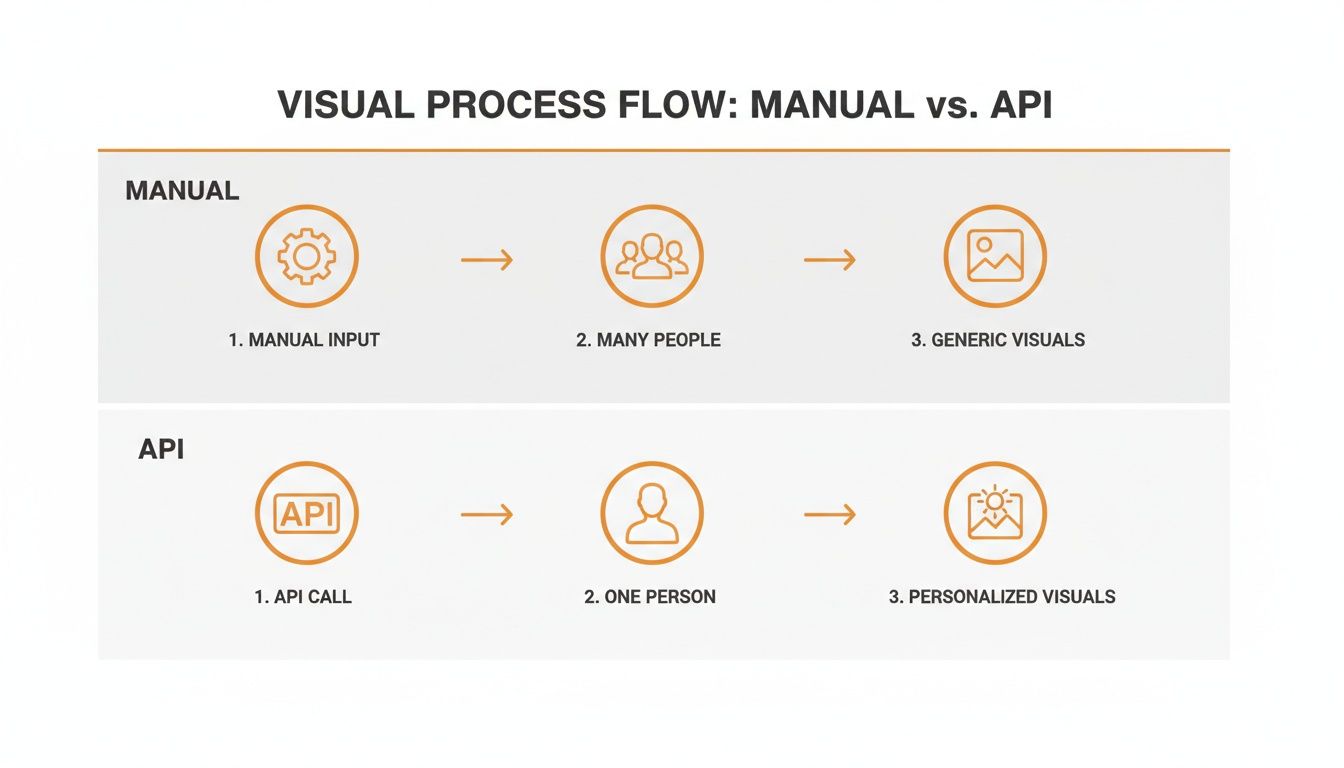
As you can see, it completely transforms a clunky, multi-step manual process into a streamlined, one-person operation that delivers personalized results.
The Three Core Components
To really get how it all works, you need to know about the three fundamental building blocks. Each one plays a critical role in creating the final image.
The Base Template: This is your master design. It’s the static background, branding, and layout that stays the same across all the images you generate. Think of it as the canvas where all the personalization happens. A great example of predefined visual structures are things like these Meme Templates.
Dynamic Layers: These are basically smart placeholders, or "merge tags," you place on your template. These are the spots where content will change—like text for a customer’s name, an image for their profile picture, or a number for a unique discount code.
The Data Source: This is the information that breathes life into your dynamic layers. It can be anything from a simple spreadsheet or a customer list from your CRM, to real-time data pulled from another app.
When you send a request to the API, you’re essentially saying: "Take this base template, find these specific dynamic layers, and fill them up with this data." It’s an elegant process that lets you create massive volumes of personalized images, which is a game-changer for modern marketing. For a deeper dive, check out our guide on the API for personalized graphics.
Handling Missing Data with Fallbacks
So what happens if your data source is a bit spotty? A good image templating API has a built-in safety net: fallbacks, or default values.
A fallback is a predefined value the API uses when the primary data is missing. If a customer's name isn't available, the API can automatically insert a generic greeting like "Hello there!" instead of leaving an awkward blank space.
This feature is crucial for maintaining a professional look. It ensures every image generated is complete and polished, protecting your brand and guaranteeing a consistent experience, no matter how clean your data is. This kind of no-code automation is a huge reason why this tech is catching on so fast.
Driving Business Growth with Dynamic Images
Understanding the nuts and bolts of an image templating API is one thing, but seeing how it actually moves the needle on your business goals is where things get exciting. When you shift from generic, one-size-fits-all visuals to dynamic, personalized images, you start connecting with customers on a completely different level. This isn't just about sticking a name on a graphic; it's about making each person feel seen and valued.
Think about it. In a crowded inbox or a noisy social media feed, generic content is easy to scroll past. But personalized visuals grab attention. By speaking to an individual instead of a faceless crowd, you can build stronger relationships, boost engagement, and drive real action. The result is a direct, measurable lift in key metrics like conversion rates and customer loyalty.

Unlocking Tangible Business Results
Dynamic images aren't just a niche tech tool; they're a strategic asset for growth that delivers tangible results across all kinds of industries and roles.
Here are a few real-world examples to paint a picture:
- For Online Educators: Automatically generate personalized certificates of completion. This small touch validates a student's hard work, gives them a sense of pride, and encourages them to share their achievement online—creating powerful, organic marketing for your courses.
- For Event Organizers: Create dynamic event tickets with the attendee's name, a unique QR code, and even their seat number. This not only makes the check-in process a breeze but also gives the whole experience a more exclusive and professional feel.
- For Sales Teams: Design custom onboarding graphics or sales proposals that pull in the prospect’s name, company logo, and key details. This high-touch approach shows you’ve done your homework and makes your pitch far more compelling.
The core idea is simple but incredibly powerful: personalization drives connection. When a customer sees an image that is uniquely theirs, a routine interaction becomes a memorable moment. That's how you turn prospects into customers.
Powering Personalized Marketing Campaigns
For marketers, especially in email, the impact is huge. Imagine sending a newsletter where every single recipient sees a different product recommendation, beautifully displayed in a custom-designed graphic that features their name and loyalty status. This level of personalization can dramatically increase click-through rates and sales.
Integrating these visuals is a cornerstone of a modern marketing stack. To see how this fits into the bigger picture, it's worth exploring resources on ecommerce marketing automation that can help you grow your store.
The table below breaks down a few more practical applications and the business goals they help achieve.
Use Cases for Image Templating APIs Across Industries
| Target Audience | Use Case Example | Primary Business Goal |
|---|---|---|
| Marketers | Personalized social media ads showing a user's name on a product. | Increase ad click-through rates (CTR) and conversions. |
| HR Managers | Automated "Happy Work Anniversary" graphics for employees. | Boost employee morale and internal engagement. |
| E-commerce Stores | Dynamic "abandoned cart" images with the specific products left behind. | Improve cart recovery rates and drive sales. |
| Real Estate Agents | Custom property flyers with a client's name and viewing time. | Create a premium, personalized client experience. |
| SaaS Companies | Onboarding welcome images featuring the new user's name and company. | Increase user activation rates and reduce churn. |
As you can see, the applications are incredibly diverse, but they all share a common thread: using automation to create meaningful, one-to-one connections at scale.
At the end of the day, an image templating API is more than just a piece of tech; it's a tool for building better relationships. By automating the creation of personalized visuals, you can deliver highly relevant content that captures attention, encourages engagement, and directly contributes to your bottom line. If you're looking to produce visuals at scale, our guide on a scalable image API offers some deeper insights.
Four Ways to Integrate Personalized Images
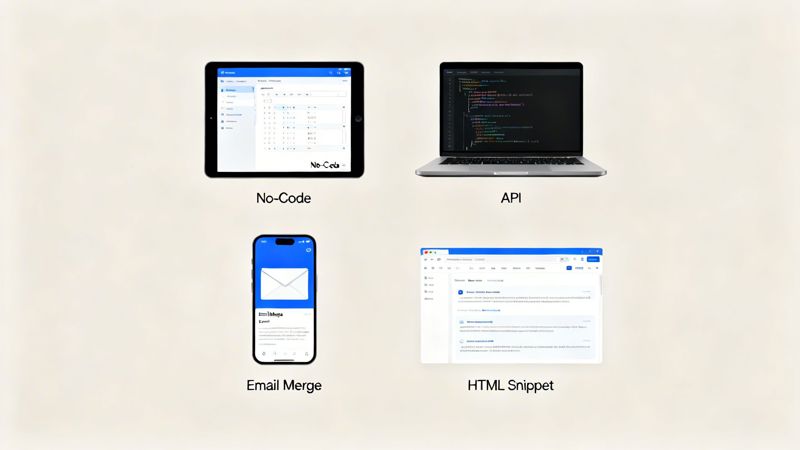
Knowing what an image templating API can do is one thing, but plugging it into your existing tools is where the magic really happens. The great news is that modern solutions are built for flexibility. They offer several ways to connect, whether you're a marketer who lives in spreadsheets or a developer who breathes code. You don't need to rip out your current setup just to start creating personalized visuals.
The goal is to make image personalization feel effortless, so you can focus on the creative side of things instead of getting tangled up in technical weeds. Let's walk through the four main ways you can get dynamic images up and running in your projects.
No-Code Platforms
For marketers, consultants, and social media managers, no-code is the fastest path from idea to execution. These tools give you a visual, drag-and-drop interface to design your templates, map out your dynamic fields, and generate images—all without writing a single line of code.
You can often hook up a Google Sheet or upload a CSV, which makes it dead simple to churn out hundreds of personalized graphics for a campaign in minutes. This approach is perfect if you want to see results right away and prefer a hands-on, visual way of working.
Direct API Integration
Developers who need total control and deep automation will naturally gravitate toward a direct API integration. This method lets you generate images programmatically from any app, database, or backend system. A simple API call is all it takes to create, update, and manage visuals as part of a much larger automated workflow.
This is the ideal setup for:
- SaaS platforms that need to generate personalized welcome images for new users.
- E-commerce sites looking to create dynamic product suggestions on the fly.
- Internal tools that automatically produce custom reports or certificates.
A direct API gives you limitless flexibility to build custom solutions that scale with you. The API ecosystem is booming, and it's not uncommon for organizations to manage hundreds of API endpoints. Image-related requests can easily exceed a thousand queries per second, which shows just how much demand there is for powerful visual automation. You can find more stats on API usage trends over at sqmagazine.co.uk.
Email Merge Tags
One of the most popular and straightforward methods involves using email merge tags. Your image templating service generates a unique URL for each personalized image. You then just pop this URL into your email marketing platform—like Klaviyo, Instantly, or Mailchimp—using the same merge tags you already use for names or other custom fields.
It's as simple as adding a custom field to your contact list. When you send the campaign, your email provider automatically swaps the merge tag with the right image URL for each person, delivering a unique visual straight to their inbox.
HTML Snippets
For a quick and easy way to embed images on websites, landing pages, or even inside direct messages, HTML snippets are your best friend. The process couldn't be simpler: the service gives you a small block of HTML code with an <img> tag pointing to the dynamic URL.
All you have to do is copy that snippet and paste it wherever you want the image to show up. It's a fantastic way to add personalized welcome banners to a user's dashboard, create custom visuals for chatbots, or drop dynamic images onto any webpage without bugging a developer.
Choosing the Right Image Templating Solution
Picking the right partner for your image automation is a big decision. With so many platforms out there, doing your homework ensures your investment in an image templating API actually pays off. The goal is to find a solution that not only handles what you need today but can also grow with you—whether you're sending a few hundred personalized emails or pumping out millions of dynamic social media graphics.
Key things like scalability, security, and how easy it is to integrate should be front and center. A platform that can scale without breaking a sweat is non-negotiable. Look for providers that offer clear pricing, from a free plan for kicking the tires to enterprise packages built for massive volume. This way, you only pay for what you use but have a clear runway for growth.
Evaluating Core Technical Features
It’s about more than just making pretty pictures. The technical guts of the platform will make or break your workflow efficiency and the final quality of your images. Don't gloss over the fundamentals when you're comparing your options.
Make sure you check these boxes:
- Supported Formats: The service absolutely must support standard web formats like PNG and JPEG. This is your guarantee that the images will work just about everywhere—email clients, websites, and social media platforms.
- Security Protocols: You're dealing with your data and your customers' data. It has to be protected. Double-check that the provider has solid security measures in place to handle any sensitive info you pass through the API.
- Ease of Integration: A good solution will have clear, well-written documentation and more than one way to connect. Whether you need a simple no-code hookup or a full-blown developer API, getting started shouldn't be a struggle.
Here’s something people often forget: the quality of customer support. When you inevitably hit a snag, having responsive, knowledgeable support is the difference between a five-minute fix and a full-blown crisis. I’d always lean towards providers offering real-time chat or video support.
Aligning with Your Team and Business Goals
For bigger companies and marketing agencies, features built for teams are a must-have. You’ll want to look for solutions with project management tools and user role assignments. This is what lets you collaborate without tripping over each other, control who sees what, and keep your branding consistent across different campaigns.
To make a smart decision here, it helps to understand the different kinds of image personalization software on the market and how they map to specific business goals.
Ultimately, you want a provider that feels more like a partner than just a vendor. Go with a company that actively listens to its users and builds that feedback into its product. That kind of culture tells you they’re invested in your success, not just their own.
Frequently Asked Questions About Image Templating APIs
Trying out a new tool always brings up a few questions. To help clear the air, we’ve put together answers to the most common things people ask about using an image templating API. Think of this as your practical guide to getting started, checking compatibility, and understanding the real-world value.
How Difficult Is It to Get Started?
Honestly, it’s designed to be pretty straightforward, no matter your technical comfort level. For non-technical users, most services offer no-code editors where you can design templates visually and connect a spreadsheet. If you can upload a CSV, you're good to go.
For developers, you get the full flexibility of a direct API integration with clear documentation. But you don't always have to go that deep. Many services also provide simple email merge tags or HTML snippets you can copy and paste right into your existing tools. You can literally have personalized images up and running in a few minutes.
Will It Work with My Current Email Platform?
Yes, absolutely. Any high-quality image templating solution is built to play nicely with others. Most will work with pretty much any Email Service Provider (ESP) out there, including popular platforms like Instantly, Klaviyo, and Mailchimp. It's a non-negotiable feature for a modern service.
The magic happens by generating a unique image URL for each person on your list. You just pop this URL into your email template using your ESP's normal merge tag feature. It slides right into your existing workflow without you having to change a thing about your marketing stack.
What Happens If Personalization Data Is Missing?
This is a great question, and it's where a robust API really shines. They have a safety net built-in called fallbacks or default values. This feature ensures your visuals always look professional, even when your data isn't perfect.
You can set up default text or images ahead of time that will appear if a data field is empty.
For instance, if a user's first name is missing from your list, the image could automatically display a generic greeting like "Hello there!" instead of an awkward blank space. This ensures every generated image looks complete and polished.
This is super important for keeping your brand looking good and giving everyone a great experience. It prevents embarrassing mistakes and keeps your campaigns looking sharp, no matter how clean (or not-so-clean) your data is.
Is This Service Suitable for All Business Sizes?
Definitely. Modern image templating services are built to grow with you. They usually offer different pricing plans, from a free tier for individuals or small projects all the way up to enterprise solutions that can churn out millions of images a month.
As you move up, you'll also get more advanced features for team collaboration, like:
- Project Management Tools: To keep your campaigns and assets organized.
- User Role Assignments: To control who on your team can see and do what.
This scalability makes an image templating API a smart, cost-effective tool for everyone, from solo founders to massive marketing agencies.
Ready to create personalized visuals that grab attention and get results? With OKZest, you can automate your image creation using our powerful no-code and API solutions. Start building stronger customer connections today by visiting https://okzest.com.