You’ve probably lived this already. A campaign is due, the copy is ready, and then the visual work begins. One square image for Instagram. A resized version for Stories. Another for LinkedIn. A slightly tweaked one for X. Then someone asks for a version for top prospects in DMs, and suddenly you’re making tiny variations by hand.
Producing content is not the challenge. The hard part is producing relevant content at volume without burning hours on design tasks. That’s where dynamic image generation for social media changes the game, especially in places many marketers still overlook: private conversations like WhatsApp, X direct messages, and chatbot flows.
Why Your Generic Social Media Visuals Are Failing
A social media manager launches a promotion on Monday with polished graphics. By Wednesday, the posts look like everything else in the feed. Same stock-photo energy. Same generic headline. Same broad message for everyone.
That’s not a design problem alone. It’s a relevance problem.
People scroll past visuals that feel mass-produced because most of them are. Even when the branding is solid, a single image pushed to every audience segment often misses what gets attention: specificity. A first name. A local event detail. A product category someone cares about. A visual that feels like it was made for this person, not for “the audience.”
That pressure shows up in every industry. Real estate marketers, for example, often need dozens of versions of the same campaign for listings, neighborhoods, buyer stages, and agent brands. If you want inspiration for the content side of that challenge, 10 Game-Changing Real Estate Social Media Posts is a useful reference because it shows how quickly “just post consistently” turns into a variation problem.
The market has already shifted. In 2026, 71% of images shared on social media platforms worldwide are AI-generated, according to SQ Magazine’s AI in social media statistics. That matters because it signals a change in how teams create visual content. More marketers are moving from one-off design files to automated, data-driven image workflows.
Why manual variation breaks down
Manual design works when volume is low. It starts breaking when you need:
- Audience versions: One campaign for new leads, another for returning buyers, another for high-intent prospects.
- Channel versions: Public post formats are different from DM-friendly visuals.
- Speed: Sales and support teams can’t wait for a designer every time a live conversation needs a custom image.
A better mental model is this: your visuals should work more like modern email personalization. Many teams already understand that idea in copy. The same shift is happening in design, and it’s closely tied to stronger visual storytelling for social media.
Generic visuals often fail for a simple reason. They ask every viewer to do the work of making the message feel relevant.
Dynamic image generation solves that by letting teams create one system instead of hundreds of manual files.
What Is Dynamic Image Generation for Social Media
Dynamic image generation for social media is the process of creating images automatically from a template plus data. If that sounds technical, use this simpler analogy: it’s merge tags for images.
You already know merge tags from email. You write “Hi {{FirstName}}” once, and the platform fills in a different name for each person. Dynamic image generation does the same thing visually. Instead of only swapping text in an email body, it can swap text, logos, dates, headshots, offers, prices, or background elements inside an image.
Here’s a simple visual reference:
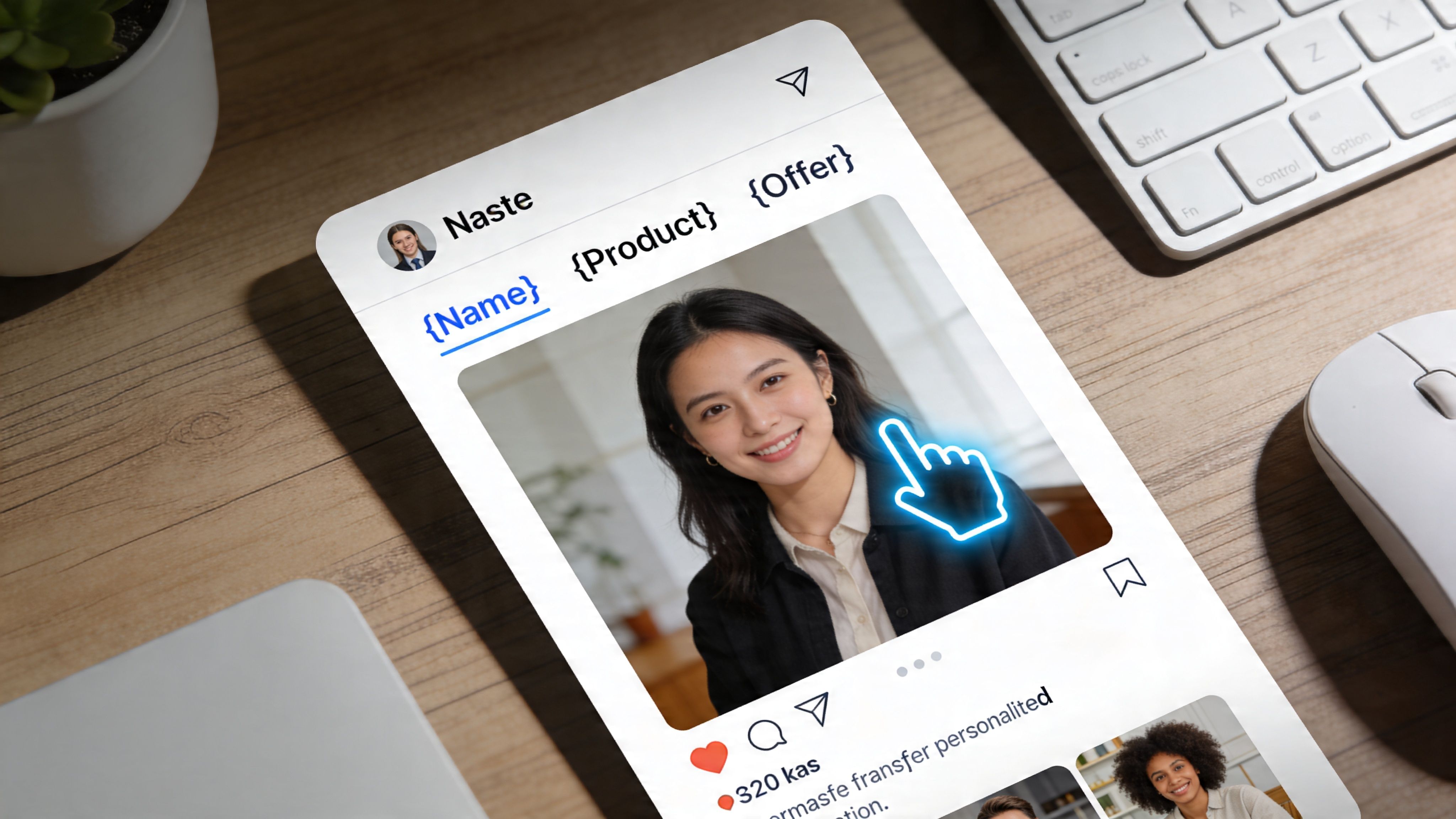
Think template plus data plus output
A dynamic image system usually has three parts:
A base template
This is the designed layout. It might include brand colors, typography, a product frame, or a CTA area.Dynamic fields
These are the parts that change. Name, city, event date, product image, coach photo, company logo, coupon code, or chatbot response category.A generation engine
This combines the template and the data to produce a unique image.
That’s the core idea. One template. Many outputs.
How it differs from Canva or Photoshop
Canva and Photoshop are excellent tools for creating visuals. But by default, they’re still mostly manual design environments. You open a file, edit the content, export, and repeat.
Dynamic image generation changes the workflow. Instead of editing each visual one at a time, you create a reusable structure that can output many image variations automatically.
A quick comparison makes this easier to see:
| Approach | Best for | Limitation |
|---|---|---|
| Static design in Canva or Photoshop | One-off posts, polished creative work, campaign concepts | Repetition becomes slow when many versions are needed |
| Dynamic image generation | Personalized campaigns, DMs, certificates, chatbots, social cards | Requires planning the template and data rules upfront |
The easiest example
Say you run webinars.
A static process looks like this: create one “You’re Invited” image, then manually edit attendee names for VIP outreach.
A dynamic process looks like this: design one webinar invite template with placeholders for name, date, host, and seat type. The system then generates unique images for each recipient.
Practical rule: If you're making the same image more than a few times with small edits, it probably wants to become a dynamic template.
What marketers usually get wrong
People often assume this only matters for public posts. It doesn’t.
The strongest use cases are often private and triggered by behavior. A chatbot sends a welcome card. A sales rep sends a prospecting visual with the prospect’s company name. A coach sends a custom milestone image after a course step is completed. Those moments feel personal because they are.
That’s why dynamic image generation for social media isn’t just about prettier posts. It’s a production system for relevance.
How Dynamic Image Generation Actually Works
The mechanics sound advanced until you break them into layers. Most setups follow a simple flow: template layer, data layer, then generation engine.
Here’s the process at a glance:
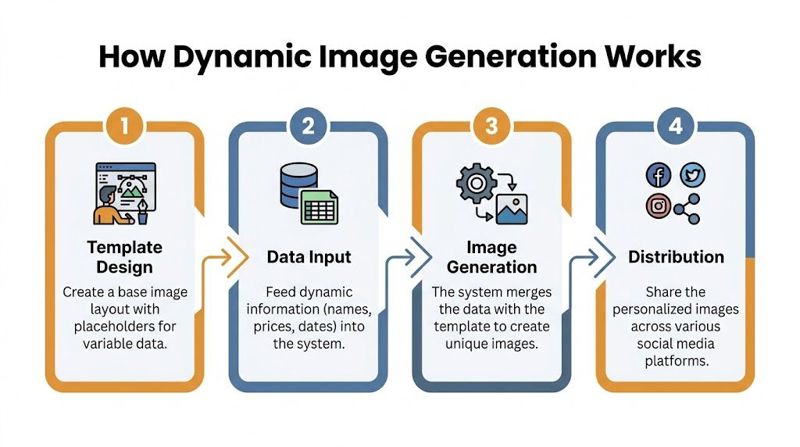
The template layer
Start with a master design.
This is your reusable canvas. It might include a background image, a fixed headline area, a photo placeholder, a badge, and a footer. The designer decides what stays constant and what can change.
For example, a WhatsApp outreach image for an event could include:
- Static brand elements: logo, colors, layout, CTA style
- Dynamic text areas: recipient name, event title, event date
- Optional visual areas: speaker photo, city name, seat type
- Fallback zones: default wording if a field is empty
The smart part is that you design for variation ahead of time. If some names are short and others are long, the text box needs breathing room. If some company logos are wide and others are square, the placeholder should handle both.
The data layer
Then the system needs something to pull from.
That data might come from:
- A spreadsheet with customer names, product categories, or offer codes
- A CRM with lead information
- A form or chatbot that captures a user’s choices
- A live API with event details, pricing, or inventory information
Many readers get confused, assuming the data source must be complicated. It doesn’t have to be. A spreadsheet is enough for many campaigns.
A sales team could upload a list with columns like first name, company, rep name, and meeting link. The image tool reads each row and creates a visual for that contact.
The generation engine
Now the system combines the two.
The engine takes the template, fills in the dynamic fields, and outputs a new image. Sometimes that output appears through a unique image URL. Sometimes it gets pushed into a workflow tool. Sometimes it’s inserted into a message automatically.
If you want a more technical walkthrough of this style of workflow, generate images programmatically is a useful reference because it shows how image creation moves from manual exporting to automated production logic.
Why AI matters here
Some workflows rely on template logic alone. Others layer in AI-powered generation.
According to OKZest’s guide to dynamic image generation, AI-powered dynamic image generation can use models like Stable Diffusion and DALL-E 2 to create personalized visuals based on user-specific data, and personalized images can increase click-through rates by 20-30% in campaigns that use merge tags. For marketers, the practical takeaway is simple: AI can help create or adapt the image content, while dynamic systems make sure the final result is usable at scale.
What happens when data is missing
This is one of the most important parts of a real workflow.
If a chatbot doesn’t capture someone’s city, or a CRM record is missing a company logo, the system still needs to generate a usable image. That’s where fallbacks come in.
A fallback is the default value that appears when dynamic data isn’t available.
Examples:
- If first name is missing, use “there”
- If company logo is missing, use a neutral branded badge
- If event time is unavailable, show “Details inside”
- If profile image fails, use a template illustration
Missing data shouldn't break the image. It should trigger a sensible default.
Without fallbacks, automation becomes fragile. With them, it becomes dependable enough for high-volume campaigns.
A plain-language workflow example
Here’s what this looks like in everyday marketing terms:
- A lead messages your business on X.
- Your chatbot asks which service they want.
- Their answer gets stored.
- The system generates an image specific to that service.
- The bot replies with a DM containing that image.
No designer had to stop and make a fresh graphic. The system handled it in the background.
That’s the leap. You’re not designing one image. You’re designing a machine that can produce the right image when it’s needed.
The Business Case for Personalized Social Images
Personalized social visuals aren’t just a creative upgrade. They’re a performance tool.
When a platform decides what to show people, relevance matters. So does freshness. So does the likelihood that someone will stop scrolling, click, reply, or continue a conversation. Generic assets struggle because they speak broadly. Personalized assets work better because they narrow the message to what the viewer cares about right now.
That shift is happening at platform level too. Over 80% of social media content recommendations rely on AI-powered dynamic image generation, and Reddit saw a 146% rise in AI posts since 2021, according to Triumphoid’s breakdown of creating social cards via API and dynamic image generation. For marketers, that’s less about hype and more about adaptation. The feeds are already optimizing around relevance.
Where the value shows up
The business impact usually appears in three places.
Better response from warm audiences
If someone already knows your brand, a more customized image can push them into action faster. That might mean clicking through to register, replying to a DM, or revisiting an offer they ignored the first time.
More useful sales outreach
Sales teams often need a reason for someone to pause. A custom visual in a direct message can make outreach feel intentional rather than automated. It gives the prospect something specific to react to.
Stronger client delivery for agencies
Agencies benefit in a different way. Dynamic workflows let them produce more variation without multiplying design hours. That matters when a client wants local versions, audience-specific offers, or always-on campaign assets.
Why private channels matter more than many teams think
Public posts build awareness. Private channels move conversations forward.
A personalized DM image can support:
- Lead qualification: show the next step based on someone’s interest
- Event follow-up: send a custom invitation or reminder
- Customer support: guide users with visual instructions specific to their product or plan
- Recruitment outreach: include role, company, or meeting context in the image itself
The visual acts like a mini landing page inside the conversation.
A good personalized image doesn’t just decorate the message. It carries the context the recipient needs to decide whether to respond.
Who benefits most
Some groups usually see the clearest return:
| Team | Why dynamic images help |
|---|---|
| Event organizers | They need invitation, reminder, and follow-up visuals that reflect attendee details |
| Sales teams | They can personalize outreach without creating assets manually for every lead |
| Marketing agencies | They can deliver segmented creative output at scale |
| Coaches and consultants | They can send milestone, welcome, and offer visuals in direct conversations |
That’s the business case in plain terms. More relevance, less manual production, and a better chance that your social content helps move revenue or relationships forward.
Dynamic Image Generation Use Cases in Action
The most interesting use cases aren’t the obvious banner ads. They happen in moments where someone expects a response, not a broadcast.
That’s why DMs and chatbots matter so much. While dynamic image generation for social media is often directed at public posts, private conversations often create the strongest business impact.
Here’s a visual cue for the kind of mobile-first experiences this supports:
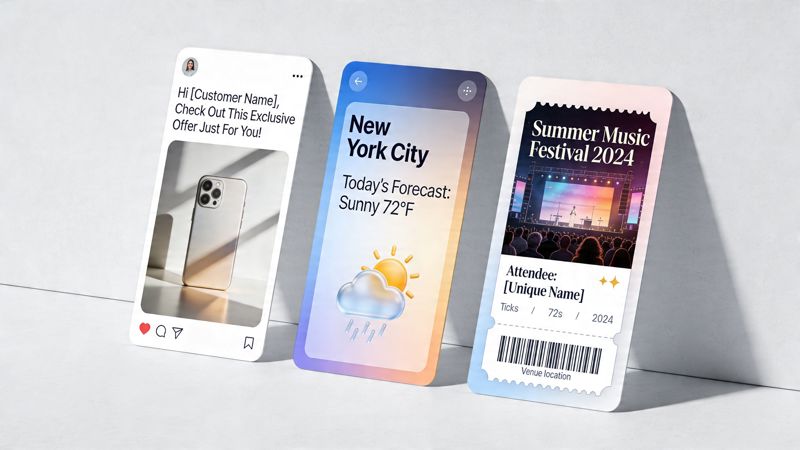
WhatsApp and X direct messages
A prospect asks about pricing on WhatsApp. Instead of replying with plain text alone, the business sends a branded image that includes the prospect’s first name, the service they asked about, and a clear next step.
That’s not a gimmick. It creates clarity.
The underserved angle here is important. Abyssale’s dynamic image page notes that integrating dynamic images into social media direct messaging is a critical gap, and that personalized DMs have been shown to boost replies by 35%. If your team measures success by booked calls, event responses, or lead engagement, reply rate is not a side metric.
Common DM workflows include:
- Welcome visuals: sent after someone follows or messages your brand
- Offer cards: customized by product interest or audience segment
- Reminder graphics: for calls, demos, webinars, or application deadlines
- Reactivation messages: customized visuals for old leads or inactive subscribers
Event marketing that feels personal
Events are a natural fit because registration data already exists.
A simple workflow can generate:
- “You’re invited” images with the attendee’s name
- VIP reminder cards with event date and session type
- Shareable badges for speakers or sponsors
- Post-event thank-you graphics
An event organizer doesn’t need to redesign each asset. They need one reliable template and attendee data.
Sales and recruitment outreach
Dynamic visuals can cut through the sameness of cold outreach.
A recruiter could send a prospect a direct message with an image that includes the person’s name, target role, and company context. A B2B sales rep could send a custom visual with the prospect’s company logo and the meeting objective.
That doesn’t guarantee interest. It does signal effort.
When outreach looks tailored, recipients are more likely to treat it like a real conversation instead of a bulk sequence.
Education and coaching
Coaches, educators, and course creators often rely on momentum. Small milestones matter.
Dynamic image generation can support:
Enrollment confirmations
A welcome image can reinforce the student’s decision and make onboarding feel polished.Progress check-ins
A chatbot can send a personalized “Module completed” image that nudges the learner to continue.Certificates
Completion certificates are one of the cleanest use cases because they combine structured templates with personal data.
Content repurposing into conversational assets
Many brands already have source material. They just don’t adapt it for private channels.
A blog post can become a DM teaser image. A webinar clip can become a visual invite. A testimonial can become a prospect-specific outreach card. If you’re thinking about that workflow more broadly, AI content repurposing is a helpful companion topic because it pushes marketers to think in systems, not single assets.
A chatbot example in plain English
Let’s say a real estate business runs an Instagram ad. A user clicks and starts a WhatsApp conversation.
The flow could work like this:
| Trigger | Data captured | Image sent |
|---|---|---|
| User asks for listings | Budget and location | Branded property match card |
| User asks for viewing | Preferred day and property type | Appointment request image |
| User stops replying | Last interest category | Re-engagement visual with tailored CTA |
The value isn’t only personalization. It’s speed plus consistency. The business responds quickly, the brand stays on-message, and the prospect gets something more useful than a generic text block.
That’s why these use cases keep growing. They turn static design into a responsive part of the conversation.
Integrating Dynamic Images API vs No-Code Platforms
There are two main ways to implement dynamic image generation for social media: no-code platforms and APIs. Neither is universally better. The right choice depends on who’s building the workflow and how much control the business needs.
Here’s the implementation picture many teams are deciding between:
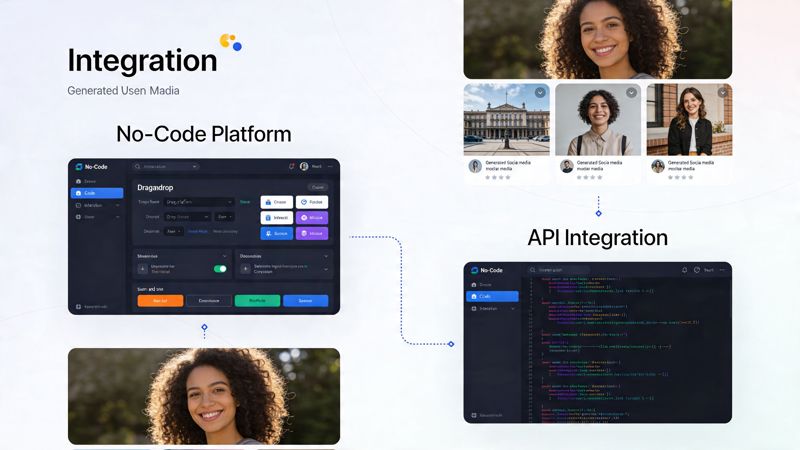
When no-code makes more sense
No-code platforms are usually the faster starting point for marketers, agencies, consultants, and social teams. They’re built for people who want automation without needing to write custom application logic.
Typical advantages:
- Faster setup: easier to connect forms, spreadsheets, CRMs, or automation tools
- Template management: non-designers can reuse approved layouts
- Lower technical overhead: marketing teams can own the workflow directly
This route works well when your process looks like “when a lead fills out a form, generate an image and send it through a campaign tool.”
One example is OKZest, which offers no-code and API options for creating personalized images from dynamic and real-time data with fallback values. That makes it relevant for teams handling certificates, chatbots, websites, email, WhatsApp, and X without wanting to engineer every step from scratch.
When APIs are the better fit
APIs make more sense when the image generation needs to live inside your own software, app, or enterprise workflow.
This path is useful if you need:
- custom logic tied to proprietary systems
- direct integration with a product backend
- high-volume generation under application control
- tighter control over authentication, delivery, or rendering behavior
Developers often prefer this because the image service becomes one piece of a larger system rather than a standalone marketing tool. If you want to understand that route more concretely, image generation via API is a solid reference point.
A side-by-side decision view
| Question | No-code platform | API |
|---|---|---|
| Who usually owns it | Marketer, agency, ops team | Developer, product, engineering |
| Setup speed | Faster | Slower at the start |
| Flexibility | Good for common workflows | Strong for custom workflows |
| Maintenance | Lower | Higher |
| Best use case | Campaign automation and business workflows | Deep product integration and enterprise systems |
A practical way to choose
If your team says, “We need personalized images in campaigns next week,” start no-code.
If your team says, “We need image generation embedded in our app and triggered by user actions across multiple systems,” use an API.
Choose the method your team can actually maintain. A simpler workflow that gets used beats a powerful setup nobody owns.
One more consideration
The tool decision isn’t only technical. It affects how quickly marketing can test ideas.
No-code gives marketers room to experiment with DM offers, chatbot journeys, event reminders, or social cards without waiting in a development queue. APIs give product teams more room to build custom experiences. The best long-term setup often combines both, with no-code for campaigns and APIs for product-led use cases.
Frequently Asked Questions About Dynamic Image Generation
What makes a good dynamic image template
A good template is flexible before it is flashy.
That means using fonts that remain readable at different text lengths, leaving enough room around placeholders, and checking contrast so the image still works on a small mobile screen. If names, titles, or company names can vary a lot, the layout needs to survive those changes without looking broken.
A practical checklist helps:
- Use forgiving text areas: long names and titles should wrap cleanly
- Design for cropping: social apps often preview images differently
- Keep hierarchy obvious: one main message, one supporting detail, one CTA
- Test ugly inputs: long words, missing logos, odd capitalization, blank fields
How do I handle performance when generating lots of images
Performance matters because slow visuals interrupt the experience, especially in mobile messaging and social environments.
According to Zero Gravity Marketing’s article on dynamic image generation, dynamic image optimization with cloud CDNs can reduce file sizes by 50-70% and page loads by 30-50ms, leading to 2-3x faster rendering and retaining 85% more user attention. In practical terms, marketers should think about caching, image compression, and serving the right size for the device.
A few operational habits make a big difference:
- Cache repeated images: if the same asset is requested often, don’t regenerate it every time
- Use a CDN: serve images closer to the viewer
- Match image dimensions to the channel: don’t send oversized files into mobile DMs
- Prefer consistent templates: predictable layouts are easier to optimize
Is dynamic image generation affordable for small businesses
Usually, yes.
Many platforms use tiered pricing, and some support everything from smaller campaigns to enterprise-scale image volumes. A solo consultant may only need a handful of templates for outreach, onboarding, and testimonials. A larger agency may need approval workflows, shared projects, and higher-volume output.
The key question isn’t only subscription cost. It’s whether the workflow saves enough time or improves enough campaign performance to justify itself.
What happens if the personalization data is wrong or missing
That is why fallback planning matters.
If the system receives incomplete data, it should still produce a clean image. That might mean using generic copy, a default logo area, or a neutral background option. The goal is to avoid broken visuals and awkward empty spaces.
A simple fallback table can keep teams organized:
| If this is missing | Use this fallback |
|---|---|
| First name | Friendly generic greeting |
| Company logo | Brand badge or neutral graphic |
| Event detail | Generic event message |
| Profile photo | Default illustration or branded placeholder |
Do I need a developer to get started
Not always.
If your workflow depends on spreadsheets, forms, CRM data, or automation tools, no-code platforms are often enough. If you want image generation inside your app, chatbot infrastructure, or custom lead-routing system, developer support becomes more useful.
Where should I start first
Start with one repeatable use case.
Good first projects include a welcome DM image, a personalized event invite, a certificate, or a follow-up visual for inbound leads. Those are easier to test than trying to redesign your entire social content system at once.
Start with the message that already works. Then make the visual dynamic. That’s usually faster than inventing a brand-new campaign.
If you're exploring a practical way to create personalized images for social media, DMs, chatbots, certificates, and other automated campaigns, OKZest is worth a look. It offers both no-code and API options, supports fallback values when personalization data is missing, and is built around the idea of merge tags for images so teams can produce unique visuals without manual editing every time.