You’ve probably shipped this campaign before. The subject line is sharp, the segmentation is decent, and the offer is relevant. Then the email lands with a generic hero image that could’ve gone to anyone.
That’s where image generation via API changes the economics of personalization. Instead of treating visuals as fixed creative assets, you treat them like dynamic output. The same way your email platform merges in a first name or company, an image API can merge in a name, event date, product, profile detail, promotion, QR code, or account-specific message, then return a unique image URL you can place directly into an email, landing page, chatbot, or sales sequence.
For marketers and sales teams, that matters because static creative doesn’t scale well across segments. Dynamic image generation does. The practical question isn’t whether the tech exists. It does. The practical question is how to use it without creating a fragile workflow that breaks the moment your data is messy or your send volume spikes.
Beyond First Names Personalized Marketing Reimagined
A lot of personalization still stops at text. “Hi Sarah” in the email body. “Your offer is ready” in the headline. That can help, but it rarely changes the visual experience of the campaign.
A personalized image does. A conference invite can show the recipient’s name on a badge. A webinar reminder can display their company on a branded seat reservation card. A sales email can include a mockup of their homepage inside a frame with a custom note from the rep. Those assets feel specific because they are specific.

Why visuals change the response
People scan before they read. In a crowded inbox or feed, the image often gets judged before the copy. If the visual looks mass-produced, the whole message feels mass-produced.
Dynamic visuals help with three things marketers care about:
- Attention: A recipient notices details that clearly belong to them.
- Relevance: The image reflects the actual offer, event, location, account, or product context.
- Continuity: The same personalization can carry from outreach to landing page to follow-up.
That doesn’t mean every campaign needs AI-generated art. Often the strongest use of image generation via API is operational, not theatrical. You take a proven layout, swap in dynamic data, and generate assets automatically at send time or just before it.
Practical rule: The safest path to better performance is usually a stable template with dynamic elements, not a fully open-ended prompt.
Why many teams get stuck
The hard part isn’t making one image. The hard part is connecting design, data, delivery, approvals, fallback content, and campaign timing so the system behaves reliably.
That’s why the implementation risk matters. AI project implementation failure rates stand at 95% when measuring meaningful business results, with the primary causes stemming from organizational integration challenges, context and data quality issues, and skills gaps with inadequate team training, according to Gigenet’s write-up of the MIT finding.
For marketing teams, that usually shows up in familiar ways:
- Workflow friction: Creative, CRM, and email ops all work in separate tools.
- Bad source data: Fields are empty, outdated, or inconsistently formatted.
- Overbuilt solutions: Someone tries to create a custom image stack when the team really needs a controlled production workflow.
The business case for personalized images is strong. The operational case for keeping the system simple is even stronger. Teams that win here usually treat image generation via API as a connected marketing process, not as a side experiment run by one technical person.
The Building Blocks of Automated Image Personalization
The easiest way to understand image generation via API is to think of it as mail merge for visuals. You start with a designed asset, identify what changes, then feed in the data that should populate those changing parts.
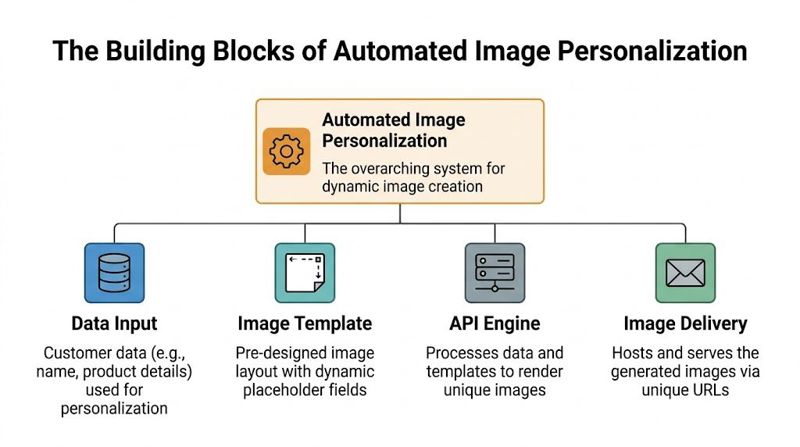
The four parts that matter
At a practical level, most automated image systems rely on the same core components.
Data input
This is the personalization source. It might come from your CRM, event platform, spreadsheet, product feed, form submission, or an internal database. Common fields include first name, company name, job title, product name, discount code, city, appointment time, or image URL.Image template
This is your base design. It contains the static layout, colors, brand elements, and placeholders where dynamic content will appear. Marketers often get better results when they design this first in the same way they’d design an email banner or paid social creative.API engine
The API takes the template plus the incoming data and renders a final image. This is the system that receives your request, inserts the values into the correct layers, and returns a hosted image URL or file output.Delivery layer The finished image gets used in this layer. In practice, that usually means email, a landing page, a sales outreach tool, a customer portal, or a chatbot flow.
Static content versus dynamic content
A lot of confusion disappears once you separate what stays fixed from what changes.
| Content type | What it includes | Example |
|---|---|---|
| Static | Brand logo, background, frame, CTA shape, legal footer | Same event background for every recipient |
| Dynamic | Text, product detail, dates, profile info, external image, QR code | Each recipient’s name and booking time |
| Conditional | Content shown only if a rule is true | VIP badge only for a premium segment |
That distinction matters because not every campaign needs generative creativity. Many high-performing executions are controlled templates with dynamic layers. That gives the marketing team consistency while still making the asset feel personal.
The more tightly you define the template, the easier it becomes to test, approve, and reuse.
Why this model fits modern AI workflows
The broader API market has shifted toward multimodal systems that combine text, images, and conversational logic. One sign of that shift is adoption. Google’s Gemini API reached 86.9 million downloads, which reflects how quickly teams are building with tools that support more than one input type, as noted by Prodia’s API market overview.
For marketers, that means image generation via API doesn’t need to live as a standalone experiment. It can sit inside a broader automation flow where a form submission triggers a CRM update, which triggers image rendering, which triggers email delivery.
A good example is commerce creative. A retail team might use product attributes, campaign rules, and visual templates to generate catalog-style assets at scale. In fashion, teams exploring AI model creation for clothing are working with the same underlying idea: combine structured inputs with controlled visual output so production can scale without starting from scratch each time.
How to Generate Your First Image via API
The first successful API call is the point where this stops feeling abstract. You send structured data to an endpoint, and the system returns a finished image you can use.

Start with a simple use case
Don’t begin with your most complicated campaign. Start with one image template and two or three variables. For example:
- Recipient first name
- Company name
- Event date
That’s enough to validate the full chain from data input to generated output.
What you need before the call
Most image APIs require the same basic ingredients:
- An API key: Used for authentication
- A template or design ID: Tells the system which layout to use
- A JSON payload: Holds the dynamic values for the image layers
- An output expectation: Usually a URL to the rendered image
Keep the API key out of shared docs and design files. It should live in your app settings, server environment, or automation platform secret manager.
Example cURL request
Here’s a representative example using a REST-style request pattern common in image generation workflows:
curl -X POST "https://api.example.com/v1/generate" \
  -H "Authorization: Bearer YOUR_API_KEY" \
  -H "Content-Type: application/json" \
  -d '{
    "design_id": "event-badge-template",
    "format": "png",
    "layers": {
      "first_name": "Jordan",
      "company_name": "Northstar Media",
      "event_date": "June 18"
    }
  }'
The exact field names vary by provider, but the structure is usually familiar:
design_idpoints to the saved templateformatdefines the output typelayerscontains the dynamic values that map to placeholders in the template
If you want a concrete walkthrough of this kind of request structure, OKZest has a useful guide on how an API call for image generation works.
Example Python request
If your team has a developer, or you’re working with someone in RevOps or marketing ops, a Python request is often the fastest path to a reusable script.
import requests

url = "https://api.example.com/v1/generate"
headers = {
    "Authorization": "Bearer YOUR_API_KEY",
    "Content-Type": "application/json"
}
payload = {
    "design_id": "event-badge-template",
    "format": "png",
    "layers": {
        "first_name": "Jordan",
        "company_name": "Northstar Media",
        "event_date": "June 18"
    }
}

response = requests.post(url, headers=headers, json=payload)
print(response.json())
This is the same request in a more automation-friendly format. Once this works, you can replace the hardcoded values with fields from your CRM, form tool, or spreadsheet export.
Test with one known record first. If the image is wrong, you’ll know the issue is in the template or field mapping, not in the campaign logic.
What a successful response looks like
Most APIs respond with metadata plus a link to the generated asset. A typical response might look something like this:
{
  "status": "success",
  "image_url": "https://cdn.example.com/generated/abc123.png",
  "format": "png",
  "design_id": "event-badge-template"
}
The critical field is the hosted image URL. That’s the value you’ll pass downstream into email HTML, a website image tag, or a sales automation sequence.
Common first-run mistakes
Your first test usually fails for boring reasons, not dramatic ones. Watch for these:
- Layer name mismatch: The payload says
company_name, but the template layer is calledcompany. - Missing required field: The template expects a value that isn’t present in the request.
- Wrong asset format: The platform expects a hosted image URL for a background layer, but gets plain text.
- Bad authentication: The API key is missing, expired, or sent with the wrong header.
A useful internal habit is to save one working request and one working response in your project documentation. That gives your team a known-good reference and makes troubleshooting much faster later.
Using Dynamic Data and Fallback Logic
A critical juncture for many personalization projects determines whether they become dependable or brittle. Clean demos assume every field is present and properly formatted. Live marketing systems don’t behave that way.
One contact has a first name but no company. Another has a company, but the account owner entered it in all caps. A third record includes a broken image URL for the product photo you planned to show. If your image generation workflow can’t handle those cases, you don’t have a personalization engine. You have a test environment.
Dynamic data is only useful when it’s governed
There are two broad categories of data you’ll feed into images:
| Data type | Typical source | Example use |
|---|---|---|
| Stored data | CRM, ESP, spreadsheet, event tool | Name, company, date, plan, rep name |
| Live data | API, database, webhook, inventory system | Latest price, appointment status, seat assignment |
Stored data is easier to control. Live data is more powerful, but more volatile. If a campaign depends on current pricing, availability, or profile updates, the image should be generated close to send time or page load time so it reflects what’s true.
The operational trick is to decide which values must be live and which can be pre-rendered. Marketers often overestimate how much real-time data they need. If the visual won’t materially change the customer experience, pre-generating the image is usually simpler.
Fallback logic prevents embarrassing output
A personalized image with missing values is worse than a generic image. “Welcome, !” or a blank product frame looks broken and undermines trust.
That’s why fallback logic matters. You define a default value or alternate display rule for any field that might be empty, invalid, or delayed.
Examples:
- If
first_nameis blank, show “there” - If
company_nameis missing, remove the company line entirely - If
product_imagefails, show a default category image - If
discount_codedoesn’t exist, swap the banner text to a standard offer
Here’s a simplified JSON pattern that shows the idea:
{
  "layers": {
    "headline_name": "Jordan",
    "headline_name_fallback": "there",
    "company_name": "",
    "company_name_fallback": "",
    "offer_label": "VIP Access"
  }
}
Some platforms let you configure fallback directly in the design tool. Others expect the calling system to handle it before the request is sent. Both approaches work. The important thing is deciding where the logic belongs.
For a practical view of that pattern in production, this guide on how to generate images programmatically is useful because it connects the API request to the actual-world need for dynamic values.
If your source data is unpredictable, build your defaults into the image workflow from day one, not after the first broken campaign.
A simple decision framework
When teams decide how to personalize, I recommend using three filters:
Must-have data
If it’s missing, don’t generate the personalized version. Use a standard image instead.Nice-to-have data
If it’s present, use it. If it’s absent, swap to fallback text or hide that layer.High-risk data
If the field changes often or comes from another system, validate it before rendering.
That framework helps non-developers make sensible choices without debating every field individually.
What works better than over-personalizing
Not every element needs to be dynamic. In practice, the strongest campaigns usually personalize one primary visual signal and support it with one or two secondary details.
Good combinations include:
- First name plus event title
- Company name plus rep signature
- Destination name plus travel date
- Product image plus price label
- Account logo plus renewal deadline
What doesn’t work well is stuffing every available field into one crowded creative. That makes the image look automated in the wrong way. Controlled personalization feels thoughtful. Excessive personalization feels mechanical.
Embedding Images in Emails and on Webpages
A generated image only becomes useful when it appears where the customer sees it. Typically, this translates to email first and web second.

Email platforms
The common pattern is simple. Your image API returns a unique hosted URL, and your email platform inserts that URL into an image block or HTML template using its own merge system.
In practical terms:
- Mailchimp: Store the image URL in an audience field, then reference that field in a custom template.
- Klaviyo: Pass the image URL as a profile property or event property, then use it in the email markup.
- Instantly: Insert the generated image URL into the sequence template where the platform supports dynamic fields.
The exact syntax varies, but the concept doesn’t. The email doesn’t need to generate the image. It only needs the final URL.
If you need examples of the URL-driven pattern, this article on dynamic image URLs in campaigns is a good reference.
Webpages and landing pages
On the web, it’s even more direct. If you have the image URL, you can place it in a standard HTML tag:
<img src="https://cdn.example.com/generated/abc123.png" alt="Personalized event pass">
That works on landing pages, dashboards, portals, chatbot interfaces, and embedded app views. The important decision is whether the URL is generated ahead of time or created on demand when the page loads.
For high-traffic pages, pre-generating often keeps things simpler. For logged-in experiences where the image depends on current user context, on-demand generation can make more sense.
A dynamic image should behave like any other production asset. It needs a predictable URL strategy, sensible alt text, and a delivery plan that won’t surprise the channel team.
Design matters as much as delivery
Marketers sometimes focus on the API and forget the basic creative constraints of the placement. The image still needs to fit the module, crop correctly, and remain legible on mobile.
For teams producing banners and hero assets across channels, a sizing reference like this ultimate guide to website banner size helps keep the template practical before you automate it.
A dynamic image that loads correctly but is unreadable in the email pane still fails the job.
Best Practices for Production Reliability and Scale
Generating one personalized image is easy. Running image generation via API across a live campaign calendar is where discipline matters.
This is the point where marketing teams stop thinking about “the image” and start thinking about system behavior. What happens when your provider slows down, your data feed is incomplete, or your send window collides with everyone else’s traffic?
The reliability challenge is real. Peak hour failure rates for image generation APIs can reach 45%, with “503 model is overloaded” errors being a primary cause. Production-grade reliability requires architectural patterns like circuit breakers and batch processing, which can offer a 50% cost discount for non-real-time workflows, according to LaoZhang’s analysis of production behavior.
Build for the send window you actually have
If your campaign doesn’t require instant image creation, don’t generate at the exact moment the user opens the email or lands on the page. Pre-rendering and scheduled batch workflows are often the safer option.
That matters even more for high-volume sends. A promotional email, event reminder, or outbound sequence can usually tolerate assets being created before launch. When that’s true, batch generation reduces pressure on the live path and gives your team time to verify the output.
Error handling should be intentional
Not all failures mean the same thing. Some should trigger a retry. Others should trigger fallback behavior. Some should stop the workflow entirely.
Here’s a practical handling guide:
| HTTP Code | Meaning | Recommended Action |
|---|---|---|
| 400 | Bad request | Check payload structure, required fields, and layer names |
| 401 | Unauthorized | Verify API key, token format, and permission scope |
| 404 | Not found | Confirm template ID, endpoint path, or referenced asset exists |
| 429 | Rate limited | Pause requests, queue them, and retry later |
| 500 | Server error | Retry with backoff, log the failure, and monitor recurrence |
| 503 | Model overloaded or service unavailable | Route to retry logic, queue for later, or use a fallback provider/path |
A few operational rules make these codes manageable:
Retry transient errors only
A 503 or 500 may recover. A 400 usually won’t until you fix the request.Use backoff, not rapid-fire retries
Repeating the same request instantly can make congestion worse.Log the full failed payload context
You need to know which template, record, and field mapping caused the problem.
The patterns that hold up in production
Teams that run this well usually adopt a small number of control mechanisms.
Circuit breakers
A circuit breaker stops your system from repeatedly calling a failing service. If the image API starts returning a string of service errors, the breaker opens and redirects the flow to a safer path, such as a generic image, deferred queue, or backup provider.
This protects both the campaign and the rest of your automation stack.
Queue-based processing
Queues are useful when image generation doesn’t need to happen in front of the customer. Instead of demanding an immediate render, your system places jobs in a queue and processes them as capacity allows.
That approach is less glamorous than real-time generation, but it’s usually more reliable.
Fallback assets
A production workflow should always know what to show if the personalized version fails. For email, that may be a standard branded banner. For a landing page, it may be a category image or default event graphic.
Reliability isn’t just keeping the API alive. It’s making sure the customer still sees something acceptable when the API isn’t available.
Multi-provider thinking
Even if you don’t build full provider failover on day one, it helps to design your workflow so the image-generation layer can be swapped or supplemented later. That means avoiding hardcoded assumptions in every downstream system.
Testing before launch
Template testing should cover more than aesthetics. It should include ugly data.
Use a test set with:
- Normal records: Clean, complete customer data
- Incomplete records: Missing name, missing company, missing image
- Edge cases: Long names, unusual characters, all caps, empty optional fields
- Channel checks: Email client rendering, mobile crop, webpage load behavior
If your system only works with ideal data, it isn’t ready.
Cost control without breaking the workflow
Marketing teams often make the same mistake with image generation via API that they make with paid media automation. They optimize for speed before they optimize for fit.
If the image is for a newsletter, webinar confirmation, post-demo recap, or outbound prospecting sequence, the customer rarely needs the asset generated in the same second. In those cases, asynchronous generation is often the better business decision because it reduces live dependency and can lower cost through batch processing.
That gives you a cleaner operating model:
- Prepare the audience and personalization data
- Generate images ahead of send
- Validate a sample
- Push the final URLs into the channel
- Launch with fewer moving parts
That workflow isn’t as flashy as “generate on open,” but it’s easier for marketing teams to trust. And trust is what turns a neat technical capability into a repeatable campaign asset.
The New Standard for Digital Engagement
Personalized images used to feel like a special project. Now they fit naturally into everyday marketing and sales operations. The mechanics are clear: define the template, pass the data, generate the asset, deliver it in the channel, and protect the workflow with fallbacks and sensible error handling.
The technology has also reached a more usable stage. As of 2026, the AI image generation market has matured significantly, with top models like GPT Image 1.5 achieving Elo scores over 1,280, and speed-optimized APIs offering generation in under 200ms, according to Wavespeed’s 2026 image API guide. For marketers, that means the decision isn’t about waiting for the category to become viable. It’s about choosing the right operating model for your use case.
What this changes for teams
The practical shift is straightforward.
- Email marketers can move from static creative to per-recipient hero images.
- Sales teams can send account-specific visuals without manual design work.
- Event organizers can automate passes, reminders, and follow-ups.
- Agencies can standardize templates while tailoring output by client or segment.
The teams that benefit most won’t be the ones with the most experimental prompts. They’ll be the ones that connect design, data, and delivery cleanly.
Where to start
Start smaller than you think. One campaign. One template. A handful of fields. A fallback image. A controlled send.
Then expand from there once the workflow is stable. That’s how image generation via API becomes useful to the business, not just interesting to the team.
If you want a system built specifically for personalized image workflows, OKZest gives marketing teams a no-code and API-based way to generate images from templates, merge in dynamic data, apply fallback values when data is missing, and use the resulting image URLs in email or on webpages.