Imagine your marketing visuals could act like a digital chameleon, perfectly adapting to every single person who sees them. That’s the core idea behind dynamic marketing images. Instead of pushing out the same one-size-fits-all graphic, these images automatically change based on customer data like their name, location, or recent purchase.
What Are Dynamic Marketing Images and Why Do They Matter?
Simply put, dynamic marketing images are visuals that personalize themselves in real time for each individual. We're talking about going way beyond a basic mail merge where you just drop a name into text. This is about embedding a customer's name directly onto a product image, showing a unique countdown timer for a sale they can't miss, or even displaying their local weather on a travel promotion.

This entire approach is about creating a "wow" moment that makes your audience feel seen and understood. It’s the difference between a mass-produced flyer and a handwritten note—one gets tossed, while the other feels personal and special. To get the full picture, it helps to understand the principles behind a dynamic website. Both systems work by adapting content to the user, creating a far more relevant and compelling experience.
The Big Shift: From Static to Dynamic
For years, marketers have relied on static images. These are the fixed, unchanging visuals you see everywhere—a standard product shot on a website, a uniform banner ad, or a general social media post. They serve the same content to every single person, no matter who they are or what they're interested in.
Dynamic images completely flip this model on its head. They connect to your data sources to pull in specific information, making each visual uniquely tailored to the person viewing it. This creates a powerful 1-to-1 connection that static content just can't replicate. You can dive deeper into the broader strategy in our guide on what is dynamic content.
Here's a quick look at how the two approaches stack up.
Static Images vs. Dynamic Images at a Glance
The table below breaks down the core differences between traditional static visuals and the modern dynamic approach. It highlights how they function and the impact they have on your marketing efforts.
| Feature | Static Image | Dynamic Image |
|---|---|---|
| Personalization | One-size-fits-all | 1-to-1 personalization |
| Content | Fixed and unchanging | Changes based on data |
| Engagement | Passive viewing | Interactive and personal |
| Relevance | Low to moderate | Extremely high |
| Data Usage | None | Real-time data integration |
| Scalability | Manual updates required | Automatically scales |
As you can see, the shift to dynamic isn't just about making things look cooler; it's about fundamentally changing how you communicate with your audience to drive better results.
A dynamic image isn't just a picture; it's a conversation. It uses data to speak directly to an individual, turning a passive viewing experience into an active, personal interaction.
This ability to communicate on a personal level is no longer optional. Today’s digital world is incredibly noisy, and your audience’s attention is the most valuable currency you have. Generic messages are easily ignored, but a personalized touch cuts right through the clutter. This is especially true for visual content. By 2026, visual-heavy content is projected to get 94% more views than text-only posts, making your images one of the most critical tools in your arsenal.
Why This Matters for Modern Marketers
The move toward dynamic marketing images isn't just a trend; it's a response to a fundamental need to build genuine customer relationships. Here’s why it’s no longer a "nice-to-have" but a core part of any smart marketing strategy:
- Deeper Personalization: You can finally move beyond
Hi [First Name]and create visuals that reflect a user's loyalty status, recent browsing history, or upcoming appointments. - Increased Engagement: Personalized visuals are unexpected and delightful. They make people stop scrolling and pay attention, which naturally leads to higher click-through rates and more interactions.
- Improved Conversions: By showing a customer a product they just looked at or an offer tailored to their city, you create a more relevant and persuasive call to action that feels like it was made just for them.
The Unbeatable ROI of Personalized Visual Content
It's one thing to understand what dynamic marketing images are, but the real question is simple: why bother? The answer comes down to the tangible, bottom-line results they deliver. Personalized visuals aren't just a creative gimmick; they are a powerful engine for growth that directly moves your most important numbers.
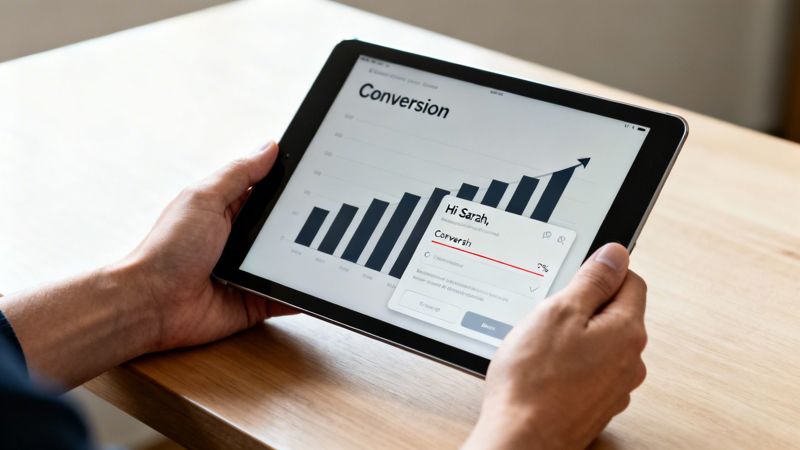
Think of it this way: a generic ad is like shouting into a crowded room and hoping someone listens. A dynamic image is like leaning in and whispering a message meant only for one person. This level of personalization doesn't just feel special—it drives real action and delivers a powerful return on your investment.
Boosting Your Core Marketing Metrics
When you start using dynamic visuals, you'll see a direct improvement in the numbers across your entire marketing funnel. The personalization grabs attention in a way that static content simply can't, triggering a cascade of positive effects that touch every stage of the customer journey.
Let's break down exactly how dynamic content impacts your business:
- Skyrocketing Engagement Rates: Personalized visuals are new and instantly relevant, making people stop scrolling and pay attention. This leads to much higher click-through rates (CTR) on emails, ads, and social posts because the content feels like it was created just for them.
- Strengthening Customer Relationships: When you greet a customer by name on an image or show them a product they just viewed, you’re showing that you know and value them as an individual. This builds a sense of connection and loyalty that generic marketing can never replicate.
- Driving Higher Conversion Rates: Relevance is the soul of conversion. A dynamic image with a limited-time offer for a product a customer actually loves is far more persuasive than a generic sales banner. It's no surprise that personalized calls-to-action convert at a significantly higher rate.
By speaking to an audience of one, dynamic marketing images make every interaction feel personal, turning passive viewers into engaged customers and loyal advocates.
This is more than just theory. For marketing agencies, delivering these kinds of results strengthens client retention and provides clear, demonstrable value. For sales teams, using personalized visuals in outreach can shorten long sales cycles by building instant rapport and showing a deep understanding of a prospect’s needs. Our guide on personalized marketing dives deeper into how this strategy builds lasting customer relationships.
The Financial Impact of Personalization
The line between personalization and revenue is direct and clear. When your engagement and conversion rates go up, your income follows. Dynamic images make this happen by making every dollar you spend on marketing work harder. Instead of wasting impressions on a tuned-out audience, every visual is optimized to connect with its intended viewer.
Now, consider the cost of traditional content creation. Making unique visuals for every audience segment is incredibly time-consuming and expensive. Dynamic image platforms automate this entire process, letting you generate thousands of unique variations from a single template at a fraction of the cost.
This kind of scalability means you can deliver a 1-to-1 experience without having to scale your budget or team size along with it. For small businesses, this efficiency is a complete game-changer, leveling the playing field against larger brands. The bottom line is clear: personalization is no longer a luxury, but an essential, high-ROI strategy for growth.
Alright, we've talked about the "why" behind dynamic images. Now let's get our hands dirty and look at the "how." This is where the theory stops and the practical, real-world applications begin—the fun part!
Think of these examples as idea-starters. The goal here is to help you see exactly how this strategy can slot right into the marketing channels you're already using.
The core idea is simple: transform those generic, everyday touchpoints into memorable, personal interactions. Whether you're a coach, a consultant, or part of a bigger marketing team, the mission is the same—make your audience feel seen.
Hyper-Personalized Email Marketing
Let's be honest, email inboxes are a battlefield. To win, you need to do more than just drop a first name in the subject line. Dynamic images are your secret weapon, letting you cut through the noise with a visual experience that’s impossible to ignore.
Imagine these scenarios hitting your own inbox:
- Welcome Emails: A new subscriber signs up and instantly gets a welcome banner with their name beautifully woven into the design. That’s an immediate "wow" moment.
- Abandoned Cart Reminders: A shopper gets a gentle nudge with an image of the exact product they were looking at, paired with a message like, "Still thinking about this, Sarah?"
- Milestone Celebrations: A loyal customer receives an email celebrating their anniversary, featuring a custom graphic with their name and how many years they've been with you.
This kind of detail makes every email feel like a one-to-one message, not a mass broadcast. It's no surprise that campaigns using these visuals often see a huge lift in click-through rates. You can dive deeper into this in our guide on using personalized images for email marketing.
Engaging Social Media and Chat Interactions
Personalization isn't just an email thing. You can use dynamic images to create unique, one-on-one conversations on social media and through chatbots, turning what could be a robotic interaction into something genuinely delightful.
For instance, a chatbot can do more than just spit out text-based answers. A user asking about their fitness plan could get a dynamic image showing their personal stats, recent achievements, and a motivational quote with their name on it.
Dynamic images transform automated messages from robotic responses into personal, visually engaging conversations that build genuine rapport.
The same goes for direct messages on platforms like WhatsApp or X (formerly Twitter). A dynamic image can be used to send a personalized thank you, an exclusive offer, or a fun event reminder. It’s an unexpected personal touch that helps build a stronger, more memorable brand.
Automated Event and Certificate Generation
For anyone running events or online courses, this is a massive time-saver. Dynamic images are perfect for generating unique visuals on the fly for every single attendee or student, completely automatically.
As you can see here, one template can spit out thousands of unique variations without any manual work. This is a total game-changer for businesses that need to create personalized visuals at scale.
Consider these powerful applications:
- Personalized Event Tickets: Automatically generate and send tickets that include the attendee's name, a unique QR code, and even a personal welcome message.
- Custom Course Certificates: The moment a student finishes a course, instantly create and send a professional certificate with their name, the course title, and the completion date.
- Real-Time Leaderboards: For a conference or online challenge, you can display a dynamic image of the current leaderboard, which updates in real-time as participants score points.
This thinking can even extend into the physical world. For businesses wanting to bring this level of dynamic content into physical spaces, using effective digital signage for trade shows is a compelling way to grab attention and share real-time, personalized information.
By putting these strategies to work, you can dramatically improve the user experience across all your channels. The key is to start thinking beyond static, one-size-fits-all content and embrace the possibilities that data-driven visuals open up for your business.
How to Implement Dynamic Marketing Images With Ease
Getting started with dynamic marketing images sounds technical, but it’s more straightforward than you might think. You don’t need a team of developers or to be a coding whiz to make it happen. The key is using the right tools that handle the heavy lifting for you, so you can focus on being creative.
The most common entry point is using merge tags. If you’ve ever sent a personalized email with a greeting like Hello {{first_name}}, you’re already familiar with the concept. A merge tag is simply a placeholder that tells your marketing platform what specific customer data to insert.
With dynamic images, you're just extending that same logic to your visuals. You design a base image and then use merge tags to mark where you want personalized text—like a name, a unique discount code, or a loyalty points balance—to appear.
The Easiest Method: Merge Tags
This approach is incredibly simple and works with over 99% of modern Email Service Providers (ESPs), including platforms like Klaviyo, Mailchimp, and Instantly. You just design your image in a dynamic image platform, which gives you a special URL packed with the necessary merge tags.
Then, you copy and paste this URL into the image block of your email editor. When you send the campaign, your ESP automatically swaps the merge tags with each recipient’s data, creating a unique image for every single person. It all happens on the fly, with zero coding on your end.
This simple workflow isn’t just for email. You can deploy a single dynamic template across multiple channels, as shown below.
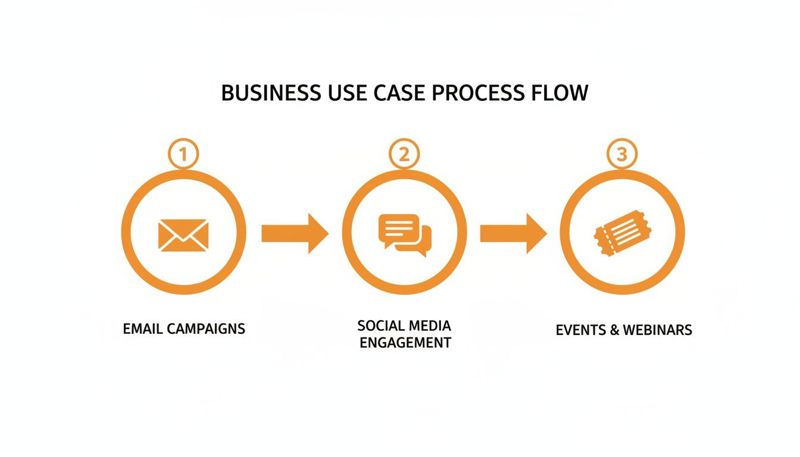
The template automatically adapts its content for email, social media, or event marketing, tailoring the visual for each specific user and channel.
Embedding on Your Website With HTML
What about using dynamic images on your website or landing pages? The process is just as easy. Instead of a merge tag URL, you’ll use a small HTML snippet. This is a pre-made block of code that you can copy and paste right into your site’s code.
For example, you could add a homepage banner that greets returning visitors by name or shows a special offer based on their location. You don't need to be a developer—if you can copy and paste, you can implement dynamic images on your site.
This fits into a bigger picture where AI is reshaping how we create marketing visuals. Nearly 75% of marketers are now using AI for media creation, automating repetitive work and freeing up teams to think bigger. You can find more statistics about AI's role in marketing on HubSpot.
Advanced Integration With an API
For more complex projects or if you have development resources, an Application Programming Interface (API) offers the ultimate power and flexibility. An API lets your software "talk" directly to the dynamic image platform, enabling real-time data flow.
Think of an API as a dedicated messenger between your data and your images. It allows for instant updates, pulling information from a database or a live event feed and placing it directly onto your visual content.
This method is ideal for use cases that depend on instant, up-to-the-second information, like:
- Live leaderboards for contests.
- Real-time stock levels on product images.
- Personalized travel offers showing live flight prices.
Ensuring a Flawless Experience With Fallbacks
A common worry is what happens if your data is incomplete. For example, what if a new subscriber signs up but doesn't provide their first name? An image that says "Hello, !" looks broken and unprofessional.
This is where fallback rules are essential. A fallback is simply a default value you set to appear when the primary data is missing. So instead of a blank space, your image can display a generic but friendly "Hello, there!". This simple step ensures every user gets a polished, complete visual, protecting your brand from looking sloppy.
Key Considerations for Scalable Image Personalization
Once you’ve nailed the basics and are ready to really scale your personalized marketing, it’s time to think bigger. Launching a few hundred dynamic marketing images is one thing, but successfully managing millions requires a bulletproof strategy. This all comes down to your data sources, technical integrations, and whether your platform can actually grow with you.
Think of your data as the fuel for your personalization engine. The quality and accessibility of that data will directly decide how creative and effective your campaigns can be. Without clean, reliable data, even the most brilliant image templates are going to fall flat.
Mastering Your Data Sources
Your data pipeline is the absolute heart of any scalable personalization strategy. The information you use can come from all over the place, and each source has a different job. The key is understanding how to connect and use both static and dynamic data sources without creating a technical mess.
Static Data is the information that doesn’t change very often. This is stuff like a customer's first name, their city, or the date they joined your loyalty program. This data is usually sitting in organized files or your CRM and is simple to pull into your campaigns.
- CSV Files: The easiest method, perfect for one-off campaigns like sending personalized certificates to a list of event attendees.
- CRM/ESP Data: This is the information stored in platforms like Klaviyo or HubSpot, such as customer names and their purchase history.
Dynamic Data, on the other hand, is information that changes in real-time. This data is often pulled directly from a live database or a third-party service through an API. This is where truly timely and relevant personalization comes to life.
The real magic happens when you combine stable customer details with live, in-the-moment information. This creates a visual experience that isn't just personal, but also incredibly timely.
For example, a travel company could pull a live weather forecast for a destination right into a promotional image. An e-commerce store could display real-time stock levels for a specific product. This kind of immediacy creates an urgency and relevance that static data just can't match.
Ensuring Seamless Platform Compatibility
Your marketing tools need to play nicely together. A dynamic image platform that doesn’t integrate well with the rest of your marketing stack will only create headaches and slow you down. Compatibility, especially with your Email Service Provider (ESP), is completely non-negotiable.
Modern platforms like OKZest are built specifically for this. We ensure compatibility with over 99% of ESPs through simple merge tags. That means you can plug dynamic images directly into your existing workflows in Mailchimp, Instantly, Klaviyo, and more, with zero custom development needed. This "plug-and-play" setup is essential for scaling your efforts without getting tangled up in technical roadblocks.
Planning for Growth and Performance
Finally, you have to think about the challenge of scale itself. A system that works perfectly for 1,000 images a month might completely fall apart when you ask it to generate one million. As your business grows, so will your need for personalized visuals, and your platform must be ready to handle that demand without breaking a sweat.
When you're looking at a solution, ask yourself:
- Can it handle high volume? You need a platform built on a robust infrastructure designed to generate millions of images quickly and reliably.
- Does it support team collaboration? As you scale, more people from your team will get involved. Features for project management and user roles are critical for keeping everything efficient and on-brand.
The goal is to find a solution that removes technical barriers, not one that creates new ones. With the right platform in place, scaling your personalization becomes a strategic advantage, letting your team focus on what they do best: creating amazing campaigns that connect with every single customer on a personal level.
A Practical Guide to Frequently Asked Questions
Diving into new technology always brings up a few questions. That's a good thing! It means you're already thinking about how to make it work for you.
Let's walk through some of the most common queries we hear from marketers about dynamic images. We'll give you straight, practical answers to clear up any doubts and give you the confidence to get started.
What Is the Difference Between Dynamic Images and Basic Merge Tags
This is a fantastic and crucial question. Think of basic merge tags as simple text placeholders. They pull a piece of data, like {{FirstName}}, and drop it into your email body. It's useful, but it's just plain text.
Dynamic images take this concept a huge step further. Instead of just dropping text into a sentence, they embed that same personalized data directly onto an image, like a banner, product shot, or a digital ticket. You're no longer just personalizing the text; you're personalizing the entire visual experience, making it far more integrated and engaging for each person.
Do I Need to Be a Developer to Use This Technology
Absolutely not. Modern dynamic image platforms are built specifically for marketers. The goal is to make powerful personalization accessible, which is why most day-to-day uses require zero code.
You can get incredible results just by using:
- Merge Tags: Simply copy and paste a special URL into your email platform.
- HTML Snippets: Copy a small block of code and paste it onto your website or landing page.
While APIs are available for developers who want to build advanced, real-time integrations, they are an option, not a requirement.
The best tools don't require you to be a technician; they empower you to be a creator. Modern platforms handle the technical complexity so you can focus on strategy and creativity.
How Do I Measure the ROI of Dynamic Image Campaigns
Measuring the return on your investment is straightforward and something you should absolutely do. The most effective way is to run a simple A/B test.
Set up two versions of your campaign. Group A gets the standard, static images. Group B gets the new dynamic marketing images. Send each version to a segment of your audience and then watch the numbers.
Track the key metrics that matter to your business:
- Click-Through Rates (CTR)
- Conversion Rates
- Overall Engagement (like replies or social shares)
The measurable lift you see in these metrics for the dynamic version gives you a clear, direct line to the impact on revenue and customer value.
What Happens if Personalization Data for a User Is Missing
This is a common concern, but it’s easily handled with fallback rules. You can set a default image or a piece of text to show up whenever specific data for a user is missing.
For example, instead of an image that might break while trying to say "Hello, [Name]!", you can have it automatically default to a friendly "Hello, there!". This ensures every single person receives a complete, professional-looking visual—no broken images or awkward empty spaces.
Ready to transform your marketing visuals from static to spectacular? OKZest helps you create thousands of personalized images automatically, with no coding required. Start building deeper connections and driving better results today. Explore our no-code solutions at https://okzest.com.