Scroll through your social media feed. What do you see? A blur of posts, all competing for a sliver of your attention. Most of it feels like you're driving past billboards on a highway—you see them, but they don't really connect with you. This is where dynamic visuals for social media completely change the game.
What Are Dynamic Visuals and Why They Matter Now

Instead of blasting out the same generic graphic to everyone, dynamic visuals turn your content into a personal, one-to-one conversation.
Think of a standard, static image as a printed flyer—it’s identical for everyone who gets one. A dynamic visual, on the other hand, is like a digital concierge. It greets each person by name and offers them something relevant. It works by pulling data—like a follower's name, location, or recent activity—and embedding it directly into the image or video in real-time.
The Power of Relevance at Scale
This kind of personalization does more than just grab attention; it forges a genuine connection. When someone sees an image tailored specifically for them, it creates a powerful pattern interrupt. It stops the scroll. Why? Because it speaks directly to them, making them feel seen and valued. This is a fundamental shift from mass marketing to mass personalization.
Dynamic visuals are not just about plugging a name into a template. They are about creating a moment of relevance that makes your audience feel like an individual, not just another number in your analytics.
The applications here are incredibly practical and effective. For example, you could create:
- Personalized Welcome Images: Greet new followers with a slick graphic featuring their username.
- Real-Time Countdowns: Build serious hype for an event with a graphic that shows the days, hours, and minutes ticking down live.
- Customized Certificates: Reward people for finishing a course or attending a webinar with a shareable, personalized certificate.
- Data-Driven Summaries: Create those "year-in-review" style graphics that summarize a user's engagement with your brand.
Beyond Simple Animation
It's easy to confuse dynamic visuals with standard animations like GIFs or simple videos. While motion is great for engagement, a truly dynamic visual is interactive and driven by data. The content inside the visual actually adapts based on external information.
This unlocks a whole new layer of strategy. An e-commerce brand could show a user an image of a product they just browsed. A coach could send weekly progress reports visualized with unique data for each client. For a closer look at the tech behind this, check out our guide on dynamic image generation in our detailed guide.
By integrating real-time information, these visuals stop being just content—they become a service.
The Psychology of Personalized Social Content
To really get why dynamic visuals for social media work so well, we need to peek into human psychology. Our brains are hardwired to notice and prioritize information that’s directly about us. Amid the endless noise of a social media feed, personalized content is the ultimate pattern interrupt—it stops the scroll cold and grabs attention.
Think about being at a crowded party. Hundreds of conversations are happening, but most of it is just background chatter. Then, you hear someone say your name. Instantly, your brain snaps to attention. That's exactly what personalized visuals do online. They create a digital "cocktail party effect," making your audience feel like you're speaking directly to them.
This goes way beyond just getting a click. It’s about making someone feel valued and seen. When a brand takes a moment to acknowledge a customer's journey, celebrate a win, or even just show them their local weather in a graphic, it builds a real connection.
Triggering Recognition and Building Loyalty
When someone sees content made just for them, it sparks a genuinely positive feeling. It sends a clear signal: this brand gets me. The whole dynamic shifts from a generic broadcast to a one-on-one conversation, and that’s where true brand loyalty begins.
Now, multiply that effect with the power of visuals. The human brain processes images an incredible 60,000 times faster than text, making pictures and graphics a brutally efficient way to communicate. Combine that speed with a personal touch, and your message becomes almost impossible for your audience to ignore.
When you create a personalized visual, you’re not just sending an image; you’re delivering a moment of recognition. This simple act makes the recipient feel important and understood, which is the cornerstone of any strong relationship.
For example, a fitness app could automatically send a user a dynamic image celebrating a new personal best. It's a small, automated gesture, but it reinforces their achievement and deepens their connection to the app. These are the kinds of micro-moments that turn casual users into a loyal community.
The Science of Visual Retention
The impact visuals have on our memory is massive and well-documented. Studies have found that people retain 95% of a message when they watch it in a video, compared to just 10% when they read it in text. That staggering difference makes dynamic visuals a non-negotiable tool for any marketer trying to stick in someone's mind.
Whether you're in email marketing or recruiting, creating memorable content is the name of the game, especially as influencer marketing in the US is on track to blow past $10 billion by 2025. You can find even more great insights on visual marketing over at Skedsocial.
So, how can you put this into practice?
- Reflect a User's Journey: Create a dynamic visual that sums up a customer's history, like "You've been a valued member for 3 years, Sarah!"
- Celebrate Milestones: Automatically generate and share personalized certificates or badges when users hit a goal or finish a course.
- Provide Real-Time Utility: Show live data in a shareable graphic, like a countdown to an event, a local weather forecast, or the current results of a poll.
By making your audience the hero of their own story, you turn them from passive scrollers into active, engaged fans. This isn't just another marketing gimmick; it's a fundamental change in how brands can talk to people at scale. For a deeper look into this, check out our guide on creating personalized marketing visuals. This one-to-one approach is what turns followers into your biggest advocates.
Exploring Different Types of Dynamic Visuals
To really understand what dynamic visuals for social media can do, you have to see them in action. Let's move past the theory and look at concrete examples you can start using today. We'll explore the different forms they take, from simple personalized touches to complex, data-driven masterpieces.
Think of it like learning to cook. You start with basic ingredients before moving on to more complex recipes. In the world of dynamic content, the simplest ingredient is often just a user's name.
Personalized Images The Foundational Layer
The most straightforward and common type of dynamic visual is the personalized image. This is where you take a standard template and automatically slot in individual user data. It’s a simple concept, but the impact is huge—it creates an immediate sense of recognition for the viewer.
For example, an event organizer can generate thousands of unique digital tickets, each stamped with the attendee's name and a unique QR code. Or a coach could create customized progress certificates for clients, automatically populating their name and the specific milestone they just hit. These small personalizations turn a generic graphic into something meaningful.
This flowchart breaks down the psychological journey of how personalization builds a stronger connection with your audience.
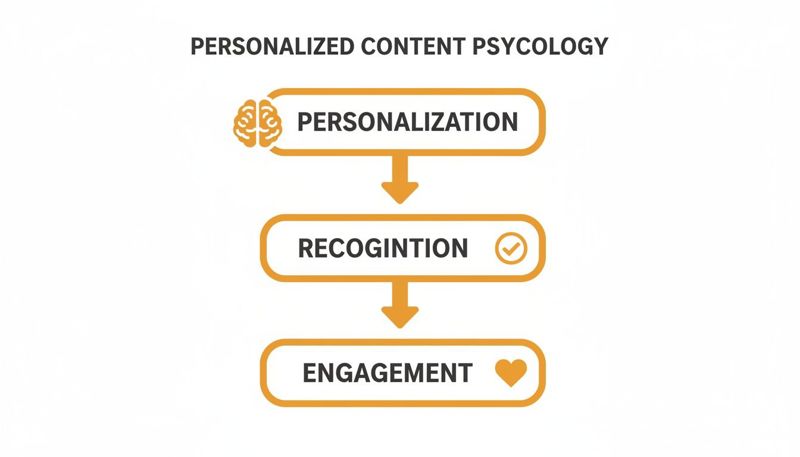
As you can see, personalization isn't just a gimmick. It leads directly to recognition, which is the fuel for genuine engagement.
Data-Driven Infographics The Storytellers
Next up, we have data-driven infographics. These visuals take things a step further by grabbing data specific to a user and weaving it into a compelling, shareable story. This format is perfect for summarizing a user's journey or highlighting their achievements over a period of time.
The best example is Spotify's annual "Wrapped" campaign. It doesn’t just tell you, "You listened to a lot of music." It visualizes your top songs, favorite artists, and unique listening habits in a series of slick, engaging graphics that people can't wait to share.
A data-driven visual makes the user the hero of their own story. It validates their experience and turns their personal data into a badge of honor, encouraging them to share it with their network.
You can apply this same idea in all sorts of ways:
- Year-in-Review Summaries: Show a customer how many products they bought, how much money they saved, or how many articles they read on your blog.
- Fitness Progress Reports: A fitness app could visualize a user's total miles run, calories burned, or workout streaks for the month.
- Account Activity Highlights: A SaaS company could send a summary showing a user's most-used features or their team's productivity gains.
This approach transforms dry statistics into a narrative that connects on a personal level.
Real-Time Visuals The Ultimate in Relevancy
The most advanced type of dynamic visual pulls in real-time information. These are images or even short videos that update automatically based on live data feeds, creating content that is always current and hyper-relevant. This is where dynamic visuals truly show their power, providing immediate value to the audience.
For instance, a real estate agent could create a social media template that automatically pulls the latest local housing market stats. A travel company could display a live weather forecast for a featured destination. The possibilities are massive and incredibly engaging.
Here’s a look at how static and dynamic visuals stack up against each other.
Static vs Dynamic Visuals A Quick Comparison
To make the distinction crystal clear, this table contrasts the characteristics and impact of traditional static visuals with their dynamic counterparts. It really highlights the advantages you gain with personalization and real-time data.
| Feature | Static Visuals | Dynamic Visuals |
|---|---|---|
| Personalization | One-size-fits-all, generic message for everyone. | Tailored to each individual with their name, data, or preferences. |
| Relevance | Remains the same over time, can quickly become outdated. | Updates in real-time with current data like countdowns or stats. |
| Engagement | Passive viewing, often results in lower interaction. | Active engagement, prompts sharing and direct interaction. |
| Scalability | Creating variations requires manual design work. | Generates thousands of unique versions automatically from one template. |
Ultimately, whether you need a simple personalized welcome image or a complex real-time dashboard, choosing the right type of dynamic visual for your goal is key. It’s how you create social media content that doesn't just get seen—it gets remembered.
Building Your Dynamic Visuals Strategy
It's one thing to have great ideas for dynamic visuals for social media, but it's another thing entirely to pull them off. To turn those creative sparks into actual business results, you need a solid plan. A good strategy makes sure your visuals aren't just cool to look at—they're actually working toward your goals.
The whole process starts by figuring out what "success" even looks like. Are you trying to get more sign-ups for a webinar? Push traffic to a new product page? Or just get more people to interact with your posts? You have to nail down a specific objective first, or you'll just be guessing.
Define Your Objectives and Key Data Points
Before you even think about opening a design tool, you need to know your primary goal. A fuzzy objective like "increase engagement" won't cut it. Get specific. Aim for something you can actually measure, like "achieve a 20% increase in click-through rates on our weekly newsletter promotions."
With a clear goal in place, you can figure out which data points you need to make your visuals personal and relevant. These are the building blocks for your dynamic content.
- For an Event Organizer: You'll probably need the attendee's first name, their city, the event they signed up for, and maybe a unique QR code for their ticket.
- For a Coach or Consultant: Think about using a client's name, the specific program they're in, a recent milestone they hit, or even a visual of their progress percentage.
- For an E-commerce Brand: Data points like a customer's name, their loyalty status, products they recently looked at, or their purchase history are gold.
Pinpointing these data points early on is a game-changer. It ensures you’re collecting the right info from the start and can build templates that really connect with people. This is what separates the high-performing campaigns from the ones that fall flat.
Choosing the Right Channels and Designing Templates
Where you share your dynamic visuals is just as important as what they look like. A personalized certificate of completion, for example, is perfect for a direct message on LinkedIn. But a real-time countdown to an event? That’s made for an Instagram Story. Always match the visual format to how people behave on that specific platform.
Once your channels are sorted, you can dive into designing your visual templates. The trick here is to create a design that looks great with your branding but is also flexible enough to handle different data. Think of your template like a picture frame—it provides the style and structure, while the dynamic data is the unique photo you drop inside. A strong social media and content strategy is what makes this all work together. For anyone looking to sharpen their overall plan, this guide on Mastering Social Media and Content Strategy is packed with useful insights.
Your template design should anticipate variation. Plan for names of different lengths and create a layout that looks great whether you're showing a single-digit number or a five-digit one.
Essential Best Practices for Success
Before you hit "go," a few best practices will help protect your brand and make sure your campaign runs smoothly. These are the non-negotiables for building trust and giving your audience a great experience.
First up: data privacy. Always be transparent about how you're using personal data and make sure you have permission. Using someone's information should always add value for them, not just for you.
You also need a backup plan. What happens if a piece of data, like a first name, is missing?
- Use Fallback Options: Tools like OKZest let you set default values. Instead of an awkward "Hello, !", your visual can show a friendly "Hello, there!"
- Maintain Brand Consistency: Make sure every dynamic visual, no matter the data, uses your official brand fonts, colors, and logos. Consistency is key to building recognition and trust.
- Test Extensively: Before you launch to everyone, test your templates with all sorts of data. This helps you catch any weird formatting issues or layouts that just don't look right.
By following this strategic framework, you can move past just making cool visuals. You’ll be building a powerful, repeatable system for engaging your audience on a truly personal level.
Automating Dynamic Content with OKZest
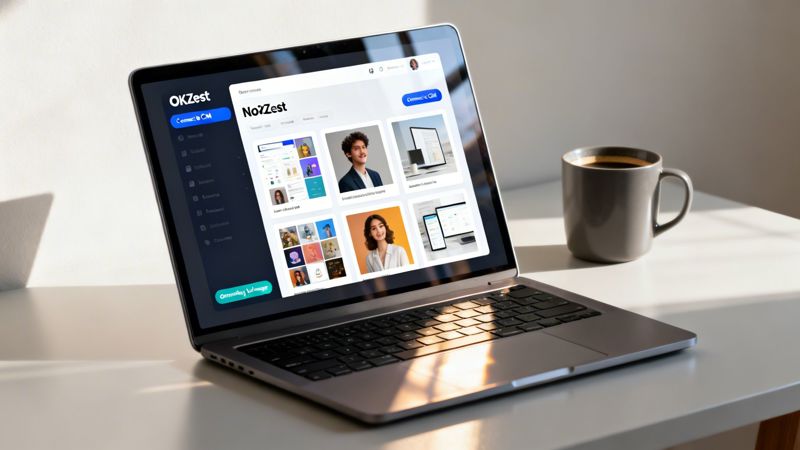
Putting a dynamic visuals for social media strategy into play might feel like a massive technical hurdle, but it really doesn't have to be. The secret isn't learning to code overnight. It’s about finding the right tool to do the heavy lifting for you, so you can stay focused on the creative and strategic work.
This is exactly where a platform like OKZest comes in. It bridges the gap between your biggest ideas and actually getting them done. It’s a system built to make personalization at scale feel easy, without needing a team of engineers or a single line of code.
No-Code Simplicity Meets API Power
At its core, OKZest works a lot like merge tags, but for images. You create one master visual template, and the platform automatically pulls in data from your connected sources to customize it. This means you can generate thousands of unique, personalized images all from a single design.
There are two main ways to connect your data and get the automation rolling:
The No-Code Solution: This is the go-to path for marketers, consultants, and social media managers. You can design your templates visually and hook them up to a spreadsheet, your CRM, or another database through a simple, intuitive interface. It’s as straightforward as matching columns from a CSV file to different layers in your image.
The API for Developers: For teams that need deeper, more custom integrations, an API gives you total control. This lets you programmatically generate visuals right inside your own apps or workflows, opening up all kinds of possibilities for complex, real-time personalization.
A crucial part of your dynamic visuals strategy is picking the right social media video maker to create content that really grabs attention. Tools that play nicely with automation platforms can make your entire workflow more efficient, whether you're making personalized videos or slick animated graphics.
Practical Use Cases for Automation
Automating your visuals unlocks incredibly powerful ways to engage with your audience everywhere. The real beauty of this approach is just how versatile it is.
With automation, you turn personalization from a time-consuming manual chore into a scalable system. You can create one-to-one connections with thousands of people at once, making every single person feel seen.
Think about a coach who wants to send a personalized certificate to every student who finishes their online course. Instead of grinding away for hours in a design tool, they can just connect their student list and automatically generate a unique certificate for each person in minutes.
Other powerful applications include:
- Hyper-Personalized Email Campaigns: Embed dynamic images straight into your Mailchimp or Klaviyo newsletters. Imagine each person seeing an image with their name, their loyalty points, or a product they just looked at. That's how you boost click-through rates.
- Scalable Social Media DMs: Create custom "welcome" images for new followers on Instagram or Twitter/X. A simple graphic with their username can make an unforgettable first impression.
- Customized Sales Outreach: Sales teams can generate visuals with a prospect’s company logo and name, creating a highly personalized touchpoint that immediately stands out in a crowded inbox.
This kind of automation isn't just about saving time—it’s about creating better experiences. Of course, knowing where to focus your efforts is key. Engagement rates tell a powerful story: TikTok is projected to lead at 3.70% in 2026, a massive 49% jump year-over-year. Instagram is holding steady at 0.48%, while Facebook dips to 0.15%. This data makes it clear why marketers need to be on platforms where visuals, especially dynamic ones, can shine.
OKZest makes it simple to integrate these powerful visuals everywhere, helping you connect with your audience in a more meaningful and effective way. By mixing smart design with seamless automation, you can finally run your dynamic content strategy at the scale you've always wanted. For a deeper dive, check out our guide on how automated social media posts can transform your marketing.
Measuring the ROI of Your Dynamic Campaigns
A slick strategy for dynamic visuals for social media is one thing, but a great campaign has to deliver real results. To prove that your investment in personalization is paying off, you need to track its actual impact on your bottom line. This means looking past vanity metrics like likes and shares and focusing on the numbers that truly move the needle.
The whole point is to connect every personalized image to a measurable outcome. Instead of just counting views, start digging into the click-through rates (CTRs) on your dynamic visuals. Are people actually clicking on that personalized event ticket you sent? Did the custom welcome image drive new followers to your link in bio? These are the questions that reveal the real ROI.
Moving Beyond Vanity Metrics
To get a clear picture of your campaign's success, you need to track the right data. Zero in on metrics that show a direct link between your visuals and the actions you want users to take.
Here are the key KPIs to keep an eye on:
- Click-Through Rate (CTR): This is your most direct measure of engagement. A high CTR on a personalized visual is a clear sign that it grabbed someone's attention and made them act.
- Conversion Rate: Follow the customer journey. How many people who engaged with your dynamic visual went on to make a purchase, sign up for your newsletter, or fill out a form?
- Audience Retention: Are the people who receive personalized content sticking around longer? Look at churn rates and repeat engagement to see if personalization is building genuine loyalty.
The ultimate test of your dynamic visuals isn't how many people see them, but how many people act because of them. Tying your creative efforts to conversions is how you build a powerful business case for personalization.
Proving Value with A/B Testing
The best way to prove the value of your dynamic campaigns is to put them to the test. A good old-fashioned A/B test is your best friend here. Pit your new, personalized visuals against your standard static ones to get definitive, data-backed proof of what really works. Just set up a controlled experiment where one group gets a generic image and the other gets a personalized version.
The data you'll get from these tests is gold. We already know that visual content is a powerhouse online—it's 40 times more likely to be shared than other types of content. And with social video generating a staggering 1200% more shares than text and images combined, proving your dynamic approach outperforms static visuals can unlock serious budget and support for future campaigns. You can find more stats on why visual marketing works so well in research from Lean Labs.
By meticulously measuring performance and comparing the results, you can confidently show exactly how your strategy for dynamic visuals for social media leads directly to more leads, higher sales, and a healthier bottom line.
Frequently Asked Questions
Diving into a new strategy like dynamic visuals always brings up a few questions. Let's tackle some of the common ones about the tech, data, and costs so you can move forward with confidence.
Is Creating Dynamic Visuals Too Technical for My Small Team?
Not at all. While the technology behind it sounds complicated, modern tools are built for marketers, not developers. You definitely don’t need to be a coding guru to get professional-looking results.
For instance, platforms like OKZest offer a completely no-code way to do this. You just design your templates and connect your data sources through a simple, visual interface. It’s possible to generate thousands of personalized images without touching a single line of code. And if your team does have developers, there’s an API for deeper integrations, giving you the best of both worlds.
What Kind of Data Do I Need for Personalization?
You can make a huge impact by starting small. Something as basic as a user's first name, their company, or even their city is often more than enough to make your visuals feel way more relevant. That first step alone can be a game-changer for engagement.
You don't need a massive, complex database to get started. The goal is just to use data that makes the visual more valuable to the person seeing it. Always start with what you already have.
Once you get comfortable, you can start layering in other data points:
- CRM Data: Pull in details like a customer's last purchase, their loyalty points, or how often they engage.
- Real-Time Data: You can even integrate live information like the current weather, stock prices, or a countdown to an event using an API.
It's also super important to have a backup plan for when data is missing. A good platform will let you set fallback text (like "Hello there!" instead of leaving a blank space) to make sure every visual still looks great.
How Much Does It Cost to Implement a Dynamic Visuals Strategy?
It’s more accessible than you might think, and the cost really depends on what you need. Many services, including OKZest, use tiered pricing that grows with you. This usually includes a free or low-cost plan that’s perfect for small businesses or for just testing the waters on your first campaign.
As your needs scale up into the millions of images per month, there are enterprise plans ready to handle that volume. When you're looking at the cost, just remember to weigh it against the ROI. The boost you get from higher engagement, better conversion rates, and stronger customer loyalty often makes it a no-brainer.
Ready to stop pushing out generic content and start building real connections? OKZest makes it simple to automate personalized visuals for your social media, email, and sales outreach. Create thousands of unique images from a single template, no code required.
Start for free and see the difference personalization makes at https://okzest.com.