At its core, an email image automation tool is software that lets you create unique, personalized images for every single person on your email list. Instead of blasting the same generic banner to everyone, the tech swaps out parts of a base template with data specific to each recipient—like their name, company logo, or a custom offer.
The goal? To make every single email feel like a one-on-one conversation.
What Is Email Image Automation and Why It Matters Now
Imagine sending a welcome email where the main image greets your new subscriber by name. Or picture a sales email where the visual has the prospect's company logo dropped right into a product mockup. This isn't just some marketing pipe dream; it's exactly what an email image automation tool does.

Think of it like the text-based merge tags you're already familiar with, such as {{first_name}}, but for visuals. While those tags personalize words, an image automation tool does the same for your graphics. It takes a master image and uses data from your ESP or CRM to spin up thousands of unique variations instantly.
Moving Beyond Text-Only Personalization
For years, we've all relied on text personalization to make emails feel a little more human. But let's be honest—in today's crowded inboxes, just dropping a name in the subject line isn't enough to stand out anymore. We're visual creatures; our brains process images a staggering 60,000 times faster than text. That's where dynamic visuals completely change the game.
Personalized images cut through the noise by delivering a "wow" moment that standard text just can't match. It shows your subscribers you see them as individuals, not just another email address on a spreadsheet.
This leap from static to dynamic visuals solves a huge marketing headache: creating relevant experiences at scale. Manually designing thousands of personalized images would be impossible. An email image automation tool makes it not just possible, but easy.
The Core Benefits of Dynamic Visuals
When you start automating image personalization, you unlock some serious advantages that directly boost your campaign performance and build better customer relationships. It's about way more than just looking good.
- Skyrocket Engagement: Unique, eye-catching images stop the mindless scroll, convincing people to spend more time with your email and driving up click-through rates.
- Build a Stronger Brand Connection: A personalized touch makes customers feel seen and understood, which is key to fostering real loyalty.
- Improve Conversion Rates: When you visually present relevant offers, products, or information, you remove friction and make it much easier for subscribers to take that next step.
If you want a wider view of how automation can streamline marketing and bring in more leads, check out the benefits of real estate marketing automation software. The core ideas of saving time and creating hyper-targeted outreach are universal, showing just how powerful this technology is for any modern business.
Ultimately, this approach transforms your email from a generic broadcast tool into a powerful, personalized communication channel.
How the Personalization Magic Happens Behind the Scenes
It’s easy to look at a personalized image in an email and assume it’s the result of some seriously complicated, high-tech wizardry. But the reality is surprisingly simple. An email image automation tool works off a single, elegant principle: it all starts with one base image.
Think of this base image like a blank party invitation. You've got the cool design, the colors are perfect, but the important details—like the guest's name and the event date—are just empty placeholders. The tool’s only job is to fill in those blanks for every single person on your list, instantly and on the fly.
This is how one template can suddenly become thousands of unique, one-to-one visuals without you ever having to open Photoshop. It's a way to make every single person feel like you created something just for them, and it scales beautifully.
The Power of Merge Tags for Images
If you’ve spent any time in email marketing, you’re probably familiar with merge tags (sometimes called personalization tokens). They’re those simple little placeholders like {{first_name}} or {{company_name}} that grab data from your email service provider (ESP) to customize your text.
Well, email image automation takes that exact same concept and applies it to your visuals. Instead of just swapping out text in a sentence, you can now personalize different layers within your image template. A merge tag can change the text written on an image, swap out a company logo, or even change a background photo based on a subscriber's city.
For example, a {{first_name}} tag connected to your image template will pull each person's name from your Mailchimp or Klaviyo list and stamp it right onto the graphic before the email even lands in their inbox. It's a seamless, no-code way to bring that same dynamic power into your visuals.
Diving Deeper with APIs
Merge tags are perfect for most marketers and handle the bulk of personalization needs. But sometimes, you need something more powerful—something that happens in real-time. This is where an Application Programming Interface, or API, comes into the picture. An API is basically a messenger that lets your image automation tool talk to other software and databases.
This opens up a whole new world of advanced possibilities:
- Live Data Integration: You could pull in real-time data, like current stock prices or a live countdown to an event, and display it right on the image.
- E-commerce Personalization: Show the exact items a customer abandoned in their shopping cart.
- SaaS Onboarding: Display a user's actual progress bar or usage stats from your platform inside their welcome email.
An API lets you hook your images up to pretty much any data source you can get your hands on. To really get into the nuts and bolts, our guide on using an email image templating API is a great read for anyone looking to build more complex integrations.
The All-Important Safety Net: Fallback Logic
So, what happens if the data you need is missing? You try to pull a first name, but that field is empty in your contact list. You definitely don't want to send an email with a broken image or, even worse, a graphic that says, "Hello, !"
This is where fallback logic becomes your absolute best friend. It’s a simple rule you set up beforehand that tells the system what to display when the primary data isn't there.
Fallback logic is the critical backup plan that makes sure your emails always look polished. It prevents personalization mistakes from ever reaching your audience, protecting your brand experience.
For instance, if a {{first_name}} tag comes up empty, you can set the fallback to show a friendly, generic greeting like "Hello there!" or "A special offer for you." If a customer's company logo isn't available, you could have it show your own logo instead. This simple feature is a core part of any good image automation tool, giving you the confidence to personalize at scale without ever worrying about sending a broken-looking campaign.
The Real Business Impact of Personalized Images
Moving beyond the initial "wow" factor, the true value of an email image automation tool is its direct, measurable impact on the metrics that matter. It’s about turning cool visuals into real results and making personalization a core part of your revenue strategy, not just a nice-to-have.
When a subscriber sees an image made just for them, it stops the scroll. That immediate visual connection is incredibly powerful in a crowded inbox and is the first step toward some serious performance gains.
This diagram shows the simple but powerful workflow: start with a base template, add your personalized data, and generate a unique image for every single recipient.
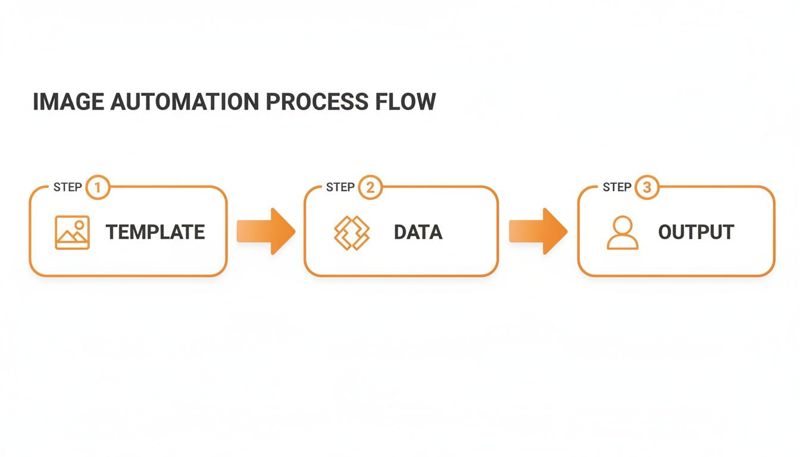
The key takeaway is that this process is built for scale. Marketers can run highly personalized campaigns without getting bogged down creating every single visual by hand.
Boosting Your Click-Through Rates
One of the first metrics you’ll see jump is your click-through rate (CTR). A generic stock photo might get a passing glance, but an image with the subscriber's name or company logo on it demands a closer look. That personal touch makes your call-to-action feel more relevant and urgent, encouraging more clicks.
This isn’t just a hunch; it’s basic human psychology. We're wired to pay attention to things that are about us. When an image reflects a user's identity, it creates an instant bond and makes them far more likely to engage. Understanding what good looks like is key when you want to boost your email ROI with these kinds of tactics.
Driving Higher Conversion Rates
More clicks are great, but the end goal is always more conversions. This is where personalized images really shine, by showing the value of an offer in a way that connects one-on-one. Imagine an e-commerce store sending a special discount where the image actually displays the subscriber’s name on a coupon code.
That small touch makes the offer feel exclusive, cutting down the friction between seeing the deal and acting on it. And the numbers back this up.
Automated emails now drive a remarkable 37% of all email-generated sales despite representing just 2% of total email volume. These campaigns see 260% higher click rates and conversion rates that dwarf traditional emails.
This data hammers home the point: when you make the experience about the individual, they are far more likely to convert from a passive subscriber into an active customer.
Enhancing Long-Term Brand Loyalty
Beyond the immediate clicks and sales, using personalized images consistently builds something much more valuable: brand loyalty. Each personalized email is like a small deposit into your relationship with that customer, showing them you see them as an individual, not just a name on a list.
This creates a memorable experience that standard, one-size-fits-all marketing struggles to match. When customers feel understood, they’re more likely to stick around, buy again, and tell their friends about you. This is especially critical for businesses managing image-based personalization for large-scale email campaigns without losing that human connection.
An email image automation tool makes this level of connection possible at scale, helping you foster a loyal community that feels genuinely connected to your brand. That long-term relationship might just be the most significant return on your investment.
Creative Ways to Use Automated Images
Theory is one thing, but seeing an email image automation tool in action is where the real fun starts. Once you move past basic name personalization, a whole world of creative possibilities opens up. This is where you can truly engage customers, push them to act, and build a brand experience they'll actually remember.
The real magic of this tech isn't just what it can do, but the clever strategies it unlocks for marketers who are willing to think outside the box.
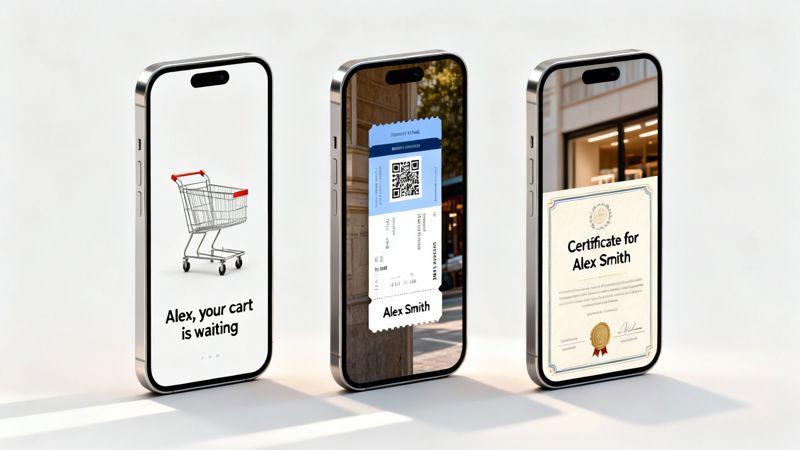
Let's dig into some practical, high-impact ways businesses are using automated images to create those "wow" moments for their audience. Think of these examples as your playbook for turning a powerful tool into a core part of your marketing engine.
Supercharge Your E-commerce and Retail Campaigns
For any e-commerce brand, personalization is the only way to cut through the noise. Automated images let you go way beyond a simple "Hi, {{first_name}}" and create shopping experiences that feel one-to-one and visually stunning.
- Abandoned Cart Recovery: Forget the plain text reminder. Imagine sending an email with an image showing the exact product they left behind, maybe with their name on a personalized discount right next to it. That visual nudge is so much more powerful than words alone.
- Personalized Product Recommendations: You can generate images that showcase a hand-picked collection of products based on what a user has browsed or bought before. It turns a generic upsell into something that feels like a personal styling session.
- Loyalty and VIP Recognition: Celebrate your best customers with dynamic images. Create visuals that say "Happy Anniversary, Sarah!" or show them their current loyalty points balance on a slick, branded graphic.
By visually reinforcing the value and relevance of your offers, you close the gap between someone just looking and actually buying. It makes the customer journey feel seamless and built just for them.
These aren't just fancy tricks; they turn standard automated emails into powerful sales drivers, boosting engagement and clawing back revenue you might have otherwise lost.
Elevate B2B and Sales Outreach
In the B2B world, just getting a prospect to notice you is half the battle. Personalized images can break through a crowded inbox and make your outreach feel instantly more relevant and thoughtful.
Think about that cold email you're about to send. A generic message is easy to ignore. But what if your email included a visual with the prospect's company logo dropped into a mockup or on a personalized report cover? That gets noticed.
This simple move shows you've done your homework and are genuinely focused on their business. It turns a cold email into a warm introduction and dramatically increases your chances of getting a reply. The same idea works wonders for webinar invites, where you can generate images with an attendee's name and company on a virtual name badge.
Revolutionize Events and Education
Event organizers and educators can use an email image automation tool to streamline their comms and add a layer of polish that attendees and students will love. Manually creating hundreds of custom tickets or certificates is a logistical nightmare—but automation makes it a piece of cake.
Here are a few game-changing ideas:
- Dynamic Event Tickets: Automatically generate a personalized ticket for every single registrant, complete with their name, a unique QR code for check-in, and all the key event details. It looks sharp and makes the entry process smooth.
- Personalized Certificates of Completion: For online courses or workshops, you can instantly create and email a unique certificate with the student's name and the course title beautifully displayed.
- Customized Agendas: Send attendees a personalized visual agenda before a conference, highlighting the sessions they registered for with their name right at the top.
These simple touches make people feel valued and create a high-end experience from the get-go. They prove you’re paying attention to the small details that make a huge difference.
To give you a clearer picture, here's how different roles can put these ideas into practice.
Image Automation Use Cases by Industry
This table provides a quick overview of how different professionals can apply email image automation to achieve specific marketing and sales goals.
| Target Audience | Primary Use Case | Key Business Goal |
|---|---|---|
| E-commerce Marketers | Abandoned cart reminders with product images | Increase conversion rates and recover lost sales. |
| SaaS Sales Teams | Personalized demo invites with prospect's logo | Boost meeting booking rates and stand out in the inbox. |
| Event Managers | Automated, personalized event tickets & badges | Enhance attendee experience and streamline check-in. |
| Online Course Creators | Certificates of completion with student names | Increase student satisfaction and encourage social sharing. |
| B2B Marketers | Custom report covers for lead magnets | Improve download rates and create a professional impression. |
| Retail Loyalty Managers | Visuals showing loyalty points or tier status | Drive repeat purchases and foster brand loyalty. |
As you can see, the applications are incredibly diverse. No matter your industry, there's a creative way to use personalized images to connect with your audience more effectively.
Integrating With Your Favorite Email Tools
Let’s bust a common myth right now: adopting new marketing tech doesn't have to be a complicated, developer-heavy headache. Modern email image automation tools are built for marketers, not coders. The whole point is to make the integration simple, fast, and completely compatible with the email service providers (ESPs) you already use every day.
You won't have to rip out your current marketing stack or learn a new programming language. The goal is to plug this visual personalization power straight into your existing workflow, whether you’re on Klaviyo, Mailchimp, HubSpot, or another major platform.
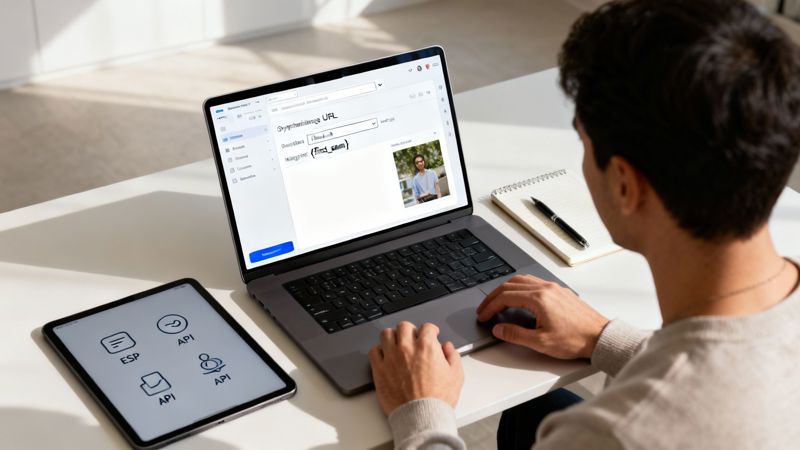
The Simple No-Code Workflow
Getting personalized images into your campaigns is a straightforward, four-step process. Honestly, it feels less like a technical setup and more like building any other part of your email.
- Design Your Template: First, create your base image. This is the visual foundation where you decide which parts—like text, a logo, or even a background—will change for each recipient.
- Map Your Data: Next, connect the dynamic layers in your image to the data you have in your ESP. You’ll do this using the exact same merge tags you already use for text, like
{{first_name}}or{{company}}. - Generate a Dynamic URL: Once your data is mapped, the tool generates a single, smart URL for your image. This link contains all the instructions needed to create thousands of personalized visuals on the fly.
- Paste It Into Your Email: Finally, just copy this dynamic URL and paste it into the image block of your email builder. That's it. Your ESP handles the rest, making sure every single person sees their own unique version.
The beauty of this system is its universal compatibility. Because it just uses a standard image URL, it works with practically any email platform out there. If you can add an image, you can add a dynamic one.
Built for Broad Compatibility
This simple URL-based approach is what makes an email image automation tool so flexible. There are no complicated plugins to install or APIs to wrestle with for most uses. If your email editor has a spot to insert an image, you’re good to go. You can dive deeper into the mechanics by learning about the dynamic image API for email marketing, which is the engine powering these seamless integrations.
This kind of wide-ranging compatibility is essential in a channel that operates at a massive scale. Global daily email volume has hit a staggering 376.4 billion, reaching 4.59 billion users worldwide. That makes email the perfect place for advanced personalization, which can deliver an ROI anywhere from 32:1 to 45:1. It’s clear that email continues to deliver exceptional returns, proving that connecting powerful tools to your existing email strategy is more important than ever.
At the end of the day, adding an email image automation tool is designed to be a quick win. It gives you the power to elevate your campaigns without the friction of a painful setup, letting you get back to what matters: creating amazing experiences for your audience.
Choosing the Right Tool for Your Marketing Goals
Picking the right email image automation tool isn’t about chasing the longest feature list. It’s about finding a partner that fits your marketing goals like a glove. The right tool should feel like a natural part of your workflow, whether you're a one-person marketing team that needs simplicity or a larger company that needs serious power and scale.
Think of it like picking a car. A two-seater sports car is a blast, but it’s not going to work for a family of five. In the same way, a tool built just for developers will leave a no-code marketing team stuck in the mud. You need a solution that fits your team's skills, budget, and goals today—with enough horsepower to grow with you.
Core Features to Evaluate
When you start comparing platforms, there are a few non-negotiables that should be on your checklist. These are the core features that will either make the tool a dream to use or a source of constant headaches.
You want something that balances ease of use with real power. A drag-and-drop editor is a must for marketers who need to move fast, but easy-to-access API documentation is just as important for developers building custom integrations. This way, everyone on the team can get their work done without stepping on each other's toes.
A great tool empowers your entire team. Marketers should be able to launch campaigns without writing a single line of code, while developers have the freedom to integrate dynamic images into any app with a solid API.
And, of course, it has to play nicely with your Email Service Provider (ESP). The tool should integrate seamlessly with platforms like Mailchimp, Klaviyo, or HubSpot, using the same merge tags you already know and love. This way, you're not forced to tear down your entire setup just to add personalized images.
Matching Pricing to Your Scale
Your budget and how many emails you send will obviously be a huge factor. The best tools offer flexible pricing that grows with you, so you aren’t stuck paying enterprise prices when you’re just getting your feet wet.
- Free Tiers: Perfect for testing the waters. A good free plan lets you try out the main features without pulling out your credit card, making it ideal for small businesses or marketers who need to prove the concept.
- Growth Plans: As you start sending more, you’ll need a plan that offers more image generations, advanced features, and better support without costing a fortune.
- Enterprise Solutions: For big operations sending millions of emails, an enterprise plan should give you unlimited capacity, features for team collaboration, and a dedicated support line to make sure your campaigns go off without a hitch.
Choosing a solution like OKZest, which offers this kind of tiered pricing, means you only pay for what you actually use. It gives you the confidence to scale up your personalization, knowing your tool can keep up every step of the way.
Of course. Here is the rewritten section, crafted to sound like it was written by an experienced human expert, following your provided style guide.
Common Questions About Email Image Automation
So, you're thinking about diving into email image automation, but a few practical questions are probably rattling around in your head. It's totally normal. Most marketers I talk to have the same concerns about how this tech actually performs in the real world and what it takes to get it running. Let's clear up some of the most common ones.
First up, the big one: email load time. Are these dynamic, high-quality images going to slow everything down and annoy your subscribers? The short answer is no, not if you're using the right tool.
Modern image automation platforms are built for speed. They host the visuals on fast content delivery networks (CDNs) and optimize them on the fly. That means every image is compressed and formatted perfectly for quick loading on any device, ensuring a smooth experience without bogging down your campaign.
What Happens if Personalization Data Is Missing?
This is another great question. What if you want to personalize an image with a first name, but that field is blank for some of your contacts? The last thing you want is a broken-looking email hitting someone's inbox.
That’s where fallback logic comes in—it's a core feature of any decent tool. You can set a default value, like "Hello there!" instead of a blank space where a name should be. This little safety net lets you personalize with confidence, knowing every single email will look complete and professional.
The push for this kind of smart automation is only getting stronger. With 39% of marketers saying that AI-powered hyper-personalization is making the biggest impact on their results, tools that can manage dynamic content are becoming a must-have.
In fact, nearly 90% of marketers expect most of their work will be AI-supported soon, and with 39.7% of users wanting automatic content generation, the demand for smarter personalization is undeniable. You can check out more stats and trends on email marketing over at cognism.com.
Is Setup Difficult and Can I Track Clicks?
I get it—the word "automation" can sometimes sound like a huge technical headache. The good news is that modern tools are designed with a no-code approach in mind. For the most part, setup just involves generating a dynamic image URL and pasting it into your email editor. No coding required.
And what about tracking? Absolutely. Since the personalized image is just a standard image with a dynamic URL, your email platform’s built-in analytics will track clicks on it just like any other picture. You get all the perks of personalization without losing a single bit of insight into your campaign performance.
Ready to create unforgettable, personalized visuals for every customer? OKZest helps you automate image creation with no-code and API solutions, making every email feel like a one-to-one conversation. Start for free at https://okzest.com.