When we talk about personalizing images for email, we're talking about using subscriber data—like a first name or company—to dynamically create a unique visual for each person on your list. This is done by adding merge tags to an image URL. Your email platform then swaps in the individual's data when the email is sent, turning a generic broadcast into a one-to-one conversation.
Why Personalized Images Are Your New Secret Weapon

Let’s be honest, generic emails are easy to ignore. If you want to stand out in a jam-packed inbox, a personalized subject line is just the start. The real magic happens when you show subscribers you see them with unique, dynamic visuals that grab their attention.
Shifting from static to dynamic images forges an instant, personal connection. Think about a welcome email with a "Welcome, Sarah!" graphic. Or a virtual event ticket with the attendee's name beautifully printed on it. It’s these small, thoughtful touches that make your audience feel seen and valued.
This isn't about writing complex code or hiring a team of developers. It's about making a genuine connection that drives real engagement and, ultimately, more revenue. And with modern tools, this powerful tactic is now within reach for any marketer, coach, or sales pro.
The Impact on Engagement and Revenue
Platforms like OKZest work like "merge tags for images," making the whole process as simple as personalizing text. By inserting a customer's name, their company, or even a relevant product image directly into your email visuals, you create a powerful pattern-interrupt that stops the scroll.
This extra touch has a clear, measurable effect on your bottom line. While standard emails might see an average click-through rate (CTR) of around 3.25%, campaigns with personalization can increase that by 14% and boost conversions by 10%.
The real power of personalized images is their ability to transform a mass communication into what feels like a one-on-one conversation. It’s the difference between shouting into a crowd and whispering a secret.
This shift from mass-produced to personal has a direct impact on your most important email metrics. Let's compare how static and personalized images stack up.
Static vs Personalized Image Impact on Email Metrics
While a standard image might get a passing glance, a personalized one encourages a longer look, creating a stronger bond with your message and brand. The table below shows the kind of impact you can expect.
| Metric | Standard Static Image Campaign | Personalized Image Campaign |
|---|---|---|
| Open Rate | Standard industry average | Often higher due to intriguing subject lines hinting at personalization. |
| Click-Through Rate (CTR) | Baseline performance | Significantly increased as visuals directly resonate with the recipient. |
| Conversion Rate | Dependent on offer relevance | Higher due to increased trust and perceived individual attention. |
| Brand Recall | Moderate; may blend in | Stronger, as the subscriber feels uniquely addressed and remembered. |
As you can see, personalization doesn't just feel good—it performs better across the board, leading to more engagement and better results.
Understanding key performance indicators is crucial for measuring the success of any email effort. To get a better handle on your own metrics, it helps to know what’s a good click-through rate for your campaigns.
By learning how to personalize images for email campaigns, you’re not just adding a clever trick to your playbook. You’re building a more human, responsive, and profitable marketing channel. This guide will show you exactly how to get it done.
Building Your First Dynamic Image Template in OKZest
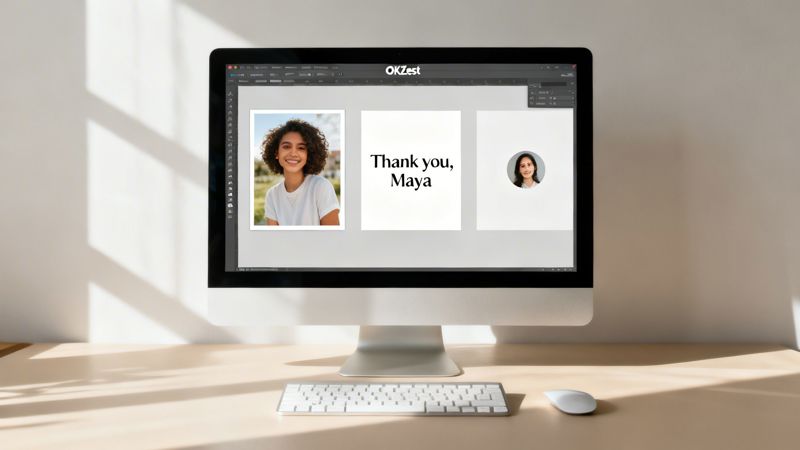
Alright, let's roll up our sleeves and move from theory to practice. The good news is you don’t need a design degree or any coding chops to build a personalized image template. We designed OKZest to be straightforward, with a visual, layer-based editor that feels intuitive right from the start.
To show you how it works, let's walk through a real-world scenario: creating a personalized "Thank You" image for a new subscriber. This is a crucial first impression, and a dynamic visual can make a new community member feel genuinely seen—not just like another email address on a list.
Choosing Your Canvas and Background
Every great design starts with a solid foundation. In this case, it’s your background image. This single element sets the tone for the entire visual, whether it's a branded graphic, a subtle texture, or a welcoming stock photo.
Inside the OKZest editor, you'll kick things off by creating a new template and uploading your chosen background. Think of it as the static canvas where you'll add all your dynamic, personalized layers. For our "Thank You" image, a clean, on-brand graphic with plenty of empty space for text is perfect.
Once your background is uploaded, you can resize and position it to fit your needs. Remember, most emails are opened on mobile, so designing with a vertical orientation in mind is a smart move. A width of around 600-800 pixels is a great starting point—it looks sharp in most email clients without slowing down load times.
Adding Dynamic Text Layers
This is where the real magic happens. With your background in place, it's time to add text that changes for every single person who sees it.
In the OKZest editor, you’ll add a new "Text Layer." For our thank-you image, the most obvious personal touch is the subscriber's first name. You’ll create a text box, but instead of typing a static name, you'll use a placeholder. OKZest uses a simple format like {{first_name}}.
Think of these placeholders as merge tags for your images. They're instructions for the software, telling it, "When you generate this image for Sarah, put 'Sarah' right here."
You can add multiple text layers for all sorts of data. You could even try:
- Company Name: "Welcome, {{company_name}} Team!" for a B2B audience.
- Specific Interest: "Your Guide to {{interest}} Is Here!" for segmented lists.
- Unique Code: "Your discount code is {{discount_code}}."
For each text layer, you have complete control over the font, size, color, and alignment, ensuring your dynamic text always matches your brand's style. Placement is key—make sure your text is easy to read and sits nicely on the background.
Incorporating Dynamic Images and Elements
But personalization isn't just about text. You can also make images within your image dynamic. This opens up a ton of creative possibilities for anyone figuring out how to personalize images for email campaigns.
Let's say you collect a profile picture during sign-up. You can add an "Image Layer" in OKZest and use a placeholder URL, like {{profile_pic_url}}. When the final image is created, OKZest will automatically grab the image from that URL and place it perfectly into your template.
This is incredibly useful for scenarios like:
- Personalized Event Badges: Displaying an attendee's headshot.
- Account Dashboards: Showing a user’s profile picture.
- Real Estate Updates: Featuring a photo of the exact property a client is watching.
Beyond photos, you can add static shapes, lines, and other design elements to frame your dynamic content and make it pop. This layered approach gives you the flexibility to build complex, professional-looking designs without ever opening Photoshop. If you want to dive even deeper, our guide on how to master email image templating with an API covers more advanced techniques.
Once all your layers are in place, just save the template. OKZest instantly gives you a unique URL for that design, ready to be plugged right into your email service provider.
Tapping Into Your Data for Truly Dynamic Content
Once you have a great image template, it’s time to bring it to life with data. This is where the magic really happens—transforming a nice design into hyper-relevant content that speaks directly to each recipient. Your data can be as simple as a first name in a CSV file or as sophisticated as live inventory from your e-commerce store.
The right approach depends entirely on your goal. If you're printing personalized badges for a one-off conference, uploading a static CSV with names and companies is quick and effective. But for ongoing, automated campaigns like a welcome series or an abandoned cart flow, you’ll want to plug into more powerful, live data sources.
Connecting Your Data Sources
The best way to create truly dynamic images is to connect OKZest directly to where your customer data already lives. This is usually done with an API, which acts as a secure bridge between your database and our image generation engine.
This direct connection unlocks some seriously impressive personalization. Just imagine:
- Abandoned Carts: An email featuring an image of the exact product the customer left behind, with their name elegantly overlaid on it.
- Travel Offers: A stunning promotional image of a user's favorite destination, pulled straight from their profile preferences.
- Welcome Series: An image that not only greets a new user by name but also displays their company logo, pulled automatically from a B2B database.
This infographic breaks down the basic flow, from your data source to the final, personalized image delivered to the inbox.
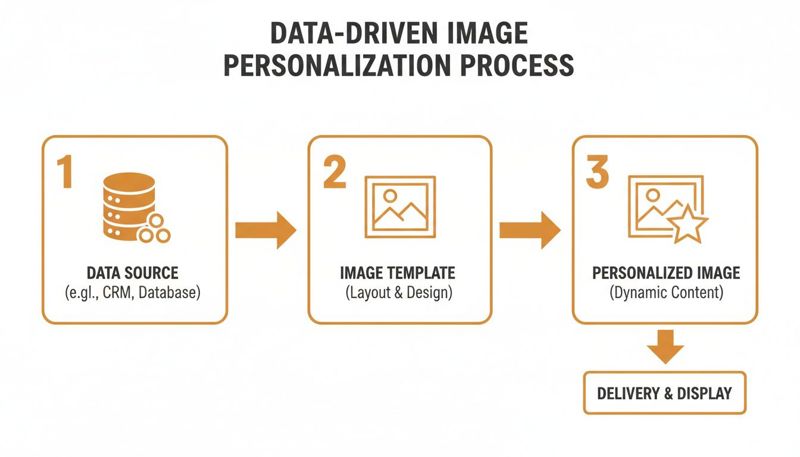
The key takeaway here is that your existing data is the fuel. By linking it to a flexible image template, you can automate the creation of countless unique visuals, all on the fly.
The Critical Role of Fallback Values
But what happens when your data isn’t perfect? A subscriber might not have shared their first name, or maybe a product image URL is missing. This is where fallback values become your safety net, ensuring a polished, professional experience for every single recipient.
A fallback is simply a default value that OKZest will show if the primary data isn't available. Without them, you risk sending emails with broken images or awkward-looking text like "Hello, {{first_name}}!" This one feature is absolutely essential for protecting your brand and avoiding a sloppy user experience.
Think of fallbacks as your plan B for every personalized element. They guarantee that even with imperfect data, your email still looks perfect.
For example, if a first name field is empty, you could set the fallback to something generic but friendly, like "Valued Customer." Or you could just have that text layer disappear completely. This kind of foresight is a non-negotiable part of learning how to personalize images for email campaigns effectively.
From Basic Data to Hyper-Relevance
The data you collect directly influences the level of personalization you can achieve. While basic info like a name is a great start, the real power comes from behavioral and preference data. This is often called "zero-party data"—information customers willingly and proactively share with you. To learn more about collecting and using it, check out our guide on what is zero-party data.
Every email marketer knows standing out takes more than just good copy. With 80% of customers more likely to buy from brands that offer tailored experiences, dynamic images can turn a standard newsletter into a must-open event. When you use the right data, you're not just decorating an email; you're building a more relevant, compelling message that drives real action.
Alright, you’ve designed a brilliant dynamic image and hooked it up to your data. Now for the fun part: getting that image into your email campaigns. This is where all your hard work pays off, turning a single template into a unique visual for every person on your list.
If you’ve ever used a standard text merge tag like *|FNAME|*, you're already 90% of the way there. The concept is almost identical. You'll just be taking the image URL from OKZest and plugging in the merge tags from your email service provider (ESP).
Once your dynamic image template is ready, you'll need the right platform to send it. You can explore plenty of free and paid email marketing and automation tools to find one that fits your needs and makes this process a breeze.
The Universal Method for Embedding
The beauty of this technique is its simplicity. It works with just about any modern ESP you can think of—Mailchimp, Klaviyo, ActiveCampaign, you name it. The core idea is always the same: you’re building a dynamic URL that your ESP will complete for each person right as the email is sent.
An OKZest image URL has a basic structure that looks something like this:
https://okzest.com/api/image/YOUR_TEMPLATE_ID.jpg?name={{name}}
To get this working in your ESP, you just swap out the OKZest placeholder {{name}} with your platform's specific merge tag.
- In Mailchimp, it becomes:
?name=*|FNAME|* - In Klaviyo, it’s:
?name={{ first_name }} - In ActiveCampaign, you’d use:
?name=%FIRSTNAME%
From there, you just paste this finished, modified URL into the "Image URL" or "Source" field of an image block in your email editor. Your ESP does the heavy lifting, automatically replacing the merge tag with each subscriber's actual data.
Step-by-Step in Mailchimp
Let’s walk through a real-world example using Mailchimp, a popular choice for many businesses.
- Get Your URL: First, copy the image URL from your saved template in OKZest.
- Add an Image Block: In your Mailchimp campaign builder, drag an "Image" block into your email layout.
- Insert the Dynamic URL: Instead of uploading a file, choose the option to "Import from URL" and paste your OKZest URL there.
- Add Merge Tags: Now, the important part. Modify the URL by replacing OKZest’s placeholders with Mailchimp's tags. For example, if your URL is
?name={{name}}&company={{company}}, you’d change it to?name=*|FNAME|*&company=*|MMERGE6|*(assumingMMERGE6is your company field).
When you preview or send the campaign, Mailchimp grabs the data for that specific contact, fills in the URL, and requests the personalized image from OKZest on the fly. The result? A perfectly unique image appears in their inbox.
The most common mistake we see is a simple merge tag mismatch. Always double-check that the tag you're using in the URL (like
*|FNAME|*) is the exact tag available in your ESP's audience settings. One little typo will break the personalization.
A Quick Guide for Klaviyo
The process in Klaviyo is just as simple, which really shows how universal this method is. Klaviyo uses a slightly different syntax for its tags, but the principle is identical.
- Copy the Base URL: Grab your image template URL from OKZest.
- Add an Image to Your Email: In the Klaviyo email editor, add an image block.
- Use Dynamic URL: Select "Import via URL" and paste the OKZest link.
- Insert Klaviyo Tags: Tweak the URL with Klaviyo’s tags. A URL like
.../template.jpg?name={{name}}becomes.../template.jpg?name={{ first_name }}.
You can get really creative with Klaviyo's powerful event data. Imagine an abandoned cart email where the image URL includes &product_name={{ event.extra.line_items.0.product.name }}. This would dynamically pull the name of the first item left in the cart and display it right in your image. This is a perfect example of how to personalize images for email campaigns using real-time behavioral data.
Handling Fallbacks and Previews
One final, critical point is testing. Most ESP preview functions won't populate merge tags correctly because they aren't tied to a specific contact record. To truly see your personalized image in action, you must send a live test email to an address that's on your list and has the necessary data fields filled out (e.g., a first name).
This is also where fallbacks shine. If a contact is missing data like a first name, the fallback value you set in OKZest will be used instead. This simple safety net prevents broken images and ensures every single email you send looks polished and professional.
Advanced Personalization Strategies and Use Cases
<img src="https://okzest.blob.core.windows.net/blog/a-personalized-white-ticket-with-ticket-for-jordan-and-a-qr-code-on-a-clean-white-table.jpg" alt="A personalized white ticket with "Ticket for Jordan" and a QR code on a clean white table." width="800">
So, you've got the basics down. You know how to add a first name to an image in your emails. Now it's time for the fun part: exploring the creative strategies that turn a simple personal touch into a memorable experience.
Moving beyond just a name opens up a ton of possibilities across different industries. Let’s dive into some practical, real-world examples that show what dynamic images are truly capable of. These aren't just theories; they're actionable tactics you can start using to drive engagement and build real customer relationships.
For Event Organizers and Coaches
If you run events or offer coaching, personalized images can add a massive layer of value and professionalism to your communications. Instead of sending another generic confirmation email, you can automate unique visuals that feel exclusive to each person.
Think about these powerful use cases:
- Personalized Event Tickets: Generate a unique image for every attendee that includes their name, a custom QR code for check-in, and all the key event details. It looks incredibly professional and actually streamlines your registration process on the day.
- Custom Certificates of Completion: For coaches and course creators, automatically creating and emailing personalized certificates is a game-changer. You can celebrate a client’s achievement with a beautifully designed certificate featuring their name and completion date, all without lifting a finger.
This level of detail makes your attendees and clients feel seen and valued, turning a simple administrative task into a genuinely positive brand moment.
By automating these personalized assets, you save countless hours of manual work while delivering a superior experience. It's about working smarter, not harder, to make every touchpoint feel special.
For Sales and Outreach Teams
In the world of sales, just getting noticed is half the battle. A generic outreach message is all too easy to ignore, but a hyper-personalized visual can stop a prospect dead in their tracks and make them take a closer look.
Imagine sending a LinkedIn message or a cold email that includes an image addressed directly to your prospect. With a tool like OKZest, you can connect to data sources to create visuals that reference specific, timely information, showing you've actually done your research.
- Hyper-Personalized Outreach: Create an image that mentions a prospect’s recent company achievement, a new funding round, or even a promotion. For instance, a simple graphic that says, "Congrats on the new product launch, [Prospect Name]!" can work wonders.
- Custom Meeting Invitations: Instead of a plain text invite, why not send a branded image with the prospect's name, their company logo, and the proposed meeting time? It's a small touch that makes a big impact.
This approach proves you aren't just blasting out another template. It’s a powerful way to show genuine interest and can seriously boost your reply rates.
Innovative Ideas for Other Industries
Honestly, the applications for dynamic images are nearly endless and can be adapted to almost any business. The key is to think about what you know about your audience and how you can use that information to create a more relevant, eye-catching visual.
As we head further into 2026, AI-driven personalization is reshaping what's possible in email campaigns. In fact, 39% of professionals predict hyper-personalized images will become a dominant force in marketing automation. To get ahead of the curve, you can read more about these developing personalization statistics and trends.
Here are a few more industry-specific ideas to get your creative juices flowing:
- Real Estate: Send property updates with an image of a home featuring the client's name overlaid, like, "Is this your new home, David?"
- Nonprofits: Create unique donor appreciation graphics that thank individuals by name and visually represent the impact of their specific contribution.
- E-commerce: Display a product review with the customer's own name and profile picture on it, creating undeniable social proof that feels authentic.
Each of these strategies transforms a standard communication into a powerful, one-to-one moment. By creatively applying what you know about your audience, you can make your brand unforgettable.
A personalized campaign is only as good as its results. Launching dynamic images is exciting, but you're just guessing without a solid way to test, measure, and scale. This final step is where you prove the value of your efforts with hard data and build a repeatable system for success.
The best way to quantify your wins is through rigorous A/B testing. Don't just swap out all your old static images at once. Instead, run a controlled experiment to see exactly how personalized visuals perform against your existing control. This data is your most powerful tool for getting buy-in and justifying more creative campaigns down the road.
Prove Your Impact with A/B Testing
Setting up an A/B test is surprisingly straightforward. You'll just need two versions of your email campaign:
- Version A (The Control): Your standard email featuring a static, one-size-fits-all image.
- Version B (The Variant): The same email, but with your new dynamic, personalized image from OKZest.
Send each version to a different, randomized segment of your audience and let the results roll in. A statistically significant portion of your list—say, 10-20% for each variant—is usually enough to get a clear winner without risking the entire send. Let the test run for a day or two before you declare a victor and send the winning version to everyone else.
When you’re learning how to personalize images for email campaigns, this testing phase provides invaluable insights into what actually resonates with your audience.
Key Metrics to Track
Once your A/B test wraps up, it’s time to dive into the numbers. Don't just glance at open rates; look at the metrics that truly signal engagement and intent.
The most important metrics to watch are:
- Click-Through Rate (CTR): This is the gold standard. Did the personalized image compel more people to click? An uplift here is a strong indicator of success.
- Conversion Rate: Did the group that saw the personalized image actually complete the desired action, like making a purchase or signing up? This is where you see the impact on the bottom line.
- Click-to-Open Rate (CTOR): This metric tells you how engaging the email content was for those who opened it. A higher CTOR for your personalized version means the visual truly captured their attention.
Track these metrics closely. Even a small lift of 1-2% in CTR or conversions can translate into significant revenue when applied across your entire email list.
Don’t forget about qualitative feedback. A personalized image might not just boost clicks; it might generate positive replies or social media mentions. These are signs of a deeper brand connection that numbers alone can't always capture.
Your Pre-Send Quality Checklist
Before any campaign goes out the door, a final quality check is non-negotiable. A broken image or a faulty merge tag can ruin a great first impression and damage your credibility. Trust me, you don't want to be that person.
Here’s a quick pre-flight checklist to run through:
- Verify Merge Tags: Double-check that the tags in your image URL (
*|FNAME|*,{{ first_name }}, etc.) exactly match the ones your email platform uses. A single misplaced character can break everything. - Test Fallback Values: Send a test email to a contact who is missing data (e.g., no first name). Does the fallback you set in OKZest appear correctly? This is a lifesaver.
- Check Across Email Clients: Use a tool like Litmus or Email on Acid to preview how your email looks in Gmail, Outlook, and on mobile devices. Ensure the image renders perfectly everywhere.
- Confirm Links: Click every link in your test email, especially the personalized image itself if it's clickable, to ensure they lead to the correct destination.
Scaling Your Personalization Efforts
Once you've proven the ROI of your initial campaigns, it's time to scale. This is where a robust platform becomes essential.
For agencies or larger marketing departments, team features in OKZest allow multiple users to collaborate on projects, manage templates, and maintain brand consistency across all campaigns. If you're looking to really expand, it helps to understand how a scalable image API works and how it can support your growth.
Whether you're sending your first hundred personalized images or scaling to millions per month, the core principles remain the same. Start with a clear goal, test everything, measure what matters, and build on your successes.
Your Questions, Answered
As you start your journey with personalized images, you’ll probably have a few questions. That’s perfectly normal! Here are a couple of the most common ones we hear from marketers just like you.
Will Personalized Images Slow Down My Emails?
I get this question all the time, and it’s a valid concern. Nobody wants to send an email that takes forever to load.
The short answer is no, not if you use a service built for performance. Tools like OKZest were designed specifically for this. We generate lightweight images and deliver them through a global Content Delivery Network (CDN), which means they load almost instantly for your subscribers, no matter their email client or device. You get all the benefits of personalization without sacrificing speed.
What if I'm Missing Subscriber Data?
This is another classic "what if" scenario. What happens if you want to personalize with a first name, but you don't have it for every single contact? A broken image is the last thing you want.
This is where "fallback" values come in. It’s your safety net. If a first name is missing from your contact list, your image can automatically display a default you’ve chosen, like “Valued Customer” or even just show the beautiful graphic without any text at all. This simple step ensures every single email looks professional and complete.
Ready to stop sending generic emails and start building real connections? With OKZest, you can create and automate stunning, personalized images in minutes. Get started for free today and see the difference it makes.