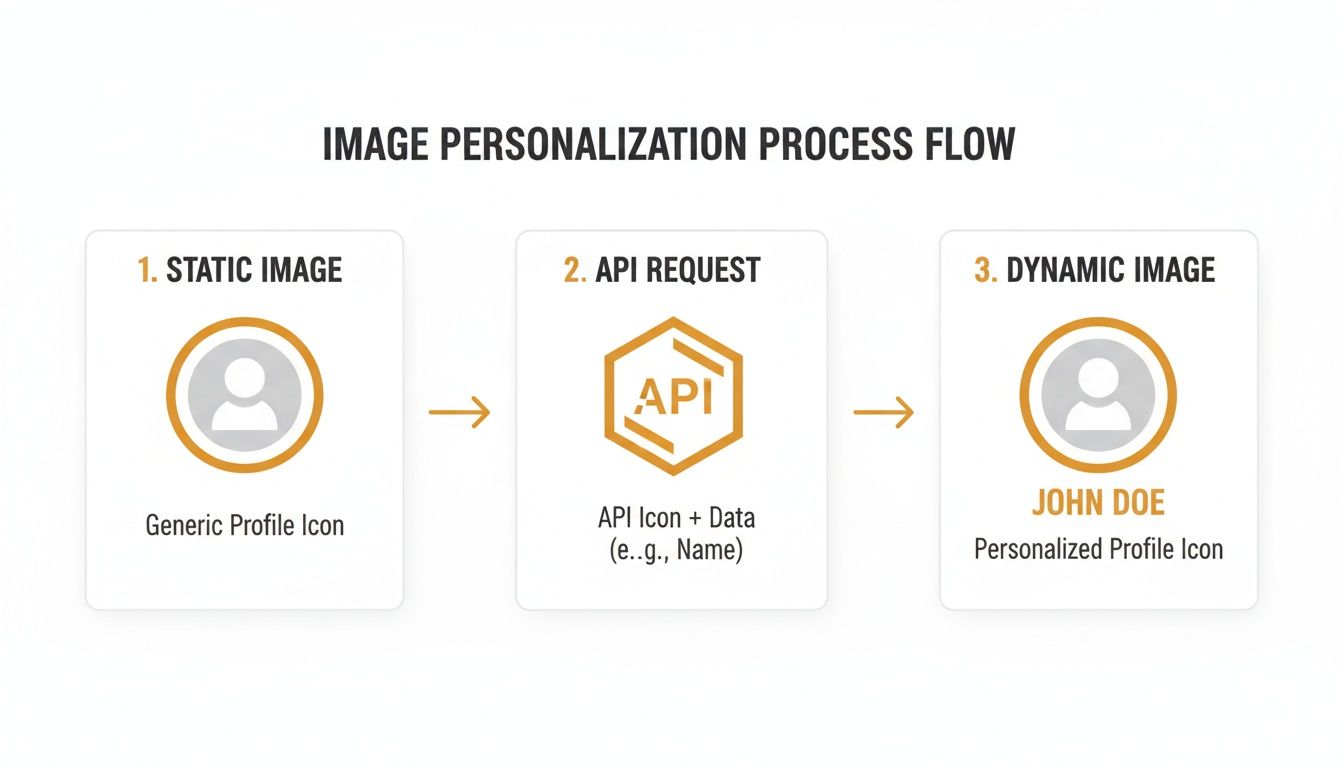
An image generation API creates images programmatically from a template rather than by hand in a design tool. You define a design once, then supply different data - a name, a company, a product, a number - and the API returns a version of that design for each set of values. One template becomes thousands of images without a designer touching any of them.
For marketing teams the appeal is straightforward: it removes the production bottleneck that has always made truly personalized visuals impractical. This guide covers what these APIs do, the one architectural choice that determines your costs, where they deliver, and how to evaluate one.
Template-based vs AI-generated: an important distinction
"Image generation" now means two very different things, and confusing them wastes a lot of time.
AI image generation (DALL-E, Midjourney, Stable Diffusion) creates novel images from a text prompt. Excellent for concept art and illustration. Poor for brand work, because output varies between runs - you cannot guarantee your logo is the right color, your text is spelled correctly, or the layout matches last week's.
Template-based image generation renders a design you control, substituting specific values into specific layers. Output is deterministic: the layout, fonts, and brand elements are identical every time, and only the data changes.
For marketing at scale you almost always want the second. Consistency is the point - you are producing 50,000 versions of one on-brand asset, not 50,000 different creative interpretations. Everything below refers to template-based generation.
Static vs dynamic images
| Static image | Dynamic image | |
|---|---|---|
| Created | Once, by hand | Automatically, per recipient |
| Content | Identical for everyone | Different per viewer |
| Updating | Redesign and re-upload | Change the template or the data |
| Scales to 50,000 | Not without 50,000 hours | Yes, from one template |
| Can show live data | No, frozen at design time | Yes, if rendered on demand |
How it works
Three steps, regardless of vendor.
1. Build a template. A design with fixed elements (background, logo, brand colors, layout) and dynamic layers - placeholders that will change. A dynamic text layer might be named name or company; a dynamic image layer might hold a product photo or a customer's logo.
2. Connect your data. Whatever you already hold: your email platform's subscriber fields, a CRM record, a CSV, a spreadsheet, a database, or values passed live from your application.
3. Generate. The API combines template and data and returns the image. Either as a URL you embed, or as a file you download - which brings us to the choice that matters most.
The architectural choice that determines your costs
Image generation APIs work one of two ways. The difference is invisible in a feature list and enormous in your invoice.
Pre-rendering. You call the API once per recipient and it returns a finished image file. A 50,000-person campaign means 50,000 API calls, 50,000 stored files, and 50,000 billed renders. The batch also has to complete before you can send - at ten images a second, that is nearly three hours.
Real-time rendering (open-time). You get one image URL containing your data as parameters. Nothing is generated in advance. The image renders the moment it is requested - when the recipient opens the email. One template, one URL, any number of recipients.
The consequences are worth being concrete about:
- Cost stops scaling with list size. With pre-rendering, doubling your list doubles your bill. With real-time rendering, list size is irrelevant to what you are charged.
- No send delay. There is no batch job to wait for. The campaign is ready as soon as the template is saved.
- The image can show current information. Pre-rendered images are frozen at generation time. A real-time image can reflect live pricing, remaining stock, an accurate countdown, or an updated points balance at the moment someone looks at it.
Neither is universally right. If the file itself is your deliverable - a social post to upload, an ad variant, a certificate to attach - you need pre-rendering. For images that live inside emails or web pages, real-time rendering is dramatically less work and less money.
What the URL actually looks like
For real-time rendering, the entire integration is a URL:
https://media.okzest.com/img?c=YOUR-COMPANY-ID&i=YOUR-DESIGN-ID&name=Sarah&company=Acme
c is your company ID, the same across every design in your account. i identifies the specific design. Everything after them is a dynamic layer from your template.
Because the result is a standard image, it goes straight into an <img> tag with your email platform's merge tags in place of the values:
<img src="https://media.okzest.com/img?c=YOUR-COMPANY-ID&i=YOUR-DESIGN-ID&name={{ first_name }}" alt="A message for {{ first_name }}" />
That is the whole integration. No SDK, no platform-specific plugin, no developer.
When you need image files instead, you POST the values and receive a rendered image back:
curl -X POST https://api.okzest.com/v1/images \
  -H "Content-Type: application/json" \
  -H "x-api-key: YOUR_API_KEY" \
  -d '{
        "design_id": "YOUR_DESIGN_ID",
        "layers": [
          { "layer_id": "name",    "text": "Sarah Chen" },
          { "layer_id": "company", "text": "Acme Corp" }
        ]
      }'
The developer guide covers the mechanics in more depth, and there is a full walkthrough for generating images from a CSV.
Where marketing teams use this
Email campaigns
The highest-return application, because inbox competition is severe and a genuinely personalized visual is still rare. Subscribers stopped noticing "Hi [First Name]" years ago; a designed graphic carrying their name reads as effort.
The flows that benefit most: welcome sequences, abandoned cart emails showing the actual item left behind, win-back campaigns, renewal notices, and loyalty updates where the recipient's own data is the message. Platform-specific walkthroughs are available for Klaviyo, and the same approach works in Mailchimp, HubSpot, ActiveCampaign, Campaign Monitor, and anything else that accepts a custom image URL.
Sales outreach
Cold email lives or dies on whether it looks like effort. An image displaying the prospect's own company name or logo signals the message was not blasted to ten thousand people. Data typically comes from your CRM rather than your ESP; the mechanism is identical.
Social media
Quote cards, announcement graphics, and product posts generated from a content feed rather than designed one at a time. The template enforces brand consistency; automation removes the production time. This is a case where you usually want pre-rendered files, since you are uploading them to a platform.
Paid advertising
Ad variants at scale - the same layout rendered across sizes, offers, audiences, and locales. Useful for testing, and for markets where you need dozens of localized versions of one creative.
Certificates, tickets, and documents
Course completions, event tickets, attendee badges, invoices, and reports. One-template-many-outputs problems where each output must be accurate and on-brand. Wire a form or spreadsheet to the template and every submission produces its own finished document.
Websites and apps
Personalized hero images, dynamic Open Graph images for link previews, and user-specific dashboards rendered as images. The same URL pattern works; values come from your application rather than an email platform.
Personalizing at scale: data and fallbacks
Any field you hold can drive the image: identity (name, company, job title), behavior (last product viewed, cart contents), account data (plan tier, points balance, renewal date), or context (city, language, timezone).
Two things separate a professional implementation from a fragile one.
Fallbacks are mandatory. Real data is messy. Some contacts have no first name, some have "N/A", some have their whole email address in the name field. Without a default value, those recipients see a blank space or something absurd inside an otherwise polished graphic. Most email platforms support a default in the merge tag itself; set one every time.
Text length varies more than you expect. "Jo" and "Bartholomew" need very different amounts of room, as do "IBM" and a German compound company name. Templates should either auto-fit text or be designed with enough space for the long cases. Test with your longest real values, not with sample data.
How to evaluate an image generation API
Rendering model. Ask directly whether generation happens pre-send or on demand, and what a 100,000-recipient campaign costs on their pricing. This single question separates tools whose costs scale with your success from tools whose do not.
Template limits. Several vendors cap templates per plan or charge per template. If you run multiple brands, campaigns, or clients, that limit binds quickly.
Who can edit. If every copy change requires a developer, your marketing team becomes a ticket queue. Look for a genuine no-code editor alongside the API.
Integration breadth. A plain image URL works everywhere, which is why it beats platform-specific plugins. Check for no-code automation too - Zapier or Make support means your team can build workflows without engineering time.
Performance under burst. With real-time rendering, load arrives when recipients open, and opens cluster hard in the first hour after a send. Ask about caching, CDN coverage, and uptime. A public status page is a good sign.
Deliverability behavior. Images should be served as standard formats from plain URLs. Anything requiring scripts in the email body will be stripped by most clients.
Support and documentation. Spend ten minutes in the docs before any sales call. Copy-paste examples and a complete parameter reference predict a smooth integration; vague documentation predicts the opposite.
Frequently asked questions
Do I need to be a developer to use an image generation API? No. For the common case - personalized images in email - the integration is pasting a URL into your email builder and swapping the values for merge tags. Building the template is a no-code editing task. A developer is only needed if you want to generate images programmatically from your own application.
How much does it cost to generate personalized images? It depends entirely on the rendering model. Pre-rendering tools typically bill per generated image, so a 100,000-recipient campaign is 100,000 billable units. Real-time rendering tools generally bill on a plan or on opens, so campaign size does not drive the cost. Model your actual send volumes against both before committing - at scale the difference is usually several multiples, not a few percent.
Will this work with my current email platform? If your platform lets you set a custom image URL and use merge tags - which covers Mailchimp, Klaviyo, HubSpot, Campaign Monitor, ActiveCampaign, ConvertKit, SendGrid and most others - then yes. There is no integration to install, because an image tag works the same everywhere.
How fast are the images generated? Real-time rendering typically returns in well under a second, and repeat requests are usually served from cache. There is no pre-send batch, so campaign readiness is not affected by list size.
Do personalized images hurt email deliverability? No. They are standard image URLs and mailbox providers treat them like any other image. Normal best practice still applies: a reasonable text-to-image ratio, an authenticated sending domain, and meaningful alt text on every image.
Will the images display in Gmail and Outlook? Yes, when served as a standard image format from a plain URL. Set an explicit width and alt text so the email still communicates when images are blocked by default, which is common in Outlook.
Can the image show live data like prices or countdowns? With real-time rendering, yes - the image is generated when it is opened, so it can reflect current values rather than values frozen at send time. Pre-rendered images cannot do this.
What happens if a contact is missing data? Use your email platform's default-value syntax in the merge tag so the image falls back to friendly wording instead of rendering a blank. Always test with an incomplete contact record before sending.
How is this different from Canva bulk create? Bulk-create tools produce a batch of static files you then have to store, host, and match to the right recipients. An image generation API with real-time rendering produces one URL that resolves to the correct image per person automatically - no files to manage, and changing the template updates every image without regenerating anything.
Getting started
The fastest way to find out whether this works for your audience is a single test. Build one template with one dynamic text layer, put the URL in your next welcome or abandoned-cart email with your platform's merge tag, and compare the click-through rate against your last generic send. That is about ten minutes of work.
OKZest is built on real-time rendering: one template, one URL, a different image for every recipient, generated when they open it. It works with any email platform that accepts a custom image URL, connects through Zapier and the REST API for automation, and exposes an MCP server if you want AI assistants to generate images conversationally.
Create a free account, no credit card required.
Related reading: REST API GET image - developer guide, generate images from a CSV, personalized images explained, choosing image software for agencies.