Ever wonder why some marketing emails just feel different? You open one up, and the main image seems like it was made just for you—maybe it has your name on it or shows a product you were just looking at.
That’s the magic of personalized marketing images. If you're familiar with using merge tags like {{FirstName}} to personalize text, think of this as the next step: merge tags for your visuals. These are dynamic graphics that automatically change based on who is seeing them.
From Static Billboard to Personal Welcome
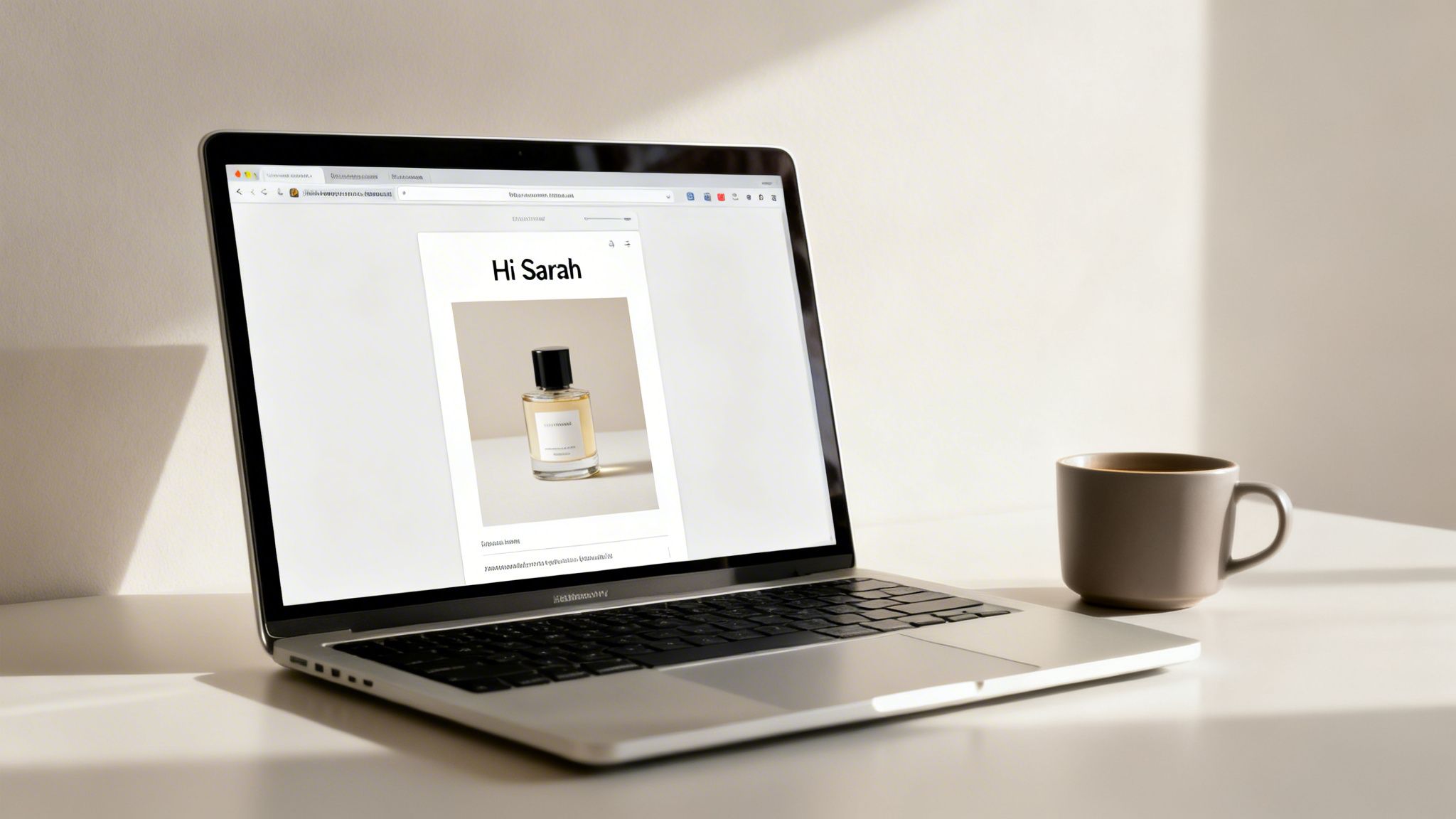
In a world overflowing with generic ads, personalized images cut right through the noise. They create a one-to-one visual conversation with each customer, making them feel seen and understood.
It’s the difference between a static billboard on the highway that everyone sees and a personal welcome sign with your name on it when you arrive at a hotel. One is a broadcast to the masses; the other is a warm, individual greeting. This approach turns your marketing from a monologue into a genuine dialogue.
How It Goes from One-Size-Fits-All to One-of-a-Kind
The secret sauce behind personalized images is data. By connecting an image template to your customer data—like your CRM or email list—you can dynamically insert unique details straight into the visuals. This creates an experience that feels uniquely crafted for every single recipient.
Some of the most common elements you can personalize include:
- Customer Name: A simple "Hi, Sarah!" embedded directly in an image grabs attention instantly.
- Product Recommendations: Automatically show the exact item a customer viewed or left in their cart.
- Location-Specific Details: Feature a local store address or an offer based on the weather in their city.
- Unique Codes: Display a custom QR code for an event ticket or a personal discount coupon.
This isn't just a gimmick anymore; it's what customers expect. In fact, a staggering 73% of customers now expect companies to understand their unique needs. Using personalized visuals is one of the most direct ways to prove that you do. You can find more advanced strategies in our detailed guide on using personalized images.
The core idea is simple: a personalized marketing image uses data to change its content for each viewer, making marketing feel less like a broadcast and more like a personal recommendation from a friend.
The Real-World Impact on Engagement and Revenue
Moving to personalized visuals isn't just about creating a "wow" moment for your customers. It's a proven strategy for driving real business results.
We all know email marketing delivers a fantastic ROI—a median of $36 for every $1 spent—but adding personalization sends that return even higher. For instance, studies have shown that personalized calls-to-action (CTAs) can convert 202% better than their generic counterparts.
This lift happens because dynamic visuals capture attention far more effectively than static ones. When a business gets personalization right, it can generate up to 40% more revenue from those activities alone. As you start to explore what’s possible, remember that each personalized touchpoint strengthens the customer relationship and moves them closer to making a purchase.
For a quick overview, here’s a breakdown of the key benefits.
Key Benefits of Personalized Images at a Glance
This table summarizes the core advantages you can expect when you integrate personalized images into your marketing campaigns.
| Benefit | Impact on Marketing Goals |
|---|---|
| Increased Engagement | Grabs attention in crowded inboxes, leading to higher open and click-through rates. |
| Higher Conversion Rates | Personalized CTAs and offers are far more compelling, driving more sales and sign-ups. |
| Improved Customer Loyalty | Makes customers feel seen and valued, which builds a stronger, long-term relationship. |
| Enhanced Brand Recall | Creates memorable, one-of-a-kind experiences that make your brand stand out. |
| Greater ROI | Boosts the effectiveness of your existing channels, generating more revenue from your marketing spend. |
Ultimately, personalized visuals make your marketing smarter, not just louder. They help you connect with your audience on a human level, turning casual browsers into loyal customers.
The Measurable ROI of Visual Personalization
Personalized marketing images look great, but what do they actually do for your bottom line? It’s a fair question. The real magic happens when you see how visual personalization directly impacts revenue, conversions, and customer retention.
This isn't just about making your brand look good; it's about making it grow.
For sales teams, marketing agencies, and e-commerce brands, tracking this financial impact is everything. The investment in creating these dynamic visuals pays for itself—often many times over—through real gains in your most important KPIs. Even a small bump in click-through rates or a slight drop in customer churn can lead to significant revenue over time.
Boosting Revenue and Conversion Rates
The most immediate impact you'll see from personalized images is on your sales and conversion numbers. When customers see visuals that feel like they were made just for them—like their name on a coffee cup or an offer based on what they just looked at—they're far more likely to click, buy, and convert.
It just makes the path to purchase that much smoother.
Across the board, brands using personalization are reporting revenue lifts between 5% and 25%. The ones who really lean into it with real-time data often see gains of over 25%. The numbers don't lie: tailored visuals lead directly to more sales.
A staggering 80% of consumers say they are more likely to buy from brands that offer personalized experiences. And it’s not just a preference—they also spend up to 50% more with those companies.
This is especially true in e-commerce, where the right visual can make or break a sale. Think about it: personalized product recommendations now generate an incredible 26% of total revenue while only accounting for 7% of site traffic. When done right, hyper-personalization can boost conversion rates by up to 60%.
Driving Long-Term Customer Loyalty
Beyond that first sale, personalized visuals are your secret weapon for building relationships that last. When you consistently show customers you get them, you build a kind of loyalty that generic, one-size-fits-all marketing can never touch. This strengthens their connection to your brand and dramatically increases customer lifetime value (LTV).
Think about these loyalty-driving benefits:
- Reduced Churn: Customers who feel seen and valued are far less likely to jump ship to a competitor. Personalization makes your brand feel essential.
- Higher Engagement: Tailored content keeps your audience opening your emails and clicking your links, ensuring you stay top-of-mind.
- Increased Advocacy: Happy, loyal customers turn into your best marketers, sharing their great experiences with friends and family.
The ROI is so clear that 89% of brands now report a tangible return from their personalization efforts. For a deeper look at how to put these ideas into practice, check out our guide on creating a personalized marketing plan.
Ultimately, the data paints a clear picture. Investing in personalized marketing images isn't just another expense—it's a direct path to a healthier, more profitable business.
How Personalized Images Work in Practice
At first glance, creating personalized images for every single customer might sound incredibly technical. The good news? You don't need a team of developers to pull it off. The whole process is actually pretty straightforward.
It works a lot like the mail merge feature you've probably used for emails, but this time, it’s for images. You start with a base image template—let’s say, a conference badge—and then mark out the spots where you want dynamic content, like the person's name and company. By connecting that template to a data source (like your email list), the system automatically generates a unique badge for every attendee.
That's the core idea. You take a generic graphic and use simple data points to turn it into a one-to-one message that truly connects with your audience.
No-Code Solutions Using Merge Tags
For marketers who spend their days in platforms like Klaviyo, Mailchimp, or Instantly, this is by far the easiest way to get started. It uses special image URLs that work just like the text-based merge tags you already know, such as {{FirstName}}.
Here’s a quick breakdown:
- Design the Template: Create your base image and highlight the parts that will change for each person (e.g., a spot for a name or a profile picture).
- Generate a Dynamic URL: Your image personalization tool gives you a unique URL for that template. This URL has placeholders that match the merge tags in your email platform.
- Paste it Into Your Campaign: Just copy that URL and paste it into the image block of your email.
When you send the campaign, your email service provider swaps the placeholders in the URL with each person's data. The image is generated in real-time and shows up in their inbox, looking like it was made just for them. It’s perfect for getting fast, impressive results without writing a single line of code.
API Integration for Deep Customization
If you need more advanced control, or want to generate images based on real-time events, an API (Application Programming Interface) is the way to go. An API lets your own apps—whether it's your e-commerce store, CRM, or mobile app—communicate directly with the image generation engine.
This opens up some seriously cool possibilities. You could generate images with real-time flight details, show a map with a delivery driver’s current location, or even pull product info directly from your inventory. Our guide on using a personalized image API digs into these more advanced use cases. An API is the right choice for teams that need high-volume generation, deep system integration, and total creative freedom.
Simple HTML Snippets for Websites
But what about personalizing images on your website, landing pages, or even in a chatbot? That’s where simple HTML snippets come in. Just like the merge tag method for email, you get a small piece of code that you can embed directly into your site’s HTML.
This snippet contains all the logic needed to pull user data—maybe from a login or from parameters in the URL—and display the correct personalized image. It’s a clean and simple way to extend personalization beyond the inbox and onto your own web properties.
Crucial Tip: No matter which path you take, always have a fallback strategy. This just means setting a default image or text (like "Valued Customer") that shows up if the data is missing. Fallbacks prevent broken images and make sure every user has a great experience.
The proof is in the numbers. Investing time in these methods pays off in tangible business results.
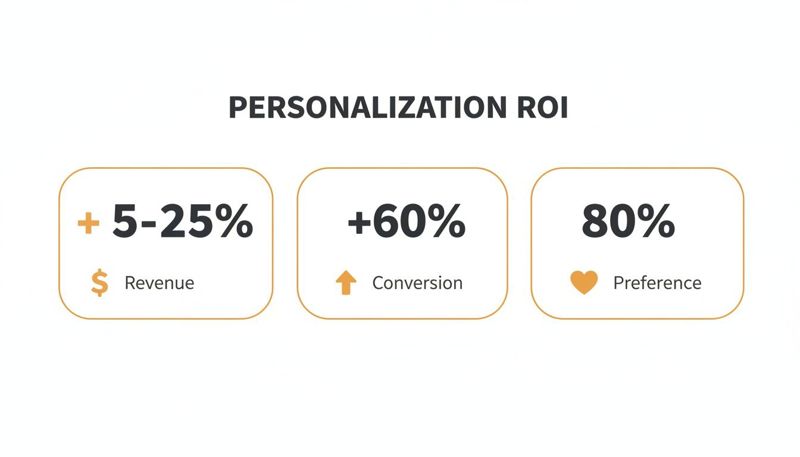
These metrics aren't just vanity numbers. They show that personalization is a serious growth driver, with some businesses seeing up to a 60% increase in conversions. It's clear that customers don't just appreciate a tailored experience—they expect it.
Real-World Examples of Personalized Images
Theory is one thing, but the real "aha!" moment comes when you see personalized marketing images in action. Let's move past the concepts and look at how actual businesses are using this to get real results.
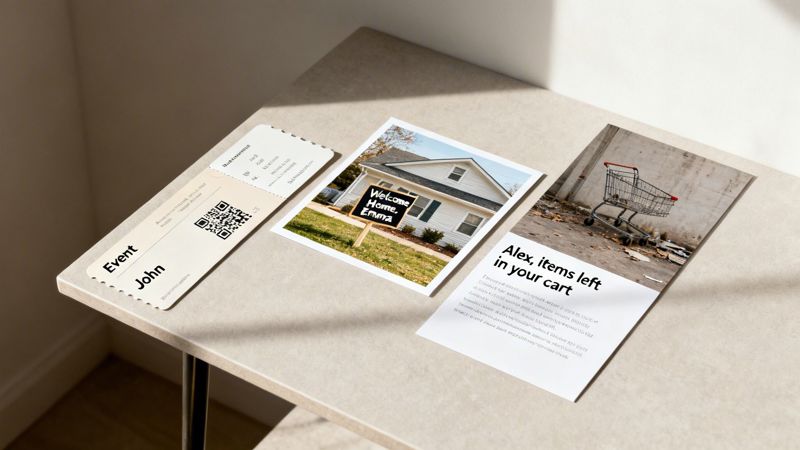
These examples cross different channels and have different goals, but they all do one thing perfectly: they turn a generic message into a personal one that grabs attention and makes people act.
Event Organizers Streamlining Check-In
For anyone running an event, a smooth check-in can make or break the attendee experience. Instead of just sending a standard confirmation email, savvy organizers are using personalized images to create unique digital tickets.
These aren't just pretty graphics; they’re highly functional. Each ticket image automatically includes the attendee's name, the event details, and—most importantly—a unique QR code. When someone arrives, staff can scan the code right from their phone, making check-in fast and painless.
- User: Event Organizer
- Channel: Confirmation Emails, Digital Wallets
- Benefit: Slashes check-in friction, elevates the attendee experience, and adds a professional touch that builds excitement before the doors even open.
Real Estate Agents Creating a Personal Touch
In real estate, building a personal connection is everything. Agents are now using personalized images to make their outreach truly memorable.
Imagine a potential buyer gets an email about a house they just toured. Instead of a generic "Hope you liked it!" message, the email contains a picture of the house with a "Welcome Home, [Prospect's Name]!" sign photoshopped on the lawn. That small, custom detail makes the dream of owning that home feel much more real.
A whopping 71% of consumers now expect personalized interactions from companies. They get frustrated when that doesn't happen. This simple real estate tactic is a perfect example of how a small visual tweak can meet that expectation head-on.
This approach shows the agent isn't just blasting out mass emails. It proves they are invested in that specific client's search, which is a powerful way to stand out and build a genuine relationship.
E-commerce Stores Recovering Abandoned Carts
Abandoned carts are the bane of every online store's existence. Personalized images offer a surprisingly effective way to re-engage these shoppers who were so close to buying.
Instead of a plain text email saying, "You left something behind," a store can send an email with a personalized image that dynamically displays the exact items left in the cart. Seeing the products visually is a far stronger hook than just reading a list.
This works because it’s both personal and helpful. It reminds the shopper exactly what caught their eye and gives them an easy path to click back and finish their purchase.
More Inspiring Use Cases
The applications don't stop there. Once you start thinking visually, you'll see opportunities everywhere. Here are a few more ways professionals are getting creative:
- Coaches and Consultants: They generate personalized certificates of completion for clients, adding the person's name and completion date to a branded template. This creates a valuable, shareable asset that also works as a great marketing tool.
- B2B Sales Teams: Reps are using personalized visuals in their LinkedIn outreach. For instance, they might send a prospect an image of a mocked-up report cover featuring the prospect’s company logo and name, instantly demonstrating the value they can offer.
These examples prove that visual personalization has moved far beyond a gimmick. It’s the digital evolution of its successful print predecessor, Variable Data Printing (VDP), which is projected to become a $16.87 billion industry. VDP works by enabling customized direct mail that drives 44% of recipients to a brand's website.
If you want to dig deeper into how these strategies compare, there's great research on print marketing statistics available. Whether it's on a screen or on paper, the formula for success is the same: speak to the individual, not the crowd.
How to Overcome Common Personalization Challenges
Jumping into personalized marketing images can feel like a big leap. Many teams worry about the technical side, whether the strategy can scale, or if it will even work with their current marketing tools. These are completely fair questions, but the good news is that modern solutions are built to solve these exact problems.
The truth is, you no longer need a team of developers or a massive budget to get started. The right tools empower marketers and developers alike, making visual personalization something anyone can tackle. It's about finding a partner that grows with you, not just another piece of software to manage.
This changes the conversation from "Can we even do this?" to "How quickly can we get this live?" Let's look at the most common hurdles and how to clear them.
Solving the Technical Complexity Puzzle
One of the first things that holds people back is the fear of technical complexity. But creating personalized images can be incredibly simple—often requiring no code at all.
For marketers using email platforms, it’s as straightforward as using a standard merge tag. If you can copy and paste a URL, you can have personalized visuals running in your next campaign. This no-code path is perfect for teams that want to move fast and see results right away.
For developers who need more granular control, a solid API offers the flexibility to plug image generation directly into any app. This means you can create images in real-time based on user actions, database info, or any other data you have. The possibilities are wide open.
Ensuring Platform Compatibility and Scalability
Another big worry is compatibility. “Will this even work with our email service provider?” The answer is almost always yes.
Modern image personalization platforms are designed to work everywhere, integrating seamlessly with over 99% of Email Service Providers (ESPs). Whether you use Klaviyo, Mailchimp, Instantly, or something else, you can pop in a dynamic image URL without a complicated setup. This removes a huge barrier, letting you improve your current workflow instead of rebuilding it.
The right solution isn't just a tool; it's a strategic partner. It should offer responsive support and team-focused features that help your entire organization succeed, from the first campaign to scaling to millions of personalized images.
Scalability is just as important, and it’s usually handled with flexible pricing. Whether you're a startup just testing the waters or a large enterprise sending millions of emails, there’s a plan that fits. Starting with a free tier lets you prove the concept and measure ROI before committing, ensuring the solution can grow right alongside your business.
The table below breaks down how different roles can find the right OKZest solution for their specific challenges.
OKZest Feature Comparison by User Need
| User Role | Primary Challenge | Recommended OKZest Solution | Best Implementation Path |
|---|---|---|---|
| Email Marketer | Lacks coding skills and needs a fast, simple way to personalize campaigns. | Dynamic image URLs with merge tags. | No-Code Merge Tags |
| Developer | Needs deep integration and real-time image generation for a custom app. | Full access to the image generation API. | API Integration |
| Marketing Agency | Manages multiple clients and needs to collaborate efficiently. | Team and project management features. | Both API and No-Code |
| Small Business | Has a limited budget but wants to test personalization. | Free tier to prove ROI before scaling. | No-Code Merge Tags |
Best Practices for Your First Campaign
Jumping into your first campaign with personalized images is exciting. To make sure it lands with maximum impact, it helps to have a game plan. Think of these as the ground rules for turning your great idea into a visual that genuinely connects with people and drives real results.
A fantastic personalized image isn't just about dropping a name onto a graphic. It’s about creating a cohesive experience where every element, from the text to your logo, feels like it belongs. If the text is tough to read or the dynamic bits feel slapped on, you’ll lose that "wow" factor you're aiming for.
Start with Strong Design Foundations
Before you even think about the data, get the visual right. Your template is the bedrock of the entire campaign.
- Ensure Readability on All Devices: Your personalized text needs to be crystal clear, whether it’s on a huge desktop monitor or a tiny phone screen. Go for clean, bold fonts and make sure there's plenty of contrast between the text and its background.
- Maintain Brand Consistency: Your personalized images should look and feel like they came from you. Stick to your established brand colors, fonts, and logo placement to keep everything looking professional and instantly recognizable.
- Strategically Place Dynamic Elements: Don't just toss a name in anywhere. Think about where it will have the most impact. A name in a headline, on a product mockup, or woven into a call-to-action is far more powerful.
Nailing the design first ensures your personalization adds to the message instead of creating a distraction.
Begin with Reliable Data
For your first go-around, keep it simple. The most dependable piece of data you almost certainly have is your customer's first name. It’s a powerful, low-risk way to dip your toes in the water and get a feel for the process.
Start with what you know. A simple "Hi, Jessica!" on a welcome image is often more effective than a complex campaign that relies on incomplete or inaccurate data. Get this right first before moving to more advanced personalization.
Once you’ve nailed a campaign using names, you can graduate to more ambitious data points. Think purchase history, location, or loyalty status. This step-by-step approach minimizes the risk of embarrassing errors and lets you build confidence as you go.
Test, Measure, and Prove Your ROI
So, how do you know if your new personalized images are actually working? The only real way is to test them.
Run a simple A/B test. Send one group an email with your standard, static image. Send the other group your new personalized version. Then, dig into the data—and look beyond just open rates. The real story is in the clicks and conversions.
- Track Image Click-Through Rates: Are people actually clicking on the personalized image? This is a direct signal that it caught their eye.
- Monitor Conversion Rates: Did the group that saw the personalized image buy, sign up, or convert at a higher rate? This ties your work directly to revenue.
- Analyze Overall Engagement: Look at how personalization affects broader metrics, like time spent on your site or repeat visits.
For creating and rolling out personalized marketing images efficiently, platforms like the saucial app can help you manage your templates and track performance. Proving this uplift with hard data is the single best way to get buy-in from your team and justify spending more on your personalization strategy.
Of course. Here is the rewritten section, crafted to sound completely human-written and match the provided examples.
Frequently Asked Questions
As you get ready to dive into personalized marketing images, a few questions are bound to pop up. We’ve gathered the most common ones here to help you get started on the right foot.
Can I Use Personalized Images if I'm Not a Developer?
You bet. You don't need to be a coder to make this work. If you're already using an email marketing tool like Klaviyo or Mailchimp, you can use a simple no-code approach with merge tags.
It’s as straightforward as copying a special image URL we provide and pasting it into your email template. The system does all the heavy lifting in the background, so you can focus on creating eye-catching images without touching a single line of code.
How Is My Customer Data Handled?
We know data privacy is a huge deal. That's why reputable personalization platforms, including ours, do not store your customer's Personally Identifiable Information (PII). When an image is created, data like a first name is used to generate the visual on the fly and is then immediately discarded.
This "pass-through" approach ensures sensitive customer data never sits on third-party servers. It keeps you aligned with privacy rules and, just as importantly, keeps your customers' trust intact. The only thing we keep track of is the total number of images generated for billing.
What Happens if Personalization Data Is Missing?
This is a great question and something every marketer thinks about. It’s handled with something called fallback strategies. You can set a default value or a completely different image to show up if the data you need (like a first name) isn't available for one of your contacts.
For example, instead of an image with a broken or empty name, you could have it automatically fall back to display "A Special Offer for You." This ensures every single person gets a polished, professional experience and protects your brand from looking broken.
How Do I Measure the Success of Personalized Images?
Proving the value of your work is key. You'll want to look beyond standard email open rates and track metrics that show the real impact of your personalized visuals.
Here are the key performance indicators we recommend tracking:
- Image Click-Through Rate (CTR): This tells you how many people were compelled to click on the image itself, which is a strong signal of visual engagement.
- Conversion Rate: The classic A/B test is your friend here. Pit your personalized images against static versions to see which group drives more sales, sign-ups, or whatever your goal is.
- Overall Campaign ROI: Compare the revenue and engagement from your personalized campaigns to your baseline numbers to calculate the direct financial return.
Ready to transform your marketing with visuals that connect on a personal level? With OKZest, you can effortlessly create and automate personalized marketing images for email, social media, and more. Start for free and see the difference it makes.