You already personalize subject lines. You already drop {{FirstName}} into emails. You may even swap website copy by segment.
And yet the campaign still feels generic.
That is the wall many marketers hit. The data says “VIP customer,” “new lead,” or “attended webinar,” but the actual creative still looks the same for everyone. The result is predictable. The message is technically personalized, while the experience is not.
An API for personalization at scale changes that. It turns customer data into live creative output across email, web, apps, and sales assets. Instead of only changing words, you can change images, offers, layouts, recommendations, and visual context for each person without building endless versions by hand.
For marketers, that means fewer static templates. For developers, it means a cleaner system for delivering customized content quickly and reliably. For agencies and consultants, it solves a practical problem that strategy decks frequently ignore: how to produce personalized creative without turning every campaign into a production bottleneck.
Beyond First Names The New Frontier of Personalization
You can see the old model everywhere. An email says, “Hi Sarah,” but the hero image is the same for every recipient. A landing page swaps one headline by industry, but every visitor gets the same screenshot, the same testimonial block, and the same offer panel.
That kind of personalization still has value. It no longer feels distinctive.

The shift is larger than a channel tactic. The personalization market was valued at $11.98 billion in 2025 and is projected to reach $31.62 billion by 2030, while organizations that excel at personalization grow revenue 40% faster than their peers, according to Shaped.ai’s analysis of personalization infrastructure and RAG APIs.
Why text-only personalization stalls
A marketer launching a webinar follow-up sequence frequently has enough data to personalize far more than the greeting. They may know:
- Who attended: live attendee, no-show, or replay viewer
- What they care about: topic track, product category, or industry
- Where they are in the funnel: lead, customer, partner, or renewal account
But turning that into creative is hard. Writing a few conditional lines is easy. Producing individualized visuals for each path is where the work explodes.
One static banner becomes many versions. One product mockup becomes a matrix of industries, use cases, regions, and offers. Such tasks slow teams down.
What changes now
An API becomes the delivery mechanism for individualized content. Instead of exporting dozens of assets in advance, the system can assemble a visual or content block when needed, using live data and rules.
That is the new frontier. Not “Hello, Sarah.” More like “Hello, Sarah. Here is the certificate with your name, the event date you attended, your organization, and the right next offer, rendered automatically.”
Key takeaway: Personalization at scale is no longer about targeting the right person. It is about generating the right creative output for that person without multiplying manual design work.
If you want inspiration beyond email, these powerful website personalization examples show how brands tailor on-page experiences in ways that go well beyond basic merge tags.
What Is an API for Personalization
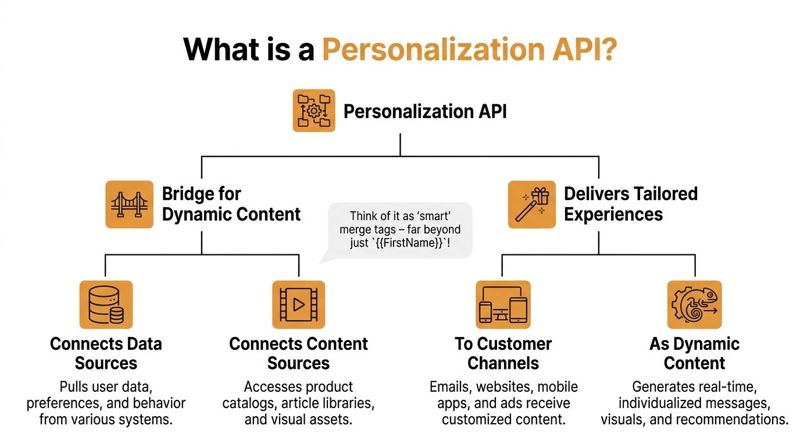
A simple mental model for a personalization API is merge tags for images.
Text merge tags replace {{FirstName}} inside a sentence. A personalization API applies the same idea to visual and modular content. It can place data into an image template, swap the right product block, assemble a recommendation module, or return a ready-to-use asset for a page or email. The point is not only to connect data. It is to turn that data into creative output without asking a team to design endless variations by hand.
The simple version
At a basic level, a personalization API connects four parts:
A data source
Customer details live somewhere. That might be a CRM, CDP, form tool, ecommerce platform, spreadsheet, or app database.A request
Another system sends the fields needed for the asset. For example: name, company, product category, event title, account manager, region, or language.A template or rule layer
This layer decides how the content should be built. It controls layout rules, content choices, fallbacks, and conditional logic.An output
The API returns something a channel can use immediately, such as an image URL, HTML snippet, JSON payload, or rendered content object.
That structure matters because it separates creative logic from manual production work.
A marketer-friendly example
Say you want every event attendee to receive a branded certificate.
Without an API, a team exports names, duplicates designs, fixes line breaks, checks spacing for long names, exports files, uploads them, and maps each file back to the right recipient. The data may exist already, but the creative work becomes the bottleneck.
With a personalization API, the system requests one certificate at a time. It inserts the attendee name into the template, applies a fallback if the name is missing, renders the final image, and returns a unique URL the email platform can drop into the message automatically.
The “merge tags for images” analogy is useful because it makes a technical concept tangible.
It also highlights the bigger shift. Personalization at scale is not only a data problem. It is a creative execution problem.
What developers and marketers each need to know
Developers usually ask practical questions first. Where does the data come from? What does the payload look like? How is the endpoint authenticated? What format comes back? How reliable is it under load?
Marketers usually start somewhere else. Can this work inside the tools we already use?
Often, yes. If the API returns a URL or embeddable output, it can fit into email platforms, landing pages, sales outreach tools, customer portals, and ad workflows. For a concrete example of that output model, this guide to a scalable image API for personalized visual delivery shows how the pieces fit together.
Where confusion usually starts
A personalization API does not decide your strategy for you.
It does not choose the audience, define the offer, or fix unclear messaging. It executes the rules you give it and turns them into usable content. That includes cases where customer data is incomplete. If a company name is missing, the API can use a generic version. If a product interest is known but the industry is not, it can still render the right visual for that signal. That is one reason APIs are so useful for real-world personalization. They help teams produce creative variations that are adaptable, not brittle.
Your team still needs to define:
- which inputs matter
- what rules should apply
- what fallback content to use
- which channels should receive which output
A good test is simple. If the rule cannot be explained in one sentence, it is probably too vague to automate well.
An API for personalization is a structured way to turn customer data and creative rules into dynamic content that channels can use immediately.
Key Architectural Patterns for Performance at Scale
Once teams understand what a personalization API does, the next question is practical. How do you deliver all this dynamic content without slowing down the website, delaying an email experience, or creating a fragile system?
The answer comes down to architecture.
One helpful analogy is food preparation.
Real-time personalization is like ordering a custom pizza when the customer arrives. Fresh, specific, and responsive to the moment. Batch personalization is like meal prep for the week. Efficient, predictable, and ready to serve fast.
Both can work. The right choice depends on the use case.
Why architecture matters
Scalable personalization APIs use a decoupled architecture that separates the decision layer from the serving layer. That design can achieve sub-50ms latency by serving pre-computed content from edge caches instead of running heavy logic on every request. When teams rely on real-time inference for every request, latency can spike above 200ms, which can hurt user experience and increase bounce, as described in this breakdown of AI content personalization architecture.
That sounds technical, so put it into plain language:
- The decision layer decides what someone should get
- The serving layer delivers it quickly
- A cache or CDN keeps popular or prebuilt assets close to the user
If you blend all of that into one slow step, performance suffers.
Real-time processing
Real-time generation works best when the content depends on fresh inputs. Examples include:
- weather-aware offers
- current inventory messages
- in-session recommendations
- customer portal visuals that reflect recent activity
The upside is relevance. The downside is complexity. You need fast data access, strong fallback logic, and careful performance controls.
Batch processing
Batch generation works best when the data is stable before delivery. Examples include:
- event certificates
- renewal notices prepared in advance
- direct mail proofs
- campaign images for a scheduled email send
The upside is speed and predictability at send time. The downside is that the content may not reflect changes that happen after generation.
Real-Time vs. Batch Personalization
| Aspect | Real-Time Processing | Batch Processing |
|---|---|---|
| Data freshness | Uses current or near-current inputs | Uses data available at generation time |
| Speed at delivery | Depends on architecture, caching, and request load | Usually very fast because assets are prepared ahead of time |
| Complexity | Higher. More moving parts and more failure scenarios | Lower. Easier to test before launch |
| Best use cases | Live recommendations, contextual web content, current account data | Scheduled campaigns, certificates, fixed recipient lists |
| Operational risk | More sensitive to outages or slow downstream systems | More sensitive to stale data if plans change |
| Cost profile | Can be higher if every request triggers live decisions | Often more efficient for large planned sends |
Supporting pieces marketers should know
Template merging
Template merging is where the creative layout stays fixed while the data fields change. A banner might keep the same background and brand elements while the product image, price, city, or sales rep name changes.
This is the bridge between creative control and scalable output.
Caching
Caching stores generated or precomputed results so the system does not rebuild the same asset every time. If many people request similar content, caching reduces work and speeds delivery.
CDN delivery
A content delivery network stores assets in multiple locations so users receive content from a nearby edge server. That matters when your campaign reaches recipients across regions or when a website serves many personalized visuals at once.
Tip: If the content does not need to change second by second, precompute more of it. Teams frequently overuse real-time generation for assets that could be prepared in batch and served more reliably.
Choosing the right pattern
Marketers do not need to design the full infrastructure, but they do need to choose the right operating model.
Use real-time when:
- the message depends on fresh context
- timing affects relevance
- the visitor is actively interacting with the experience
Use batch when:
- the audience list is known in advance
- the visual can be approved before launch
- reliability matters more than moment-to-moment updates
Developers responsible for implementation will also want to plan retries, fallbacks, and cache behavior early. This guide to API integration best practices is a practical reference when a campaign starts moving from idea to production.
Integrating Personalized Visuals into Your Channels
At this point, the concept becomes useful. If your API returns a unique image URL or another embeddable asset, you can place that output directly into the channels you already manage.
For many teams, email and web are the easiest starting points.

Modern lightweight APIs can support up to 1000 concurrent campaigns on a single page through asynchronous server calls and achieve 3X faster load times, helping prevent render-blocking experiences, according to Insider’s writeup on lightweight JavaScript APIs for personalization.
In email platforms
Email is a natural fit because marketers already understand merge tags.
Instead of only using merge tags inside text, you use them inside an image URL. The ESP resolves the recipient data, and the image service returns a personalized asset for that recipient.
A simplified example looks like this:
<img src="https://image-service.example/render?name={{ first_name }}&company={{ company }}" alt="Personalized banner">
In practice, the field syntax changes by platform.
Example pattern for ESPs
- Klaviyo-style fields: the URL can include profile variables inserted at send time
- Mailchimp-style fields: the same idea works with audience merge fields
- Instantly-style fields: recipient fields can be passed into the dynamic image URL
The important point is not the exact tag syntax. It is that the ESP already knows the recipient data, and the image URL uses that data to request the right asset.
On websites and landing pages
Web integration is even simpler in many cases. If the system can generate a personalized image URL, you can place it in a standard HTML tag:
<img src="https://image-service.example/render?user_id=abc123" alt="Personalized offer">
That image can sit inside:
- a landing page hero
- a logged-in dashboard
- a customer portal
- a partner resource center
- a post-purchase confirmation page
The browser requests the image like any other asset. The difference is that the image content is personalized.
What makes this manageable for marketers
Teams frequently assume this requires a custom app build. It does not.
The workflow is closer to this:
Create a visual template Design the base asset once.
Map data fields Connect placeholders like first name, company, event name, city, product, or date.
Generate a dynamic URL pattern The API accepts those values as parameters.
Insert the URL into your channel Use the image block in your email builder or the
<img>tag on your page.Test fallback behavior Confirm what appears when a value is missing or malformed.
A common use case for agencies
Agencies managing multiple clients frequently need personalized creative without rebuilding campaigns every week.
A real estate team, for example, might personalize property visuals, agent branding, and local context for each prospect. If you are exploring adjacent creative workflows, this overview of AI real estate videos is a useful example of how automation is expanding beyond text into richer media formats.
Real-world channel fit
Email newsletters
A newsletter can include a personalized hero image, account summary graphic, or event ticket.
Sales outreach
A rep can send a custom visual with the prospect’s company name, industry framing, or customized proposal cover.
Event communications
Registration confirmations, badges, and completion certificates are strong candidates because the content structure is consistent while the attendee data changes.
Key takeaway: If a platform can display an image from a URL, it can usually display a personalized image from an API.
For teams focused specifically on live image rendering workflows, this overview of a real-time image API shows how the pattern fits into email and web delivery.
Managing Security Privacy and Performance
Personalization only works long term if people trust it.
That trust rests on three pillars: fast delivery, controlled access, and respectful data handling. If one fails, the whole system becomes fragile.

According to Emarsys personalization statistics, 69% of customers appreciate personalization, but only 37% trust companies with their personal information. The same source notes that 98% of marketers using AI for personalization face at least one hurdle, including siloed data and poor data quality.
Performance is part of trust
A slow personalized experience does not feel smart. It feels broken.
Teams handling heavy request volume need a few operational controls:
- Rate limiting: prevents sudden spikes from overwhelming the API
- Request batching: groups work when many assets can be generated together
- Parallel processing: speeds up high-volume jobs without serial bottlenecks
- Queues: smooth demand when spikes are unavoidable
This matters most during launches, big traffic windows, or send times when many recipients open messages at once.
Practical rule
If your campaign depends on live generation, treat traffic surges as normal, not exceptional. Build for them before launch.
Security protects the system
Marketers do not need to implement authentication flows themselves, but they should know the operational basics.
API keys need governance
Keys should be stored in secure systems, rotated when needed, and limited to the environments that require them. A shared key passed around in chat or stored in a spreadsheet creates obvious risk.
Access should be scoped
Not every application or teammate needs full permissions. Separate read access, generation access, template editing, and admin controls where possible.
Logs matter
You need enough logging to diagnose failures, misuse, or malformed requests. You also need to avoid dumping sensitive fields into logs unnecessarily.
Privacy shapes the personalization model
Many teams overreach in this area.
Good personalization does not always require a deep customer profile. In many cases, contextual signals and declared inputs are enough. For example:
- location selected by the user
- event name from the registration form
- language choice
- campaign source
- device context
- current page or product category
That matters because some audiences will not share much data, and some regions impose stricter consent requirements.
Fallbacks are not a nice-to-have
Sparse or missing data is normal. Teams should plan for it early.
If a first name is unavailable, show a neutral greeting. If a profile photo is missing, use a branded placeholder. If a recommendation cannot be resolved, show a general offer rather than a broken space.
Tip: A polished default is part of the personalization strategy. The absence of data should still produce a coherent experience.
Data quality is the hidden blocker
Many failed personalization programs are not caused by bad ideas. They are caused by mismatched field names, outdated records, inconsistent values, and disconnected systems.
A practical review before launch should cover:
- whether the required fields exist
- whether formats are consistent
- whether consent rules are documented
- whether default values are defined
- whether expired or null records have been tested
When performance, security, and privacy work together, personalization feels seamless. When they are handled separately, teams notice the gaps too late.
How OKZest Solves Real-World Personalization Challenges
Few teams struggle with the idea of personalization. They struggle with making the creative.
They know which audience should get which message. They know what data fields they have. They frequently even know which channel to use. The core bottleneck is producing the visuals without turning every campaign into a design and operations project.
That gap is widely overlooked. As noted in Hightouch’s discussion of personalization APIs, most guides focus on data and segmentation, not the practical challenge of creating large volumes of creative variants.
The creative bottleneck in plain terms
A marketer wants to send a campaign with:
- a personalized banner
- the recipient’s company name
- the correct product image
- the right CTA by use case
- a fallback if some fields are missing
Without a visual automation layer, that frequently means manually creating versions or simplifying the campaign until the personalization disappears.
That is where a no-code image workflow becomes useful.
One practical option
OKZest is one option built for this exact problem. It helps teams generate personalized images through a no-code editor and API-based workflows, so marketers can create templates once and populate them with dynamic values later.
That matters because the creative can stay controlled while the content changes at scale.
Before and after for common teams
Email marketers
Before: A marketer builds one email for everyone because producing visual variants is too slow. They may personalize the greeting, but the hero graphic stays generic.
After: The campaign uses one visual template with dynamic text, images, or fields. Each recipient gets a personalized image URL inserted into the email at send time.
Event organizers
Before: Staff export attendee names and manually build certificates, badges, or thank-you graphics after the event.
After: A template pulls in attendee data automatically. If a field is missing, the system uses a default value so every recipient still gets a clean asset.
Sales teams
Before: A rep asks design for a custom one-pager or cover image every time they target a named account.
After: The rep or ops team uses a repeatable template that inserts account name, industry framing, rep details, and offer context into the asset.
Why fallback rules matter
Incomplete data is not an edge case. It is normal.
A good personalization workflow should decide what to do when values are missing. That could mean:
- replacing a blank first name with “Valued Customer”
- swapping a personalized line for a neutral one
- changing the layout if a photo is unavailable
- pulling a default background if a category-specific one is missing
This is useful for nonprofits, event teams, and growing B2B databases where records are frequently incomplete.
Key takeaway: The best personalization systems do not only personalize when data is perfect. They degrade gracefully when data is incomplete.
Why this helps both marketers and developers
For marketers, a no-code template removes repetitive design work. They can manage the visual logic without asking for a new asset every time a field changes.
For developers, the value is operational. They can pass structured data into a predictable system rather than hardcoding asset versions or manually storing endless image files.
Strong use cases for visual personalization
Some of the clearest fits include:
- Certificates and awards: same design, different recipient details
- Newsletter hero images: same brand frame, different message or segment context
- Sales proposals: same structure, different account-specific details
- Social DMs and outreach assets: same campaign concept, different names, offers, or local references
- Website graphics: same placement, different user context or campaign source
The important part is not the template editor alone. It is the combination of reusable creative, dynamic inputs, and default handling. That is what turns personalization from a strategy slide into a repeatable operating model.
Start Scaling Your Personalization Today
The move from basic merge tags to true personalization is not primarily a data story. It is a creative delivery story.
You need a way to take customer context and turn it into assets people see. That could be a certificate, a sales visual, a personalized offer banner, or a dynamic image in an email. An API for personalization at scale is the mechanism that makes that possible.
What matters most
Three ideas tend to separate workable programs from stalled ones:
Start with one repeatable use case
Certificates, personalized email visuals, and account-based hero images are good starting points because the template stays stable while the data changes.
Match the architecture to the job
Some assets should be generated in real time. Others should be prepared in batch and served fast.
Design for imperfect data
Fallback text, default imagery, and neutral variants are part of the system. They are not cleanup tasks for later.
The bigger shift
The old model of personalization changed copy. The newer model changes the experience.
That shift matters because audiences notice visuals faster than body text. When the image, offer, or recommendation reflects the person receiving it, the message feels more intentional and more relevant.
You do not need to build a giant personalization program to begin. You need one workflow where data, creative, and delivery connect cleanly.
Pick one campaign. Pick one template. Define the inputs. Decide the fallback rules. Then launch something your audience can recognize as personal.
If you want to put this into practice, explore OKZest to see how no-code templates and API-based image generation can help you create personalized visuals for email, websites, certificates, and other campaigns without manually producing endless asset variations.