At its core, a photo API is the technology that lets your apps automatically create, tweak, and send out personalized images on the fly. It's what powers those unique visuals for every single user, helping you move past the generic, one-size-fits-all content that everyone tunes out.
Why Static Images No Longer Cut It
Let’s be real for a second. The generic stock photos you’re using in your marketing? They’re not turning heads. We live in a world where people expect experiences made just for them, and a static image with a bland message just gets ignored. The way to win engagement today is by making each person feel like you see them.
Visuals made for one person create a powerful connection that a static image just can't replicate. When a new subscriber gets a welcome email and sees their name beautifully woven into an image, it instantly grabs their attention. This isn't just a party trick; it's a completely different way of thinking about communication.
The Power of Visual Personalization
The biggest problem with static content is that it can't adapt. Every user sees the exact same thing, no matter who they are, what they've done, or how they feel about your brand. The result is a generic experience that just doesn't hit home.
This is where dynamic, personalized images come in. They turn raw data into a visual asset. Think about what this opens up for your marketing:
- Make it Instantly Relevant: An image with a user's name, their company's logo, or a picture of something they just bought makes the message impossible to ignore.
- Boost Engagement: Personalization is a proven scroll-stopper. Time and time again, studies show that personalized content gets way higher click-through and conversion rates.
- Build a Real Connection: When you speak directly to your audience with visuals, it feels less like a brand talking to a crowd and more like a one-on-one conversation.
The whole point is to shift from one-size-fits-all to one-on-one, but at scale. A photo API is what makes this happen, automating the creation of thousands of unique visuals without you lifting a finger.
Real-World Applications
This isn't some far-off theory. Developers are already using photo APIs to power all kinds of automated visuals that get real results. Imagine automatically generating event tickets with an attendee's name and QR code, or creating custom welcome messages in a chatbot that pull in the user's profile picture.
The use cases are endless—from dynamic sales leaderboards on a website to customized certificates for people who finish an online course. It’s all about turning every visual touchpoint into a chance for a personal connection, making your brand that much more memorable.
How to Choose the Right API for Photos
Picking the right photo API is a make-or-break decision for your project. It's not just about finding something that can generate an image; it's about finding a partner that makes integration a breeze and scales with your vision. Get this right, and you unlock a new level of personalization. Get it wrong, and you're stuck with maintenance headaches and limited potential.
The difference in outcomes is night and day. Generic stock photos just don't cut it anymore, and audiences can spot them a mile away.
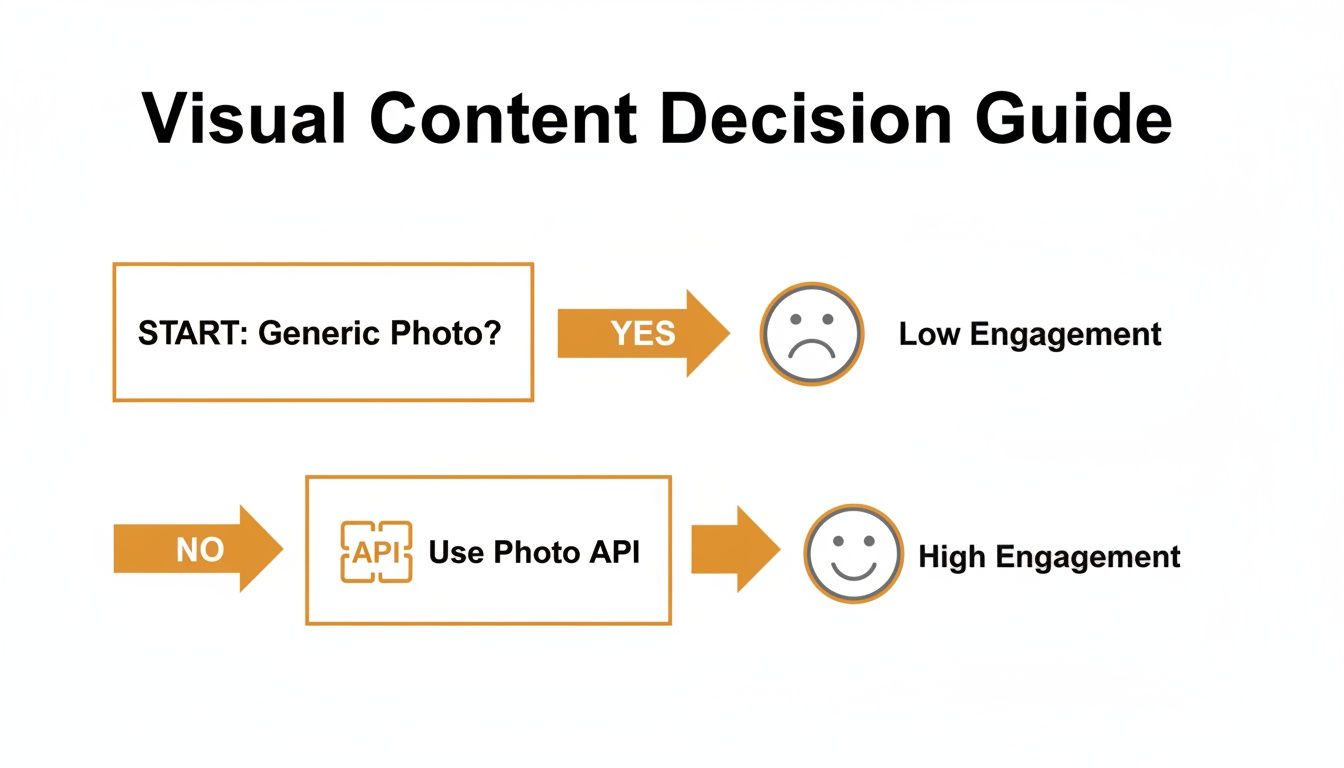
This flowchart really nails a core truth of modern marketing: generic visuals kill engagement. A solid photo API, on the other hand, is your ticket to creating high-impact, personalized experiences that actually resonate with people.
Start with the Developer Experience
The first thing I always look at is the developer experience. If the documentation is a mess, I'm out. It's a huge red flag. You want to see clear, comprehensive guides, code examples that reflect real-world use, and SDKs for the languages your team actually uses.
But a truly great API goes a step further. It should also have an intuitive visual editor or a no-code tool, just like the one we've built at OKZest. This is a game-changer because it lets marketers and designers create and tweak image templates on their own, without ever needing to write a line of code. That frees up your developers to focus on bigger things.
Key Features You Can't Live Without
Okay, let's get into the nuts and bolts. The API you choose has to handle real-world complexity without falling over.
Here are the absolute must-haves:
- Dynamic Data Merging: The API has to seamlessly pull in data from your various sources and merge it into your image templates. This is the entire point of personalization, after all.
- Smart Fallback Options: What happens when data is missing? A top-tier API lets you define defaults. Instead of a blank space where a name should be, it can display "Hello there!" This saves you from embarrassing and broken-looking images.
- Rock-Solid Performance: Your service needs to handle anything you throw at it, whether it's a few hundred images for a small campaign or millions a month for a huge user base. Look for providers that use a global CDN to ensure images load lightning-fast for everyone, everywhere.
- Martech Compatibility: It absolutely must play nice with your current stack. Check for easy integrations with major Email Service Providers (ESPs) like Klaviyo, Instantly, and Mailchimp.
The global API market is exploding, set to hit $269.9 billion by 2025. This isn't just a tech trend; it's a direct response to the massive demand for tools that can automate personalization at scale. You can read more about the booming API market on daffodilsw.com.
To make it even easier, here's a quick checklist you can use when comparing different providers. It helps you see at a glance how they stack up on the features that truly matter for your business and technical needs.
API for Photos Feature Comparison Checklist
| Feature | OKZest | Other Providers (Generic) |
|---|---|---|
| No-Code Visual Editor | ✅ | Often requires coding |
| Dynamic Data Merging | ✅ | Basic functionality |
| Robust Fallback Options | ✅ | Limited or none |
| Global CDN for Performance | ✅ | Varies |
| Direct ESP Compatibility | ✅ | Manual integration needed |
| Transparent, Scalable Pricing | ✅ | Often complex/enterprise-only |
| Responsive Human Support | ✅ | Slow email/ticket support |
| Free Tier for Testing | ✅ | Limited or time-based trial |
This checklist isn't just about ticking boxes. It's about finding a solution that fits your workflow and supports your growth, rather than creating new problems for you to solve.
Don't Overlook Support and Pricing
Finally, think about the people behind the product and the business model. When you're stuck, can you get a quick answer on chat or hop on a call? Good, responsive support can turn a major roadblock into a minor hiccup.
Pricing should be just as clear and flexible. I'm always wary of opaque pricing models. Look for a provider with tiered plans that make sense, including a free tier for development and testing. This lets you prove the concept and grow into the solution without being forced into a huge, expensive plan before you're even generating revenue from it.
Integrating Dynamic Images into Email Campaigns
Okay, let's get practical. This is where we move from theory to action and see the real magic happen. Integrating an api for photos into your email campaigns is what turns a static, one-size-fits-all message into a dynamic, one-to-one conversation. And don't worry, it isn't nearly as complex as it might sound. At its core, it's just about connecting a visual template to your user data.
Let's walk through a classic, high-impact scenario: sending a personalized welcome image to a new subscriber. Instead of a generic "Welcome!" graphic that everyone gets, we'll create an image that says "Welcome, Alex!" using the subscriber's actual first name. This small touch makes a massive difference in how your brand comes across from that very first interaction.
Crafting the Base Image Template
First things first, you need to design your visual foundation. This part isn't about code; it's all about creative direction. Using a visual editor, you'll design the static parts of your image—the background, your logo, and the general layout. Then, you'll define specific layers that will be filled in with dynamic data.
For our welcome image, the process would look something like this:
- Design the background: Pick out colors and graphics that fit your brand's vibe.
- Place your logo: Add your company logo where it makes the most impact.
- Create a dynamic text layer: This is the key. You'll add a text box where the user's name will go and link this layer to a data field, like
first_name.
This template essentially becomes your blueprint. The API will then use it to generate a unique image for every single person on your list by swapping out that placeholder data.
The core idea is simple: design it once, and let the API automate the personalization for thousands or even millions of recipients. This approach keeps your branding consistent while delivering a uniquely personal touch at scale.
Here’s a look at how straightforward it is to set up a dynamic text layer in a visual editor, linking it to the first_name parameter.

As you can see, you're essentially just telling the system, "This specific part of the image needs to change based on the data I provide." It’s that simple.
Constructing the Dynamic Image URL
Once your template is ready, the API gives you a unique URL for it. This URL is the engine for all the personalization. To generate a custom image, you just append parameters to this base URL that match the dynamic layers you created.
Sticking with our example, the URL structure would look something like this:
https://api.yourprovider.com/image/TEMPLATE_ID?first_name={{subscriber.first_name}}
That {{subscriber.first_name}} bit is a merge tag. It's a placeholder that your Email Service Provider (ESP)—whether it's Klaviyo, Instantly, or Mailchimp—will automatically replace with the subscriber's actual data when the email goes out.
So, for a subscriber named Alex, the ESP fills in the merge tag, and the final URL requested becomes:
https://api.yourprovider.com/image/TEMPLATE_ID?first_name=Alex
When Alex opens the email, his email client requests this specific URL. The photo API instantly generates the "Welcome, Alex!" image on the fly and delivers it. It's a completely seamless and personalized experience. If you want to go deeper into the mechanics, exploring a dynamic image API for email marketing can give you more specific strategies.
Embedding in Your Email Service Provider
The final piece of the puzzle is getting this dynamic URL into your email template. This is done using a standard HTML <img> tag, exactly like you would for any other static image.
You would simply insert this into your email's HTML code:
<img src="https://api.yourprovider.com/image/TEMPLATE_ID?first_name={{subscriber.first_name}}" alt="Welcome!">
And that's it. Your ESP handles all the heavy lifting from there. It pulls the first name for each subscriber, plugs it into the URL, and makes sure every single person receives their own unique welcome image. This one simple line of code is the bridge between your user data and a seriously engaging visual experience.
If you’re only using dynamic images in your emails, you’re leaving a ton of potential on the table. A good api for photos shouldn't be a one-trick pony; it should be the engine that drives personalization across your entire digital presence.
The same magic that makes an email feel like it was crafted just for one person works wonders on your website or in a social media DM. When a customer sees that same level of tailored detail everywhere they interact with your brand, it builds a much stronger, more cohesive connection.
The best part? Extending this strategy beyond the inbox is surprisingly easy.

Bringing Dynamic Images to Your Website
You can pop a personalized image onto any webpage with a simple HTML snippet, opening up a whole new world of engagement possibilities.
Just think about these use cases:
- Personalized Welcome Banners: Greet logged-in users with a banner that says "Welcome back, [Name]!" or even features their company logo. It's a small touch that makes a big difference.
- Real-Time Data Visualization: Think dynamic sales leaderboards that update on the fly, or custom progress charts for users taking an online course.
- Dynamic Product Previews: Show a customer what a product would look like with their own name on it. This helps them visualize ownership and can seriously boost conversion.
Getting this set up is almost identical to the email method. You just drop an <img> tag into your site’s HTML and use a bit of server-side logic or JavaScript to plug the right parameters into the image URL.
Powering Visuals on Social and Messaging Platforms
Your website isn't the final frontier. Modern photo APIs are perfect for making your social media and messaging app interactions more vibrant, especially since these platforms are so visual. A great example of this in action is services that let users create personalized cards incorporating photos and videos—it shows just how powerful dynamic content can be.
You can set up your system to programmatically generate and send unique images based on user actions, creating truly interactive experiences.
The huge advantage here is the blend of speed and automation. Instead of a social media manager spending hours creating custom replies by hand, the API can generate thousands of unique, on-brand images in seconds.
This approach is incredibly effective for:
- Automated Chatbot Responses: A chatbot could send a personalized welcome image or a visual summary of a user's recent order.
- Direct Messaging at Scale: Imagine sending personalized thank-you images to new followers on platforms like X or Instagram, completely automatically.
- WhatsApp and Messenger: Confirm event registrations or send promotional offers with a graphic that includes the recipient's name and other key details.
This is all powered by the massive growth in AI image generation. The AI Image Generator Market is on track to grow by $2.39 billion between 2025-2029. With millions of AI images being created every day and 71% of Americans already believing they’re common on social media, using an API to create unique visuals for DMs is a no-brainer for marketers.
Ensuring Performance and Deliverability at Scale

A slick API integration is about more than just generating a pretty picture—it's about delivering it perfectly, millions of times over. When you’re pushing a high-volume campaign, every millisecond counts. A slow-loading or broken image isn't just a technical glitch; it's a missed opportunity to connect with your customer.
This is where I see a lot of teams stumble: they forget about caching. Your api for photos absolutely must cache generated images on a global Content Delivery Network (CDN). The first time an image is requested, it gets created and stored on servers worldwide. Every subsequent request for that same image is then served instantly from the closest location.
This isn't a "nice-to-have." It's critical, especially when you consider the photography services market is projected to hit $47.46 billion by 2030. Much of that growth is fueled by digital platforms that need scalable, API-driven visuals. Without a CDN, your image generation can quickly become a bottleneck that grinds your whole campaign to a halt.
Optimizing Your API Calls and Fallbacks
Once caching is sorted, you need to look at how you're making your API calls. Clean, efficient code is key. Try to batch requests where it makes sense and avoid sending redundant calls that clog up the works. Getting this right is a huge part of optimizing images for web for speed and SEO, which helps with both load times and visibility.
But what about when things go wrong? What if your data is incomplete? A broken image icon looks unprofessional and erodes trust. This is where smart fallbacks save the day.
- Define Default Text: If a
first_namefield is empty, your API shouldn't just leave a blank space. It should automatically insert a default like "Valued Customer." - Use Placeholder Images: Got a missing profile picture? Configure a default, brand-approved graphic to display instead. No more ugly broken image links.
These small details ensure every image that goes out is complete and professional, regardless of how clean your data is.
A well-architected integration anticipates failure. Building robust fallbacks isn’t just good practice; it's essential for maintaining a high-quality user experience at scale, protecting your brand reputation with every image delivered.
By focusing on these strategies, you can sidestep the common issues that plague large-scale deployments. For a deeper look into the technical side of things, check out our complete guide on API integration best practices. It'll help you make sure your dynamic images are not just personalized, but also fast, reliable, and professional every time.
Whenever you're looking at a new API, a few questions always pop up. It’s totally normal to wonder about the learning curve, what happens when things go wrong, and how it’ll affect performance. Let's walk through the common concerns developers have when they first look at using an api for photos.
How Hard Is It to Get Started?
Honestly, it’s easier than you probably think. Gone are the days of clunky, complex integrations. Modern photo APIs are built for developers first, which means you get clear documentation, SDKs for the languages you already use, and usually a slick visual editor to build your templates.
You can genuinely go from signing up to having your first personalized image ready in just a few minutes.
The process usually looks something like this:
- You design the base image visually in a no-code editor.
- You mark which elements, like a name or a profile picture, need to be dynamic.
- Then, you just hit the API endpoint with your data to merge it all together.
This approach strips out a ton of the complexity, making even sophisticated personalization feel surprisingly simple.
What Happens If Personalization Data Is Missing?
This is a big one. A missing first_name can turn a beautiful, personalized graphic into a broken-looking mess. Any solid API for photos needs to have your back here with built-in fallbacks.
You should be able to set rules right in your template or API call. For instance, if the first_name field is empty, the image can automatically show a generic greeting like "Hello there!" instead of leaving an awkward blank spot.
This is a non-negotiable feature. It protects the user experience and ensures every single image you generate looks professional, no matter how clean your data is.
It’s the kind of safety net that keeps your brand looking polished, every single time.
Can I Use My Own Branding and Fonts?
Absolutely. Full creative control is essential. A professional-grade photo API will let you upload your own fonts, logos, and color palettes.
This ensures every image feels like a natural extension of your brand, not something tacked on. Maintaining that consistency is key, and it’s a standard feature you should expect.
How Do Dynamic Images Affect Performance?
Performance and email deliverability are always valid concerns, especially when you're working at scale. The best providers have this figured out. Images are typically generated and then cached on a global Content Delivery Network (CDN), which means they load incredibly fast for users no matter where they are.
As for emails, the dynamic URL is just placed inside a standard <img> tag. Email clients see it and treat it just like any other static image, so it has no negative impact on deliverability. If you want to dive deeper into the nuts and bolts, we have a whole guide on how to get images from an API.
Ready to see how easy it is to automate personalized images? With OKZest, you can create dynamic visuals for emails, websites, and social media in minutes. Start for free at OKZest.com