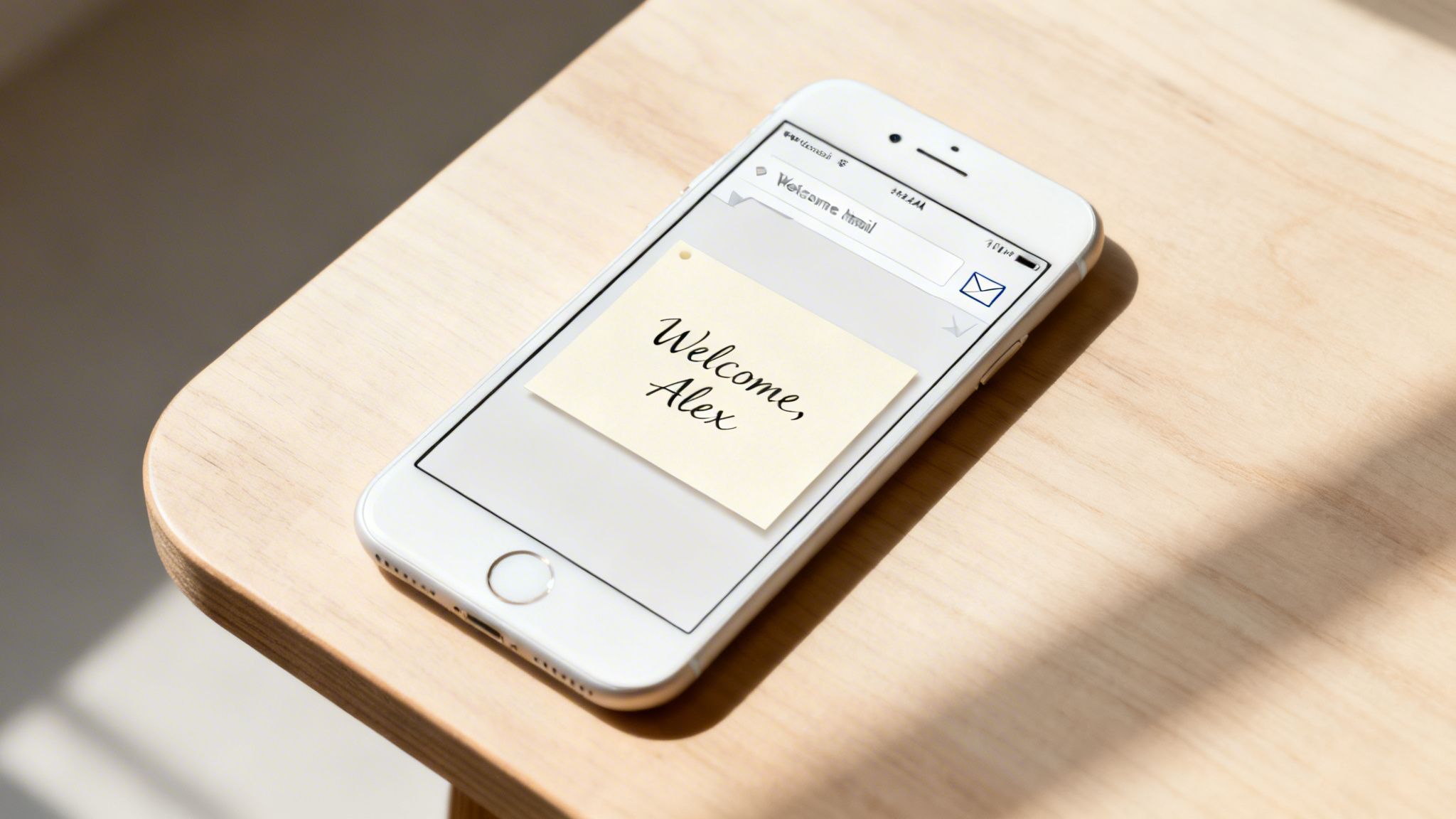
Imagine getting an email with a welcome banner that has your name beautifully styled right into the image. That’s the magic of automated email images. It’s a strategy that shifts your campaigns from generic broadcasts to personal, one-to-one conversations by creating unique visuals for every single person on your list.
The Power of Personalized Visuals in Email
Think about the average marketing email in your inbox. Most of them feel like a public billboard—it’s meant for everyone, which means it’s not really for anyone in particular. An email with an automated email image, on the other hand, feels more like a handwritten note meant just for you. It’s a simple way to cut through the noise and make your customer feel seen.
Years ago, merge tags like *|FNAME|* changed the game for text personalization. Automated visuals are the next logical step for any modern marketer. We’re moving beyond just putting a name in a sentence; we're now baking that personal data right into the graphics of the email itself.
Why Visual Personalization Matters Now
The move toward dynamic, personalized content isn't just a trend; it's an acceleration. The industry is waking up to the fact that one-size-fits-all imagery just doesn't connect anymore. In fact, we saw a massive 340% increase in the use of AI-powered image generation from 2024 to 2025 alone, which shows just how fast marketers are changing their approach to visual content.
This boom really drives home one key truth: if you can create personalized images at scale, you have a serious competitive edge. To put it in perspective, let’s quickly compare the old way of doing things with the new.
Static vs Automated Email Images At a Glance
The difference between a static image and an automated one might seem small, but the impact on your campaign's performance is anything but. Here’s a simple breakdown of how the two approaches stack up.
| Feature | Static Email Images | Automated Email Images |
|---|---|---|
| Personalization | One image for all recipients. | Unique image for each recipient. |
| Engagement | Lower, feels generic. | Higher, feels personal and relevant. |
| Scalability | Manual and time-consuming. | Fully automated and instant. |
| Impact | Easily ignored or forgotten. | Memorable and attention-grabbing. |
As you can see, the ability to automate opens up a level of personalization that was once impossible. It’s a complete shift in how you can communicate visually with your audience.
By automating visuals, you create a one-to-one connection that resonates on a deeper level. It’s about making every customer feel like they are your only customer.
This isn't just about making things look pretty. It's about building real relationships and getting measurable results. When your audience feels like you're speaking directly to them, you build loyalty and inspire them to take action. This simple change can turn a standard email into one of your most powerful tools for conversion.
If you're looking to dive deeper into how visuals can make or break your campaigns, check out our ultimate guide to using images in email. It’s a must-read for any marketer planning to stand out in 2026 and beyond.
How Automated Image Personalization Works
Ever wondered how those slick, personalized images in your inbox are made? If you’re picturing a team of designers working around the clock, think again. The whole process is actually pretty straightforward.
You don't need to be a developer to get the hang of it. At its heart, the system works just like a mail merge—something you’ve probably already used for personalizing text—but for pictures instead.
It all starts with an image template. This is your base design, the foundation that holds all the static parts of your graphic. Think of it as a pre-designed canvas with your logo, brand colors, and background imagery already in place, just waiting for the final, personalized touches.
This template is where the real magic happens. You simply define specific areas within the image that should change for each person. These spots are then linked to dynamic data from your contact list or CRM, like a first name, company name, loyalty points balance, or even a product they just looked at.
The Role of the Dynamic Image URL
Once you’ve set up your template, the system generates a special URL. This isn’t a link to a static JPG or PNG file that sits on a server somewhere. Instead, it’s a dynamic URL packed with placeholders that work exactly like the merge tags you already use in your email copy (like {{first_name}} or *|FNAME|*).
Here’s a quick breakdown of how it all comes together:
- URL Generation: An image platform like OKZest gives you a unique URL for your template.
- Merge Tag Integration: You copy this URL into your email campaign’s image block and pop in your ESP's merge tags. For instance, a parameter in the URL might look like
...&name={{first_name}}. - Real-Time Creation: When someone opens your email, their email client requests the image from that URL. In that instant, the system grabs their data (e.g., "Sarah"), slots it into the template, generates the final, personalized image, and displays it.
This entire sequence happens in a fraction of a second. The image is never pre-made; it’s created on-the-fly, specifically for the person viewing it. For those who want to dig into the technical side, a dedicated personalized image API gives you even more control for advanced setups.
Ensuring a Flawless Experience with Fallback Rules
But what happens if your data isn’t perfect? What if you don't have a first name for every single contact on your list? This is where fallback rules come in to save the day. A good automated image system will never leave an ugly blank space or a broken-looking graphic.
Fallback rules are your safety net. They ensure that every single recipient receives a polished, professional-looking image, even when your data isn't perfect.
Instead, you can set up default content to appear whenever a piece of data is missing.
- No First Name? The image can automatically show "Valued Customer" instead.
- Missing Company Logo? It can display a generic icon or just hide that element completely.
- Points Balance Unavailable? It could show a general message like "Check Your Rewards."
This intelligent logic is crucial for maintaining a high-quality experience and protecting your brand. It lets you launch campaigns with confidence, knowing every single automated email image will look exactly how you planned.
Boosting Engagement and Revenue with Visual Personalization
So, why should you bother personalizing images in your emails? It’s a fair question. The short answer is that it draws a straight, measurable line from your visual content to your most important business goals—engagement, conversions, and revenue.
It all comes down to basic human connection. When someone opens an email and sees a graphic made just for them, they feel seen. Whether it's their name on a welcome banner or a unique discount code overlaid on an image, that small touch of recognition makes them feel like more than just another subscriber on a list. It turns a passive glance into active interest.
From First Impressions to Lasting Loyalty
Think about the customer journey from start to finish. Your welcome email is the first real handshake. A generic “Welcome!” is fine, but an email with a personalized, visually striking image makes that moment memorable. It sets a positive, personal tone right from the start.
This isn’t just for welcomes, either. You can weave this into every stage:
- Onboarding: Guide new users with images that call out their specific account details.
- Engagement: Celebrate milestones like anniversaries or rewards thresholds with custom visuals.
- Re-engagement: Win back inactive users with a personalized offer they can see, not just read about.
By folding this strategy into your automated email flows, you’re essentially supercharging campaigns that are already running. That abandoned cart series that works pretty well? It becomes a powerhouse when the visuals are tailored to each specific shopper.
This simple flow chart shows how it works. You start with a template, feed it customer data, and out come powerful, personalized emails.
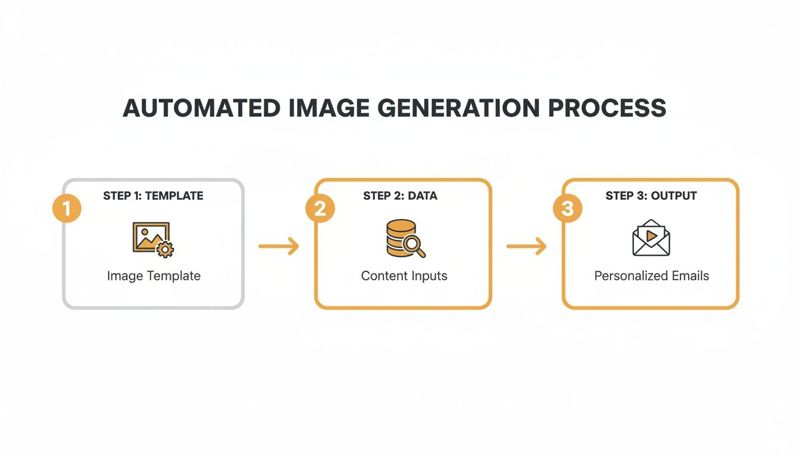
It’s a clean, repeatable process that turns your marketing data into a compelling visual asset for every single email you send.
Turning Automation into Tangible ROI
The numbers behind email automation are frankly staggering. While automated emails might only make up about 2% of your total sends, they can be responsible for an incredible 37% of all email-driven sales. If you want to dive deeper, you can find more of these powerful email marketing statistics on Originality.ai.
Adding personalized visuals to an already effective automation strategy is like adding a turbocharger to an engine. It takes a high-performing system and makes it generate even more impressive results.
Let’s look at some real-world examples. Welcome emails often see open rates north of 60%. Imagine boosting the click-through rate on those opens just by making the hero image more personally relevant.
Or consider abandoned carts. We know sending three abandoned cart emails can lead to 69% more orders than sending just one. Now, picture each of those emails containing a unique image showing the exact items the person left behind. The sense of urgency and personal appeal goes through the roof.
When you make your emails visually personal, you stop just sending messages and start creating experiences. That better experience leads directly to higher click-throughs, stronger brand loyalty, and a real, measurable bump in revenue. It proves that automated visual content is one of the smartest moves a modern marketer can make.
All the theory is great, but what does this actually look like in a real email campaign? It’s one thing to talk about dynamic visuals, but seeing automated email images in action is where the lightbulb really goes on.
Let's move past the abstract and look at how smart businesses are already using this strategy. These aren't just ideas; they are proven, practical ways to turn customer data into visual moments that get results.
E-commerce Abandoned Cart Recovery
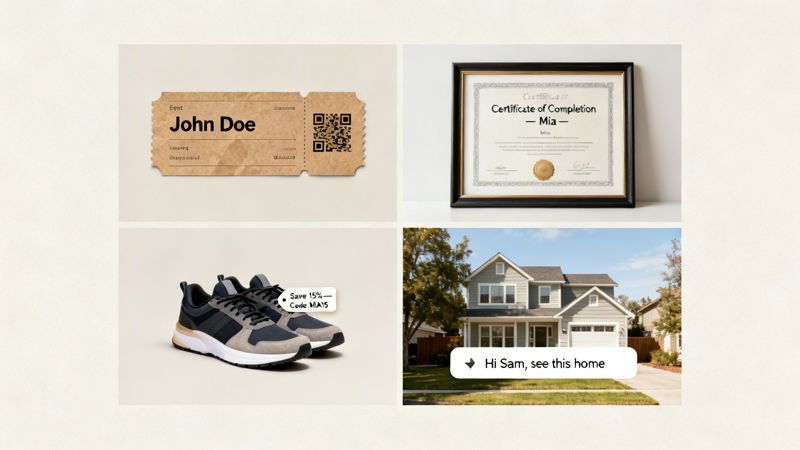
Picture this: a shopper named "Maria" finds the perfect pair of running shoes, adds them to her cart, but then gets distracted and leaves your site. An hour later, an email hits her inbox. It doesn't just contain a generic reminder—it features an image of the exact shoes she wanted, with a unique discount code like "MARIA15" overlaid right on the graphic.
This is powerful for two reasons. It instantly reminds her of the product she was excited about, and the personalized code makes the offer feel exclusive. It’s a special, urgent nudge that dramatically increases the chances of winning back that sale.
Event Ticketing and Confirmations
Event organizers can finally ditch those boring, text-heavy confirmation emails. Imagine automatically generating a unique, beautifully branded ticket for every single person who registers. Each image can display the attendee's name, their seat number, and a personalized QR code for quick check-in.
Suddenly, a functional receipt becomes an exciting pre-event experience. It feels less like a transaction and more like the first piece of event memorabilia, building anticipation from the moment they open the email.
Education and Coaching Certifications
If you run online courses or coaching programs, recognizing a student's hard work is a huge moment. Instead of a simple "Congrats!" email, you can send a polished, personalized certificate of completion.
By automatically generating a certificate with the student's name and the course they finished, you create a valuable, shareable asset. This makes your student feel proud and turns them into a brand advocate when they post their achievement on social media.
Every time a certificate is shared on LinkedIn, it acts as a glowing testimonial for your program, complete with your branding, putting your course in front of a whole new audience.
Real Estate and Property Showings
A real estate agent just gave a tour to a potential buyer named "David." To keep the property top-of-mind, the agent sends a follow-up email. But instead of just repeating the address, it includes a stunning photo of the home with a message bubble overlaid that reads, "David, can you picture yourself here?"
This small, personal touch creates a powerful emotional connection. It helps the buyer visualize a future in that home, shifting the conversation from transactional to aspirational. It’s a perfect example of how automated images can nurture high-value leads.
The growing trust in this kind of email experience backs up these strategies. Nearly 58.3% of users believe AI can significantly improve email newsletters, and for 39.7% of them, automatic image generation is the most compelling feature. With data showing that AI-driven personalization can boost revenue by 41%, these visual tactics are more relevant than ever. To see how these numbers fit into the bigger picture, you can discover more compelling email marketing statistics on Cognism.
Integrating Personalized Images into Your Email Platform
So, how do you actually get these personalized visuals into the emails you’re already sending? You might be picturing a complicated setup that needs a team of developers, but the reality is much simpler. Platforms like OKZest are built to work with the tools you already use, whether that’s Mailchimp, Klaviyo, or Instantly.
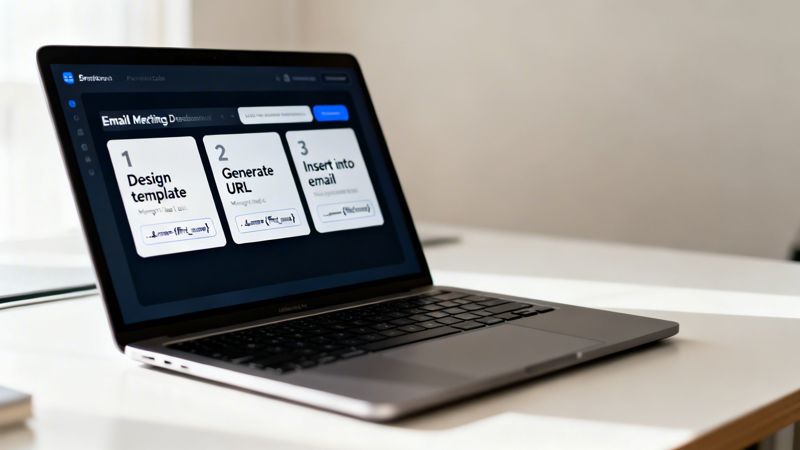
The whole process was designed with marketers in mind. If you can copy and paste, you have all the skills you need to implement automated email images. It’s a simple, three-step workflow that plugs right into how you already build campaigns, letting you add dynamic visuals in minutes, not hours.
Your Three-Step Implementation Plan
Getting started is surprisingly straightforward. You don't have to change how you build emails at all—you just need to change where the image comes from. The setup only takes a few clicks.
Design Your Image Template: First, use a simple editor to create your base image. You can upload an existing design or build one from scratch. Add your static elements like logos and backgrounds, then mark the text or image layers that will change for each person.
Generate the Unique Image URL: Once your template is ready, the platform gives you a special URL. This isn't a link to a static JPG or PNG; it’s a dynamic link that holds the keys to your personalization.
Insert the URL into Your Email: Finally, copy this unique URL and paste it into the image source field in your ESP’s email editor. You’ll then swap the placeholders in the URL with your ESP's own merge tags (like
*|FNAME|*or{{first_name}}).
And that’s it. Your ESP takes over from there, automatically filling in the subscriber data for every single person on your list.
A Look at a Real-World Example
To make this crystal clear, let's look at what one of these dynamic URLs actually looks like. Imagine you’ve designed a welcome image and want to add the subscriber’s first name. The URL you get from a platform like OKZest would look something like this:
<img src="https://okzest.com/api/image/your-template-id?name={{first_name}}&fallback=Friend" />
Let's break that down:
your-template-idpoints to the specific design you created in OKZest.name={{first_name}}tells the system to grab the subscriber's first name from your email list and put it in the right spot on the image.fallback=Friendis your safety net. If someone's name is missing from your list, the image will say "Friend" instead of showing a weird blank space.
You simply paste this one line of code where you would normally put an image. Your ESP automatically handles filling in the
{{first_name}}merge tag, making the whole process feel like magic.
This "no-code" approach means any marketer can start using personalized images, regardless of technical skill. While an email image API is available for teams who want to build deeper, more custom integrations, the core tool is built for speed and simplicity. You can have your first campaign with automated email images running in the same time it takes to build a standard email.
Getting Started with Automated Email Images
You’ve seen what personalized visuals can do and the results they drive. So, how do you move from theory to action? Getting started with automated email images is simpler than you might expect, and you don’t need to rebuild your entire marketing process to make it happen.
The trick is finding a tool that fits right into your current workflow. That’s where OKZest comes in. We built our platform to connect powerful personalization with straightforward implementation, giving you a clear path to start creating dynamic visuals today.
A Path for Every Workflow
We know that every marketing team works a little differently. A solo entrepreneur needs a quick, no-fuss solution, while a large agency might need more granular control. That’s why OKZest offers two ways to get going:
- The No-Code Editor: This is perfect for marketers, founders, and anyone who just wants to get things done fast. Our visual editor is intuitive, letting you design templates, connect data fields, and get your dynamic image URL in minutes. If you’ve ever used a tool like Canva, you’ll feel right at home.
- The Developer API: For teams that need to build custom solutions or want a deeper integration, our API gives you the flexibility to generate images programmatically. It’s the ideal choice for embedding personalization directly into your own app or automating more complex visual campaigns.
No matter which path you take, the goal is the same: to make image personalization simple and scalable.
Your First Personalized Image in Three Steps
Ready to build your first campaign? The process is designed to get you from sign-up to sending your first email as fast as possible. It all starts with your free account.
- Create Your Free Account: Sign up in seconds to get immediate access to the template editor. There’s no long onboarding process or waiting around.
- Design Your First Template: You can upload a background image you already have or design one from scratch. Just drag and drop text fields, add your logo, and decide which parts will be dynamic.
- Integrate and Send: Once your template is ready, OKZest gives you a unique URL. Copy that link, paste it into your favorite email service provider (like Klaviyo or Mailchimp), and map the fields using their merge tags.
The beauty of this process is that it fits right into your existing workflow. You're not learning a new way to send emails; you're just upgrading the kind of images you put in them.
Built for Growth and Collaboration
As your needs change, our platform grows with you. Our pricing is flexible, scaling from a free tier for those just getting started to plans that can handle millions of image generations a month for large-scale campaigns. For bigger teams, our project and role management features make collaboration a breeze, ensuring your brand stays consistent across every project.
We are focused on building a product that solves real marketing challenges, and a big part of that is listening to our users. With solid support and a user-driven roadmap, we’re here to help you create more personal, engaging, and effective email campaigns. Your journey with automated email images starts right now.
Frequently Asked Questions About Automated Email Images
It’s completely normal to have questions when you’re thinking about adding a new tool to your marketing. Let’s walk through some of the most common ones we hear about automated email images so you can move forward with confidence.
What Happens If My Contact Data Is Incomplete?
This is a great question and one of the first things people worry about. Don't worry—modern platforms are built for this. They use something called fallback logic to make sure every single image still looks professional.
For instance, let’s say you want to use a contact’s first name in an image, but you don't have it for everyone on your list. You can set a default. Instead of an awkward blank space, the image will automatically show something like "A Special Offer for You" or "Valued Customer." It's a safety net that guarantees a polished look for every recipient, no matter what.
Will This Slow Down My Email Sends or Hurt Deliverability?
Nope, not at all. The way the technology works is actually one of its biggest benefits. The images aren't created before you hit send; they're generated instantly, in real-time, the second someone opens your email.
Your Email Service Provider (ESP) just sends the email as usual, but with a unique image URL for each person. When they open it, that URL gets called, and a service like OKZest builds and delivers the final graphic on the spot. The process is lightning-fast and has zero impact on your campaign's send speed or deliverability.
Is This Difficult to Set Up? Do I Need a Developer?
For the vast majority of marketers, the answer is a firm no. These platforms are designed with a "no-code" approach, making them accessible to anyone on the team. It really just comes down to three simple steps:
- Design your image template in an easy-to-use editor.
- Connect the dynamic parts of your image to your ESP's merge tags (like
*|FNAME|*in Mailchimp). - Copy the generated URL and paste it into the image block in your email.
It's just as straightforward as adding a regular, static image. While there's usually an API for more advanced, custom jobs, the core features are built for marketers, not coders.
You don't need to be a technical expert to create highly personalized visuals. If you can build an email in Mailchimp or Klaviyo, you have all the skills you need to get started with automated images.
Can I Track Clicks on These Personalized Images?
Yes, absolutely. When it comes to tracking, an automated image acts just like any other picture in your email editor.
You can wrap it in a hyperlink, and your ESP will track the clicks on that link just like it would for a button or a standard image. This lets you directly measure how well your personalized visuals are performing and gives you clear data on what's really connecting with your audience.
Ready to transform your email campaigns from generic broadcasts into personal conversations? With OKZest, you can start creating stunning automated email images in minutes. Create your free account and design your first personalized image today!