You’ve already done the basic personalization. The subject line uses a first name. The email body pulls in a company name. Maybe your CRM pushes a few dynamic text fields into your ESP.
And still, the campaign looks like every other campaign in the inbox.
That’s usually the point where teams realize the bottleneck isn’t data collection. It’s presentation. The CRM knows a lot about the contact, but the visual layer stays static, so every message feels mass-produced even when the copy is technically personalized. Automated image creation for crm systems fixes that gap by turning CRM fields into images that change per recipient, per segment, and per moment.
This isn’t only a creative upgrade. It’s an implementation problem with strategic consequences. If you build it well, your CRM stops being a storage system and starts acting like a visual delivery engine across email, web pages, chat, social DMs, certificates, and other customer touchpoints. If you build it poorly, bad data, brittle workflows, and messy handoffs will sink adoption before the first campaign scales.
Moving Beyond First-Name Personalization
A lot of email programs stall at text merge tags. That approach still matters, but it has limits. Recipients skim fast, inboxes are crowded, and static hero images train people to ignore the visual area of the message because it rarely feels relevant to them.

Dynamic images change that. Instead of sending one banner to everyone, you generate a visual that reflects the contact’s record in your CRM. That might mean a certificate with the recipient’s name, a sales image with a company logo, an event asset with a custom date, or a newsletter visual that reflects account data.
The business case gets strong quickly when teams move from manual design to automation. Teams automating image creation in CRM systems achieve a 10-50x return on investment within the first 6 months, and a typical 5-person marketing team saves 160 hours per month, according to Imejis.io’s 2026 image automation statistics. That matters because visual personalization is usually delayed not by lack of ideas, but by production overhead.
Why static visuals stop working
Static graphics create three practical problems:
- They flatten segments: Your CRM may distinguish customers by lifecycle stage, geography, product interest, or event status, but one image hides those distinctions.
- They slow teams down: Every variation becomes a design request, a duplicate file, and another round of approvals.
- They break consistency: When marketers create one-off assets manually, naming, sizing, and branding drift fast.
That’s why automated visuals fit naturally into broader automated lead nurturing programs. Once you’re already triggering messages by behavior or stage, it makes sense to trigger the image layer too. The nurture flow becomes more coherent because the copy and the visual both respond to the same CRM state.
What changes when the image is data-driven
The shift is simple in concept. Your image becomes a template, not a final file.
Instead of designing fifty assets, you design one layout with dynamic fields. The CRM supplies the values. The rendering system creates the final image at send time or request time. That keeps your brand system intact while still making the output feel individual.
Practical rule: If a marketer has to open a design tool every time a list changes, the workflow won’t scale.
The strongest use cases tend to share one trait. The visual isn’t decorative. It carries meaning. A ticket, badge, scorecard, property image, onboarding graphic, or account update image gives the recipient something specific to notice. That’s why automated image creation works best when it’s tied to a real CRM moment, not just a novelty overlay.
Choosing Your Integration Path No-Code vs API
A marketing manager wants personalized event graphics live by Friday. The CRM already holds the attendee data, the ESP is set up, and the campaign brief is approved. The actual decision is not the template. It is the integration path that the team can launch, maintain, and trust after the first campaign goes out.
Some teams need a marketer-controlled setup that fits the existing CRM and email workflow. Others need image generation to sit inside a broader application or data pipeline. Both are valid. The better choice depends on who owns the process, how much custom logic is required, and how often the workflow will change.
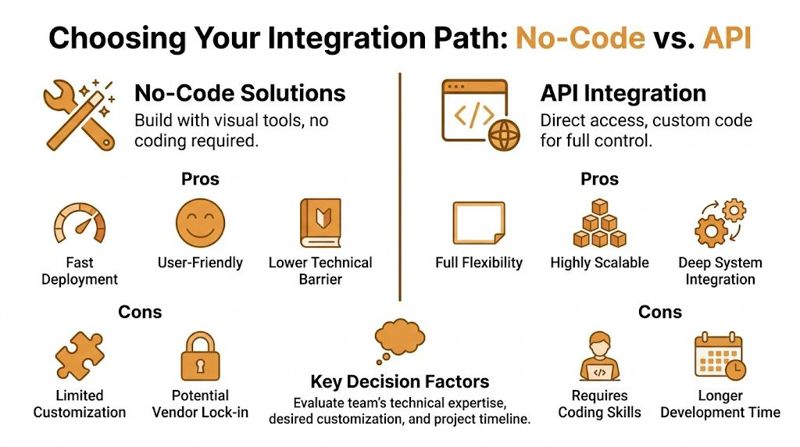
The practical difference
A no-code setup lets a marketing or operations team connect CRM fields to an image template, generate image URLs, and use those URLs in campaigns without building application logic. An API setup gives developers direct control over how data is passed, transformed, rendered, cached, and delivered across systems.
That difference shapes more than implementation. It shapes ownership.
If marketing needs to adjust copy on the image, swap a background, or launch a new variation next week, no-code usually keeps the work close to the team using it. If the image depends on multiple systems, approval logic, or product-side triggers, the API route is often cleaner because engineering can control the full flow in code.
| Factor | No-Code Solution (e.g., OKZest Platform) | API Solution (e.g., OKZest API) |
|---|---|---|
| Team fit | Best for marketers, agencies, consultants, and lean ops teams | Best for dev-supported teams and custom product environments |
| Setup speed | Faster to launch and easier to test | Slower upfront because logic and integration need development |
| Flexibility | Works well for standard campaign workflows | Better for custom triggers, bespoke apps, and unusual data models |
| Maintenance | Lower day-to-day overhead for marketing teams | Higher control, but also higher technical responsibility |
| Governance | Easier for non-technical users to manage visually | Easier for engineering teams to standardize in code |
| Scaling style | Good for repeatable campaign patterns | Good for high-volume and deeply integrated pipelines |
When no-code is the better choice
No-code fits teams that want automated image creation inside the tools they already run every day. That usually means CRM-driven email, lifecycle campaigns, sales enablement assets, certificates, event graphics, and follow-up visuals where the workflow is repeatable and speed matters.
OKZest is a good example of that model. Marketers can set up templates, connect fields, and push output into campaigns without asking engineering to build a custom rendering service. For teams evaluating that route, this guide to no-code image design automation shows the kind of setup that works well when campaign ownership stays with marketing.
No-code also reduces a common operational problem. The team that briefs the campaign is usually the team that notices last-minute changes. If every update needs a developer, the image layer becomes a bottleneck.
When API is the better choice
API-based image generation is the stronger option when rendering is part of a wider system, not just a campaign asset. Common examples include customer portals, event platforms, sales apps, onboarding systems, and websites that generate visuals in response to live user data.
In those cases, the image is part of product behavior. The integration may need authentication, custom business rules, data transformation, or logic that sits outside the CRM and ESP. It may also need to support dynamic web experiences, which is one reason teams investing in personalized landing pages and app-like site behavior often care about the broader benefits of developing a dynamic website.
The trade-off is simple. API integrations give more control, but they also create engineering work around monitoring, error handling, versioning, and support.
A simple decision filter
Choose no-code if these statements are true:
- Marketing owns execution: The team builds and updates campaigns without regular developer support.
- Launch speed matters: You want to test the channel and prove response before investing in custom engineering.
- The workflow repeats: The same image pattern will be reused across campaigns, segments, or clients.
Choose API if these statements are true:
- Engineering already manages connected systems: The team can support the integration as part of normal development work.
- The workflow needs custom orchestration: Data comes from several systems or needs transformation before rendering.
- Image generation is embedded in a product or web experience: The output is requested by software, not just dropped into an email.
A phased approach often works best. Start with no-code to prove that the image improves the campaign. Move selected use cases to the API once the business rule, data model, and ownership model are stable.
Mapping CRM Data to Dynamic Image Templates
The template is where most projects either become reliable or become embarrassing.
A personalized image only feels polished when the data behind it is clean, predictable, and matched to the design. The visual layer should never expose the messiness of the CRM. That means field mapping, validation, and fallback logic are not side tasks. They are the implementation.

Poor data quality can affect up to 70% of CRM projects, and in automated imaging it can cause a 38% drop in user adoption. The same source notes that real-time fallbacks for missing values are critical to ensure 100% render success and maintain trust in the automation, as explained in VantagePoint’s discussion of CRM project failure patterns.
Start with a field inventory
Before anyone designs a template, list the fields that will drive the image. Don’t only capture the obvious values like first name and company. Include format expectations and failure conditions.
A practical field inventory usually includes:
- Display text fields: name, event title, plan name, property address
- Image-based fields: company logo, headshot, product image
- Conditional fields: offer status, renewal state, booking date
- Fallback values: default text, generic logo, standard background
- Formatting rules: date format, character limits, capitalization rules
This is the part many teams skip. They go straight into layout decisions, then discover that one field contains inconsistent labels, another stores empty values, and a third uses a format that breaks the design.
Validate before rendering
For automated image creation for crm systems, the safest sequence is extract, sanitize, render, then verify.
That usually looks like this:
- Extract dynamic data from your CRM or connected system.
- Sanitize inputs so bad values don’t make it into the image.
- Render the template only after required checks pass.
- Review output through previewing or automated QA before broad deployment.
If your CRM says a date can be blank, your template has to know what to do with that. If logos come from different sources, you need sizing rules. If a sales rep can manually type a company name field, expect inconsistent capitalization and trailing spaces.
A fallback isn’t a backup idea. It’s part of the design.
Design templates for data reality
Designers often think in terms of ideal content. CRM systems contain real content, which is much messier.
The template has to account for long names, short names, missing logos, odd aspect ratios, and occasional bad records. If a layout only looks good when every field is perfect, it isn’t production-ready. It’s a mockup.
That’s also why dynamic visual systems work well on websites. The same logic that makes CRM-driven images usable in email applies to dynamic on-site experiences too. If you’re thinking through the broader pattern, this explanation of the benefits of developing a dynamic website is a useful parallel because the operational challenge is similar. Data changes, and the presentation layer has to stay stable.
Build your fallback hierarchy
A dependable template uses fallback rules in a fixed order. That keeps behavior predictable and easier to troubleshoot.
| Missing data type | Preferred fallback | Why it works |
|---|---|---|
| First name | Neutral label such as “there” or a non-personal greeting | Keeps tone natural without exposing blank fields |
| Company logo | Brand-safe default graphic | Prevents broken layouts and awkward empty boxes |
| Event date | Generic date line or no date block | Better than displaying a wrong or malformed value |
| Profile image | Placeholder image with consistent crop | Preserves layout integrity |
For merge-tag-driven images, a clean implementation pattern is to define the template variables first, then assign defaults before sending traffic to the final image URL. This article on merge tag images reflects that operating model well.
Test edge cases before launch
Most failures show up in the weird records, not the clean ones.
Create a test set with intentionally messy contacts. Include missing names, broken logos, extra-long companies, outdated fields, and edge-case dates. If the image still looks professional, your template is likely ready.
Use a QA checklist like this:
- Check truncation: Long values shouldn’t overlap other elements.
- Check null behavior: Empty fields should trigger fallbacks, not blank gaps.
- Check visual hierarchy: Dynamic elements shouldn’t overpower the core message.
- Check channel fit: The same image may need different crops or padding depending on email or web placement.
The teams that do this well treat personalization as a rendering system, not a design trick. That mindset produces fewer surprises and far less cleanup after launch.
Deploying Personalized Images in Emails and on Web Pages
Once the template works, deployment becomes a distribution problem. The good news is that the final output is usually just an image URL or a small HTML snippet, which makes it easier to place inside the systems you already use.

Email platforms don’t need to understand the image-generation logic. They just need a valid image source. The same applies to landing pages, chat widgets, and many CRM-driven web experiences.
In email campaigns
In practice, deployment in an ESP works a lot like any other merge-tag setup. Your image URL contains parameters or references tied to contact data, and the platform resolves them per recipient.
Common implementation patterns include:
- Static template plus dynamic parameters: The layout stays fixed while text or image layers change per recipient.
- Pre-generated image URLs: Useful when you want approval control before send time.
- On-demand rendering: Better when the image needs current CRM or API data at open time or request time.
A simplified email pattern looks like this in concept:
- Image block in Mailchimp or Klaviyo: insert the generated image URL as the source
- Merge-tag-aware URL: use recipient fields as variables
- Fallback-safe output: ensure the final image still renders if a field is missing
If you’re planning the URL structure itself, this guide to dynamic image URLs is the kind of implementation detail worth reviewing before rollout.
On web pages and landing pages
Web deployment is often more flexible than email because you control the surrounding page logic. You can render a personalized image inside a landing page, thank-you page, embedded widget, or chatbot handoff.
A basic HTML placement pattern is straightforward:
- Image tag: place the personalized image inside a standard
<img>element - Responsive sizing: constrain width so the image scales across devices
- Context control: pair it with nearby dynamic text only when that improves clarity
A personalized image on a landing page often works best when it’s treated like a proof object. For example, a custom certificate preview, attendee pass, recruitment panel, or sales visual gives the visitor something concrete and specific to them.
Keep deployment boring. If the image requires special handling in every platform, operations will resist using it.
Formatting decisions that reduce problems
A few choices prevent most rendering issues:
- Use consistent aspect ratios: Don’t make the ESP guess how to display unpredictable image dimensions.
- Design for constrained spaces: Email columns, mobile screens, and web cards all crop aggressively.
- Avoid tiny text in the image: The recipient may open on mobile, and the image still has to communicate quickly.
- Separate decorative and critical information: If a key message must be readable even when images are blocked, don’t place all meaning inside the image.
The best deployment setups feel invisible to the campaign team. They select a template, connect the CRM fields, and drop the output into email or web without inventing a new process every time.
Inspiring Use Cases for Automated Image Creation
The easiest way to spot a strong use case is to ask a blunt question. Does the image become more useful when it reflects a person, account, or event record? If the answer is yes, automation usually has a place.
Event organizers and attendee assets
An event team often has all the required data already sitting in a CRM, ticketing tool, or registration system. Name, session type, event date, and attendance status are all structured fields.
That makes personalized event visuals a natural fit. The image can become a digital ticket, speaker invite, confirmation banner, or follow-up asset with attendee-specific details and a unique QR code. The visual is no longer generic event branding. It becomes an operational object the attendee can use.
Coaches, consultants, and course delivery
Coaches and consultants often need to send assets that should feel personal but still be produced at scale. Completion certificates are the obvious example, but the pattern goes further than that.
A coach can automatically generate welcome visuals, progress milestone graphics, workshop reminders, and certificate images from contact data. The benefit isn’t just time saved. It’s consistency. Every participant gets a clean, branded asset without someone rebuilding the same design over and over.
Sales and account-based outreach
Sales teams often have strong CRM data but weak visual execution. They know the account name, rep name, stage, product focus, or scheduled meeting date, but outreach still relies on static graphics or plain text.
A better pattern is account-specific imagery. That could be a prospecting image that includes the company name, a renewal reminder asset tied to account status, or a post-demo follow-up image reflecting the conversation context. Used carefully, this feels relevant. Used carelessly, it feels gimmicky, so the design has to stay professional and restrained.
The best automated images help the recipient act, remember, or recognize. They don’t just prove that personalization is possible.
Recruitment and candidate communication
Recruitment teams can use automated visuals for interview confirmations, candidate status updates, employer brand campaigns, and onboarding assets. This works especially well when the image supports a real milestone in the hiring journey.
A candidate who receives a clean visual with their name, role title, and interview time gets a clearer signal than they would from a plain reminder email. The same principle applies after offer acceptance, when personalized onboarding assets can reduce friction and create a more deliberate first impression.
Real estate, agencies, and social teams
Real estate agents can personalize property visuals with a prospect’s name or inquiry context. Agencies can generate campaign assets for many client segments without creating separate master files for each audience. Social teams can use the same template logic for direct-message visuals, promotional images, or newsletter artwork tied to CRM attributes.
The pattern stays consistent across industries. Start with a moment that already has structured data, then create a visual that becomes more useful because of that data.
Scaling and Optimizing Your Automated Visuals
A pilot campaign can survive on manual checks and tribal knowledge. A scaled program cannot.
Once automated image creation starts feeding regular CRM and ESP workflows, the bottlenecks become technical and operational. Rendering speed affects email load time and page performance. File size affects deliverability and user experience. Permissions affect brand control. Measurement affects whether the program keeps budget and internal support.
Performance and delivery discipline
Production volume changes the design brief. A template is no longer just a creative asset. It becomes a rendering system that has to behave predictably across thousands or millions of records.
That usually means making a few deliberate choices early. Server-side rendering gives better consistency than assembling visuals in the browser. Modern formats such as WebP help keep payloads under control. Caching prevents the same image request from being regenerated every time a recipient opens an email or revisits a page.
The exact stack depends on the channel mix and the level of personalization. A batch email campaign has different requirements from a real-time web experience. What matters is that the workflow can absorb higher send volumes, more template variants, and stricter SLA expectations without a full rebuild.
What usually breaks at scale
Creative quality rarely causes the biggest failures. Operations do.
I usually see four problems first:
- Unclear ownership: Marketing launches the workflow, but nobody owns template maintenance, QA, or incident response.
- Data drift: CRM fields change name, format, or business meaning, and the image logic keeps rendering the old assumption.
- Template sprawl: New requests get solved with new templates instead of controlled rules inside a smaller template library.
- Weak change control: Too many users can edit production assets, and too few people review the rendering logic before launch.
This is where CRM discipline matters more than personalization ambition. Poor field hygiene, inconsistent naming, and undocumented workflow changes create problems long before recipients see a broken image. As noted earlier, those are common CRM failure points in systems like Salesforce and HubSpot, and automated visuals expose them quickly because the output is visible.
If a personalized image workflow depends on one person remembering how it works, the program is fragile.
A better operating model separates template design, campaign use, and technical configuration. Marketing should be able to launch approved assets. Design should control brand presentation. Operations or technical owners should manage data mapping, rendering rules, and fallbacks.
Measuring ROI without fooling yourself
Personalized images are easy to like and harder to attribute. That is why measurement needs to be designed upfront, not added after the campaign performs well or poorly.
The useful question is not whether the image looked better. The useful question is whether the image changed behavior inside a specific journey. That means comparing a personalized visual against a static control, or comparing one level of personalization against another, while keeping the surrounding message as stable as possible.
A practical model looks like this:
| Measurement method | What it helps answer |
|---|---|
| A/B testing static vs personalized image | Did the visual treatment change behavior in this campaign? |
| Segment-level comparison | Do certain audiences respond better to visual personalization than others? |
| Template-level tracking | Which image concepts influence downstream action most reliably? |
| Assisted-conversion review | Did personalized visuals appear in journeys that later converted? |
I also recommend separating operational metrics from business metrics. Render success rate, image load speed, and fallback usage tell you whether the system is working. Clicks, conversions, influenced pipeline, or activation tell you whether it is worth expanding.
Keep optimization narrow and intentional
Broad optimization creates noise. Controlled optimization creates learning.
Start with a small number of templates tied to business-critical moments such as onboarding, renewal, event confirmation, or sales follow-up. Then review performance at the template level, not just at the campaign level. That makes it easier to see whether the issue is the offer, the audience, the data quality, or the image logic itself.
Use a short operating checklist:
- Is rendering fast enough? Slow image delivery weakens the message before the recipient acts on it.
- Is the data trustworthy enough? If not, improve validation and fallback rules before increasing scale.
- Is the template reusable? A strong template should cover many records without repeated redesign work.
- Can the team manage it safely? If approvals and edits are messy, scale will increase mistakes.
OKZest fits this stage well because it supports both no-code and API-based image generation, accepts static and dynamic data sources, supports fallback values, and lets teams place generated images into emails or web pages. That matters in practice. It means a marketing team can start with campaign-driven workflows, then move to more controlled, programmatic deployment without switching the underlying template system.
Frequently Asked Questions About CRM Image Automation
Do I need a developer to start?
For many CRM and ESP setups, no. A marketing team can start with a no-code workflow if the job is straightforward: map a few fields, apply fallback values, and place the generated image into an email or landing page.
Developer support matters once image generation depends on custom business rules, real-time triggers, or data pulled from several systems at once. That is usually the dividing line. If the workflow behaves like a campaign asset, no-code is often enough. If it behaves like application logic, use the API and involve engineering early.
What kind of CRM data works best?
Structured, predictable fields produce the cleanest output. First name, company name, renewal date, product tier, owner name, location, headshot URL, and logo URL are all practical inputs because they are easy to validate before rendering.
Free-text fields are riskier. Sales notes, open text form responses, and manually entered account details often contain formatting issues, odd capitalization, or content that breaks the design. I usually treat those fields as optional layers, not core template inputs, unless there is a clear validation step upstream.
What happens when data is missing?
Missing data should change the image gracefully, not expose the problem to the customer.
A production setup needs fallback text, default images, and layout rules that still look intentional when a field is blank. With a platform like OKZest, that means building templates that can accept variable data while still rendering a usable image if a headshot, date, or company field does not arrive. Good fallback logic protects campaign quality and reduces the cleanup work that slows teams down later.
Are personalized images only for email?
Email is usually the first channel because the deployment model is simple, but the same image layer can support web pages, sales outreach, event confirmations, certificates, chat touchpoints, and customer portals.
That flexibility matters for implementation. Teams do not need one image workflow for email and another for web. They can keep the template logic consistent, then decide whether to insert the output through merge tags, HTML embeds, or an API call.
How should I measure success?
Measure image automation at three levels: delivery reliability, engagement, and business impact.
Start with operational checks. Was the image generated correctly? Did fallback rules fire too often? Did load time affect delivery or page experience? Then compare template variants against a control so the team can isolate the effect of the visual, rather than giving all credit to the campaign itself. For revenue teams, the useful metrics are the ones already tied to the CRM or ESP workflow, such as clicks, form completions, meeting bookings, influenced pipeline, or activation.
As noted earlier, broad gains from marketing automation do not explain the contribution of personalized visuals on their own. That is why controlled testing matters here more than high-level platform reporting.
What’s the biggest mistake teams make?
They treat image automation as creative production instead of systems design.
The design still matters, but long-term performance depends more on field mapping, approval rules, fallback handling, template ownership, and deployment discipline. Teams that get this right build once, reuse often, and avoid the slow drift into one-off templates that nobody wants to maintain.