So, what exactly are custom email graphics? Think of them not as just another image, but as a personal handshake in a crowded room. Instead of sending everyone the same generic banner, each person on your list gets a unique visual that might feature their name, company, or something else specific to them. It’s a simple concept that creates a powerful one-to-one connection.
Why Bother with Custom Email Graphics?

Let's be honest, everyone's inbox is overflowing. Generic, one-size-fits-all emails are just adding to the noise and are quickly ignored. This is where custom email graphics come in, shifting your strategy from a nice-to-have novelty to an absolute necessity for standing out.
This isn’t just a passing trend—it's how modern brands operate. By 2025, an incredible 91% of brands worldwide had adopted email personalization, with North American companies leading the charge at 97%. This signals a massive shift from mass-blasting messages to creating meaningful, individual conversations. You can explore the data yourself and see how personalized email marketing is taking over in this deep dive on global trends.
From Static to Dynamic: The Impact on Your Campaigns
What does this actually mean for your email campaigns? It means that a generic stock photo just can’t compete with an image that greets a customer by name. The business impact of using custom graphics goes far beyond opens and clicks; it’s about building genuine relationships that turn subscribers into loyal fans and drive real revenue.
To see the difference clearly, let's compare the old way with the new way.
Static vs Dynamic Graphics At a Glance
| Feature | Static Graphics (Traditional) | Custom Graphics (Dynamic) |
|---|---|---|
| Recipient Experience | Generic, one-size-fits-all | Personal, one-to-one |
| Engagement Level | Low; easily ignored | High; captures attention |
| Brand Connection | Impersonal and distant | Memorable and individual |
| Conversion Potential | Limited; broad call-to-action | High; tailored offers and info |
| Data Usage | None | Uses recipient data for relevance |
The table makes it clear: dynamic, personalized graphics aren't just a minor upgrade. They represent a fundamentally different approach to email marketing that delivers far better results.
Consider a few key advantages you gain:
- Sky-High Engagement: Emails with personalized visuals demand attention. They make subscribers pause, read, and actually interact with your message.
- Stronger Brand Connection: When you show a customer you see them as an individual—not just a name on a list—you create a memorable experience that builds a real bond with your brand.
- Better Conversion Rates: A custom graphic can feature a unique discount code, a personal product recommendation, or a VIP event ticket with the recipient's name, directly pushing them to take action.
The core idea is simple: speak to everyone by speaking to someone. By using data to create a unique visual for each person, you make every subscriber feel seen, understood, and valued.
This approach turns your email strategy from a monologue into a dialogue. With tools like OKZest, marketers, agencies, and sales teams can automate this entire process, making high-impact personalization accessible to everyone. The days of blasting the same message to your entire list are over; the future is about creating unique experiences, one custom email graphic at a time.
Creating Personalized Images with No-Code Tools
The idea of creating thousands of unique images might sound like a job for a team of developers, but no-code platforms have made this surprisingly simple. These tools let you design a single master template and then automatically generate endless variations by pulling data straight from your email list.
Think of it like a mail merge, but for your visuals. Instead of just plugging {{first_name}} into a line of text, you’re embedding it directly into a stunning graphic. This approach lets you create highly relevant custom email graphics without ever touching an API or writing a single line of code.
Designing Your First Dynamic Template
Getting started is refreshingly straightforward. Most no-code tools, like OKZest, provide a visual, drag-and-drop editor where you build your base image. You can start with a pre-made template or design one from scratch that perfectly matches your brand. From there, you just add layers for the text and images that will change for each person.
For instance, a typical template might include:
- A static background image that stays the same for everyone.
- A text layer for the recipient's name, pulling from your
{{first_name}}merge tag. - An image layer that shows a specific product they recently browsed.
- Another text layer that displays a unique, one-time discount code.
Each of these dynamic elements is just a placeholder in your design, waiting for the real data to bring it to life.
Here’s a peek at what this looks like inside a no-code image builder. You can see the layers on the side and the dynamic fields (like {{first_name}}) right on the canvas.
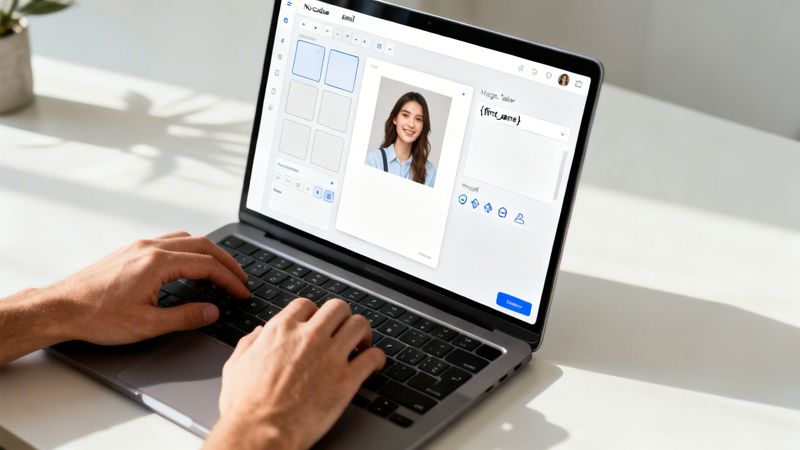
This kind of interface is built for marketers, not coders, so connecting your data fields to your visual elements is as easy as a few clicks.
The Importance of Fallback Rules
So, what happens when your data isn’t perfect? If you try to personalize an image with a first name but you don't have one for a subscriber, you risk sending a broken or awkward-looking graphic. This is exactly where fallback rules come in.
A fallback is simply a default value that appears when the primary data is missing. It’s your safety net, making sure every single email graphic looks polished and professional, no matter what.
For example, you can set the fallback for a first name to display something generic like "Valued Customer" or "A Special Offer for You." For an even cleaner look, some tools let you hide the entire text layer if the data is missing, so you're not left with any awkward empty space.
Setting up these rules is a critical step that prevents your personalization efforts from backfiring. You can learn more about how to get started with no-code image design automation to see these principles in action. This control ensures a high-quality experience for everyone on your list, protecting your brand while still delivering that "wow" factor.
Automating Graphics at Scale Using APIs
While no-code tools are fantastic for many marketers, what happens when you need to generate thousands of personalized event tickets, real-time sales leaderboards, or custom welcome graphics every single day?
For those high-volume needs, an image generation API is the most powerful and scalable way to create custom email graphics. This approach allows your own systems to programmatically ask for and receive unique images on the fly, without any manual work.
Instead of a hands-on design process, an API connects directly to your data sources—whether that's a customer database, CRM, or a third-party service. When a specific event is triggered, like a new user signing up, your application sends a request to the image API packed with personalization details. The API instantly generates a fresh graphic from your template and sends back a unique URL for that new image.
Building Your API Request
Making an API call sounds more technical than it often is. At its core, it’s just a web request that bundles up all the information needed to build your image. You simply define the base template you want to use and then pass in the dynamic data—like names, dates, or profile pictures—as parameters.
For instance, a developer could test an endpoint with a simple cURL command like this:
curl -X POST "https://api.okzest.com/v1/images"
-H "Authorization: Bearer YOUR_API_KEY"
-H "Content-Type: application/json"
-d '{
"template_id": "tpl_welcome_graphic",
"modifications": [
{ "name": "user_name", "text": "Jessica" },
{ "name": "company_logo", "image_url": "https://example.com/logo.png" }
]
}'
This request tells the API to grab the "tpl_welcome_graphic" template and swap out the user_name and company_logo layers with the new data. In return, the API provides a new URL, something like https://cdn.okzest.com/img/generated_image_123.png, which you can then pop right into your email campaign.
Key Practices for API Integration
When you're dealing with potentially thousands of API calls, performance and reliability are everything. Following a few best practices will ensure your automated workflow runs smoothly, without bogging down your systems or creating a broken user experience.
- Secure Your Endpoints: Always use API keys to authenticate your requests. This is non-negotiable. It stops unauthorized access and protects your image generation service from abuse.
- Implement Robust Error Handling: What if the API is temporarily down or a request fails? Your code needs to be ready to handle these hiccups gracefully. A great solution is to use a default static image as a fallback.
- Optimize for Performance: If you need to generate images in bulk, think about using asynchronous requests or batch processing to avoid creating bottlenecks. Caching already-generated images can also dramatically reduce redundant API calls and speed up load times.
Using a personalized image API transforms your ability to scale personalization. It shifts the creation of custom email graphics from a manual, time-consuming task to a fully automated, real-time workflow that can handle any volume you throw at it.
By connecting your data directly to an image generation engine, you can deliver truly unique visual experiences at a scale that's simply impossible with no-code tools alone. For a deeper dive into the technical side, you can learn more about our personalized image API and see how it can be integrated into your existing tech stack.
Putting Your Graphics Into Action
You’ve designed a fantastic dynamic graphic. Now, how do you get it into your customers' inboxes? A great design is only half the battle; ensuring it shows up perfectly for every single person is what makes it effective. This is where the integration with your email service provider (ESP) comes in.
The real power here comes from a dynamic image URL. Instead of just dropping a static image file into your email, you’ll use a special link that contains merge tags. Your ESP, whether it's Klaviyo or Mailchimp, then swaps out those tags with each subscriber's unique data just before hitting send.
It's actually a pretty straightforward process. You'll grab the dynamic image URL from your image tool (like OKZest) and paste it into an image block in your email editor. That URL will look something like this: https://cdn.okzest.com/your-image.png?name={{first_name}}. When the email goes out, the ESP finds {{first_name}} and replaces it with the recipient's name, telling our server to generate their personalized graphic in real-time.
This diagram breaks down how that automated process works, from grabbing the customer data to sending the final personalized email.
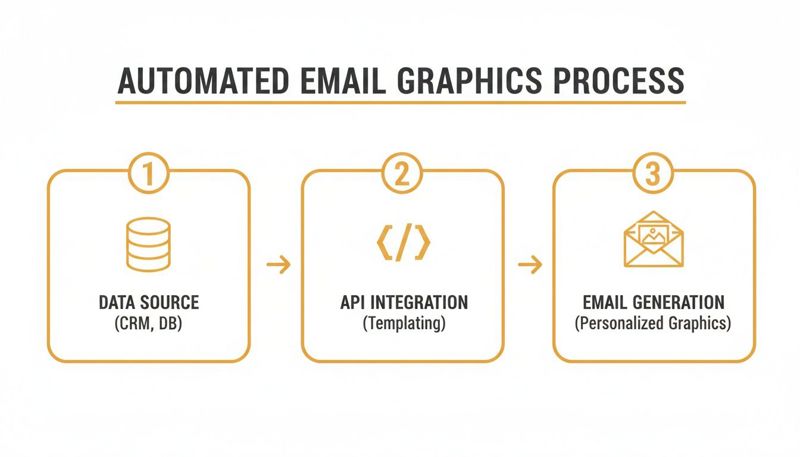
As you can see, your customer database feeds the API, which creates and places a unique graphic into every email on the fly.
Nailing the Delivery Every Time
Just pasting the URL and hitting "send" isn't quite enough. To create a truly professional experience, a few small but critical details need your attention. Getting these right protects you from common email client headaches and makes sure your graphics always land perfectly.
Set Up Fallback Text (Alt Text): Some email clients block images by default. Alt text is what people see instead, so make it count. Instead of a generic "Graphic," try something descriptive like, "Your personalized welcome offer, Jane!"
Check for Mobile Responsiveness: Your graphic has to look good on small screens. Make sure the image block in your ESP is set to be responsive or 100% width. This prevents it from breaking your email's layout on a phone.
Understand Image Caching: To save on load times, some email clients will "cache" or save a version of an image. This can sometimes cause an old graphic to show up. A good trick is to use unique parameters in your image URL for each campaign, which can help force a fresh version to load.
The goal is to make your custom email graphics feel like a natural part of the email, not a clunky add-on. How you set things up in your ESP is just as important as the design of the graphic itself.
For more strategic insights, it's worth reading up on email marketing campaign best practices. Think of custom visuals as one piece of a much larger optimization puzzle. By handling these technical details, you ensure every message has the impact you intended, helping you build much stronger connections with your customers. If you're looking for more ways to enhance your emails, check out our guide on dynamic content solutions for email marketing.
Proven Use Cases That Drive ROI
It's one thing to have a cool creative idea, but it’s another to see it actually impact your bottom line. That's the real test. For custom email graphics, their value shines when you put them to work in ways that directly boost engagement, conversions, and a return you can actually measure.
Let’s get practical and look at how smart businesses are already using personalized visuals to hit their targets. The results aren't just a minor bump, either. The data is pretty clear.
Brands that consistently use dynamic content in their emails have seen a 100% increase in ROI. They're getting an average of 42:1 compared to just 21:1 for brands that don't. This kind of financial lift moves custom visuals from a "nice-to-have" novelty into a core part of any serious marketing strategy. You can find more eye-opening email marketing statistics that dig into this massive performance difference.
This ROI boost happens because you’re making every email feel personal, like a one-to-one conversation. Here’s how different industries are making it happen.
Dynamic Graphics for Events and Education
If you run conferences or offer online coaching, you know how important it is to make every single person feel seen. Instead of blasting out generic confirmation emails, savvy organizers are creating unique, shareable graphics for each attendee.
- Personalized Event Certificates: Imagine sending a certificate of completion after a webinar, complete with the attendee's name and the event title. It creates a real sense of achievement and gives them something they’re proud to share on social media, which means free, organic promotion for you.
- Custom Welcome Graphics: An online coach can kick things off on the right foot by welcoming a new client with a sharp graphic that has their name, the program they joined, and an inspiring quote. It sets a positive, personal tone from day one and instantly makes the client feel good about their decision.
Hyper-Personalization in Real Estate and Sales
In cutthroat industries like real estate and sales, you have to do more than just show up in an inbox. Generic emails are dead on arrival.
Real estate agents are using dynamic images to create an emotional spark. Think about getting an email that doesn't just list a property's features but shows a picture of the front door with a "Welcome Home, Sarah" message on it. That little touch makes a connection that a standard listing never could.
Sales teams are also getting incredible results by personalizing their outreach with custom offer images.
Example Use Case for Sales A B2B sales rep can build an image that automatically pulls in:
- The prospect's company logo.
- The prospect's first name.
- A unique discount or a headline like, "A Special Offer for [Company Name]."
An email like that immediately signals that it's not a generic blast. It shows you've done your homework, which massively increases your chances of getting a reply.
Best Practices for Proving Financial Impact
To really prove that these efforts are worth the investment, you need to track what's working and what isn't.
- A/B Test Your Visuals: Don't just assume what works. Run tests on different designs, calls-to-action, and levels of personalization. Let the data tell you what your audience responds to.
- Stay On-Brand: Personalization should feel like a natural extension of your brand, not something random. Make sure every dynamic template uses your brand’s fonts, colors, and logo. Consistency builds trust.
- Analyze Performance Data: Look past open and click rates. You need to connect your campaigns to actual business goals. Track conversion rates and revenue generated from emails using custom graphics to prove their direct financial impact.
Answering Your Top Questions on Custom Email Graphics
Jumping into the world of custom email graphics can feel like a big leap, but I promise it's more straightforward than you might think. Many marketers and sales teams I talk to have the same initial questions. Let's walk through some of the most common ones so you can get started with confidence.
One of the first things people ask is about the technical skills needed. The good news? You really don't need to be a developer to get going. Modern no-code platforms are built for marketers, with simple interfaces where you can design templates and connect data on your own.
Handling the Technical Hurdles
So, when do you actually need a developer? Technical skills really only come into play if you're looking to automate image generation on a massive scale using an API. For most of your day-to-day campaigns, a no-code tool is more than powerful enough to create stunning, personalized visuals.
Another common worry is about email load times. Will these graphics slow everything down? Not if they're set up correctly. The image is generated on a server and embedded with a simple URL, just like any other picture in an email. The trick is to optimize your base image file sizes right inside your design template. This keeps your graphics loading lightning-fast for everyone, especially those on mobile.
The goal is to make personalization feel seamless, not clunky. A well-optimized graphic will load just as fast as a static one, but with a far greater impact on your audience.
This simple optimization step is key to maintaining a great user experience and keeping subscribers hooked from the moment they open your email.
Managing Data and Testing Your Designs
"What if I don't have the data for a customer?" This is a fantastic question, and it gets right to the heart of why fallbacks are so important. A good personalization tool will always let you set default values for any dynamic field.
This means if a first name is missing, your graphic won't show a broken image or an awkward blank. Instead, it can display a default you’ve already set up, like "Hello there!" or "A special offer for you." This fallback system ensures every single email looks polished and professional.
And what about testing? You can absolutely test to see which designs work best. Here’s a simple way to approach it:
- Create two or more different dynamic image templates.
- Use your email service provider’s A/B testing feature to split your audience.
- Send each version to a different segment.
- Analyze the results to see which visuals, offers, or calls-to-action drive the most clicks and conversions.
This data-driven approach is how you continuously refine your strategy. The push for this kind of personalization isn't just a hunch; it's backed by serious business results. Nearly 80% of business leaders report that consumers spend an average of 34% more when their experiences are personalized. This trend is fueling the boom in custom email graphics, and you can discover more insights on email marketing statistics for 2026 to see its full impact. It’s a clear sign that making each customer feel seen is no longer optional—it's essential for growth.
Ready to create visuals that connect with every customer? With OKZest, you can automate personalized images for your emails, newsletters, and social campaigns using our no-code builder or powerful API. Start for free at https://okzest.com.