So, what exactly is dynamic content for email campaigns? It's pretty simple: instead of blasting the same message to everyone, you show different content to different subscribers based on who they are, what they've done, or what they like. This is how you move from generic broadcasts to creating highly relevant, individual experiences that actually get results.
Why Dynamic Content Is a Game Changer For Email Marketing
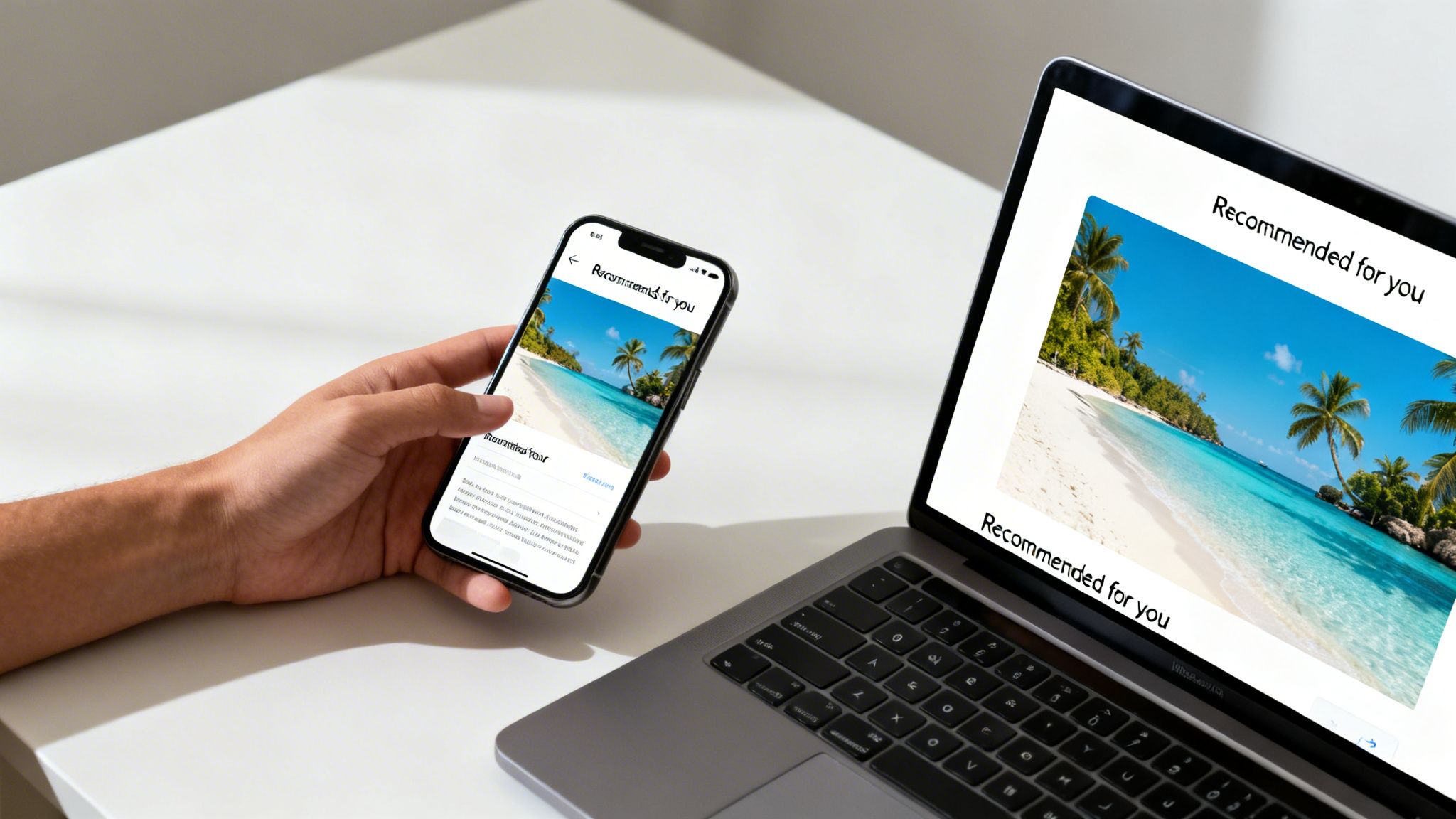
Let's cut through the buzzwords. Dynamic content isn't just about dropping a first name into a subject line. It's a fundamental shift in strategy—moving away from a one-to-many megaphone approach and toward thousands of one-to-one conversations, all happening at scale.
This works because it taps into a basic human need: to be seen and understood. When an email feels like it was made just for you, it cuts through the noise of a packed inbox. It’s the difference between a generic sales pitch and a genuinely helpful, personalized recommendation.
The Power of True Personalization
Think about these real-world scenarios:
- E-commerce: A clothing brand sends an abandoned cart email featuring a dynamic image of the exact item the customer left behind, jogging their memory.
- Travel: A travel company follows up with a user who was just browsing trips to Costa Rica by sending an email with a stunning, personalized image of that destination.
- Education: An online course provider sends a congratulatory email with a dynamically generated certificate, already filled out with the student's name and ready to be shared on LinkedIn.
These aren't just clever marketing tricks; they build loyalty. They show customers you're paying attention to their needs, which is the cornerstone of any great relationship. The data backs this up, and the numbers are pretty staggering.
Brands that make dynamic content a core part of their strategy can literally double their ROI. Campaigns that consistently use dynamic elements can see returns jump from 21:1 to an incredible 42:1.
That’s a huge lift. You’re doubling the revenue for every dollar you spend on email marketing. For agencies and in-house marketers, this is how you scale results without just working more hours.
Static vs. Dynamic Email Campaigns
To really see the difference, let’s compare the old way with the new way. Static emails are a shot in the dark—you send the same message to everyone and just hope it connects with a few people. Dynamic campaigns are built to adapt from the ground up.
The performance gap between the two is massive. Here’s a quick breakdown:
Static vs Dynamic Email Campaign Performance
| Metric | Static Content Campaigns (Rarely/Never Use) | Dynamic Content Campaigns (Always Use) |
|---|---|---|
| ROI | Average 21:1 return on investment | Average 42:1 return on investment |
| Engagement | Lower open and click-through rates | Significantly higher engagement and interaction |
| Conversion Rates | Lower, less targeted conversions | Higher, more relevant conversions and sales |
| Customer Loyalty | Can feel generic, leading to unsubscribes | Builds brand loyalty by showing you understand them |
The table makes it obvious—relying on static content is leaving money on the table.
Understanding how dynamic content fits into the bigger picture is also key. It aligns perfectly with many B2B email marketing best practices, where personalization is non-negotiable for cutting through corporate noise.
Ultimately, using dynamic content for email campaigns means your messages are always relevant. A new subscriber gets a welcome offer, a loyal customer sees exclusive rewards, and an inactive user gets a compelling reason to come back—all from a single, smart campaign. It’s about working smarter, not just harder, to deliver experiences that truly connect.
Preparing Your Data For Powerful Personalization
The stunning results you see from dynamic content don't just happen by magic. They're built on a solid foundation of clean, organized, and relevant data. Without good data, even the most creative campaign will fall flat.
Getting your data in order doesn't require a team of analysts—just a smart, focused approach. Your goal is to transform a generic contact list into a rich source of personalization signals.
The information you need is probably already scattered across your existing tools; the key is to bring it all together. To do this effectively, looking into the best data extraction software can be a huge help in pulling high-quality info from different platforms. Think of it like gathering ingredients before you start cooking. You need to know what you have, where it is, and make sure it's ready to use.
Identifying Your Key Data Points
Before you start pulling information from every source you have, take a step back. What data actually matters for personalization? You don't need hundreds of data points; you just need the right ones. Focus on the information that reveals a subscriber's intent, preferences, and identity.
Common sources of high-impact data include:
- CRM Systems: This is your goldmine for basics like first names, company names, and job titles.
- E-commerce Platforms: Here you'll find purchase history, abandoned cart items, and product categories they’ve browsed.
- Website Analytics: Track which pages a user visited, how long they stayed, and what content they downloaded.
- Email Engagement: See who opens your emails, clicks on specific links, or consistently ignores certain topics.
Often, the most powerful data comes directly from the customer themselves. This is information they willingly share, like their interests, preferences, or goals, giving you explicit permission to personalize their experience. You can dive deeper into this concept by learning what is zero-party data and how to collect it ethically.
The Critical Role of Data Hygiene
Once you know what data you need, the next step is making sure it's accurate and usable. This is the unglamorous but absolutely essential work of data hygiene.
Dirty data—things like typos, inconsistent formatting, or outdated information—is the number one cause of embarrassing personalization mistakes. Imagine sending an email that says, "Hi FNAME," or recommends a product they bought three years ago. These errors instantly break trust and make your brand look careless.
A simple data audit can prevent 90% of common personalization errors. Spending an hour cleaning your data before a campaign is far more valuable than spending hours dealing with the fallout from a mistake.
Here are a few quick wins for data cleanup:
- Standardize Formats: Make sure all data fields follow a consistent format. For example, ensure all first names are properly capitalized ("John" instead of "john" or "JOHN").
- Remove Duplicates: Merge duplicate contacts to create a single, comprehensive profile for each subscriber.
- Validate Information: Use tools to verify email addresses and remove inactive or invalid contacts from your list.
- Fill in the Gaps: Find contacts with missing information and maybe run a campaign to encourage them to update their profiles.
Segmenting Your Audience for Maximum Impact
With clean data in hand, you can now start grouping your audience into meaningful segments. Segmentation is what allows you to tailor your dynamic content with incredible precision. Instead of personalizing based on a single data point, you can create rules based on a combination of attributes.
Here are a few practical segmentation strategies to get you started:
- Behavioral Segments: Group users based on actions they’ve taken, like "abandoned a cart in the last 24 hours" or "viewed the pricing page but didn't sign up."
- Lifecycle Stage Segments: Create distinct experiences for "new subscribers," "loyal customers," and "at-risk users" to nurture them in just the right way.
- Interest-Based Segments: If you sell multiple product lines, group users based on the categories they’ve shown the most interest in.
This level of organization is your pre-flight check. It ensures that when you connect a tool like OKZest to your email service provider, it can pull the right data for the right person, every single time. This prep work is what makes the difference between a campaign that feels slightly customized and one that feels truly personal and compelling.
How To Implement Personalized Images In Your Campaigns
Alright, you've got your data prepped and polished. Now for the fun part: actually embedding those personalized images right into your emails. This is where the whole idea of dynamic content for email campaigns stops being a concept and starts making you money. It used to be a job for a developer, but these days, marketers can pull it off with some pretty slick no-code tools.
The principle is straightforward. You design one master image template. Then, a unique version of that image gets generated for every single subscriber the moment they open their email. It’s a simple way to make each person feel like the message was crafted just for them.
Designing Your First Dynamic Image Template
Think of your dynamic image template as a blueprint. It has fixed parts that everyone sees—like your logo or a background—and dynamic layers that change based on your subscriber data. The first thing to figure out is which elements you want to personalize.
Here are a few classic places to start:
- First Name: The easiest win and still one of the most effective ways to grab attention.
- Company Name: A must-have for B2B campaigns. It shows you've done your homework.
- Profile Picture: If you can pull a subscriber's social avatar, it creates an instant, powerful connection.
- Key Dates: You can build a countdown to a user's subscription renewal or another important date.
You'll typically build this template in a simple drag-and-drop editor. You upload a base image, then add text or other image layers on top. For each of those layers, you just tell the system which data field to pull from your email list, whether it's FirstName, CompanyName, or something else.
Pro Tip: Don't go overboard. The goal isn't to cram every piece of data you have into one image. Pick one or two data points that will have the biggest emotional impact and keep the design clean.
Generating Image URLs with Merge Tags
Once your template is designed in a tool like OKZest, the platform gives you a special URL. This isn't just a link to a static JPG or PNG. It’s a smart URL loaded with placeholders—you know them as merge tags—that your email service provider (ESP) will swap out with each subscriber's data.
This is why getting the data prep right is so crucial; it's the foundation for making these unique URLs work.
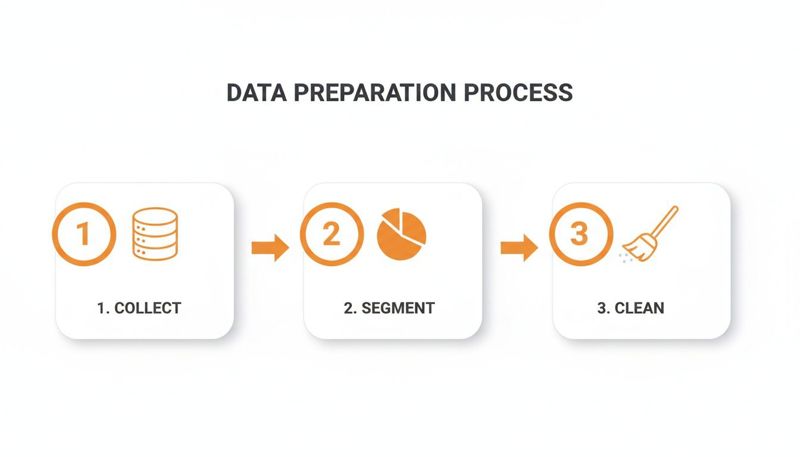
This setup ensures that when your campaign goes out, the right information is pulled for every single person, creating a perfectly personalized image every time. If you want to get nerdy about how the tech works behind the scenes, you can dig into the mechanics of an email image API.
Here's a peek at what that URL might look like for a couple of popular platforms:
- Mailchimp:
https://img.okzest.com/your-template-id?name=*|FNAME|* - Klaviyo:
https://img.okzest.com/your-template-id?name={{ first_name }}
You don't need to be a coder. You just copy this URL and paste it into your ESP's email editor wherever you'd normally put an image. The system takes care of the rest.
The Importance of Smart Fallbacks
So, what happens if you don't have a first name for one of your subscribers? Without a backup plan, they could see a broken image or, even worse, something awkward like "Hi, [FirstName]!" This is where fallbacks act as your safety net.
A fallback is just a default value that the system shows if a piece of data is missing. Setting them up is non-negotiable if you want to maintain a professional look for every recipient.
For instance:
- If
FirstNameis missing: Your image could show a friendly "Hello there!" instead of a blank spot. - If
CompanyNameis missing: It could default to showing your brand's tagline.
This simple step ensures everyone gets a great experience and prevents personalization blunders that can make you look sloppy. Getting this right pays off big time. Welcome sequences that nail this level of personalization can see 2x to 4x higher click rates and 30% to 60% higher conversions compared to generic blasts. When you consider that good automated flows often drive 25% to 45% of total email revenue, it's clear why this stuff matters.
Advanced Dynamic Content Strategies To Boost Engagement
Okay, you’ve nailed adding a first name to an image. Now it's time to dig into the more sophisticated tactics that top marketers use to create truly memorable experiences. This is where we move beyond basic personalization and into genuine one-to-one communication, where content adapts in real time to each subscriber’s unique context.
This is the stuff that drives real action. We're talking about creating urgency, providing actual utility, and making the entire customer journey feel seamless and intelligent.
Embed Real-Time Information for Urgency and Relevance
One of the slickest ways to get someone to act now is by embedding live, time-sensitive information directly into your email images. It creates a powerful sense of urgency that a static email just can't match.
Think about these powerful use cases:
- Live Countdown Timers: Got a flash sale or a webinar registration deadline? Show a timer that literally counts down every single time the user opens the email. That visual cue is a constant reminder that time is running out.
- Real-Time Event Updates: If you're selling tickets, you could display the number of spots remaining, updated live. Seeing "Only 17 tickets left!" is way more compelling than a generic "selling fast" message.
- Dynamic Weather Forecasts: A travel company could send an email showing the live weather at a customer's booked destination, building excitement and helping them pack for their upcoming trip.
These elements turn a simple notification into a live, relevant dashboard of information.
The impact of this kind of relevance is massive. Studies have shown that segmented campaigns using dynamic content can pull in up to 760% more revenue than generic ones. And when brands add live content, they often see a 107% higher ROI—jumping from a 27:1 return all the way up to 56:1. You can read more about these email marketing trends and see how they are changing the game.
The data is clear: the more relevant and timely your message is, the more likely your audience is to take action.
Leverage Behavioral Triggers for Hyper-Personalization
Taking it a step further, you can connect your dynamic images to specific user behaviors. This isn't just personalization; it's about timing your content perfectly to match what a subscriber is doing right now. It’s about reacting to their actions instantly.
Imagine a shopper who spends ten minutes looking at a specific pair of sneakers but leaves without buying them. An hour later, an email hits their inbox.
Instead of a generic "You left something in your cart" message, the email contains a crisp image of those exact sneakers. Maybe it even has a dynamic message like, "Still thinking about these, Sarah?" This level of specificity is incredibly effective at re-engaging people who have shown clear intent.
Create Interactive and Utilitarian Experiences
Advanced dynamic content for email campaigns isn't just about selling more stuff. It's also about providing genuine value and utility right there in the inbox. By making your emails more functional, you create a stickier, more engaging experience for your customers.
Think about how you can solve a problem for your subscriber without making them leave the email:
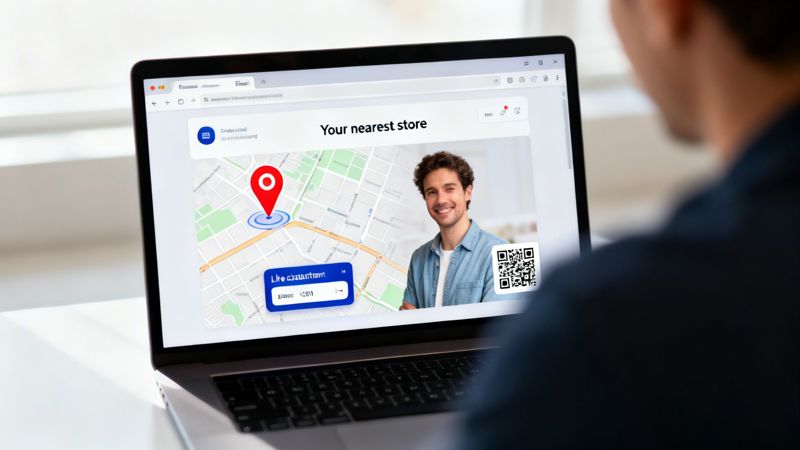
- Personalized Maps: A retailer with physical stores can generate a dynamic map image showing the exact route from the subscriber's location to their nearest store. This removes a point of friction and makes it that much easier for them to visit.
- Unique QR Codes: For an event, you can generate a unique QR code for each attendee inside their confirmation email. This makes the check-in process a breeze and makes the attendee feel prepared and valued.
- Dynamic Polls and Surveys: Embed images that change after a user clicks an option. This creates a simple, interactive poll inside the email itself, no landing page required.
These strategies show your subscribers that you respect their time by giving them useful tools and information. It's an approach that builds brand loyalty far more effectively than another generic promo, turning your email program into a genuinely helpful touchpoint that stands out in a crowded inbox.
Testing And Measuring Your Dynamic Campaigns
So, you’ve launched your dynamic campaign. That’s a huge step, but the work isn’t done once you hit "send." To really see the benefits of dynamic content for email campaigns, you need a solid plan for testing and measuring what actually works. This is how you go from a cool idea to a proven, revenue-generating strategy.
The real goal here is to get past surface-level vanity metrics. Open rates are nice to know, but they don't tell you if your personalization is actually changing how subscribers behave or encouraging them to buy. You need to dial in on the numbers that tie directly back to your business goals.
Setting Up Meaningful A/B Tests
The cleanest way to prove dynamic content is working is to test it against a static version. A simple A/B split test gives you hard, quantitative proof of what your audience responds to. Just remember to avoid testing too many things at once—keep it simple so you get clear, actionable results.
Your test structure might look something like this:
- Version A (The Control): Your standard email with a generic, one-size-fits-all image.
- Version B (The Variant): The exact same email, but this time with a personalized dynamic image that pulls in the subscriber's name or some other useful data point.
Send each version to a decent-sized chunk of your audience and see what happens. You're looking for a clear winner based on the metrics that actually move the needle for your business.
The most insightful tests are the ones that measure bottom-of-the-funnel actions. An increase in opens is nice, but a 25% lift in click-throughs that lead to actual conversions is what truly proves the ROI of your efforts.
Key Metrics to Track for Dynamic Campaigns
When you start digging into the results, zero in on the data points that show how personalization is impacting behavior. These are the numbers that will make the case for investing in even more sophisticated campaigns down the road.
You’ll want to focus your analysis on these core metrics:
- Click-Through Rate (CTR): This is your most important top-level metric. Are more people clicking the link in the email with the personalized image? A higher CTR is a huge signal that your dynamic content is grabbing attention.
- Conversion Rate: Of the people who clicked, how many actually did the thing you wanted them to do? That could be making a purchase, signing up for a webinar, or downloading a guide. This metric connects your email directly to revenue.
- Revenue Per Email (RPE): For any e-commerce brand, this is the ultimate measure of success. Just calculate the total revenue generated from each campaign version and divide it by the number of emails you sent.
For a deeper dive into what to track, exploring a guide on email campaign analytics can provide a more complete picture of how to measure performance effectively.
Pre-Launch Testing for Merge Tags and Fallbacks
Okay, before you even think about A/B testing, you have to do your pre-launch checks. A broken merge tag or a failed fallback can completely derail a campaign and make your brand look sloppy. Do not skip this.
Most email service providers have a feature that lets you preview an email as a specific contact on your list. Use it to run through a few different scenarios:
- Test a contact with complete data: Does their first name, company, or other info show up correctly in the image?
- Test a contact with missing data: Does your fallback content appear like it should? If you don't have a first name, does the image show your default greeting instead?
- Test across different email clients: Send tests to yourself on Gmail, Outlook, and Apple Mail. Check them on your phone and your computer to make sure your dynamic image looks perfect everywhere.
This methodical testing process is what ensures every single subscriber gets a polished, professional email, no matter what data you have on them. It’s the foundational work that makes successful dynamic campaigns possible.
Got Questions About Dynamic Email Content?
Jumping into dynamic content for your email campaigns can feel like a big step. It's totally normal to have questions swirling around. I hear a lot of the same concerns about the tech, the data, and deliverability, but the reality is usually much simpler than you think. Let's clear up some of the most common questions marketers have.
Will Dynamic Content Hurt My Email Deliverability?
This is always a top concern, but here's the short answer: when you do it right, dynamic content can actually help your deliverability. Think about it from the perspective of ISPs like Gmail and Outlook. They love seeing relevance. When your subscribers are consistently opening your emails and clicking links, it sends a strong signal that your content is valuable, which is great for your sender reputation.
The trick is just to stick to good technical habits. Always use optimized images that aren't huge in file size, and make sure they're hosted on a fast, reliable server. Broken image links or super slow-loading visuals can sometimes get flagged by spam filters.
Here's a critical tip: always, always test your campaigns across all the major email clients before you hit send. This makes sure your images—and more importantly, your fallbacks—look perfect everywhere. It helps you avoid that broken, spammy look that can kill your credibility.
What If I Don't Have Enough Data to Personalize?
This is probably the biggest fear I see holding marketers back. It's built on the idea that you need a mountain of data to even get started, which just isn't true. You can start small and still see a huge impact.
Honestly, even just having a subscriber's first name is enough to create a personalized welcome image that will blow a generic one out of the water. The whole game is to build up your data over time, something people call progressive data collection.
Here’s a simple way to get going:
- Start with the basics: Just grab a first name and email when someone signs up.
- Watch their behavior: Track what links they click or what pages they visit on your site. This gives you clues about what they're interested in.
- Just ask: Every now and then, run a campaign asking people to update their preferences. You could offer a small incentive or just promise them more relevant content.
Modern tools are built for this exact problem. Platforms like OKZest have strong fallback options, so if a piece of data is missing, a default image or message shows up instead. This means every single person gets a clean, complete email, even if you don't have a full profile on them yet.
Is This Going to Be Too Technical for Me to Set Up?
A few years back, the answer might have been "maybe." Today, it's a hard no. The explosion of no-code tools has completely changed the game, putting dynamic image creation right in the hands of marketers—no coding required.
Platforms like OKZest use simple drag-and-drop editors to build your image templates. You just upload a background, add some text layers, and then map which layer pulls from which data field (like FirstName, for example).
The platform handles all the heavy lifting in the background. It spits out a single line of text—a special URL with merge tags—that you copy and paste into your email editor in Mailchimp or Klaviyo. It works just like a standard *|FNAME|* tag. When your subscriber opens the email, the system creates their unique image instantly. You get all the cool results without any of the tech headaches.
Can I Use These Dynamic Images Outside of Email?
Absolutely. And this is where your strategy can get really powerful. The technology that creates these images isn't just for email. You can use that same smart URL across different channels to create a consistent, personalized experience for your customers.
For instance, you could:
- Pop the image onto your website to greet a returning visitor by name.
- Send it in a social media DM to make a really memorable first impression.
- Work it into a chatbot conversation to make the interaction more visual and fun.
When you take this cross-channel approach, you're reinforcing your brand and showing your audience that you get them, no matter where they are. Personalization stops being a one-off tactic and becomes a core part of how you communicate.
Ready to create stunning, personalized images that captivate your audience and drive real results? OKZest provides the no-code tools you need to automate personalized image creation for email, social media, and more. Start for free and see how easy it is to make every message feel personal. Explore OKZest today.