Picture this: you send an email to your prospect, John. Instead of just a "Hi John" in the text, the main banner image is a custom conference badge with his name printed right on it.
That’s the magic of personalized campaign images. They are dynamic visuals that automatically pull in unique data for every single person who sees them.
Think of it as merge tags for your images.
What Are Personalized Campaign Images?
While most marketing campaigns blast the same static image to everyone, personalized images create a genuine one-to-one connection. They make your audience feel seen.
Instead of a generic stock photo, a customer might see a product mockup featuring their own company's logo. Or an event invite that already has their name beautifully integrated into the design. This simple change turns a passive visual into a personal, engaging experience.
It’s about shifting your marketing from a generic broadcast into a meaningful conversation. In today's crowded digital space, grabbing someone's attention requires more than a clever subject line—it demands relevance. Personalized images deliver that relevance instantly, often before your reader even gets to the first sentence of your copy.
A great way to understand the difference is to see them side-by-side.
Static vs Personalized Images at a Glance
This table breaks down the core differences in approach and impact.
| Attribute | Static Campaign Image | Personalized Campaign Image |
|---|---|---|
| Approach | One-to-many broadcast | One-to-one conversation |
| Audience Feel | Anonymous, part of a crowd | Seen, understood, and valued |
| Relevance | Low; generic and impersonal | High; directly relevant to the individual |
| Data Usage | None; the same for everyone | Uses customer data (name, company, etc.) |
| Impact | Easily ignored, low engagement | Captures attention, boosts engagement |
| Results | Standard click-through rates | Higher CTR, conversions, and brand loyalty |
As you can see, the shift isn't just cosmetic. It's a fundamental change in strategy that leads to measurably better results.
The New Standard: An Expectation for Personalization
Here's the thing: modern customers don't just appreciate personalization; they've come to expect it as standard.
Recent global survey data makes this crystal clear. A huge 73% of customers now expect companies to understand their unique needs, and 81% will flat-out ignore marketing that feels irrelevant to them.
The reward for getting this right is massive. Companies that truly excel at personalization generate 40% more revenue from those activities than their average-performing competitors. You can dig into the numbers yourself in the full marketing personalization report.
This trend really underscores a critical lesson for every marketer out there:
- Generic Gets Ignored: Your audience is tired of one-size-fits-all content. They've built up a powerful filter for it.
- Relevance Is Rewarded: Content that speaks directly to an individual’s world is what cuts through the noise.
- Visuals Are Your First Impression: Personalizing the visual elements of your campaign makes an immediate and powerful impact.
Using a tool like OKZest makes this powerful strategy accessible to any marketing team. It’s how you set the stage for deeper engagement, build stronger customer relationships, and ultimately, drive higher conversions by turning every image into an opportunity for connection.
Why Visual Personalization Drives Real Results
Let's get straight to it: personalized campaign images do more than just grab attention—they have a real, measurable impact on your bottom line. When someone sees an image made just for them, it creates a powerful connection. It’s the difference between a generic ad they’ll scroll past and a message that makes them feel seen and understood.
This isn’t about creative flair; it’s about strategy. Making each interaction feel personal is how you build genuine customer loyalty. That sense of being valued is what turns a one-time buyer into a repeat customer and a vocal fan of your brand.
From Attention to Action
The path from seeing a personalized image to making a purchase is shorter than you might think. We've all been there. You get an email or a message that feels like it was written specifically for you, and it just clicks. The data backs this up completely.
Modern customers don't just prefer personalization; they expect it. A recent study found that 71% of consumers expect personalized interactions, and a whopping 76% get frustrated when they don’t get them. Another report from Deloitte found that 80% of people are more likely to buy from brands that personalize their experiences, and they often spend 50% more. You can explore the impact of personalized marketing to see just how effective this is for top-tier brands.
This infographic breaks down exactly why personalization is a must-have, not a nice-to-have. It shows the gap between what customers want and what they often get, and what that means for your revenue.
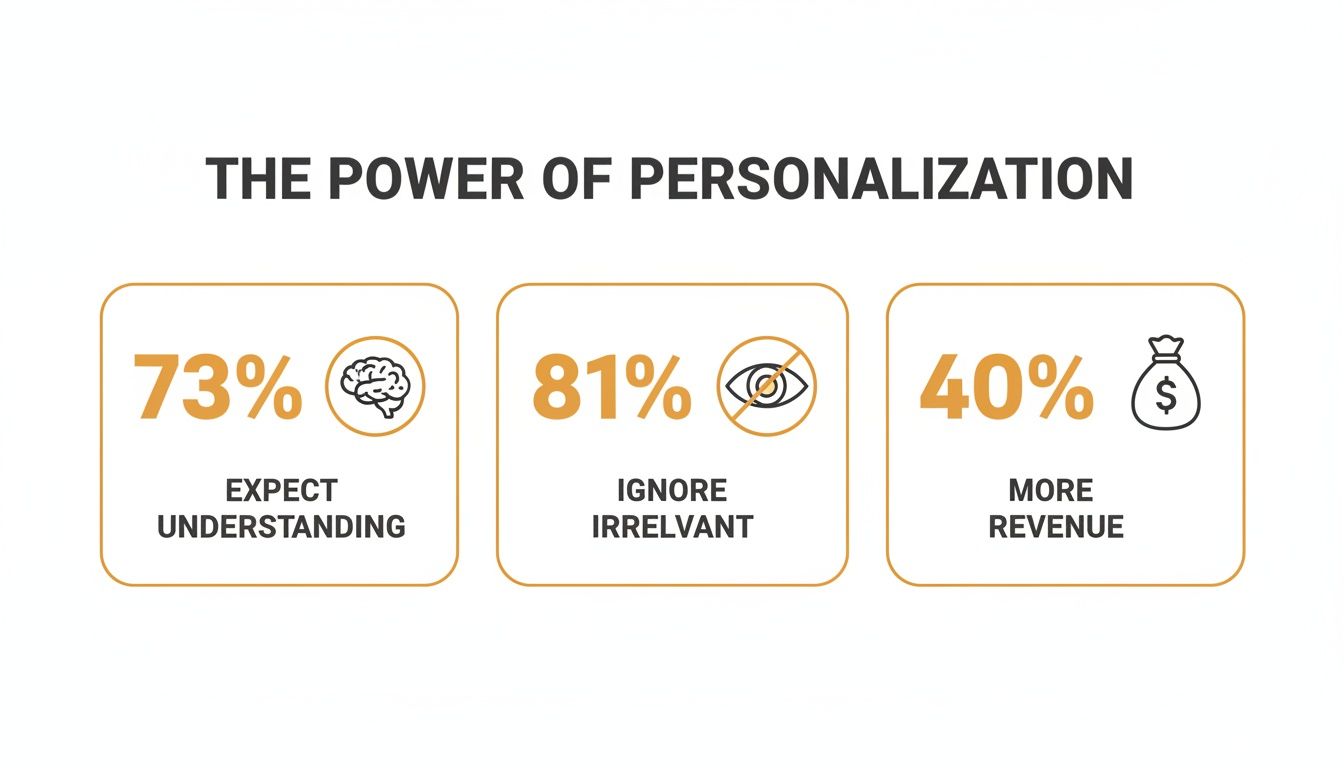
The takeaway is simple: when you show your customers you understand them, you earn their attention and, ultimately, their business.
The Financial Impact of Feeling Seen
The ROI from visual personalization isn’t just about a quick spike in click-through rates. The real value is in how it builds customer lifetime value (CLV) over the long haul.
When customers feel a brand understands them on a personal level, they don't just buy once—they buy more frequently, spend more per purchase, and become vocal supporters of the brand.
This creates a self-sustaining growth engine built on loyalty, not just constantly chasing new leads. Whether you run a marketing agency, a travel business, or an e-commerce store, automating millions of unique images isn't just about saving time. It's about delivering relevance at scale to hit three key goals:
- Higher Conversion Rates: A personalized call-to-action—like a conference pass with someone's name on it—feels far more compelling and immediate.
- Increased Customer Lifetime Value: Customers who feel understood stick around longer and make more repeat purchases, which is far more profitable than acquiring new ones.
- Stronger Brand Advocacy: A happy customer who’s had a great, personalized experience is your best marketer. They’ll share that experience with their friends and network.
In the end, investing in personalized campaign images is a direct investment in your ROI and the lasting relationships that keep your business growing.
Practical Use Cases for Personalized Images
Alright, you get the theory. But where do personalized campaign images actually make a difference? Let's get practical and look at how this works in the real world, across different channels you're already using.
Think of it this way: a generic marketing image is like a flyer tacked to a community notice board—it's for everyone, which means it's really for no one in particular. A personalized image, on the other hand, is like getting a handwritten invitation. Your name is right there on the front, and it instantly signals that the message inside was meant just for you.
Here’s a simple but powerful example of how a welcome message can be totally transformed, creating an immediate connection.
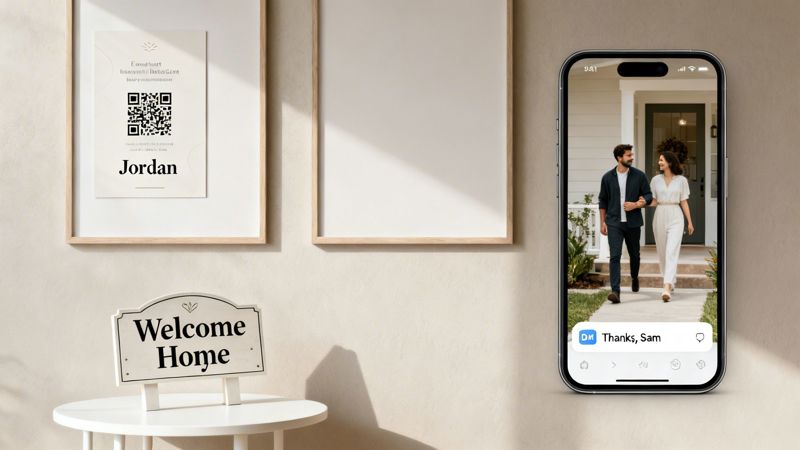
This image shows how a simple piece of data, like a name, can be dynamically added to a beautiful visual. It’s a small touch that creates a moment of genuine surprise and delight for the person seeing it.
Email Marketing and Event Invitations
For anyone in email marketing, personalization needs to go way beyond just the subject line. Imagine you're promoting a webinar. Instead of a generic banner, you could automatically generate an image for every single registrant that looks like a VIP pass, complete with their name and a unique QR code for check-in.
This single move accomplishes a few things all at once:
- Boosts Attendance: That personalized pass makes the event feel more exclusive and real, making people more likely to actually show up.
- Simplifies Logistics: The unique QR code is perfect for a seamless, one-scan check-in process, cutting down on lines and hassle on event day.
- Creates a "Wow" Factor: It’s an unexpected detail that makes your brand stand out and shows you care about the little things.
A tool like OKZest makes this incredibly straightforward. You design one template, connect it to your registration list, and the system can generate thousands of unique passes in an instant. For a closer look at this tactic, you can learn more about how to use personalized images for email marketing campaigns.
Social Media and Community Management
If you manage a social media presence, personalized images are a fantastic tool for building a stronger community, especially in direct messages (DMs). When someone new follows your brand or an influencer you're partnered with, you can set up an automated workflow to send a personalized welcome image straight to their inbox.
A simple "Thanks for the follow, [Name]!" image, maybe even featuring their profile picture, turns a standard notification into a personal greeting. This small gesture can significantly increase follower loyalty and direct engagement from day one.
This strategy is a game-changer for:
- Acknowledging New Followers: It makes them feel seen and valued from the very beginning.
- Thanking Brand Mentions: You can automate a personalized graphic to thank users who tag your brand in their posts.
- Celebrating Milestones: Send a custom graphic to a superfan when they hit an engagement anniversary.
Real Estate and High-Touch Sales
In industries like real estate, the personal connection is everything. Agents can use personalized visuals to make property viewings truly memorable. Before a scheduled tour, the agent could send an email with a stunning photo of the property, but with a "Welcome Home, [Client's Name]" sign digitally placed by the front door.
Suddenly, the client isn't just looking at a house; they're picturing their life in it. The same idea works just as well in other high-touch sales. A consultant could follow up on a proposal with a personalized image summarizing the key outcomes for that specific company, their logo included. It reinforces the message that your solution was built just for them.
How Personalized Image Technology Works
Ever wondered how those slick, personalized images in your inbox are made? It’s not magic, and thankfully, it doesn’t involve a designer manually creating thousands of graphics. The process is surprisingly straightforward.
Think of it like a mail merge, but for images. You begin with a single, well-designed image template. Then, you connect a data source—like your customer list—and tell the system where to plug in each piece of information. The technology does the heavy lifting, generating a unique visual for every single person.
The Three Core Components
At its core, this technology depends on three key elements working together. Once you understand them, the whole process becomes much clearer and you can see just how powerful it is.
- The Base Image Template: This is your static visual foundation. It could be a conference badge, a coupon, or a simple welcome graphic. You design it just once, leaving specific areas blank as placeholders for your dynamic text or images.
- The Data Source: This is the information that will populate your template. It can be a simple CSV file with names and companies, or it can be your live CRM data from platforms like HubSpot or Salesforce.
- The Integration Layer: This is the engine that merges your template and data. A platform like OKZest creates a unique URL for each personalized image. When that URL is loaded—in an email, on a webpage—the image is generated on the spot with the correct data.
This approach is incredibly efficient. A single template and a data source with a thousand contacts can produce a thousand unique personalized campaign images with zero extra design effort.
How Data Powers the Personalization
The data is what truly brings your images to life. The best part is the flexibility; you can use almost any information you've collected about your customers. Some of the most common data points include:
- First Name: The easiest and often most effective way to grab someone's attention.
- Company Name or Logo: Perfect for B2B campaigns to show a prospect you’ve done your homework.
- Job Title: Helps you frame benefits that are directly relevant to a person's role.
- Profile Picture: A fantastic way to create a deeply personal connection in welcome messages or community updates.
- Location: Using a city name can make your campaigns feel hyper-relevant and local.
A crucial part of making this work is having a fallback strategy. What if you’re missing a first name for someone? A good system will automatically use a default value you've set, like "Friend" or "Valued Customer." This ensures your campaign always looks professional and never displays a broken or empty image.
Integration Methods for Your Marketing Stack
Getting these dynamic images into your campaigns is much easier than you might think. You don't need to be a developer, as most methods use tools you're probably already familiar with.
The table below breaks down the common ways to add personalized images to your campaigns, outlining what each method is best for and the technical skill required.
| Integration Method | Best For | Technical Level |
|---|---|---|
| Merge Tag / Image URL | Email marketing, newsletters, and most marketing automation platforms. | Beginner: Just copy and paste a special URL into your email editor's image block. |
| HTML Snippet | Websites, landing pages, and web-based applications. | Beginner: Copy and paste a small block of HTML code where you want the image to appear. |
| No-Code Integrations | Connecting apps without writing code (e.g., using Zapier). | Intermediate: Involves setting up triggers and actions between your different marketing tools. |
| API Integration | Custom applications, chatbots, and large-scale, automated workflows. | Advanced: Requires development resources to connect directly with the image generation service. |
If you want to get into the nuts and bolts, you can learn more about how a dynamic image API drives these automations behind the scenes.
As you can see, the most common method—using a merge tag—is as simple as adding a {{first_name}} tag to your email. This accessibility is what makes personalized campaign images such a practical and powerful tool for any marketer today.
Alright, let's dive in. It's one thing to talk about personalized images, but it's another to actually get your first campaign out the door. The good news? It’s much more straightforward than you might think.
We're going to break it down into a simple checklist. Follow these steps, and you’ll go from a great idea to a live campaign that gets results. Think of it like a recipe—each step builds on the last, and soon enough, you'll have something impressive to show for it.
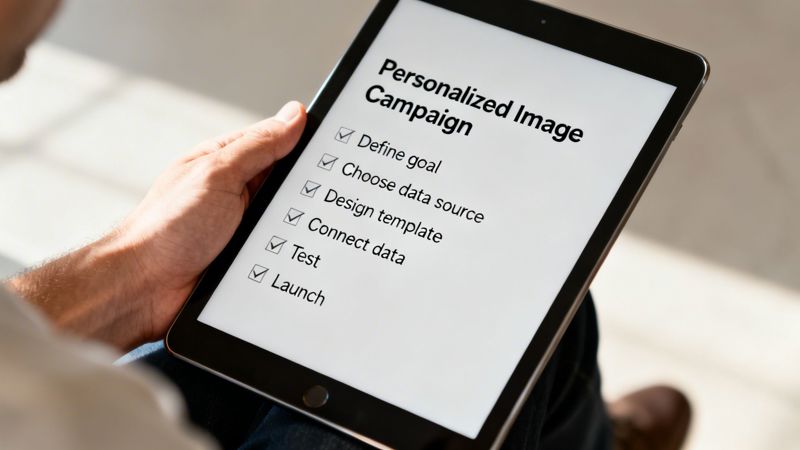
Step 1: Define a Clear Goal
Before you touch a single pixel, you need to know exactly what you're trying to accomplish. A clear goal is your north star; it guides every other decision you'll make.
Are you trying to get more sign-ups for a webinar? Push for more coupon redemptions? Or maybe just give new subscribers a warm, personal welcome? Your goal will tell you what data to use and what message your image needs to send. A webinar invite might just need a name, while a coupon could feature a unique code.
Step 2: Choose Your Data and Design Your Template
With your goal set, it’s time to pick your data. My advice? Start simple. A first name is often all it takes to make a big impact. You can pull this data from a simple CSV file, your email marketing tool, or your CRM.
Next, you'll design your image template in a tool like OKZest. This is your visual foundation. Create a sharp-looking design and add placeholders where your personalized text or images will appear.
Key Takeaway: Your template should look like it’s missing something without the personalization. The goal is for the dynamic data to feel like a core part of the design, not just text slapped on top as an afterthought.
Step 3: Generate and Test Your Images
Now for the fun part—connecting your data to your image template. A platform like OKZest will generate a unique dynamic URL for every person on your list. This is the special link that does all the magic inside your email or on your website.
But before you hit "send," you have to test. This step is non-negotiable.
- Pick a small, internal group to test with, like your own team.
- Double-check that the images load correctly and that the personalization is spot-on for everyone.
- Test your fallbacks. Send one to a contact with missing data (like no first name) to make sure your default text shows up correctly.
For more advanced workflows, you might want to explore how a dynamic image API can power these automations. But honestly, for most campaigns, a simple merge tag is all you need.
Step 4: Launch and Monitor Your Campaign
Once you’ve tested everything and confirmed it’s all working perfectly, you’re ready for the main event. Go ahead and launch your campaign to your target audience.
But don't just set it and forget it. Keep a close eye on your results. You’ll want to track a few key metrics:
- Click-Through Rate (CTR): Are more people clicking on your personalized images than your old static ones?
- Conversion Rate: Is the campaign hitting the goal you set back in Step 1?
- Engagement: Are you noticing more replies, social shares, or positive feedback?
Following this checklist takes the mystery out of creating personalized campaign images. It proves you don't need a huge budget or a team of developers to build one-to-one visual experiences that grab people's attention and drive real business results.
Common Questions About Personalized Images
Jumping into a new marketing tactic always brings up a few questions. When we talk about personalized campaign images, most people wonder about the practical, day-to-day realities. Let's tackle some of the most common concerns head-on with clear, straightforward answers.
A big one we hear is the fear of not having enough data to get started. The good news? You almost certainly do.
You can create incredibly effective personalized images using just a single piece of information: a first name. A simple graphic that says "Welcome, Sarah!" is worlds more engaging than a generic one. You can always layer in more data like company names or job titles later on.
Do I Need a Developer to Do This?
This is a huge question for many marketing teams. The short answer is no. Modern platforms like OKZest are built as no-code solutions, which means they were designed for marketers, not developers.
If you're comfortable using an email marketing tool or a social media scheduler, you have all the skills you need. The process usually looks something like this:
- Design your image template in a simple, user-friendly editor.
- Add placeholders where your dynamic text or logos will go.
- Copy a simple merge tag or URL and paste it into your email builder or website.
For teams that do have developers, there are more advanced options like API integrations. But for the vast majority of marketers, you can get started and see fantastic results without writing a single line of code.
How Do You Handle Tricky Data?
What happens when you have a contact with an exceptionally long name, or one that uses special characters? It's a valid concern—the last thing you want is for your beautifully designed images to break.
Modern personalization platforms have built-in logic to handle these exact scenarios. Text can be set to automatically shrink to fit the available space, or it can be truncated with an ellipsis (...) to prevent overflow, ensuring your design always looks clean and professional.
These tools are also built to correctly render special characters and different languages, so your global campaigns will look just as sharp as your local ones.
Can I Use Personalized Images on Social Media?
Absolutely. While email is a natural fit, personalized images are incredibly effective on social media, especially for more direct interactions.
You can set up automations to send a new follower a personalized "Thank you!" graphic in their DMs. For public posts, you can use dynamic sharing links that generate a unique image for each person who clicks. A great example is a quiz that generates a results image with the user's name on it, encouraging them to share their personalized outcome.
The whole point of personalization is to cut through the noise, which is a massive challenge for brands today. Recent survey data shows that 64% of shoppers find brand communications too generic, and a staggering 80% are likely to ignore messages that feel irrelevant. With tools like OKZest making unique image creation automatic, you have a clear path to becoming far more relevant. You can read more about the latest trends in personalization from 2026 to see just how big the opportunity is.
Ready to see how easy it is to create your own personalized images? With OKZest, you can automate stunning, unique visuals for every customer in minutes. Start creating for free at OKZest.com.