Real-time content images are dynamic visuals that update automatically with personalized information for each viewer. A simple way to think of them is like "merge tags for images." They can transform a single image template into countless unique variations by pulling in live data—like names, locations, or special offers—at the exact moment it's viewed.
What Are Real-Time Content Images

Imagine sending an email campaign where every single recipient sees a different image, created just for them. One person sees a welcome banner with their name, "Welcome, Sarah!" while another gets a coupon with a personalized code. This is exactly what real-time content images do.
Instead of a static, one-size-fits-all picture, this technology builds visuals on the fly. It's like having a tiny artist inside your email or website who paints a new picture for every visitor based on the data you have. This instantly moves your communication from a generic broadcast to a meaningful one-to-one conversation.
From Static To Dynamic Visuals
To really get it, it helps to compare static images with their real-time counterparts.
A quick comparison highlights the fundamental differences between traditional static images and dynamic real-time content images.
Static Vs Real-Time Images at a Glance
| Feature | Static Images | Real-Time Content Images |
|---|---|---|
| Creation | Created once, stored on a server | Generated "on-the-fly" at the moment of view |
| Content | Same for every viewer | Personalized for each individual viewer |
| Timeliness | Can become outdated quickly | Always current and relevant |
| Engagement | Passive and generic | Interactive and highly engaging |
| Data Usage | None | Pulls data from a CRM, ESP, or other sources |
The key takeaway is that real-time images are built to be responsive and personal, ensuring the content is always relevant.
This "just-in-time" creation is what makes them so powerful. The image doesn't even exist until someone opens your email or visits your webpage, so the information it displays—like a countdown timer or a local weather forecast—is always up-to-the-minute.
To understand how this is possible, it's useful to know how AI analyzes user behavior in real-time to inform these dynamic adjustments. This capability is at the heart of making content truly responsive.
The Technology Behind The Magic
So, how does this all work? At a high level, real-time image generation combines a base template with dynamic data. With platforms like OKZest, you can create these templates without touching a line of code by layering text, images, and shapes, then linking them to data variables.
It all comes down to three core components:
- Image Template: A base design that acts as your canvas.
- Merge Tags: Special placeholders (e.g.,
{{first_name}}) you insert into the image URL. - Data Source: Your CRM, email platform, or database that holds the personalized information.
When a user loads the image, our platform’s API instantly finds the correct data, populates the template, renders the final visual, and serves it to the user. You can dive deeper into the technical side in our guide to the real-time image rendering API.
This approach is tapping into major market shifts. The digital content market is forecasted to hit $71.19 billion by 2031, a boom driven by the demand for more engaging, visual-first experiences. We're also seeing this in the tech itself—the adoption of efficient formats like AVIF jumped from just 0.4% in 2021 to 13.3% by 2023, showing a clear need for faster, better image delivery.
By using this technology, you're not just creating pretty pictures; you're building a smarter, more responsive way to communicate with your audience.
The Business Impact of Dynamic Visuals
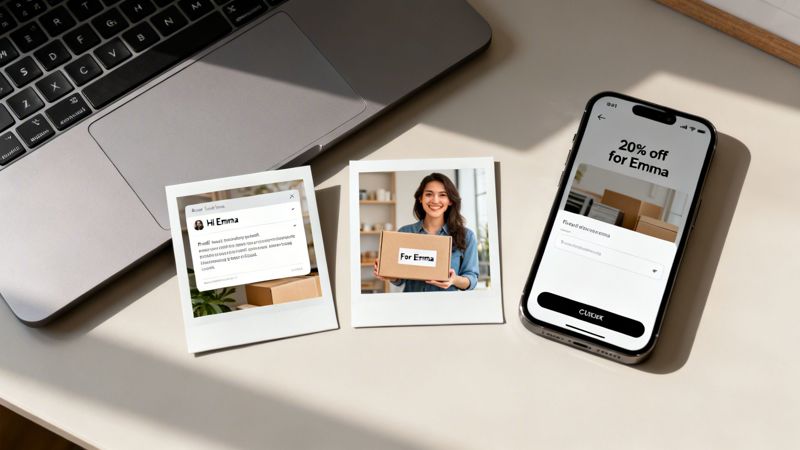
Knowing the tech is one thing, but seeing what it does for your bottom line is what really counts. So, let's move past the "what" and get into the practical "why." Real-time content images aren't just a clever gimmick; they're a serious business tool that gets tangible results.
When you switch from generic, one-size-fits-all visuals to images that are dynamic and data-driven, you create a completely different experience for your audience. This gives you a real edge in a very crowded market. The benefits boil down to three main areas that directly impact growth and customer loyalty.
A Serious Boost in Engagement
The first thing you’ll notice when using real-time content images is a major jump in engagement. When your content speaks directly to a user—using their name, referencing something they did, or even just acknowledging their location—it’s incredibly hard for them to ignore.
This is the difference between someone scrolling right past a stock photo and stopping to look at an image that feels like it was made just for them. Personalized visuals demand attention in a way plain text or generic images just can't. In fact, effective personalization can lift revenues by 5 to 15% and improve marketing spend efficiency by 10 to 30%.
Think about it:
- A fitness app sends a weekly recap email with a graphic that has the user's name and their total miles run for the week.
- An e-commerce site shows a banner on its homepage featuring a product the user looked at before, but this time, their name is on it.
This kind of personal touch makes your message feel less like an ad and more like a helpful, one-on-one chat.
Building Stronger Customer Relationships
Beyond just getting that initial click, real-time content images help you build relationships that last. They let you create those "wow" moments that show customers you see them as individuals, not just another number in your CRM.
When a brand remembers details about you and uses them to make communication better, it creates a feeling of being valued. That emotional connection is the bedrock of long-term loyalty.
Imagine a real estate agent sending a follow-up email after a home viewing. Instead of a generic message, the email includes a picture of the property with a "Welcome Home, [Client's Name]!" sign digitally placed on the lawn. It’s a small detail, but it turns a routine follow-up into a memorable moment that strengthens the agent-client connection.
Likewise, a SaaS company could send a personalized "anniversary" image to celebrate a customer's first year, dynamically adding their name and a key milestone they hit. These are the kinds of thoughtful gestures that separate the good brands from the great ones.
Driving More Revenue and Conversions
At the end of the day, better engagement and stronger relationships lead directly to more revenue. Real-time content images are incredibly good at driving conversions because they perfectly tie a personalized visual to a clear call-to-action (CTA).
When an image is made for a specific user, the CTA feels more relevant and urgent. The abandoned cart email is a perfect example. Instead of just a text list of the forgotten items, you can send an email with a dynamic image that shows the exact products, maybe even with a personalized discount code layered right on top.
That visual reminder is so much more powerful than text alone. Here’s how it directly grows revenue:
- Abandoned Carts: An e-commerce brand can show a user the exact items they left in their cart within a dynamic image, reminding them of what they're missing.
- Upselling: A travel company could send an offer for a hotel upgrade with a picture of the premium room, complete with the customer’s name on a welcome screen.
- Event Registrations: An event manager sends a "last chance" email with a preview of a personalized digital ticket, creating a sense of ownership and urgency to sign up.
By making your offer personal and tangible, you reduce friction and make it that much easier for a customer to click "buy" or "register."
Powerful Use Cases To Inspire Your Next Campaign
Theory is one thing, but seeing real-time content images in action is where the magic really happens. Let's move past the concepts and look at concrete ways businesses are using dynamic visuals to create marketing that feels personal and purposeful.
These aren't just hypotheticals; they're proven strategies you can borrow for your own campaigns, from email to social media.
Elevate Your Email Marketing
Your subscribers' inboxes are crowded. Generic, one-size-fits-all campaigns are the fastest way to get ignored. Real-time content images are your secret weapon to cut through that noise with visuals made for each individual.
Think about your "Welcome" email. Instead of a static banner, you could use a dynamic image that greets the new subscriber by name. A week later, a follow-up email could show an image of their current loyalty points, visualizing how close they are to their next reward. It’s a small touch that makes them feel seen.
- Use Case Example: A travel company's email features a stunning destination photo with a text overlay that reads, "Your next adventure, Mark?" and displays the current weather at that location.
- Another Example: A SaaS business sends a weekly digest with a personalized graphic: "You've crushed 7 tasks this week, Jessica!"
These details transform a mass email into what feels like a one-on-one conversation, boosting engagement and clicks.
Personalize Event And Course Experiences
If you run events, sell courses, or offer consulting, making each person feel valued is everything. Real-time content images automate this personalization, giving you a professional edge without the manual work.
Instead of spending hours creating hundreds of certificates by hand, picture a system that automatically generates a unique certificate of completion the moment a student finishes a course. The image pulls in their full name, the course title, and the completion date, ready for them to share on LinkedIn.
The same idea works perfectly for events. You can send personalized digital tickets that are more than just a QR code. The ticket image can include the attendee's name, their seat number, and a custom welcome message, creating a premium feel right from the start.
This level of personalization is quickly becoming an expectation. The photo-sharing market—a huge driver for visual content—is projected to grow from $5.67 billion in 2025 to $6.09 billion in 2026. This boom highlights the massive demand for engaging, personalized visuals like certificates and dynamic social posts.
Supercharge Sales And Social Media Automation
This isn't just for email. Sales and social media teams can use real-time images to build rapport and drive action in channels where a personal touch is critical.
A sales rep can create a dynamic template for deal summaries. After a meeting, they can instantly generate a visual recap that includes the prospect’s company logo, key discussion points, and their own headshot. It's far more memorable than a plain text follow-up.
Social media managers can weave dynamic visuals into their DM automations to make them feel less robotic.
- For Instagram: Someone comments a keyword on your post? Your automated DM can include an image that says, "Hey @username, thanks for your interest! Here's that link you wanted."
- For WhatsApp: A brand can welcome a new subscriber with a personalized image that includes their name and a unique discount code, all within the chat.
These automated, yet deeply personal, interactions make your brand feel human and responsive. It’s a key part of building effective strategies for dynamic visuals for social media, turning automated messages into genuine moments of connection.
So, you're ready to start using real-time content images. The good news is, it's probably easier than you think.
Platforms like OKZest are built with different users in mind. Whether you're a marketer who prefers a visual, no-code editor or a developer looking to build a custom solution, there's a path for you.
The first step is figuring out what you want to achieve. Your campaign goal will point you toward the best way to implement these images.
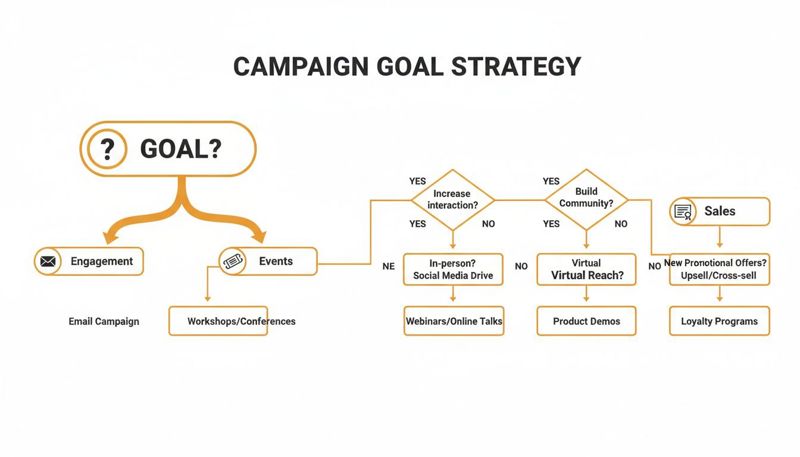
As the flowchart shows, your strategy will change depending on whether your main goal is boosting engagement, running an event, or driving sales with highly specific offers.
Let's break down the three main ways you can get this done.
The No-Code Method
This is the most user-friendly route, made for marketers, entrepreneurs, or anyone who wants to create personalized images without touching a line of code. If you've ever used a tool like Canva, you'll feel right at home.
With a no-code approach, you use a drag-and-drop editor to build your image templates. You can set background images, add text layers, place your logo, and move everything around until it's perfect. Then, you just link those elements to your data—telling the system where to pull a customer's name, their last purchase date, or their current loyalty points.
This method is perfect for:
- Rapid Prototyping: Test out new designs and personalization ideas on the fly.
- Small Teams: Lets anyone create and launch a campaign without needing a developer's help.
- Standard Campaigns: Ideal for personalized email headers, social media graphics, and event tickets.
The Merge Tag Method
This is by far the simplest way to get real-time images into the tools you already use. If you've ever typed *|FNAME|* in Mailchimp or {{first_name}} in Klaviyo, you already get the concept. It’s a true copy-and-paste solution.
After you design your image in a tool like OKZest, the platform gives you a special URL or HTML snippet. This snippet contains merge tags that match the ones used by your email service provider (ESP). You copy that snippet and paste it right into your email template.
When you send the email, your ESP swaps its merge tags for the subscriber's actual data, which then gets passed into the image URL. The platform generates the personalized image instantly. It's simple, powerful, and works with almost any marketing platform out there.
The API Method
For teams that need total control and flexibility, the API method is the way to go. This path is for developers who want to weave personalized image generation directly into custom apps, automated backend processes, or complex marketing workflows.
Using a real-time image API, developers can create images programmatically for just about any situation you can imagine. This unlocks more advanced use cases, like generating dynamic images inside a chatbot, for in-app messages, or even for automated direct mail campaigns. The API gives you complete command over the data and how the final image is rendered. You can learn more in our guide on using a real-time image API for developers.
The beauty of having these three options is that you can start simple and scale up. Begin with the no-code or merge tag method for your email campaigns, and as your needs grow, you can explore the API for more custom integrations.
Best Practices For Maximizing Your Impact
Jumping into real-time content images is a great first step, but a smart strategy is what separates a cool gimmick from a campaign that delivers real business results. Just flipping the switch on the technology isn't enough—you need a playbook. Here are a few actionable best practices to make sure every dynamic visual you create hits the mark.
Following these tips will help you turn your campaigns into high-performing assets that actually engage, convert, and build stronger customer relationships.
Start With A Clear And Measurable Goal
Before you even think about designing an image, you need to define what winning looks like. A fuzzy goal like "increase engagement" won't cut it. You need specific, measurable objectives to guide your strategy from the get-go.
A clear goal focuses your creative energy and gives you a benchmark for success. Instead of a general goal, aim for something concrete:
- Increase email click-through rates by 20% this quarter.
- Cut down shopping cart abandonment by 15% using personalized reminder images.
- Boost event registrations by 30% by sending dynamic digital tickets.
When you have a specific target, every decision becomes more intentional—from the design of your real-time content images to the call-to-action you choose. This clarity is the bedrock of any successful campaign.
The best personalization feels like a natural part of the conversation, not a gimmick. Start with your goal, then work backward to design an image that helps your customer achieve theirs—which, in turn, helps you achieve yours.
This goal-first mindset ensures your dynamic visuals are more than just a novelty; they're actively working to grow your business.
Prioritize Data Quality And Privacy
The magic behind real-time content images is the data that powers them. That means the quality and integrity of your data are everything. Bad or incomplete data leads to broken images and a terrible user experience, like an email that opens with, "Hello, {{first_name}}!"
To prevent this, get into the habit of auditing and cleaning your data sources regularly. Make sure your lists are fresh and that you have fallback rules in place. Fallbacks are simply default values that appear when data is missing, guaranteeing every user sees a complete, professional-looking image no matter what.
Just as important is respecting user privacy. Be transparent about how you collect and use data, and make sure your methods are compliant with regulations like GDPR. While platforms like OKZest act as data processors—securely following your instructions without ever owning or selling your data—the ultimate responsibility for compliance is on you.
Design For Natural Personalization
The most effective personalized images don't shout, "I was made by a robot!" They feel authentic and blend seamlessly into the user’s experience. The goal is to make the personalization feel helpful and natural, not creepy or intrusive.
Keep these design tips in mind:
- Context is Key: The personalization has to make sense. A user's name on a concert ticket feels right. Their name floating randomly on a stock photo? Not so much.
- Subtlety Can Be Powerful: You don't always need to plaster a user's name in giant letters. Sometimes, a quieter touch—like showing a product in a color they previously looked at—is far more effective.
- Test and Iterate: Always be A/B testing. Try out different calls-to-action, layouts, and levels of personalization. Track what resonates most with your audience by measuring clicks, engagement, and conversions.
By focusing on creating a genuinely better experience for the user, your real-time content images will become a trusted and powerful part of your marketing toolkit. And don't forget, features that enable team collaboration, like those in OKZest, can help your marketing department and agency partners build and test campaigns together much more efficiently.
Frequently Asked Questions
Diving into real-time content images often brings up a few practical questions. We’ve put together some straightforward answers to the most common ones, covering everything from technical skills to data privacy, so you can get started with confidence.
How Technical Do I Need To Be To Use This?
Not technical at all. Modern platforms like OKZest are built for marketers, entrepreneurs, and creators—not just developers. If you're comfortable with a simple visual editor, you already have all the skills you need.
The most common methods don't involve any code:
- No-Code Visual Editors: These are drag-and-drop tools. You design your image template by adding text and shapes, then link them to your data fields visually. It's incredibly intuitive.
- Merge Tag Snippets: This is as simple as copy-and-paste. Once you design an image, the platform gives you a special URL or HTML snippet. You just paste this into your email marketing tool, exactly like you would a
{{first_name}}merge tag.
While there’s an API for developers who want to build completely custom integrations, it’s by no means a requirement to get powerful results.
What Happens If Personalization Data Is Missing?
This is a critical point, because nobody wants to send an email with a broken image. The solution is a feature called "fallbacks."
When you build your image template, you can set a default value. For example, if you don't have a contact's first name, your "Hello {{first_name}}!" image can automatically "fall back" to showing "Hello there!" instead.
This simple step ensures every single person sees a complete, professional-looking image. It prevents awkward blank spaces or error messages, guaranteeing a good experience for your entire audience.
Is This Compliant With Data Privacy Regulations?
Yes. The technology itself is fully compliant with regulations like GDPR. The key thing to remember is that you are the one responsible for how you collect and use personal data.
Think of a service like OKZest as a data processor. It simply follows the instructions you give it to create an image. These platforms don't own your data, and they certainly don't sell or share it. Your customer information is used securely to generate the image and then it's gone—it isn’t stored for any other reason.
How Much Does A Service Like This Cost?
Pricing is designed to work for businesses of all sizes, from a one-person shop to a large company. Most platforms, OKZest included, use a subscription model that scales with you.
Typically, you'll find:
- A free plan that's perfect for trying out the tools, running small projects, or if you only have a low number of image generations each month.
- Various paid plans that are based on your monthly image volume. As your campaigns grow, you can move to a higher tier that supports more images and unlocks extra features like team seats or priority support.
This approach makes it cost-effective because you only pay for what you actually use.
Ready to create visuals that build real connections? With OKZest, you can easily generate thousands of personalized images for your email, social media, and web campaigns. Start for free on okzest.com.