Real-time email content generation is all about creating personalized elements—like images or text—at the exact moment a subscriber opens your message. Instead of blasting out a static, one-size-fits-all campaign, this approach lets you serve up hyper-relevant content that reflects live data like current inventory, breaking news, or what a user was just doing on your site.
Essentially, it turns every email into a dynamic, one-to-one conversation.
Why Real-Time Personalization Matters More Than Ever
Let's be honest, our inboxes are overflowing. Generic email blasts are just background noise now. The old-school approach of designing one message for thousands of people just doesn't cut it anymore. It's a broadcast that ignores individual context, timing, and needs. By the time you hit "send," the content is already dated.
Real-time content generation completely flips this model on its head. Imagine an email that isn't truly "finished" until the recipient opens it. The content renders on the spot, pulling in the most current data to create a message that feels uniquely personal and incredibly timely.
From Static Blasts to Dynamic Conversations
The difference here is huge. A static email might promote a general sale, but a real-time email can show a live countdown timer for a flash sale that starts now. It can display the current weather at the recipient's location or feature product recommendations based on what they were just browsing on your website minutes ago.
This transforms the email from a simple notification into an interactive, live experience.
This shift is a big deal for a few key reasons:
- Deeper Engagement: Personalization that’s both relevant and timely grabs attention way more effectively than generic content.
- Increased Trust: When you show customers you understand their immediate context, you build a stronger relationship. It makes your brand feel more attentive.
- Higher Revenue: Timely offers, live inventory updates, and personalized recommendations directly influence purchasing decisions and drive conversions.
Even basic automated personalization can deepen customer connections. Just look at the impact of something as simple as automated birthday emails.
Adapting to a Crowded Digital World
The world of email marketing is moving fast, and with daily email volume projected to hit 392.5 billion by 2026, the need for smarter tools is obvious. Personalized images, which act like merge tags for visuals, are a perfect example. They can insert unique content for each recipient—think dynamic event badges or completion certificates.
A no-code platform like OKZest makes this possible, working with 99% of ESPs like Klaviyo and Mailchimp. As inboxes get smarter about prioritizing what’s relevant, tools that allow for instant, one-to-one personalization are what build trust and spike engagement.
The core idea is simple: stop sending messages that are old news. Real-time generation ensures your content is always fresh, always relevant, and always tailored to the individual, turning your email program into a powerful engine for one-to-one communication at scale.
Understanding Your Technical Implementation Options
To really get the most out of real-time email content, it helps to peek behind the curtain. Understanding the core technology empowers you to make smarter decisions, whether you're working with a dev team or picking a no-code tool like OKZest. It all comes down to two key choices in your technical setup.
The first big decision is how the dynamic content gets created. This usually falls into two main camps, each with its own pros and cons.
Comparing Real-Time Content Generation Methods
Let's break down the key architectural choices for implementing real-time content. This table highlights the best use cases for each method so you can see what fits your needs.
| Generation Method | How It Works | Best For | Key Advantage |
|---|---|---|---|
| Server-Side Rendering | A server builds a complete, personalized HTML email file just before sending or on open. | Large enterprises with dedicated tech teams and complex personalization logic. | Maximum flexibility; can alter the entire email layout based on user data. |
| Client-Side Image Snippets | A special URL is embedded in the email. When opened, it requests a personalized image from a server. | Most marketing teams looking for a powerful yet simple solution. | Easy integration into existing workflows without heavy backend development. |
As you can see, the methods serve different needs. For most marketers, the image snippet approach offers a fantastic balance of impact and ease of use.
Server-Side Rendering vs. Image Snippets
Server-side rendering is the heavy-duty option. A server generates a complete, custom HTML file for the email right before it sends or as it's opened. This gives you incredible flexibility to change the entire layout based on complex logic and deep user data. But, it often requires serious development resources and a powerful server setup, making it a better fit for big companies with in-house tech teams.
On the other hand, client-side image snippets are a much more accessible route. This is where you embed a special URL into your email template. When someone opens the email, their email client calls that URL, and a server generates a personalized image on the fly to display. This is exactly how platforms like OKZest work, making sophisticated personalization incredibly straightforward for marketers who don't write code.
For most marketing teams, dynamic image snippets provide the perfect balance of power and simplicity. They slot right into existing email workflows without needing complex backend development, delivering a huge impact with minimal technical headaches.
This simple decision tree helps visualize the journey from a generic message to a real-time, personalized one.
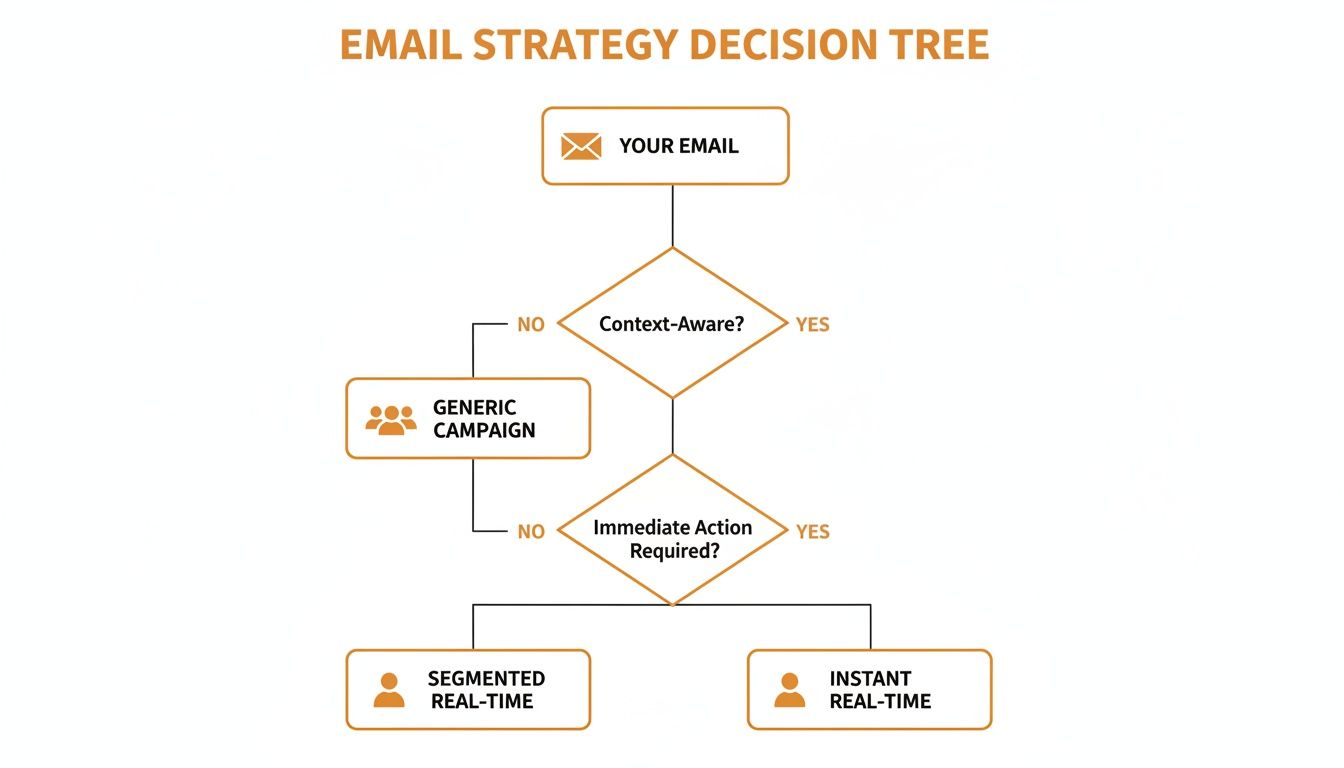
As the chart shows, moving toward real-time content is all about shifting your focus from the group to the individual—the very core of a modern, effective email strategy.
The Crucial Timing: On-Send vs. On-Open
The second critical decision is when the personalization actually happens. This choice directly impacts just how current your content can be.
With on-send generation, content is personalized the moment you hit "send." The system creates all the unique email versions for your list and fires them off. This works great for data that doesn’t change quickly, like greeting a subscriber by their first name.
On-open generation is the secret sauce for true real-time marketing. The content—specifically a dynamic image—is generated at the exact moment the recipient opens the email. This opens the door to incredibly timely information that can change minute by minute.
Think about the possibilities with on-open:
- A live countdown timer for a flash sale that's about to end.
- Real-time stock levels for a product the user just viewed.
- The current score of a live sports game.
- Up-to-the-minute shipping status for a recent order.
To pull this off effectively, it helps to master lead nurturing automation principles first. These technical choices are really just advanced forms of nurturing, turning every email open into a fresh opportunity to provide immediate value.
Choosing the right path depends entirely on your campaign goals and technical resources. For marketers wanting to add powerful, timely visuals without the heavy lifting, an on-open, image-snippet-based approach is almost always the most effective and efficient solution. If you're curious about the more technical side, you can explore the possibilities of a dynamic image API for email marketing and see how it fits into more advanced workflows.
Alright, let's move from the "why" to the "how." This is where the theory behind real-time email content gets practical. Using a tool like OKZest, you can create and embed hyper-personalized images right into your emails. And trust me, it's way simpler than it sounds.
We'll walk through the whole process, from sketching out your first image template to hooking up your data sources and, finally, pasting a simple URL into your favorite email platform. You're about to see just how powerful a no-code approach can be.
Designing Your First Dynamic Image Template
Every great dynamic image starts with a solid template. This is your base design—the blueprint where you decide which parts stay the same and which parts will change for every single person on your list. Think of it like a mail merge, but for visuals.
Inside a platform like OKZest, this feels a lot like using a simple graphic design tool. You'll create a canvas and add layers for text, shapes, and other images. For any layer you want to personalize, you'll mark it as a dynamic field.
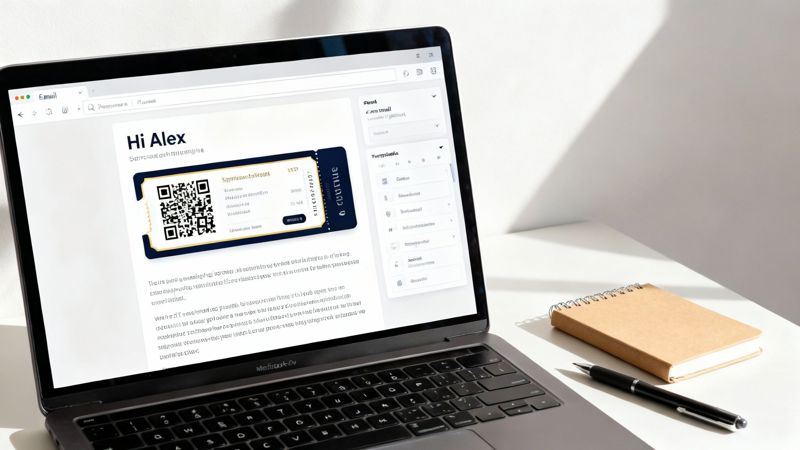
Let's imagine a real-world scenario. An event organizer wants to send digital tickets by email. The template would break down like this:
- Static Elements: The event logo, venue info, and background design. These are the same for everyone.
- Dynamic Elements: The recipient's name, their unique seat number, and a personalized QR code for entry.
In your design, you just create placeholders for those dynamic spots. You might add a text layer that says {{FirstName}} or {{SeatNumber}}. This tells the system exactly where to inject the unique data for each person.
Connecting Your Data Source
Once your template is built, you need to tell the system where to pull the personalization data from. This is where modern platforms really shine—you're not stuck with just one method.
You generally have three ways to connect your data:
- Uploading a CSV File: This is the go-to for one-off campaigns. Just export a list from your CRM or ESP with columns for
FirstName,Email, etc., and upload it directly. Simple. - Connecting to a Database: For more automated, ongoing campaigns, you can link directly to a database. This keeps your images pulling from the most current information at all times.
- Using an API: This is the most powerful option for real-time personalization. An API connection lets your system generate images on the fly based on triggers, like a customer making a purchase or a student completing a course.
For a coach creating personalized certificates, an API trigger is perfect. The moment a student finishes their final lesson, the learning platform can send a request to generate a certificate with their name and completion date, ready to be emailed instantly.
The goal is to make data integration seamless. Whether you’re a marketer with a simple spreadsheet or a developer connecting to a live database, the right tool should accommodate your workflow without friction.
Generating and Using Your Dynamic Image URL
After your data is connected, the magic happens. The system generates a unique URL for each person on your list. This URL is the key to everything. It's not just a link; it's a command.
When an email is opened, the email client sees this URL in an image tag and sends a request to the server. Instantly, the server generates the personalized image based on the unique parameters in that URL and sends it back to be displayed. This all happens in a fraction of a second.
This URL basically becomes your new favorite merge tag.
Let’s see how this works in a major ESP like Klaviyo or Mailchimp. The process is ridiculously simple:
- In your dynamic image tool, you'll get a generated URL snippet that already includes the merge tags for your ESP. It might look something like this:
https://images.okzest.com/...?name={{ person.first_name }}. - You copy that entire URL.
- In your email editor, add an image block. But instead of uploading an image, you'll choose the option to insert an image from a URL.
- Paste your dynamic URL into the source field.
That’s it. Seriously. When Klaviyo sends the campaign, it will automatically replace {{ person.first_name }} with each subscriber's actual first name, creating a unique image URL for every single person. When they open the email, they’ll see an image made just for them.
For a deeper dive, you can learn more about how to use live images in email marketing and discover some more advanced techniques. This simple copy-and-paste action is what makes powerful real-time personalization accessible to any marketer—no coding required.
Best Practices for Personalization That Resonates
Having the right tools for real-time email content generation for marketing is a game-changer, but it's the strategy behind them that truly sets a campaign apart. This is where technology meets thoughtful execution—creating an experience that feels genuinely personal, not just automated.
It's all about anticipating snags, respecting your audience, and making sure your creative is on point.
The results of getting this right are massive. Email marketing still reigns supreme with an average ROI of $36 for every $1 spent. That’s a 3600% return. With nearly half of all consumers buying directly from emails and the user base set to hit 4.73 billion by 2026, the stakes are incredibly high.
As AI pushes us beyond broad segments toward true one-to-one communication, nailing your strategy isn't just a good idea—it's essential for staying ahead.
Build a Rock-Solid Fallback Plan
So, what happens if your personalization data is missing? This is a question you absolutely have to answer before you hit send.
Imagine personalizing an image with a first name, but a subscriber's name is missing from your list. You can't just serve up a broken image or, worse, an awkward blank space. This is precisely where a fallback strategy becomes your safety net.
A fallback is simply a default value or image that gets shown when the data you need isn't there. For instance, if the FirstName field is empty, your dynamic image could automatically show a friendly, generic greeting like "Hello there!" instead of a broken "Hello, !".
Tools like OKZest have this baked right in. You can define default text for any dynamic layer or even set up an entirely different default image. This simple step ensures every single recipient gets a professional, seamless experience, protecting your brand from looking sloppy.
A great fallback plan means you never have to worry about a data gap ruining a customer's experience. It’s the difference between looking unprepared and appearing thoughtful, even when things don't go perfectly.
Navigate Data Privacy and Compliance
Personalization runs on data, which puts privacy and compliance front and center. People are more aware than ever of how their information is being used. Trust is hard to earn and incredibly easy to lose.
Always operate with transparency and respect.
Here are a few ground rules to live by:
- Use Data Purposefully: Only use data you have explicit permission for, and stick to the reason it was collected. If a customer gave you their location for shipping updates, don't suddenly start pinging them with local event promotions without their consent.
- Be Transparent: Your privacy policy shouldn't be a legal maze. Make it clear and easy to find. Tell users what you collect and how it makes their experience better.
- Honor Preferences: Make it dead simple for users to opt out or manage their data preferences. This isn't just about ticking a legal box; it's fundamental to building a respectful relationship with your customers.
Nail the Design for Dynamic Images
Finally, let’s talk design. Just because an image is personalized doesn't mean design principles get tossed out the window. A brilliant personalization concept can be completely undermined by a poorly designed image.
Keep these best practices in mind for your dynamic visuals:
- Legibility is Key: Your text needs to be crystal clear and easy to read on any device. Test your font sizes, colors, and backgrounds. Remember that about 50% of users will flat-out delete an email that isn’t mobile-friendly, so your designs have to scale down beautifully.
- Stay On-Brand: Your dynamic images should feel like a natural part of your brand ecosystem. Use your brand’s fonts, color palette, and logo consistently to maintain a cohesive look.
- Optimize Image Sizes: While the content is dynamic, the image template itself needs to load fast. Use web-friendly formats like JPEG or PNG and keep file sizes down to avoid annoying delays in the inbox.
How to Test, Monitor, and Scale Your Campaigns
Getting your first dynamic email campaign out the door is a great feeling, but the real work starts after you hit send. This is where you prove the value of real-time email content generation for marketing, learn what resonates, and figure out how to scale up your wins. Without a solid plan for testing and monitoring, even the most innovative campaign is just a guess.
This is the phase where all your setup and creativity pays off. It’s about getting the hard data that shows personalization works and building a repeatable process for it.
Proving the Value with A/B Testing
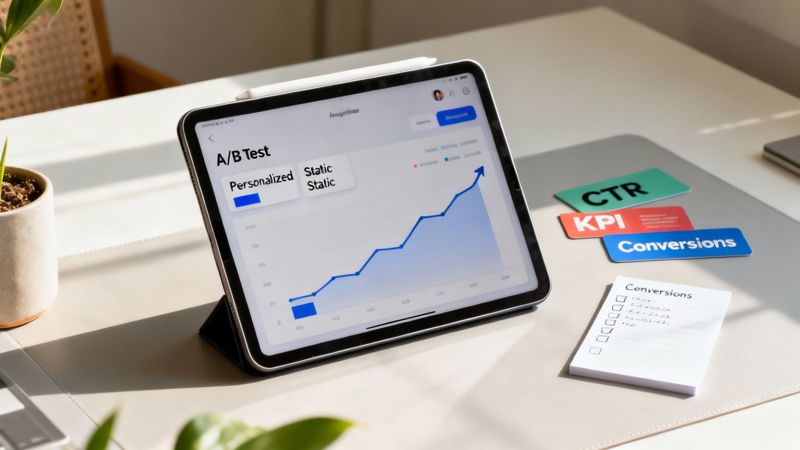
Gut feelings are nice, but stakeholders want to see the numbers. The cleanest way to measure the impact of your personalized images is with a classic A/B test. The whole point is to isolate the effect of the dynamic content.
It’s a straightforward but powerful setup:
- Version A (The Control): Your email with the standard, static image. This is your baseline—what you were doing before.
- Version B (The Variant): An identical email in every other respect—same subject line, same copy, same CTA button. The only difference is that it uses your new real-time, personalized image.
By keeping everything else the same, you can be confident that any change in performance is because of the dynamic image. This isn’t just good practice; it's how you build a business case to do more of this across the company.
Key KPIs You Need to Track
When you start digging into the results, look past vanity metrics. Open rates are one thing, but they don't tell you if your personalization actually made someone do something. You need to focus on the metrics that tie directly to engagement and revenue.
Make sure your performance dashboard highlights:
- Click-Through Rate (CTR) on the Dynamic Image: Most ESPs and dynamic image tools let you track clicks on specific images. This is your number one indicator of whether the personalized visual was compelling.
- Overall Email CTR: Did the dynamic image lift engagement across the entire email? A great personalized visual can get people more interested in clicking other links, too.
- Conversion Rate: This is the bottom line. Did the people who saw the personalized image actually follow through and make a purchase, register for the webinar, or use the coupon?
- Return on Investment (ROI): This is where you connect the dots. Compare the revenue generated from the personalized campaign against the control group. That gives you definitive proof of its financial impact.
The goal is to build a clear story with your data. Being able to say, "Our campaign with personalized images drove a 15% higher conversion rate than the static version" is a powerful statement that justifies more budget and resources.
If you want to go deeper on this, we've got a complete guide to email campaign analytics that covers more advanced tracking methods.
Scaling Your Efforts with the Right Platform
Once you've run a few tests and proven the value, the next question is always, "How do we scale this?" Going from a few hundred personalized images to tens of thousands—or millions—is a huge leap. It requires a platform that's built for that kind of growth, which is where a tool like OKZest really comes into its own.
As you grow, your needs will get more complex. You'll want to look for a few key features.
Project and Role Management When you have multiple marketers, designers, or even clients working on campaigns, things can get messy fast. A platform that offers project management lets you keep different campaigns, templates, and data sources organized. Add in role-based access, and you can let everyone collaborate securely without worrying about them accidentally breaking someone else's work.
Flexible and Predictable Pricing Scaling shouldn't bring surprise bills. Look for a provider with clear, tiered pricing that can grow with you. A model that offers a solid free plan to start and then scales up to enterprise volumes means you’re only paying for what you actually use. This kind of predictable cost makes it much easier to budget as you expand personalization to more of your email programs.
The key to successfully scaling your real-time email content is to build on a foundation of proven results. Start small with controlled tests, track the right KPIs like a hawk, and pick a platform that can support your ambitions as you go.
Common Questions About Real-Time Email Content
Jumping into any new marketing tech is bound to bring up a few questions. When it comes to real-time content, marketers usually have the same concerns circling in their minds: performance, reliability, and just how far you can push the technology. Getting straight answers is the only way to move forward with confidence and sidestep those early growing pains.
This section tackles the most common questions we hear from marketers who are just starting to explore dynamic content. We'll give you practical, no-fluff answers to help you get a handle on the details and feel ready to launch.
Will Real-Time Images Slow Down My Email Load Times?
This is always one of the first questions, and for good reason. The short answer? Not in any way your subscribers will notice.
Modern dynamic image systems are built from the ground up for speed. When a subscriber opens your email, their email client sends a lightning-fast request to a server that generates the image on the fly.
Platforms like OKZest lean on powerful, globally distributed Content Delivery Networks (CDNs) to make this happen almost instantly. This setup ensures the image is served from a location geographically close to your subscriber, which keeps any potential lag to an absolute minimum.
Any tiny, fractional-second delay is a small price to pay for the massive jump in engagement you get from truly personal, relevant content. As long as your base image templates are optimized for the web, your subscribers won't feel a thing.
What Happens If Personalization Data Is Missing?
This is precisely why a solid fallback strategy is an absolute must-have. A well-designed system will never show a broken image or a weird-looking blank space. Instead, you get to define a default state ahead of time, ensuring a professional, on-brand experience for every single person on your list.
Think of it as your safety net. If you’re personalizing an image with a first name but a specific contact record is missing that piece of data, the system doesn’t just throw its hands up. It automatically switches to your fallback plan.
Here’s what that looks like in the real world:
- Default Text: Instead of an awkward "Hello, !", the image can show a friendly, generic greeting like "Hello there!" or "A Special Offer Just for You!".
- Default Images: You can even set an entirely different default image to display when data is missing. This keeps the visual fresh and relevant, no matter what.
Tools like OKZest have these fallback rules built right in, giving you total control over the experience, regardless of how clean your data is.
Can I Use This Technology Beyond Standard Emails?
Absolutely. This is where you can start getting really creative and see the true power of this tech. At its core, real-time image generation is just a unique URL that serves up an image. That means you can embed it just about anywhere that supports a basic HTML image tag.
Your personalization strategy doesn't have to be confined to the inbox. Think about all the other places you can create a consistent, one-to-one conversation with your audience:
- Website Chatbots: Greet a returning visitor by name right inside the chat widget.
- Social Media DMs: Send personalized welcome images on platforms like X (formerly Twitter) or WhatsApp.
- Dynamic Web Pages: Create personalized banners or hero images on your site for logged-in users.
- Newsletters: Embed dynamic content in your web-based newsletters to make them pop.
This cross-channel power lets you carry a personalized conversation through the entire customer journey.
Do I Need to Be a Developer to Implement This?
Not anymore. It's true that this kind of personalization used to require serious coding skills and server management, but modern no-code platforms have made it accessible to everyone. All the heavy technical lifting is handled behind the scenes, so you can focus on strategy and creative.
With a solution like OKZest, the process is dead simple:
- Design your image in a simple, user-friendly editor.
- Tell the system which parts of the image will be dynamic.
- Copy a small text snippet—this is your new dynamic merge tag.
- Paste it straight into your email service provider.
For most marketers, this no-code approach is powerful, fast, and doesn't require a single line of code. While there's an API available for developers who want more advanced integrations, the main goal is to empower marketers to run sophisticated campaigns all on their own.
Ready to create unforgettable, one-to-one email experiences that grab attention and get results? With OKZest, you can easily automate the creation of millions of personalized images using our powerful no-code and API solutions. Start building more engaging campaigns today. Get started for free on okzest.com.