Real-time email images are dynamic visuals generated the very moment a subscriber opens your message. Instead of sending everyone the same static picture, you can show them fresh, personalized content like their name, a live countdown, or even a weather-specific promotion.
What Are Real-Time Email Images?
Think about your email as a conversation. Sending a static image is like shouting one generic greeting to an entire room. But a real-time email image is like walking up to each person, greeting them by name, and mentioning something that matters to them right now. It instantly turns a broadcast into a one-on-one dialogue.

So, what's the magic behind them? These aren't your standard JPEGs or PNGs that you just upload and send. Instead, they’re generated live by a server right when the recipient's email client requests the image. This clever process allows the image to pull in live data specific to that person, the time they opened the email, or even their current location.
Beyond Standard Personalization
Simple text personalization, like using {{first_name}}, has been a staple in email marketing for years. Real-time email images take that same idea and make it visual, which is a whole lot more engaging. Instead of just reading their name in a line of text, your subscribers see it beautifully integrated into a banner, a custom certificate, or a product recommendation.
This isn't just a gimmick; it’s becoming essential. With global email volume expected to hit between 376-392 billion per day in 2025, marketers need every advantage to get noticed. In fact, we saw a 340% increase in AI-powered image generation from 2024 to 2025 as businesses scrambled to stand out. You can dive deeper into how AI is changing email on Knak.com.
At its core, a real-time email image is a visual merge tag. It’s a placeholder that gets filled with unique, relevant content for each individual at the exact moment they engage with your email.
How Do They Differ From GIFs?
It's a common question, but real-time images and animated GIFs are two totally different tools. While both feel "dynamic," a GIF is just a pre-made animation that loops the same sequence of frames for everyone. It’s a one-size-fits-all video clip.
A real-time email image, on the other hand, is generated uniquely for each person who sees it. Here’s a simple way to think about it:
- Animated GIF: A single, pre-made file that plays a short, looping animation. Everyone sees the exact same thing.
- Real-Time Image: A unique image created at the moment of open, pulling in specific data for that one recipient.
A classic example is a countdown timer. When you use a real-time image, the timer shows the actual time remaining until a sale ends, calculated the instant the email is opened. It creates genuine urgency that a static, looping GIF simply can't match.
How Real-Time Image Personalization Actually Works
So, how does this "magic" of real-time images actually happen? It might sound complex, but the technology behind it is surprisingly elegant. It’s all about connecting your customer data to a flexible image template at the exact moment your email is opened.
Think of it less like a pre-printed flyer and more like a digital barista crafting a unique coffee for every customer who walks in—one gets an oat milk latte with their name on it, the next gets a black Americano. Same coffee shop, different experience.
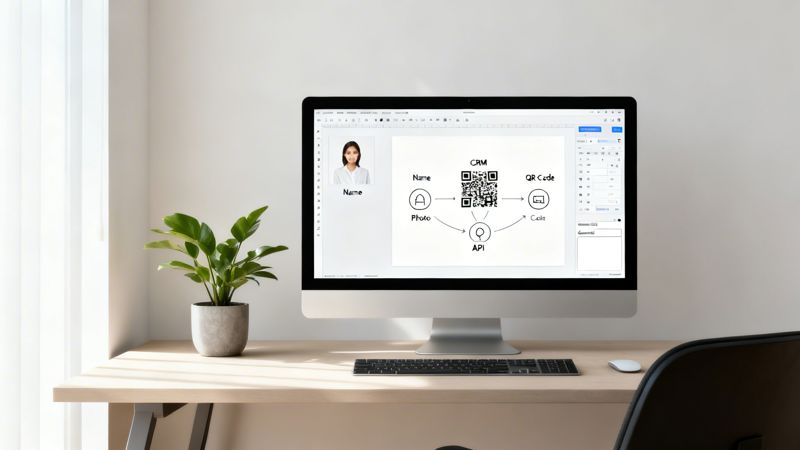
It all begins with your data, which is the secret sauce for any personalization. This information usually lives in your CRM, e-commerce platform like Shopify, or even just a well-organized spreadsheet.
From there, you design a base image template in a tool like OKZest. You create your core visual and then mark specific spots as dynamic layers. These layers are just placeholders waiting to be filled with personalized text, other images, or even QR codes.
The Magic of the Merge Tag URL
Once your template is set, the system gives you a special URL. This isn't your typical image link. It’s a dynamic URL packed with merge tags that correspond to the placeholders you created. You simply copy this one URL and paste it into your email template where you’d normally put a static image.
Here’s a play-by-play of what happens when your email lands in an inbox:
- Email Opened: A subscriber opens your campaign.
- Image Requested: Their email client (like Gmail or Outlook) sees the image URL and sends a request to fetch the visual.
- Data Pulled: The server instantly reads the merge tags in the URL, grabs the right data for that specific subscriber (like their first name), and injects it into the image template.
- Image Generated: A brand-new, completely personalized image is created on the fly.
- Image Displayed: This unique image is sent back to the email client and appears in the recipient's inbox.
This whole process unfolds in a fraction of a second. Your subscriber has no idea what’s happening in the background; they just see a compelling, relevant image that feels like it was made just for them. To go a bit deeper on this, you can learn more about image URL personalization in our guide.
The core concept is simple: The image doesn’t exist until it’s requested. Every time an email is opened, a fresh, personalized visual is born, ensuring the content is always relevant at that specific moment.
The Importance of Fallback Options
But what if a piece of data is missing? Say you want to personalize with a first name, but you don't have one for a few subscribers. A broken image or an awkward blank space would completely kill the professional vibe you’re going for.
This is where fallback options are an absolute must-have. Any good real-time image platform will let you define a default value for every single dynamic layer. If a name is missing, the fallback can display a friendly, generic greeting like "Hello there!" or "A special offer for you." This simple safety net ensures that every single recipient sees a complete, polished image, no matter what.
The Tangible Benefits of Using Dynamic Images
Let's move past the theory and talk about what really matters: results. Using real-time images isn't just about making your emails look flashy; it's about driving measurable outcomes that grow your business. When you deliver a hyper-relevant visual, you make subscribers feel seen and understood, which is the secret sauce for building unshakable brand loyalty.
For sales teams, this means shorter sales cycles. Instead of another generic outreach email, they can grab a prospect's attention instantly with images personalized with a name, company logo, or specific pain point. For marketers, it's a direct line to better campaign performance, turning passive readers into engaged customers.
Boost Engagement and ROI
You have about 10 seconds to capture a reader's attention in an email. That's it. A generic, one-size-fits-all image is easy to scroll past, but a visual that speaks directly to the recipient is impossible to ignore. This spike in relevance is what drives more clicks and, ultimately, more conversions.
By making your outreach more engaging and personalized, the tangible benefits of using dynamic images extend to various email marketing strategies, including improving the effectiveness of specialized outreach like PR Package Emails.
This is where the return on investment really shines. Historically, brands switching to dynamic content have seen their ROI climb from a baseline of 21:1 to an impressive 42:1. But when you add live, real-time elements, that figure can jump to an incredible 56:1 ROI—a 107% uplift over standard personalized campaigns.
Let's put that in perspective.
Static Vs Dynamic Email Content ROI Comparison
The table below shows the financial return you can expect when moving from standard email campaigns to those using dynamic, real-time content. The numbers speak for themselves.
| Content Type | Average ROI | Potential Uplift |
|---|---|---|
| Standard Static Email | 21:1 | - |
| Personalized Email (Dynamic Content) | 42:1 | +100% |
| Real-Time Email (Live Content) | 56:1 | +167% |
In a world with 4.6 billion email users and 376 billion emails sent daily, static content just can't compete. For a deeper dive into the numbers, check out these email marketing benchmarks from Verified.email.
Create Deeper Customer Connections
Beyond the metrics, real-time images create genuine human connections. Imagine a customer opening an email with an image that celebrates their latest purchase, displays their current loyalty points balance, or shows a product recommendation based on their recent browsing. These are the "wow" moments that stick.
These small, thoughtful touches prove you value their business and are paying attention. It makes your brand more memorable and builds the kind of loyalty that can withstand price wars and aggressive competitors.
Best of all, a tool like OKZest can automate this entire process, ensuring every subscriber gets a unique, tailored experience without any manual heavy lifting from your team. You can learn more about how to get started in our complete guide to email image personalization.
Inspiring Use Cases for Real-Time Images
Okay, enough with the technical stuff—let's look at what you can actually do with real-time images. The theory is one thing, but seeing these dynamic visuals in action is what really shows off their power. Here are some practical examples that transform a standard email into something memorable and genuinely personal.
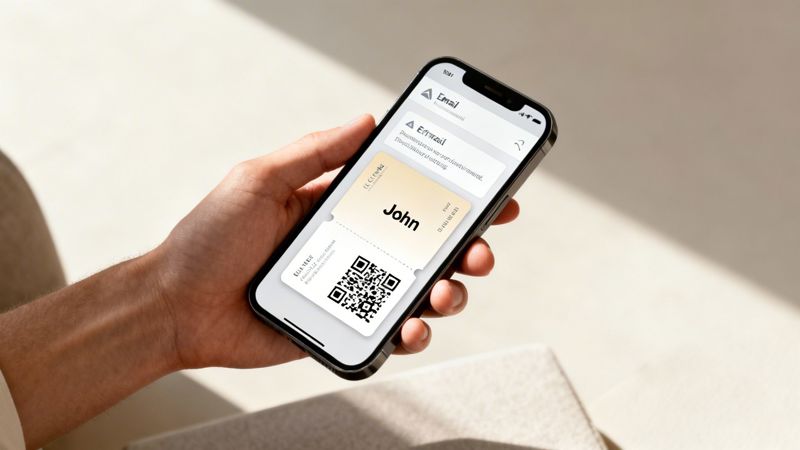
Let's say you're organizing an event. Instead of sending a generic confirmation email, imagine sending a personalized digital ticket. This isn't just a static graphic; it’s an image that dynamically pulls in the attendee's name, a unique QR code for check-in, and maybe even a custom agenda based on the workshops they registered for. All of this can be generated from a simple spreadsheet or your registration system.
Personalization for E-commerce and Coaching
For e-commerce brands, abandoned cart emails are a perfect fit for this technology. You can go way beyond just listing the items left behind. Instead, show a dynamically generated image of the actual products sitting in their cart. Seeing that must-have item again is a powerful visual reminder that often nudges them to complete the purchase.
Coaches and consultants can also create a more personal connection by celebrating client progress. You could automatically generate an image that visualizes key milestones, pulls in their name, and congratulates them on a recent achievement. It's a simple, automated touch that strengthens client relationships and keeps them motivated.
The real magic here is turning raw data into a visual story. You’re not just sending another email; you’re delivering a unique, helpful, and engaging piece of content crafted specifically for one person.
Dynamic Imagery for Urgency and Location
Travel companies can design personalized itineraries that stay up-to-date. The image inside an email could show the recipient's flight details, hotel information, and even the current weather at their destination, all pulled live the moment they open the message.
This works great for real estate agents, too. Instead of just sending static links to property listings, they can generate an image showing a map of a client’s favorite neighborhood, complete with pins on available properties that match their exact criteria.
Here are a few more quick ideas for using real-time email images:
- Countdown Timers: Build genuine urgency for a sale ending or an event starting. A classic example of dynamic imagery in action is using animated GIF clocks to create a real sense of FOMO in your marketing campaigns.
- Loyalty Programs: Show a customer their current points balance or a progress bar illustrating how close they are to their next reward.
- Personalized Greetings: Move beyond a simple
{{first_name}}in the text. Create a beautifully designed banner image featuring the subscriber's name for a holiday, birthday, or anniversary.
Each of these powerful examples starts with just two things: a data source and an image template. With a tool like OKZest, connecting them is incredibly straightforward, allowing you to create stunning visuals for email, chat, and more without touching a single line of code. The possibilities are truly only limited by your imagination.
How to Implement Real-Time Images in 5 Steps
So, you’re ready to bring real-time images into your email campaigns. The best part? You don't need to be a coding whiz to make it happen. With a tool like OKZest, the whole process is broken down into a few simple steps, making this kind of advanced personalization something anyone can do.
This guide will walk you through the entire process, from designing your core image to launching it in your next email send.
Step 1: Design Your Base Image
First things first, you need to create the foundation of your image. This is your static background, branding, and any other elements that will stay the same for every single person who opens the email.
Think of it as setting the stage before the main actors—your personalized content—make their entrance.
Step 2: Define Your Dynamic Layers
Next, you'll decide which parts of your image need to change for each viewer. This is where you add placeholders for things like text, other images, or even unique QR codes. Each of these placeholders, or "layers," will eventually be filled with unique data for each subscriber.
You might add dynamic layers for:
- A subscriber’s first name.
- A custom welcome message.
- A product image from an abandoned cart.
- A unique QR code for an event ticket.
Step 3: Connect Your Data Source
Those dynamic layers need information to work their magic. Here, you’ll connect your image template to a data source, whether that’s a CSV file, a Google Sheet, or an API. This is the well of information that will populate your dynamic fields, turning a generic template into a one-of-a-kind visual.
This step is where it all comes together. You’re simply telling your image template where to find the personalized details for each recipient, creating a direct bridge between your data and your design.
Step 4: Generate the Merge Tag URL
Once your template is designed and your data is hooked up, the platform will generate a single, powerful URL for you. This isn’t your average image link; it’s a special merge tag URL that holds all the instructions needed to build the personalized image on the fly.
This unique URL is the key. When an email is opened, it tells the server exactly what data to grab and how to assemble the final image in that very moment. You can get a deeper look into the mechanics by exploring how to build a real-time image API for your own projects.
Step 5: Paste into Your Email Platform
Finally, just copy this merge tag URL and paste it into your email service provider (ESP) right where you’d normally put a static image. That’s it!
Tools like OKZest are designed for maximum compatibility, working seamlessly with over 99% of platforms, including giants like Klaviyo, Mailchimp, and ActiveCampaign. Your ESP handles the rest, making sure every subscriber gets their own unique, real-time image.
Technical Tips and Best Practices for 2026
To really get the most out of real-time images, you need to understand the current email landscape. The technology is incredibly powerful, but a few technical details and best practices can be the difference between a good campaign and a truly great one.
One of the biggest factors at play is Apple's Mail Privacy Protection (MPP). MPP automatically preloads images the moment an email lands in the inbox, not when the recipient actually opens it. This means open rates can be wildly inflated, with some projections showing these false opens could hit 75% by 2025. This is happening while AI-powered image generation is seeing a 340% surge, yet only 6% of top marketers feel they’ve perfected their workflows. You can explore the full 2026 data projections on TheLoopMarketing.com to see how these trends are reshaping the industry.
Navigating Caching and Fallbacks
Another technical piece of the puzzle is image caching by email clients. Some providers, like Gmail, will store or "cache" an image after it's opened for the first time. If a user re-opens that same email, they’ll see the original image that was generated, not a freshly updated one. This is a crucial detail to remember for time-sensitive content like countdown timers.
The single most important best practice is to always set a fallback image. If a data field is empty or something goes wrong, a fallback makes sure the recipient sees a polished, generic image instead of a broken link. It’s a simple step that protects your brand’s professionalism.
This simple flow shows just how straightforward it is to bring a real-time image to life.
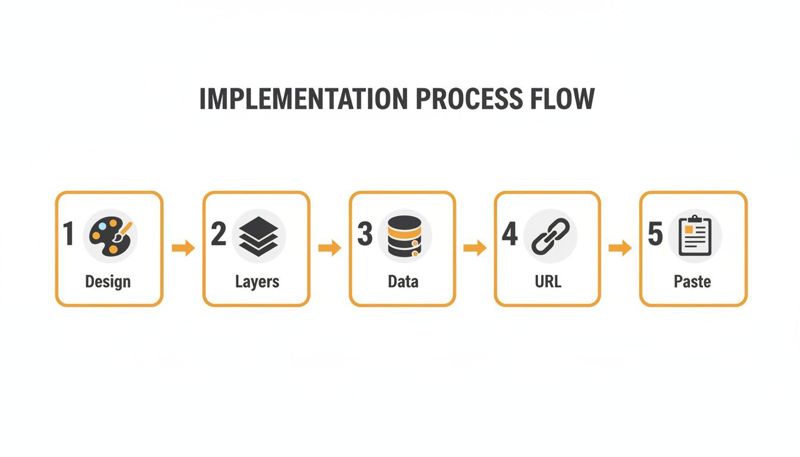
As you can see, creating these dynamic visuals is a structured, step-by-step process, not some complicated, one-off task.
Core Best Practices for Success
To make sure your campaigns deliver results, stick to these essential guidelines. They’ll help you create images that are effective, load quickly, and respect your subscribers' privacy.
- Focus on Click-Through Rate (CTR): With MPP making open rates unreliable, CTR is a much better measure of real engagement. For 2026, you should be aiming for a CTR of 3.5% or higher.
- Optimize File Sizes: Just because an image is generated in real time doesn’t mean it can be huge. Always compress your template assets to keep file sizes down. This ensures a fast, smooth experience, especially for people on mobile.
- A/B Test Your Personalization: The only way to know if it’s working is to test it. Run A/B tests comparing your static images against the new real-time versions to measure the actual lift in clicks and conversions.
- Be Mindful of Privacy: Only use data your subscribers have explicitly consented to you using. Using personalization transparently builds trust, but crossing a line can seriously damage your brand.
Frequently Asked Questions
It's natural to have a few questions when you're diving into something new like real-time images. Getting the answers sorted out upfront helps you build your campaigns with confidence. Let's tackle some of the most common ones we hear.
How Much Technical Skill Do I Need?
Surprisingly little. While the technology behind it sounds complex, modern no-code tools have made creating real-time email images incredibly accessible. If you can drag and drop elements in a design tool or connect a simple spreadsheet, you’ve got all the skills you need.
Platforms like OKZest are built for marketers, not developers. The whole point is to let you focus on your creative strategy without ever having to touch a line of code.
Will These Images Slow Down My Emails?
This is a great question, but the answer is a clear no. A real-time email image adds zero "weight" to your email when you hit send. Why? Because the image isn't actually attached to the message.
The image is only generated and loaded from a server the moment a subscriber opens your email. This means the initial delivery of your campaign remains just as fast as ever, ensuring a great user experience from the start.
What Happens If a Subscriber's Data Is Missing?
A professional campaign can't afford broken images or awkward blank spaces. That’s exactly why fallback images are an essential safety net for any dynamic content.
If a piece of data you need (like a first name) isn't available for a specific contact, the system will automatically show a pre-set default image or text that you've already defined. This ensures every single recipient sees a complete, polished visual, maintaining a professional brand experience no matter what.
Can I Use Real-Time Images Outside of Email?
Absolutely. While email is a perfect home for them, the same technology is incredibly versatile. You can just as easily use these dynamic images on your website, in social media direct messages, and even within chatbot conversations to create a more personal touch.
Ready to create your own "wow" moments? With OKZest, you can easily design and automate stunning real-time images for all your campaigns. Explore the possibilities on okzest.com and start personalizing today.