You’ve already done the easy part. Your emails use {{FirstName}}, your segments are clean, and your automations fire on time.
But the visual layer still gives you away.
Every recipient gets the same hero image, the same banner, the same certificate background, or the same sales graphic. The copy feels personal. The image feels broadcast. That gap matters because people notice visuals before they read body text.
A REST image generation API closes that gap. It gives you a programmatic way to generate a unique image for each person, campaign, or event trigger, then drop that image into email, web, chat, or social workflows. For marketers, the practical translation is simple: think of it as merge tags for images. For developers, it’s just an HTTP request, a payload, and a returned image URL.
Understanding this possibility isn't the core challenge. It’s turning the idea into a production workflow that marketing can use without constant developer cleanup. This is a common challenge.
Beyond First Names The New Frontier of Personalization
Many organizations encounter the same limitations.
They personalize subject lines, preheaders, maybe even product recommendations. Then they open the campaign preview and see one generic banner stretched across every send. That’s where “personalized marketing” starts to feel thinner than it should.
Where generic visuals break the experience
A recruiter sends candidate outreach with a custom intro line, but the image is a stock office photo.
An event organizer sends certificates with dynamic names in the email body, but attaches a static design that doesn’t reflect the recipient.
A sales team references account details in the copy, but the visual still looks like a broad ad.
That disconnect weakens the message. The email says, “this is for you,” while the image says, “this went to everyone.”
This is why a REST image generation API matters. It lets you generate visuals from data, not just text. A recipient’s name, plan, score, city, event title, sales rep, offer, or real-time API value can shape the image itself.
Think of it as merge tags for images
The simplest mental model is this: your image template contains placeholders, and your application fills them at send time.
Instead of only replacing {{FirstName}} in HTML copy, you also replace image fields inside a design. The final output might be:
- A certificate with the recipient’s name and event date
- A product card with live pricing or location-specific messaging
- A sales outreach image with company name and rep details
- A newsletter visual that changes by segment or account status
That changes the role of the image from decoration to message delivery.
If you want a broader view of how teams use this in campaigns, this practical overview of personalized marketing images is a useful companion.
Generic text can still work. Generic visuals usually get ignored first.
The market still has a gap
A lot of image APIs were built for creative generation. They’re good at prompt-based artwork, edits, and experimentation. They’re less useful when marketing needs controlled, repeatable outputs tied to CRM or database fields.
That gap is evident in current API offerings. Existing REST image generation APIs mostly focus on text-to-image generation and don’t offer strong support for dynamic data personalization with merge tags or real-time inputs. The same source notes that a 2025 Email Marketing Report found 73% of campaigns fail engagement due to generic visuals, while only 12% of APIs offer batch personalization at scale, which leaves agencies and high-volume teams underserved (Wavespeed documentation).
That’s the key distinction to keep in mind from the start. If your goal is artistic generation, many APIs can help. If your goal is business personalization at scale, you need an API workflow that behaves more like campaign infrastructure than a creative sandbox.
Understanding Authentication and API Endpoints
A personalized image project usually becomes real at the first API call. Marketing wants a live asset URL that can drop into an email or landing page. Development needs a request that is secure, predictable, and easy to repeat.
At a practical level, that means three parts working together: authentication, the correct endpoint, and a payload the API accepts. Get those right once, and the rest of the integration becomes much easier to scale across campaigns.
Authentication is your front door
An API key works like a private pass. If the key is missing, expired, or sent in the wrong header, the request fails before any image is rendered.
Most image APIs expect the key in an Authorization header. Keep that key out of frontend code where possible. Store it in environment variables or a backend secrets manager, especially if campaign traffic will hit the API from forms, web apps, or email-triggered workflows. If you want a concise refresher on standard auth patterns, Masko.ai's authentication guide gives a clean overview of bearer-token handling.
A common request header looks like this:
- Authorization header:
Authorization: Bearer YOUR_API_KEY - Content type:
Content-Type: application/json
Security decisions here affect campaign operations, not just engineering hygiene.
- Keep keys server-side: Don’t place them in client apps or public repositories.
- Separate environments: Use different keys for testing and live sends so QA work does not interfere with production reporting.
- Rotate on exposure: If a key appears in logs, screenshots, or shared snippets, replace it immediately.
Endpoints are purpose-specific URLs
The term “API endpoint” can seem more complex than it is. In practice, you usually work with a small set of URLs, and each one handles a specific job.
For a marketing workflow, the pattern is straightforward. One endpoint helps you identify the template or design. Another generates the personalized image. A third may report job status if rendering happens asynchronously.
That distinction matters because it affects campaign timing. If the API returns a finished image URL immediately, you can plug it into an email or web experience right away. If it returns a job ID, your system needs a short polling step or webhook flow before the asset is ready.
What to expect from an image personalization API
The table below shows a common endpoint pattern for campaign work.
| Endpoint | HTTP Method | Description |
|---|---|---|
/v1/designs |
GET | Returns available templates or designs so you can choose the right asset for a campaign |
/v1/generate |
POST | Generates a personalized image from a chosen template and supplied dynamic data |
/v1/jobs/{id} |
GET | Checks the status of an image generation request when processing is asynchronous |
Some platforms keep things simple and return the final asset URL as part of the generation response. Others split generation and retrieval into separate steps. If you want to see how that response can feed into delivery systems, this example on getting an image URL via API shows the pattern clearly.
Read the docs like a debugger
Good API documentation shortens setup time. Weak documentation turns a simple integration into trial and error.
Check the docs for the details that affect implementation and campaign reliability:
- Required fields: Which values must be present for the request to succeed
- Accepted data types: Whether fields expect strings, arrays, booleans, or nested objects
- Response format: Whether the API returns a final URL, base64 image data, or a job ID
- Error behavior: How validation failures, rate limits, and auth problems are reported
One practical habit saves time here. Make one successful request in Postman, curl, or your preferred API client before you write application logic.
For marketers handing requirements to developers, the cleanest brief is simple: the chosen template, the personalization fields, a confirmed sample payload, and the response format your campaign needs. That gives both sides what they care about. Reliable implementation for engineering, and assets that are ready to drive clicks, conversions, or email engagement for marketing.
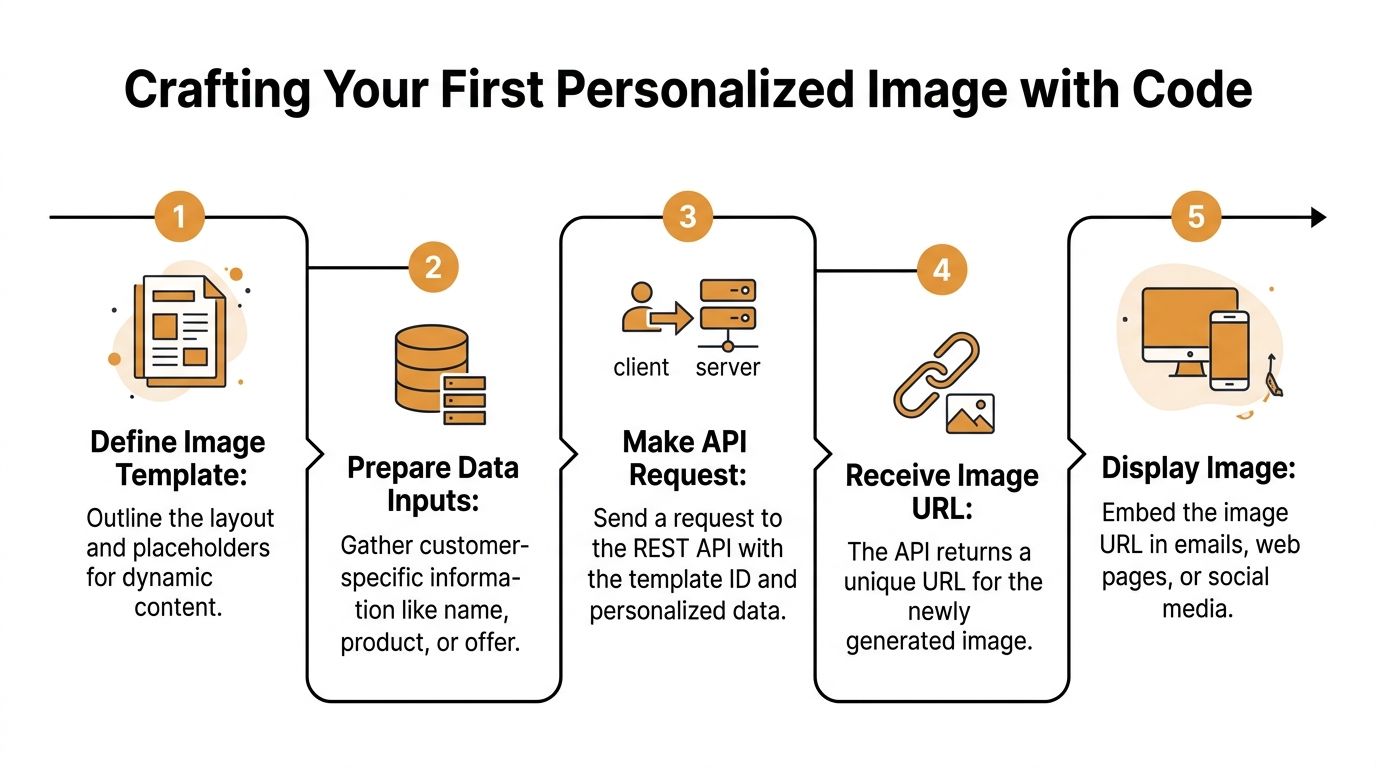
Crafting Your First Personalized Image with Code
A first request sets the tone for the whole project.
If it works on the first pass, engineering gets a repeatable pattern and marketing gets confidence that the creative can ship on schedule. If it fails, the team usually wastes time sorting out whether the problem sits in the template, the payload, or the response handling. Clear examples reduce that friction. As noted earlier, usage examples have a measurable effect on how quickly developers get to a working result.
What the request needs to contain
A personalized image request usually has four parts:
- The template identifier: Which design to render
- The dynamic values: Name, company, event, score, product, offer, or other fields
- Optional fallback values: Defaults when a field is missing
- Presentation settings: Backgrounds, layers, or rendering options when supported
That structure matters for campaign performance, not just technical correctness. A fixed template with controlled fields gives teams more consistency than prompt-only image generation, which is why it tends to fit email, outbound, and lifecycle marketing better.
If your use case leans more toward product visuals than campaign graphics, this roundup of AI product photography tools is useful context for where template-based output and generative workflows diverge.
cURL example for quick testing
Start in the terminal. It gives the fastest read on whether authentication, payload structure, and response format are correct before any app logic gets involved.
curl -X POST "https://api.example.com/v1/generate" \
  -H "Authorization: Bearer YOUR_API_KEY" \
  -H "Content-Type: application/json" \
  -d '{
    "design_id": "cert-2025",
    "data": {
      "full_name": "Ava Johnson",
      "event_name": "Growth Summit",
      "award_title": "Top Performer"
    },
    "fallbacks": {
      "award_title": "Participant"
    }
  }'
A typical successful response might look like this:
{
  "image_url": "https://cdn.example.com/generated/abc123.png",
  "status": "completed"
}
The exact field names will vary by provider. The pattern stays the same. You send a design reference plus recipient data, and the API returns a URL your campaign systems can use.
JavaScript example for web apps and serverless functions
If the image is generated from a signup form, CRM event, or outbound workflow, fetch is usually enough.
async function generatePersonalizedImage() {
  const response = await fetch("https://api.example.com/v1/generate", {
    method: "POST",
    headers: {
      "Authorization": "Bearer YOUR_API_KEY",
      "Content-Type": "application/json"
    },
    body: JSON.stringify({
      design_id: "sales-banner-01",
      data: {
        first_name: "Mia",
        company_name: "Northwind Health",
        rep_name: "Jordan"
      },
      fallbacks: {
        company_name: "your team"
      }
    })
  });

  if (!response.ok) {
    throw new Error(`API request failed with status ${response.status}`);
  }

  const result = await response.json();
  return result.image_url;
}

generatePersonalizedImage()
  .then((imageUrl) => {
    console.log("Generated image:", imageUrl);
  })
  .catch((error) => {
    console.error(error);
  });
This approach works well when the returned URL needs to move quickly into another system. Common examples include a landing page renderer, an outbound sequence builder, or a campaign service that writes image URLs back to contact records before send time.
Python example for backend workflows
Python is a good fit for batch generation, CRM syncs, and scheduled campaign prep because it sits close to your data layer and is easy to run as a job.
import requests

url = "https://api.example.com/v1/generate"
headers = {
    "Authorization": "Bearer YOUR_API_KEY",
    "Content-Type": "application/json"
}

payload = {
    "design_id": "newsletter-hero-april",
    "data": {
        "first_name": "Leo",
        "city": "Chicago",
        "offer_name": "Spring Access Pass"
    },
    "fallbacks": {
        "city": "your area"
    }
}

response = requests.post(url, json=payload, headers=headers)
response.raise_for_status()

result = response.json()
print("Image URL:", result["image_url"])
This is often the right place to join customer data, generate the image, and save the returned asset URL for later use in email or web campaigns. For a concrete request pattern, see this guide to an API call for image generation.
Handling merge-tag style data without surprises
Keep the payload boring. That is usually the right call.
Use field names that match the template placeholders exactly. Normalize blanks before the request is sent. Set approved fallbacks for anything that might be missing from your CRM or signup data. Personalized images fail in production for simple reasons, such as firstName in the contact record and first_name in the design schema.
A reliable mapping looks like this:
- Template field:
first_name - Input source: CRM contact record
- Fallback:
"there"or another approved default - Rendered output: text layer in the image
Missing data is a runtime issue. Handle it before the request leaves your app.
What works in production and what usually breaks
The projects that get from proof of concept to campaign launch usually follow a narrow path. They test one contact first, review the actual rendered image, keep field names simple, and store the returned URL so downstream systems do not need to regenerate the asset. That discipline helps both sides of the project. Developers get predictable behavior. Marketers get consistent creative that can be tied to a specific audience segment or send.
The projects that slip tend to start with batch mode too early, pass raw CRM fields without validation, or skip fallback planning because the first demo looked fine.
For a first build, optimize for repeatability. One stable template, one stable payload, and one clear business use case, such as improving email engagement with account-specific visuals, will take you further than a flashy prototype that nobody can run twice.
Embedding Dynamic Images in Email and Web Campaigns
Generating the image is only half the job. The image has to land where the customer will see it.
In practice, that usually means taking the returned image URL and inserting it into an ESP merge field, a landing page template, or a web component. The good news is that this step is often simpler than the generation step itself.

The simplest email pattern
Most email platforms already know how to render an image from a URL. You just need to place the generated URL into a field the platform can merge into the message.
A common HTML pattern looks like this:
<img src="{{dynamic_image_url}}" alt="Personalized campaign image">
That dynamic_image_url value might come from:
- A field written back to your CRM
- A custom property added before the send
- A webhook or automation step that stores the generated asset URL
If your team uses Klaviyo, Mailchimp, or Instantly, the exact merge syntax may vary, but the principle doesn’t. The ESP inserts each recipient’s own image URL into the email at send time.
Why this matters for campaign performance
This last-mile step is where personalization becomes visible. Personalized image tools built on REST APIs often report 99% compatibility with major ESPs like Mailchimp, and industry benchmarks note that adding personalized visuals to emails can increase open rates by up to 26% (astica documentation).
That doesn’t mean every campaign will see the same lift. It means the channel supports the tactic cleanly, and the upside is tied to execution.
Fallbacks prevent ugly failures
A live campaign should never depend on perfect data.
Someone will have a blank company field. A city value will arrive malformed. A product feed will miss a value right before launch. If the image request can’t handle missing data, you risk broken visuals or awkward empty text layers.
Use fallbacks in two places:
- Inside the image generation request: Default values for missing variables
- Inside the email itself: A backup static image or safe default URL if the custom field is empty
A practical fallback version of the HTML can look like this:
<img src="{{dynamic_image_url | default:'https://cdn.example.com/default-image.png'}}" alt="Campaign image">
Web campaigns are even more direct
On a web page or inside an app, you usually don’t need merge syntax from an ESP. You just render the returned URL directly.
Examples include:
- Sales dashboards: Show account-specific graphics
- Member portals: Display certificates or badges
- Event pages: Render customized tickets or welcome images
- Chat flows: Insert unique images into conversational interfaces
If the API returns a stable image URL, the browser doesn’t care whether the image was personalized or static. It just needs a valid
src.
The practical takeaway is simple. Don’t stop at image generation. Plan the data handoff into email or web at the same time you design the template. That’s where campaign value gets realized.
API Best Practices for Performance Security and Scale
A prototype proves the API works. Production work starts when that image has to render reliably for every recipient in a real campaign.
At that point, the concerns shift. Marketing wants sends to go out on time, with consistent visuals and measurable lift. Engineering needs predictable latency, controlled cost, and a system that does not fail because one provider is slow for five minutes. Treat the image pipeline like campaign infrastructure from the start.

Cache repeated renders
If the same template, input data, and rendering settings produce the same image, store the result and reuse it.
That matters for both cost and delivery speed. Analysts comparing image generation APIs found that faster models can reduce render time, and a caching layer cuts a meaningful share of repeat calls in production workflows (benchmark comparison). In practice, caching also gives marketers more stable launch windows because fewer images need to be generated at send time.
A useful cache key usually includes:
- Template ID
- Normalized personalization payload
- Rendering options
- Template version
Versioning is the part teams skip. Then a designer updates the template, the old image stays in cache, and the campaign ships the wrong creative.
Design around rate limits before launch day
Rate limits are often discovered during a critical campaign launch.
The fix is operational, not creative. Queue requests instead of sending them all at once. Batch work if the provider supports it. Add retries with exponential backoff for temporary failures. For larger sends, pre-generate images hours before the campaign goes live.
This is one of the clearest places where developer choices affect marketing results. A queue and retry policy can be the difference between a campaign that starts on schedule and one that stalls with half its images still pending.
Keep API keys off the client side
Image generation APIs often get lighter treatment than payment or database credentials. That is a mistake.
If a key sits in frontend code, browser requests, screenshots, or shared scripts, assume it will spread. Once that happens, unauthorized usage can drive up spend, hit account limits, or force a rotation in the middle of an active campaign.
A safer baseline is straightforward:
- Store secrets in environment variables or a secret manager
- Use separate keys for development and production
- Restrict scopes if the provider supports it
- Log which service sent each request
- Rotate keys after exposure or team changes
Expect partial failure
Even reliable APIs return timeouts, transient errors, or occasional malformed responses. Build for that early.
| Area | Good practice | Why it matters |
|---|---|---|
| Request handling | Retry temporary failures with backoff | Short outages do not kill the whole job |
| Traffic control | Queue and throttle requests | Prevents bursts from triggering provider limits |
| Observability | Log request IDs, payload summaries, and response codes | Speeds up debugging during a live send |
| Delivery fallback | Keep a default image path available | Prevents blank placements in email or web experiences |
| Provider resilience | Add circuit breaker logic and a backup path if image generation is business-critical | Reduces the chance that one vendor outage delays a campaign |
If personalized images drive a revenue campaign, a fallback plan is not optional. It protects the send, even when generation fails.
Choose tooling based on campaign requirements
Different APIs solve different problems.
Prompt-based image generation is useful for creative exploration. Operational personalization needs something else: fixed layouts, deterministic output, variable handling, predictable URLs, and behavior that fits email and web delivery systems. Choose the API that matches the job, not the one that looked impressive in a demo.
The production checklist is short:
- Cache repeated outputs
- Throttle intelligently
- Secure credentials
- Log request paths
- Keep a fallback image ready
Build those pieces early and the API becomes dependable enough for recurring campaigns, not just one successful test.
Troubleshooting Common API Integration Issues
Most REST image generation API problems look mysterious until you reduce them to three questions: what happened, what likely caused it, and what you should check first.
Common errors in plain English
| Symptom | Likely cause | What to do |
|---|---|---|
401 Unauthorized |
Missing API key, invalid token, or wrong auth header format | Confirm the bearer token is present and valid, then verify you’re sending it in the expected header |
429 Too Many Requests |
You sent requests too quickly | Slow the request rate, queue work, and add retry logic with backoff |
400 Bad Request |
Malformed JSON or missing required fields | Validate the payload structure and confirm required keys match the API docs |
| Image text looks broken or missing | Dynamic fields are empty or special characters weren’t handled cleanly | Sanitize inputs and define fallback values before sending the request |
Two integration mistakes show up constantly
The first is malformed request data.
An API expects JSON, but the client sends the wrong shape, the wrong nesting, or the wrong content type. That’s why one successful test request matters so much. Use it as your baseline and compare failing requests against it field by field.
The second is bad dynamic input.
Names with special characters, empty CRM properties, and unexpected whitespace can all produce awkward output. The fix usually isn’t in the image engine. It’s in your preprocessing layer.
- Normalize strings: Trim whitespace and standardize empty values
- Escape carefully: Make sure special characters survive serialization
- Apply defaults: Don’t let a missing field create a broken visual
Documentation quality has a direct effect on debugging
The easiest APIs to integrate aren’t always the most powerful. They’re the ones that show exactly what a valid request and response look like.
The developer study cited earlier found that poor examples sharply reduced task success and increased trial-and-error. That’s a reminder to debug with evidence, not instinct. Compare headers, payload shape, field names, and response bodies before rewriting your whole flow.
When an integration breaks, the fastest fix is usually a small mismatch in auth, payload shape, or input data. Start there.
Start Personalizing Your Visual Content Today
A strong personalized image workflow improves campaign execution where it matters. The recipient sees a visual that matches the message, and your team gets a repeatable system instead of a one-off creative test.
A good first project is usually simple. Pick a campaign where the copy already feels personal but the image still looks generic, such as a nurture email, webinar follow-up, outbound sequence, or reward certificate. Build one template around that use case, pass in a small set of clean variables, and review the final output in the same places your audience will see it.
That last part matters.
Developers tend to focus on whether the request succeeds. Marketers care whether the image helps the campaign get more clicks, replies, or conversions. The useful middle ground is to treat the API integration as both an engineering task and a channel performance test. If the image renders correctly but feels off-brand, gets cropped in email, or clashes with the CTA, the implementation is not done yet.
Start with one template, one payload shape, and one live campaign. Measure the result, learn where the visual helps, and then expand to more segments or channels. That approach keeps implementation risk low and gives the marketing team evidence they can act on.
OKZest is one option for teams that want to automate personalized images across email, web pages, certificates, social messages, and similar workflows. The practical way to evaluate it is the same way you should evaluate any image generation API. Run a small test, connect it to a real campaign, and see whether it improves the outcome enough to earn a permanent place in your stack.