You’ve probably felt the ceiling on text-only personalization already.
Your emails have {{FirstName}} in the subject line. Your landing pages swap in a city name. Your automation is working, but the creative still looks the same for everyone. The copy says “personal,” yet the hero image is a generic stock photo that could belong to any campaign sent by any brand.
That gap matters. People don’t just read marketing. They scan it. They notice the headline, the image, the offer, and whether it feels meant for them. A first name in a sentence helps, but a custom image that greets someone by name, shows their location, reflects their event, or confirms their score feels far more direct.
For many marketers, that’s where the confusion starts. Personalizing text is familiar. Personalizing images sounds expensive, technical, and developer-heavy. It can seem like something reserved for large product teams.
It isn’t.
Server-side image rendering is the method that makes one-to-one images practical for email and web marketing. Instead of sending one static banner to everyone, you generate a distinct image for each person before it reaches their screen. Think of it as merge tags for images.
If you’ve been exploring more visual ways to personalize campaigns, this overview of personalized marketing visuals is a useful companion. The bigger idea is simple. Text personalization got marketers started. Visual personalization is what helps a message stand out in a crowded inbox and on busy landing pages.
Beyond First Name The Power of Visual Personalization
A common pattern shows up in mature email programs.
The team has solid segmentation. Flows are live in Mailchimp or Klaviyo. Subject lines are tested. Product recommendations are in place. But campaign performance starts to flatten because every message still looks broadly the same.
The marketer tweaks copy again. Changes the CTA button color. Rotates a new hero banner in. Nothing feels meaningfully different to the person opening the email.
Why text alone starts to feel thin
Text merge tags are useful because they acknowledge the reader. But they don’t reshape the visual experience.
A sales rep sending outbound outreach might include a prospect’s company name in the first sentence. An event organizer might add an attendee’s name to the confirmation email. A coach might insert a student’s score into a paragraph. All of that helps, but the image usually stays generic.
That’s a missed chance.
A personalized image can show:
- A named welcome graphic for a webinar registrant
- A custom certificate visual with a participant’s result
- A location-aware banner for a travel or hospitality promotion
- A sales outreach image customized for an account or industry
- A nonprofit appeal graphic that feels directed to the donor, not the list
Why visuals change the feel of a campaign
Images do a lot of work fast. They tell people, often before they read, whether the message is worth attention.
Practical rule: If your copy is personalized but your visual is generic, the campaign still feels half-personalized.
That’s why server-side image rendering matters to marketers. It closes the gap between what your automation knows and what your audience sees.
Instead of treating personalization as a few text fields sprinkled into a template, it treats the image itself as dynamic. Every recipient can receive a version built for them, without asking them to do anything special and without relying on the viewer’s browser or email client to assemble it after the fact.
For non-technical teams, that’s the key shift. This isn’t about turning marketers into engineers. It’s about using a technology that can make personalization visible, memorable, and much harder to ignore.
What Is Server-Side Image Rendering
The simplest way to understand server-side image rendering is to compare it to two different ways of delivering a custom poster.
With server-side rendering, a designer creates the finished poster for each person before it’s mailed. The recipient opens the envelope and sees the completed piece immediately.
With client-side rendering, you mail a kit instead. It contains parts, instructions, and maybe the person’s name on a separate slip. The recipient has to assemble the final poster on their side.
That difference sounds technical, but the business effect is easy to grasp. Marketers care about whether the image appears quickly, whether it shows up reliably, and whether the experience works across inboxes, browsers, and devices.
The personal designer versus the DIY kit
Server-side image rendering means the work happens on the server before delivery.
A request comes in for an image. The server pulls the needed data, combines it with a template, generates the final image, and sends back something ready to display. The person opening the email or page sees the finished result.
Client-side rendering means the browser or app does more of that work after the page loads. That can be fine for some web app experiences. It’s a poor fit for email, where JavaScript is commonly blocked and the client has very limited freedom to assemble visual content on the fly.
Why marketers should care about the distinction
The difference isn’t academic. It shapes real outcomes.
A server-rendered image is more dependable because the viewer doesn’t need extra processing power, special browser behavior, or script execution just to see what you intended. That matters when someone opens your email on an older phone, a weak connection, or an email client with strict limitations.
For email, this is the decisive point. A server-generated image arrives like any other image. That makes it compatible with environments where client-side logic won’t run.
The comparison below keeps the focus on what marketers need to decide.
| Factor | Server-Side Rendering (SSR) | Client-Side Rendering (CSR) |
|---|---|---|
| Initial load speed | Sends a ready-to-display result, so the main visual appears faster | Often waits on browser processing before the visual is fully assembled |
| Reliability in email clients | Works with image delivery patterns email clients already support | Poor fit for email because client-side scripting is typically blocked |
| SEO impact | Search engines can index full HTML more easily | Search engines may have to wait for browser-side rendering |
| Device dependency | Shifts more work away from the user’s device | Depends more on the user’s browser and device capability |
Where people get confused
Many marketers hear “server-side rendering” and assume it means rebuilding a website in a modern JavaScript framework.
That’s one use case, but it’s not the only one.
In marketing, server-side image rendering often means something narrower and more practical: creating personalized images on demand. The server takes a base template and merges in data like a name, location, date, score, product detail, or fallback value. Then it returns a finished image file that can be dropped into an email or webpage like any standard image.
Why email depends on this approach
Email is where the distinction becomes crystal clear.
A webpage can sometimes get away with browser-side assembly. An email usually can’t. If your personalization depends on code running inside the inbox, you’re building on a weak foundation.
Server-side processing avoids that problem because the image is already complete before the email client sees it. That’s why this method is the practical path for one-to-one visuals in newsletters, sales sequences, event reminders, certificates, and promotional sends.
A personalized image in email has to behave like an image first, not like a miniature app.
That’s also why the phrase merge tags for images is so useful. Marketers already understand merge tags in copy. Server-side image rendering applies the same logic to the visual asset itself.
How Server-Side Rendering Builds Your Images
The easiest way to understand the mechanics is to follow one image request from start to finish.
A person opens an email. They don’t see any of the system behind it. They just expect the image to appear, look relevant, and load without friction.
Behind the scenes, several parts work together to make that happen.
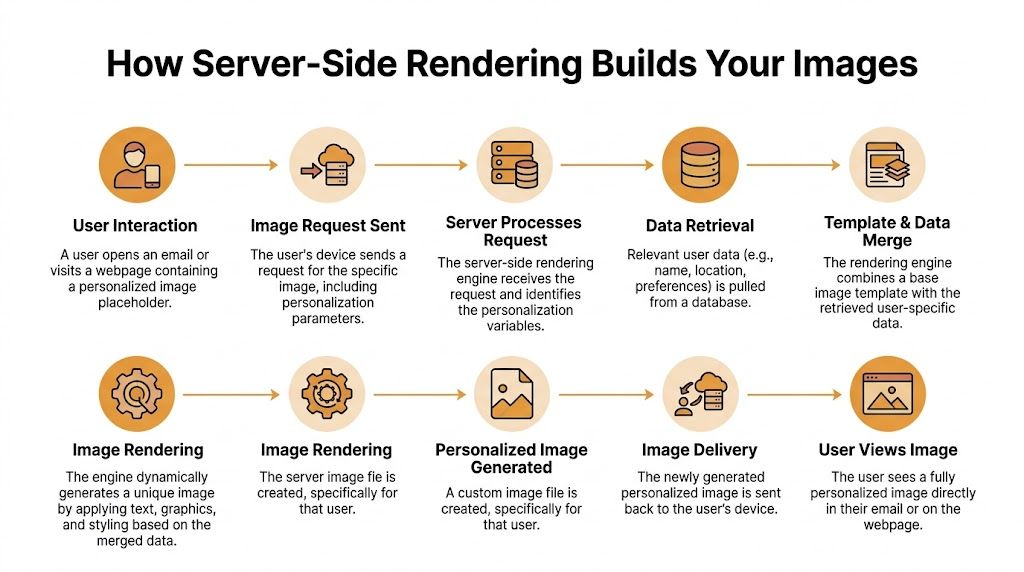
If you want a more technical companion to this explanation, this overview of backend image rendering helps connect the marketer view with what the system is doing under the hood.
The request starts with a normal image call
When someone opens your email or visits your landing page, their device requests an image URL.
That URL can contain personalization details directly, or it can point to a system that knows how to look them up. From the marketer’s perspective, this is just the image source. From the server’s perspective, it’s the trigger to build or retrieve a personalized visual.
The rendering engine acts like the brain
The rendering engine is the part that decides what the image should look like.
It receives the request, identifies the variables, finds the right template, and begins composing the final output. If the campaign is a certificate, the engine may place a participant name and score onto a branded background. If it’s a webinar reminder, it may add a date, a city, and a speaker name.
This is the moment where image personalization becomes concrete instead of theoretical.
The API works like a messenger
The engine often needs fresh data.
That data might live in a CRM, event platform, ecommerce system, spreadsheet, or another application. The API acts like the messenger that fetches the relevant values and brings them back to the renderer.
For marketers, the important part isn’t the protocol. It’s the fact that the image can reflect current information instead of a static asset exported days earlier.
The template does the visual heavy lifting
Once the data arrives, the system merges it into a base design.
That can include text overlays, dynamic badges, watermarks, profile-style elements, product visuals, or other graphics. Creative rules are applied here. Font choice, spacing, logo position, image crop, and background treatment all shape the final impression.
If your team already works with dynamic visual assets, related formats like 3D product visualization can be useful to study because they show how presentation quality changes buyer perception long before the click.
The cache works like short-term memory
Not every request should force a full rebuild.
A caching layer stores recently generated results or reusable components so the system can respond faster the next time a similar request comes in. That matters when a campaign sends at scale or when many recipients request similar image structures.
This is also one of the reasons server-side image rendering can remain practical outside small tests. Without caching, the system would do unnecessary repeat work.
The CDN handles global delivery
After the image is generated, it still has to reach the viewer quickly.
A Content Delivery Network, or CDN, acts like a global delivery fleet. It serves the image from locations closer to the user, reducing the distance the file has to travel. For audiences spread across regions, that keeps the experience more consistent.
Why this improves visible performance
All of this architecture supports one marketer-facing outcome. The main visual appears sooner.
A 2023 study found that on pages with 5000 kB of image data, server-side rendering drastically reduced Largest Contentful Paint compared to client-side rendering, because the server sends a fully formed HTML file and the main image becomes visible much faster, which improves Core Web Vitals and reduces bounce rates (DIVA portal study).
That sounds technical, but the business translation is simple. People see the important part sooner. They wait less. They bounce less often. Your campaign gets a fairer chance to do its job.
Faster visual delivery doesn’t just help developers hit a metric. It helps marketers avoid losing attention before the message even appears.
A marketer-friendly way to picture the full chain
Think of the system as a fast custom print shop.
- A request arrives when someone opens the message.
- The job ticket is read to understand who the image is for.
- Customer data is retrieved from the right source.
- The design template is selected for that campaign.
- The image is assembled with the personalized content.
- The finished file is delivered from the fastest available location.
The user sees one image. The system completed several coordinated steps to make that moment feel instant.
Putting Personalized Images Into Practice
The practical workflow is much less intimidating than the term “server-side image rendering” suggests.
Marketers already know the core pattern because they use it every day with text merge tags. The only real change is that the personalization lives inside an image request instead of a sentence.

The email workflow marketers already understand
Say you’re building a campaign in Mailchimp or Klaviyo.
Normally, you’d write something like “Hi {{FirstName}}” in the copy. With personalized images, you place an image URL into the email template and include merge tags in the URL itself.
A simple example might look like this:
https://image-service.example/render?name={{FirstName}}&city={{City}}
The email platform replaces those merge tags for each recipient at send time. Then, when the email opens, the server receives a request with the actual values and generates the image for that person.
So one subscriber might trigger:
...?name=Amira&city=London
Another might trigger:
...?name=James&city=Chicago
The marketer doesn’t manually create thousands of banners. The server creates each version when needed.
What happens after the URL fires
Once that request hits the image service, the system can:
- Fetch extra data from an API or database if the URL doesn’t contain everything
- Overlay dynamic text like a name, score, or event date onto a base image
- Output an optimized format that’s ready to display
- Return the finished visual to the email client or webpage
According to Cloudinary’s guide, the server-side rendering process for a personalized image involves fetching real-time data from APIs, overlaying dynamic text onto a base template, and outputting an optimized format. It also ensures up to 99% compatibility with email clients that block JavaScript, and benchmarks show 20 to 40% faster initial render times on slow networks (Cloudinary guide).
That’s the big practical win. The image behaves like a normal image for the recipient, while the heavy lifting happens elsewhere.
Why fallbacks matter more than marketers expect
Real-world data is messy.
Someone’s first name might be missing. A city field may be blank. An external system may not respond in time. If your campaign assumes perfect data, the image can break or look awkward.
Good server-side image rendering uses fallbacks so the output still makes sense when data is incomplete.
Examples include:
- Default text when a merge value is empty
- Generic location wording when city or region isn’t available
- Backup templates if a data source fails
- Safe design rules that prevent long names from ruining layout
Field test: Before launch, review the image output for complete records, partial records, and empty records. Fallback quality often decides whether the campaign feels polished or fragile.
Web personalization follows the same logic
The same image pattern works on websites.
You can place the personalized image in a landing page, account area, referral screen, or campaign microsite using a standard HTML image element. The page doesn’t need to explain how the image was built. It only needs the image URL.
That makes this useful for:
- Lead capture pages that adapt the hero visual
- Post-purchase pages that show a custom confirmation graphic
- Event pages that generate social-share-ready attendee images
- Sales pages where the image changes based on known account data
On the web, you may also combine image rendering with the rest of your personalization stack, such as forms, CRM segments, and session data.
Practical use cases marketers can launch
Not every campaign needs the same level of complexity. Start with a use case where the value is obvious.
A few strong candidates:
Certificates and achievements
Event organizers, course creators, and nonprofits can create a branded certificate image with the recipient’s name and outcome.Sales outreach visuals
Teams using outbound tools often personalize the copy but leave the visuals generic. If you’re evaluating outreach workflows, this overview of platforms like Lemlist helps show where image-based personalization can complement sequence automation.Newsletter hero images
Instead of using the same banner for everyone, tailor the image to segment, location, audience type, or product interest.Social-ready assets
Personalized share cards can encourage recipients to post an achievement, event registration, or milestone.
The easiest way to think about implementation
For non-developers, the whole system becomes manageable when you reduce it to one sentence:
Put merge tags into the image request, let the server generate the final image, and make sure fallbacks are in place.
That’s why this approach feels familiar once you see it in action. It isn’t replacing marketing automation. It’s extending it into the visual layer.
Best Practices for Scaling Image Personalization
Launching one personalized image campaign is one thing. Running dozens across clients, business units, or product lines is another.
At that stage, the challenge stops being “Can we do this?” and becomes “How do we keep this reliable, secure, and manageable?”

Watch the system, not just the campaign
Marketers usually monitor opens, clicks, conversions, and revenue. Those still matter.
But at scale, image personalization also needs operational checks. If the image loads slowly, fails for a segment, or uses stale data, your campaign metrics can degrade before anyone spots the source of the problem.
Pay attention to:
- Render speed: Slow image generation can hurt the campaign experience even when the copy is strong.
- Failure patterns: Repeated fallback use may point to upstream data issues.
- Template consistency: Small layout errors multiply quickly when many campaigns reuse the same design logic.
- Regional delivery behavior: A global audience may experience different load quality depending on where the image is served.
Treat URLs as part of your data surface
Personalized image URLs often carry useful values. That’s convenient, but it also means teams should think carefully about what gets exposed.
A good rule is simple. Don’t place sensitive customer data into a public image URL if it doesn’t need to be there. Use tokens, indirect identifiers, or server-side lookups where appropriate.
This isn’t just a technical preference. It protects customer trust and lowers operational risk for agencies handling multiple accounts.
Accessibility belongs in the workflow
Dynamic visuals should still be understandable when the image doesn’t load or when the user relies on assistive technology.
That means writing alt text that reflects the purpose of the image, not just the campaign category. If the personalized image shows a certificate, the alt text should communicate that context. If it displays an event reminder with a name and date, the alt text should support the same core message.
Accessibility often gets dropped when teams get excited about personalization. That’s a mistake. If the image carries meaning, the non-visual version of that meaning also needs a home.
Personalized images should add richness, not create a blind spot for people who can’t view them.
Build a template system before you need one
Teams usually start with a handful of image templates.
Then more requests come in. One for webinar invites. Another for product launches. Another for account-based sales outreach. Soon there are many variations, and no one is sure which template uses which font rules, fallback logic, or approved logo treatment.
A scalable program needs structure.
Use a system that defines:
| Area | What to standardize |
|---|---|
| Template naming | Clear labels by campaign type, audience, or brand |
| Data rules | Which fields are required, optional, or fallback-enabled |
| Creative constraints | Font sizes, safe zones, line limits, logo positions |
| Review process | Who approves design changes and who owns QA |
| Team access | Which people can edit templates, data sources, and live campaigns |
In this context, collaboration features become important. Large teams need shared control, not one marketer passing files around by email. If you’re planning for a broader program, this article on a scalable image API is a useful reference point.
Why managed infrastructure matters at volume
This is the part many marketing teams underestimate.
Server-side rendering creates work on the server for each request. At small volume, that may feel invisible. At larger volume, it becomes a real infrastructure problem.
ITNEXT notes that scaling server-side rendering for high-volume image generation introduces significant server load per request, and handling millions of images per month requires strategies like caching, database query optimization, and modern frameworks. It also argues that managed solutions matter because they offload the technical and financial burden of maintaining performant infrastructure (ITNEXT analysis).
For agencies and enterprise teams, that changes the buying criteria.
You’re no longer evaluating only creative flexibility. You’re evaluating whether the platform can hold up under campaign spikes, multiple clients, varied use cases, and ongoing collaboration between marketers, designers, and operations teams.
A practical scaling mindset
As image personalization grows, the strongest teams tend to do three things well:
- They simplify the creative system so new campaigns don’t require reinvention.
- They protect the data flow so personalization stays accurate and safe.
- They rely on infrastructure built for volume instead of improvising with one-off workarounds.
That’s what turns a clever tactic into a repeatable program.
The Future of Real-Time Visual Communication
Server-side image rendering isn’t a novelty feature. It’s becoming part of how modern marketing communicates with people as individuals.
That matters because customer expectations keep moving in one direction. People want relevance, speed, and a message that feels current. They don’t care whether the delivery mechanism is elegant. They care whether the result feels personal and appears without friction.

The next step is moving closer to the user
One emerging direction is Edge-Side Image Rendering, or ESIR.
Instead of generating personalized visuals only from a central server setup, ESIR extends rendering to edge networks and CDNs so images can be produced closer to the person requesting them. A Q1 2026 analysis says ESIR can reduce latency by 40 to 60%, but it also notes ongoing challenges with synchronizing real-time data across global edge networks, especially for instant social media direct message scenarios (Crystallize analysis).
That’s worth watching, but it doesn’t replace the value of current server-side image rendering. It reinforces it.
Why centralized SSR still matters
For most marketing teams, maturity beats novelty.
A stable central rendering model is easier to govern, easier to monitor, and easier to connect with the systems marketers already use. That makes it a strong fit for email, websites, certificates, newsletters, social assets, and outreach campaigns where consistency matters more than chasing the newest architecture pattern.
The future may include more edge rendering for specialized high-speed use cases. The present still belongs to approaches that teams can deploy confidently and scale responsibly.
What this means for marketers
The practical takeaway is straightforward.
If your personalization strategy stops at text, you’re leaving a major part of the experience untouched. People respond to what they can see immediately. Personalized visuals make segmentation visible. They make automation feel human. They give campaigns a stronger first impression before the recipient reads a single line.
That can support the outcomes marketers care about:
- Higher engagement because the message feels meant for the viewer
- Stronger relationships because communication feels less generic
- Better revenue potential because attention lasts longer and campaigns connect more clearly to intent
The brands that use personalization well won’t just know more about their audience. They’ll show that understanding in the first second of the experience.
Server-side image rendering gives non-developer marketers a way to do exactly that. Not by learning a deep rendering stack, but by using tools and workflows that turn complex generation into something as familiar as merge tags.
The opportunity is already practical. You don’t need to wait for a future trend line to start.
If you want to turn “merge tags for images” into something your team can launch, OKZest gives you a no-code and API-based way to create personalized images for email, websites, certificates, social messaging, and more. It’s built for marketers who want the impact of server-side image rendering without having to build and manage the infrastructure themselves.