Email marketing optimisation is really just the process of using data, strategy, and a bit of testing to consistently improve how your email campaigns perform. It’s about refining everything—from your subscriber lists and content to your deliverability and automation—to get better engagement, higher conversions, and a much better return on your effort.
The goal? Simple. Send the right message to the right person at the right time. Every time.
Building a Strong Foundation for High-Performing Emails

Before you even think about complex A/B tests or fancy automation workflows, you have to know that the most impactful optimisation happens at the foundational level. Too many marketers jump straight into tactics like subject line testing, but the real performance gains come from deeply understanding who you're talking to and what they actually need.
This initial strategic work is what separates the campaigns that get instantly deleted from the ones that actually drive revenue.
Effective optimisation isn't about guesswork; it's about building a framework based on genuine audience insights. Without this, you’re essentially decorating a house with unstable foundations. Let’s build that solid ground first.
Moving Beyond Demographics in Audience Research
Standard audience profiles often stop at the basics—age, location, gender. While that’s a decent starting point, this data barely scratches the surface. To create emails that truly connect, you need to uncover the psychological and behavioral drivers behind why your subscribers do what they do.
That means asking deeper questions:
- What are their primary pain points? What daily frustrations or challenges does your product or service solve for them?
- What are their core motivations? Are they looking for career growth, time savings, financial security, or maybe social status?
- What is their "job to be done"? In other words, what specific outcome are they trying to achieve by "hiring" your product?
For example, a project management software company might find its audience isn't just "small business owners" (a demographic). Instead, they are "overwhelmed founders struggling to delegate" (a pain point) who are motivated by a desire for a better work-life balance (a motivation). This single insight changes your messaging from "Manage projects better" to "Reclaim your evenings with seamless delegation." See the difference?
Creating Segments That Actually Matter
Segmentation is one of those strategies everyone talks about, yet 90% of marketers don't segment their lists consistently. The real opportunity here is to create segments based on behavior and intent, not just static attributes. This is the absolute core of effective email marketing optimisation.
A well-segmented campaign can deliver astonishing results. When we sent a campaign to a general list versus an interest-based segment, the segmented list achieved a 94% open rate and a 38% click-through rate, completely dwarfing the general list's performance.
This just goes to show that relevance is the ultimate driver of engagement.
Practical Segmentation Strategies for Immediate Impact
Forget those generic buckets like "new subscribers." Let's build segments that allow for truly personal communication.
1. Engagement-Based Segments
Group your audience by how they interact with your emails. This is a dynamic approach that reflects their current level of interest.
- Highly Engaged (Opened/Clicked in last 30 days): These are your fans. Send them new offers, ask for reviews, and invite them to loyalty programs.
- Partially Engaged (Opened in last 90 days, no clicks): Their interest is fading. Try sending them your best-performing content or a compelling survey to recapture their attention.
- At-Risk/Inactive (No opens in 120+ days): Before you hit delete, launch a targeted re-engagement campaign with an offer they can't refuse.
2. Purchase Behavior Segments
For any e-commerce business, this is non-negotiable. It allows you to tailor promotions and recommendations with laser precision.
- First-Time Buyers: Send them a warm welcome email, share some tips on using their new product, and include a special offer for their second purchase to encourage repeat business.
- High-Value Customers (Top 10% by spend): Grant them exclusive access to new products, VIP support, or special discounts. Make them feel important.
- Category-Specific Purchasers: If someone buys running shoes, segment them to receive content about marathon training, new running gear, and nutrition tips. It's just common sense—don't send them basketball promotions.
By building this strategic foundation with deep audience research and intelligent segmentation, you set the stage for every other optimisation tactic to succeed. Your creative, copy, and automation will be exponentially more effective because they’re built on a rock-solid understanding of who you’re talking to.
Crafting Emails That Convert and Captivate
With a solid plan in place, it’s time to get down to the email itself—the actual message that lands in the inbox. This is where the magic happens, where sharp copywriting and smart design come together to create something that doesn't just get opened, but gets results.
Let's be honest, a beautiful email that doesn't drive action is just a pretty picture. A truly effective email, on the other hand, is a revenue-generating machine. It’s about more than just witty words; it's about structuring your layout for the modern, on-the-go reader, writing calls-to-action that are impossible to ignore, and using visuals to make every single person feel like you're talking directly to them.
Designing for the Mobile-First Inbox
Here’s a simple truth: the vast majority of your audience will open your email on a smartphone. This isn’t a fleeting trend; it’s the new normal. If your emails aren’t designed with a mobile-first mindset, you’re already falling behind.
Think about the user’s context. They’re probably scrolling through their inbox while waiting for a coffee, multitasking, or just killing a few minutes. Your design has to work within that reality.
- Single-Column Layout: This is non-negotiable. A single-column design ensures your content flows logically down the screen, making it easy to scroll with a thumb. No one wants to pinch and zoom.
- Large, Tappable CTAs: Your buttons need to be big enough for a finger tap. Aim for at least 44x44 pixels. Don’t make your audience struggle to click a tiny text link. Use bold, contrasting colors to make your call-to-action stand out.
- Readable Fonts: Stick with web-safe fonts and keep your body copy at a minimum of 16px. Anything smaller is a recipe for squinting, and your email will likely get deleted.
For a deeper dive into creating emails that are both stunning and effective, check out these essential email design best practices that cover everything from typography to accessibility.
Writing Copy That Connects and Converts
Your subject line is the gatekeeper. Its one and only job is to get that email opened. Nearly half of all subscribers decide whether to open an email based on the subject line alone. To really master this crucial first impression, it's worth digging into proven email subject line best practices.
Once they're in, the body copy has to deliver on the promise of the subject line. The trick is to write with empathy and absolute clarity. Speak directly to the specific segment you’re targeting, using their language and hitting on the pain points you uncovered during your planning phase.
Remember, you're not writing to a list; you're writing to a person. Use words like "you" and "your" to make it feel like a one-to-one conversation. Frame benefits, not just features. Instead of saying, "Our software has a new dashboard," try, "You can now track your progress in real-time with your new dashboard."
That small shift from "we" to "you" makes all the difference.
The Power of Hyper-Personalized Visuals
Personalization is so much more than just dropping a {{FirstName}} merge tag into your greeting. True email optimisation today is about creating genuinely unique, individualized experiences. This is where dynamic, personalized images completely change the game, turning a generic email blast into a personal message.
Imagine sending an event invitation where the image features the recipient’s name printed right on their VIP pass. Or a sales update showing a chart that dynamically visualizes their personal performance data. This is the kind of personalization that makes someone feel seen and valued, and it has a massive impact on engagement.
Tools like OKZest make this surprisingly simple. By using the same merge tags you already use for text, you can generate a completely unique image for every single person on your list.
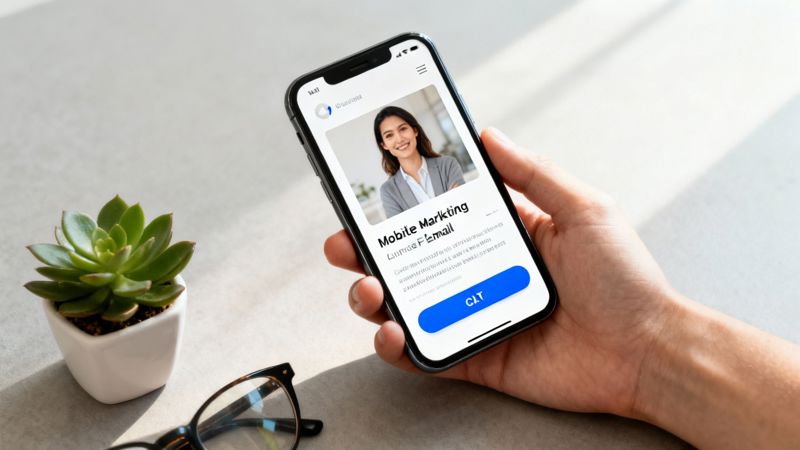
The real takeaway here is how seamlessly you can weave individual data into a visual format, creating a powerful, one-of-a-kind experience that can be scaled to thousands of subscribers. In a world where over 376.4 billion emails flood inboxes every single day, this isn't just a cool trick—it's a necessity.
Making Sure Your Emails Actually Get Delivered
Let's be honest: even the most creative, perfectly personalized email is completely worthless if it lands in the spam folder. Real email marketing optimization isn't just about clever copy or beautiful images; it’s built on a technical foundation that’s often ignored: deliverability.
Getting your emails to the inbox is all about building trust with Internet Service Providers (ISPs) like Gmail and Outlook. You have to prove you’re a legitimate sender whose emails people actually want to receive. If you can't, your sender reputation tanks, and your messages get filtered out before anyone even has a chance to see them.
The Three Pillars of Email Authentication
Building that trust starts with setting up three core authentication protocols. Think of them as your email’s passport—they verify your identity and stop spammers from hijacking your domain.
- SPF (Sender Policy Framework): This is just a simple list of all the servers you’ve authorized to send emails for your domain. It’s a basic check that tells an ISP, "Hey, this email from
yourbrand.comreally did come from a server we trust." - DKIM (DomainKeys Identified Mail): This one is a bit more sophisticated. It adds a digital signature to every email you send. When it arrives, the ISP checks that signature to make sure the message wasn't messed with along the way.
- DMARC (Domain-based Message Authentication, Reporting & Conformance): DMARC is the final piece of the puzzle, tying SPF and DKIM together. It gives ISPs instructions on what to do if an email fails either check—whether they should quarantine it, reject it outright, or just let it through.
Setting these up is a one-time job that pays off for years. It’s the clearest signal you can send that you're a serious, responsible sender.
Keeping Your Sender Reputation Squeaky Clean
Once you're properly authenticated, you have to act the part. Your sender reputation, often tracked as a "sender score," is basically a credit score for your email domain. A high score gets you into the main inbox. A low one sends you straight to spam.
The key to a high score is proactive list management.
Your email list isn't just a static file; it's a living thing that needs regular care. Pruning unengaged subscribers isn't a loss—it's a smart move that boosts your engagement metrics and, in turn, your sender score.
If you’re starting with a new domain or IP address, you need to warm it up. Don't just blast your entire list on day one. Start by sending small batches to your most engaged subscribers first. This slow-and-steady approach shows ISPs you're building a positive sending pattern. For a full rundown, it's worth checking out some expert advice on email deliverability best practices to protect your score for the long haul.
Dodging Common Spam Triggers
Finally, what’s inside your email really matters. ISPs use complex filters to hunt for anything that looks and smells like spam. While there's no single secret to avoiding them, you can steer clear of the most obvious red flags.
Here are a few simple rules of thumb.
Key Content Practices to Follow:
| Do's | Don'ts |
|---|---|
| Keep a good balance of text and images. | Use tons of punctuation or all caps (e.g., FREE!!!). |
| Make your unsubscribe link obvious and easy to find. | Use cheesy, spammy words like "act now," "risk-free," or "$$$." |
| Personalize your emails to show they're relevant. | Include attachments. It’s always better to link to content. |
| Make sure your HTML code is clean and simple. | Write misleading subject lines that don't match the email's content. |
Nailing these technical details ensures all your hard work on strategy and creative actually gets seen. To really dig into the specifics of bypassing spam filters, a comprehensive guide on how to improve email deliverability can give you a deeper technical breakdown. This foundational work is the bedrock of any email marketing strategy that actually gets results.
Driving Revenue with Smart Automation and A/B Testing
Smart automation is the engine that drives modern email marketing. It’s what lets you shift from sending generic blasts to delivering perfectly timed, highly relevant messages that feel like a one-on-one conversation—all while you focus on bigger strategic goals.
This isn’t just about a basic welcome series. It’s about building an intelligent system that nurtures leads, recovers lost sales, and builds lasting customer relationships.
The impact of getting this right is massive. Automation has quietly become the secret sauce for top-performing email programs. While automated emails might only account for 2% of your total sends, they can be responsible for an astonishing 37% of all sales generated through email. The engagement metrics speak for themselves, with open rates and conversions soaring far above standard manual campaigns.
Building Your Automated Sales Machine
Effective automation starts by identifying key moments in the customer journey and creating a helpful, triggered response. Think beyond a simple "hello" and build workflows that solve problems and drive action.
Here are a few high-impact automations you can set up right away:
- Cart Abandonment Flow: This is a non-negotiable for any e-commerce business. When a user adds items to their cart but leaves, a timed series of emails can bring them back. The first email, sent an hour or so later, can be a simple reminder. The next might address common concerns like shipping costs or even offer a small discount to nudge them over the finish line.
- Browse Abandonment Flow: This one’s more subtle but just as powerful. If a logged-in user views a specific product multiple times without adding it to their cart, you can send a follow-up email showcasing that item, related products, or helpful reviews. It shows you're paying attention without being creepy.
- Re-Engagement Campaign: Every list has subscribers who go quiet. An automated workflow can spot users who haven't opened or clicked an email in 90-120 days and send a targeted "we miss you" campaign. This could include your best-performing content, a special offer, or a simple poll asking what they'd like to see from you.
These workflows are fundamental. For a more detailed look at setting up these systems, our guide to email marketing automation best practices provides a complete playbook.
The real power of automation is its ability to scale deep personalization. A well-designed workflow doesn't just send a generic message; it sends a unique one based on specific user data and behavior.
For instance, you could use a tool like OKZest within your cart abandonment flow to automatically generate a personalized image showing the exact items left in the cart. You could even dynamically add a unique discount code directly onto the image, creating a compelling visual that's impossible to ignore. It turns a simple reminder into a highly tailored, persuasive experience.
A/B Testing for Continuous Improvement
Automation sets the stage, but A/B testing is how you refine the performance. It's the scientific method for email marketing, allowing you to make data-driven decisions instead of just guessing what works. The key is to be methodical: test one variable at a time so you can clearly attribute any change in performance.
Start by forming a clear hypothesis. Don't just test random elements; have a reason behind your experiment.
- Hypothesis: "We believe that using a question in the subject line will increase our open rate because it creates curiosity."
- Variable: Subject Line
- Control (A): "New Spring Collection is Here"
- Variant (B): "Ready to See Our New Spring Collection?"
You can test almost any element of your email, but some have a bigger impact than others.
High-Impact Elements for A/B Testing
| Element to Test | Why It Matters | Example A | Example B |
|---|---|---|---|
| Subject Line | The primary driver of open rates. Small changes can lead to big lifts. | "Get 20% Off Your Next Order" | "A Special 20% Offer Just for You" |
| Call-to-Action (CTA) | The main conversion point. Color, text, and placement are critical. | "Buy Now" | "Get Your Discount" |
| Email Copy | The tone and length of your message can affect click-through rates. | A short, punchy paragraph. | A longer, more detailed explanation. |
| Sender Name | Influences trust and recognition. Test your company name vs. a person's name. | "From OKZest" | "From Sarah at OKZest" |
Automated campaigns consistently outperform their manual counterparts because they are timely, relevant, and personal. Here’s a quick look at what that performance difference can look like.
Automated vs. Manual Email Campaign Performance
| Metric | Automated Campaigns | Manual Campaigns | Performance Lift |
|---|---|---|---|
| Open Rate | 35-50% | 15-25% | +133% |
| Click-Through Rate (CTR) | 5-10% | 2-5% | +100% |
| Conversion Rate | 3-6% | 0.5-2% | +200% |
The data is clear: automation delivers more engagement and, ultimately, more revenue by connecting with customers at the perfect moment.
This is why having solid deliverability is so crucial—you can't test what doesn't get delivered.
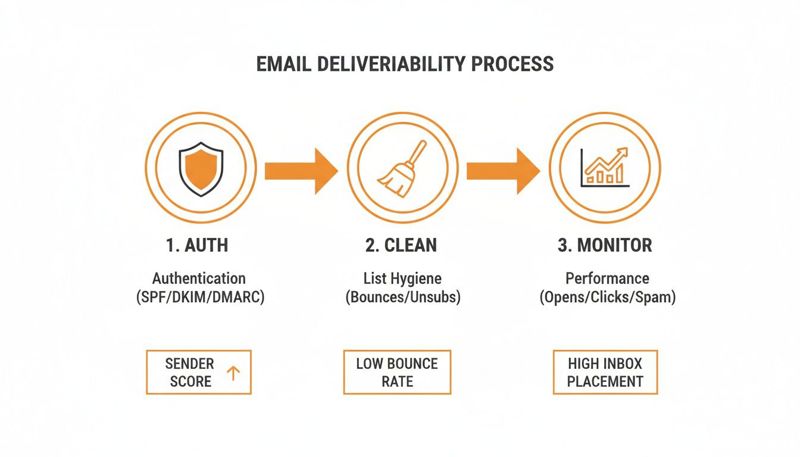
This process—authentication, list hygiene, and performance monitoring—ensures your carefully crafted tests actually make it to the inbox.
Once you have a statistically significant result, implement the winner and move on to your next hypothesis. This iterative cycle of testing, learning, and implementing is the engine of sustainable growth. It ensures your automated workflows don't just run—they evolve and get better over time.
Measuring What Actually Matters
"If you can't measure it, you can't improve it."
It's a classic for a reason. When it comes to email marketing, this is the simple truth that separates the pros from the amateurs. It’s all too easy to get excited about a high open rate, but that number is often just a vanity metric. Real, sustainable growth happens when you track the key performance indicators (KPIs) that tie your email efforts directly to business results.
Think of measurement as a feedback loop. The data from one campaign should directly inform the strategy for the next, creating a cycle of continuous improvement. This means digging deeper than the surface-level stats and zeroing in on the numbers that truly reflect engagement and, more importantly, revenue.
Moving Beyond the Open Rate
Let’s be honest: the open rate isn't what it used to be. It’s a decent starting point, but it's far from the finish line. With privacy changes like Apple's Mail Privacy Protection, open rates are becoming less and less reliable. It’s time to shift your focus to what subscribers do after they open your email.
These are the KPIs that really tell the story:
- Click-Through Rate (CTR): This is your first real sign of life. It’s the percentage of people who clicked on at least one link. A solid CTR tells you that your message and call-to-action were compelling enough to get someone to act.
- Click-to-Open Rate (CTOR): This metric gets a little more granular. It compares the number of unique clicks to the number of unique opens. It’s a fantastic way to gauge how engaging your email content was for the people who actually saw it. A high CTOR is a sign that your message hit the mark.
- Conversion Rate: Here it is—the bottom line. This tracks the percentage of people who completed the goal you set, whether that’s making a purchase, signing up for a webinar, or downloading an ebook. This is where email proves its value.
Focusing on these three gives you a much clearer picture of your campaign's real-world performance.
The Metrics That Drive Revenue
For any business where sales matter, you have to connect the dots between your emails and the money coming in. These are the KPIs that quantify the direct impact of your email marketing and help you justify its existence (and budget).
Too many marketers see email as just another communication channel. The best see it as a revenue engine. When you start tracking financial KPIs, you can prove its value and make smarter decisions about where to invest your time and money.
Start tracking these numbers to understand the true ROI of your campaigns:
- Revenue Per Email (RPE): A simple but powerful calculation:
Total Revenue Generated / Number of Emails Delivered. This gives you the average dollar value of every single email you send. - Revenue Per Recipient (RPR): A slightly different angle, this is
Total Revenue Generated / Number of Recipients. RPR is brilliant for comparing the long-term value of different audience segments. - Average Order Value (AOV): By tracking the AOV from your email campaigns, you can see if specific messages, offers, or product recommendations encourage customers to spend more. This is a huge lever for growth.
Building Your Performance Dashboard
To make any sense of this data, you need one place to see it all. Most modern email service providers (ESPs) have built-in analytics, but the real magic happens when you combine that data with insights from your website analytics or CRM.
Your dashboard should be an at-a-glance command center for your most important KPIs. It’s where you spot trends, celebrate wins, and diagnose problems before they get out of hand.
Key Components of an Effective Dashboard:
| Component | What to Track | Why It's Important |
|---|---|---|
| Engagement Trends | CTR, CTOR, Unsubscribe Rate | Shows how well your content is resonating over time. |
| Conversion Metrics | Conversion Rate, AOV | Connects email activity directly to business outcomes. |
| Revenue Impact | RPE, RPR | Quantifies the financial return of your email program. |
| List Health | List Growth Rate, Bounce Rate | Monitors the quality and growth of your subscriber base. |
By consistently keeping an eye on these core metrics, you stop just sending emails and start building a strategic, data-driven growth system. This analytical approach is the key to winning in the long run.
Common Questions About Email Optimisation
Even with the best playbook in hand, you're bound to run into a few tricky questions when you start digging into email optimisation. It’s one thing to know the theory, but another to put it into practice. Let's tackle some of the most common hurdles I see marketers face when they're trying to get their email program firing on all cylinders.
Think of this as the practical advice that bridges the gap between a great strategy and a high-performing email system.
How Often Should I Clean My Email List?
This is a big one. The short answer? Constantly. List hygiene isn’t a massive, twice-a-year chore—it's an ongoing habit. While a big scrub every six months is a good idea, your day-to-day automation is what really moves the needle.
The most effective way to handle this is to set up a simple workflow. Automatically tag any subscriber who hasn't opened or clicked an email in the last 90-120 days. Don't just delete them—give them one last chance with a re-engagement campaign.
- Email 1: A gentle nudge. Something like, "Is everything okay?" with links to your most popular content.
- Email 2: A clear value proposition. This could be a compelling offer or a quick survey asking about their content preferences.
- Email 3: The friendly goodbye. Let them know you'll be removing them to respect their inbox, but give them a clear link to click if they want to stay.
If they ghost you through that entire series, it's time to let them go. Seriously. Pruning your list regularly keeps your engagement metrics healthy, protects your sender reputation, and makes sure your hard work is seen by people who actually want to see it.
Hanging onto unengaged contacts is like shouting into an empty room. It tanks your metrics and tells inbox providers like Gmail and Outlook that your emails might not be all that important, which can torpedo your deliverability across the board.
What Is a Good Open Rate for Email Marketing?
Ah, the million-dollar question. And the honest answer is always, "it depends." You'll hear people throw around industry benchmarks of 20-30%, but that number is often more distracting than helpful.
A "good" open rate is completely relative. It changes dramatically based on your industry, who you're emailing, and what kind of email you're sending.
For instance, a transactional email—like an order confirmation or password reset—can easily hit an 80% open rate or higher. People are expecting it. But a promotional newsletter sent to a huge list might be crushing it at 22%.
So, instead of chasing some generic industry average, benchmark against yourself. Your real goal should be consistent, incremental improvement. If your open rates are trending up month-over-month, you're winning. That's a much more powerful indicator of success than hitting an arbitrary number.
Can I Use Personalized Images in Any Email Platform?
For the most part, yes. You don't need a super-specialized, complex setup for this. Personalization tools are built to be flexible. A solution like OKZest is designed to integrate seamlessly with pretty much any modern Email Service Provider (ESP) that uses merge tags—think Klaviyo, Mailchimp, Instantly, and countless others.
The process itself is surprisingly simple. You generate a unique image URL in the tool, and that URL contains merge tags from your ESP. When you send your campaign, your email platform automatically swaps those tags with each subscriber's data, like their name, company, or city. The image renders in real-time, just for them.
It’s an incredibly straightforward way to add a layer of powerful, one-to-one personalization to your campaigns without any technical headaches.
Ready to create emails that feel personal and drive real engagement? With OKZest, you can automate personalized images for every subscriber, boosting conversions and building stronger relationships. Start creating for free today at okzest.com.