When we talk about personalized graphics in email, we're going way beyond just dropping a [First Name] merge tag into the subject line. We're talking about dynamic, custom images tailored to each person on your list. Imagine an email with a product mockup featuring the recipient's name, a custom-generated discount code on a graphic, or a digital event ticket created just for them.
This strategy embeds unique visual content right into the email, giving your engagement a serious boost and creating an experience that people actually remember.
Why Generic Emails No Longer Work

Let's be real—the standard 'Hi [First Name]' trick is old news. Inboxes are more crowded than ever, and your audience can spot a generic, one-size-fits-all marketing blast from a mile away. People crave interactions that feel genuine and designed just for them.
This is exactly why personalized content, especially visual content, hits so hard. When someone sees an image with their name on it or a detail that’s unique to their account, the email instantly shifts from a mass broadcast to a one-on-one conversation. It's a simple psychological trigger that signals you see and value them as an individual.
Moving Beyond Basic Personalization
The whole idea behind personalized graphics in email campaigns is to make your emails feel more like a real conversation. Instead of just saying their name, you’re showing them something made specifically for them. This isn't just a gimmick; it’s a high-impact strategy that cuts right through the digital noise.
The numbers don't lie:
- Personalized emails get a 29% higher open rate and a 41% higher click-through rate than their generic counterparts.
- With over 347 billion emails sent every single day, a unique, personalized image makes your message feel important.
- Targeted campaigns with personalized elements are responsible for 58% of all email revenue. Some businesses even report a revenue jump as high as 760%.
This approach builds real connections and drives tangible results. You can get a deeper look at the fundamentals in our complete guide on https://okzest.com/blog/email-marketing-personalisation.
The Impact on Customer Engagement
At the end of the day, generic emails fail because they lack context. They're trying to speak to everyone, which means they end up speaking to no one in particular.
Dynamic, personalized graphics solve this problem by anchoring your message in the recipient's world—whether that's with their name, loyalty status, or a recent purchase. To see how this fits into a broader plan, it's worth exploring modern SaaS email marketing strategies. By adopting this visual-first approach, you create a far more engaging brand experience that doesn't just grab attention but actually builds lasting loyalty.
Crafting Your Personalized Image Templates
This is where the creative part of your campaign really comes to life. Building an effective template isn't just about making a pretty picture; it’s about designing a flexible canvas that can automatically blend your brand with each customer's unique data. A great template is the foundation for every single personalized image you'll generate.
The trick is to find the right balance between what stays the same and what changes. The static elements are your brand constants—think your logo, a signature background, or specific brand colors. Then you have your dynamic elements, which are essentially placeholders you’ll fill with customer data like a first name, loyalty points, or a unique coupon code.
Designing for Clarity and Impact
When you're designing, remember one thing: clarity is king. Your personalized text has to be easy to read, especially on the small mobile screens where most emails are opened today. This means picking legible fonts, making sure there's high contrast between your text and the background, and giving your dynamic elements enough breathing room so they don't look crammed in.
Let’s imagine a real-world example. An event organizer wants to email personalized digital tickets to every attendee. Their template would look something like this:
- Static Elements: The event logo, a branded background, and the venue address. These are identical for everyone.
- Dynamic Elements: Placeholders for the attendee’s full name, a unique QR code for entry, and their specific seat number. These will be different for every single person.
This approach keeps everything on-brand while delivering something genuinely personal and useful to each recipient.
The best personalized graphics feel both professional and personal. They should look like a natural part of your brand's communication, not a tacked-on gimmick. Your template is what makes that consistency possible at scale.
Here’s a look at how a no-code tool like OKZest lets you build these templates by layering static and dynamic components.
You can see how this works in practice, mapping data sources directly to visual layers to turn a generic design into a powerful personalization engine.
Mapping Data to Your Visual Layers
Once your template design is ready, the next step is to connect it to your data. This part can sound technical, but modern tools have made it a much more intuitive process. You're basically just telling the software which piece of customer data goes into which placeholder you created.
Think of it like a mail merge, but for images. Instead of putting [First Name] into a text document, you're linking a "First Name" column from your subscriber list to a text layer in your image editor.
Let's go back to our event organizer. Using a tool like OKZest, they would map their data like this:
| Template Placeholder | Data Source (from a CSV or API) | Example Output |
|---|---|---|
| Attendee Name Layer | {{full_name}} |
Alex Johnson |
| QR Code Image Layer | {{qr_code_url}} |
[Unique QR Image] |
| Seat Number Layer | {{seat_assignment}} |
Section 102, Row B, Seat 14 |
You only have to set up this mapping once for the template. After that, the system can automatically generate thousands of unique graphics for your email campaign, each one perfectly tailored to the recipient. This is what makes creating personalized images not just possible, but incredibly efficient. By nailing your template design and data mapping upfront, you set the stage for a campaign that truly gets noticed.
Putting Your Dynamic Images Into Action
You've designed your visual templates and hooked them up to your data sources. Now for the fun part: getting those personalized images into your subscribers' inboxes. This is where the technical magic happens, but trust me, it’s a lot more straightforward than it sounds.
The whole process hinges on creating a unique image URL for every single person on your email list.
Think of this special URL as a dynamic link. When a subscriber opens their email, that link tells your personalization tool (like OKZest) to instantly build the graphic for that specific contact, pulling their data right into the template you made. The result? Each recipient sees an image created just for them, all from a single email campaign.
This diagram gives you a bird's-eye view of the entire workflow.
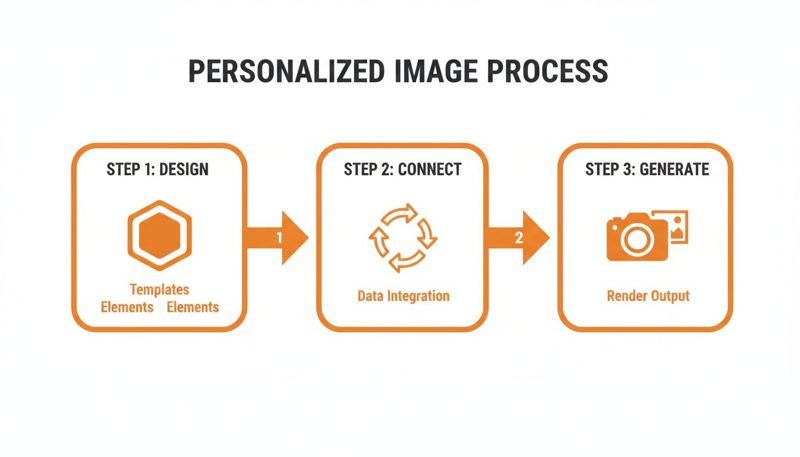
As you can see, the heavy lifting—designing templates and connecting data—is all done upfront. That makes the final generation step a lightweight, automated process that just works.
Using Merge Tags to Insert Your Dynamic URL
Your Email Service Provider (ESP) is already built to handle this kind of personalization through merge tags, which you might also know as personalization tags or custom fields. These are the same little snippets you use to pop in a subscriber's first name, like *|FNAME|* or {{ first_name }}.
Instead of inserting text, though, you'll be using a merge tag to construct and insert your unique image URL.
Most personalization platforms give you a base URL for your image template. From there, you just append your ESP's merge tags to that URL as parameters to pass the data along. If you want to get into the nitty-gritty, you can explore the mechanics of how image URL personalization works in email. It’s a great read for understanding exactly how data travels from your ESP to the final image.
Let's say your base URL is https://okzest.com/image/template123 and you want to personalize it with a first name and company name. Your final URL structure would look something like this:
https://okzest.com/image/template123?name={{first_name}}&company={{company_name}}
When your ESP sends the email, it swaps {{first_name}} and {{company_name}} with the real data for each contact, creating a unique link for everyone on your list.
ESP Merge Tag Implementation Examples
The exact syntax for merge tags changes from one platform to another. Getting this detail right is absolutely critical for making sure your personalized graphics in email campaigns show up correctly for everyone. You’ll simply insert your finished URL into the src attribute of an <img> tag in your email's HTML.
Here's a quick reference table showing how to format that image URL for some of the most popular ESPs.
| Email Service Provider (ESP) | Merge Tag Syntax Example |
|---|---|
| Mailchimp | <img src="https://okzest.com/image/123?name=*|FNAME|*"> |
| Klaviyo | <img src="https://okzest.com/image/123?name={{ first_name }}"> |
| Instantly | <img src="https://okzest.com/image/123?name={{firstName}}"> |
| ActiveCampaign | <img src="https://okzest.com/image/123?name=%FIRSTNAME%"> |
As you can see, the core concept is identical across the board. The only thing that changes is the specific merge tag format your ESP uses.
Pro Tip: Always, always double-check your ESP's documentation for the exact merge tag syntax. A tiny typo, like using curly braces instead of percent signs, is all it takes to break the personalization.
Don't Forget Fallback Images
So, what happens if a contact on your list is missing data? For instance, what if you don't have a first name for "[email protected]"? Without a backup plan, they could see a broken image or a graphic with an awkward blank space. It immediately looks unprofessional and sloppy.
This is exactly why fallback images are so important.
A fallback is simply a default, generic version of your graphic that displays whenever the necessary personalization data is missing. It’s a critical safety net that protects the user experience and keeps your campaign looking sharp.
You can set up fallbacks in a couple of ways:
- Platform-Level Fallbacks: Most dedicated image personalization tools let you specify a default value for each dynamic layer. If a name field is empty, it can automatically default to something like "Valued Customer" or "Friend."
- URL Parameter Fallbacks: You can often set the fallback directly in the image URL itself. For example:
.../image/123?name={{first_name}}&fallback_name=Friend. If thefirst_namefield is empty, the system will use "Friend" instead.
Implementing a fallback strategy isn't optional—it's essential. It ensures every single email you send is polished and complete, protecting your brand's reputation and preventing the jarring experience of a broken campaign. This one small step makes a huge difference.
Creative Ideas for Personalized Graphics
Alright, you've got the technical side down. Now for the fun part: figuring out what you can actually do with personalized graphics. This is where you move beyond just slapping a first name on a stock photo and start seeing a real lift in engagement. The true power of personalized graphics in email campaigns is unlocked when you get creative and tailor visuals to solve a specific problem or just plain delight your audience.
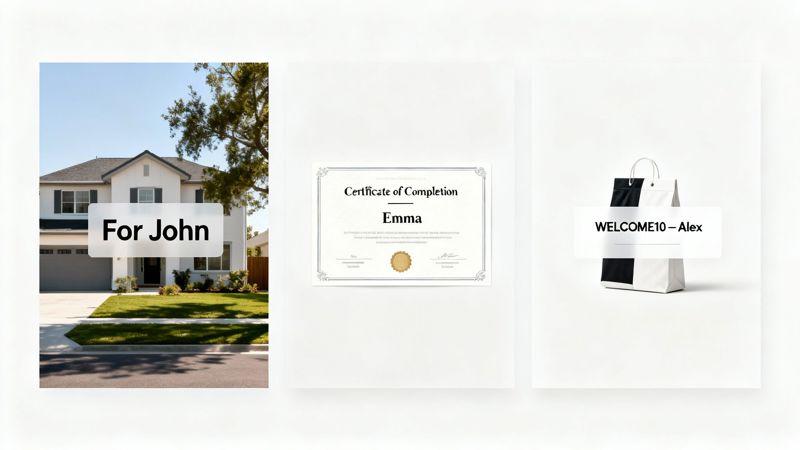
When done right, these graphics feel less like a marketing gimmick and more like a thoughtful, bespoke experience. By connecting your customer data to your creativity, you can turn a standard email into a memorable moment that actually gets people to click.
Let's dig into some practical, industry-specific examples to get your own ideas rolling.
For E-commerce and Retail Brands
For any online store, personalization is your best weapon against a crowded inbox. Dynamic images can take a generic sale announcement and turn it into an offer someone feels they can't afford to miss.
Imagine an abandoned cart email. Instead of just listing the products left behind, you show an image of the exact item with the shopper's name and a unique, one-time discount code right on top. That's way more powerful than plain text. It creates a visual reminder and a genuine sense of urgency.
Here are a few other ideas for e-commerce:
- Loyalty Program Updates: Send an image of a personalized digital loyalty card. Show their name, current points balance, and their member status (like "Gold Member"). It makes their status feel tangible.
- Product Recommendations: Instead of a list, create a visual collage of products based on their browsing history. Add their name in the header, like a note from a personal shopper.
- Post-Purchase Thank You: Generate a graphic showing the customer's name and an image of the product they just bought. You can even include a personalized referral code for them to share.
For Coaches, Consultants, and Educators
If you're in the business of knowledge or services, personalized graphics are fantastic for building relationships and adding value. These visuals become powerful motivators and markers of achievement, making your clients feel seen and celebrated.
For example, a course creator can automatically generate and email a personalized certificate of completion the moment a student finishes a module. It’s a simple gesture, but it provides instant gratification and gives them a shareable asset that doubles as social proof for you.
The most effective personalized graphics don't just convey information; they evoke emotion. A certificate isn't just a record of completion—it's a symbol of accomplishment that strengthens a client's connection to your brand.
Here are some other powerful use cases:
- Personalized Progress Reports: Visualize a client's journey with a custom graphic showing their name alongside key milestones they've hit.
- Onboarding Welcome Images: Greet new clients with a personalized image that includes their name, their coach's name, and the date of their first session.
- Event Invitations: Send invites to exclusive webinars or workshops with a digital ticket featuring the attendee's name.
For Sales and Real Estate Professionals
In high-touch industries like sales and real estate, personalized graphics make your communications feel incredibly polished and client-focused. It’s that extra layer of care and attention to detail that really sets you apart.
A sales team could create a dynamic proposal cover page that automatically pulls in the prospect's company name and logo. The entire document feels custom-built from the very first glance.
For a real estate agent, this might look like a weekly property update sent to a potential buyer. The hero image could be a beautiful home with a text overlay saying, "Sarah, could this be your new home in Austin?" This small touch transforms a generic listing alert into a personal invitation.
This level of customization shows you truly understand your client's needs and makes your outreach far more memorable. If you think creatively, you can apply these principles to just about any industry to build stronger connections and, ultimately, get better results.
How to Test and Measure Your Campaign's Success
Launching a campaign with personalized graphics is a great first move, but your work isn't done when you hit "send." The real magic happens when you start to understand what’s working, what isn’t, and how you can make your next campaign even better. A data-driven approach is what separates a decent campaign from a truly great one.
You can't just assume personalization is working; you have to prove it. This means setting up a clear framework to test your efforts and measure the real impact on your bottom line. Without tracking the right metrics, you’re flying blind and can't justify the investment or refine your strategy.
Establishing Your A/B Testing Framework
The most reliable way to figure out if your personalized graphics are making a difference is through A/B testing. This is where you split your audience into groups to see which version of your email gets a better reaction. A solid test gives you definitive proof of the uplift your dynamic images provide.
Here’s a simple but effective way to set it up:
- Group A (The Control): This group gets your standard email. Maybe it has a generic, static image, or maybe no image at all, depending on your usual style. This is your performance baseline.
- Group B (The Variable): This group receives the exact same email—same copy, same subject line, same CTA—but with one crucial difference: the personalized graphic. Isolating the image as the only variable is key.
Make sure you split your audience randomly so the results are statistically sound. Let the test run for a set period, usually 24 to 48 hours, to give your subscribers enough time to open and engage.
Key Metrics to Track Beyond Open Rates
Open rates are a nice start, but they don't tell the whole story. An engaging personalized graphic is designed to drive action, not just grab attention. That means you need to look further down the funnel to measure the real impact of your personalized graphics in email campaigns.
Zero in on these metrics:
- Click-Through Rate (CTR): This is the most important metric for this kind of test. It shows you what percentage of people who opened the email were compelled enough by the visual to actually click on it. A big jump in CTR for Group B is a huge win.
- Conversion Rate: Of all the people who clicked, how many actually did the thing you wanted them to do on your landing page? Whether it was making a purchase, signing up for a webinar, or downloading a guide, this metric ties your email directly to business goals.
- Image Engagement: Some tools can even track interactions directly with the image itself. If your personalized graphic is the main call-to-action, tracking clicks on that specific element gives you incredibly valuable insight.
The goal isn't just to get more opens; it's to get more of the right kind of engagement. A higher CTR on your personalized image campaign proves that the visual element is successfully motivating your audience to take the next step.
To get a complete picture of your campaign's performance, it's worth digging into all the essential email campaign performance metrics.
Analyzing ROI and Iterating for Improvement
At the end of the day, any marketing effort comes down to its return on investment (ROI). The data is pretty clear on this: brands that use personalization can see their email ROI climb by nearly 260%, hitting a 43:1 return compared to 12:1 for those who don't. When you add dynamic elements like personalized graphics, that ROI can jump another 105-107%.
Why? Because these emails can achieve six times higher transaction rates and a 15% boost in customer lifetime value.
To figure out your own ROI, just compare the revenue generated from Group B against Group A, and make sure to subtract any costs for your personalization tool. A positive result gives you a solid business case to keep going and even expand your efforts.
For a deeper dive into the numbers, check out our guide on mastering email campaign analytics. Use what you learn to iterate—test different designs, calls-to-action, or types of personalization in your next campaigns to keep optimizing your results.
Of course. Here is the rewritten section, crafted to sound like an experienced human expert, following all your specified requirements.
Got Questions About Personalized Graphics?
If you're thinking about adding dynamic visuals to your emails, it's totally normal to have a few questions. You're introducing a new element to your campaigns, and it's smart to understand how it all works before you dive in. We get these questions all the time, so let's clear up the most common ones.
Our goal here is to give you straight, simple answers so you can move forward with confidence. From data privacy to email speed, here’s what you need to know.
How Do Personalized Graphics Affect Data Privacy?
This is usually the first question people ask, and the answer is refreshingly simple. Personalization platforms don't collect new data; they just visualize the data you already have and have permission to use.
Think of it like this: the tool is just taking an existing piece of data, like a first name or company, and rendering it as part of an image. If your data collection process is already compliant with rules like GDPR and CCPA, then using that data to create a personalized image is compliant, too. The responsibility for consent always stays with you, the sender.
A good personalization service acts as a data processor, not a data controller. It only processes the info you give it to create an image, and it doesn't store or use that personal data for anything else.
That distinction is everything. Your compliance is tied to how you manage subscriber consent, not whether you display {{first_name}} as text or as part of a graphic.
Will Dynamic Images Slow Down My Emails?
It’s a fair concern—nobody wants to send a clunky, slow-loading email. The good news is that modern image personalization services are built for speed, so this is rarely an issue.
Reputable platforms use a Content Delivery Network (CDN), which is basically a global network of servers. When someone opens your email, the personalized graphic loads from the server closest to them, making it incredibly fast. The whole process is nearly instant and has a negligible impact on how quickly your email loads for the user.
These images are also optimized on the fly, striking the perfect balance between image quality and file size to avoid any noticeable lag.
Do Personalized Images Trigger Spam Filters?
Spam filters are smarter than ever these days. They care way more about your sender reputation and subscriber engagement than whether an email contains an image. In fact, personalized graphics in email campaigns can actually help your deliverability over time.
Here's the logic:
- Engagement Is a Huge Signal: Spam filters watch how people interact with your emails. Because personalized visuals are designed to get more opens, clicks, and replies, they send all the right engagement signals.
- Sender Reputation: High engagement shows email clients like Gmail and Outlook that people want your content. This gives your sender reputation a nice boost, making it less likely you'll land in the spam folder down the road.
Sure, an email with one giant, unoptimized image and no text might look suspicious. But a well-designed email that uses a personalized graphic as one part of a balanced layout is perfectly fine.
What Happens If Personalization Data Is Missing?
This happens more often than you'd think, but it's easily handled with a critical feature: fallbacks. A solid personalization platform will never let a broken or empty image get through.
A fallback is simply a default value you set for any dynamic part of your image. If a contact record is missing a piece of data (like a first name), the system automatically pops in the fallback content instead.
Here’s what that looks like in practice:
| Dynamic Field | Subscriber Data | Fallback Setting | What the Recipient Sees |
|---|---|---|---|
| First Name | "Maria" | "Friend" | "Hi Maria!" |
| First Name | (empty) | "Friend" | "Hi Friend!" |
| Company Name | "Acme Inc." | "Your Company" | An image with the Acme Inc. logo |
| Company Name | (empty) | "Your Company" | An image with a generic placeholder logo |
Setting up your fallbacks is a non-negotiable step. It’s your safety net to make sure every single person gets a complete, professional-looking email, protecting both the user experience and your brand's reputation.
Ready to create unforgettable email experiences that drive real results? With OKZest, you can effortlessly generate thousands of unique, personalized images for your campaigns. Start for free and see the difference today.