Let's be honest, a generic template certificate of participation is more than just a document—it's a missed opportunity. While it technically ticks the box for acknowledgment, it rarely makes a lasting impression. More often than not, it just gets lost in a digital folder or tossed aside without a second thought.
Why Generic Certificates No Longer Cut It
That manual, one-by-one process of creating certificates is a familiar headache for anyone who's organized an event. It's a soul-crushing cycle of repetitive data entry, copy-pasting names, and endless proofreading. This old-school method doesn't just eat up your time; it actively works against your brand.
Inconsistent branding, typos, and a complete lack of personalization make your organization look amateurish. Instead of being a memorable keepsake that an attendee is proud to share on LinkedIn, a generic certificate becomes just another forgettable file. It fails to connect because it's missing the personal touch that makes someone feel genuinely seen and appreciated.
The True Cost of Manual Certificate Creation
The hidden costs of sticking with old methods go way beyond just lost hours. Every minute you or your team spends manually tweaking a template certificate of participation is a minute you're not spending on improving your event or engaging with your community.
Think about the real impact here:
- Brand Dilution: When certificates look different every time or are riddled with formatting errors, it chips away at your professional image.
- Reduced Engagement: A bland, impersonal award isn't going to be shared. You're missing out on valuable organic marketing every time someone decides not to post their achievement.
- Administrative Burden: Your team gets bogged down in low-impact, administrative grunt work instead of focusing on tasks that actually move the needle.
The move away from manual processes isn't just about saving time. It's about turning a simple acknowledgment into a powerful marketing asset that drives social proof and reinforces your brand’s commitment to quality.
This is exactly where a modern tool like OKZest comes in. By automating the entire process, you can generate thousands of beautiful, on-brand, and personalized certificates that people are genuinely excited to receive and share. This guide will walk you through exactly how to set up this system, shifting you from tedious manual work to an efficient, brand-building machine.
The market is already heading this way. The global certificates market was valued at USD 173.2 million in 2023 and is projected to hit USD 528.65 million by 2032. If you're interested, you can learn more about the rise of digital certificates and see the full market research.
Designing Your Master Certificate Template
This is where you bring your brand's vision for the certificate to life. Think of your master template certificate of participation in OKZest as the foundation—a professional, flexible core design that will represent your event, course, or workshop long after it's over.
The real trick is to separate your static elements from the dynamic ones. Static elements are the parts that never change, forming the backbone of your certificate's design.
- Your Logo and Branding: Pop your company or event logo in a prominent spot, usually somewhere near the top.
- Official Signatures: If you have them, add scanned signatures of key people like the CEO, lead instructor, or event director. It adds a nice, official touch.
- Seals and Emblems: Got any official seals or accreditations? Including them adds a layer of authenticity.
- Fixed Text: This covers the standard phrases like "Certificate of Participation" or "Proudly Awarded To."
Once you've got those locked in, you can map out the blank spaces where all the personalized, dynamic information will go. This is the data OKZest will automatically populate for each recipient.
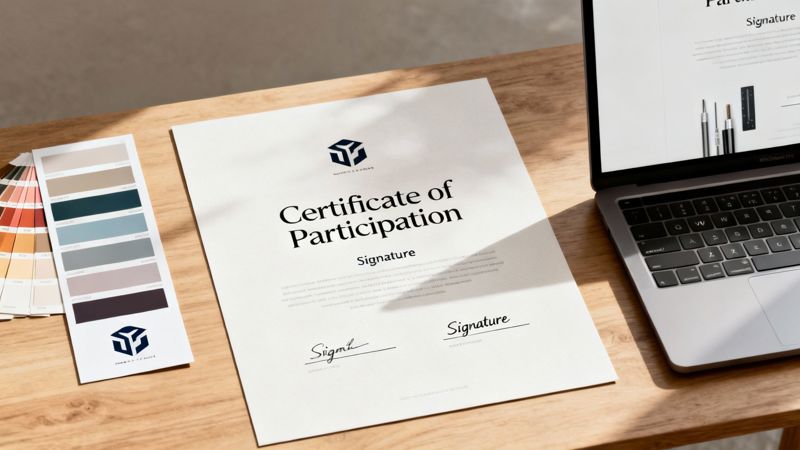
This example shows a really clean layout. It has clear, designated areas for recipient names, course details, and dates, all held together by strong brand elements. The goal is a balanced design that feels official without being stuffy.
Aligning Design with Your Brand
Your certificate's design should be a direct reflection of your brand. A corporate training company hosting a leadership workshop, for example, will probably want a sleek, minimalist design with a professional color palette and classic serif fonts. On the flip side, a creative arts festival might go for vibrant colors and more expressive, artistic typography.
Keep these core design principles in mind:
- Font Choice: Pick two complementary fonts—one for headings, one for the body text. Make sure they're easy to read and fit your brand’s personality.
- Color Scheme: Stick to your established brand colors. Using a consistent palette is a simple way to reinforce brand recognition and create a polished look.
- Visual Hierarchy: Arrange elements to guide the viewer’s eye naturally. The recipient's name should be the most prominent thing on the page, followed by the event or course title.
A well-designed certificate isn't just a record of attendance; it’s a shareable piece of marketing content. A design worthy of a LinkedIn post can generate significant organic reach for your brand.
It's also worth thinking about the physical certificate itself. For a premium feel, it pays to learn about printing on cardstock. That small detail can make a huge difference in how valuable the certificate feels.
And if you're stuck for inspiration on what kind of graphics work best, check out our guide on choosing the best images for certificates. It’ll help you pull together a template that’s genuinely impressive.
Unlocking Personalization with Dynamic Data
Personalization is what turns a generic template certificate of participation into an award that feels genuinely special. It's the secret ingredient that makes someone feel seen and recognized. This is where we move past static design and get into the real power of automation: dynamic data and merge tags.
Think of merge tags as smart placeholders. They’re simple text snippets, like {{participant_name}}, that you drop onto your master template. When OKZest goes to work, it grabs data from your connected source—whether that's a Google Sheet, a CSV file, or even a live API call—and swaps those placeholders with real, individual information.
The process is incredibly powerful. You can design one beautiful template and, in an instant, generate hundreds or thousands of unique certificates, each perfectly customized for the person receiving it.
Connecting Your Data for Seamless Automation
The magic really starts when you link your design to a data source. OKZest is built for flexibility, so you can use the tools you’re already familiar with. You can easily connect a simple spreadsheet where each row represents a participant and each column holds a piece of information you want on the certificate.
You'll probably start with a few essential merge tags:
{{participant_name}}: The most critical field for making it personal.{{course_title}}: Specifies the name of the workshop, webinar, or event.{{completion_date}}: Adds the official date the participation was recognized.
This kind of detail is more important than ever. The global market for professional certificates is projected to hit US$3.74 billion by 2025, fueled by a huge demand for upskilling. In such a crowded space, a personalized certificate that feels special truly stands out and boosts engagement. You can explore detailed projections on the professional certificates market to see just how big this trend is.
Of course, you can get more advanced. Think about embedding a unique QR code for instant verification or pulling in specific achievement details for different levels of participation. It all comes from the same data source. This is the core concept of variable data printing, which you can learn more about in our detailed guide.
Essential Merge Tags for Your Certificate Template
To make this process seamless, it helps to plan which data points you’ll need. Here’s a breakdown of common merge tags, their purpose, and example fallback values to ensure your certificates always look professional.
| Merge Tag Example | Purpose | Data Source Example | Recommended Fallback Value |
|---|---|---|---|
{{participant_name}} |
Displays the full name of the recipient. | John Doe | Valued Participant |
{{course_title}} |
Specifies the name of the event or course. | Introduction to Digital Marketing | Our Recent Workshop |
{{completion_date}} |
Shows the date the certificate was issued. | 2024-10-26 | Today's Date |
{{instructor_name}} |
Credits the person who led the course. | Jane Smith | The OKZest Team |
{{unique_id}} |
Adds a unique serial or verification code. | CERT-12345 | N/A |
Having this structure in mind when setting up your spreadsheet or data feed makes the entire process smoother and helps prevent errors down the line.
The Importance of Smart Fallback Values
So, what happens when your data isn't perfect? A missing name in your spreadsheet could leave an awkward blank space on a certificate, completely undermining the professional look you've worked so hard to create. This is precisely why smart fallbacks are a lifesaver.
A fallback is just a default value you assign to a merge tag. If the data cell for that tag is empty, OKZest automatically inserts your fallback text instead. This guarantees every single certificate looks complete and polished, no matter what.
Setting up fallbacks is a non-negotiable step for quality control. It’s a simple safety net that guarantees a consistent, professional experience for every single recipient, protecting your brand from embarrassing errors caused by incomplete data.
For example, if a cell in your {{participant_name}} column is empty, you could set the fallback to "Valued Participant." If the {{course_title}} is missing, it could default to "Our Recent Workshop." This simple precaution maintains your design's integrity and ensures no one receives a broken-looking award. It’s a small detail that makes a huge difference in maintaining high quality at scale.
Automating Your Certificate Delivery Workflow
Creating a beautiful, personalized template certificate of participation is a great start, but it's only half the battle. The real magic happens when that certificate lands in your participant's hands the moment they've earned it. Automating your delivery workflow is what makes this possible, turning a static design into an instant, meaningful reward that gets people excited. This is where you connect OKZest to the communication tools you already use every day.
The whole process is surprisingly simple. Once your design is ready and linked to a data source, OKZest generates a unique image URL for every single personalized certificate. This URL is the key to your entire automation strategy. Instead of messing with file attachments, you just embed this URL into your marketing and communication platforms.
Embedding Certificates Directly Into Your Emails
Let's say you just wrapped up a webinar and need to send certificates to 200 attendees. You can connect OKZest directly with your Email Service Provider (ESP) like Mailchimp, Klaviyo, or ActiveCampaign. All you do is paste the dynamic image URL from OKZest into your email template. Your ESP's own merge tags handle the rest, pulling the correct recipient data and telling OKZest which personalized image to show for each person.
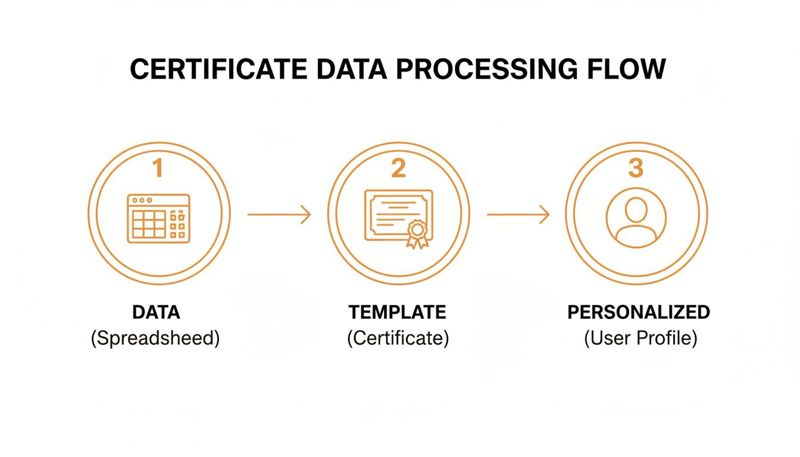
This is basically how the data flows from a simple spreadsheet, through your branded template, and ends up as a unique certificate for every user—all on autopilot.
By embedding the certificate image directly, you eliminate friction. Recipients see their achievement the second they open the email. This makes them far more likely to save it, share it, and actually value it.
This isn't just a neat trick; it's becoming the industry standard. The global market for digital certificate authorities is on track to hit USD 485.13 million by 2032. That kind of growth points to a massive shift toward secure, instant, and scalable digital recognition.
Expanding Delivery Beyond Email
Your options don't stop with email, though. You can apply the same principle to almost any digital channel, which gives you incredible flexibility in how you recognize participants.
- Post-Webinar Thank You Pages: Drop a simple HTML snippet onto the confirmation page after an event to display a personalized certificate right then and there.
- Secure Member Portals: Add certificates directly to user profiles inside your online course platform or membership site.
- Chatbot Conversations: Set up a chatbot flow to deliver a certificate automatically once a user finishes a quiz or module.
This multi-channel approach means that no matter how your audience interacts with you, their recognition is delivered instantly. To really scale your efforts and keep things running smoothly, it’s worth checking out guides on the best marketing automation software to manage these different workflows.
Whether you're doing a one-off batch generation for an entire event or using an API trigger for real-time delivery, the goal is always the same: instant, automated recognition. And if you're thinking about physical copies, we also have a guide on custom certificates printing. The bottom line is to make sure every participant gets their acknowledgment the moment they earn it, strengthening their connection to your brand.
Taking Your Certificate Operations to the Next Level
When you're just starting out, a single template certificate of participation might be all you need. But as your business scales, so does the headache of managing everything. Suddenly, you're juggling assets for multiple clients, events, and brands, and it's easy for things to spiral into chaos. This is the point where a smart, scalable workflow isn't just nice to have—it's essential.
We’ve all seen the version control nightmares. Files get buried in endless email threads, someone uses an old logo by mistake, and brand consistency goes right out the window. By moving your operations out of shared folders and into a structured platform like OKZest, you can finally put an end to that mess.
Give Each Client Their Own Space
The first step to getting organized is to stop throwing everything into one big folder. Instead, imagine creating a dedicated, self-contained workspace for each client or major event series. Think of it as a digital filing cabinet where you can store all the relevant assets, from the master certificate templates to the specific data files for each run.
This simple change pays off almost immediately:
- No More Brand Mix-Ups: Each client’s branding, logos, and fonts stay completely separate. The risk of using the wrong asset drops to zero.
- A Single Source of Truth: Your team always knows exactly where to find the correct template for any given project. No more guessing or searching.
- Painless Onboarding: When a new person joins the team, you can grant them access only to the projects they're working on, making their ramp-up time much faster.
This approach transforms your workflow from a frantic, ad-hoc scramble into a tidy, repeatable system that’s ready to handle as many clients as you can bring on.
Set Up Roles for a Smoother Workflow
Once your projects are neatly organized, it’s time to define who can do what. Not everyone on your team needs admin-level access to everything. With role-based permissions, you can assign specific responsibilities to create a clear, secure, and much more efficient process.
Let's look at how this plays out for a real-world agency:
- The Designer: Your graphic designer gets access to create and tweak the visual templates inside a client’s workspace. They can focus on making things look perfect without ever touching sensitive participant data.
- The Campaign Manager: This person is in charge of uploading the participant lists (like a CSV file) and kicking off the certificate generation and delivery. They can use the approved templates but can't accidentally change the design.
- The Client (View-Only): You can even give clients read-only access to their own workspace. This is perfect for getting design approvals or letting them monitor progress without giving them the keys to the castle.
This separation of duties is more than just a security measure; it’s a massive productivity booster. It lets team members concentrate on what they do best, slashes the risk of human error, and ensures your brand standards are perfectly maintained across every single certificate you send out.
Common Questions About Certificate Automation
Jumping into certificate automation is a big move. It's way more powerful than cranking them out one by one, so it's totally normal to have a few questions before you start. Let's walk through some of the most common things people ask when they're getting their workflows set up in OKZest for the first time.
What File Formats Work Best for Certificate Backgrounds?
For the best quality and most creative flexibility, a high-resolution PNG file is your best friend. The big win with PNGs is their support for transparency. This is a game-changer.
You can design your certificate base in a tool you're already comfortable with—like Canva, Figma, or Adobe Illustrator—and leave specific areas transparent. This is where the dynamic text, like a participant's name, will be placed by OKZest. The text sits cleanly right on top of your design, instead of being stuck inside a clunky white box.
While JPEGs work just fine for backgrounds that don't need any see-through elements, PNGs give you the creative room to build layered, really professional-looking certificates.
How Does OKZest Handle Missing Participant Data?
This is a huge one, especially when you're generating certificates at scale. It’s exactly why we built the fallback value feature. Let's be real—your data source, whether it's a spreadsheet or a live database, is bound to have a few gaps. Someone's name is missing, or a course title wasn't filled in. It happens.
Instead of leaving an awkward blank space on the certificate, OKZest automatically pops in a default value that you’ve already set.
- For a missing
{{first_name}}, you could have it say "Valued Attendee." - If
{{course_title}}is empty, it could default to "Our Recent Workshop."
This simple safety net is non-negotiable for quality control. It makes sure every single certificate that goes out looks complete and professional, protecting your brand from embarrassing errors caused by incomplete data.
Can I Generate Thousands of Certificates at Once?
Yep, OKZest was built from the ground up for high-volume generation. You have two main ways to tackle large batches, and which one you choose just depends on your workflow.
- Batch Generation: Got a CSV file or a Google Sheet with thousands of rows of participant data? Just upload it. The platform will chew through the entire list in one go, creating a unique, personalized certificate for every single person. It's perfect for when an event wraps up.
- API Generation: For real-time needs, like a massive online course or a virtual summit where people finish at different times, our API is the way to go. Every time a user completes a module, a quick call to the API can instantly create their certificate and have it ready for them.
This kind of scalability means your process stays efficient whether you're rewarding ten people or ten thousand.
Will This Work with My Current Email Platform?
Absolutely. OKZest is designed to play nicely with just about anything. It generates a standard image URL for each personalized certificate, which works with practically any Email Service Provider (ESP) that supports image merge tags.
This includes all the big names like Mailchimp, Klaviyo, HubSpot, and ActiveCampaign. Getting it set up is as simple as copying and pasting the dynamic URL into your email template. No complex, hair-pulling integration needed.
Ready to stop manually creating certificates and start automating beautiful, personalized awards that people are proud to share? With OKZest, you can transform your template certificate of participation into a powerful marketing asset. Get started for free today and see how easy it is.